change time INFINITI QX60 2023 User Guide
[x] Cancel search | Manufacturer: INFINITI, Model Year: 2023, Model line: QX60, Model: INFINITI QX60 2023Pages: 636, PDF Size: 7.28 MB
Page 143 of 636
Timer Alert — Have a break?
This indicator appears when the set time is
reached. The time can be set up to six hours.
For additional information, see “Driver Assis-
tance” (P. 2-28).
Tire Pressure Low - Add Air
This warning appears when the low tire pres-
sure warning light in the meter illuminates
and low tire pressure is detected. The
warning appears each time the ignition
switch is placed in the ON position as long as
the low tire pressure warning light remains
illuminated. If this warning appears, stop the
vehicle and adjust the tire pressures of all four
tires to the recommended COLD tire pres-
sure shown on the Tire and Loading Informa-
tion label. For additional information, see
“Low tire pressure warning light” (P. 2-18)
and “Tire Pressure Monitoring System
(TPMS)” (P. 5-5).
TPMS Error: See Owner’s Manual
This warning appears when there is an error
with your TPMS. If this warning appears,
have the system checked. It is recommended
that you visit an INFINITI retailer for this
service.
Transmission Shift Position
indicator
This indicator shows the transmission shift
position.
When parked apply parking
brake
This message appears when a malfunction
occurs in the electric shift control system be-
low 6 mph (10 km/h).
Have the system checked. It is recommended
that you visit an INFINITI retailer for this
service.
AWD Error: See Owner’s Manual
This warning appears when the Intelligent
All-Wheel Drive (AWD) system is not func-
tioning properly while the engine is running.
Reduce vehicle speed and have your vehicle
checked by an INFINITI retailer as soon as
possible. For additional information, see “In-
telligent All-Wheel Drive (AWD)” (P. 5-161).
AWD High Temp. Stop Vehicle
This warning appears when the oil tempera-
ture of the powertrain parts will increase due
to the difference in rotation between the
front and rear wheels is large (wheel slip),
such as when driving the vehicle on rough
roads, through sand or mud, or freeing a
stuck vehicle. If this warning is displayed, stopthe vehicle with the engine idling, as soon as it
is safe to do so. In these cases, the AWD
changes to 2WD to protect the powertrain
parts. Then if the warning turns off, you can
continue AWD driving.
Tire Size Incorrect: See Owner’s Manual
This warning may appear if there is a large
difference between the diameters of the
front and rear wheels. Pull off the road in a
safe area, with the engine idling. Check that
all the tire sizes, brand, construction and
tread patterns are the same, that the tire
pressure is correct and that the tires are not
excessively worn. If you have any problems,
please change tires or adjust to the correct
tire pressure. Do not select the SNOW mode
with the INFINITI Drive Mode Selector and
do not drive fast. For additional information,
see “Intelligent All-Wheel Drive (AWD)”
(P. 5-161).
Forward Emergency Braking
(FEB) with Pedestrian
Detection emergency warning
indicator
This indicator appears along, with an audible
warning, when the system detects the possi-
bility of a forward collision.
Instruments and controls2-41
Page 155 of 636
Personal Display
The Personal Display menu allows the user to set various screens in the personal display area in the vehicle information display.
Some menu items shown below may not be equipped on your vehicle.
Menu itemExplanation
Blank Allows user to select the blank screen.
Navigation Allows user to select the navigation screen.
Time to Destination Allows user to select the time to destination screen.
Fuel Economy Allows user to select the fuel economy screen.
Trip Allows user to select the trip screen.
Gear position Allows user to select the gear position screen.
Average speed Allows user to select the average speed screen.
Head-Up Display (if so equipped)
The Head—Up Display menu allows the user to control the Head—Up Display feature.
Some menu items shown below may not be equipped on your vehicle.
Menu item Explanation
Brightness Allows user to change the brightness.
Height Allows user to change the height.
Rotation Allows user to change the rotation.
Contents selection Displays the available content in the Head-Up Display.
Navigation Allows user to turn the navigation on or off.
Driving Assist Allows user to turn the driving assist on or off.
Speed Limit Sign Allows user to turn the speed limit sign on or off.
Audio Allows user to turn the audio on or off.
TEL/SMS Allows user to turn the TEL/SMS on or off.
Reset Allows user to reset the settings. Once selected, the user can confirm or cancel the reset.
Instruments and controls2-53
Page 157 of 636
Clock
Allows user to adjust the clock settings and time within the vehicle information display.
Some menu items shown below may not be equipped on your vehicle.
Menu itemExplanation
Display Allows user to turn the display on or off.
Clock Mode Allows user to adjust the clock mode to Auto, Manual or Time Zone.
Clock Format Allows user to adjust the clock format to 24H or 12H.
Daylight Saving Allows user to turn on or off the daylight saving mode.
Time Zone Allows user to select a time zone.
Set Clock Manually Allows user to set the clock manually.
Vehicle Settings
The vehicle settings menu allows the user to change the settings for lights, wipers, locking, keys, and other vehicle settings.
Some menu items shown below may not be equipped on your vehicle.
Menu item Explanation
Lighting Displays the available lighting options. Welcome Headlight Allows user to turn the welcome headlight on or off.
Auto Room Lamp Allows user to turn the auto room lamp on or off.
Accent Lighting Allows user to adjust the accent lighting. Brightness Allows user to adjust the brightness of the accent lighting.
Front Seat Area Allows user to turn the front seat area lighting on or off.
Rear Seat Area Allows user to turn the rear seat area lighting on or off.
Light Sensitivity Allows user to change when the light illuminate based on the brightness outside the vehicle.
Light Off Delay Allows user to change the duration of time that the automatic headlights stay on after the vehicle is shut off.
Locking Displays the available locking options.
Instruments and controls2-55
Page 168 of 636

When a rear passenger’s seat belt has been
securely fastened, the color of the corre-
sponding seat belt icon will change. The
warning will automatically turn off after ap-
proximately 65 seconds.
After the initial reminder is turned off (by 65
second timer or dismissing the warning in
vehicle information display) and the vehicle
speed is less than 10 mph (15 km/h), if any
rear seat belt is unfastened, the rear seat belt
reminder will display. The warning will auto-
matically turn off after approximately 95
seconds.
After the initial reminder is turned off (by 65
second timer or dismissing the warning in
vehicle information display) and the vehicle
speed is greater than 10 mph (15 km/h), if
any rear seat belt is unfastened, the rear seat
belt reminder will display and a warning
chime will sound every two seconds until the
corresponding seat belt is fastened. The
chime will automatically turn off after ap-
proximately 95 seconds. The rear seat belt
reminder will be displayed until it is dismissed
in the vehicle information display.Reminder: Turn OFF
headlights
This warning appears when the headlights
are left in the ON position when exiting the
vehicle. Place the headlight switch in the OFF
or AUTO position. For additional informa-
tion, see “Headlight and turn signal switch”
(P. 2-77).
Seat belt indicator and chime
The light and chime remind you to fasten the
driver and front passenger seat belts.
The 2nd and 3rd row seats may also be
equipped with a seat belt indicator.
For additional information, see “Seat belts”
(P. 1-17).
Shipping Mode On Push Storage Fuse
This warning may appear if the extended
storage switch is not pushed in. When this
warning appears, push in the extended stor-
age switch to turn off the warning. For addi-
tional information, see “Extended storage
switch” (P. 2-99).
Side light and headlight
indicator (green)
The side indicator and headlight indicator ap-
pears when the side light or headlights are on
(not including the Daytime Running Lights
(DRL) system or signature lights). If the head-
light switch is in the AUTO position, the side
indicator and headlight indicator will appear
when the headlights turn on. For additional
information, see “Headlight and turn signal
switch” (P. 2-77).
Steep Slope Apply foot brake
This indicator appears, and chime sounds if
the “Caution Steep slope” has appeared over
about 3 minutes. Then the parking brake will
automatically be applied and the brake force
of the automatic brake hold will be released,
and the vehicle may move or roll away unex-
pectedly. Apply the foot brake to stop the
vehicle moving.
For additional information, see “Automatic
brake hold” (P. 5-27).
Timer Alert — Have a break?
This indicator appears when the set time is
reached. The time can be set up to six hours.
For additional information, see “Driver Assis-
tance” (P. 2-51).
2-66Instruments and controls
Page 169 of 636
Tire Pressure Low - Add Air
This warning appears when the low tire pres-
sure warning light in the meter illuminates
and low tire pressure is detected. The
warning appears each time the ignition
switch is placed in the ON position as long as
the low tire pressure warning light remains
illuminated. If this warning appears, stop the
vehicle and adjust the tire pressures of all four
tires to the recommended COLD tire pres-
sure shown on the Tire and Loading Informa-
tion label. For additional information, see
“Low tire pressure warning light” (P. 2-18)
and “Tire Pressure Monitoring System
(TPMS)” (P. 5-5).
TPMS Error: See Owner’s Manual
This warning appears when there is an error
with your TPMS. If this warning appears,
have the system checked. It is recommended
that you visit an INFINITI retailer for this
service.
Transmission Shift Position
indicator
This indicator shows the transmission shift
position.
Turn signal/hazard indicators
(green)
The appropriate indicator flashes when the
turn signal switch is activated.
Both indicators flash when the hazard switch
is turned on.
When parked apply parking
brake
This message appears when a malfunction
occurs in the electric shift control system be-
low 6 mph (10 km/h).
Have the system checked. It is recommended
that you visit an INFINITI retailer for this
service.
AWD Error: See Owner’s Manual
This warning appears when the Intelligent
All-Wheel Drive (AWD) system is not func-
tioning properly while the engine is running.
Reduce vehicle speed and have your vehicle
checked by an INFINITI retailer as soon as
possible. For additional information, see “In-
telligent All-Wheel Drive (AWD)” (P. 5-161).
AWD High Temp. Stop Vehicle
This warning appears when the oil tempera-
ture of the powertrain parts will increase due
to the difference in rotation between the
front and rear wheels is large (wheel slip),such as when driving the vehicle on rough
roads, through sand or mud, or freeing a
stuck vehicle. If this warning is displayed, stop
the vehicle with the engine idling, as soon as it
is safe to do so. In these cases, the AWD
changes to 2WD to protect the powertrain
parts. Then if the warning turns off, you can
continue AWD driving.
Tire Size Incorrect: See Owner’s Manual
This warning may appear if there is a large
difference between the diameters of the
front and rear wheels. Pull off the road in a
safe area, with the engine idling. Check that
all the tire sizes, brand, construction and
tread patterns are the same, that the tire
pressure is correct and that the tires are not
excessively worn. If you have any problems,
please change tires or adjust to the correct
tire pressure. Do not select the SNOW mode
with the INFINITI Drive Mode Selector and
do not drive fast. For additional information,
see “Intelligent All-Wheel Drive (AWD)”
(P. 5-161).
Forward Emergency Braking
(FEB) with Pedestrian
Detection system indicator
This warning appears when the ignition
switch is placed in the ON position.
Instruments and controls2-67
Page 182 of 636

High Beam Assist
The High Beam Assist system will operate
when the vehicle is driven at speeds of ap-
proximately 25 mph (40 km/h) and above. If
an oncoming vehicle or leading vehicle ap-
pears in front of your vehicle when the head-
light high beam is on, the headlight will be
switched to the low beam automatically.
WARNING
• The High Beam Assist system is a conve-
nience but it is not a substitute for safe
driving operation. The driver should re-
main alert at all times, ensure safe driv-
ing practices and switch the high beams
and low beam manually when necessary.
• The high beam or low beam may not
switch automatically under the follow-
ing conditions. Switch the high beam and
low beam manually.
– During bad weather (rain, fog, snow,
wind, etc.).
– When a light source similar to a head-
light or tail light is in the vicinity of the
vehicle. –
When the headlights of the oncoming
vehicle or the leading vehicle are
turned off, when the color of the light
is affected due to foreign materials on
the lights, or when the light beam is
out of position.
– When there is a sudden, continuous
change in brightness.
– When driving on a road that passes
over rolling hills, or a road that has
level differences.
– When driving on a road with many
curves.
– When a sign or mirror-like surface is
reflecting intense light towards the
front of the vehicle.
– When the container, etc. being towed
by a leading vehicle is reflecting in-
tense light.
– When a headlight on your vehicle is
damaged or dirty.
– When the vehicle is leaning at an
angle due to a punctured tire, being
towed, etc. •
The timing of switching the low beam
and high beam may change under the fol-
lowing situations.
– The brightness of the headlights of
the oncoming vehicle or leading
vehicle.
– The movement and direction of the
oncoming vehicle and the leading
vehicle.
– When only one light on the oncoming
vehicle or the leading vehicle is
illuminated.
– When the oncoming vehicle or the
leading vehicle is a two-wheeled
vehicle.
– Road conditions (incline, curve, the
road surface, etc.).
– The number of passengers and the
amount of luggage.
2-80Instruments and controls
Page 186 of 636
Move the lever up or down until the turn
signal begins to flash, but the lever does not
latch, and release the lever. The turn signal
will automatically flash three times.
Choose the appropriate method to signal a
lane change based on road and traffic
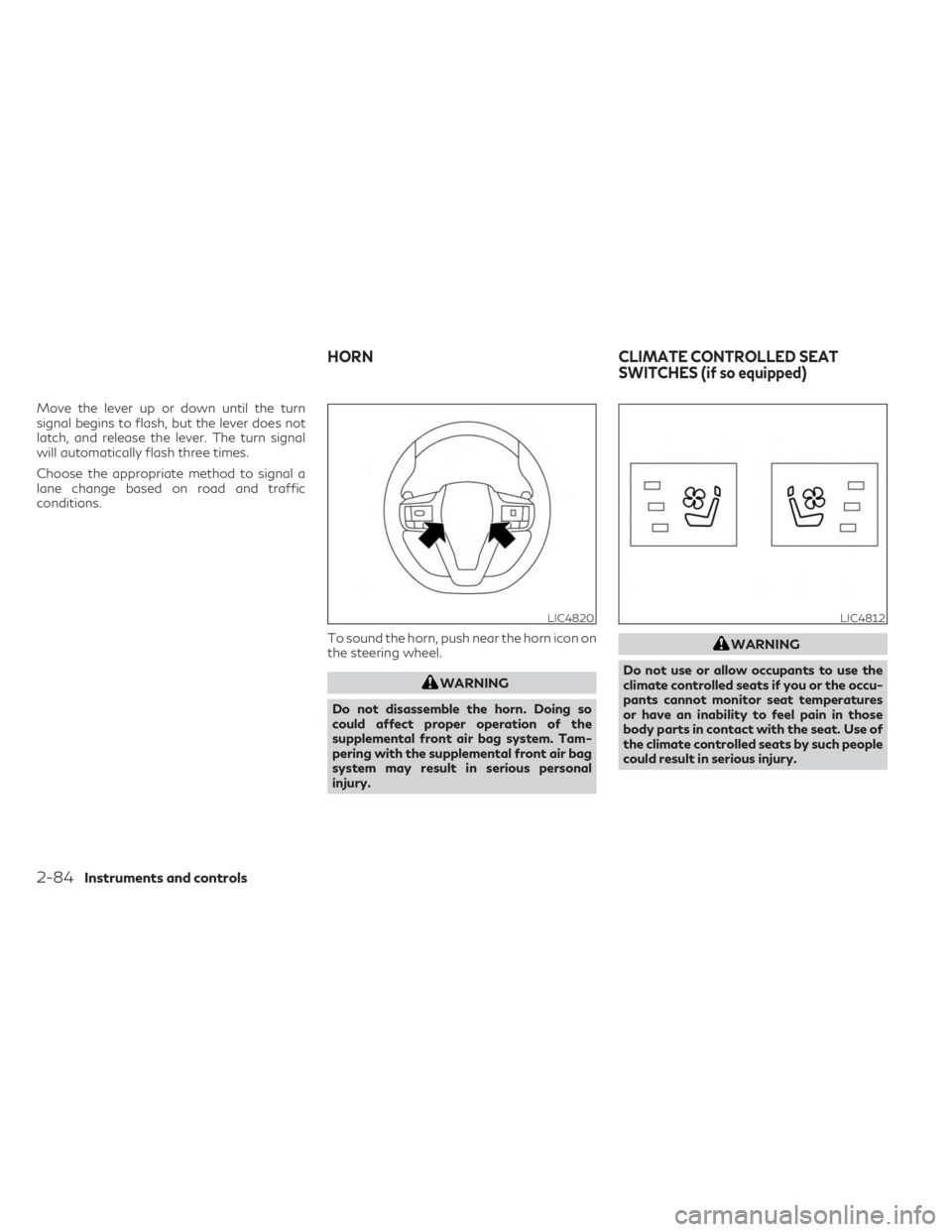
conditions.To sound the horn, push near the horn icon on
the steering wheel.
WARNING
Do not disassemble the horn. Doing so
could affect proper operation of the
supplemental front air bag system. Tam-
pering with the supplemental front air bag
system may result in serious personal
injury.
WARNING
Do not use or allow occupants to use the
climate controlled seats if you or the occu-
pants cannot monitor seat temperatures
or have an inability to feel pain in those
body parts in contact with the seat. Use of
the climate controlled seats by such people
could result in serious injury.
LIC4820LIC4812
HORN CLIMATE CONTROLLED SEAT
SWITCHES (if so equipped)
2-84Instruments and controls
Page 220 of 636

NOTE:
Some hand-held transmitter (garage door
opener remote) may actually train better a
distance of 6–12 inches (15–20 cm). Keep
this in mind if you have difficulty with the
programming process.3. While the HomeLink® indicator light is
flashing in orange, press and hold the
hand-held transmitter button. Continue
pressing the hand-held transmitter button
until the HomeLink® indicator light
changes from orange to green and
“TRAINED” is displayed on the lower right
of the mirror (only Type A). You may now
release the hand-held transmitter button.
NOTE:
Some devices to be programmed may require
you to replace the step 3 with the cycling pro-
cedure noted in “Programming HomeLink®
for Canadian customers and gate openers”
(P. 2-120).
4. Wait until your garage door has stopped
moving before completing the next steps.
5. Press the HomeLink® button and observe the indicator light.
• If the indicator light remains constant green, your device should operate when
the HomeLink® button is pressed. At
this point, if your device operates, pro-
gramming is complete. • If the indicator light rapidly flashes in
green, firmly press, hold for two sec-
onds and release the HomeLink® but-
ton up to three times to complete the
programming process. Do not press the
HomeLink® button rapidly. At this
point if your device operates, program-
ming is complete. If the device does not
operate or operates but no door status
indicator with Two- Way Communica-
tion*1, continue with the next step of
the programming instructions.
6. At the garage door opener motor (security gate motor, etc.), locate the “Learn” or
“Set” button. This can usually be found
where the hanging antenna wire is at-
tached to the motor-head unit (see the
device’s manual to identify this button.).
The name and color of the button may
vary by manufacturer.
NOTE:
A ladder and/or second person may simplify
the following steps. Do not stand on your
vehicle to perform the next steps.
LIC5026
Type B (if so equipped)
2-118Instruments and controls
Page 222 of 636

USING THE GARAGE DOOR
TWO-WAY COMMUNICATION
HomeLink® has the function of communicat-
ing with garage door opener systems. If your
garage door openers are compatible with
HomeLink®, the HomeLink® can:
• receive and display “closing” or “opening”status from your garage door opener.
• recall and display the garage door being “closed” or “opened”.
HomeLink® can receive the status from a
garage door opener at a range up to 820 ft
(250 m), but it varies depending on the envi-
ronment. You may need to reduce vehicle
speed to successfully receive the garage door
opener communication.
Using two-way communication
Press and hold the HomeLink® buttons (1
and 2) simultaneously for 2 seconds to recall
and display the last recorded garage door
status communicated to HomeLink®.
HomeLink® will display the last recorded sta-
tus for 3 seconds. If two-way communication programming is
successful, HomeLink® will display the status
of your garage door opener with the status
indicator
OA, which changes depending on
the status. The garage door opener status
indicator shows the garage door opener sta-
tus as follows:
Flashing in orange — Closing
Flashing in orange — Opening
Illuminating in green — Closed
Illuminating in green — Opened
The status indicator stops to flash after an
open/close signal is received or no signal is
received within 30 seconds from the garage
door opener.
PROGRAMMING HOMELINK®
FOR CANADIAN CUSTOMERS
AND GATE OPENERS
Canadian radio-frequency laws require
transmitter signals to “time-out” (or quit) af-
ter several seconds of transmission – which
may not be long enough for HomeLink® to
pick up the signal during training. Similar to
this Canadian law, some U.S. gate operators
are designed to “time-out” in the same
manner.
LIC4948
2-120Instruments and controls
Page 223 of 636

If you live in Canada or you are having diffi-
culties training a gate operatororgarage
door opener by using the “Programming
HomeLink®” procedures, replace“Program-
ming HomeLink®” step 3with the following:
NOTE:
When programming a garage door opener,
etc., unplug the device during the “cycling”
process to prevent possible damage to the
device components.
Step 3: While the HomeLink® indicator light
is flashing in orange, press and release
(“cycling”) the hand-held transmitter button
every 2 seconds. Continue to press and re-
lease the hand-held transmitter button until
the HomeLink® indicator light changes from
orange to green. When the indicator light
illuminates in green, the hand-held transmit-
ter button may be released.
Proceed with “Programming HomeLink®”
step 4 to complete.
Remember to plug the device back in when
programming is completed.
OPERATING THE HOMELINK®
UNIVERSAL TRANSCEIVER
The HomeLink® Universal Transceiver, after
it is programmed, can be used to activate the
programmed device. To operate, firmly press
the appropriate programmed HomeLink®
button. The indicator light will illuminate in
green with three parenthesis
on the
mirror while the signal is being transmitted.
PROGRAMMING TROUBLE-
SHOOTING
If the HomeLink® does not quickly learn the
hand-held transmitter information:
• Replace the hand-held transmitter batter- ies with new batteries.
• Position the hand-held transmitter with its battery area facing away from the
HomeLink® button.
• Press and hold both the HomeLink® button and hand-held transmitter button in each
step without interruption. • Position the hand-held transmitter 1 to 3 in
(2 to 8 cm) away from the HomeLink®
button. Hold the transmitter in that position
for up to 15 seconds. If HomeLink® is not
programmed within that time, try holding
the transmitter in another position – for
example, 6 to 12 in (15 to 20 cm) away,
keeping the HomeLink® button in view at
all times.
If you have any questions or are having
difficulty programming your HomeLink®
buttons, refer to the HomeLink® web
site at: www.homelink.com/infiniti or call
1-800-355-3515.
CLEARING THE PROGRAMMED
INFORMATION
The following procedure clears the pro-
grammed information from three buttons. In-
dividual buttons cannot be cleared. However,
individual buttons can be reprogrammed. For
additional information, see “Reprogramming
a single HomeLink® button” (P. 2-122).
Instruments and controls2-121