steering INFINITI QX60 2023 Owner's Manual
[x] Cancel search | Manufacturer: INFINITI, Model Year: 2023, Model line: QX60, Model: INFINITI QX60 2023Pages: 636, PDF Size: 7.28 MB
Page 129 of 636
14. Idling Stop System
The Idling Stop System provides the driver
with information about the amount of fuel
saved while using the system.
For additional information, see “Idling Stop
System” (P. 5-178).
OIL CONTROL SYSTEM (if so
equipped)
The oil control system can be accessed in the
Maintenance portion of the vehicle informa-
tion display settings.
Engine oil information informs the distance
to oil change. Never exceed one year or
10,000 miles (16,000 km) between oil
change intervals for the 3.5L 6 cylinder
(VQ35DD engine model).
Display when
ignition is ONDisplay timing Action Required
Engine Oil Ser-
vice due in xxx
miles Remaining oil
life is less than
940 miles
(1500 km). Plan to have
your vehicle
serviced.
Engine Oil Ser-
vice due Remaining oil
life is 0 miles (0
km). Have your ve-
hicle serviced
within two
weeks or less
than 500 miles
(800 km).
The oil change interval cannot be adjusted
manually.
The distance to oil change interval is calcu-
lated depending on the driving conditions and
set automatically by the oil control system. A
reminder will be displayed when approaching
the end of the service interval.
When the Factory Reset option is selected in
the vehicle information display, the oil control
system will also be reset to initial value.
Please change the engine oil when Factory
Reset is selected.
CAUTION
If the oil replacement indicator is displayed,
change the engine oil within two weeks or
less than 500 miles (800 km).
Operating the vehicle with deteriorated oil
can damage the engine.
To reset oil control system:
1. Place the ignition switch in the ON position.
2. Push the
andbuttons located
on the steering wheel until “Settings” dis-
plays in the vehicle information display.
Use the scroll dial to select “Maintenance”.
Then, press the scroll dial. 3. Select “Service” and press the scroll dial.
4. Press the scroll dial according to the reset
instructions displayed at the bottom of
the “Service” maintenance screen.
For additional information, see “Mainte-
nance” (P. 2-33).
SETTINGS
The setting mode allows you to change the
information displayed in the vehicle informa-
tion display:
• VDC Setting
• Driver Assistance
• ECO Mode Setting
• TPMS Setting
• Clock
• Vehicle Settings
• Maintenance
• Customize Display
• Unit/Language
• Key-Linked Settings (if so equipped)
• Factory Reset
Instruments and controls2-27
Page 134 of 636

Menu itemExplanation
Acceleration Allows user to adjust the acceleration mode to SPORT, STANDARD or ECO.
Steering Allows user to adjust the steering mode to SPORT or STANDARD.
Trace Control Allows user to turn the Active Trace Control feature on or off.
Reset Allows user to reset the INFINITI Drive Mode Selector settings.
Driving Position Displays the available driving position options.
Exit Seat Slide When the exit seat slide is on the driver’s seat will move backward for easy exit when the ignition switch is placed in the
OFF position and the driver’s door is opened. After getting into the vehicle and placing the ignition switch in the ON
position, the driver’s seat will move to the previous set position.
For additional information, see “Memory seat” (P. 3-43).
Exit Steering Up When the exit steering up feature is turned on, the steering wheel moves upward for easy exit when the ignition switch
is in the OFF position and the driver’s door is opened. After getting into the vehicle and placing the ignition switch in
the ON position, the steering wheel moves to the previous position.
For additional information, see “Memory seat” (P. 3-43).
Rear Door Alert Displays the available Rear Door Alert options.
Horn & Alert When selected, the alert is displayed; and the horn sounds.
Alert Only When selected, only the alert is displayed.
OFF When selected, no alert or horn will be active.
2-32Instruments and controls
Page 140 of 636

retailer for this service. For additional infor-
mation, see “Chassis Control” (P. 5-170).
Check Back Seat For All Articles
When the system is enabled, this message
appears when the vehicle comes to a com-
plete stop, the vehicle is transitioned from the
D (Drive) position to P (Park) position, and the
driver exits the vehicle. This message alerts
the driver, after a period of time, to check for
items in the rear seat after the audible alert
has been provided.
NOTE:
This system is disabled until a driver enables
it using the vehicle information display. For
additional information, see “How to use the
vehicle information display” (P. 2-44).
For additional information, see “Rear Door
Alert” (P. 2-92).
Rear Door Alert is activated
When the system is enabled, this message
appears when the Rear Door Alert system is
active and can remind the driver to check the
back seat.
• Using the steering wheel switch, a drivercan select “Dismiss Message” to clear the
display for a period of time. If no selection is
made, this message automatically turns off
after a period of time. • Using the steering wheel switch, a driver
can select “Disable Alert” to disable the
horn alert for the remainder of the current
trip.
WARNING
Selecting “Dismiss Message” during a stop
within a trip temporarily dismisses the
message for that stop without turning the
system off. Alerts can be provided for
other stops during the trip. Selecting “Dis-
able Alert” turns off the Rear Door Alert
system for the remainder of a trip and no
audible alert will be provided.
NOTE:
This system is disabled until a driver enables
it using the vehicle information display. For
additional information, see “How to use the
vehicle information display” (P. 2-44).
For additional information, see “Rear Door
Alert” (P. 2-92).
Door/Liftgate Open
This warning appears when a door or the
liftgate has been opened.
Headlight System Error: See Owner’s
Manual
This warning appears when there is an error
with the system. For additional information,
see “Headlight and turn signal switch”
(P. 2-77).
INFINITI Drive Mode Selector indicator
When a driving mode is selected using the
INFINITI Drive Mode Selector, the selected
mode indicator is displayed.
• PERSONAL
• SPORT
• STANDARD (2WD models)
• AUTO (AWD models)
• ECO
• SNOW
For additional information, see “INFINITI
Drive Mode Selector” (P. 5-29).
Low Fuel
This warning appears when the fuel level in
the fuel tank is getting low. Refuel as soon as
it is convenient, preferably before the fuel
gauge reaches 0 (Empty). There will be a
small reserve of fuel in the tank when the fuel
gauge needle reaches 0 (Empty).
2-38Instruments and controls
Page 146 of 636
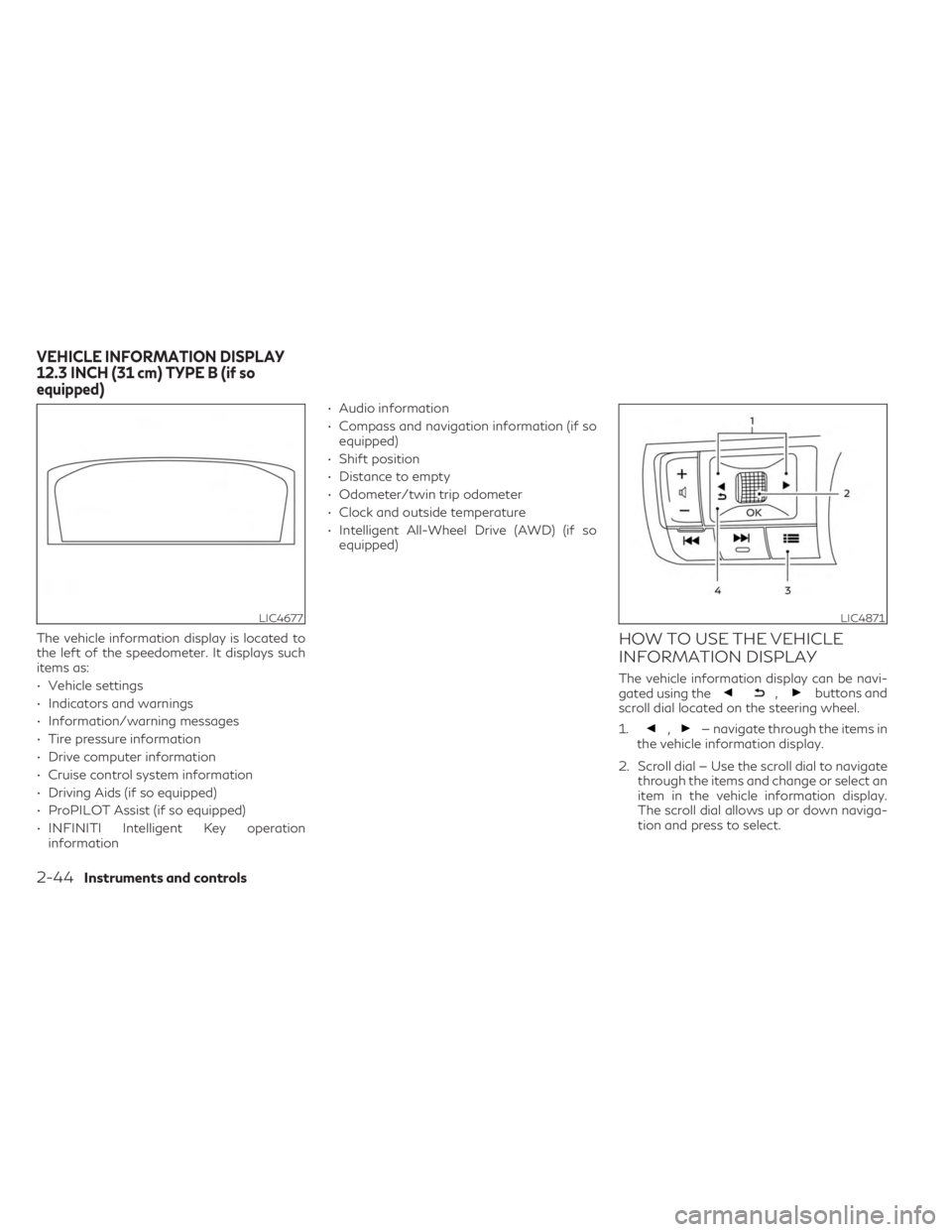
The vehicle information display is located to
the left of the speedometer. It displays such
items as:
• Vehicle settings
• Indicators and warnings
• Information/warning messages
• Tire pressure information
• Drive computer information
• Cruise control system information
• Driving Aids (if so equipped)
• ProPILOT Assist (if so equipped)
• INFINITI Intelligent Key operationinformation • Audio information
• Compass and navigation information (if so
equipped)
• Shift position
• Distance to empty
• Odometer/twin trip odometer
• Clock and outside temperature
• Intelligent All-Wheel Drive (AWD) (if so equipped)HOW TO USE THE VEHICLE
INFORMATION DISPLAY
The vehicle information display can be navi-
gated using the,buttons and
scroll dial located on the steering wheel.
1.
,— navigate through the items in
the vehicle information display.
2. Scroll dial — Use the scroll dial to navigate through the items and change or select an
item in the vehicle information display.
The scroll dial allows up or down naviga-
tion and press to select.
LIC4677LIC4871
VEHICLE INFORMATION DISPLAY
12.3 INCH (31 cm) TYPE B (if so
equipped)
2-44Instruments and controls
Page 150 of 636
6. Intelligent All-Wheel Drive
(AWD) torque distribution display
(if so equipped)
When the Intelligent AWD torque distribution
display is selected, you can view the distribu-
tion ratio of the transmission torque to the
front and rear wheels during driving.
7. Compass (if so equipped)
This display indicates the direction the vehicle
is heading.
8. Navigation (if so equipped)
When the route guidance is set in the naviga-
tion system, this item shows the navigation
route information.
9. Audio
The audio mode shows the status of audio
information.
10. Driver Assistance
The Driver Assistance mode shows the oper-
ating condition for the following systems:
• Forward–– Forward Emergency Braking (FEB) with Pedestrian Detection system –– Predictive Forward Collision Warning
(PFCW)
• Lane: –– Lane Departure Warning (LDW)
–– Lane Departure Prevention (LDP)
• Blind Spot: –– Blind Spot Warning (BSW)
–– Blind Spot Intervention® (BSI) (if so equipped)
For additional information, see “Blind Spot
Intervention® (BSI)” (P. 5-61), “Blind Spot
Warning (BSW)” (P. 5-49), “Lane Departure
Warning (LDW)” (P. 5-36), “Forward Emer-
gency Braking (FEB) with Pedestrian Detec-
tion” (P. 5-128), “Predictive Forward Collision
Warning (PFCW)” (P. 5-140) or “Lane Depar-
ture Prevention (LDP)” (P. 5-43).
11. ProPILOT Assist (if so
equipped)
The ProPILOT Assist mode shows operating
conditions for the following systems:
• Intelligent Cruise Control (ICC)
• Steering Assist
The display will also be shown when the Pro-
PILOT Assist is turned on. For additional in-
formation, see “ProPILOT Assist” (P. 5-84).
12. Traffic Sign Recognition (if so
equipped)
The Traffic Sign Recognition (TSR) system
provides the driver with information about
the most recently detected speed limit.
For additional information, see “Traffic Sign
Recognition (TSR) (P. 5-34).
13. Idling Stop System
The Idling Stop System provides the driver
with information about the amount of fuel
saved while using the system.
For additional information, see “Idling Stop
System” (P. 5-178).
2-48Instruments and controls
Page 151 of 636
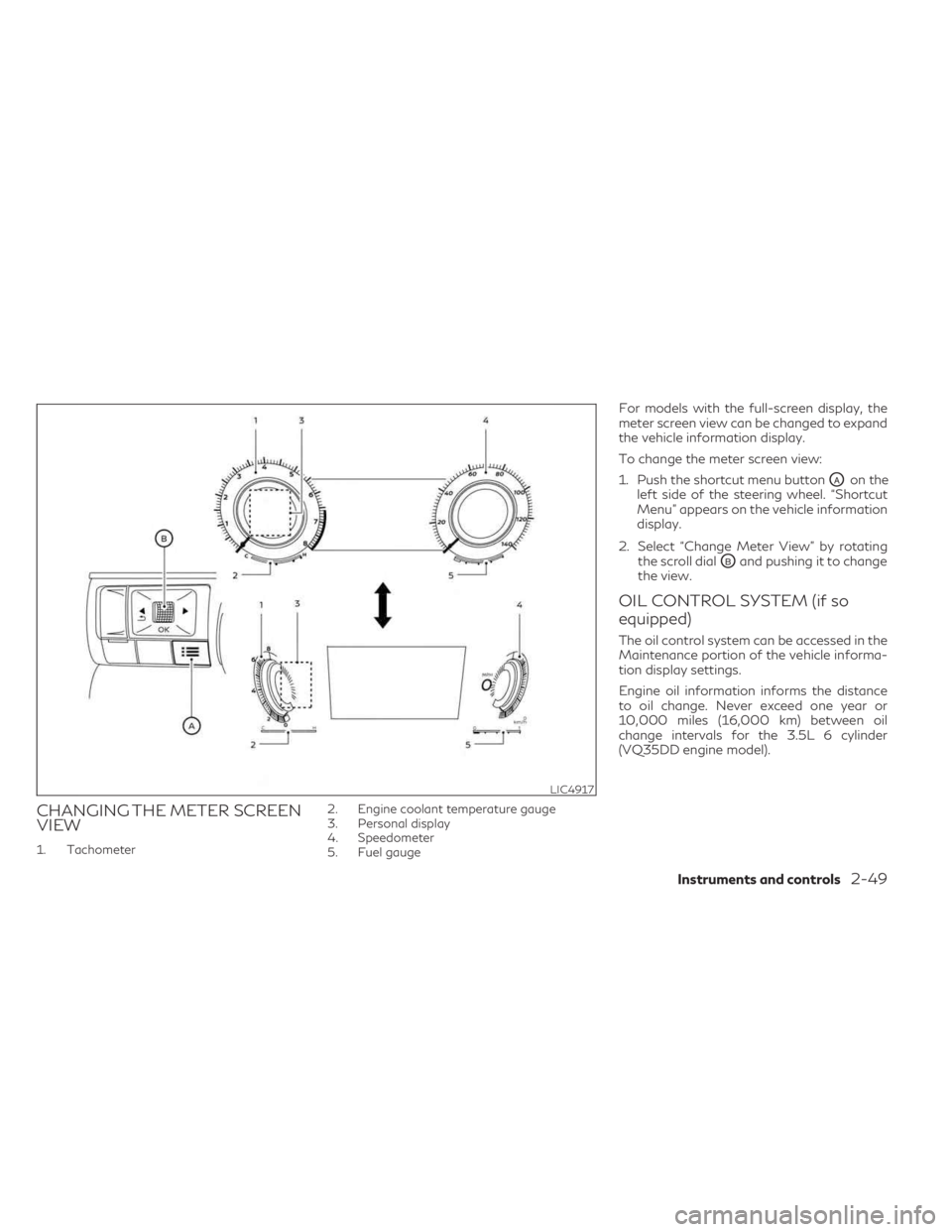
CHANGING THE METER SCREEN
VIEW
1. Tachometer2. Engine coolant temperature gauge
3. Personal display
4. Speedometer
5. Fuel gauge
For models with the full-screen display, the
meter screen view can be changed to expand
the vehicle information display.
To change the meter screen view:
1. Push the shortcut menu button
OAon the
left side of the steering wheel. “Shortcut
Menu” appears on the vehicle information
display.
2. Select “Change Meter View” by rotating the scroll dial
OBand pushing it to change
the view.
OIL CONTROL SYSTEM (if so
equipped)
The oil control system can be accessed in the
Maintenance portion of the vehicle informa-
tion display settings.
Engine oil information informs the distance
to oil change. Never exceed one year or
10,000 miles (16,000 km) between oil
change intervals for the 3.5L 6 cylinder
(VQ35DD engine model).
LIC4917
Instruments and controls2-49
Page 152 of 636
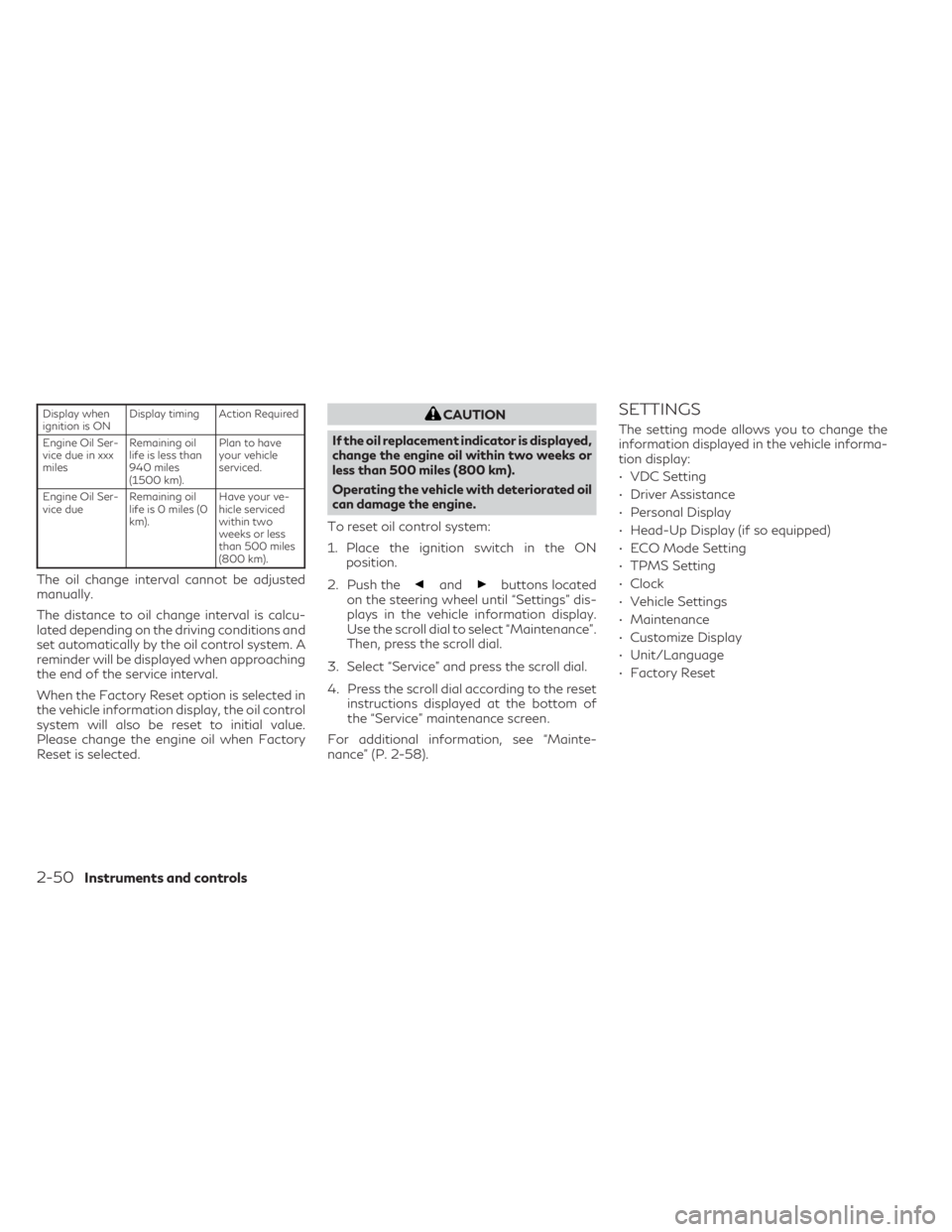
Display when
ignition is ONDisplay timing Action Required
Engine Oil Ser-
vice due in xxx
miles Remaining oil
life is less than
940 miles
(1500 km). Plan to have
your vehicle
serviced.
Engine Oil Ser-
vice due Remaining oil
life is 0 miles (0
km). Have your ve-
hicle serviced
within two
weeks or less
than 500 miles
(800 km).
The oil change interval cannot be adjusted
manually.
The distance to oil change interval is calcu-
lated depending on the driving conditions and
set automatically by the oil control system. A
reminder will be displayed when approaching
the end of the service interval.
When the Factory Reset option is selected in
the vehicle information display, the oil control
system will also be reset to initial value.
Please change the engine oil when Factory
Reset is selected.
CAUTION
If the oil replacement indicator is displayed,
change the engine oil within two weeks or
less than 500 miles (800 km).
Operating the vehicle with deteriorated oil
can damage the engine.
To reset oil control system:
1. Place the ignition switch in the ON position.
2. Push the
andbuttons located
on the steering wheel until “Settings” dis-
plays in the vehicle information display.
Use the scroll dial to select “Maintenance”.
Then, press the scroll dial.
3. Select “Service” and press the scroll dial.
4. Press the scroll dial according to the reset instructions displayed at the bottom of
the “Service” maintenance screen.
For additional information, see “Mainte-
nance” (P. 2-58).
SETTINGS
The setting mode allows you to change the
information displayed in the vehicle informa-
tion display:
• VDC Setting
• Driver Assistance
• Personal Display
• Head-Up Display (if so equipped)
• ECO Mode Setting
• TPMS Setting
• Clock
• Vehicle Settings
• Maintenance
• Customize Display
• Unit/Language
• Factory Reset
2-50Instruments and controls
Page 153 of 636
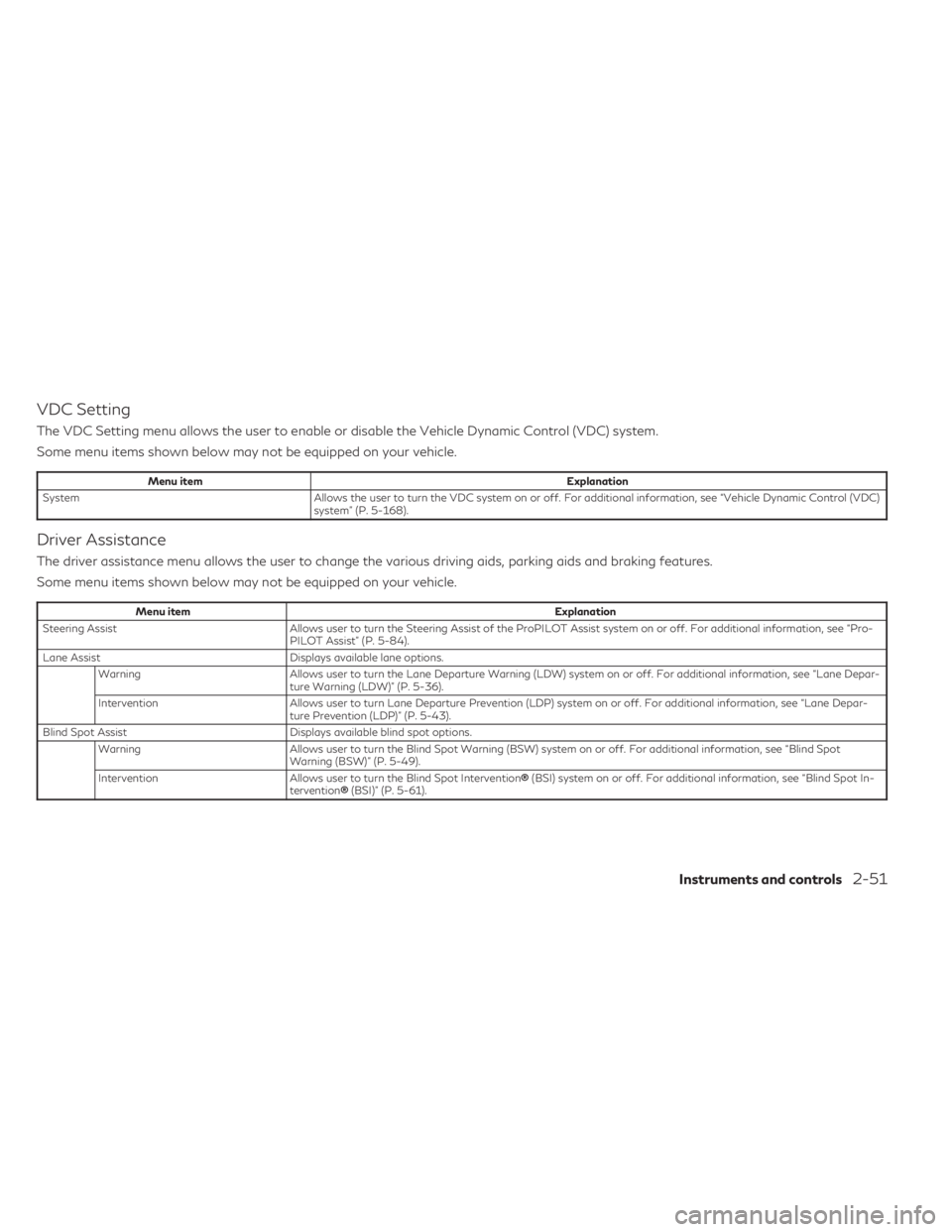
VDC Setting
The VDC Setting menu allows the user to enable or disable the Vehicle Dynamic Control (VDC) system.
Some menu items shown below may not be equipped on your vehicle.
Menu itemExplanation
System Allows the user to turn the VDC system on or off. For additional information, see “Vehicle Dynamic Control (VDC)
system” (P. 5-168).
Driver Assistance
The driver assistance menu allows the user to change the various driving aids, parking aids and braking features.
Some menu items shown below may not be equipped on your vehicle.
Menu item Explanation
Steering Assist Allows user to turn the Steering Assist of the ProPILOT Assist system on or off. For additional information, see “Pro-
PILOT Assist” (P. 5-84).
Lane Assist Displays available lane options.
Warning Allows user to turn the Lane Departure Warning (LDW) system on or off. For additional information, see “Lane Depar-
ture Warning (LDW)” (P. 5-36).
Intervention Allows user to turn Lane Departure Prevention (LDP) system on or off. For additional information, see “Lane Depar-
ture Prevention (LDP)” (P. 5-43).
Blind Spot Assist Displays available blind spot options.
Warning Allows user to turn the Blind Spot Warning (BSW) system on or off. For additional information, see “Blind Spot
Warning (BSW)” (P. 5-49).
Intervention Allows user to turn the Blind Spot Intervention ®(BSI) system on or off. For additional information, see “Blind Spot In-
tervention ®(BSI)” (P. 5-61).
Instruments and controls2-51
Page 158 of 636

Menu itemExplanation
Ext. Door Switch Allows user to turn the exit door switch on or off.
Selective Unlock Allows user to turn the selective unlock feature on or off. When this item is turned on (default), only the driver’s door is unlocked after the driver’s door unlock operation. All the doors can be unlocked if the capacitive touch pad is pressed
within 60 seconds of the door handle capacitive unlock feature. When this feature is turned off, all the doors unlock
when the driver’s door unlock operation is performed once.
Auto Door Unlock Allows the user to set the auto door unlock to Shift to P, IGN OFF and OFF.
Horn beeps on lock Allows the user to turn the horn beeps on lock feature on or off.
Wipers Displays the available wiper options. Speed Dependent Allows user to turn the speed dependent wipers on or off.
Rain Sensor Allows user to turn the rain sensor wipers on or off.
Reverse Link Allows user to turn the reverse link feature on or off.
Personal Drive Mode Displays the available INFINITI Drive Mode Selector options. Acceleration Allows user to adjust the acceleration mode to SPORT, STANDARD or ECO.
Steering Allows user to adjust the steering mode to SPORT or STANDARD.
Trace Control Allows user to turn the Active Trace Control feature on or off.
Reset Allows user to reset the INFINITI Drive Mode Selector settings.
Driving Position Displays the available driving position options. Exit Seat Slide When the exit seat slide is on the driver’s seat will move backward for easy exit when the ignition switch is placed in the OFF position and the driver’s door is opened. After getting into the vehicle and placing the ignition switch in the ON
position, the driver’s seat will move to the previous set position.
For additional information, see “Memory seat” (P. 3-43).
Exit Steering Up When the exit steering up feature is turned on, the steering wheel moves upward for easy exit when the ignition switch is in the OFF position and the driver’s door is opened. After getting into the vehicle and placing the ignition switch in
the ON position, the steering wheel moves to the previous position.
For additional information, see “Memory seat” (P. 3-43).
Rear Door Alert Displays the available Rear Door Alert options.
Horn & Alert When selected, the alert is displayed; and the horn sounds.
Alert Only When selected, only the alert is displayed.
OFF When selected, no alert or horn will be active.
2-56Instruments and controls
Page 163 of 636

Caution Steep slope
This indicator appears, and a chime sounds
when the automatic brake hold function is
activated while the vehicle is on a steep hill.
Apply the foot brake to stop the vehicle mov-
ing. For additional information, see “Auto-
matic brake hold” (P. 5-27).
Chassis Control System Error See
Owner’s Manual
This warning appears if the chassis control
module detects a malfunction in the chassis
control system. Have the system checked.
It is recommended that you visit an INFINITI
retailer for this service. For additional infor-
mation, see “Chassis Control” (P. 5-170).
Check Back Seat For All Articles
When the system is enabled, this message ap-
pears when the vehicle comes to a complete
stop, the vehicle is transitioned from the D (Drive)
position to P (Park) position, and the driver exits
the vehicle. This message alerts the driver, after a
period of time, to check for items in the rear seat
after the audible alert has been provided.
NOTE:
This system is disabled until a driver enables
it using the vehicle information display. For
additional information, see “How to use the
vehicle information display” (P. 2-44).For additional information, see “Rear Door
Alert” (P. 2-92).
Rear Door Alert is activated
When the system is enabled, this message
appears when the Rear Door Alert system is
active and can remind the driver to check the
back seat.
• Using the steering wheel switch, a driver
can select “Dismiss Message” to clear the
display for a period of time. If no selection is
made, this message automatically turns off
after a period of time.
• Using the steering wheel switch, a driver can select “Disable Alert” to disable the
horn alert for the remainder of the current
trip.
WARNING
Selecting “Dismiss Message” during a stop
within a trip temporarily dismisses the
message for that stop without turning the
system off. Alerts can be provided for
other stops during the trip. Selecting “Dis-
able Alert” turns off the Rear Door Alert
system for the remainder of a trip and no
audible alert will be provided.
NOTE:
This system is disabled until a driver enables
it using the vehicle information display. For
additional information, see “How to use the
vehicle information display” (P. 2-44).
For additional information, see “Rear Door
Alert” (P. 2-92).
Door/Liftgate Open
This warning appears when a door or the
liftgate has been opened.
Electric shift control system
indicator
This indicator appears when a malfunction
occurs in the electric shift control system.
When the master warning indicator appears,
the chime sounds and the following message
is displayed in the vehicle information display:
“When parked apply parking brake”.
When the ignition is placed in the OFF posi-
tion, the chime sounds continuously. Ensure
the parking brake is applied
Have the system checked. It is recommended
that you visit an INFINITI retailer for this
service.
Instruments and controls2-61