lock INFINITI QX60 2023 Manual Online
[x] Cancel search | Manufacturer: INFINITI, Model Year: 2023, Model line: QX60, Model: INFINITI QX60 2023Pages: 636, PDF Size: 7.28 MB
Page 304 of 636

REAR AUTOMATIC AIR
CONDITIONING SYSTEM
1. REAR CONTROL button
2. REAR ON-OFF button
3. REAR LOCK button4. SYNC button/ temperature control dial
(passenger’s side)
5. Display screen
6.
Fan speed control buttons
7. A/C (air conditioner) button 8. ON-OFF button
9. AUTO button/ temperature control dial
(driver’s side)
To turn on/off the rear automatic air condi-
tioning system with the front air conditioner
control panel, press the REAR ON-OFF
button.
The rear automatic air conditioning system
can be adjusted with the front air conditioner
control panel by pressing the REAR CON-
TROL button.
The front climate display will switch to the
REAR climate screen.
To adjust the front air conditioning system,
press the REAR CONTROL button
Automatic operation
1. Press the AUTO button. The AUTO indi- cator button will illuminate.
2. Turn the temperature control dials to set desired temperature.
Manual operation
• Temperature control
Turn the temperature control dial to set the
desired temperature.
LHA5523
Front Controls
4-34Monitor, climate, audio, phone and voice recognition systems
Page 305 of 636
•Fan speed control
Press theFan speed control buttons
to manually control the fan speed.
Rear Heating
1. Press the AUTO button. The AUTO indi- cator button will illuminate on the front
display.
2. Turn the temperature control dial to set the desired temperature.
Turning the system off
1. Press the REAR ON-OFF button on the front display to turn the rear climate sys-
tem off. The indicator light will turn off.
2. Press the ON-OFF button. The rear cli- mate will turn off and the control will
switch to front climate.
Locking the REAR controls
1. Press the REAR LOCK button on the front climate control panel. LOCK will be dis-
played on the rear climate display screen.
2. The rear climate controls will be locked and can only be adjusted using the front
controls. Rear control buttons
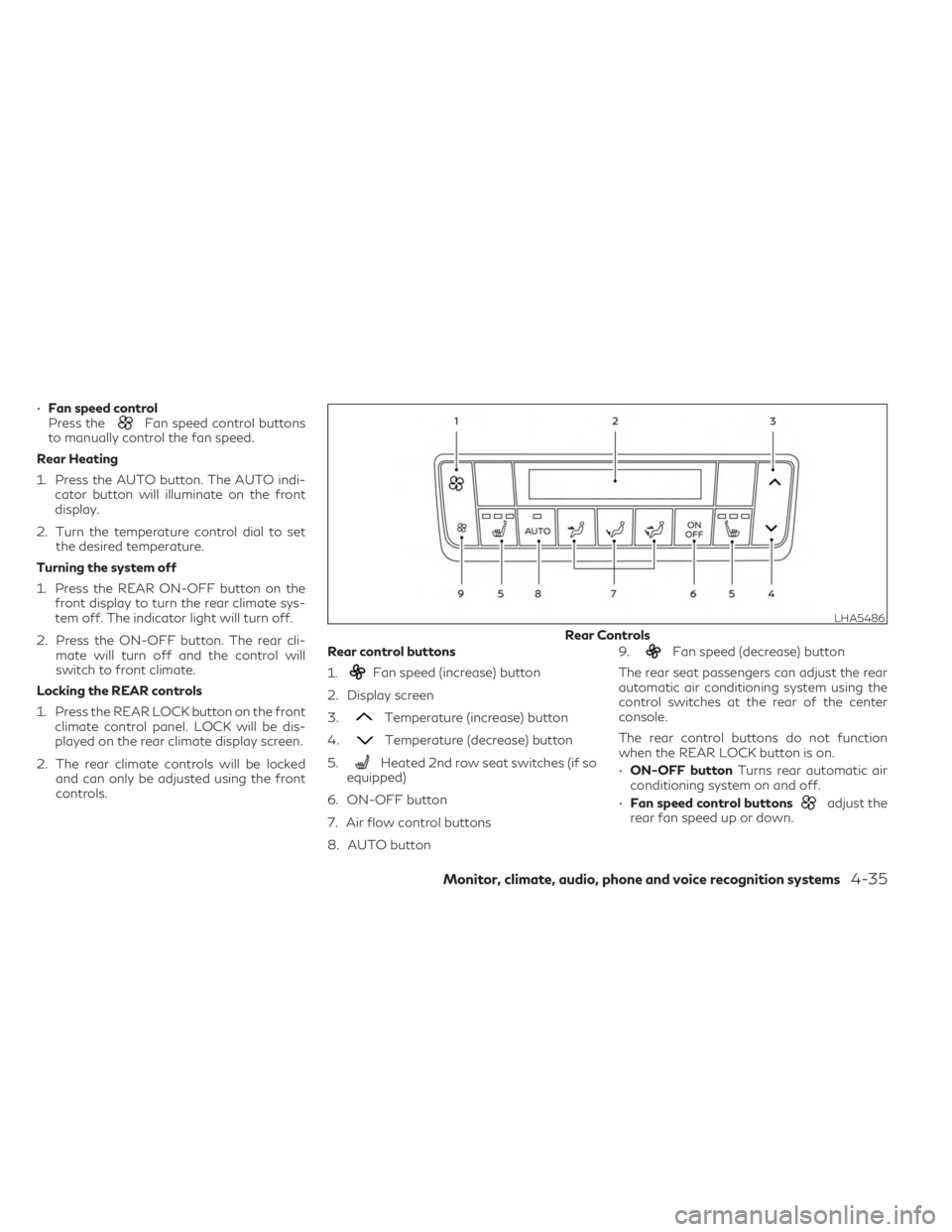
1.
Fan speed (increase) button
2. Display screen
3.
Temperature (increase) button
4.
Temperature (decrease) button
5.
Heated 2nd row seat switches (if so
equipped)
6. ON-OFF button
7. Air flow control buttons
8. AUTO button 9.
Fan speed (decrease) button
The rear seat passengers can adjust the rear
automatic air conditioning system using the
control switches at the rear of the center
console.
The rear control buttons do not function
when the REAR LOCK button is on.
• ON-OFF button Turns rear automatic air
conditioning system on and off.
• Fan speed control buttons
adjust the
rear fan speed up or down.
LHA5486
Rear Controls
Monitor, climate, audio, phone and voice recognition systems4-35
Page 310 of 636
System malfunction........................ 5-127
System maintenance ....................... 5-127
Forward Emergency Braking (FEB) with
Pedestrian Detection .......................... 5-128
FEB with Pedestrian Detection system
operation .................................. 5-129
Turning the FEB with Pedestrian
Detection system ON/OFF ................5-131
FEB with Pedestrian Detection system
limitations ................................. 5-133
System temporarily unavailable .............5-136
System malfunction ........................ 5-138
System maintenance ....................... 5-139
Predictive Forward Collision Warning
(PFCW) ...................................... 5-140
PFCW system operation ...................5-143
Turning the PFCW system on/off ..........5-144
PFCW system limitations ...................5-146
System temporarily unavailable .............5-152
System malfunction ........................ 5-154
System maintenance ....................... 5-155
Driver Attention Alert (DAA) (if so equipped) . . . 5-156 Driver Attention Alert (DAA) system
operation .................................. 5-157How to enable/disable the Driver
Attention Alert (DAA) system
...............5-158
Driver Attention Alert (DAA) system
limitations ................................. 5-158
Break-in schedule ............................. 5-159
Fuel efficient driving tips ......................5-160
Increasing fuel economy .......................5-161
Intelligent All-Wheel Drive (AWD)
(if so equipped) ............................... 5-161
Parking/parking on hills .......................5-163
Power steering ............................... 5-164
Brake system ................................. 5-165
Brake precautions .......................... 5-165
Anti-lock Braking System (ABS) .............5-166
Brake Assist ............................... 5-167
Active Brake Limited Slip (ABLS) system .......5-167
Vehicle Dynamic Control (VDC) system ........5-168
Brake force distribution ....................5-169
Chassis Control ............................... 5-170
Active
Trace Control ....................... 5-170
Active Ride Control (if so equipped) .........5-171
Hill start assist system ........................ 5-171
Front and Rear Sonar System (if so equipped) . . 5-172
Page 311 of 636
System operation.......................... 5-173
How to enable/disable the front and rear
sonar system .............................. 5-175
Sonar limitations ........................... 5-176
System temporarily unavailable .............5-177
System maintenance ....................... 5-177
Idling Stop System ............................ 5-178
Retrograde movement control function .....5-180
Idling Stop System display ..................5-180Idling Stop OFF switch
.....................5-184
Cold weather driving .......................... 5-184
Freeing a frozen door lock ..................5-184
Antifreeze ................................. 5-184
Battery .................................... 5-184
Draining of coolant water ..................5-184
Tire equipment ............................. 5-185
Special winter equipment ...................5-185
Driving on snow or ice ...................... 5-185
Page 322 of 636
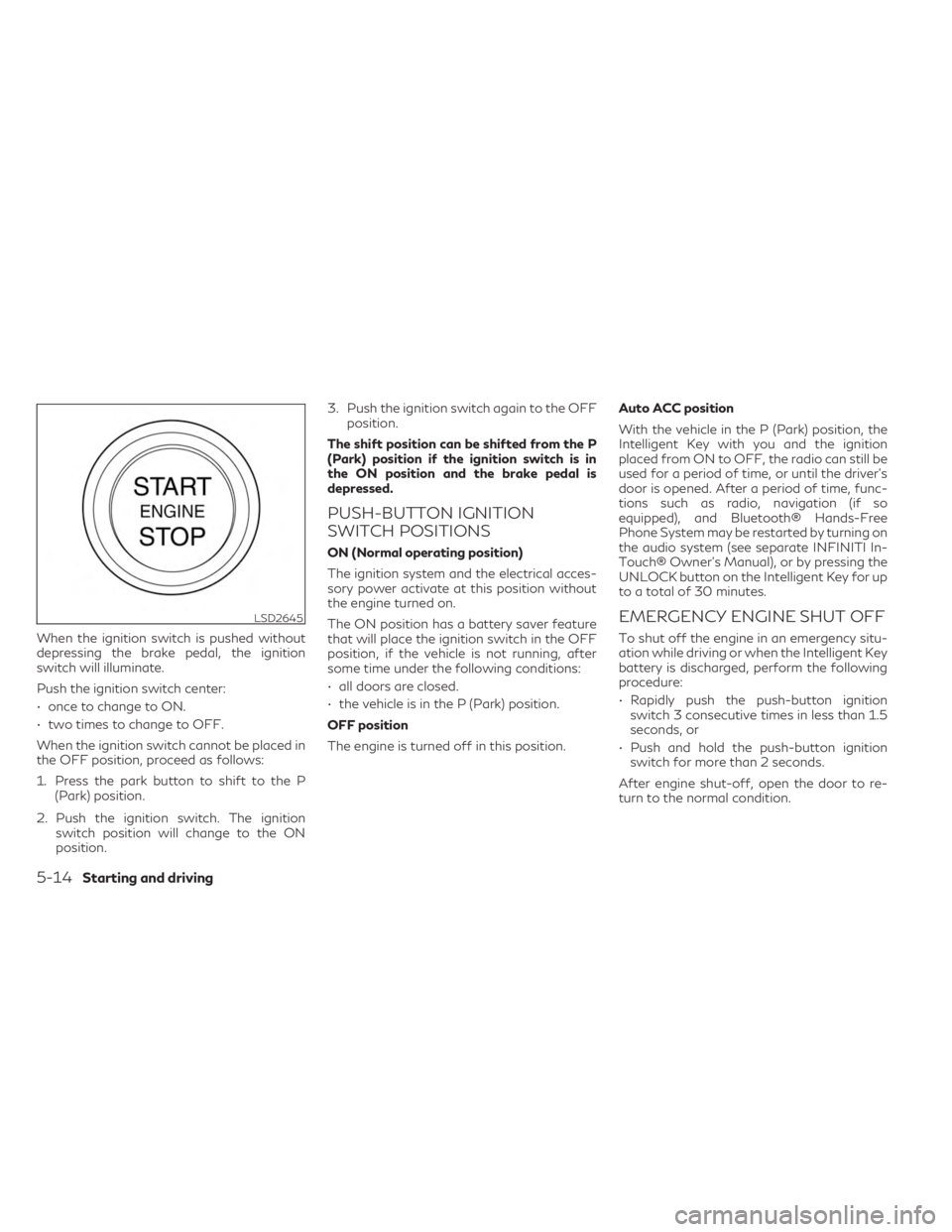
When the ignition switch is pushed without
depressing the brake pedal, the ignition
switch will illuminate.
Push the ignition switch center:
• once to change to ON.
• two times to change to OFF.
When the ignition switch cannot be placed in
the OFF position, proceed as follows:
1. Press the park button to shift to the P(Park) position.
2. Push the ignition switch. The ignition switch position will change to the ON
position. 3. Push the ignition switch again to the OFF
position.
The shift position can be shifted from the P
(Park) position if the ignition switch is in
the ON position and the brake pedal is
depressed.
PUSH-BUTTON IGNITION
SWITCH POSITIONS
ON (Normal operating position)
The ignition system and the electrical acces-
sory power activate at this position without
the engine turned on.
The ON position has a battery saver feature
that will place the ignition switch in the OFF
position, if the vehicle is not running, after
some time under the following conditions:
• all doors are closed.
• the vehicle is in the P (Park) position.
OFF position
The engine is turned off in this position. Auto ACC position
With the vehicle in the P (Park) position, the
Intelligent Key with you and the ignition
placed from ON to OFF, the radio can still be
used for a period of time, or until the driver’s
door is opened. After a period of time, func-
tions such as radio, navigation (if so
equipped), and Bluetooth® Hands-Free
Phone System may be restarted by turning on
the audio system (see separate INFINITI In-
Touch® Owner’s Manual), or by pressing the
UNLOCK button on the Intelligent Key for up
to a total of 30 minutes.
EMERGENCY ENGINE SHUT OFF
To shut off the engine in an emergency situ-
ation while driving or when the Intelligent Key
battery is discharged, perform the following
procedure:
• Rapidly push the push-button ignition
switch 3 consecutive times in less than 1.5
seconds, or
• Push and hold the push-button ignition switch for more than 2 seconds.
After engine shut-off, open the door to re-
turn to the normal condition.
LSD2645
5-14Starting and driving
Page 324 of 636

FCC Notice:
For USA:
This device complies with Part 15 of the FCC
Rules. Operation is subject to the following
two conditions: (1) This device may not
cause harmful interference, and (2) this de-
vice must accept any interference received,
including interference that may cause unde-
sired operation.
NOTE:
Changes or modifications not expressly ap-
proved by the party responsible for compli-
ance could void the user’s authority to oper-
ate the equipment.
For Canada:
This device contains licence-exempt
transmitter(s)/receiver(s) that comply with
Innovation, Science and Economic Develop-
ment Canada’s licence-exempt RSS(s). Op-
eration is subject to the following two con-
ditions: (1) This device may not cause
interference. (2) This device must accept any
interference, including interference that
may cause undesired operation of the
device.• Make sure the area around the vehicle is
clear.
• Check fluid levels such as engine oil, cool- ant, brake fluid, and windshield-washer
fluid as frequently as possible, or at least
whenever you refuel.
• Check that all windows and lights are clean.
• Visually inspect tires for their appearance and condition. Also check tires for proper
inflation.
• Check that all doors are closed.
• Position seat and adjust head restraints/headrests.
• Adjust inside and outside mirrors.
• Fasten seat belts and ask all passengers to do likewise.
• Check the operation of warning lights when the ignition switch is placed in the ON
position. For additional information, see
“Warning lights, indicator lights and audible
reminders” (P. 2-12). 1. Apply the parking brake.
2. Confirm that the vehicle is in the P (Park)
position.
The starter is designed not to operate if
the shift lever is in any of the driving
positions.
3. Push the ignition switch to the ON posi- tion. Depress the brake pedal and push
the ignition switch to start the engine.
To start the engine immediately, push and
release the ignition switch while depress-
ing the brake pedal with the ignition
switch in any position.
• If the engine is very hard to start in extremely cold weather or when re-
starting, depress the accelerator pedal a
little (approximately 1/3 to the floor)
and while holding, crank the engine. Re-
lease the accelerator pedal when the
engine starts.
• If the engine is very hard to start be- cause it is flooded, depress the accel-
erator pedal all the way to the floor and
hold it. Push the ignition switch to the
ON position to start cranking the en-
gine. After 5 or 6 seconds, stop cranking
by pushing the ignition switch to the
LOCK position. After cranking the en-
gine, release the accelerator pedal.
BEFORE STARTING THE ENGINE STARTING THE ENGINE
5-16Starting and driving
Page 326 of 636

AUTOMATIC TRANSMISSION
(A/T)
WARNING
• Do not depress the accelerator pedal
while shifting from P (Park) or N (Neu-
tral) to R (Reverse), D (Drive), or M
(Manual). Always depress the brake
pedal until shifting is completed. Failure
to do so could cause you to lose control
and have an accident.
• Cold engine idle speed is high, so use
caution when shifting into a forward or
reverse gear before the engine has
warmed up.
• Do not downshift abruptly on slippery
roads. This may cause a loss of control.
• Never shift to either the P (Park) or R
(Reverse) position while the vehicle is
moving forward and P (Park) or D (Drive)
position while the vehicle is reversing.
This could cause an accident or damage
the transmission.
CAUTION
• To avoid possible damage to your ve-
hicle; when stopping the vehicle on an
uphill grade, do not hold the vehicle by
depressing the accelerator pedal. The
foot brake should be used for this
purpose.
• Except in an emergency, do not shift to
the N (Neutral) position while driving.
Coasting with the transmission in the N
(Neutral) position may cause serious
damage to the transmission.
The A/T in your vehicle is electronically con-
trolled to produce maximum power and
smooth operation.
The recommended operating procedures for
this transmission are shown on the following
pages. Follow these procedures for maxi-
mum vehicle performance and driving
enjoyment.
Engine power may be automatically reduced
to protect the A/T if the engine speed in-
creases quickly when driving on slippery roads
or while being tested on some dynamometers.
Starting the vehicle
1. After starting the engine, fully depress the foot brake pedal before moving the shift
position out of the P (Park) position.
This Automatic Transmission is designed
so that the foot brake pedal must be de-
pressed before shifting from P (Park) to
any driving position while the ignition
switch is in the ON position.
The shift position cannot be moved out of
the P (Park) position and into any of the
other positions if the ignition switch is
placed in the LOCK, OFF or AUTO ACC
position while the ready light illuminates.
2. Keep the foot brake pedal depressed and move the shift lever to a driving position.
3. Release the parking brake and foot brake pedal and then gradually start the vehicle
in motion.
WARNING
• Do not depress the accelerator pedal
while shifting from P (Park) or N (Neu-
tral) to R (Reverse), D (Drive) or M
(Manual). Always depress the brake
pedal until shifting is completed. Failure
to do so could cause you to lose control
and have an accident.
DRIVING THE VEHICLE
5-18Starting and driving
Page 328 of 636

Confirm that the vehicle is in the desired shift
position by checking the shift indicator lo-
cated on the shift lever or in the vehicle infor-
mation display.
WARNING
Apply the electronic parking brake if the
shift lever is in any position while the en-
gine is not running. Failure to do so could
cause the vehicle to move unexpectedly or
roll away and result in serious personal in-
jury or property damage.
CAUTION
• Use the P (Park), R (Reverse) or D (Drive)
position only when the vehicle is com-
pletely stopped.
• When switching to the desired shift po-
sition by operating the shift lever, check
that the shift lever returns to the home
position by releasing your hand from the
lever. Holding the shift lever in a mid-
way position may also damage the shift
control system. •
Do not operate the shift lever while the
accelerator pedal is depressed. This may
cause a sudden start which could result in
an accident.
• The following operations are not allowed
because excessive force would be ap-
plied to the transmission and this may
result in damage to the vehicle:
– Moving the shift lever to the R (Re- verse) position when driving forward
– Moving the shift lever to the D (Drive) position when reversing
If the vehicle is moving over 8 km/h (5mph)
when shifting to D (Drive) from R (Re-
verse), the N (Neutral) position will auto-
matically be selected. A buzzer will sound,
noting that D (Drive) was not selected.
When selecting D (Drive) while reversing
below 8 km/h (5 mph) the range will
change normally.
If these operations are attempted, a chime
sounds and the vehicle shifts to the N (Neu-
tral) position.
P (Park)
CAUTION
• To prevent transmission damage, use the
P (Park) position only when the vehicle is
completely stopped.
• Do not slide the shift lever while pressing
the park button. This may damage the
shift control system.
Use the P (Park) position when the vehicle is
parked or when starting the engine. Make
sure the vehicle is completely stopped before
pressing the park button to engage the P
(Park) position. For maximum safety, the
brake pedal must be depressed before en-
gaging the P (Park) position. Use this position
together with the electronic parking brake.
When parking on a hill, first depress the brake
pedal, apply the electronic parking brake and
then engage the P (Park) position. The park-
ing lock should not be used as a brake when
parking. In order to secure the vehicle, always
apply the electronic parking brake in addition
to the parking lock.
5-20Starting and driving
Page 329 of 636

In the event of a malfunction of the vehicle’s
electronics, the transmission may lock in the
P (Park) position. Have the vehicle’s electron-
ics checked immediately. It is recommended
that you visit an INFINITI retailer for this
service.
The P (Park) position is automatically en-
gaged if:
• You place the ignition switch in the OFFposition
• You unfasten the driver’s seat belt and open the driver side door when the vehicle
is stationary or driving at very low speed
and the transmission is in the D (Drive) po-
sition, the N (Neutral) position, or the R
(Reverse) position.
CAUTION
To avoid A/T malfunction, you must
manually place the shift position in the P
(Park) position under the above conditions.
R (Reverse)
CAUTION
• To prevent transmission damage, use the
R (Reverse) position only when the ve-
hicle is completely stopped and the brake
is pressed. Use the R (Reverse) position to back up. Make
sure the vehicle is completely stopped before
selecting the R (Reverse) position.
The brake
pedal must be depressed and the shift lever
button pressed to move the shift lever from
the home position to R (Reverse). If the ve-
hicle is placed in R (Reverse) position while
the vehicle is moving forward, the chime will
sound and the vehicle will switch into the N
(Neutral) position.
NOTE:
If the vehicle is moving over 5 mph (8 km/h),
when shifting to D (Drive) from R (Reverse),
the N (Neutral) position will automatically
be selected. A buzzer will sound, noting that
D (Drive) was not selected. When selecting D
(Drive) while reversing below 5 mph (8 km/
h), the range will change normally.
N (Neutral)
Neither forward nor reverse gear is engaged
when the vehicle is completely stopped, and
the brake is pressed. The engine can be
started in this position. You may shift to the N
(Neutral) position and restart a stalled engine
while the vehicle is moving.
You can select this position by holding the
shift lever at this position for 0.5 seconds.
D (Drive)
Use this position for all normal forward driv-
ing when the vehicle is completely stopped,
and the brake is pressed. The A/T changes
gears automatically. All forward gears are
available. If the vehicle is placed in the D
(Drive) position while the vehicle is revers-
ing, the chime will sound and the vehicle will
switch into the N (Neutral) position.
NOTE:
If the vehicle is moving over 5 mph (8 km/h)
when shifting to D (Drive) from R (Reverse),
the N (Neutral) position will automatically
be selected. A buzzer will sound, noting that
D (Drive) was not selected. When selecting D
(Drive) while reversing below 5 mph (8 km/
h), the range will change normally.
Neutral hold mode function (if so
equipped)
This function enables you to get out of the
vehicle when it is in the N (Neutral) position,
while the engine is running. While this func-
tion is activated, the vehicle can be moved by
pushing with hand (when car washing). When
using this function, release the electronic
parking brake.
Starting and driving5-21
Page 332 of 636

Accelerator downshift
— in D (Drive) position —
For passing or hill climbing, depress the ac-
celerator pedal to the floor. This shifts the
transmission down into a lower gear, de-
pending on the vehicle speed.
High fluid temperature protection
mode
This transmission has a high fluid tempera-
ture protection mode. If the fluid temperature
becomes too high (for example, when climb-
ing steep grades in high temperatures with
heavy loads, such as when towing a trailer),
engine power and, under some conditions,
vehicle speed will be decreased automatically
to reduce the chance of transmission dam-
age. Vehicle speed can be controlled with the
accelerator pedal, but the engine and vehicle
speed may be limited.
Fail-safe
When the fail-safe operation occurs, please
note that the transmission will be locked in
any of the forward gears according to the
condition.If the vehicle is driven under extreme condi-
tions, such as excessive wheel spinning and
subsequent hard braking, the fail-safe sys-
tem may be activated. The Malfunction Indi-
cator Light (MIL) may come on to indicate
the fail-safe mode is activated. For addi-
tional information, see “Malfunction Indica-
tor Light (MIL)” (P. 2-19). This will occur
even if all electrical circuits are functioning
properly. In this case, place the ignition
switch in the OFF position and wait for 10
seconds. Then push the switch back to the
ON position. The vehicle should return to its
normal operating condition. If it does not re-
turn to its normal operating condition, have
the transmission checked and repaired, if
necessary. It is recommended that you visit
an INFINITI retailer for this service.
WARNING
When the high fluid temperature protec-
tion mode or fail-safe operation occurs, ve-
hicle speed may be gradually reduced. The
reduced speed may be lower than other
traffic, which could increase the chance of
a collision. Be especially careful when driv-
ing. If necessary, pull to the side of the road
at a safe place and allow the transmission
to return to normal operation, or have it
repaired if necessary.
5-24Starting and driving