lock INFINITI QX60 2023 Manual PDF
[x] Cancel search | Manufacturer: INFINITI, Model Year: 2023, Model line: QX60, Model: INFINITI QX60 2023Pages: 636, PDF Size: 7.28 MB
Page 247 of 636

1. Pull the hood lock release handleO1lo-
cated below the driver side instrument
panel. The hood will spring up slightly.
2. Push the lever
O2at the front of the hood
upward as illustrated with your fingertips
and raise the hood.
When closing the hood, lower it slowly and
make sure it locks into place.
WARNING
• Make sure the hood is completely closed
and latched before driving. Failure to do
so could cause the hood to fly open and
result in an accident.
• If you see steam or smoke coming from
the engine compartment, to avoid injury
do not open the hood.
WARNING
• Always be sure the liftgate has been
closed securely to prevent it from open-
ing while driving.
• Do not drive with the liftgate open. This
could allow dangerous exhaust gases to
be drawn into the vehicle. For additional
information, see “Exhaust gas (carbon
monoxide)” (P. 5-4).
• To help avoid risk of injury or death
through unintended operation of the ve-
hicle and/or its systems, including en-
trapment in windows or inadvertent
door lock activation, do not leave chil-
dren, people who require the assistance
of others or pets unattended in your ve-
hicle. Additionally, the temperature in-
side a closed vehicle on a warm day can
quickly become high enough to cause a
significant risk of injury or death to
people and pets.
• Always be sure that hands and feet are
clear of the door frame to avoid injury
while closing the liftgate.
LPD3258
HOOD LIFTGATE
Pre-driving checks and adjustments3-21
Page 248 of 636
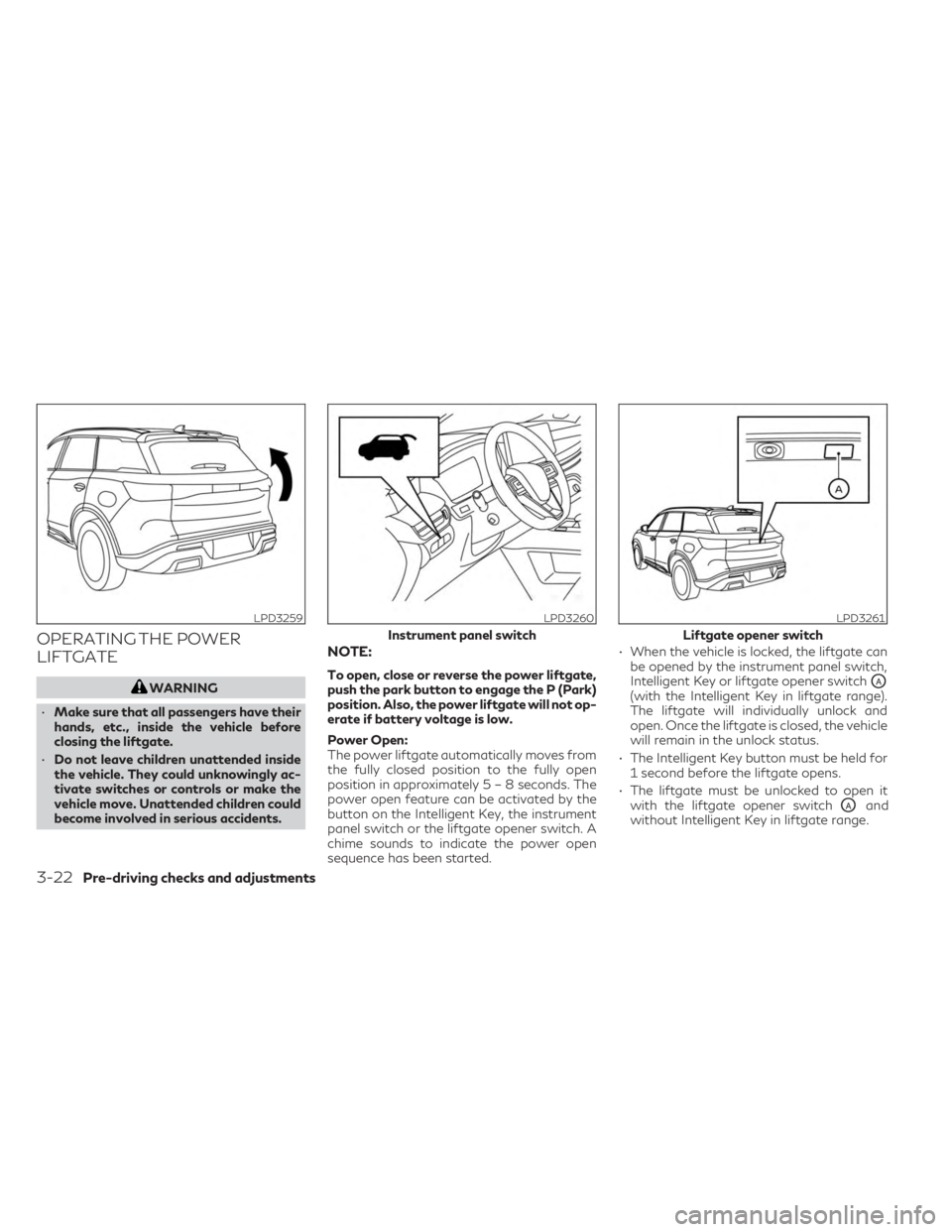
OPERATING THE POWER
LIFTGATE
WARNING
• Make sure that all passengers have their
hands, etc., inside the vehicle before
closing the liftgate.
• Do not leave children unattended inside
the vehicle. They could unknowingly ac-
tivate switches or controls or make the
vehicle move. Unattended children could
become involved in serious accidents.
NOTE:
To open, close or reverse the power liftgate,
push the park button to engage the P (Park)
position. Also, the power liftgate will not op-
erate if battery voltage is low.
Power Open:
The power liftgate automatically moves from
the fully closed position to the fully open
position in approximately5–8seconds. The
power open feature can be activated by the
button on the Intelligent Key, the instrument
panel switch or the liftgate opener switch. A
chime sounds to indicate the power open
sequence has been started. • When the vehicle is locked, the liftgate can
be opened by the instrument panel switch,
Intelligent Key or liftgate opener switchOA(with the Intelligent Key in liftgate range).
The liftgate will individually unlock and
open. Once the liftgate is closed, the vehicle
will remain in the unlock status.
• The Intelligent Key button must be held for 1 second before the liftgate opens.
• The liftgate must be unlocked to open it with the liftgate opener switch
OAand
without Intelligent Key in liftgate range.
LPD3259LPD3260
Instrument panel switch
LPD3261
Liftgate opener switch
3-22Pre-driving checks and adjustments
Page 249 of 636

A warning chime will sound if the shift posi-
tion is moved out of P (Park) and the vehicle is
beginning to move, during a power open
operation.Power Close:
The power liftgate automatically moves from
the fully open position to the secondary po-
sition. When the liftgate reaches the second-
ary position, the cinching motor engages and
pulls the liftgate to its primary latch position.
Power close takes approximately7–10sec-
onds. The power close feature can be acti-
vated by the button on the Intelligent Key, the
instrument panel switch, the liftgate close
switch
OBor the liftgate lock switchOC.A
chime sounds to indicate the power close
sequence has been started. • If the liftgate opener switch
OAis activated
while the cinching motor is engaged, the
cinching motor will disengage and release
the latch.
• The Intelligent Key button must be held for 1 second before the liftgate closes.
• When the Intelligent Key is in range and the liftgate lock switch
OCis activated the lift-
gate will begin to close and all doors will
lock.
Stop - Reverse:
During the open/close movement, the lift-
gate can be stopped if the Intelligent Key,
instrument panel or liftgate opener switch
OA, liftgate close switchOBor liftgate lock
switch
OCis pushed. The liftgate can be re-
versed if the Intelligent Key, instrument panel,
liftgate opener switch
OAor liftgate lock
switch
OCis pushed again.
Auto Reverse:
If an obstacle is detected during power open
or power close, a warning chime will sound
and the liftgate will reverse direction and re-
turn to the full open or full close position. If a
second obstacle is detected, the liftgate mo-
tion will stop and the liftgate will enter
manual mode.
LPD3262
Liftgate close switch
Pre-driving checks and adjustments3-23
Page 257 of 636
MANUAL OPERATION (if so
equipped)
Tilt and telescopic operation
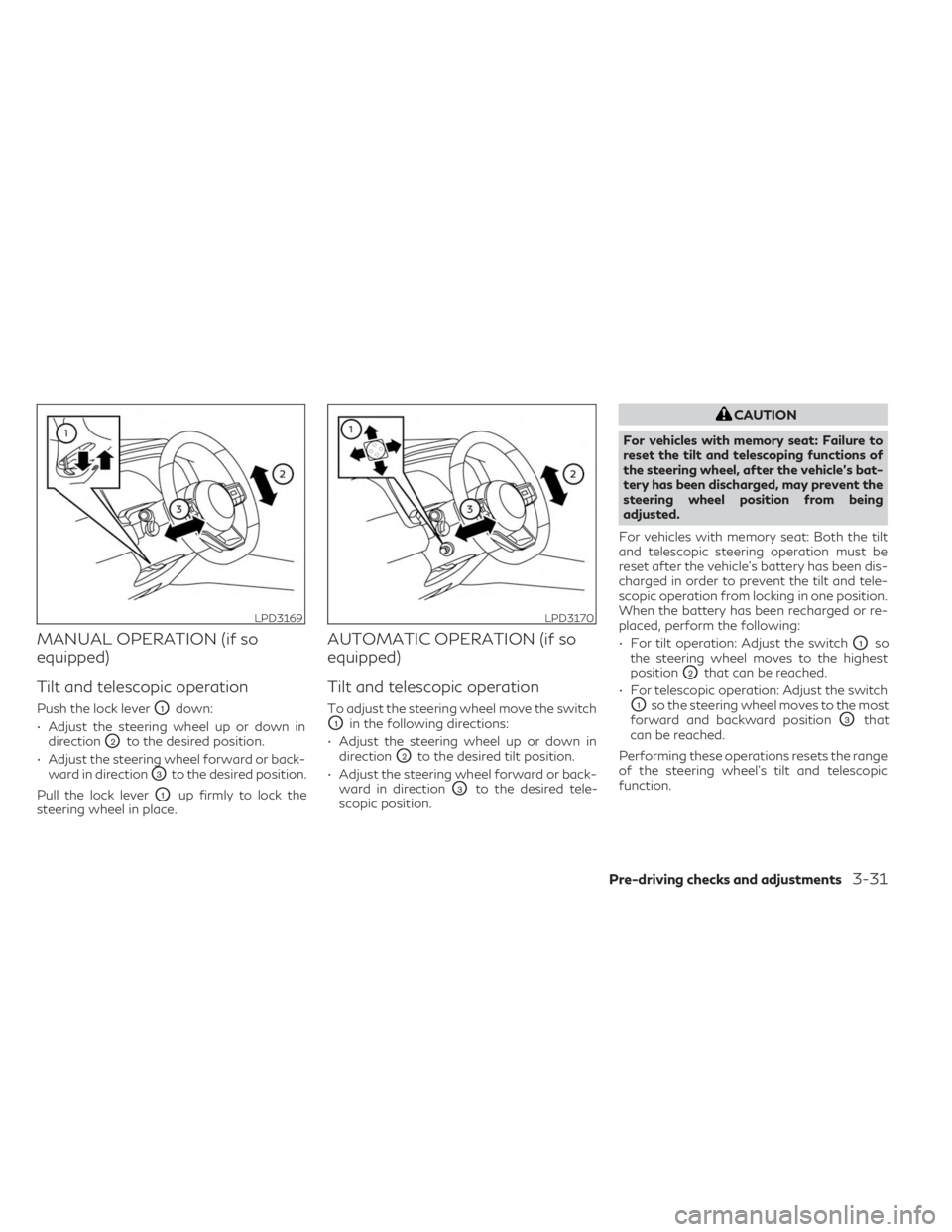
Push the lock leverO1down:
• Adjust the steering wheel up or down in direction
O2to the desired position.
• Adjust the steering wheel forward or back- ward in direction
O3to the desired position.
Pull the lock lever
O1up firmly to lock the
steering wheel in place.
AUTOMATIC OPERATION (if so
equipped)
Tilt and telescopic operation
To adjust the steering wheel move the switch
O1in the following directions:
• Adjust the steering wheel up or down in direction
O2to the desired tilt position.
• Adjust the steering wheel forward or back- ward in direction
O3to the desired tele-
scopic position.
CAUTION
For vehicles with memory seat: Failure to
reset the tilt and telescoping functions of
the steering wheel, after the vehicle’s bat-
tery has been discharged, may prevent the
steering wheel position from being
adjusted.
For vehicles with memory seat: Both the tilt
and telescopic steering operation must be
reset after the vehicle’s battery has been dis-
charged in order to prevent the tilt and tele-
scopic operation from locking in one position.
When the battery has been recharged or re-
placed, perform the following:
• For tilt operation: Adjust the switch
O1so
the steering wheel moves to the highest
position
O2that can be reached.
• For telescopic operation: Adjust the switch
O1so the steering wheel moves to the most
forward and backward position
O3that
can be reached.
Performing these operations resets the range
of the steering wheel’s tilt and telescopic
function.
LPD3169LPD3170
Pre-driving checks and adjustments3-31
Page 258 of 636
Entry/Exit function (if so equipped)
The memory seat will make the steering
wheel move up automatically when the driv-
er's door is opened and the ignition switch is
in the LOCK position. This lets the driver get
into and out of the seat more easily. The
steering wheel moves back into position
when the driver's door is closed and the igni-
tion switch is pushed.
For additional information, see “Memory
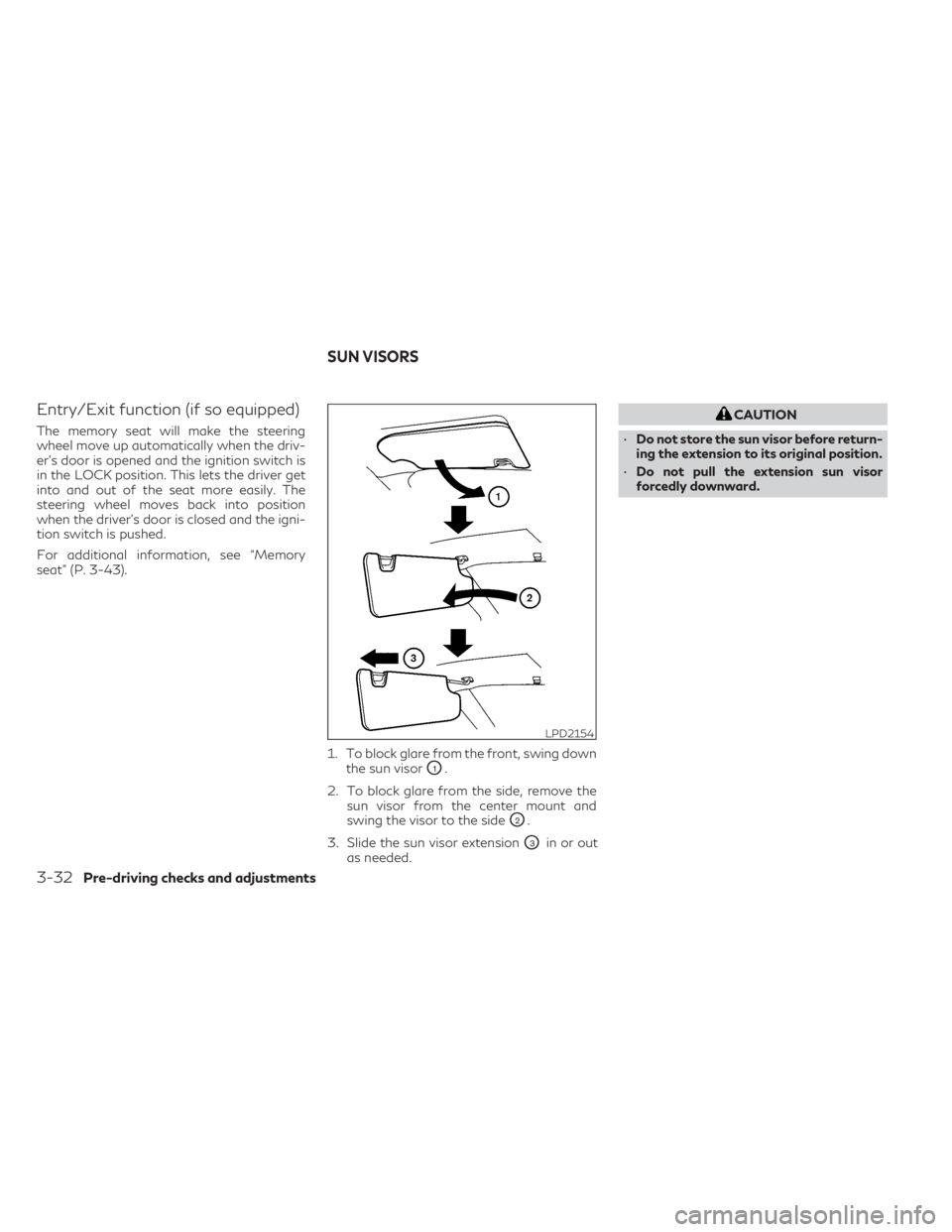
seat” (P. 3-43).1. To block glare from the front, swing downthe sun visor
O1.
2. To block glare from the side, remove the sun visor from the center mount and
swing the visor to the side
O2.
3. Slide the sun visor extension
O3in or out
as needed.
CAUTION
• Do not store the sun visor before return-
ing the extension to its original position.
• Do not pull the extension sun visor
forcedly downward.
LPD2154
SUN VISORS
3-32Pre-driving checks and adjustments
Page 270 of 636
Confirming memory storage
• Push the SET switch.
• If a memory position has been stored in theswitch (1 or 2) then the indicator light for
the respective switch will stay on for ap-
proximately 5 seconds.
ENTRY/EXIT FUNCTION
This system is designed so that the driver's
seat and automatic operation steering wheel
will automatically move. This allows the
driver to get into and out of the driver’s seat
more easily.
The driver’s seat will slide backward and the
steering wheel will move up:
• When the driver’s door is opened with theignition switch placed in the OFF position.
• When the ignition switch is changed from ACC to OFF with the driver’s door open.
The driver’s seat and steering wheel will re-
turn to the previous position:
• When the ignition switch is changed from ACC or ON while the shift position is in the
P (Park) position. The entry/exit function can be adjusted or
canceled through “Vehicle Settings” in the ve-
hicle information display by performing the
following:
• Switch the Exit Seat Slide from “On” to
“Off”.
• Switch the Exit Steering Up from “On” to “Off”.SETTING MEMORY FUNCTION
The position of the following settings can be
linked to the Intelligent Key and the memo-
rized settings can be available for each Intel-
ligent Key.
To use the memory function, set the climate,
navigation and audio systems to the driver's
preferred settings. Lock the doors with the
Intelligent Key. Each Intelligent Key may be
set with the driver's individual preferences.
When a new Intelligent Key is used, “Connec-
tion with the key has been done” will be dis-
played on the vehicle information display and
the memorized settings are available.
To engage the memorized settings, perform
the following:
1. Carry the Intelligent Key that is linked to the memorized settings. 2. Unlock the doors by wrapping hand
around the capacitive door handle or the
button on the Intelligent Key.
3. Place the ignition switch in the ON posi- tion. The settings linked to the Intelligent
Key will start. .
For additional information, see “INFINITI In-
Touch™ Owner’s Manual” (P. 4-2) and
“Heater and air conditioner (automatic)”
(P. 4-29).
SYSTEM OPERATION
The memory seat system will not work or will
stop operating under the following
conditions:
• When the vehicle speed is above 4 mph (7 km/h).
• When any of the memory switches are pushed while the memory seat is operating.
• When the switch for the driver’s seat, steering wheel or passenger’s seat (if so
equipped) is pushed while the memory seat
is operating.
• When the seat has already been moved to the memorized position.
• When no seat position is stored in the memory switch.
• When the shift position is moved from P (Park) to any other position.
3-44Pre-driving checks and adjustments
Page 276 of 636
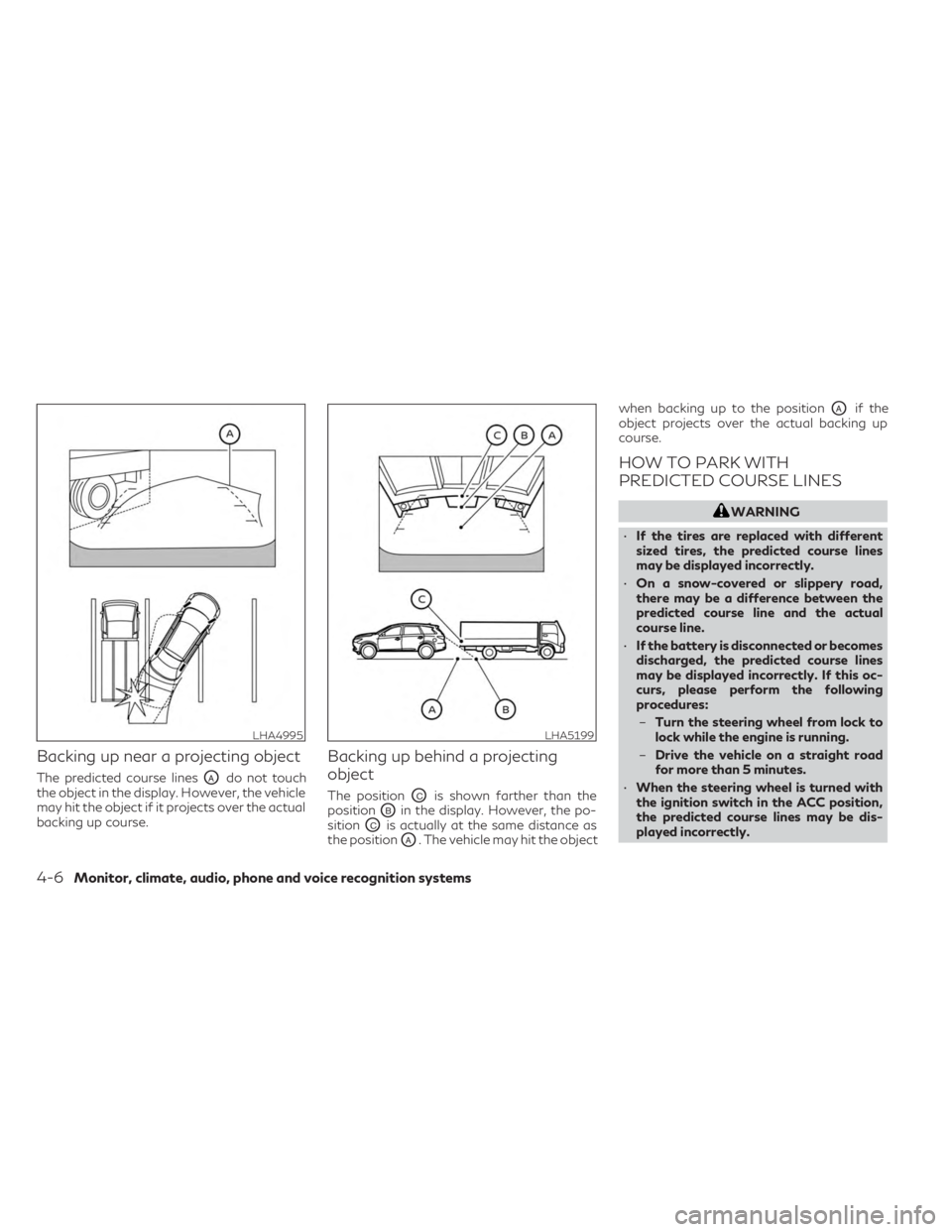
Backing up near a projecting object
The predicted course linesOAdo not touch
the object in the display. However, the vehicle
may hit the object if it projects over the actual
backing up course.
Backing up behind a projecting
object
The positionOCis shown farther than the
position
OBin the display. However, the po-
sition
OCis actually at the same distance as
the position
OA. The vehicle may hit the object when backing up to the position
OAif the
object projects over the actual backing up
course.
HOW TO PARK WITH
PREDICTED COURSE LINES
WARNING
• If the tires are replaced with different
sized tires, the predicted course lines
may be displayed incorrectly.
• On a snow-covered or slippery road,
there may be a difference between the
predicted course line and the actual
course line.
• If the battery is disconnected or becomes
discharged, the predicted course lines
may be displayed incorrectly. If this oc-
curs, please perform the following
procedures:
– Turn the steering wheel from lock to
lock while the engine is running.
– Drive the vehicle on a straight road
for more than 5 minutes.
• When the steering wheel is turned with
the ignition switch in the ACC position,
the predicted course lines may be dis-
played incorrectly.
LHA4995LHA5199
4-6Monitor, climate, audio, phone and voice recognition systems
Page 287 of 636
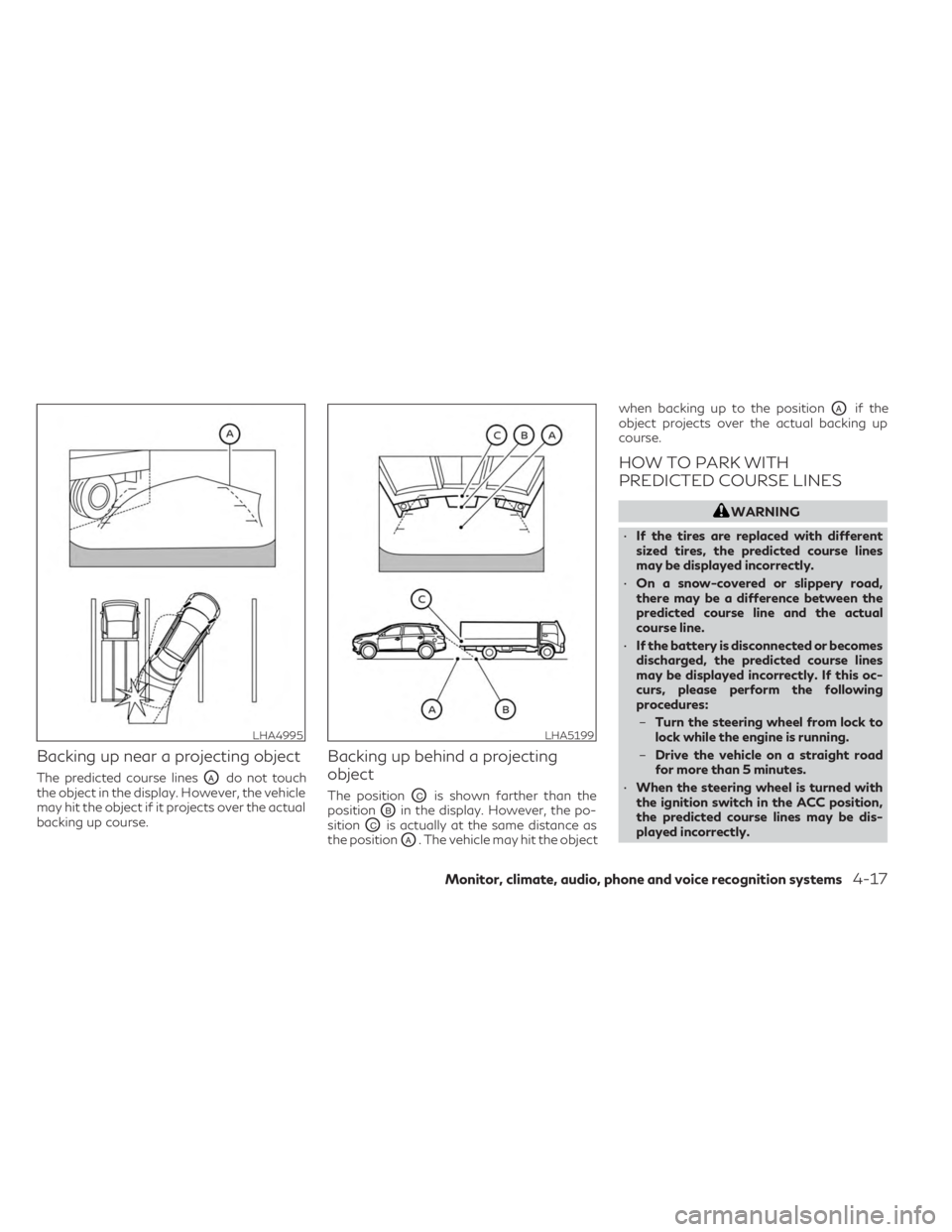
Backing up near a projecting object
The predicted course linesOAdo not touch
the object in the display. However, the vehicle
may hit the object if it projects over the actual
backing up course.
Backing up behind a projecting
object
The positionOCis shown farther than the
position
OBin the display. However, the po-
sition
OCis actually at the same distance as
the position
OA. The vehicle may hit the object when backing up to the position
OAif the
object projects over the actual backing up
course.
HOW TO PARK WITH
PREDICTED COURSE LINES
WARNING
• If the tires are replaced with different
sized tires, the predicted course lines
may be displayed incorrectly.
• On a snow-covered or slippery road,
there may be a difference between the
predicted course line and the actual
course line.
• If the battery is disconnected or becomes
discharged, the predicted course lines
may be displayed incorrectly. If this oc-
curs, please perform the following
procedures:
– Turn the steering wheel from lock to
lock while the engine is running.
– Drive the vehicle on a straight road
for more than 5 minutes.
• When the steering wheel is turned with
the ignition switch in the ACC position,
the predicted course lines may be dis-
played incorrectly.
LHA4995LHA5199
Monitor, climate, audio, phone and voice recognition systems4-17
Page 297 of 636
NOTE:
The green MOD icon will change to orange if
one of the following has occurred:
•When the system is malfunctioning.
• When the component temperature
reaches a high level (icon will blink).
• When the RearView camera has detected
a blockage (icon will blink).
If the icon light continues to illuminate or-
ange, have the MOD system checked. It is
recommended that you visit an INFINITI re-
tailer for this service.
SYSTEM MAINTENANCE
CAUTION
• Do not use alcohol, benzine or thinner to
clean the camera. This will cause
discoloration.
• Do not damage the camera as the moni-
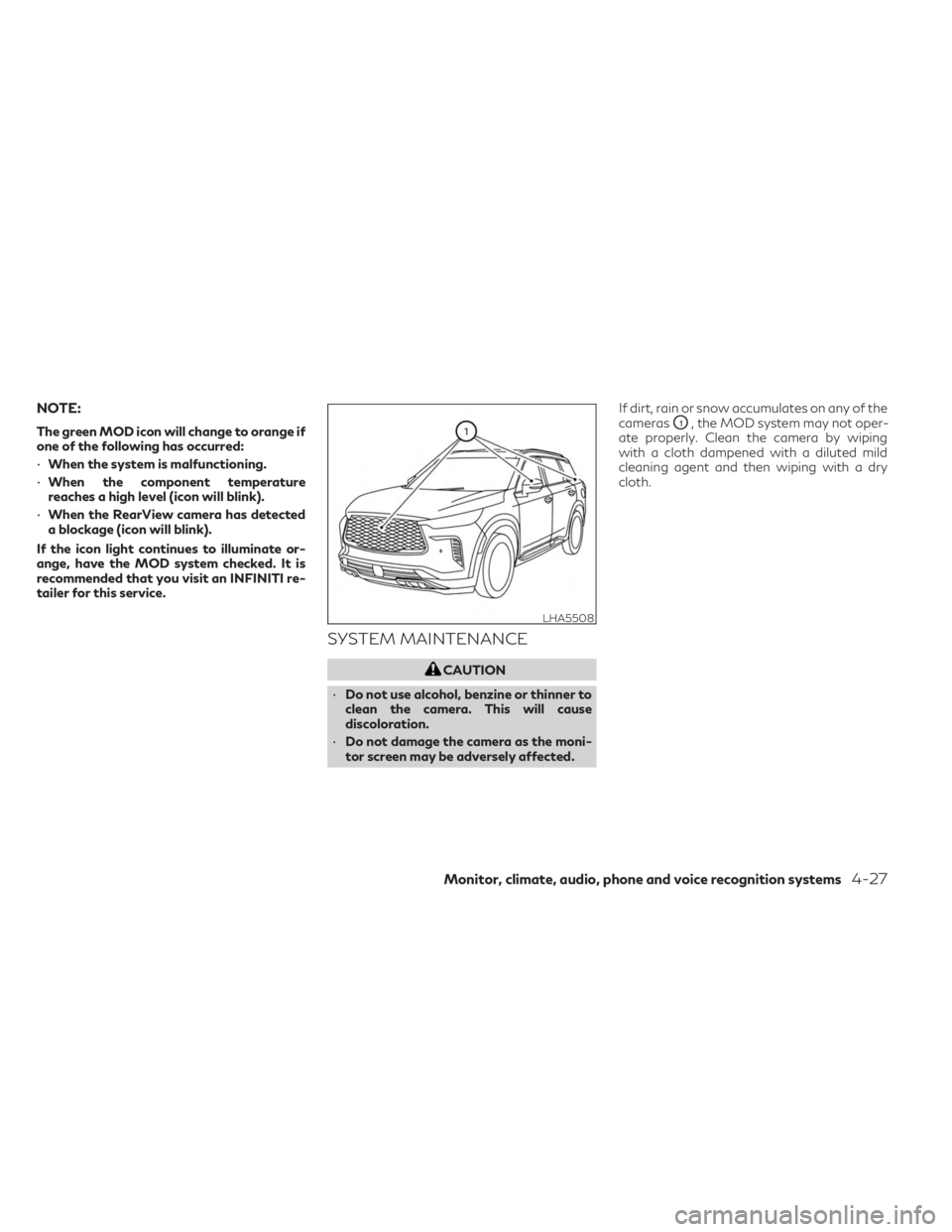
tor screen may be adversely affected. If dirt, rain or snow accumulates on any of the
cameras
O1, the MOD system may not oper-
ate properly. Clean the camera by wiping
with a cloth dampened with a diluted mild
cleaning agent and then wiping with a dry
cloth.
LHA5508
Monitor, climate, audio, phone and voice recognition systems4-27
Page 299 of 636

1.Heated steering wheel switch
(if so equipped)
2. Display screen
3. REAR CONTROL (rear climate display screen) button
4. REAR ON-OFF button
5. REAR LOCK button 6.REAR window and outside mirror
(if so equipped) defroster switch
7.
Heated seat switches (if so equipped)
8.Climate controlled seat switches
(if so equipped)
9. SYNC button/ temperature control dial
(passenger's side) 10.
CLEAN (if so equipped)
11.Air recirculation button
12.Fresh air intake button
13.Fan speed control buttons
14. MODE button
15. A/C (air conditioner) button
16. ON-OFF button
17.
Front defroster button
18. AUTO (automatic) climate control button/
temperature control dial (driver's side)
WARNING
• The air conditioner cooling function op-
erates only when the engine is running.
• Do not leave children or adults who
would normally require the assistance of
others alone in your vehicle. Pets should
also not be left alone. They could acci-
dentally injure themselves or others
through inadvertent operation of the
vehicle. Also, on hot, sunny days, tem-
peratures in a closed vehicle could
quickly become high enough to cause se-
vere or possibly fatal injuries to people or
animals.
• Do not use the recirculation mode for
long periods as it may cause the interior
air to become stale and the windows to
fog up.
LHA5522
HEATER AND AIR CONDITIONER
(automatic)
Monitor, climate, audio, phone and voice recognition systems4-29