turn signal INFINITI QX60 HYBRID 2016 Owner's Manual
[x] Cancel search | Manufacturer: INFINITI, Model Year: 2016, Model line: QX60 HYBRID, Model: INFINITI QX60 HYBRID 2016Pages: 651, PDF Size: 13.31 MB
Page 5 of 651
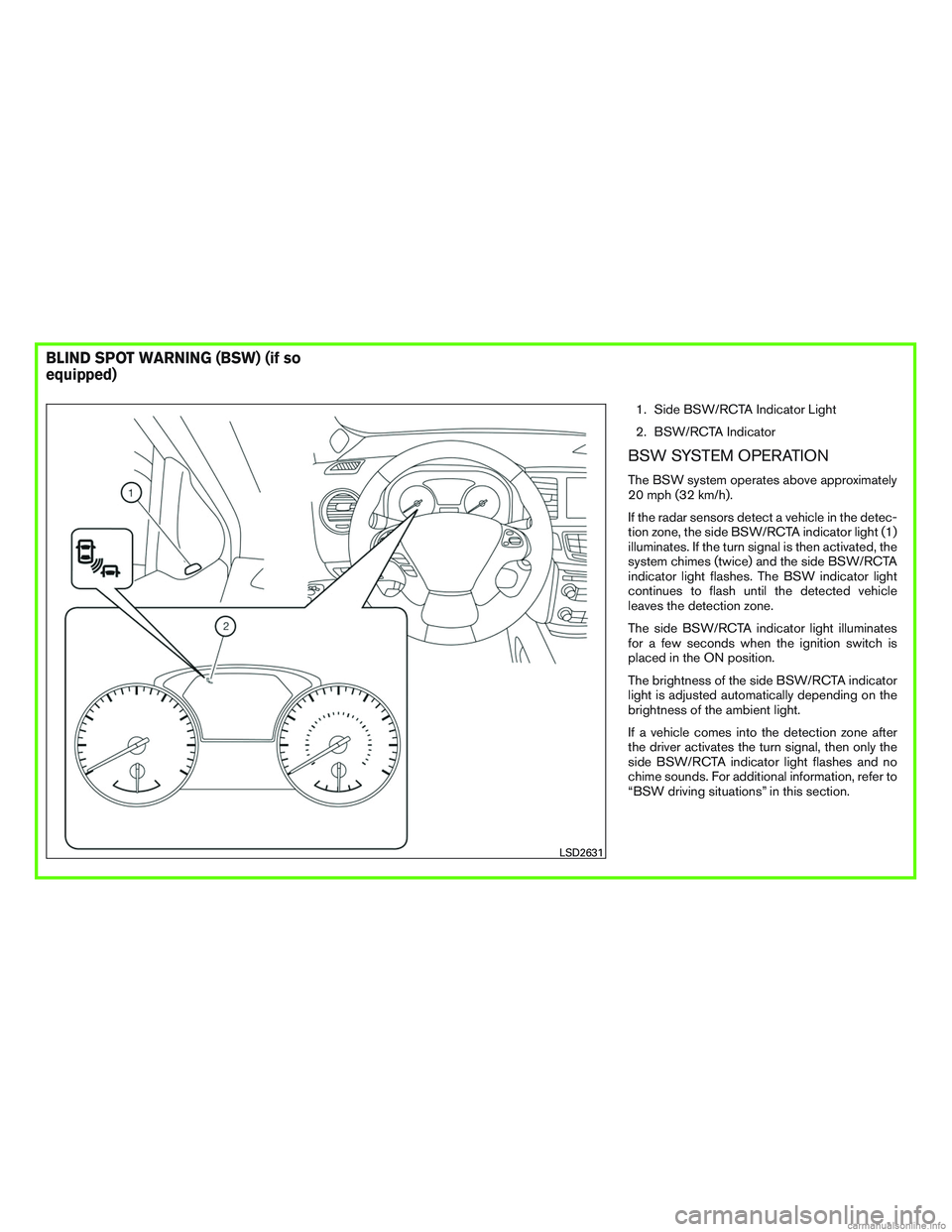
1. Side BSW/RCTA Indicator Light
2. BSW/RCTA Indicator
BSW SYSTEM OPERATION
The BSW system operates above approximately
20 mph (32 km/h).
If the radar sensors detect a vehicle in the detec-
tion zone, the side BSW/RCTA indicator light (1)
illuminates. If the turn signal is then activated, the
system chimes (twice) and the side BSW/RCTA
indicator light flashes. The BSW indicator light
continues to flash until the detected vehicle
leaves the detection zone.
The side BSW/RCTA indicator light illuminates
for a few seconds when the ignition switch is
placed in the ON position.
The brightness of the side BSW/RCTA indicator
light is adjusted automatically depending on the
brightness of the ambient light.
If a vehicle comes into the detection zone after
the driver activates the turn signal, then only the
side BSW/RCTA indicator light flashes and no
chime sounds. For additional information, refer to
“BSW driving situations” in this section.
LSD2631
BLIND SPOT WARNING (BSW) (if so
equipped)
Page 39 of 651

1. Engine hood (P. 3-21)
2. Wiper and washer switch (P. 2-35)Wiper blades (P. 8-21)
3. Windshield (P. 8-21)
4. Power windows (P. 2-59)
5. Door locks (P. 3-4) INFINITI Intelligent Key (P. 3-7)
Remote engine start (if so equipped)
(P. 3-19)
Keys (P. 3-2)
6. Mirrors (P. 3-32) Side camera (P. 4-31)
7. Tire pressure (P. 8-29) Flat tire (P. 6-3)
Tire chains (P. 8-29)
8. Replacing bulbs (P. 8-27) Headlight and turn signal switch
(P. 2-38)
9. Fog light switch (P. 2-38)
10. Front and rear sonar system
(if so equipped) (P. 5-141)
11. Front camera (P. 4-31)
Refer to the page number indicated in pa-
rentheses for operating details.
LII2417
EXTERIOR FRONT
Illustrated table of contents0-3
Page 42 of 651

1. Vent (P. 4-48)
2. Headlight/fog light/turn signal switch(P. 2-38)
3. Instrument brightness control (P. 2-38)
4. Meters and gauges (P. 2-4) Warning and indicator lights (P. 2-7)
Vehicle information display (P. 2-16)
5. Driver supplemental air bag (P.1-48) Horn (P. 2-43)
6. Back-up Collision Intervention (BCI)
system switch (if so equipped) (P.5-56)
7. Twin trip odometer reset switch (P. 2-4)
8. Wiper and washer switch (P. 2-35) Rear wiper and washer switch
(P. 2-35)
9. Rear window and outside mirror de-
froster switch (P. 2-38)
10. Center display (P. 4-4) Navigation system* (if so equipped)
(P. 4-12)
11. Automatic heater and air conditioning
controls (P. 4-49)
12. Front passenger supplemental air bag
(P. 1-55)
13. Glove box (P. 2-52)
14. Center multi-function control buttons
(P. 4-5, 4-13)
LII2436
INSTRUMENT PANEL
0-6Illustrated table of contents
Page 46 of 651

Indicatorlight Name Page
READY to drive indi-
cator light 2-14
Security indicator
light2-14
Side light and head-
light indicator light
(green)2-14
Slip indicator light 2-14
Turn signal/hazard
indicator lights
2-14
Vehicle Dynamic
Control (VDC) OFF
indicator light2-14
0-10Illustrated table of contents
Page 114 of 651
2 Instruments and controls
Instrument panel...................................2-2
Meters and gauges ................................2-4
Speedometer and odometer .....................2-4
Tachometer ....................................2-5
Fuel gauge ....................................2-6
Assist Charge Gauge ...........................2-6
Warning lights, indicator lights and audible
reminders .........................................2-7
Checking lights ................................2-7
Warning lights .................................2-8
Indicator lights ................................ 2-13
Audible reminders ............................. 2-15
Vehicle Information Display ........................2-16
How to use the vehicle information display .......2-16
Startup display ................................ 2-17
Resetting the trip computer .....................2-17
Settings ...................................... 2-17
Vehicle information display warnings and
indicators ..................................... 2-27
Security systems ................................. 2-32
Vehicle security system ......................... 2-32
INFINITI vehicle immobilizer system ..............2-34
Wiper and washer switch ......................... 2-35Switch operation
.............................. 2-35
Rain-sensing auto wiper system
(if so equipped) ............................... 2-36
Rear switch operation .......................... 2-37
Rear window and outside mirror defroster switch .....2-38
Headlight and turn signal switch ....................2-38
Xenon headlights .............................. 2-38
Headlight control switch ........................ 2-39
Daytime running light system ....................2-41
Instrument brightness control ...................2-42
Turn signal switch ............................. 2-42
Fog light switch ............................... 2-43
Horn ............................................ 2-43
Heated seat switches (if so equipped) ..............2-44
Heated 2nd row seat switches (if so equipped) ......2-45
Climate controlled seat switches (if so equipped) ....2-46
Heated steering wheel
switch ...................... 2-47
Vehicle Dynamic Control (VDC) off switch ...........2-47
Warning systems switch (if so equipped) ............2-48
Power inverter switch (if so equipped) ..............2-48
E-call (SOS) switch (if so equipped) ................2-49
Power outlets .................................... 2-49
12v outlets ................................... 2-49
Page 116 of 651
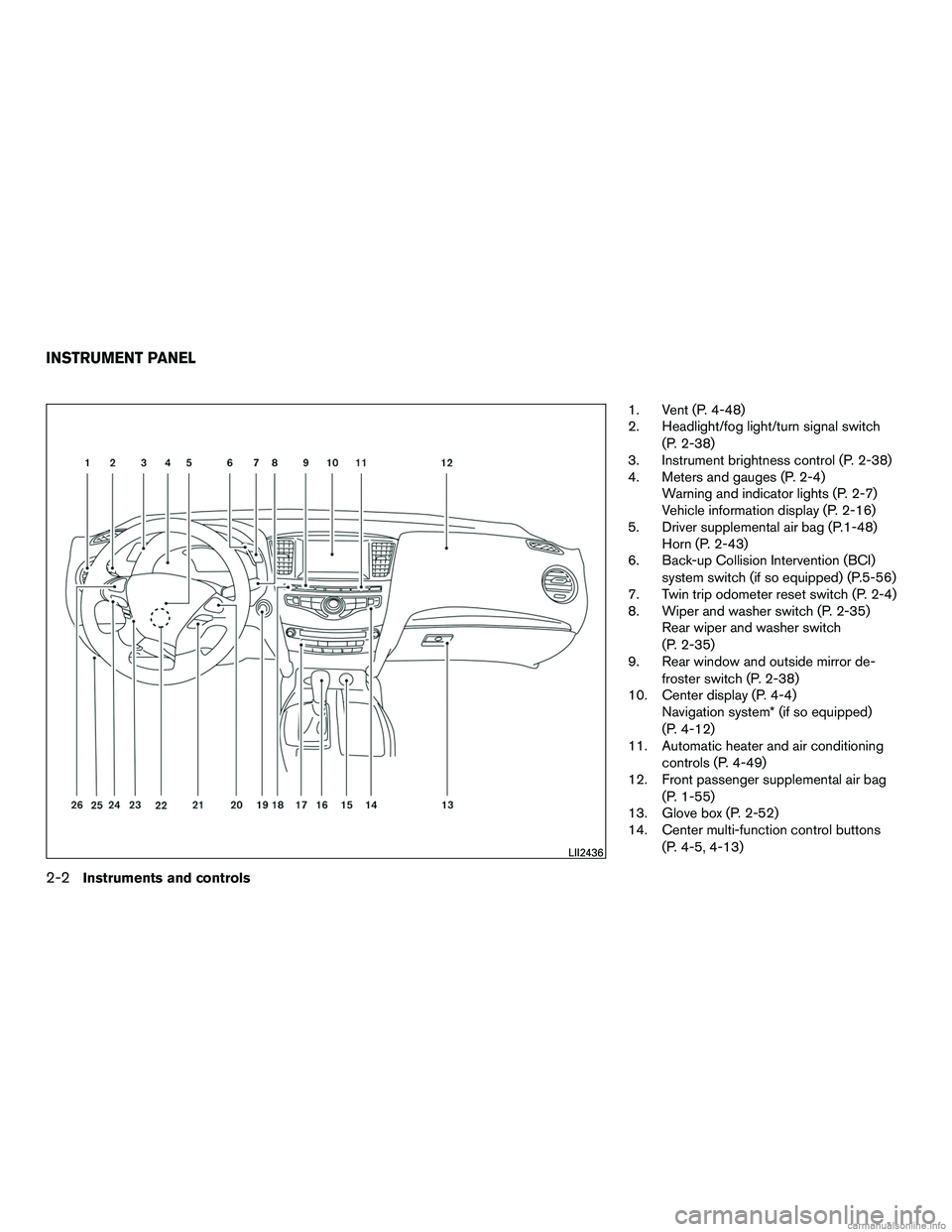
1. Vent (P. 4-48)
2. Headlight/fog light/turn signal switch(P. 2-38)
3. Instrument brightness control (P. 2-38)
4. Meters and gauges (P. 2-4) Warning and indicator lights (P. 2-7)
Vehicle information display (P. 2-16)
5. Driver supplemental air bag (P.1-48) Horn (P. 2-43)
6. Back-up Collision Intervention (BCI)
system switch (if so equipped) (P.5-56)
7. Twin trip odometer reset switch (P. 2-4)
8. Wiper and washer switch (P. 2-35) Rear wiper and washer switch
(P. 2-35)
9. Rear window and outside mirror de-
froster switch (P. 2-38)
10. Center display (P. 4-4) Navigation system* (if so equipped)
(P. 4-12)
11. Automatic heater and air conditioning
controls (P. 4-49)
12. Front passenger supplemental air bag
(P. 1-55)
13. Glove box (P. 2-52)
14. Center multi-function control buttons
(P. 4-5, 4-13)
LII2436
INSTRUMENT PANEL
2-2Instruments and controls
Page 121 of 651

12–volt battery charge warning lightPower steering warning lightLow temperature indicator light (blue)
orAnti-lock Braking System (ABS)
warning lightSeat belt warning light and chimeMalfunction Indicator Light (MIL)
orBrake warning light (red)Supplemental air bag warning lightREADY to drive indicator light
Direct Response Hybrid warning lightApproaching Vehicle Sound for Pedestrians
(VSP) OFF indicator lightSecurity indicator light
Electronically controlled brake warning light
(yellow)EV indicator lightSide light and headlight indicator light (green)
Forward Emergency Braking (FEB) system
warning light (if so equipped)Front fog light indicator lightSlip indicator light
Low tire pressure warning lightFront passenger air bag status lightTurn signal/hazard indicator lights
Master warning lightHigh beam indicator light (blue)Vehicle Dynamic Control (VDC) OFF indicator
light
CHECKING LIGHTS
With all doors closed, apply the parking brake,
fasten the seat belts and place the ignition switchin the ON position without starting the engine.
The following lights (if so equipped) will come on:
,or(red) ,,
The following lights (if so equipped) come on
briefly and then go off:
or,,,,
WARNING LIGHTS, INDICATOR
LIGHTS AND AUDIBLE REMINDERS
Instruments and controls2-7
Page 127 of 651
INDICATOR LIGHTS
For additional information, refer to “Vehicle infor-
mation display” in this section.
Approaching Vehicle Soundfor Pedestrians (VSP) OFF
indicator light
This light comes on if there is a malfunction in the
Approaching Vehicle Sound for Pedestrians
(VSP) system.
EV indicator light
This illuminates when the engine stops but the
vehicle is running.
Front fog light indicator light
The front fog light indicator light illuminates when
the front fog lights are ON. For additional infor-
mation, refer to “Fog light switch” in this section.
Front passenger air bag statuslight
The front passenger air bag status light will be lit
and the passenger front air bag will be OFF
depending on how the front passenger seat is
being used. For additional information, refer to “Front passen-
ger air bag and status light” in the “Safety —
Seats, seat belts and supplemental restraint sys-
tem” section of this manual.
High beam indicator light
(blue)
This blue light comes on when the headlight high
beams are on and goes out when the low beams
are selected.
The high beam indicator light also comes on
when the passing signal is activated.
Low temperature indicatorlight (blue)
The low temperature indicator light illuminates
when the engine coolant temperature is low.
When the ignition switch is placed in the ON
position, the low temperature indicator light illu-
minates and then turns off after the engine cool-
ant has warmed up.
If the low temperature indicator light stays illumi-
nated after the engine has sufficiently warmed
up, it may indicate the low temperature sensor in
the engine coolant system is not functioning
properly and may need servicing. It is recom-
mended that you have the system checked, and if
necessary repaired. It is recommended that you
visit an INFINITI retailer for this service.
Malfunction Indicator Light(MIL)
If this indicator light comes on steady or blinks
while the engine is running, it may indicate a
potential emission control malfunction.
The MIL may also come on steady if the fuel-filler
cap is loose or missing, or if the vehicle runs out
of fuel. Check to make sure the fuel-filler cap is
installed and closed tightly, and that the vehicle
has at least 3 gal (11.4 L) of fuel in the fuel tank.
After a few driving trips, the
light should
turn off if no other potential emission control
system malfunction exists.
If this indicator light comes on steady for 20 sec-
onds and then blinks for 10 seconds when the
engine is not running, it indicates that the vehicle
is not ready for an emission control system
inspection/maintenance test. For additional infor-
mation, refer to “Readiness for
inspection/maintenance (I/M) test” in the “Tech-
nical and consumer information” section of this
manual.
Instruments and controls2-13
Page 128 of 651

Operation
The MIL will come on in one of two ways:● MIL on steady — An emission control system
malfunction has been detected. Check the
fuel-filler cap if the LOOSE FUEL CAP
warning appears in the vehicle information
display. If the fuel-filler cap is loose or miss-
ing, tighten or install the cap and continue to
drive the vehicle. The
light should turn
off after a few driving trips. If the
light
does not turn off after a few driving trips,
have the vehicle inspected. It is recom-
mended you visit an INFINITI retailer for this
service. You do not need to have your vehicle
towed to the retailer.
● MIL blinking — An engine misfire has been
detected which may damage the emission
control system. To reduce or avoid emission
control system damage:
– do not drive at speeds above 72 km (45 mph) .
– avoid hard acceleration or deceleration.
– avoid steep uphill grades.
– if possible, reduce the amount of cargo being hauled or towed. The MIL may stop blinking and come on steady.
Have the vehicle inspected. It is recommended
you visit an INFINITI retailer for this service. You
do not need to have your vehicle towed to the
retailer.
CAUTION
Continued vehicle operation without hav-
ing the emission control system checked
and repaired as necessary could lead to
poor driveability, reduced fuel economy,
and possible damage to the emission con-
trol system.
READY to drive indicator light
The READY to drive indicator light illuminates
when the hybrid system is powered and the ve-
hicle may be driven.
Security indicator light
This light blinks whenever the ignition switch is in
the LOCK, OFF or ACC position. This function
indicates the security system equipped on the
vehicle is operational.
For additional information, refer to “Security sys-
tems” in this section.
Side light and headlight
indicator light (green)
The side light and headlight indicator light illumi-
nates when the side light or headlight position is
selected. For additional information, refer to
“Headlight and turn signal switch” in this section.
Slip indicator light
This indicator will blink when the VDC system is
operating, thus alerting that the vehicle is nearing
its traction limits. The road surface may be slip-
pery.
Turn signal/hazard indicator lights
The appropriate light flashes when the turn signal
switch is activated.
Both lights flash when the hazard switch is turned
on.
Vehicle Dynamic Control(VDC) OFF indicator light
This indicator light comes on when the VDC off
switch is pushed to OFF. This indicates the VDC
has been turned off.
Push the VDC off switch again or restart the
engine and the system will be reactivated. For
additional information, refer to “Vehicle Dynamic
2-14Instruments and controls
Page 143 of 651
Shutting Down
This warning appears when the hybrid system
has been turned off. This warning also may ap-
pear when the ignition is turned off, however, this
is not a malfunction of the system.
Low Washer Fluid
This warning illuminates when the windshield-
washer fluid is at a low level. Add windshield-
washer fluid as necessary. For additional informa-
tion, refer to “Windshield-washer fluid” in the
“Maintenance and do-it-yourself” section of this
manual.
Door Open
This warning illuminates when a door has been
opened when the engine is running.
Liftgate Open
This warning illuminates when the liftgate has
been opened when the engine is running.
Timer Alert – Time for a driver break?
This indicator appears when the set time is
reached. The time can be set up to six hours. For
additional information, refer to “Settings” in this
section.Low Outside Temperature
This warning appears if the outside temperature
is below 37°F (3°C) . The temperature can be
changed to display in Celsius or Fahrenheit. For
additional information, refer to “Settings” in this
section.
Power will turn off to save the battery
This warning appears in the message area of the
vehicle information display after a period of time if
the shift lever has not moved from the P (Park)
position.
CVT Error: See Owner’s Manual
This warning illuminates when the there is a prob-
lem with the CVT system. If this warning comes
on, have the system checked. It is recommended
that you visit an INFINITI retailer for this service.
Reminder: Turn OFF headlights
This warning appears when the headlights are
left in the ON position when exiting the vehicle.
Place the headlight switch in the OFF or AUTO
position. For additional information, refer to
“Headlight and turn signal switch” in this section.
Shift to Park Press Brake & Start
This warning appears after the hybrid system was
automatically turned off if the level of remaining
charge in the Li-ion battery is low. When thiswarning appears, place the shift lever in the P
(Park) position and restart the hybrid system.
Shift to Park Li-ion battery low
This warning appears when the shift lever is in the
N (Neutral) position and level of remaining charge
in the Li-ion battery is low. When this warning
appears, place the shift lever in the P (Park)
position.
This will turn off in the following conditions.
● When the shift lever has been placed in the
P (Park) position.
Low Oil Pressure: See Owner’s Manual
This warning appears in the message area of the
vehicle information display if low oil pressure is
detected. This gauge is not designed to indicate
low oil level. The low oil pressure warning is
not designed to indicate a low oil level. Use
the dipstick to check the oil level. For additional
information, refer to “Engine oil” in the “Mainte-
nance and do-it-yourself” section of this manual.
Key Registration Complete
This appears when a new Intelligent Key is regis-
tered to the vehicle.
Tire Pressure Low - Add Air
This warning appears when the low tire pressure
warning light in the meter illuminates and low tire
Instruments and controls2-29