set clock ISUZU TROOPER 1995 Workshop Manual
[x] Cancel search | Manufacturer: ISUZU, Model Year: 1995, Model line: TROOPER, Model: ISUZU TROOPER 1995Pages: 1928
Page 161 of 1928
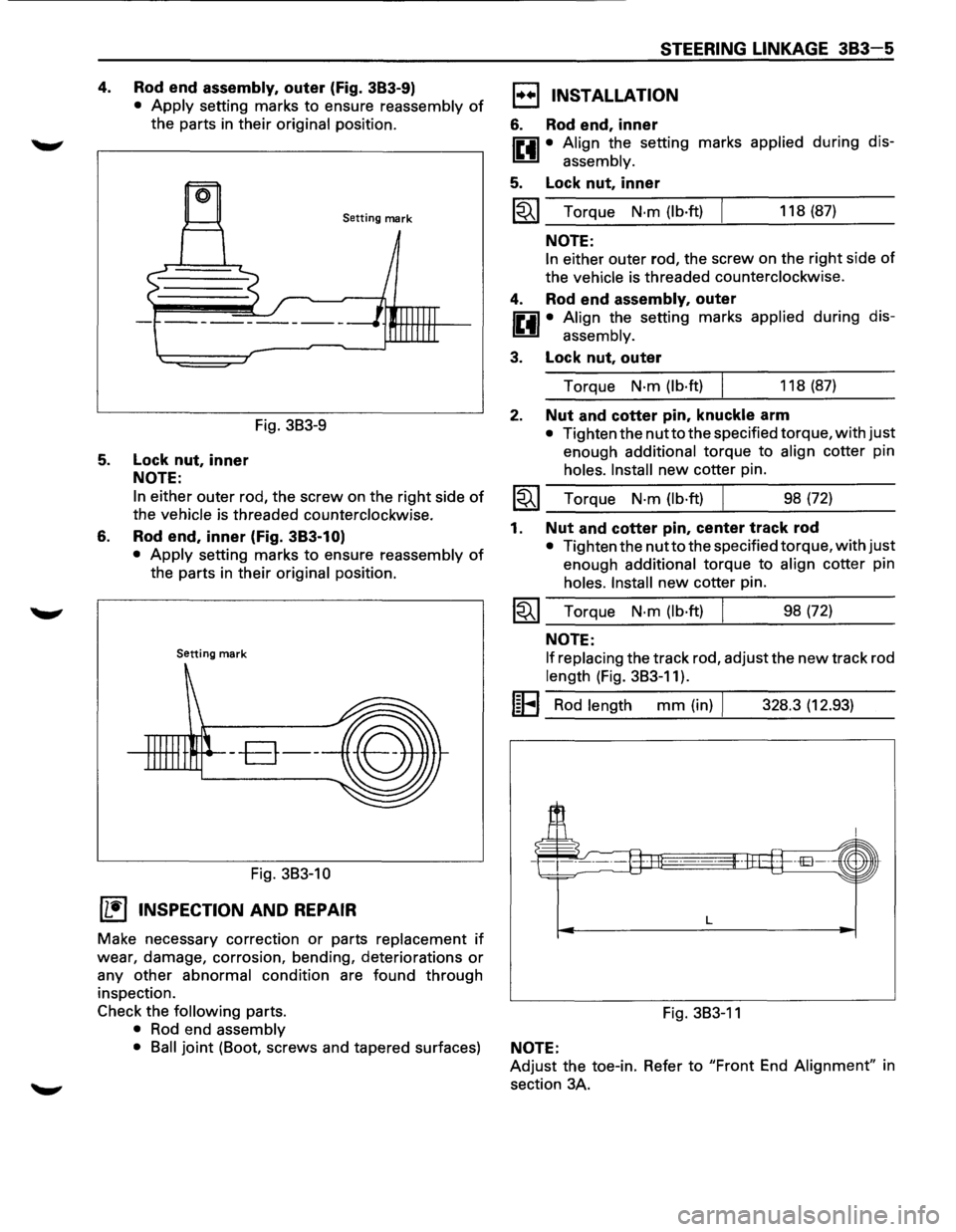
4. Rod end assembly, outer (Fig. 383-9)
• Apply setting marks to ensure reassembly of
the parts in their original position.
Setting mark
Fig. 3B3-9
5. Lock nut, inner
NOTE:
6.
In either outer rod, the screw on the right side of
the vehicle is threaded counterclockwise.
Rod end, inner (Fig. 383-1 O)
• Apply setting marks to ensure reassembly of
the parts in their original position.
Setting mark
--B--
Fig. 3B3-10
(1!] INSPECTION AND REPAIR
Make necessary correction or parts replacement if
wear, damage, corrosion, bending, deteriorations or
any other abnormal condition are found through
inspection.
Check the
following parts.
• Rod end assembly
STEERING LINKAGE 383-5
1••1 INSTALLATION
6. Rod end, inner
IP.il • Align the setting marks applied during dis-
~ assembly.
5. Lock nut, inner
~~~ Torque N·m (lb·ft) 118 (87)
NOTE:
In either outer rod, the screw on the right side of
the vehicle is threaded counterclockwise.
4. Rod end assembly, outer
IP.il • Align the setting marks applied during dis-
~ assembly.
3. Lock nut, outer
Torque N·m (lb·ft) 118 (87)
2. Nut and cotter pin, knuckle arm
• Tighten the nutto the specified torque, with just
enough additional torque to align cotter pin
holes. Install new cotter pin.
~~~ Torque N·m (lb·ft) ___ ______._ ___ _ 98 (72)
1. Nut and cotter pin, center track rod
• Tighten the nutto the specified torque, with just
enough additional torque to align cotter pin
holes. Install new cotter pin.
~~~ Torque N·m (lb·ft) 98 (72)
NOTE:
If replacing
the track rod, adjust the new track rod
length (Fig. 3B3-11).
I~EI Rod length mm (in) I 328.3 (12.93)
L
Fig. 3B3-11
• Ball joint (Boot, screws and tapered surfaces) NOTE:
Adjust the toe-in. Refer to "Front End Alignment" in
section 3A.
Page 219 of 1928
SUPPLEMENTAL RESTRAINT SYSTEM (SRS) STEERING WHEEL & COLUMN 3F4-9
B INSTALLATION
6. Combination switch and SRS coil assembly
•
After installation of combination switch as
sembly, connect the combination switch
wiring harness connector and the SRS 3way
connector located under the steering column.
•
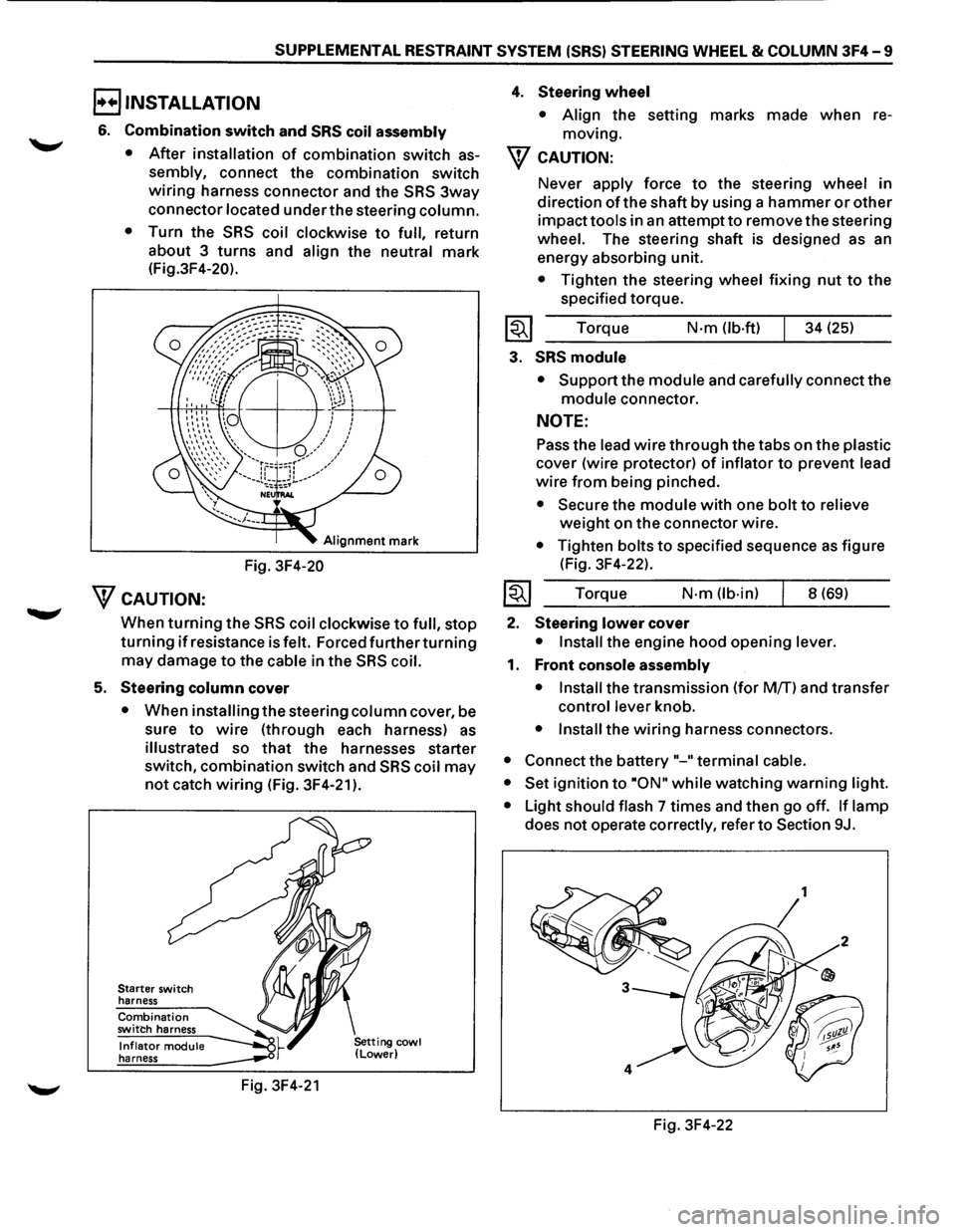
Turn the SRS coil clockwise to full, return
about 3
turns and align the neutral mark
(Fig.3F4-20).
Alignment mark
Fig. 3F4-20
WcAUTION:
When turning the SRS coil clockwise to full, stop
turning if resistance is felt. Forced further turning
may damage to the cable in the SRS coil.
5. Steering column cover
• When installing the steering column cover, be
sure
to wire (through each harness) as
illustrated so that the harnesses starter
switch,
combination switch and SRS coil may
not catch wiring (Fig. 3F4-21 ).
Starter switch
harness
Combination switch harness
Inflator module harness
Fig. 3F4-21
4. Steering wheel
• Align the setting marks made when re
moving.
W CAUTION:
Never apply force to the steering wheel in
direction
of the shaft by using a hammer or other
impact tools in an attempt to remove the steering
wheel. The steering shaft is designed as an
energy absorbing unit.
• Tighten the steering wheel fixing nut to the
specified torque.
Torque
N·m (lb-ft) 34 (25)
3. SRS module
• Support the module and carefully connect the
module connector.
NOTE:
Pass the lead wire through the tabs on the plastic
cover (wire protector) of inflator to prevent lead
wire from being pinched.
• Secure the module with one bolt to relieve
weight on the connector wire.
• Tighten bolts to specified sequence as figure
(Fig. 3F4-22).
Torque
N·m (lb·in) 8 (69)
2. Steering lower cover
• Install the engine hood opening lever.
1. Front console assembly
• Install
the transmission (for MfT) and transfer
control lever knob.
• Install the wiring harness connectors.
• Connect the battery "-"terminal cable.
• Set
ignition to ·oN" while watching warning light.
•
Light should flash 7 times and then go off. If lamp
does not operate correctly, refer to Section 9J.
Fig. 3F4-22
Page 222 of 1928
3F4 -12 SUPPLEMENTAL RESTRAINT SYSTEM (SRS) STEERING WHEEL & COLUMN
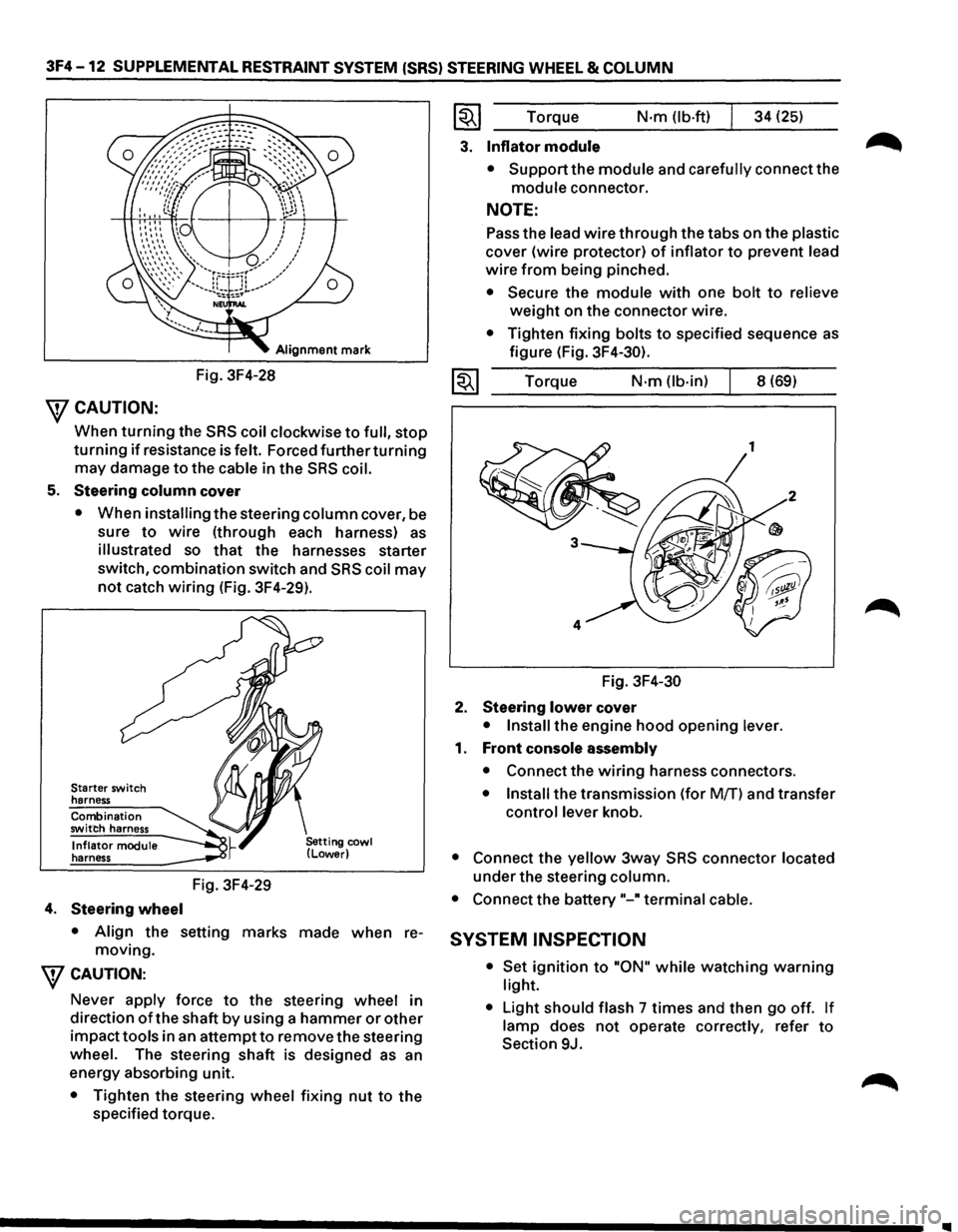
Alignment mark
Fig. 3F4-28
\fCAUTION:
When turning the SRS coil clockwise to full, stop
turning if resistance is felt. Forced further turning
may damage to the cable in the SRS coil.
5. Steering column cover
• When installing the steering column cover, be
sure
to wire (through each harness) as
illustrated so that the harnesses starter
switch,
combination switch and SRS coil may
not catch wiring (Fig. 3F4-29).
Starter switch
harness
Combination
switch harness
Inflator module
harness
4. Steering wheel
Fig. 3F4-29
• Align the setting marks made when re
moving.
\fCAUTION:
Never apply force to the steering wheel in
direction
of the shaft by using a hammer or other
impacttools in an attemptto remove the steering
wheel. The steering shaft is designed as an
energy absorbing unit.
• Tighten the steering wheel fixing nut to the
specified torque.
~~~ Torque N·m (lb-ft) 34 (25)
3. Inflator module
• Support the module and carefully connect the
module connector.
NOTE:
Pass the lead wire through the tabs on the plastic
cover (wire protector) of inflator to prevent lead
wire from being pinched.
• Secure the module with one bolt to relieve
weight on the connector wire.
• Tighten fixing bolts to specified sequence as
figure (Fig. 3F4-30).
1~1 Torque N·m (lb-in) 8 (69)
Fig.
3F4-30
2. Steering lower cover
• Install the engine hood opening lever.
1. Front console assembly
• Connect the wiring harness connectors.
• Install the transmission (for Mff) and transfer
control lever knob.
• Connect the yellow 3way SRS connector located
under the steering column.
• Connect the battery"-" terminal cable.
SYSTEM INSPECTION
• Set ignition to "ON" while watching warning
light.
•
Light should flash 7 times and then go off. If
lamp does not operate correctly, refer to
Section 9J.
Page 225 of 1928
SUPPLEMENTAL RESTRAINT SYSTEM (SRS) STEERING WHEEL & COLUMN 3F4-15
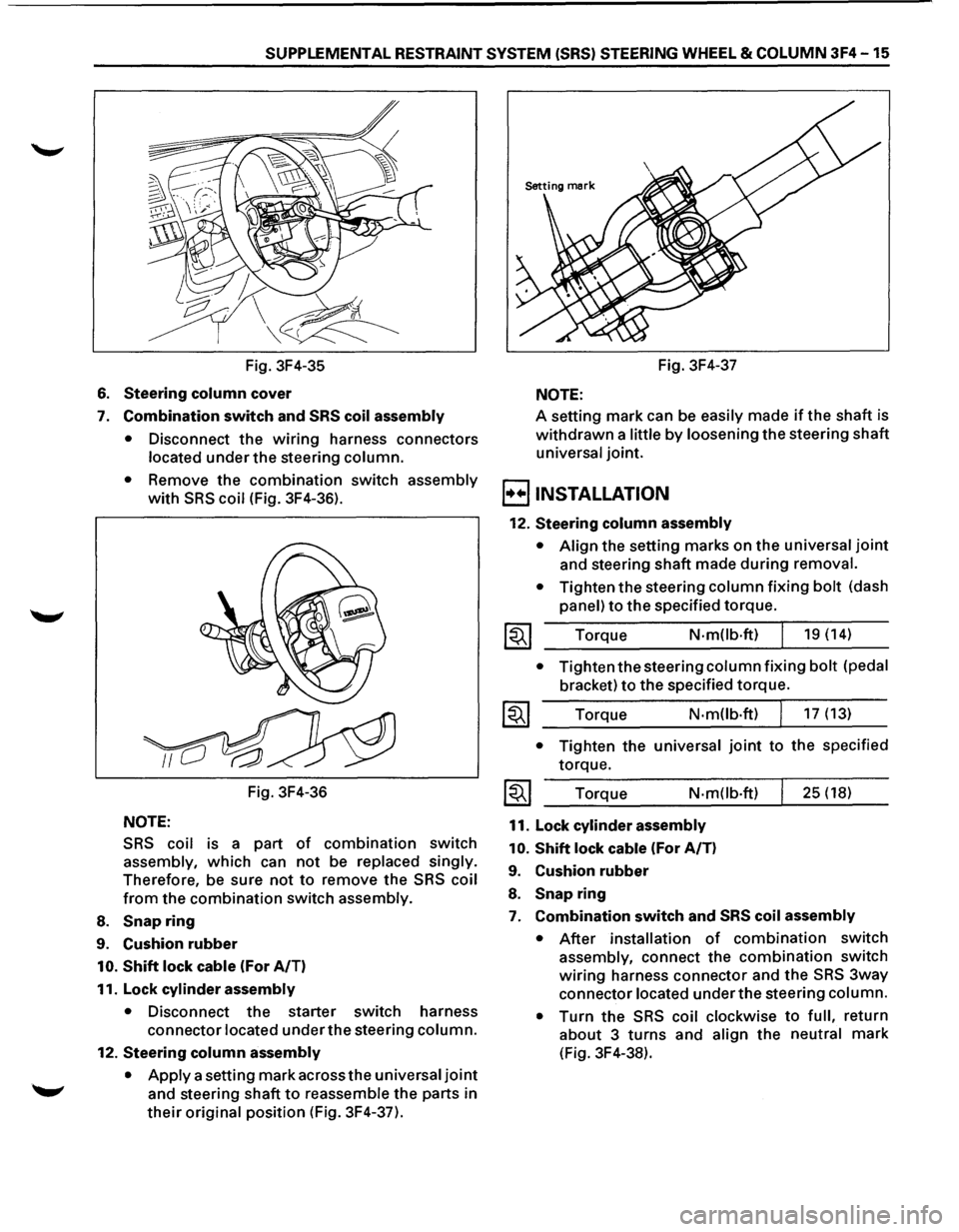
Fig. 3F4-35
6. Steering column cover
7. Combination switch and SRS coil assembly
•
Disconnect the wiring harness connectors
located under the steering column.
• Remove the combination switch assembly
with SRS coil (Fig. 3F4-36).
Fig. 3F4-36
NOTE:
SRS coil is a part of combination switch
assembly, which can not be replaced singly.
Therefore, be sure not to remove the SRS coil
from the combination switch assembly.
8. Snap ring
9. Cushion rubber
10. Shift lock cable (For A/T)
11. Lock
cylinder assembly
• Disconnect the starter switch harness
connector located under the steering column.
12. Steering column assembly
•
Apply a setting mark across the universal joint
and steering shaft to reassemble the parts in
their original position (Fig. 3F4-37). Fig.
3F4-37
NOTE:
A setting mark can be easily made if the shaft is
withdrawn a little by loosening the steering shaft
universal joint.
B INSTALLATION
12. Steering column assembly
• Align the setting marks on the universal joint
and steering shaft made during removal.
•
Tighten the steering column fixing bolt (dash
panel) to the specified torque.
Torque
N-mOb·ft) 19 (14)
• Tighten the steering column fixing bolt (pedal
bracket) to the specified torque.
Torque N·m(lb·ft) 17 (13)
• Tighten the universal joint to the specified
torque.
Torque
N-m(lb·ft)
11. Lock cylinder assembly
10.
Shift lock cable (For A/T)
9. Cushion rubber
8. Snap ring
25 (18)
7. Combination switch and SRS coil assembly
• After installation of combination switch
assembly, connect the combination switch
wiring harness connector and the SRS 3way
connector located under the steering column.
•
Turn the SRS coil clockwise to full, return
about 3 turns and align the neutral mark
(Fig. 3F4-38).
Page 226 of 1928
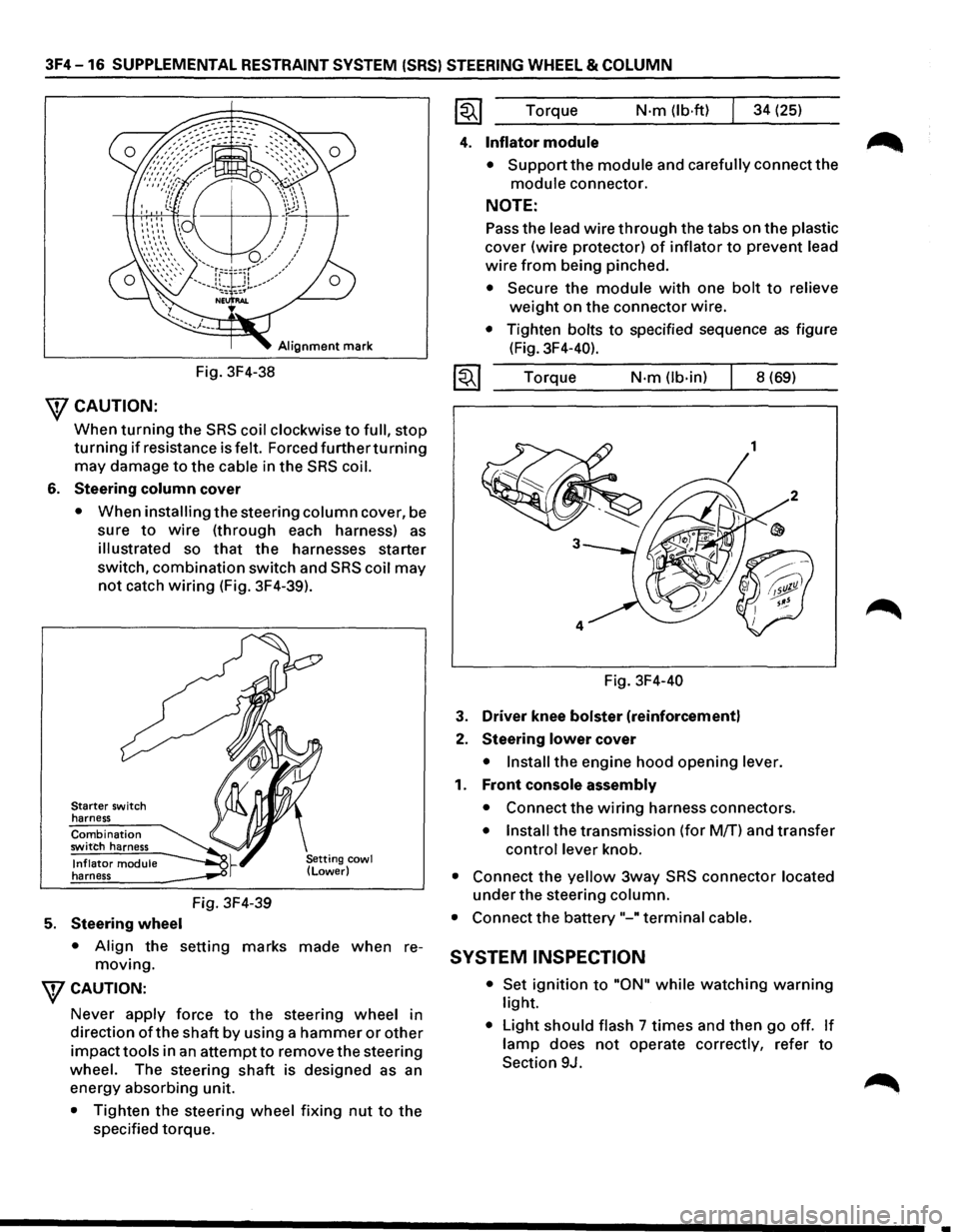
3F4-16 SUPPLEMENTAL RESTRAINT SYSTEM (SRS) STEERING WHEEL & COLUMN
Alignment mark
Fig. 3F4-38
\fCAUTION:
When turning the SRS coil clockwise to full, stop
turning if resistance is felt. Forced furtherturning
may damage to the cable in the SRS coil.
6. Steering column cover
• When installing the steering column cover, be
sure
to wire (through each harness) as
illustrated so that the harnesses starter
switch,
combination switch and SRS coil may
not catch wiring (Fig. 3F4-39).
Starter switch
harness
Combination switch harness
Inflator module harness
5. Steering wheel
Fig. 3F4-39
• Align the setting marks made when re
moving.
WCAUTION:
Never apply force to the steering wheel in
direction
ofthe shaft by using a hammer or other
impacttools in an attempt to remove the steering
wheel. The steering
shaft is designed as an
energy absorbing unit.
• Tighten the steering wheel fixing nut to the
specified torque. Torque
N·m (lb·ftl 34
(25)
4. Inflator module
• Support the module and carefully connect the
module connector.
NOTE:
Pass the lead wire through the tabs on the plastic
cover (wire protector) of inflator to prevent lead
wire from being pinched.
• Secure the module with one bolt to relieve
weight on the connector wire.
• Tighten bolts to specified sequence as figure
(Fig. 3F4-40).
Torque
N·m (lb-in) 8 (69)
Fig. 3F4-40
3. Driver knee bolster (reinforcement)
2. Steering lower cover
• Install the engine hood opening lever.
1. Front console assembly
• Connect the wiring harness connectors.
• Install the transmission (for M/T) and transfer
control lever knob.
• Connect the yellow 3way SRS connector located
under the steering column.
• Connect the battery "-"terminal cable.
SYSTEM INSPECTION
• Set ignition to "ON" while watching warning
light.
• Light should flash 7 times and then go off. If
lamp does not operate correctly, refer to
Section 9J.
•
Page 258 of 1928
48 -16 REAR AXLE
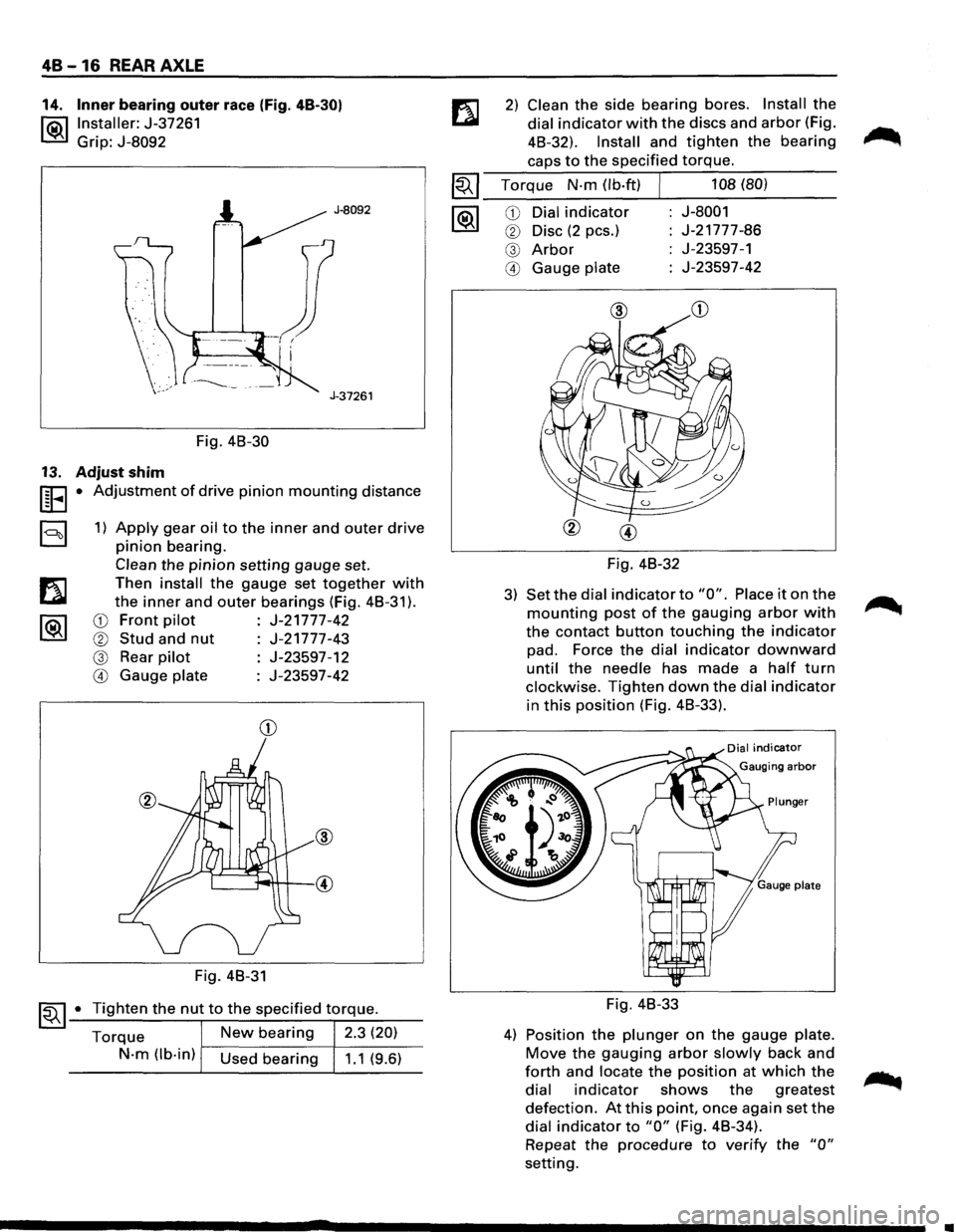
14. Inner bearing outer race (Fig. 48-30)
l®.llnstaller: J-37261
Grip: J-8092
J-8092
J-37261
Fig. 48-30
13. Adjust shim
UEI • Adjustment of drive pinion mounting distance
a 1) Apply gear oil to the inner and outer drive
pinion bearing.
Clean the pinion setting gauge set.
Then
install the gauge set together with
the inner and outer bearings (Fig. 48-31 ).
CD Front pilot J-21777-42
® Stud and nut J-21777-43
@ Rear pilot J-23597-12
@ Gauge plate J-23597-42
CD
Fig. 48-31
~~ 1-•-T_i..::..g_h_te_n_t_h_e_n_u...,t_t_o_t_h_e_s..:..p_e_c_if_ie_d_t-\
.-o_rq....:..._ue_. __
Torque New bearing 2.3 (20)
N-m (lb-in) Used bearing 1.1 (9.6)
2) Clean the side bearing bores. Install the
dial indicator with the discs and arbor (Fig.
48-32).
Install and tighten the bearing
caps to the specified torque.
~~~ Torque N-m (lb·ft) J 108 (80)
--------~----------1®.1 CD Dial indicator J-8001
® Disc (2 pes.) J-21777-86
@ Arbor J-23597-1
@ Gauge plate J-23597-42
Fig. 48-32
3) Set the dial indicator to "0". Place it on the
mounting post of the gauging arbor with
the contact button touching the indicator
pad. Force the dial indicator downward
until the needle has made a half turn
clockwise. Tighten down the dial indicator
in this position (Fig. 48-33).
Fig. 48-33
4) Position the plunger on the gauge plate.
Move the gauging arbor slowly back and
forth and locate the position at which the
dial indicator shows the greatest
defection. At this point, once again set the
dial indicator to "0" (Fig. 48-34).
Repeat
the procedure to verify the "0"
setting.
•
Page 295 of 1928
l•!•l REASSEMBLY
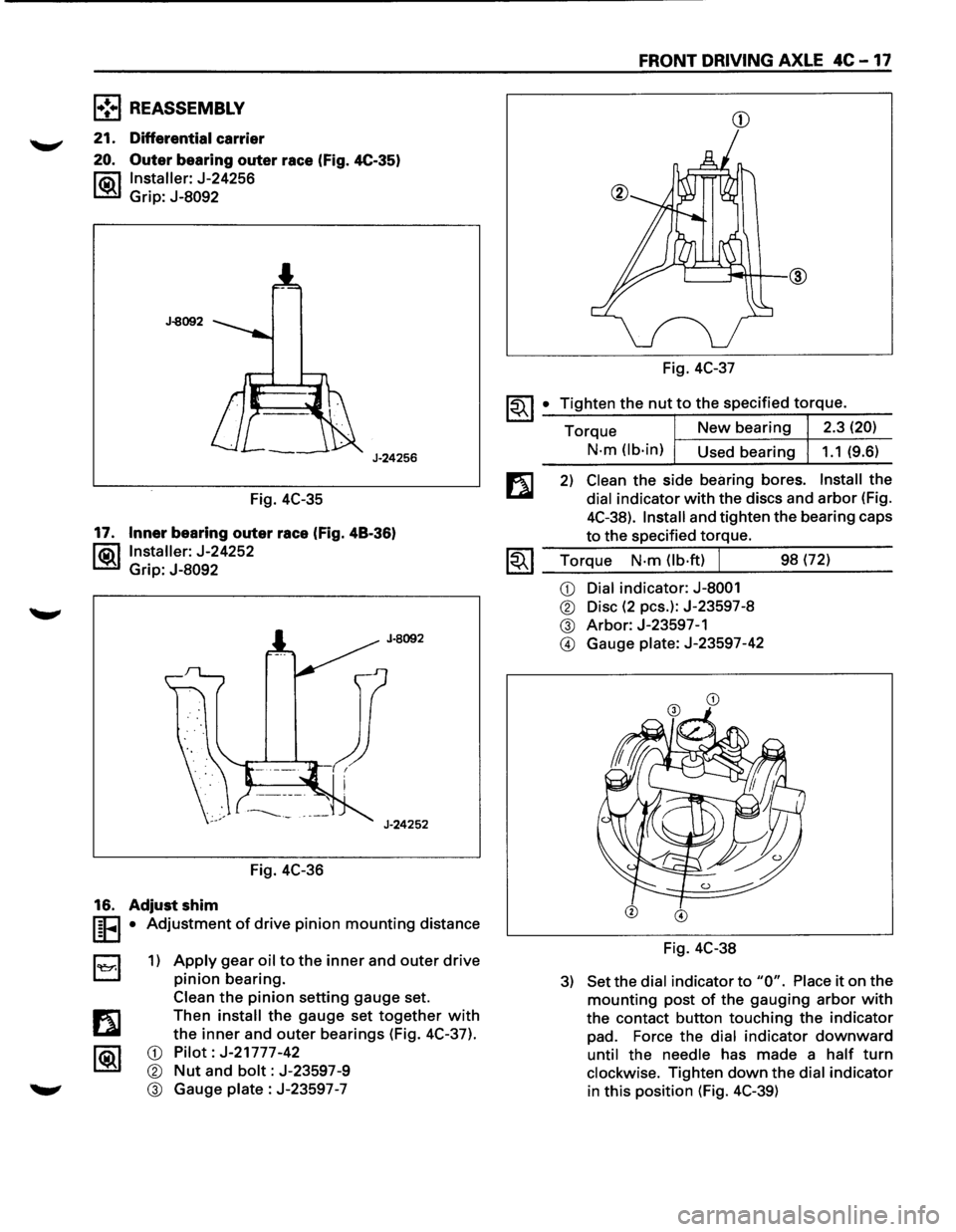
21. Differential carrier
20. Outer bearing outer race (Fig. 4C-35)
l"ii\1 Installer: J-24256
~ Grip: J-8092
J-8092
J-24256
Fig. 4C-35
17. Inner bearing outer race (Fig. 48-36)
l®.llnstaller: J-24252
Grip:
J-8092
Fig. 4C-36
16. Adjust shim
I§FI • Adjustment of drive pinion mounting distance
B 1) Apply gear oil to the inner and outer drive
pinion bearing.
Clean
the pinion setting gauge set.
Then
install the gauge set together with
the inner and outer bearings (Fig. 4C-37).
CD Pilot: J-21777-42
® Nut and bolt: J-23597-9
® Gauge plate : J-23597 -7
FRONT DRIVING AXLE 4C -17
CD
Fig. 4C-37
~~I _• _T:.:i:?.g.:.:h.:.:te:.:..n:...:t:.:..:h~e...:.n.:..:u:..:.t,..:.to.::......:.:th..:...e:.....:.:sp:....e:....:c_if_ie_d_t_orr-=-q-ue_. __
Torque New bearing 2.3 (20)
N-m (lb-in)
Used bearing 1.1 (9.6)
2) Clean the side bearing bores. Install the
dial indicator with the discs and arbor (Fig.
4C-38).
Install and tighten the bearing caps
to the specified torque.
1.;-. I Torque N-m (lb·ft) J 98 (72) ~ ~~--~~.---------
CD Dial indicator: J-8001
® Disc (2 pes.): J-23597-8
® Arbor: J-23597-1
@ Gauge plate: J-23597-42
Fig. 4C-38
3) Set the dial indicator to "0". Place it on the
mounting post of the gauging arbor with
the contact button touching the indicator
pad. Force the dial indicator downward
until the needle has made a half turn
clockwise. Tighten down the dial indicator
in this position (Fig. 4C-39)
Page 1078 of 1928
7A-206 AUTOMATIC TRANSMISSION (4L30-E)
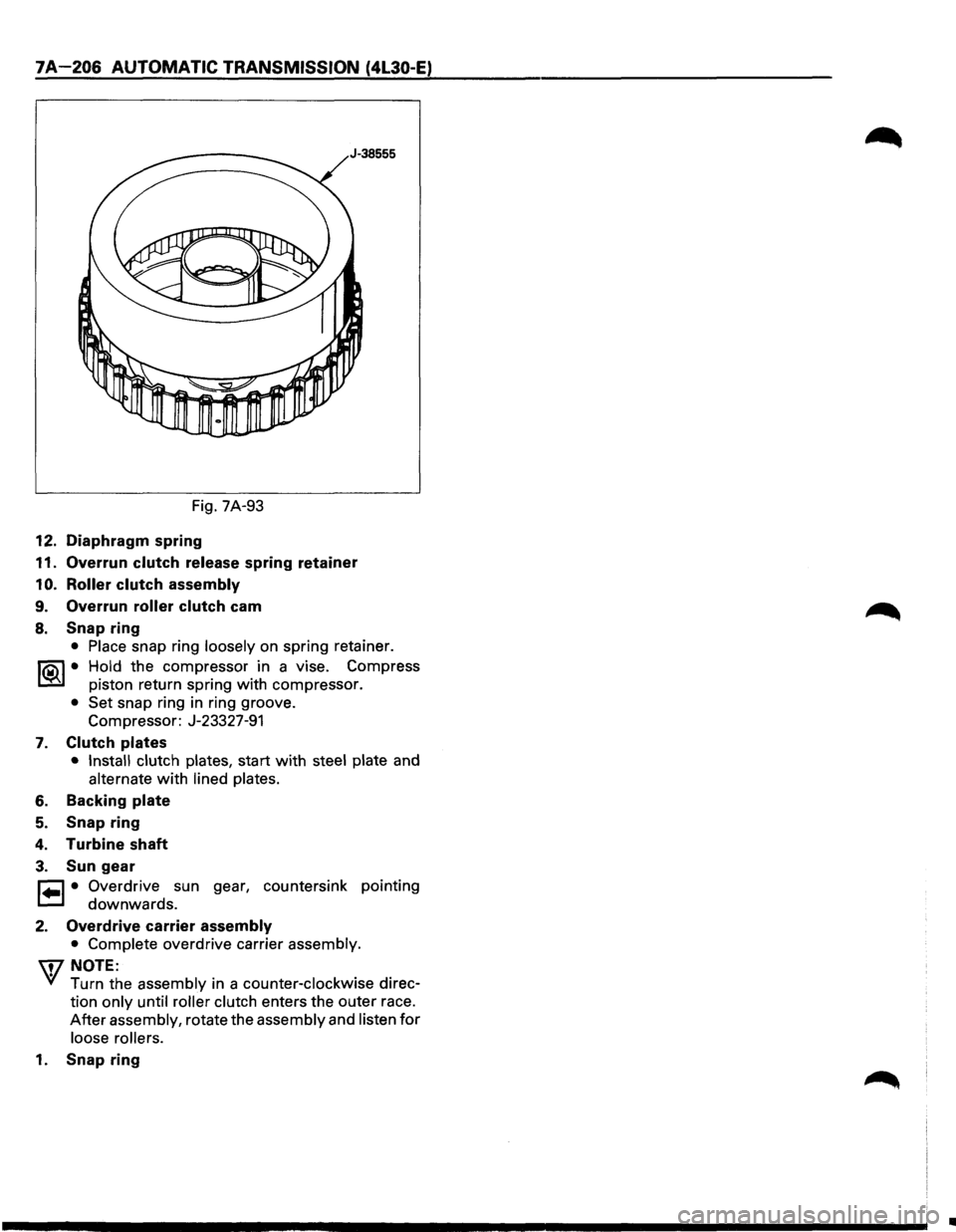
Fig. 7A-93
12. Diaphragm spring
11. Overrun clutch release spring retainer
1 0. Roller clutch assembly
9. Overrun roller clutch cam
8. Snap ring
• Place snap ring loosely on spring retainer.
I®J • Hold the compressor in a vise. Compress
piston return spring
with compressor.
• Set snap ring in ring groove.
Compressor: J-23327-91
7. Clutch plates
• Install clutch plates, start with steel plate and
alternate with lined plates.
6. Backing plate
5. Snap ring
4. Turbine shaft
3. Sun gear
r=l • Overdrive sun gear, countersink pointing
t=.l downwards.
2. Overdrive carrier assembly
• Complete overdrive carrier assembly.
\i7 NOTE:
VI Turn the assembly in a counter-clockwise direc
tion
only until roller clutch enters the outer race.
After assembly, rotate the assembly and listen for
loose rollers.
1. Snap ring
•
Page 1143 of 1928
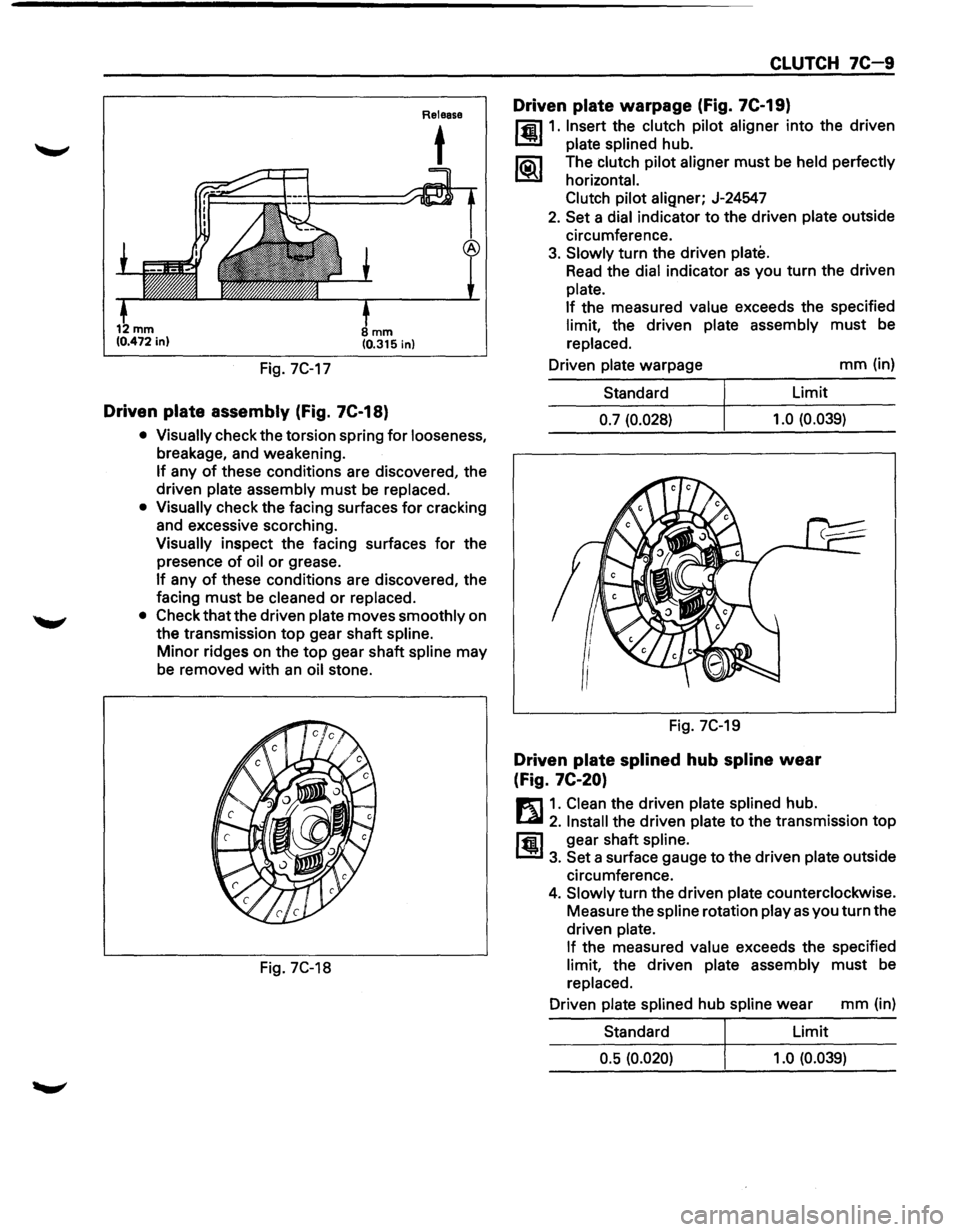
Fig. 7C-17
mm (0.315 in)
Driven plate assembly (Fig. 7C-18)
Release
t
• Visually check the torsion spring for looseness,
breakage, and weakening.
If any of these conditions are discovered, the
driven
plate assembly must be replaced.
• Visually check the facing surfaces for cracking
and excessive scorching.
Visually inspect the facing surfaces for the
presence
of oil or grease.
If any of these conditions are discovered, the
facing
must be cleaned or replaced.
• Check that the driven plate moves smoothly on
the transmission
top gear shaft spline.
Minor ridges on the top gear shaft spline may
be removed
with an oil stone.
Fig. 7C-18
CLUTCH 7C-9
Driven plate warpage (Fig. 7C-19)
l'fil1. Insert the clutch pilot aligner into the driven
1.!!!1 plate splined hub.
li5\l The clutch pilot aligner must be held perfectly
I.::2Y horizontal.
Clutch pilot
aligner; J-24547
2. Set a dial indicator to the driven plate outside
circumference.
3. Slowly turn the driven plate.
Read the dial indicator as you turn the driven
plate.
If
the measured value exceeds the specified
limit, the driven plate assembly must be
replaced.
Driven
plate warpage mm (in)
Standard Limit
0.7 (0.028) 1.0
(0.039)
Fig. 7C-19
Driven plate splined hub spline wear
(Fig.
7C-20)
E1 1. Clean the driven plate splined hub.
l...al 2. Install the driven plate to the transmission top
ffi1 gear shaft spline.
1.!!1 3. Set a surface gauge to the driven plate outside
circumference.
4. Slowly turn the driven plate counterclockwise.
Measure the
spline rotation play as you turn the
driven
plate.
If
the measured value exceeds the specified
limit, the driven plate assembly must be
replaced.
Driven
plate splined hub spline wear mm (in)
Standard Limit
0.5 (0.020) 1.0 (0.039)
Page 1260 of 1928
I ..
8 -70 CHASSIS ELECTRICAL
When placing a live inflator module on a bench
or other surface, always face the bag and trim
cover up, away from the surface. This is neces
sary so that a free space is provided to allow the
air bag to expand in the unlikely event of acci·
dental
deployment.
4. Steering wheel
• Refer to STEERING WHEEL REPLACEMENT in
Section 3F4.
5. Lighting switch (Combination switch)
• Disconnect the switch connector.
• Remove four screws.
• Remove the lighting switch together with SRS
coil assembly.
'\f CAUTION:
Do not remove SRS coil assembly from the com·
bination switch assembly.
E) INSTALLATION
To install, follow the removal steps in the reverse
order, noting the
following points.
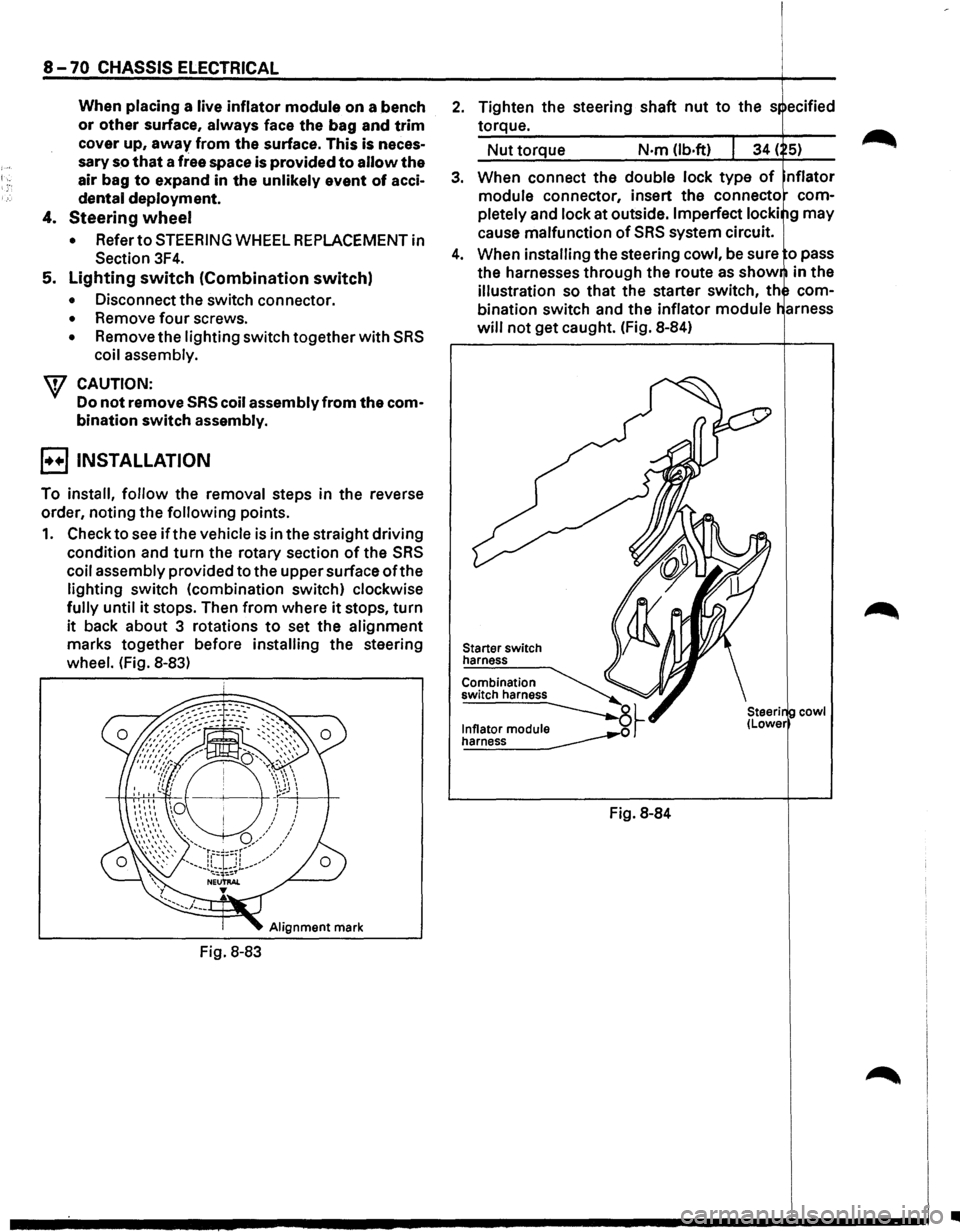
1. Check to see if the vehicle is in the straight driving
condition and turn the rotary section of the SRS
coil assembly provided to the upper surface ofthe
lighting switch (combination switch) clockwise
fully until it stops. Then from where it stops, turn
it back about 3 rotations to set the alignment
marks together before installing the steering
wheel. (Fig. 8-83)
Alignment mark
Fig. 8-83
2. Tighten the steering shaft nut to the s ecified
torque.
Nut torque N·m (lb.ft)
3. When connect the double lock type of nflator
module connector, insert the connecto com
pletely
and lock at outside. Imperfect locki g may
cause malfunction of SRS system circuit.
4. When installing the steering cowl, be sure o pass
the harnesses
through the route as show in the
illustration so that the starter switch, th com
bination switch and the inflator module
will not get caught. (Fig. 8-84)
Starter switch
harness
Combination
switch harness
~~ ~
Fig. 8-84
cowl
•