Switch JAGUAR XF 2010 1.G Owner's Manual
[x] Cancel search | Manufacturer: JAGUAR, Model Year: 2010, Model line: XF, Model: JAGUAR XF 2010 1.GPages: 225, PDF Size: 8 MB
Page 55 of 225

R
(FM8) SEMCON JLR OWNER GUIDE VER 1.00 EURO
LANGUAGE: english-en; MARQUE: jaguar; MODEL: XF
Warning lamps
55
AUDIBLE WARNINGS AND INDICATORS
Hazard or Condition Chime or tone/remedy
External lamps remain on when
the driver’s door is opened. A chime will sound until the lamps are switched off
or driver’s
door is closed (unless th e lighting control is in AUTO position).
Hazard warning indicators on. A ticking will sound until the hazard indicators are switched off.
Direction indicators on. A ticking will s ound until the indicators are switched off.
Memory 1 (or 2) settings sa ved. A short tone as the me mory selection is saved.
Seat belt reminder. A chime will sound if a seat belt is unbuckled whilst the vehicle
is moving. The warning will cease if the occupied seat’s belt is
re-buckled, the ignition is turned off or more than 3 minutes has
elapsed.
Electric parking brake (EPB). If the EPB is a pplied while the vehicle is moving a continuous
chime will sound; release the EPB. If there is a fault with the
system which would prevent the a pplication of the EPB, a brief
sequence of chimes is initiated.
Adaptive Cruise Control (ACC)
driver intervene. Multiple chime. Apply the brakes.
ACC low speed automatic
switch off. A chime will sound to indicate that the ACC system is no longer
operating.
Speed is over 15 km/h (9 mph)
above the set limit speed. A short warning chime. Reduce speed.
G e a r s e l e c t o r i s n o t i n P a r k w i t h
ignition off. A chime will sound. Select Park.
Entry delay warning (European
markets only). Intermittent slow, low pitc
hed chime. Disarm vehicle.
The Jaguar Smart Key cannot
be detected. A chime will sound. The Smart
Key should be docked in the
starter control unit. See 76, IF THE ENGINE FAILS TO START .
The Jaguar Smart Key is to be
removed from the starter
control unit. A chime will sound for 60 seconds
if the Smart Key is in the
starter control unit and the driv er’s door is opened. The remote
handset should be undocked from the starter control unit. See
76, IF THE ENGINE FAILS TO START .
DSC OFF A chime will sound.
Page 57 of 225
R
(FM8) SEMCON JLR OWNER GUIDE VER 1.00 EURO
LANGUAGE: english-en; MARQUE: jaguar; MODEL: XF
Message centre
57
METRIC/IMPERIAL/MIXED DISPLAY
The display of me tric, imperial or mixed units is
selected via the touch screen:
• With the touch screen switched on, select
Set-up from the Home menu.
• Select Security/vehicle , then select Units.
• Touch the appropriate button to select
Metric or Imperial units.
Note: Temperature display can be changed
between °C (Celsius) and °F (Fahrenheit)
independently of Metric or Imperial units.
SERVICE INTERVAL INDICATOR
The service interval message will only be
displayed when the vehicle has less than
3200 km (2000 miles) be fore the service is
due.
When the ignition is switched on, and the
vehicle has started it s service countdown,
SERVICE REQ'D XXXX km (XXXX MLS) is
displayed in the message centre.
When the service distance has been reached,
SERVICE REQUIRED is displayed in the
message centre.
If no service inte rval indicator is
displayed during the vehicle service
cycle, make sure that your vehicle is
serviced in accordance with the
intervals, as stated in the Service
Portfolio.
Page 61 of 225
R
(FM8) SEMCON JLR OWNER GUIDE VER 1.00 EURO
LANGUAGE: english-en; MARQUE: jaguar; MODEL: XF
Touch screen
61
The training session can be cancelled at any
time by touching the on-screen pop-up or by
pressing and holding the Voice button on the
steering wheel. See 126, USING VOICE
CONTROL .
TRIP COMPUTER SETTINGS
Trip Computer : Select to switch trip computer
readings between Trip A, Trip B and Trip Auto .
Select Reset to zero the trip computer
readings. Select Units to switch the trip
computer readings between Imperial and
Metric measurements.
VEHICLE SETTINGS
• Security : Select to enable/disable or alter
the settings of the following:
• Single/multi-point entry (2 stage
unlocking).
• Alarm sensors (interior and tilt).
• Drive-away locking.
Scroll down through the menu until the
desired feature is disp layed, then select On
or Off, as appropriate.
If drive-away locking is switched on, select
the desired speed (8, 16 or 32 km/h or 5,
10 or 20 mph).
• Windows/mirrors : Select to
enable/disable:
• Global opening/closing of windows
and sunroof.
• Exterior mirror dip when reversing.
• Automatic folding/unfo lding of exterior
mirrors when vehicle is locked/
unlocked.
• Interior mirror dimming.
Scroll down through the menu until the
desired feature is disp layed, then select On
or Off, as appropriate. •
Units : Select to switch between Imperial
and Metric measurements.
• Auto (AHB) high beam : Select to turn AHB
on or off, and set AHB for side of road
being driven on.
SELECTING VALET MODE
Valet mode allows the vehi cle to be locked by a
parking attendant, without giving access to the
luggage compartment and glove box. Valet
mode also prevents ope ration of the touch
screen, to prevent access to telephone
numbers or naviga tion addresses.
From the Home menu, select Valet, then enter
a four digit Personal Identification Number
(PIN) (personally chosen ). You will then be
prompted to re-enter the same PIN. On
completion, touch the OK soft key.
If you wish to cancel the PIN, touch the C soft
key. If the PIN is cancelled, or incorrectly
entered, you will be prompted to enter the PIN
again.
Once the PIN has been correctly entered, a
security information pop- up is displayed. Read
the information and remove the emergency key
from the Jaguar Smart Key.
Valet on is displayed to indicate that the PIN
has been accepted. The luggage compartment
and glove box are now securely locked in Valet
mode.
On exiting and securing the vehicle, remove the
emergency key from the Jaguar Smart Key.
Retain the emergency key and give the Jaguar
Smart Key to the attendant.
Note: The emergency key ca n be used to open
the luggage compartment, which may
de-activate Valet mode.
Page 63 of 225
R
(FM8) SEMCON JLR OWNER GUIDE VER 1.00 EURO
LANGUAGE: english-en; MARQUE: jaguar; MODEL: XF
Heating and ventilation
63
Heating and ventilationCLIMATE CONTROL
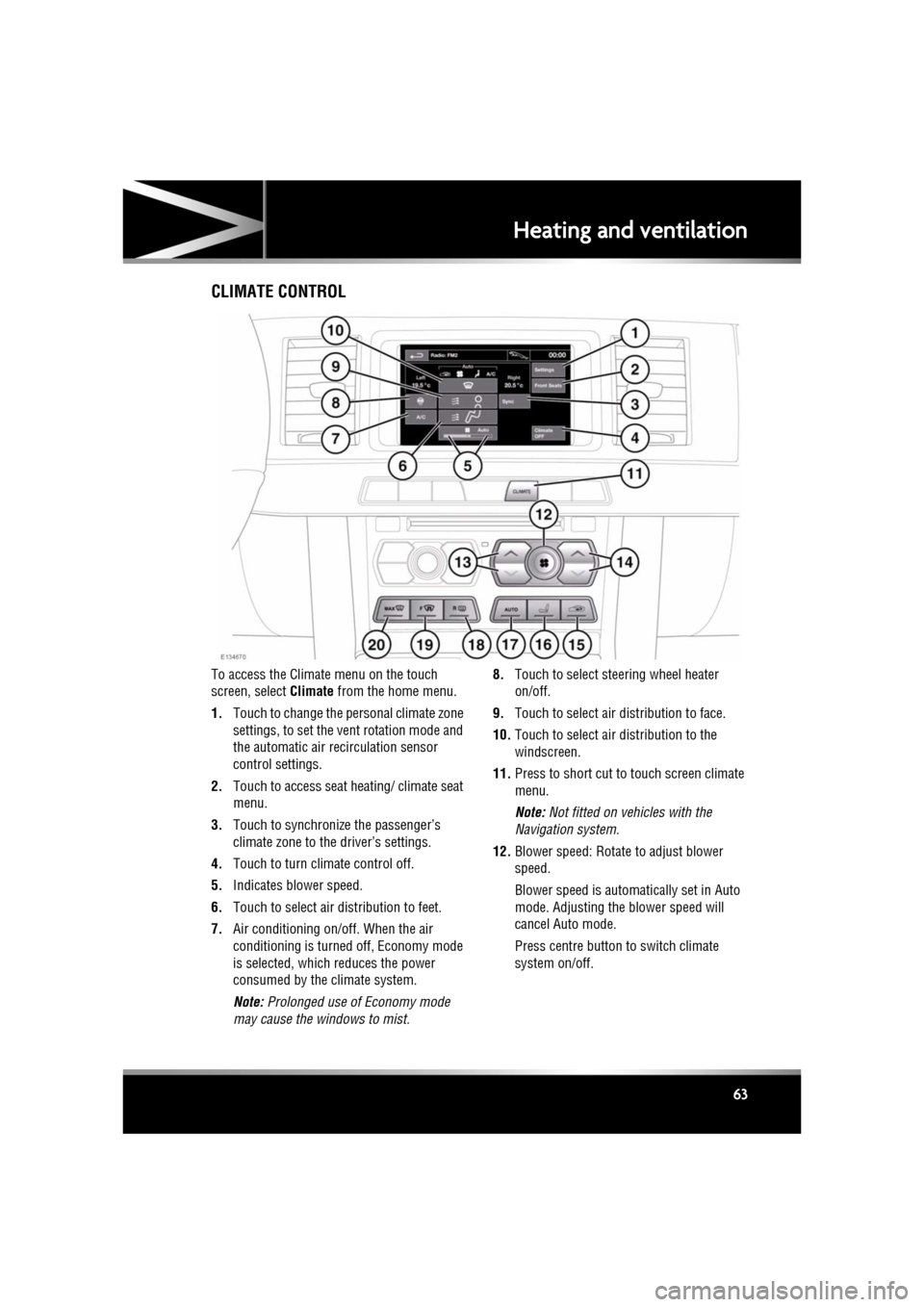
To access the Climate menu on the touch
screen, select Climate from the home menu.
1. Touch to change the personal climate zone
settings, to set the vent rotation mode and
the automatic air recirculation sensor
control settings.
2. Touch to access seat heating/ climate seat
menu.
3. Touch to synchronize the passenger’s
climate zone to the driver’s settings.
4. Touch to turn climate control off.
5. Indicates blower speed.
6. Touch to select air distribution to feet.
7. Air conditioning on/off. When the air
conditioning is turned off, Economy mode
is selected, which reduces the power
consumed by the climate system.
Note: Prolonged use of Economy mode
may cause the windows to mist. 8.
Touch to select steering wheel heater
on/off.
9. Touch to select air distribution to face.
10. Touch to select air distribution to the
windscreen.
11. Press to short cut to touch screen climate
menu.
Note: Not fitted on vehicles with the
Navigation system.
12. Blower speed: Rotate to adjust blower
speed.
Blower speed is automatically set in Auto
mode. Adjusting the blower speed will
cancel Auto mode.
Press centre button to switch climate
system on/off.
Page 64 of 225

L
(FM8) SEMCON JLR OWNER GUIDE VER 1.00 EURO
LANGUAGE: english-en; MARQUE: jaguar; MODEL: XF
Heating and ventilation
64
13. Left-hand temperature control: Press to
adjust temperature for the left side of the
vehicle. The temperat ure is displayed on
the touch screen ( HI or LO is displayed
when the maximum or minimum setting is
selected).
Note: The maximum possible temperature
differential betwee n left and right hand
temperature settings is 3°C (5.4°F).
14. Right-hand temperature control: Press to
adjust temperature for the right side of the
vehicle. The temperat ure is displayed on
the touch screen ( HI or LO is displayed
when the maximum or minimum setting is
selected).
15. Press briefly to select timed recirculation.
Press and hold to select continuous
recirculation. Press again to switch off. See
64, RECIRCULATION .
16. Press to access seat heating/ climate seat
menu.
17. AUTO control: Press to switch automatic
operation on.
18. Press to turn the heated rear screen on/off.
See 64, HEATED SCREENS .
19. Press to turn the heated front screen
on/off. See 64, HEATED SCREENS .
20. Defrost: Press to remove frost or heavy
misting from the winds creen. This setting
activates the blower s, air-conditioning,
front and rear screen heaters and prohibits
recirculation, to ac hieve a rapid defrost.
In addition to the selectable controls, the
climate menu displays symbols that indicate
the status of heating a nd ventilation functions.
Note: If the climate control system is switched
off, pressing an AUTO button or the Defrost
button, will switch the climate system on.HEATED SCREENS
With the engine running, the front (F) and rear
(R ) screen heaters, may be switched on and off
in any mode, including with the climate control
system off.
The front and rear screen heaters switch off
automatically after a timed period depending
on the ambient temperature. In cold ambient
conditions, below 5°C (41°F), the screen
heaters will switch on automatically when the
engine is started, unles s the engine or vehicle
interior is already warm.
RECIRCULATION
• Press briefly to activate timed
recirculation. The button indicator
illuminates when recirculation is on.
• Press and hold the but ton to activate
continuous recirculation. the button
indicator will flash and then illuminate
constantly.
• To cancel recirculation, press the button
briefly.
When selected, the air is recirculated inside the
vehicle. This helps to maintain a high or low
temperature, and is useful for preventing
fumes from entering the vehicle.
Timed recirculation : Recirculation will switch
off automatically after a set time (dependent on
the ambient temperature).
Latched recirculation: Recirculation will
remain on until the button is pressed again.
Note: Prolonged use at low temperatures may
cause the windows to mist.
Recirculation may also be selected in AUTO
mode, if the climate control system detects
high levels of pollution in the atmosphere
outside the vehicle (if an air quality sensor is
fitted). Manual operation of the recirculation
control will override the automatic setting.
Page 65 of 225
R
(FM8) SEMCON JLR OWNER GUIDE VER 1.00 EURO
LANGUAGE: english-en; MARQUE: jaguar; MODEL: XF
Heating and ventilation
65
AIR QUALITY SENSOR
If the air quality sensor detects pollution, air
recirculation is selected automatically to
reduce pollutants entering the vehicle.
The sensitivity of the se nsor can be adjusted
using the touch screen:
1. Select Settings from the Climate menu.
2. Touch the +/- buttons on the screen to
increase/decrease sensitivity.
To switch the function o ff, decrease sensitivity
to the minimum setting.
EXTERNAL TEMPERATURE
The external temperature is displayed in the
Home menu of the touch screen and in the
instrument panel.
When the external temp erature is low enough
that ice may be present on the road, an amber
snowflake warning lamp w ill illuminate in the
instrument panel.
AUTOMATIC CLIMATE CONTROL
AUTO mode should be used as the normal
operating mode. The air conditioning, heating
and ventilation controls automatically provide
an optimum environment at the selected
temperature.
Note: Screen heating and timed air
recirculation may be se lected in AUTO mode.
Any other manual adjustment cancels AUTO
operation.
Note: Water expelled by the air conditioning
may collect underneath the vehicle when
parked. This is not cause for concern.
TEMPERATURE CONTROLS
The driver and front seat passenger zone
temperatures can be i ndependently adjusted.
The temperature for each zone is displayed on
the relevant side of the touch screen.
Note: The maximum possible temperature
differential between the driver and passenger
settings is 3°C (5.4°F).
HEATED SEATS
Note: The seat heaters will only operate when
the engine is running.
The heated seats are controlled from the Home
or Climate menu on the touch screen.
• Touch the appropriate seat icon to switch
on the seat heater at maximum
temperature (3 red bars).
• Touch the icon a second and third time to
reduce the temperature (2 and 1 red bars).
• Touch the icon a fourth time to switch the
seat heater off.
This icon appears at the top of the
touch screen when the air quality
sensor is switched on.
Page 66 of 225

L
(FM8) SEMCON JLR OWNER GUIDE VER 1.00 EURO
LANGUAGE: english-en; MARQUE: jaguar; MODEL: XF
Heating and ventilation
66
CLIMATE SEATS
Note: The climate seats w ill only operate when
the engine is running.
Seat ventilation is cont rolled from the Home or
Climate menu on the touch screen.
Heated ventilation:
• Touch the red arrow above the appropriate
seat icon to switch he ated ventilation on at
maximum (3 red bars).
• Touch the blue arrow below the seat icon
once or twice to reduce the ventilation
setting (2 and 1 red bars).
• Touch the blue arrow a third time to switch
off seat ventilation.
Cooled ventilation:
• Touch the blue arrow below the
appropriate seat icon to switch cooled
ventilation on at maximum (3 blue bars).
• Touch the red arrow above the seat icon
once or twice to reduce the ventilation
setting (2 and 1 blue bars).
• Touch the red arrow a third time to switch
off seat ventilation.
To select backrest ventilation only:
• Select Settings from the Climate menu.
• Select the appropriate icon for full seat or
backrest only ventilation.
Page 74 of 225
L
(FM8) SEMCON JLR OWNER GUIDE VER 1.00 EURO
LANGUAGE: english-en; MARQUE: jaguar; MODEL: XF
Starting the engine
74
Starting the engineSTARTING A PETROL ENGINE
The Smart Key may not be detected if it
is placed within a metal container or if it
is shielded by a device with a back-lit
LCD screen, such as a smart phone,
laptop (including laptop bag), games
console etc. Keep the Smart Key clear of
such devices when attempting Keyless
entry or Keyless starting.
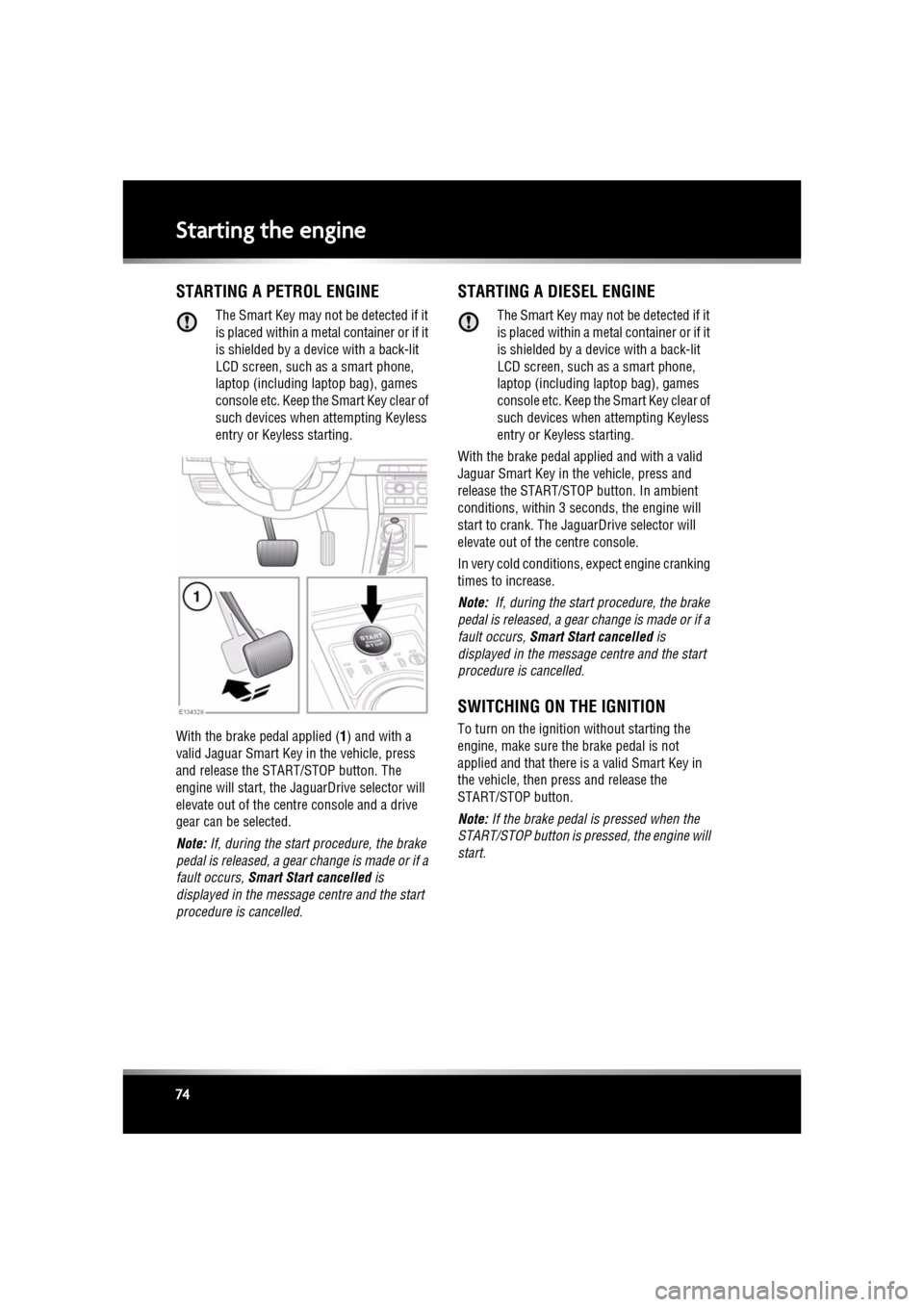
With the brake pedal applied ( 1) and with a
valid Jaguar Smart Key in the vehicle, press
and release the STAR T/STOP button. The
engine will start, the Ja guarDrive selector will
elevate out of the cent re console and a drive
gear can be selected.
Note: If, during the start procedure, the brake
pedal is released, a gear change is made or if a
fault occurs, Smart Start cancelled is
displayed in the message centre and the start
procedure is cancelled.
STARTING A DIESEL ENGINE
The Smart Key may not be detected if it
is placed within a meta l container or if it
is shielded by a device with a back-lit
LCD screen, such as a smart phone,
laptop (including la ptop bag), games
console etc. Keep the Smart Key clear of
such devices when attempting Keyless
entry or Keyless starting.
With the brake pedal applied and with a valid
Jaguar Smart Key in the vehicle, press and
release the START/STOP button. In ambient
conditions, within 3 se conds, the engine will
start to crank. The JaguarDrive selector will
elevate out of the centre console.
In very cold conditions, expect engine cranking
times to increase.
Note: If, during the start procedure, the brake
pedal is released, a gear change is made or if a
fault occurs, Smart Start cancelled is
displayed in the message centre and the start
procedure is cancelled.
SWITCHING ON THE IGNITION
To turn on the ignition without starting the
engine, make sure th e brake pedal is not
applied and that there is a valid Smart Key in
the vehicle, then press and release the
START/STOP button.
Note: If the brake pedal is pressed when the
START/STOP button is pressed, the engine will
start.
Page 75 of 225
R
(FM8) SEMCON JLR OWNER GUIDE VER 1.00 EURO
LANGUAGE: english-en; MARQUE: jaguar; MODEL: XF
Starting the engine
75
STEERING COLUMN LOCK
The steering column has an electronic lock,
which locks and unlocks in conjunction with
the vehicle Locking/Alarm system. The steering
column lock also locks when the ignition is
switched off, after a time delay. If the steering
column lock malfunctions, Steering Column
Locked is displayed in the message centre. If
this occurs:
1. Lock and then unlock the vehicle using the
Smart Key.
2. Try again to unlock the steering column
lock, by turning the steering wheel gently
to the left and right.
3. If the malfunction pers ists, seek qualified
assistance immediately.
SWITCHING OFF THE ENGINE
With the gear sele ctor in position P, press the
engine START/STOP butt on. The engine will
stop and the ignition sy stem will return to
convenience mode. The audio, telephone and
touch screen systems will revert to stand-by
mode and the JaguarDrive selector will retract
into the centre console.
Page 76 of 225
L
(FM8) SEMCON JLR OWNER GUIDE VER 1.00 EURO
LANGUAGE: english-en; MARQUE: jaguar; MODEL: XF
Starting the engine
76
IF THE ENGINE FAILS TO START
If the brake pedal has been pumped prior to an
attempt to start the engine, it may require
greater pressure on the pedal in order for the
engine to start.
If the Jaguar Smart Key is placed in the door
pocket, it may be outside the range of the
sensors when the door is open.
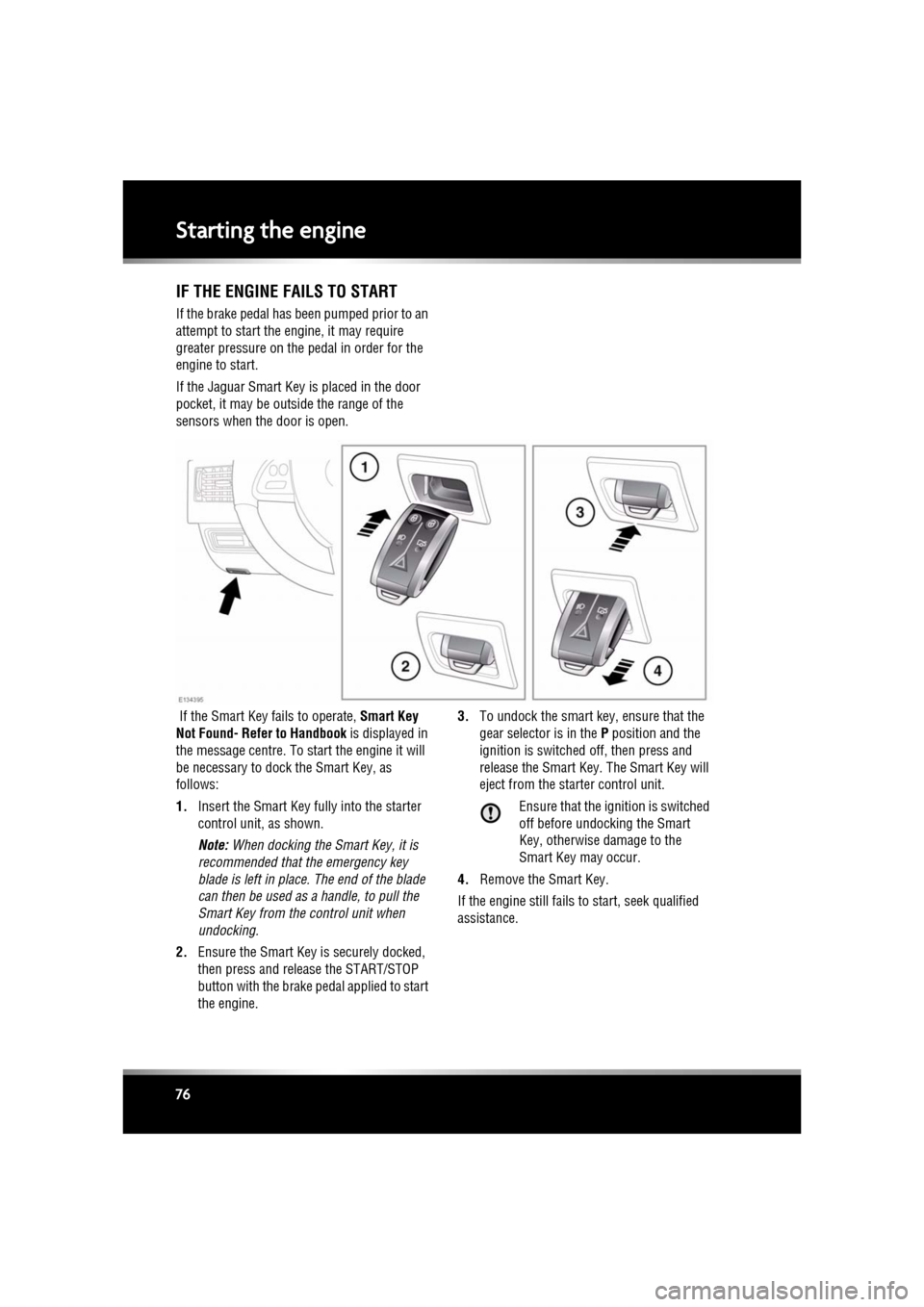
If the Smart Key fails to operate, Smart Key
Not Found- Refer to Handbook is displayed in
the message centre. To start the engine it will
be necessary to dock the Smart Key, as
follows:
1. Insert the Smart Key fully into the starter
control unit, as shown.
Note: When docking the Smart Key, it is
recommended that the emergency key
blade is left in place. The end of the blade
can then be used as a handle, to pull the
Smart Key from the control unit when
undocking.
2. Ensure the Smart Key is securely docked,
then press and release the START/STOP
button with the brake pe dal applied to start
the engine. 3.
To undock the smart key, ensure that the
gear selector is in the P position and the
ignition is switched off, then press and
release the Smart Key. The Smart Key will
eject from the st arter control unit.
Ensure that the ignition is switched
off before undocking the Smart
Key, otherwise damage to the
Smart Key may occur.
4. Remove the Smart Key.
If the engine still fails to start, seek qualified
assistance.