Eco JAGUAR XF 2011 1.G Owner's Guide
[x] Cancel search | Manufacturer: JAGUAR, Model Year: 2011, Model line: XF, Model: JAGUAR XF 2011 1.GPages: 225, PDF Size: 7.32 MB
Page 54 of 225
L
(FM8) SEMCON JLR OWNER GUIDE VER 1.00 EURO
LANGUAGE: english-en; MARQUE: jaguar; MODEL: XF
Warning lamps
54
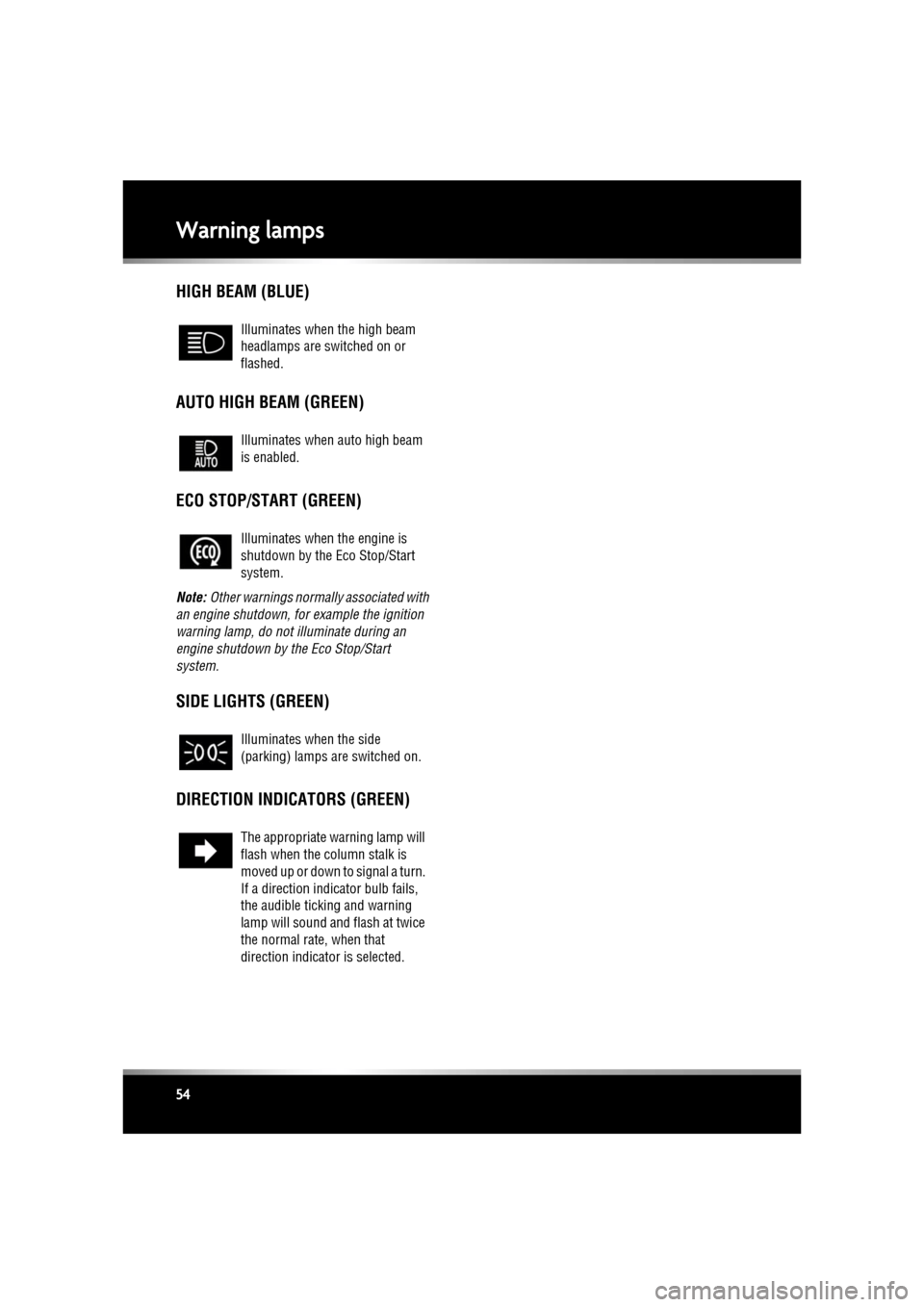
HIGH BEAM (BLUE)
AUTO HIGH BEAM (GREEN)
ECO STOP/START (GREEN)
Note: Other warnings normall y associated with
an engine shutdown, for example the ignition
warning lamp, do not illuminate during an
engine shutdown by the Eco Stop/Start
system.
SIDE LIGHTS (GREEN)
DIRECTION INDICATORS (GREEN)
Illuminates when the high beam
headlamps are switched on or
flashed.
Illuminates when auto high beam
is enabled.
Illuminates when the engine is
shutdown by the Eco Stop/Start
system.
Illuminates when the side
(parking) lamps are switched on.
The appropriate warning lamp will
flash when the column stalk is
moved up or down to signal a turn.
If a direction indi cator bulb fails,
the audible ticking and warning
lamp will sound and flash at twice
the normal rate, when that
direction indicator is selected.
Page 55 of 225

R
(FM8) SEMCON JLR OWNER GUIDE VER 1.00 EURO
LANGUAGE: english-en; MARQUE: jaguar; MODEL: XF
Warning lamps
55
AUDIBLE WARNINGS AND INDICATORS
Hazard or Condition Chime or tone/remedy
External lamps remain on when
the driver’s door is opened. A chime will sound until the lamps are switched off
or driver’s
door is closed (unless th e lighting control is in AUTO position).
Hazard warning indicators on. A ticking will sound until the hazard indicators are switched off.
Direction indicators on. A ticking will s ound until the indicators are switched off.
Memory 1 (or 2) settings sa ved. A short tone as the me mory selection is saved.
Seat belt reminder. A chime will sound if a seat belt is unbuckled whilst the vehicle
is moving. The warning will cease if the occupied seat’s belt is
re-buckled, the ignition is turned off or more than 3 minutes has
elapsed.
Electric parking brake (EPB). If the EPB is a pplied while the vehicle is moving a continuous
chime will sound; release the EPB. If there is a fault with the
system which would prevent the a pplication of the EPB, a brief
sequence of chimes is initiated.
Adaptive Cruise Control (ACC)
driver intervene. Multiple chime. Apply the brakes.
ACC low speed automatic
switch off. A chime will sound to indicate that the ACC system is no longer
operating.
Speed is over 15 km/h (9 mph)
above the set limit speed. A short warning chime. Reduce speed.
G e a r s e l e c t o r i s n o t i n P a r k w i t h
ignition off. A chime will sound. Select Park.
Entry delay warning (European
markets only). Intermittent slow, low pitc
hed chime. Disarm vehicle.
The Jaguar Smart Key cannot
be detected. A chime will sound. The Smart
Key should be docked in the
starter control unit. See 76, IF THE ENGINE FAILS TO START .
The Jaguar Smart Key is to be
removed from the starter
control unit. A chime will sound for 60 seconds
if the Smart Key is in the
starter control unit and the driv er’s door is opened. The remote
handset should be undocked from the starter control unit. See
76, IF THE ENGINE FAILS TO START .
DSC OFF A chime will sound.
Page 56 of 225
L
(FM8) SEMCON JLR OWNER GUIDE VER 1.00 EURO
LANGUAGE: english-en; MARQUE: jaguar; MODEL: XF
Message centre
56
Message centreWARNING AND INFORMATION
MESSAGES
Do not ignore warning messages.Take
appropriate action and, when
necessary, seek qualified assistance
before driving the vehicle.
If more than one message is active, each is
displayed in turn for 2 seconds in order of
priority.
Note: The message centre messages and their
meanings, are detailed where necessary within
the appropriate subject sections.
TRIP COMPUTER
The computer memory stores data for a
journey or series of journe ys until it is reset to
zero.
The displayed information is for guidance only,
as it can be affected by traffic, road and
weather conditions.
Three independent memori es are available, A,
B and Auto. A and B me mories can be reset
independently, while the Auto trip will reset
after every ignition cycle as the vehicle moves.
Trip computer information is displayed on the
instrument panel.
USING THE TRIP COMPUTER
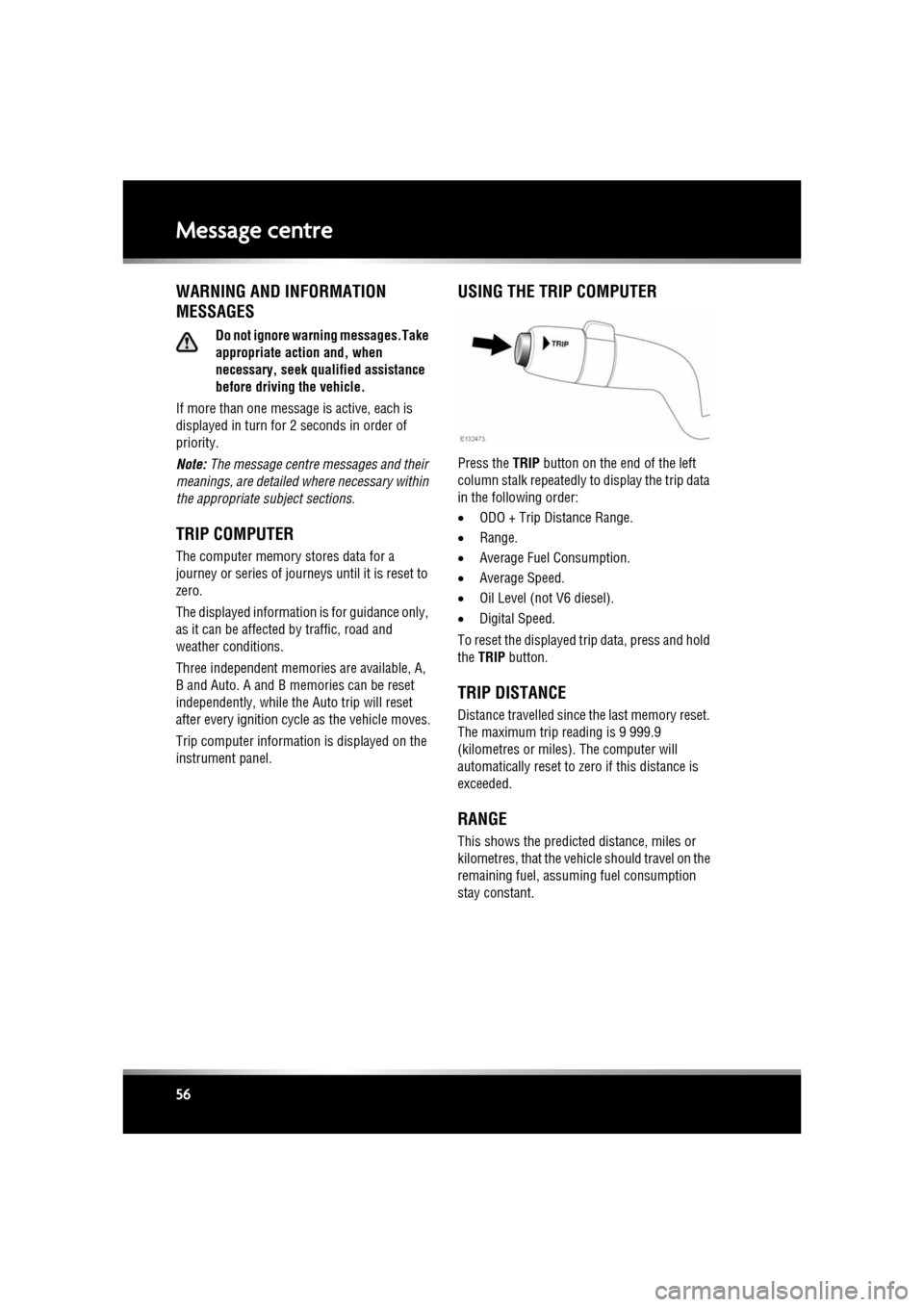
Press the TRIP button on the end of the left
column stalk repeatedly to display the trip data
in the following order:
• ODO + Trip Distance Range.
• Range.
• Average Fuel Consumption.
• Average Speed.
• Oil Level (not V6 diesel).
• Digital Speed.
To reset the displayed tr ip data, press and hold
the TRIP button.
TRIP DISTANCE
Distance travelled since the last memory reset.
The maximum trip reading is 9 999.9
(kilometres or miles). The computer will
automatically reset to zero if this distance is
exceeded.
RANGE
This shows the predicted distance, miles or
kilometres, that the vehicle should travel on the
remaining fuel, assumi ng fuel consumption
stay constant.
Page 58 of 225
L
(FM8) SEMCON JLR OWNER GUIDE VER 1.00 EURO
LANGUAGE: english-en; MARQUE: jaguar; MODEL: XF
Touch screen
58
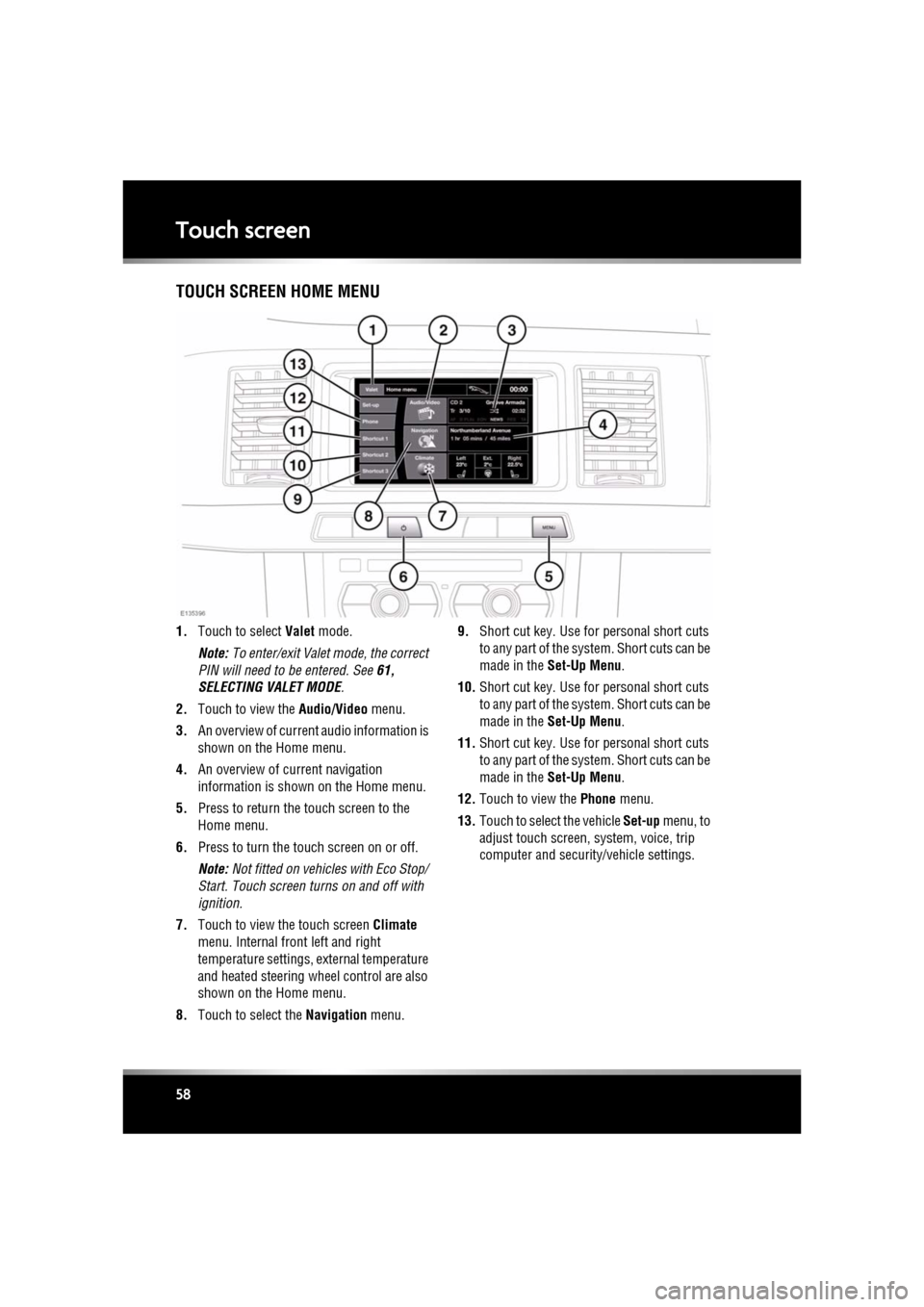
Touch screenTOUCH SCREEN HOME MENU
1. Touch to select Valet mode.
Note: To enter/exit Valet mode, the correct
PIN will need to be entered. See 61,
SELECTING VALET MODE .
2. Touch to view the Audio/Video menu.
3. An overview of current audio information is
shown on the Home menu.
4. An overview of current navigation
information is shown on the Home menu.
5. Press to return the touch screen to the
Home menu.
6. Press to turn the touch screen on or off.
Note: Not fitted on vehicles with Eco Stop/
Start. Touch screen turns on and off with
ignition.
7. Touch to view the touch screen Climate
menu. Internal fr ont left and right
temperature settings, external temperature
and heated steering wheel control are also
shown on the Home menu.
8. Touch to select the Navigation menu. 9.
Short cut key. Use for personal short cuts
to any part of the system. Short cuts can be
made in the Set-Up Menu .
10. Short cut key. Use for personal short cuts
to any part of the system. Short cuts can be
made in the Set-Up Menu .
11. Short cut key. Use for personal short cuts
to any part of the system. Short cuts can be
made in the Set-Up Menu .
12. Touch to view the Phone menu.
13. Touch to select the vehicle Set-up menu, to
adjust touch screen, system, voice, trip
computer and security/vehicle settings.
Page 59 of 225
R
(FM8) SEMCON JLR OWNER GUIDE VER 1.00 EURO
LANGUAGE: english-en; MARQUE: jaguar; MODEL: XF
Touch screen
59
TURNING OFF THE TOUCH SCREEN
Vehicles without Eco Stop/Start:
1. Press the screen on/off button once to
activate the screensaver (see 58, TOUCH
SCREEN HOME MENU ). If the screensaver
has not been set, a single press will turn off
the touch screen.
2. Press the screen on/off button twice to turn
off the touch screen.
3. To turn on the touch screen, press the
screen on/off button.
Vehicles with Eco Stop/Start:
1. From the Home menu , touch the screen off
soft key to activate the screensaver. If the
screensaver has not been set, touching the
screen off soft key w ill turn off the touch
screen.
2. From the screensaver, touch the screen off
soft key to turn off the touch screen.
3. To turn on the touch screen, touch
anywhere on the screen.
TOUCH SCREEN USE
Always run the engine during prolonged
use of the touch screen.
The buttons on the centre console, below the
touch screen display, are referred to as hard
buttons and should be pressed firmly. The
touch screen buttons are referred to as soft
keys and only require light pressure to
function. Do not use excessive pressure.
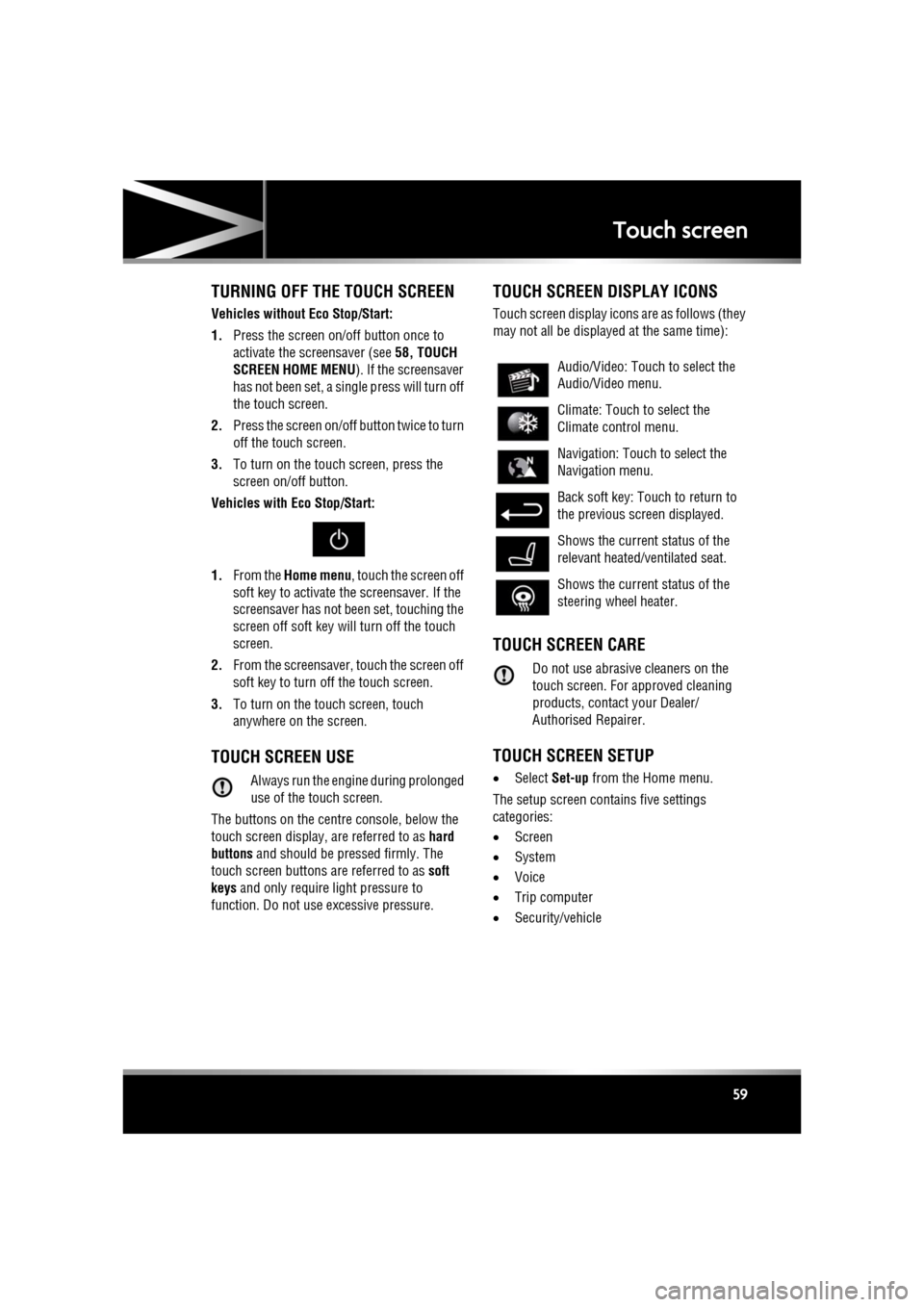
TOUCH SCREEN DISPLAY ICONS
Touch screen display icons are as follows (they
may not all be displayed at the same time):
TOUCH SCREEN CARE
Do not use abrasive cleaners on the
touch screen. For approved cleaning
products, contact your Dealer/
Authorised Repairer.
TOUCH SCREEN SETUP
• Select Set-up from the Home menu.
The setup screen cont ains five settings
categories:
• Screen
• System
• Voice
• Trip computer
• Security/vehicle
Audio/Video: Touc h to select the
Audio/Video menu.
Climate: Touch to select the
Climate control menu.
Navigation: Touch to select the
Navigation menu.
Back soft key: Touch to return to
the previous screen displayed.
Shows the current status of the
relevant heated/ventilated seat.
Shows the current status of the
steering wheel heater.
Page 60 of 225

L
(FM8) SEMCON JLR OWNER GUIDE VER 1.00 EURO
LANGUAGE: english-en; MARQUE: jaguar; MODEL: XF
Touch screen
60
SCREEN SETTINGS
Screensaver: Select to change the
screensaver. Touch an option to select.
Screen animations : Select to turn animated
transitions between screens on or off.
Note: While screen animations are on, system
response time will be slower than normal.
Time out home : Sub menu selection screens
can be set to revert to the Home menu after a
pre-determined length of time.
Theme : Changes appearance of the touch
screen soft keys.
SYSTEM SETTINGS
Button feedback : Select to turn the soft key
confirmation tone on or off.
Clock adjust : Select 12 or 24 hour clock. Set
current time. Select Date to change the date, or
to alter the date format. Select Set, to store
new settings.
Note: The clock can also be adjusted from the
touch screen time display.
Home menu shortcuts : Select up to three items
from the displayed list to appear as shortcuts
on the Home menu . Select Clear to deselect
highlighted items.
Language: Select the requir ed language. Select
Male or Female voice. Touch Change to select
alternatives for Voice and text displays. Follow
the on-screen instructions to confirm.
Note: Some languages are not yet available for
both System display text and Voice control. In
this event, it will be necessary to select a
separate language for Voice control.
Volume presets : Adjust volume for the
available sy stems (announcements, phone,
voice etc.).
VOICE SETTINGS
• Command list : View the categories and the
acceptable voice commands.
Select an Information button to view
alternative func tion commands.
• Voicetags : View the categories. Select a
category to manage the voicetags for the
chosen system. See 127, VOICETAGS.
• Operating guide: View brief Voice system
instructions. Select Voice tutorial for more
detailed instructions (cancel via the
displayed pop-up or by pressing and
holding the voice button).
• Preferences : Select to alter the following
settings:
• Voice profile: The voice system can be
trained to have a gr eater recognition of
a particular voice or accent.The default
setting is Standard. To build a voice
profile for either User 1 or User 2, it is
necessary to complete a training
program first.
To complete the training for the first
time, select either User 1 or User 2 and
follow the on-screen and audible
instructions.
• Voice feedback : Select On or Off.
• Feedback volume : Adjust using the +/-
buttons. It is not po ssible to reduce the
volume to zero.
• Voice training: Select to access the voice
system training pr ogram, designed to
enable the system to better recognise the
vocal characteristics of a user.
Select User 1 or User 2 and follow the on
screen and audible instructions. See 127,
VOICE TRAINING.
Page 63 of 225
R
(FM8) SEMCON JLR OWNER GUIDE VER 1.00 EURO
LANGUAGE: english-en; MARQUE: jaguar; MODEL: XF
Heating and ventilation
63
Heating and ventilationCLIMATE CONTROL
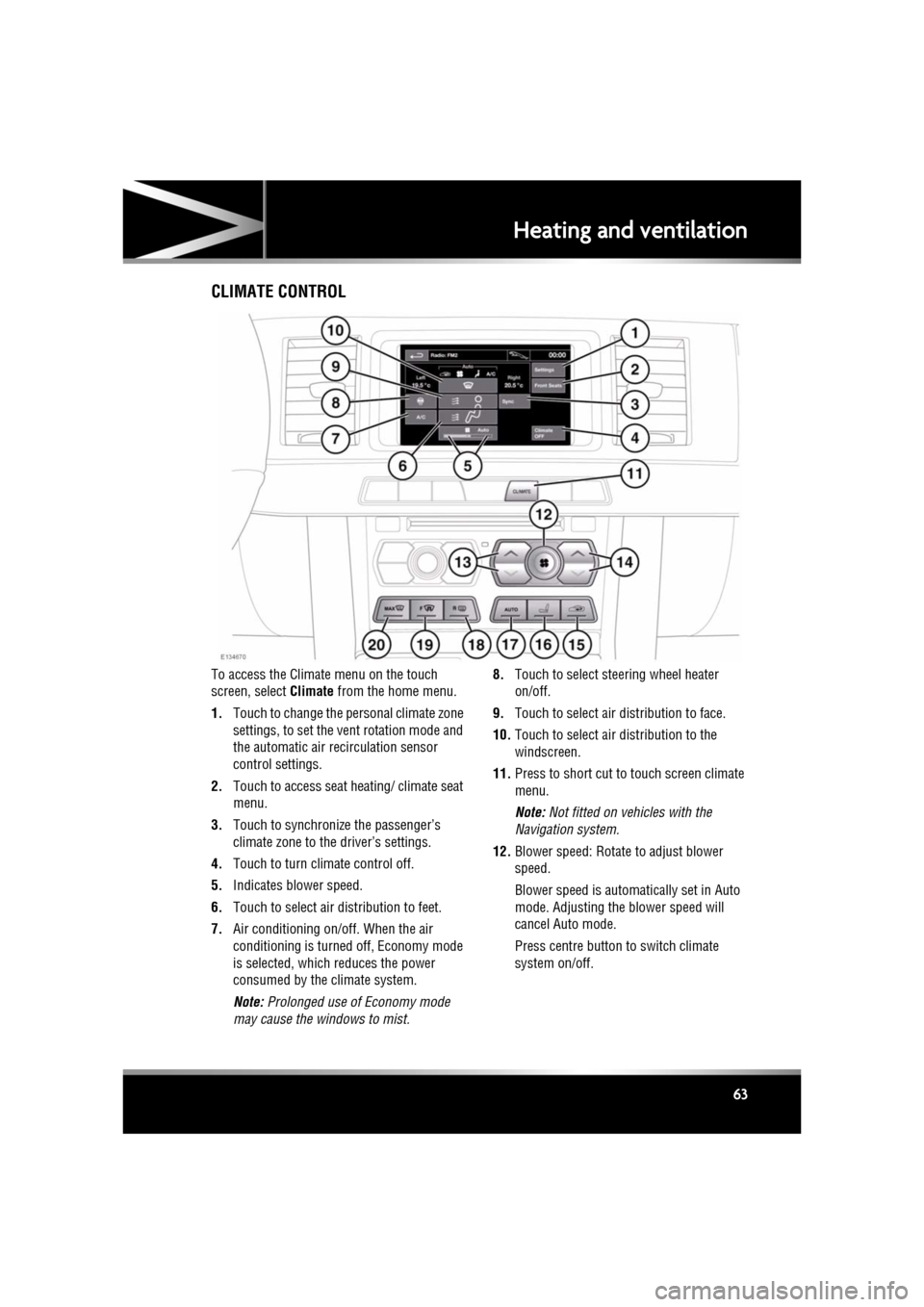
To access the Climate menu on the touch
screen, select Climate from the home menu.
1. Touch to change the personal climate zone
settings, to set the vent rotation mode and
the automatic air recirculation sensor
control settings.
2. Touch to access seat heating/ climate seat
menu.
3. Touch to synchronize the passenger’s
climate zone to the driver’s settings.
4. Touch to turn climate control off.
5. Indicates blower speed.
6. Touch to select air distribution to feet.
7. Air conditioning on/off. When the air
conditioning is turned off, Economy mode
is selected, which reduces the power
consumed by the climate system.
Note: Prolonged use of Economy mode
may cause the windows to mist. 8.
Touch to select steering wheel heater
on/off.
9. Touch to select air distribution to face.
10. Touch to select air distribution to the
windscreen.
11. Press to short cut to touch screen climate
menu.
Note: Not fitted on vehicles with the
Navigation system.
12. Blower speed: Rotate to adjust blower
speed.
Blower speed is automatically set in Auto
mode. Adjusting the blower speed will
cancel Auto mode.
Press centre button to switch climate
system on/off.
Page 65 of 225
R
(FM8) SEMCON JLR OWNER GUIDE VER 1.00 EURO
LANGUAGE: english-en; MARQUE: jaguar; MODEL: XF
Heating and ventilation
65
AIR QUALITY SENSOR
If the air quality sensor detects pollution, air
recirculation is selected automatically to
reduce pollutants entering the vehicle.
The sensitivity of the se nsor can be adjusted
using the touch screen:
1. Select Settings from the Climate menu.
2. Touch the +/- buttons on the screen to
increase/decrease sensitivity.
To switch the function o ff, decrease sensitivity
to the minimum setting.
EXTERNAL TEMPERATURE
The external temperature is displayed in the
Home menu of the touch screen and in the
instrument panel.
When the external temp erature is low enough
that ice may be present on the road, an amber
snowflake warning lamp w ill illuminate in the
instrument panel.
AUTOMATIC CLIMATE CONTROL
AUTO mode should be used as the normal
operating mode. The air conditioning, heating
and ventilation controls automatically provide
an optimum environment at the selected
temperature.
Note: Screen heating and timed air
recirculation may be se lected in AUTO mode.
Any other manual adjustment cancels AUTO
operation.
Note: Water expelled by the air conditioning
may collect underneath the vehicle when
parked. This is not cause for concern.
TEMPERATURE CONTROLS
The driver and front seat passenger zone
temperatures can be i ndependently adjusted.
The temperature for each zone is displayed on
the relevant side of the touch screen.
Note: The maximum possible temperature
differential between the driver and passenger
settings is 3°C (5.4°F).
HEATED SEATS
Note: The seat heaters will only operate when
the engine is running.
The heated seats are controlled from the Home
or Climate menu on the touch screen.
• Touch the appropriate seat icon to switch
on the seat heater at maximum
temperature (3 red bars).
• Touch the icon a second and third time to
reduce the temperature (2 and 1 red bars).
• Touch the icon a fourth time to switch the
seat heater off.
This icon appears at the top of the
touch screen when the air quality
sensor is switched on.
Page 67 of 225
R
(FM8) SEMCON JLR OWNER GUIDE VER 1.00 EURO
LANGUAGE: english-en; MARQUE: jaguar; MODEL: XF
Luggage compartment
67
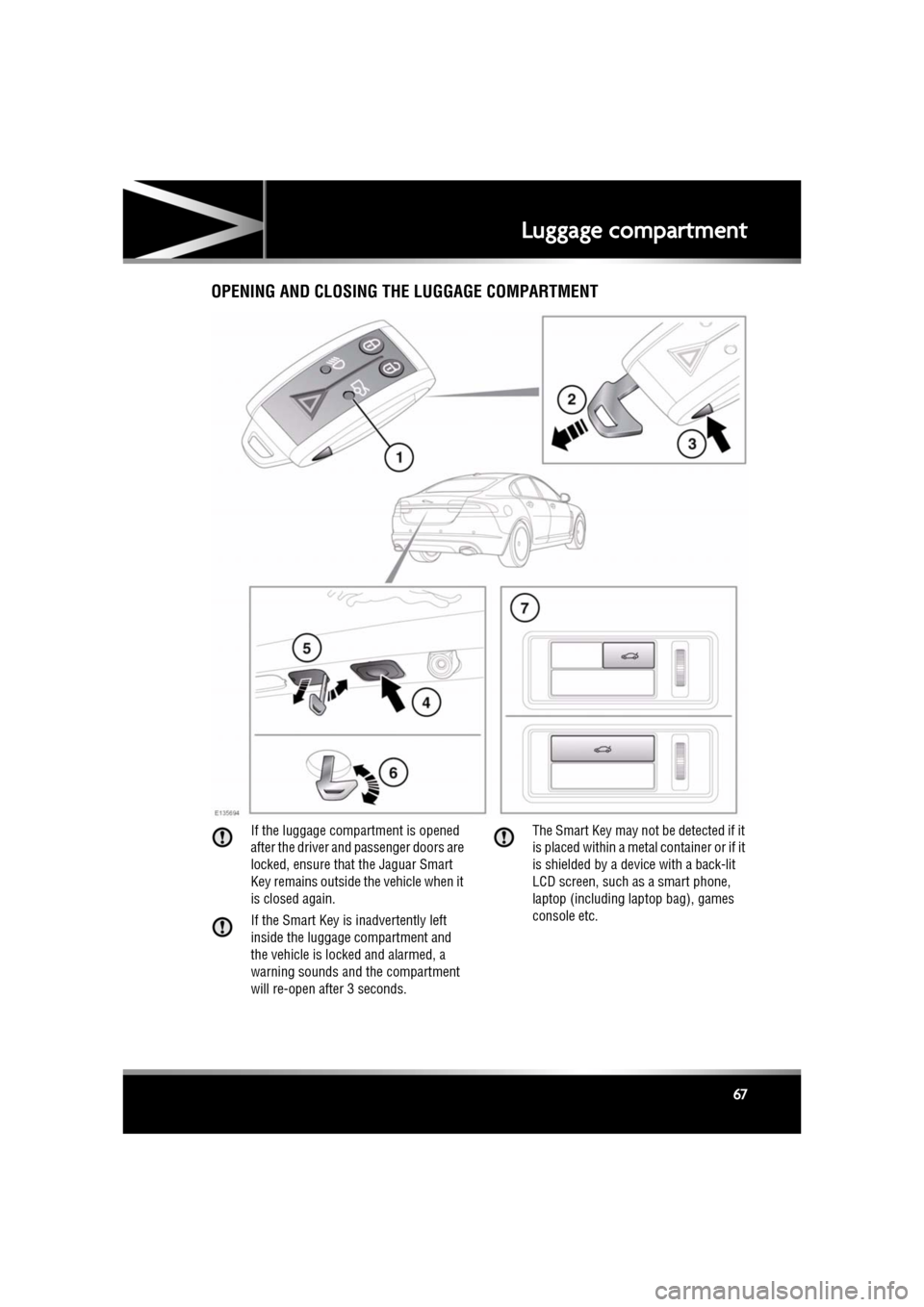
Luggage compartmentOPENING AND CLOSING THE LUGGAGE COMPARTMENT
If the luggage compartment is opened
after the driver and passenger doors are
locked, ensure that the Jaguar Smart
Key remains outside the vehicle when it
is closed again.
If the Smart Key is inadvertently left
inside the luggage compartment and
the vehicle is locked and alarmed, a
warning sounds and the compartment
will re-open after 3 seconds. The Smart Key may not be detected if it
is placed within a meta
l container or if it
is shielded by a device with a back-lit
LCD screen, such as a smart phone,
laptop (including la ptop bag), games
console etc.
Page 69 of 225
R
(FM8) SEMCON JLR OWNER GUIDE VER 1.00 EURO
LANGUAGE: english-en; MARQUE: jaguar; MODEL: XF
Towing
69
TowingTOWING A TRAILER
(V6 petrol and diesel vehicles only)
Never exceed the maximum weights
for the vehicle or the trailer. Damage
to the vehicle coul d occur and vehicle
stability and braking could be
adversely affected. This could lead to
loss of control and increased braking
distance, resulting in a rollover or
crash.
To preserve handling and stability,
only fit Jaguar approved towing
accessories.
Never use towing eyes or lashing
points to tow a trailer. They have not
been designed for this purpose and
doing so may cause them to fail,
resulting in injury or death.
When towing, do not exceed 100 km/h
(60 mph). If using a temporary spare
wheel, do not exceed 80 km/h (50
mph).
Note: It is the driver’s re sponsibility to ensure
that the towing vehicle, and the trailer, are
being used correctly and in accordance with
manufacturer’s reco mmendations and any
applicable legislation.
Information on towing, towing weight
capacities and regulati ons is available from
your Dealer and from the main motoring and
caravanning organisations.
The following are important points of safety,
stability and comfort. Seek further advice if
necessary.
• Maximum braked to wing weight is
permissible, provided that long periods of
uphill driving on gradients over 8% are not
undertaken. •
At altitudes above 1000 metres (3250 feet),
the stipulated maximum permitted Gross
Train Weight must be reduced by 10% for
every 1000 metres (3250 feet) in altitude,
because the thinner atmosphere can
reduce engine performance.
Diesel engines : When ambient temperature
exceeds 40°C (104°F), the engine coolant
temperature may increase above normal
operating level. If this occurs, the engine
management system will initiate a series of
actions to restore normal operating conditions,
which may include:
• A message centre message.
• Engine performance reduction.
• Air conditioning system cycling. The air
conditioning temper ature output will
fluctuate between hot and cold, in order to
dissipate engine heat. If engine overheat
persists, the air conditioning will move to
continuous heat output.
It is advisable to bring the vehicle and trailer to
a convenient stop and allo w the engine to idle
until normal temperature is restored. Do not
turn off the engine.
TRAILER ELECTRICAL CONNECTION
Only connect approved electrical
circuits, which are in good condition, to
the trailer socket. Connecting incorrect
or faulty circuits, may seriously damage
the vehicle’s electrical circuits.
The vehicle’s electrical system has been
designed to support all towing requirements
and comply with legal requirements for the
specific territory in which the vehicle is first
sold.
Note: The rear parking se nsors automatically
disable when the trailer electrical connection is
made using Jaguar approved towing
equipment.