Eco JAGUAR XF 2011 1.G Workshop Manual
[x] Cancel search | Manufacturer: JAGUAR, Model Year: 2011, Model line: XF, Model: JAGUAR XF 2011 1.GPages: 225, PDF Size: 7.32 MB
Page 89 of 225
R
(FM8) SEMCON JLR OWNER GUIDE VER 1.00 EURO
LANGUAGE: english-en; MARQUE: jaguar; MODEL: XF
Tyre pressure monitoring system
89
Tyre pressure monitoring systemTYRE PRESSURE MONITORING
SYSTEM (TPMS)
The TPM system provides a low
pressure warning and does not
re-inflate your tyres. Tyre pressures
should be checked regularly using an
accurate pressure gauge when cold.
The TPM system can NOT register
damage to a tyre. Regularly check the
condition of your tyres, especially if
the vehicle is driven off-road.
When inflating tyre s, care should be
taken to avoid bending or damaging the
TPM system valves. Always ensure
correct alignment of the inflation head
to the valve stem.
Note: Non-approved accessories may interfere
with the system. If this occurs, TYRE
PRESSURE MONITORI NG SYSTEM FAULT is
displayed in the message centre.
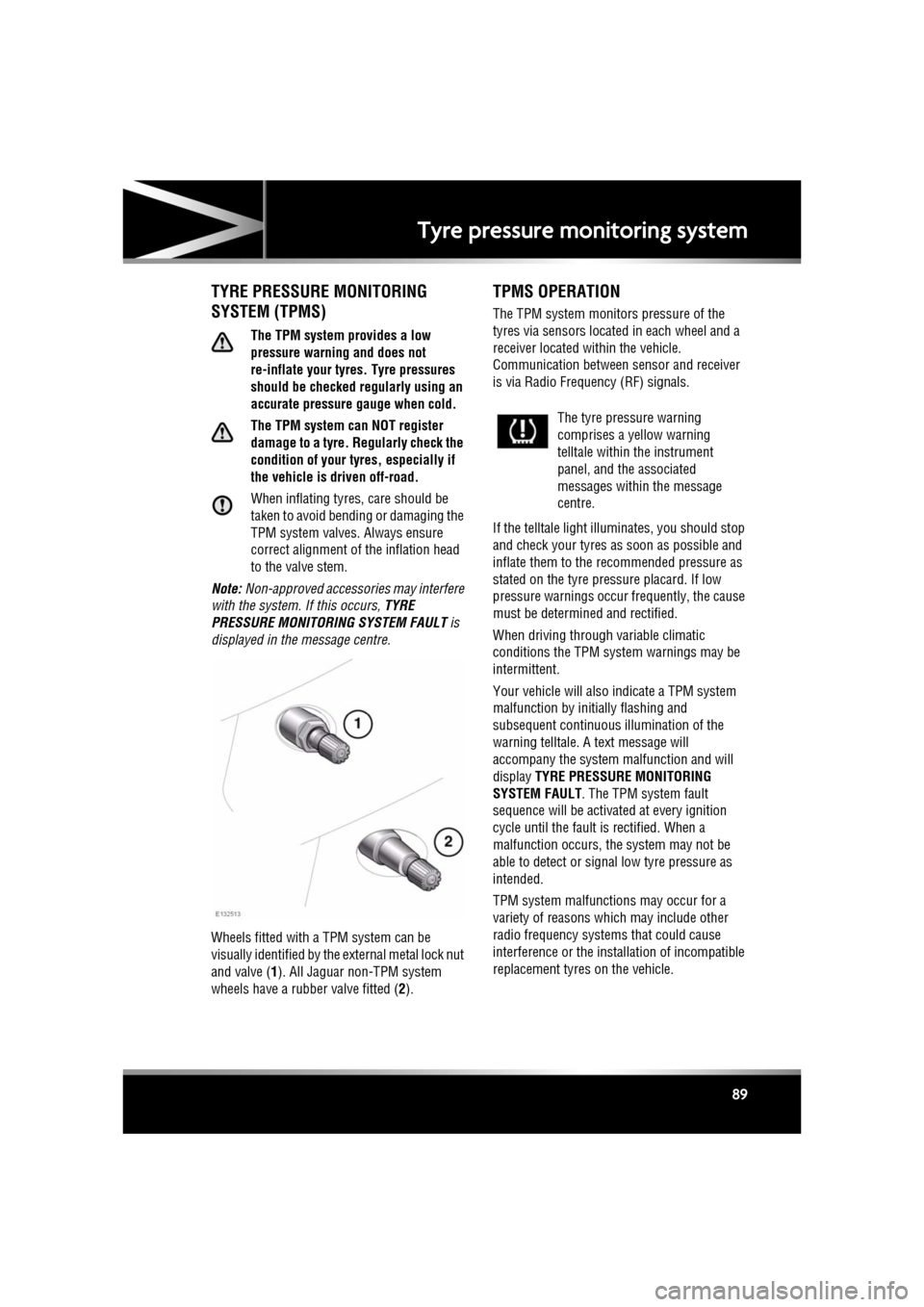
Wheels fitted with a TPM system can be
visually identified by the external metal lock nut
and valve ( 1). All Jaguar n on-TPM system
wheels have a rubber valve fitted (2).
TPMS OPERATION
The TPM system monitors pressure of the
tyres via sensors located in each wheel and a
receiver located within the vehicle.
Communication between sensor and receiver
is via Radio Freque ncy (RF) signals.
If the telltale light illu minates, you should stop
and check your tyres as soon as possible and
inflate them to the recommended pressure as
stated on the tyre pressure placard. If low
pressure warnings occur frequently, the cause
must be determined and rectified.
When driving through variable climatic
conditions the TPM syst em warnings may be
intermittent.
Your vehicle will also indicate a TPM system
malfunction by initially flashing and
subsequent continuous illumination of the
warning telltale. A text message will
accompany the system malfunction and will
display TYRE PRESSURE MONITORING
SYSTEM FAULT . The TPM system fault
sequence will be activated at every ignition
cycle until the fault is rectified. When a
malfunction occurs, the system may not be
able to detect or signal low tyre pressure as
intended.
TPM system malfuncti ons may occur for a
variety of reasons which may include other
radio frequency systems that could cause
interference or the installation of incompatible
replacement tyres on the vehicle.
The tyre pressure warning
comprises a yellow warning
telltale within the instrument
panel, and the associated
messages within the message
centre.
Page 90 of 225
L
(FM8) SEMCON JLR OWNER GUIDE VER 1.00 EURO
LANGUAGE: english-en; MARQUE: jaguar; MODEL: XF
Tyre pressure monitoring system
90
TEMPORARY USE SPARE WHEEL
AND TYRE CHANGE
If the temporary use spare wheel is fitted the
system will automatically recognise the change
in wheel positions. The n after approximately
ten minutes of drivin g above 25 km/h (18
mph), a message deta iling which tyre is
affected (e.g. FRONT LEFT) and TYRE NOT
MONITORED will be displayed accompanied by
illumination of the warning telltale and the
corresponding block in the vehicle graphic.
The warning telltale will initially flash and will
subsequently revert to continuous illumination.
Extended use of the temporary use spare wheel
will produce an additional text message TYRE
PRESSURE MONITORING SYSTEM FAULT .
This TPM system display sequence will be
activated at every ignition cycle until the
temporary use spare wheel is replaced by a
fully operational full size wheel and tyre
assembly. Always replace the temporary use
wheel before having TPM system faults
investigated. The fault may well be rectified
with the fitment of a fu lly operational full size
running tyre in lieu of the temporary use spare
wheel assembly.
TYRE PRESSURE MONITORING
UNAVAILABLE
If all four running wheels and tyres are changed
for a set that are not fitted with TPM system
sensors (e.g. a set of winter wheels and tyres),
the message TYRE PRESSURE MONITORING
UNAVAILABLE is displayed. TPM system
sensors must be fitted to the wheels and tyres
for the system to be able to warn of low tyre
pressures.
When sensors are fitted to the replacement
wheel and tyre set, the vehicle needs to be
driven until the TPM system recognizes the
sensors before TPM will be available ( TYRE
PRESSURE MONITORING AVAILABLE is
displayed).
TYRE CHANGING
Always have your tyres serviced or changed by
a qualified technician.
Care must be taken to avoid contact between
the bead of the tyre and the sensor during
removal and refitting of the tyre, otherwise the
sensor may become damaged and or
inoperable.
Valve stem seal, washer, nut, valve core
and cap should be repl aced at every tyre
change. Valve stem seal, washer and
nut must be replaced if valve retention
nut is loosened. Sensor units and nuts
must be refitted using correct torque
figures and associated profile. Damage
to the vehicle may result if these
precautions are not taken.
Sensors can be removed from the wheel by the
unscrewing of the va lve retention nut.
Page 91 of 225

R
(FM8) SEMCON JLR OWNER GUIDE VER 1.00 EURO
LANGUAGE: english-en; MARQUE: jaguar; MODEL: XF
Tyre pressure monitoring system
91
REPLACEMENT TPMS SENSOR
Should the sensor require replacing, it should
be carried out by a Deal er/Authorised Repairer.
A replacement sensor must be fitted to a
running wheel in order to be recognised by the
system. The vehicle needs to be stationary for
15 minutes during the sensor fitment before
the system is ready to detect the new sensor.
The vehicle must be driven for a minimum of
fifteen minutes after th e sensor change, and
then remain stationary for fifteen minutes to
activate full TPM system operation.
If the TPM system warning for any wheel does
not clear, even after ensuring correct inflation
and driving for more than ten minutes above 25
km/h (18 mph), you s hould seek qualified
assistance as soon as possible.
Page 93 of 225
R
(FM8) SEMCON JLR OWNER GUIDE VER 1.00 EURO
LANGUAGE: english-en; MARQUE: jaguar; MODEL: XF
Parking aids
93
CLEANING THE SENSORS
For reliable operation, th e sensors in the front
and rear bumpers should be kept free from ice,
frost and grime.
Do not clean the sensors with abrasive
or sharp objects or materials.
When using a high pressure spray, only
spray the sensors briefly, from a
distance greater than 200 mm
(8 inches).
PARKING AID SYSTEM FAULT
If the system has a fault when engaging reverse
gear or turning on the ignition, then a single, 3
second tone will be heard and a pop-up
warning will appear on the touch screen. If
both front and rear park ing aids are fitted, the
warning indicator in the parking aid switch will
flash for 3 seconds and then switch off.
If a fault is detected, the system is
automatically disabled.
Note: The parking aid may emit spurious tones
if it detects a frequenc y tone using the same
band as the sensors (e.g. air brakes).
REAR VIEW CAMERA
It remains the driver's responsibility
to detect obstacles and estimate the
vehicle's distance from them when
reversing.
When Reverse ( R) is selected, the system uses
a camera to provide a wide-angle colour rear
view image on the touch screen.
The camera display has priority over the
parking aid display. To view the parking aid
display instead, or to cancel camera display at
any time, touch the display.
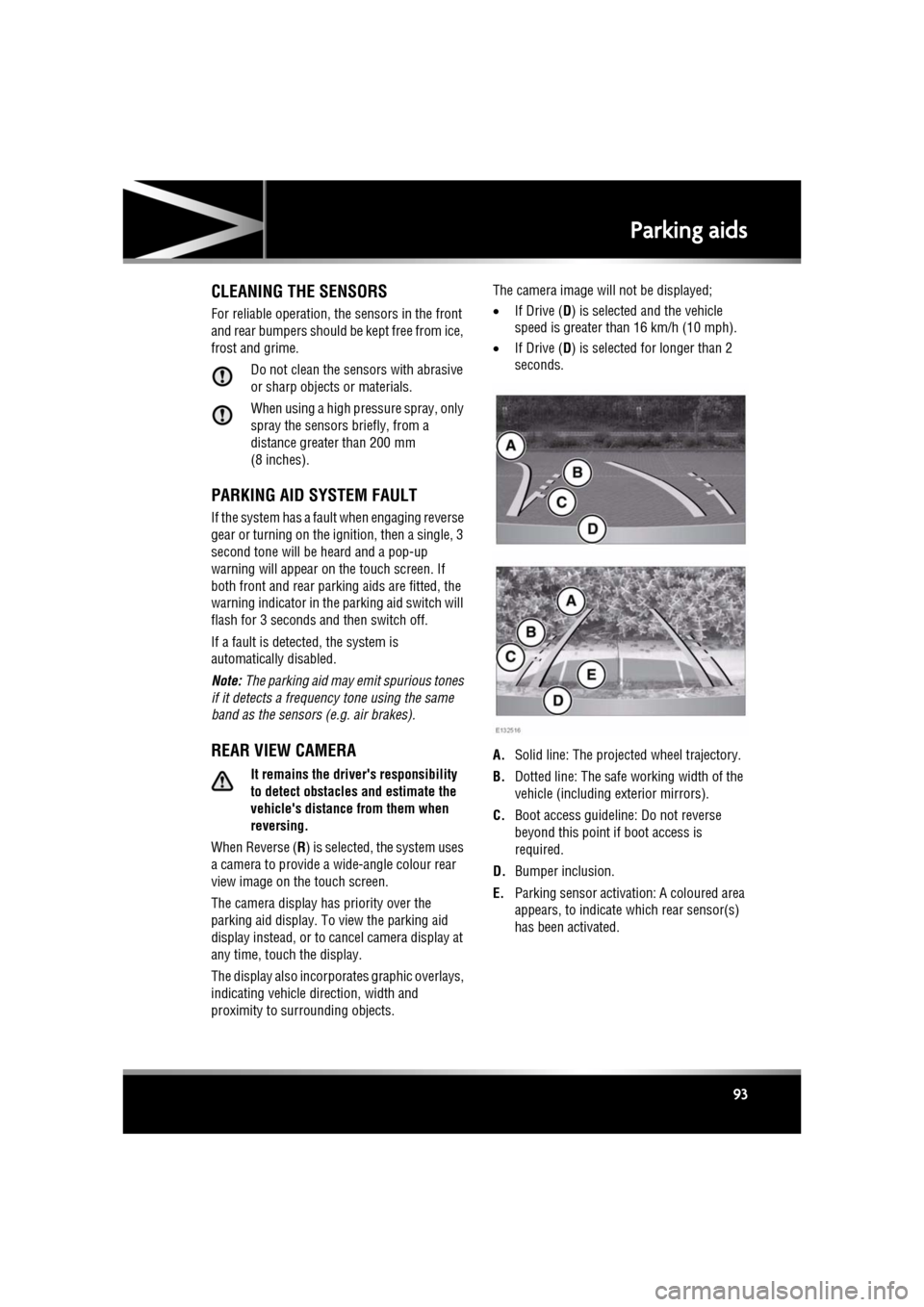
The display also incorporates graphic overlays,
indicating vehicle di rection, width and
proximity to surrounding objects. The camera image will not be displayed;
•
If Drive ( D) is selected and the vehicle
speed is greater than 16 km/h (10 mph).
• If Drive ( D) is selected for longer than 2
seconds.
A. Solid line: The projec ted wheel trajectory.
B. Dotted line: The safe working width of the
vehicle (including exterior mirrors).
C. Boot access guideline: Do not reverse
beyond this point if boot access is
required.
D. Bumper inclusion.
E. Parking sensor activati on: A coloured area
appears, to indicate which rear sensor(s)
has been activated.
Page 94 of 225
L
(FM8) SEMCON JLR OWNER GUIDE VER 1.00 EURO
LANGUAGE: english-en; MARQUE: jaguar; MODEL: XF
Cruise control
94
Cruise controlUSING CRUISE CONTROL
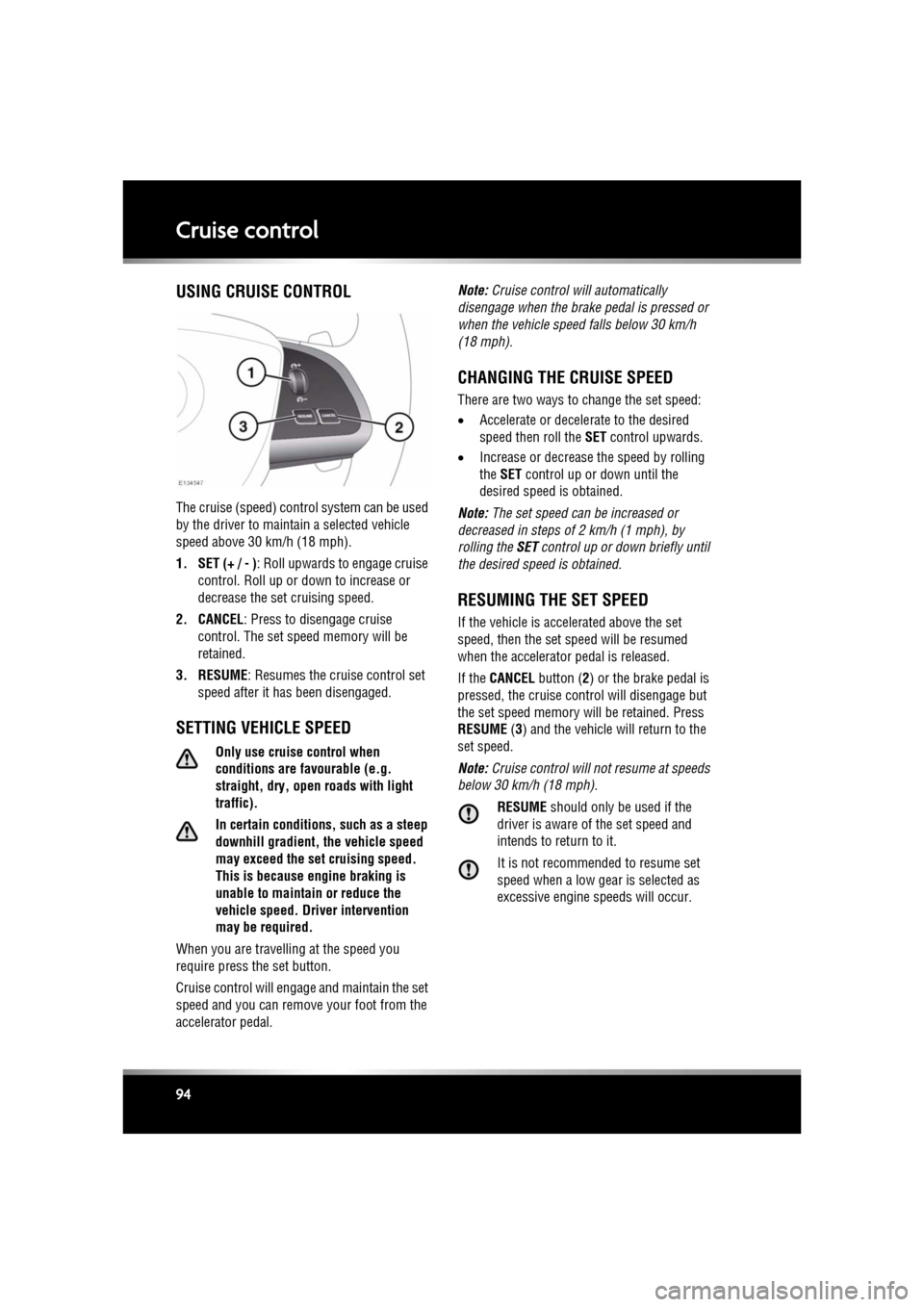
The cruise (speed) contro l system can be used
by the driver to maintain a selected vehicle
speed above 30 km/h (18 mph).
1. SET (+ / - ) : Roll upwards to engage cruise
control. Roll up or down to increase or
decrease the set cruising speed.
2. CANCEL : Press to disengage cruise
control. The set sp eed memory will be
retained.
3. RESUME : Resumes the cruise control set
speed after it has been disengaged.
SETTING VEHICLE SPEED
Only use cruise control when
conditions are favourable (e.g.
straight, dry, open roads with light
traffic).
In certain conditions, such as a steep
downhill gradient, the vehicle speed
may exceed the set cruising speed.
This is because eng ine braking is
unable to maintain or reduce the
vehicle speed. Driver intervention
may be required.
When you are travelling at the speed you
require press the set button.
Cruise control will enga ge and maintain the set
speed and you can remove your foot from the
accelerator pedal. Note:
Cruise control w ill automatically
disengage when the brake pedal is pressed or
when the vehicle speed falls below 30 km/h
(18 mph).
CHANGING THE CRUISE SPEED
There are two ways to change the set speed:
• Accelerate or decele rate to the desired
speed then roll the SET control upwards.
• Increase or decrease the speed by rolling
the SET control up or down until the
desired speed is obtained.
Note: The set speed can be increased or
decreased in steps of 2 km/h (1 mph), by
rolling the SET control up or down briefly until
the desired spee d is obtained.
RESUMING THE SET SPEED
If the vehicle is accelerated above the set
speed, then the set speed will be resumed
when the accelerator pedal is released.
If the CANCEL button ( 2) or the brake pedal is
pressed, the cruise cont rol will disengage but
the set speed memory will be retained. Press
RESUME (3) and the vehicle will return to the
set speed.
Note: Cruise control will not resume at speeds
below 30 km/h (18 mph).
RESUME should only be used if the
driver is aware of the set speed and
intends to return to it.
It is not recomme nded to resume set
speed when a low gear is selected as
excessive engine speeds will occur.
Page 99 of 225
R
(FM8) SEMCON JLR OWNER GUIDE VER 1.00 EURO
LANGUAGE: english-en; MARQUE: jaguar; MODEL: XF
Adaptive cruise control
99
RESUMING THE SPEED AND
FOLLOW MODE
RESUME should only be used if the
driver is aware of the set speed and
intends to return to it.
By pressing the RESUME button after ACC has
been cancelled, for example, after braking, the
ACC will become active again provided that the
set speed memory has not been erased. The
original set speed will be resumed (unless a
vehicle ahead causes the follow mode to
become active) and the set speed will be
displayed in the message centre for four
seconds.
HINTS ON DRIVING WITH ACC
The system acts by regulating the speed of the
vehicle using engine c ontrol and the brakes.
Gear changes may occur in response to
deceleration or accele ration whilst in ACC.
ACC is not a collision avoidance system.
However, during some situations the system
may provide the driver with an indication that
intervention is required.
An audible alarm will sound, accompanied by
the message DRIVER INTERVENE if the ACC
detects:
• A failure has occurred whilst the system is
active
• That using maximum ACC braking only is
not sufficient.
Note: ACC operates when the gear selector
lever is in position S or D.
Note: When engaged, the accelerator pedal
rests in the raised position. Fully release the
pedal to allow normal ACC operation.
Note: When braking is applied by the ACC, the
vehicle brake lamps will be switched on
although the brake pedal will not move.
DETECTION BEAM ISSUES
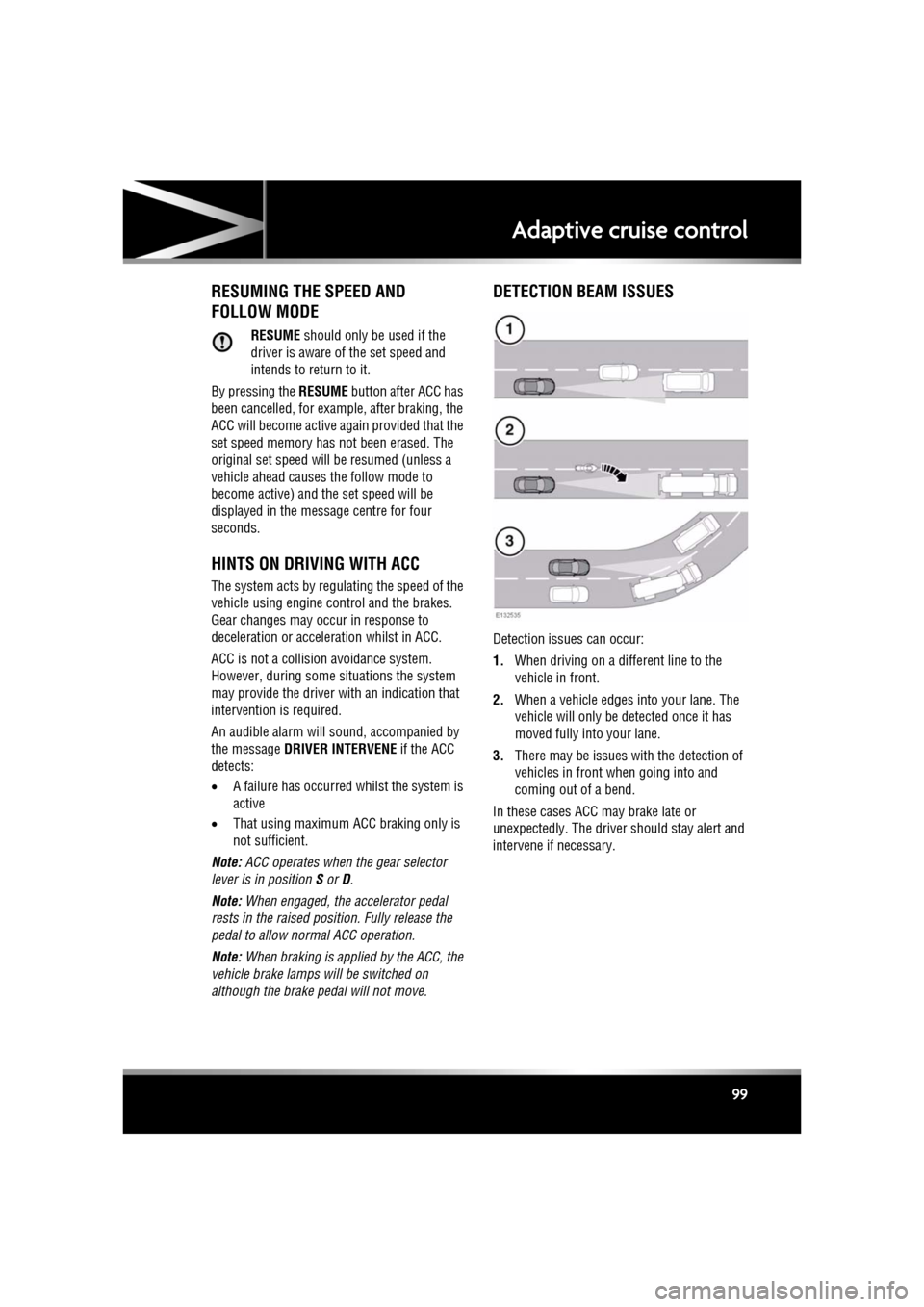
Detection issues can occur:
1. When driving on a different line to the
vehicle in front.
2. When a vehicle edges into your lane. The
vehicle will only be detected once it has
moved fully into your lane.
3. There may be issues with the detection of
vehicles in front when going into and
coming out of a bend.
In these cases ACC may brake late or
unexpectedly. The driver should stay alert and
intervene if necessary.
Page 100 of 225
L
(FM8) SEMCON JLR OWNER GUIDE VER 1.00 EURO
LANGUAGE: english-en; MARQUE: jaguar; MODEL: XF
Adaptive cruise control
100
ACC MALFUNCTION
If a malfunction occurs during operation of the
system in cruise or follow modes, the ACC
system will switch off a nd cannot be used until
the fault is cleared. The message Driver
Intervene appears briefly and is then replaced
by the message Cruise Not Available . If
malfunction of the ACC or any related system
occurs at any other time, the message Cruise
Not Available will be displayed. It will not be
possible to activate the ACC system in any
mode.
Accumulations of dirt, snow or ice on the
sensor or cover may inhibit ACC operation.
Fitting of a vehicle front protector or metallised
badges may also affect ACC operation.
The ACC system relies on its radar to detect
objects and constantly scans ahead. If the
radar is unable to detect any objects ahead,
then ACC will be deactivated, the audible alarm
sounds and the message Driver Intervene
displays briefly. The message ACC Sensor
Blocked will then be displayed.
The same messages may also be displayed
while driving on open ro ads with few objects
for the radar to detect.
Clearing the obstruction fr om in front of the
sensor allows the system to return to normal
operation. If the obstr uction is present when
ACC is inactive (e.g. on initial starting or with
the ACC system switched off), the message
ACC Sensor Blocked will be displayed.
Tyres other than those recommended for your
vehicle, may have different sizes. This can
affect the correct operation of the ACC.
FORWARD ALERT FUNCTION
Limited detect ion and warning of objects
ahead, is provided duri ng ACC operation by the
ACC Forward Alert warning. The enhanced
forward alert feature additionally provides
warnings when ACC is not engaged; if an object
is detected close ahead, then the warning tone
and message will be issu ed. The brakes will not
be applied.
The forward alert system does not initiate any
action. The driver must take appropriate action
when the Forward Alert message is displayed.
However, the system monitors driver actions
(e.g. braking, steering or indicating) and may
not initiate the warning display if the
appropriate action has been taken early
enough.
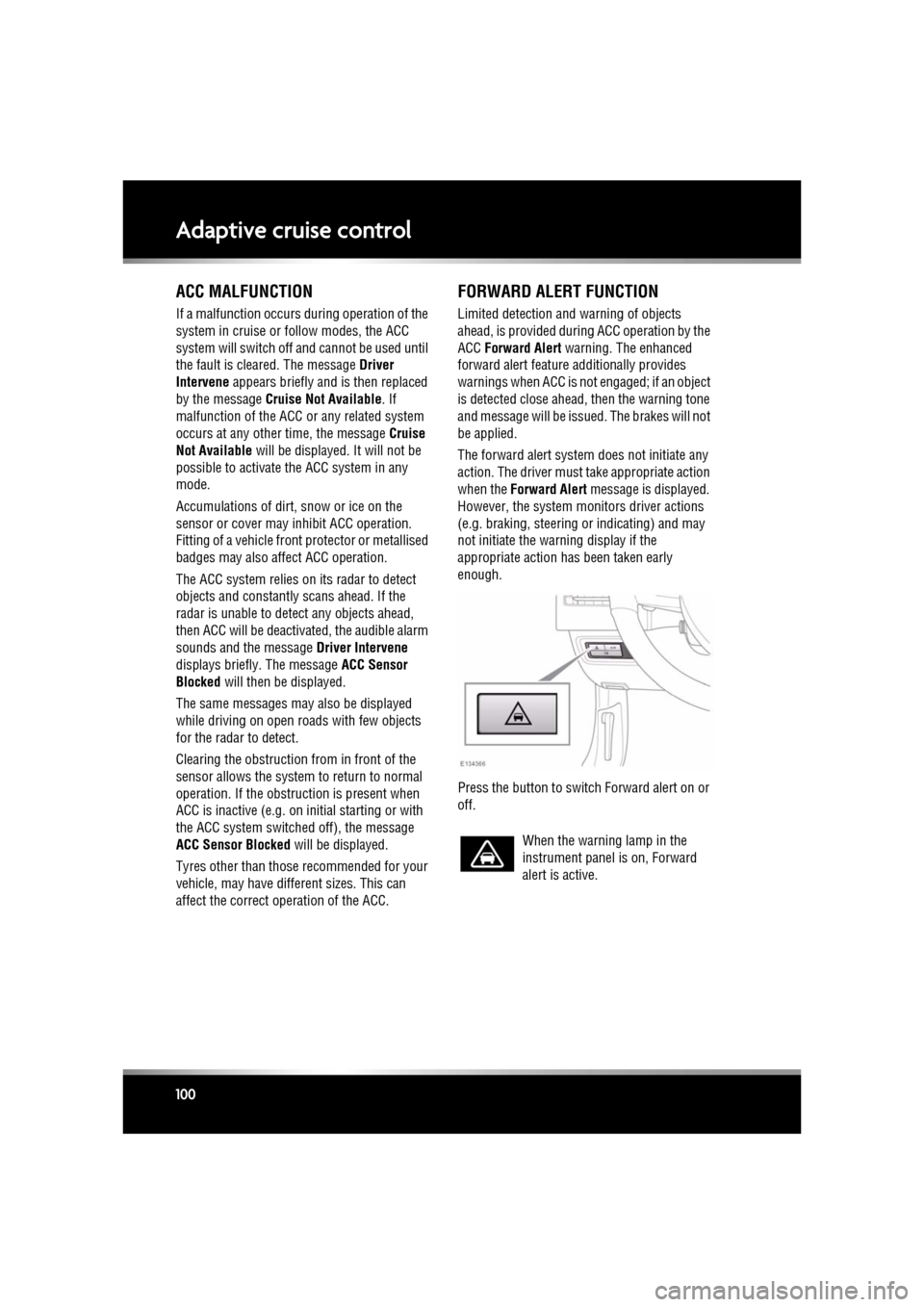
Press the button to switch Forward alert on or
off.
When the warning lamp in the
instrument panel is on, Forward
alert is active.
Page 102 of 225
L
(FM8) SEMCON JLR OWNER GUIDE VER 1.00 EURO
LANGUAGE: english-en; MARQUE: jaguar; MODEL: XF
Adaptive cruise control
102
INTELLIGENT EMERGENCY BRAKING
The system may not react to slow
moving vehicles.
The system will not react to stationary
vehicles, or vehicles that are not
travelling in the same direction as
your vehicle.
Warnings and automatic braking may
not occur if the dist ance to the vehicle
ahead is very small, or if the steering
wheel and pedal movements are large
(to avoid a collis ion for example).
IEB (Intelligent Em ergency Braking)
uses the same radar sensor as
Adaptive Cruise Control and Forward
Alert. The same performance
limitations apply, see 96, ADAPTIVE
CRUISE CONTROL OVERVIEW.
IEB is available at all speeds to automatically
apply the brakes if an unavoidable collision
with a moving vehicle in front is detected.
If there is an imminent risk of collision, an
audible warning is given. If the collision then
becomes unavoidable, the IEB system applies
the brakes at up to maximum pressure. After
IEB has activated, IEB System Was Activated
is displayed in the message centre and the
system is inhibited from further operation until
reset by a Dealer/Authorised Repairer.
IEB will function even if Forward Alert and ACC
are switched off. If the radar sensor is blocked,
by snow or heavy rain for example, or there is
a fault with the system, IEB Not Available is
displayed in the message centre. The vehicle
can still be driven and the braking system will
still operate, but without IEB. If the cause of
this message being disp layed is thought to be
other than a blocked rada r sensor, consult your
Dealer/Authorised Repairer.
Page 107 of 225

R
(FM8) SEMCON JLR OWNER GUIDE VER 1.00 EURO
LANGUAGE: english-en; MARQUE: jaguar; MODEL: XF
Audio/video overview
107
Go to http://vod.divx.com with this code to
complete the registra tion process and learn
more about DivX VOD.
Covered by one or more of the following U.S.
Patents: 7,295,673; 7,460,668; 7,515,710;
7,519,274.
Music and video recognition technology and
related data are provided by Gracenote®.
Gracenote is the industry standard in music
recognition technology and related content
delivery. For more information, please visit
www.gracenote.com.
CD, DVD, Blu-ray Di sc, and music and
video-related data fr om Gracenote, Inc.,
copyright © 2000 to present Gracenote.
Gracenote Software, copyright © 2000 to
present Gracenote. One or more patents owned
by Gracenote apply to th is product and service.
See the Gracenote website for a
non-exhaustive list of applicable Gracenote
patents. Gracenote, CDDB, MusicID,
MediaVOCS, the Gracenote logo and logotype,
and the "Powered by Gracenote" logo are either
registered trademarks or trademarks of
Gracenote in the United States and/or other
countries.GRACENOTE® END USER LICENSING
AGREEMENT
This application or device contains software
from Gracenote, Inc. of Emeryville, California
(“Gracenote”). The soft ware from Gracenote
(the “Gracenote Software”) enables this
application to perform disc and/or file
identification and obtain music-related
information, including na me, artist, track, and
title information (“Gracenote Data”) from
online servers or embedded databases
(collectively, “Gracenote Servers”) and to
perform other functions. You may use
Gracenote Data only by means of the intended
End-User functions of this application or
device.
You agree that you will use Gracenote Data, the
Gracenote Software, and Gracenote Servers for
your own personal non-commercial use only.
You agree not to assign, copy, transfer or
transmit the Gracenote Software or any
Gracenote Data to any third party. YOU AGREE
NOT TO USE OR EXPLOIT GRACENOTE DATA,
THE GRACENOTE SOFTWARE, OR
GRACENOTE SERVERS, EXCEPT AS
EXPRESSLY PERMITTED HEREIN.
You agree that your non- exclusive license to
use the Gracenote Data, the Gracenote
Software, and Gracenote Servers will terminate
if you violate these restrictions. If your license
terminates, you agree to cease any and all use
of the Gracenote Data, the Gracenote Software,
and Gracenote Servers. Gracenote reserves all
rights in Gracenote Data, the Gracenote
Software, and the Grace note Servers, including
all ownership rights. Under no circumstances
will Gracenote become liable for any payment
to you for any information that you provide.
You agree that Gracenote, Inc. may enforce its
rights under this Agreement against you
directly in its own name.
Page 109 of 225
R
(FM8) SEMCON JLR OWNER GUIDE VER 1.00 EURO
LANGUAGE: english-en; MARQUE: jaguar; MODEL: XF
Radio
109
RadioRADIO CONTROLS
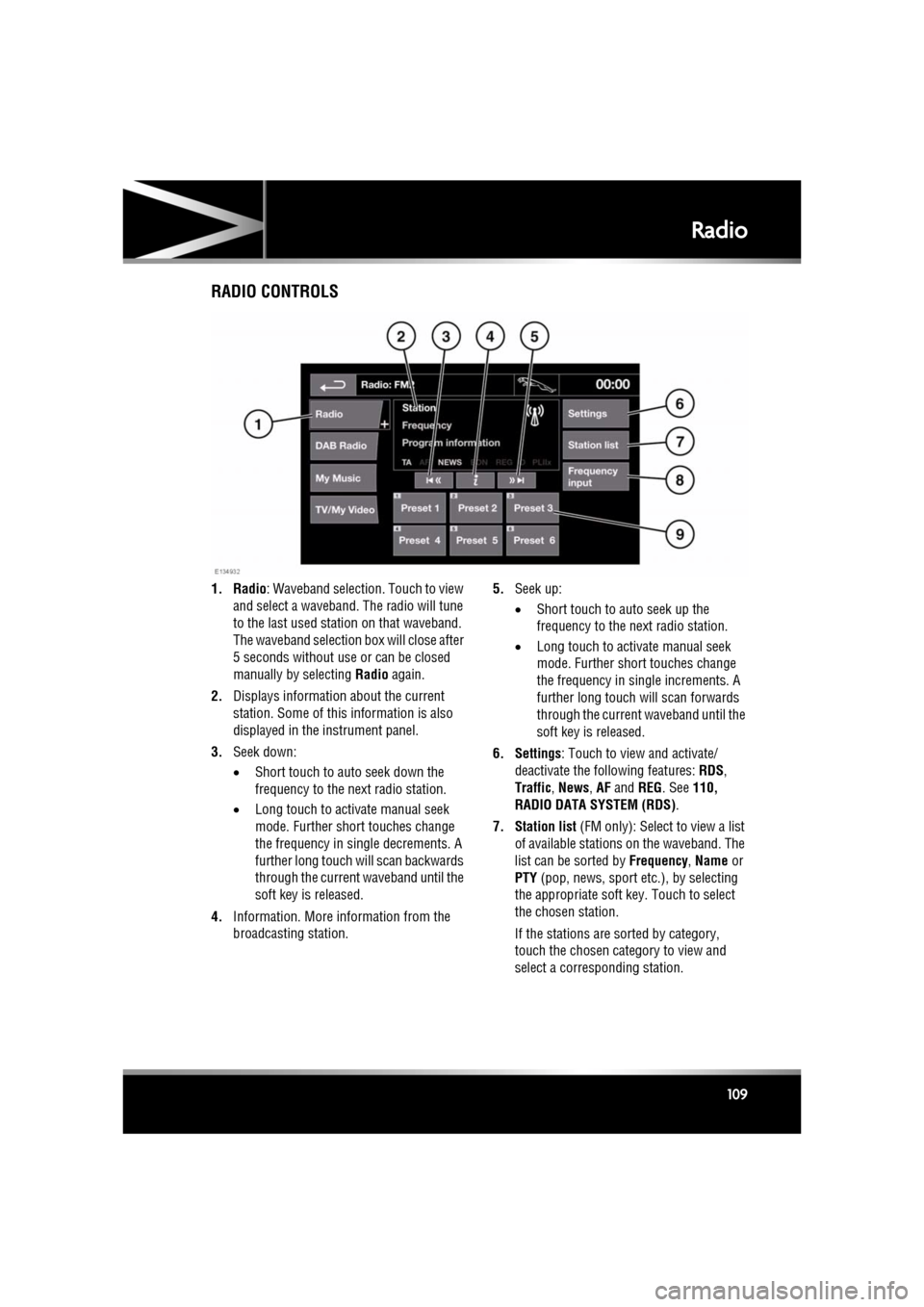
1. Radio : Waveband selection. Touch to view
and select a waveband. The radio will tune
to the last used stat ion on that waveband.
The waveband selection box will close after
5 seconds without use or can be closed
manually by selecting Radio again.
2. Displays informati on about the current
station. Some of this information is also
displayed in the instrument panel.
3. Seek down:
•Short touch to auto seek down the
frequency to the next radio station.
• Long touch to activate manual seek
mode. Further short touches change
the frequency in single decrements. A
further long touch will scan backwards
through the current waveband until the
soft key is released.
4. Information. More information from the
broadcasting station. 5.
Seek up:
•Short touch to auto seek up the
frequency to the next radio station.
• Long touch to activate manual seek
mode. Further short touches change
the frequency in single increments. A
further long touch will scan forwards
through the current waveband until the
soft key is released.
6. Settings : Touch to view and activate/
deactivate the following features: RDS ,
Traffic , News , AF and REG. See 110,
RADIO DATA SYSTEM (RDS) .
7. Station list (FM only): Select to view a list
of available stations on the waveband. The
list can be sorted by Frequency, Name or
PTY (pop, news, sport et c.), by selecting
the appropriate soft key. Touch to select
the chosen station.
If the stations are sorted by category,
touch the chosen category to view and
select a corre sponding station.