air JAGUAR XF 2011 1.G Service Manual
[x] Cancel search | Manufacturer: JAGUAR, Model Year: 2011, Model line: XF, Model: JAGUAR XF 2011 1.GPages: 225, PDF Size: 7.32 MB
Page 129 of 225
R
(FM8) SEMCON JLR OWNER GUIDE VER 1.00 EURO
LANGUAGE: english-en; MARQUE: jaguar; MODEL: XF
Telephone
129
BLUETOOTH® INFORMATION
The Jaguar Bluetoot h® system supports
Bluetooth® Hands-Fre e Profile (HFP),
Advanced Audio Distribution Profile (A2DP)
and Audio Video Remote Control Profile
(AVRCP).
Note: HFP and A2DP/AVRCP profiles can be
connected independently, so a phone can be
connected via one, while a media device can be
connected via the other, at the same time.
Before making use of the vehicle’s Bluetooth
phone system, your Bl uetooth phone must be
paired and connected to the vehicle system.
This is done using one of two methods; via
your phone to the vehicl e or from the touch
screen to your phone. If one of these methods
is not successful, try the other option.
Each time the ignition is switched on the
system will attempt to connect with the last
connected phone.
As mobile phones have a wide range of audio
and echo characteristics, it may take a few
seconds for the vehicle system to adapt and
deliver optimum audio performance. To
achieve this, it may be necessary to reduce the
in-vehicle volume a nd ventilation fan speed
slightly.
TELEPHONE SAFETY
Switch off your telephone in areas
with a high explos ion risk. This
includes filling stat ions, fuel storage
areas or chemical factories, as well
as places where the air contains fuel
vapour, chemicals or metal dust. Always stow your mobile phone
securely.
The functioning of cardiac
pacemakers or hearing aids may be
impaired when the phone is in use.
Check with a doctor or manufacturer
whether any such devices you or your
passengers are using, are sufficiently
protected against high-frequency
energy.
The Health Industry Manufacturers'
Association recommends that a minimum
separation of 15 centimetres (six inches) is
maintained between a wireless phone antenna
and a pacemaker, to avoid potential
interference with the pacemaker. These
recommendations are consistent with the
independent research by, and
recommendations of, Wi reless Technology
Research.
Bluetooth® is the name for
short-range radio frequency (RF)
technology that allows electronic
devices to communicate
wirelessly with each other.
Page 130 of 225

L
(FM8) SEMCON JLR OWNER GUIDE VER 1.00 EURO
LANGUAGE: english-en; MARQUE: jaguar; MODEL: XF
Telephone
130
TELEPHONE COMPATIBILITY
Please refer to the Ow nership section of the
Jaguar website at www.jaguar.com, for a list
of compatible phones.
Note: The Bluetooth® equipped phones listed
on Jaguar.com, have been tested for
compatibility with Jaguar vehicles.
Performance will vary, based on the phone’s
software version, batte ry condition, coverage
and your network provider. Phones are
warranted by their ma nufacturer, not Jaguar.
If the mobile phone supports Bluetooth®
Hands Free Profile 1.5 (HFP 1.5), additional
features will be displa yed on the vehicle touch
screen, such as battery meter, signal strength
and network operator.
PAIRING AND CONNECTING USING
THE MOBILE PHONE
Note: The process of pairing and connecting
your phone with the vehi cle using the mobile
phone will vary depending on the type of
mobile phone used.
1. Switch the ignition on and ensure that the
touch screen is active.
2. From the home menu, select Phone.
3. A menu will appear. Select Search new.
4. Select Device to vehicle option.
Note: The vehicle’s Blue tooth® system is
discoverable for only 3 minutes.
5. Using the mobile phone, search for
Bluetooth® devices.
On s ome phone s, t hi s i s ref e rre d to a s ne w
paired device. See your phone's operating
instructions for further information. 6.
When the vehicle's Bluetooth® system is
discovered, begin the pairing process
using your mobile phone and follow any
directions shown on the touch screen.
Select Yes when prompted, to confirm the
pairing.
Either the phone or th e vehicle system will
ask for a PIN (Personal Identification
Number). When prompted, enter a PIN of
your choice and select OK to confirm.
7. Enter the same PIN into the other device.
8. Once your phone is paired and connected
to the system, a confirmation message will
be displayed before sw itching to the Digit
Dial screen.
Note: Some mobile phones require the
Bluetooth® pairing to be set as
‘authorised’ or ‘trusted’ in order to
automatically connect. Pl ease refer to your
phone’s operating instructions for further
information.
PAIRING AND CONNECTING USING
THE TOUCH SCREEN
1. Switch on your mobile phone’s
Bluetooth® connection. Make sure that
your mobile phone is in Bluetooth®
discoverable mode, sometimes referred to
as find me mode (see your phone’s
operating instructions for more
information).
2. Switch the ignition on and ensure the touch
screen is active.
3. From the home menu select Phone.
4. A menu will appear. Select Search new.
5. Select Vehicle to device option.
6. Identify your phone from the displayed list
and select the corresponding Pair and
connect option.
Page 131 of 225
R
(FM8) SEMCON JLR OWNER GUIDE VER 1.00 EURO
LANGUAGE: english-en; MARQUE: jaguar; MODEL: XF
Telephone
131
Note: If more than 5 phones are detected,
it may be necessary to use the scroll bar to
see the entire list.
7. When prompted, enter the PIN code into
your phone. See your phone’s operating
instructions for more information.
8. Once your phone is paired and connected
to the system, a confirmation message will
be displayed before sw itching to the Digit
Dial screen.
Note: Due to the duration of a Bluetooth®
search, it is advised that the timeout to home
screen feature is switched off before
attempting to search fo r Bluetooth® devices.
This setting can be changed within Vehicle,
Syst settings , Display set, Timeout to home
screen .
CHANGING THE CONNECTED PHONE
Up to 10 mobile phones can be paired with the
vehicle in the same way. However, only one can
be connected and ready for use as a phone at
any one time.
To connect a different paired phone to the
vehicle, follow the steps below:
1.From the home menu, select Phone.
2. A menu will appear. Select Change phone.
3. Identify and select your phone from the
displayed list.
4. Once your phone is connected to the
system, a confirmation message will be
displayed before switch ing to the Digit Dial
screen.
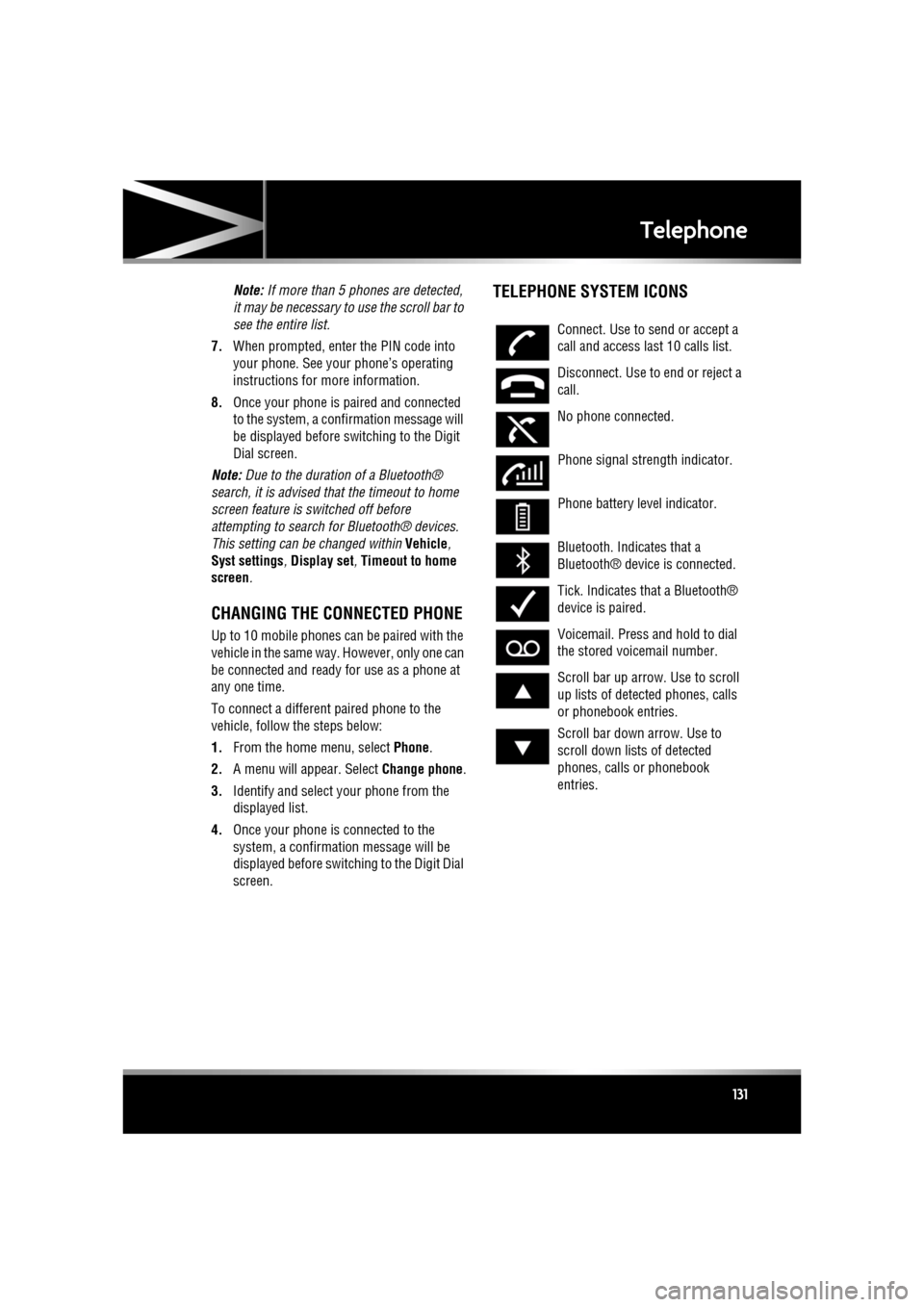
TELEPHONE SYSTEM ICONS
Connect. Use to send or accept a
call and access last 10 calls list.
Disconnect. Use to end or reject a
call.
No phone connected.
Phone signal strength indicator.
Phone battery level indicator.
Bluetooth. Indicates that a
Bluetooth® device is connected.
Tick. Indicates that a Bluetooth®
device is paired.
Voicemail. Press and hold to dial
the stored voicemail number.
Scroll bar up arrow. Use to scroll
up lists of detected phones, calls
or phonebook entries.
Scroll bar down arrow. Use to
scroll down lists of detected
phones, calls or phonebook
entries.
Page 132 of 225
L
(FM8) SEMCON JLR OWNER GUIDE VER 1.00 EURO
LANGUAGE: english-en; MARQUE: jaguar; MODEL: XF
Telephone
132
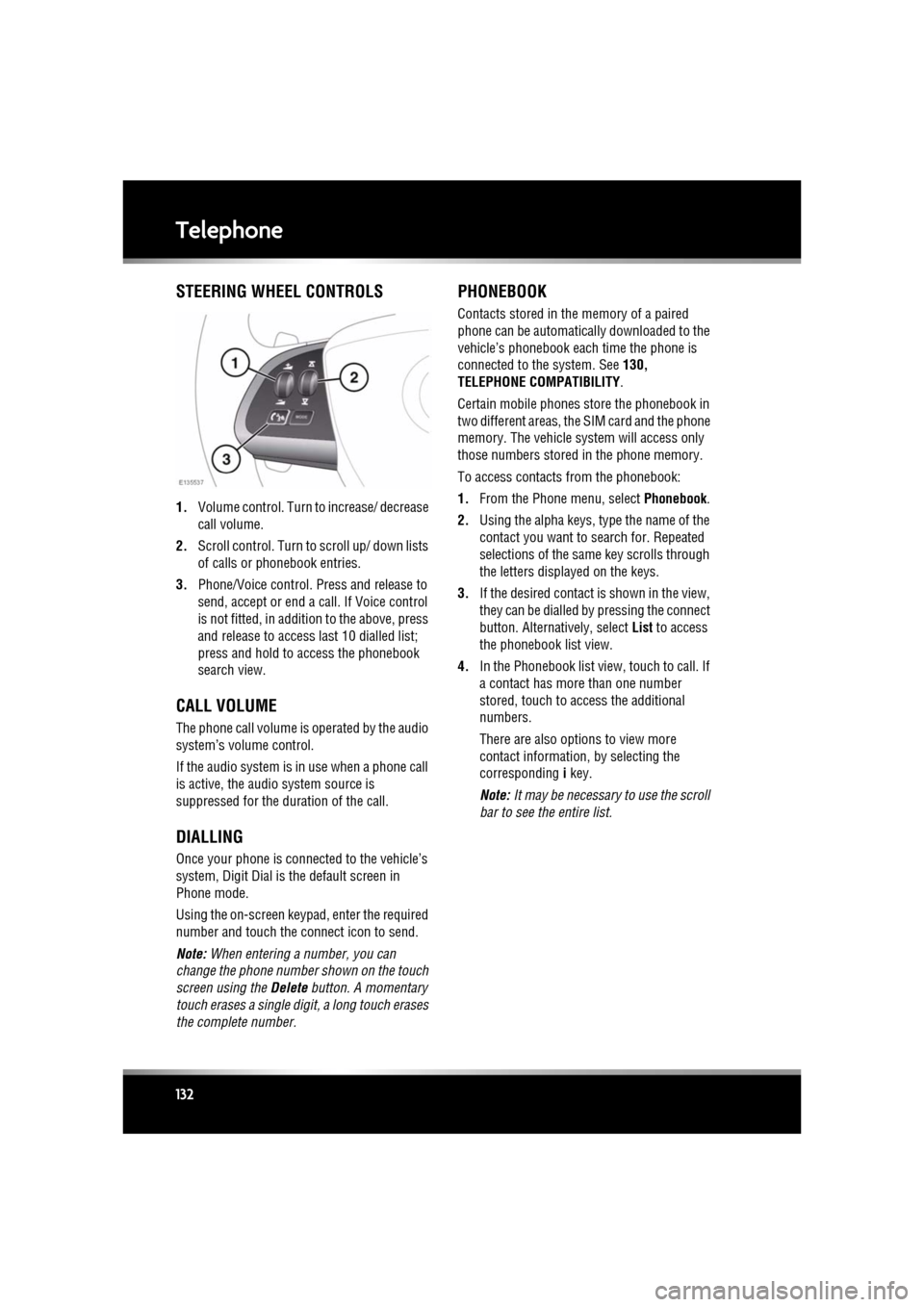
STEERING WHEEL CONTROLS
1. Volume control. Turn to increase/ decrease
call volume.
2. Scroll control. Turn to scroll up/ down lists
of calls or phonebook entries.
3. Phone/Voice control. Press and release to
send, accept or end a call. If Voice control
is not fitted, in addition to the above, press
and release to access last 10 dialled list;
press and hold to ac cess the phonebook
search view.
CALL VOLUME
The phone call volume is operated by the audio
system’s volume control.
If the audio system is in use when a phone call
is active, the audio system source is
suppressed for the dur ation of the call.
DIALLING
Once your phone is conne cted to the vehicle’s
system, Digit Dial is the default screen in
Phone mode.
Using the on-screen keypad, enter the required
number and touch the connect icon to send.
Note: When entering a number, you can
change the phone number shown on the touch
screen using the Delete button. A momentary
touch erases a single digi t, a long touch erases
the complete number.
PHONEBOOK
Contacts stored in the memory of a paired
phone can be automatically downloaded to the
vehicle’s phonebook each time the phone is
connected to the system. See 130,
TELEPHONE COMPATIBILITY .
Certain mobile phones store the phonebook in
two different areas, the SIM card and the phone
memory. The vehicle system will access only
those numbers stored in the phone memory.
To access contacts from the phonebook:
1. From the Phone menu, select Phonebook.
2. Using the alpha keys, type the name of the
contact you want to search for. Repeated
selections of the sa me key scrolls through
the letters displayed on the keys.
3. If the desired contact is shown in the view,
they can be dialled by pressing the connect
button. Alternatively, select List to access
the phonebook list view.
4. In the Phonebook list view , touch to call. If
a contact has more than one number
stored, touch to access the additional
numbers.
There are also options to view more
contact information, by selecting the
corresponding i key.
Note: It may be necessary to use the scroll
bar to see the entire list.
Page 141 of 225

R
(FM8) SEMCON JLR OWNER GUIDE VER 1.00 EURO
LANGUAGE: english-en; MARQUE: jaguar; MODEL: XF
Navigation system
141
MOTORWAY
After selecting Motorway from the menu, enter
the motorway name or number, then select an
entrance or exit. All of the entrance or exit
junctions for the chosen motorway are
displayed.
The map showing the selected motorway and
the selected exit junction is displayed.
The destination has now been set and the route
is calculated.
POINTS OF INTEREST (POI)
After selecting Points of interest from the Nav
menu, touch Name to input the POI name, for
example Petrol to display fuel stations on the
map, or touch List for a list of POIs.
Alternatively, choose Category to see all
categories of POI and make your selection.
Use the scroll arrows to change pages.
Some POIs are sub-categorised, e.g. selecting
Community will be further divided into:
• Community Centre.
• Exhibition Centre.
• Hospital.
• Park & Recreation.
• Town Hall
Note: If entering a POI name results in too
many matches being lis ted, try entering the
town name first. If y ou do not know the name
of the POI you want, try selecting a POI
category.
Note: POI icons can only be displayed up to the
1 km (½ mile ) zoom level.
Once the POI has been selected the route is
determined. Touch Change route. to change
the route settings, or touch OK to start the
route calculation.
JAGUAR DEALER LOCATIONS
Details of Jaguar Dealers are held on the
Navigation System hard drive as a points of
interest (POI) category. Certain Dealers may be
located in areas that are not fully mapped on
the hard drive. If a route is set to one of these
Dealers, guidance may only be possible to the
nearest town centre; in this case a warning
message will be displayed.
Note: If Jaguar Dealers (or certain other
categories, such as airports) are selected, they
will be displayed across all search areas.
ENTRY BY TOWN
If a town name is entered first, the points of
interest listed will be restricted to that town.
• From the Input POI Name screen, touch
Town .
• Enter the town name required.
• Touch List to display the list of possible
towns.
• Select the town required.
The Input POI screen is displayed again.
• Enter the POI name required.
CATEGORIES AND SUB-CATEGORIES
The POI database is divided into a number of
categories. Each main category is further
divided into a number of sub-categories.
The first entry in the list of Restaurant
sub-categories, is ALL. This selects all of the
Restaurant sub-categories.
To narrow the search, touch the Town button.
This will display the alpha keyboard to allow the
desired town name to be entered.
When searching the database, only points of
interest in the current search area are included,
except for the sub-categories marked All
search areas in the POI category list.
Page 147 of 225
R
(FM8) SEMCON JLR OWNER GUIDE VER 1.00 EURO
LANGUAGE: english-en; MARQUE: jaguar; MODEL: XF
Tyre repair kit
147
Tyre repair kitTYRE REPAIR KIT
If you are in any doubt regarding your
ability to carry out the instructions,
contact your Dealer/Authorised
Repairer before attempting the repair.
Your vehicle may not be equipped with a spare
tyre. If this is the case, in its place in the rear
underfloor storage compartment, you will find
a tyre repair kit (except where run-flat tyres are
fitted). The tyre repair ki t can be used to repair
one tyre and it is essent ial that you read the
following guide before attempting to repair a
tyre.
The tyre repair kit seal s most punctures with a
maximum diameter of 6 mm (1/4 inch).
Note: The sealant used in the tyre repair kit has
a shelf life and the expiry date is shown on the
tyre sealant bottle. Ensur e that the container is
replaced before the expiry date.
TYRE REPAIR KIT SAFETY
INFORMATION
Some tyre damage may only be
partially sealed, or may not seal at
all, depending on the amount and type
of damage. Any loss of tyre pressure
can seriously affect vehicle safety.
Do not use the tyre repair kit if the tyre
has been damaged by driving while
under-inflated.
Only use the tyre repair kit to seal
damage located within the tyre tread
area.
Do not exceed 80 km/h (50 mph) when
a repaired tyre is fitted to the vehicle.
The maximum distanc e that should be
driven when a repaired tyre is fitted, is
200 km (125 miles). When a repaired tyre is fitted, drive
with caution and avoid sudden braking
or steering manoeuvres.
Only use the tyre repair kit for the
vehicle with which it was supplied.
Do not use the tyre repair kit for any
other purpose than tyre repair.
Never leave the tyre repair kit
unattended when in use.
Only use the tyre repair kit within the
-30°C to +70°C temperature range.
Always keep children and animals at a
safe distance from the tyre repair kit
when in use.
Do not stand directly beside the
compressor when it is operating.
Check the tyre sidewall prior to
inflation. If any cracks, damage or
deformities are apparent, do not
inflate the tyre.
Watch the tyre sidewall during
inflation. If any cracks, bumps or
similar damage, or deformities
appear, switch off the compressor and
deflate the tyre.
Page 148 of 225
L
(FM8) SEMCON JLR OWNER GUIDE VER 1.00 EURO
LANGUAGE: english-en; MARQUE: jaguar; MODEL: XF
Tyre repair kit
148
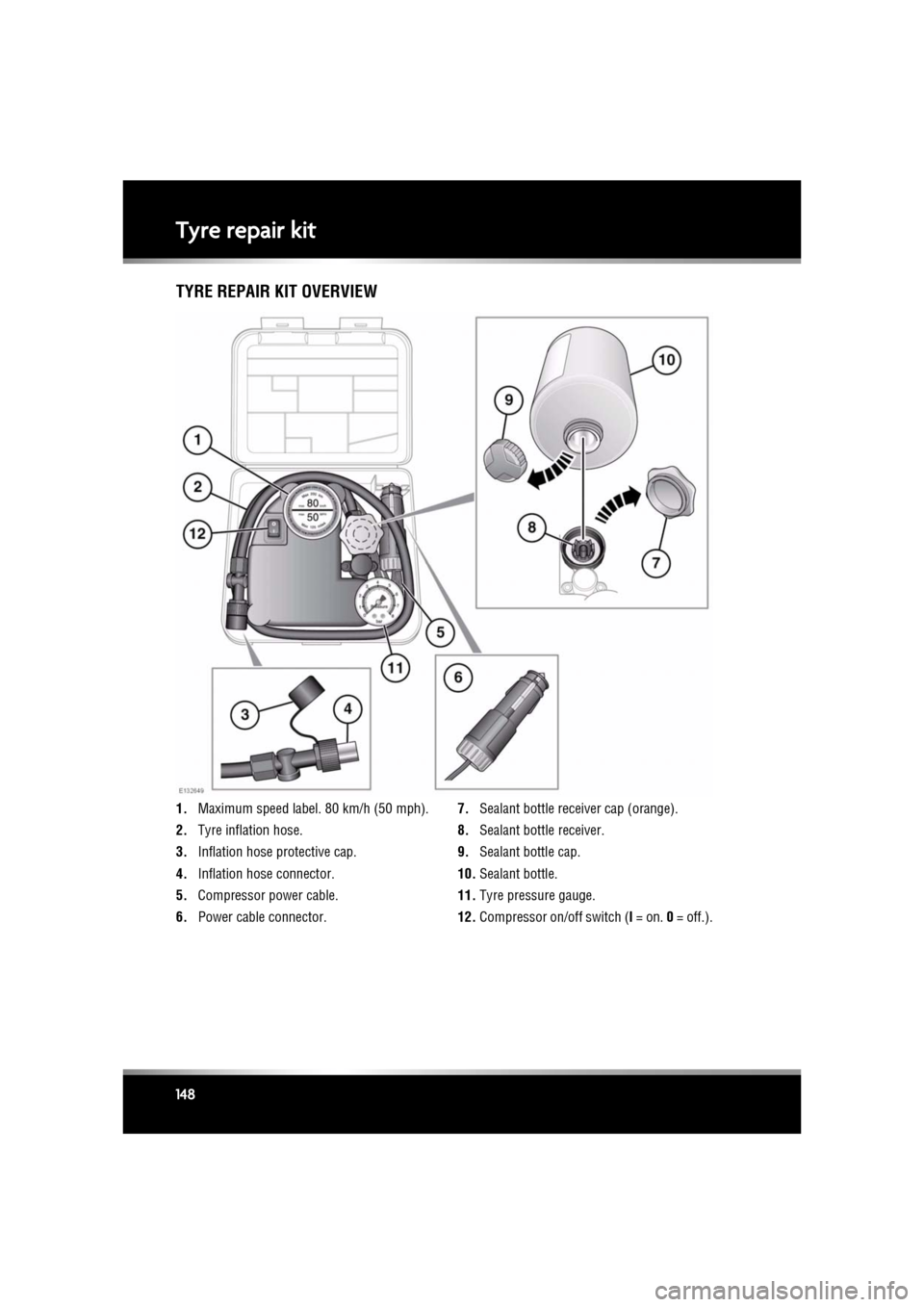
TYRE REPAIR KIT OVERVIEW
1. Maximum speed label. 80 km/h (50 mph).
2. Tyre inflation hose.
3. Inflation hose protective cap.
4. Inflation hose connector.
5. Compressor power cable.
6. Power cable connector. 7.
Sealant bottle receiver cap (orange).
8. Sealant bottle receiver.
9. Sealant bottle cap.
10. Sealant bottle.
11. Tyre pressure gauge.
12. Compressor on/off switch ( I = on. 0 = off.).
Page 149 of 225
R
(FM8) SEMCON JLR OWNER GUIDE VER 1.00 EURO
LANGUAGE: english-en; MARQUE: jaguar; MODEL: XF
Tyre repair kit
149
USING THE TYRE REPAIR KIT
Avoid skin contact with the sealant
which contains natural rubber latex.
If the tyre inflation pressure does not
reach 1.8 bar (26 psi, 180 kPa) within
seven minutes, the tyre may have
suffered excessive damage. A
temporary repair will not be possible,
and the vehicle should not be driven
until the tyre has been replaced.
Before attempting a tyre repair, ensure
that the vehicle is parked safely, as far
away from passing traffic as possible.
Ensure that the parking brake is applied
and P (Park) is selected.
Do not attempt to remove foreign
objects such as nails, screws, etc. from
the tyre.
Always run the engine when using the
compressor, unless the vehicle is in an
enclosed or poorly ventilated space, as
this may cause asphyxiation.
To prevent overheatin g, do not operate
the compressor continuously for longer
than ten minutes.
Note: All vehicle drivers and occupants should
be made aware that a temporary repair has
been made to a tyre fitt ed to the vehicle. They
should also be made aware of the special
driving conditions im posed when using a
repaired tyre.
REPAIR PROCEDURE
Check the tyre sidewall prior to
inflation. If there are any cracks,
bumps or similar damage, do not
attempt to inflate the tyre. Do not
stand directly besi de the tyre while
the compressor is pumping. Watch the
tyre sidewall. If any cracks, bumps or
similar damage appear, turn off the
compressor and let the air out by
means of the pressure relief valve. Do
not continue to use the tyre.
1. Open the tyre repair kit and peel off the
maximum speed label. Attach the label to
the facia in the driver's field of vision. Take
care not to obstruct an y of the instruments
or warning lights.
2. Uncoil the compressor power cable and
the inflation hose.
3. Unscrew the orange cap from the sealant
bottle receiver and the sealant bottle cap.
4. Screw the sealant bottle into the receiver
(clockwise) until tight.
•Screwing the bottle onto the receiver
will pierce the bottle's seal. Once the
receiver has been fitted, a ratchet
prevents it from being removed.
5. Remove the valve cap from the damaged
tyre.
6. Remove the protective cap from the
inflation hose and connect the inflation
hose to the tyre valve. Ensure that the hose
is screwed on firmly.
7. Ensure that the compressor switch is in the
off ( 0) position.
8. Insert the power cable connector into the
auxiliary power socket.
9. Unless the vehicle is in an enclosed area,
start the engine.
Page 150 of 225

L
(FM8) SEMCON JLR OWNER GUIDE VER 1.00 EURO
LANGUAGE: english-en; MARQUE: jaguar; MODEL: XF
Tyre repair kit
150
10. Set the compressor switch to the on ( I)
position.
11. Inflate the tyre to a minimum of 1.9 bar
(26 psi) and a maximum of 3.5 bar
(51 psi).
•When pumping the sealant through the
tyre valve, the pressure may rise up to
6 bar (87 psi). The pressure will drop
again after approx imately 30 seconds.
12. During the inflation, switch the
compressor off briefly, to check the tyre
pressure using the gauge mounted on the
compressor.
•It should not take longer than 7
minutes to inflate the tyre. If, after 7
minutes, the tyre ha s not yet reached
minimum pressure, the tyre should not
be used.
13. Once the tyre has been inflated, switch off
the compressor. If desired, the engine may
be turned off after the compressor has
been turned off.
14. Remove the power connector from the
auxiliary power socket.
15. Remove the inflation hose from the tyre
valve, by unscrewing it as quickly as
possible (anticlockwise).
16. Replace the inflation hose protective cap
and the tyre valve cap.
17. Ensure that the tyre repair kit (including the
bottle and receiver caps) are placed
securely in the vehicle. You will need to use
the kit to check the tyre pressure after
approximately 3 km (2 miles), so ensure
they are easily accessible.
18. Immediately drive the vehicle for
approximately 3 km (2 miles), to allow the
sealant to coat the inner surface of the tyre
and form a seal at the puncture.CHECKING THE TYRE PRESSURE
AFTER A REPAIR
When driving the vehicle, if you
experience vibrations, abnormal
steering, or noises, reduce speed
immediately. Drive with extreme
caution and reduced speed, to the first
safe place to stop the vehicle. Visually
examine the tyre and check its
pressure. If there are any signs of
damage or deformity to the tyre, or the
tyre pressure is below 1.3 bar (19
psi), do not continue driving.
Consult a tyre repair centre or your
Dealer/Authorised Repairer, for
advice concerning the replacement of
a tyre after using a tyre repair kit.
1. Drive the vehicle for 3 km (2 miles) then
stop in a safe place. Carry out a visual
examination of the tyre’s condition.
2. Make sure that the sealant container
section is in its original position.
3. Screw the inflation hos e connector firmly
onto the tyre valve.
4. Read the tyre pressure from the gauge.
5. If the pressure of the sealant filled tyre is
above 1.3 bar (19 psi) adjust the pressure
to the correct value.
6. Ensure that the compressor switch is in the
Off ( O) position and insert the power cable
connector into the au xiliary power socket.
If the vehicle is in a well ventilated area,
start the engine.
7. Switch the compressor to On ( I) and inflate
the tyre to the correct pressure.
8. To check the tyre pressure, turn off the
compressor then read the pressure from
the gauge.
Page 151 of 225
R
(FM8) SEMCON JLR OWNER GUIDE VER 1.00 EURO
LANGUAGE: english-en; MARQUE: jaguar; MODEL: XF
Tyre repair kit
151
9. When the compressor is off, if the tyre
pressure is too high, release the required
amount of pressure using the pressure
release valve.
10. Once the tyre is inflated to the correct
pressure, switch off the compressor and
remove the power plug from the auxiliary
socket.
•The use of the tyre repair kit sealant
may lead to error prompts and
incorrect readings of the Tyre Pressure
Monitoring System. Therefore, use the
tyre repair kit pressure gauge to check
and adjust the damaged tyre's inflation
pressure.
11. Unscrew the inflation hose connector from
the tyre valve, replace the tyre valve cap
and the inflation hose connector protective
cap.
12. Ensure that the tyre repair kit is placed
securely in the vehicle.
13. Drive to the nearest tyre repair centre or
Dealer/Authorised Repairer, for a
replacement tyre to be fitted. Ensure that
you make the repair centre aware that the
tyre repair kit has been used before the tyre
is removed.
14. Both the tyre inflation hose, and the sealant
container should be replaced once a new
tyre has been fitted.
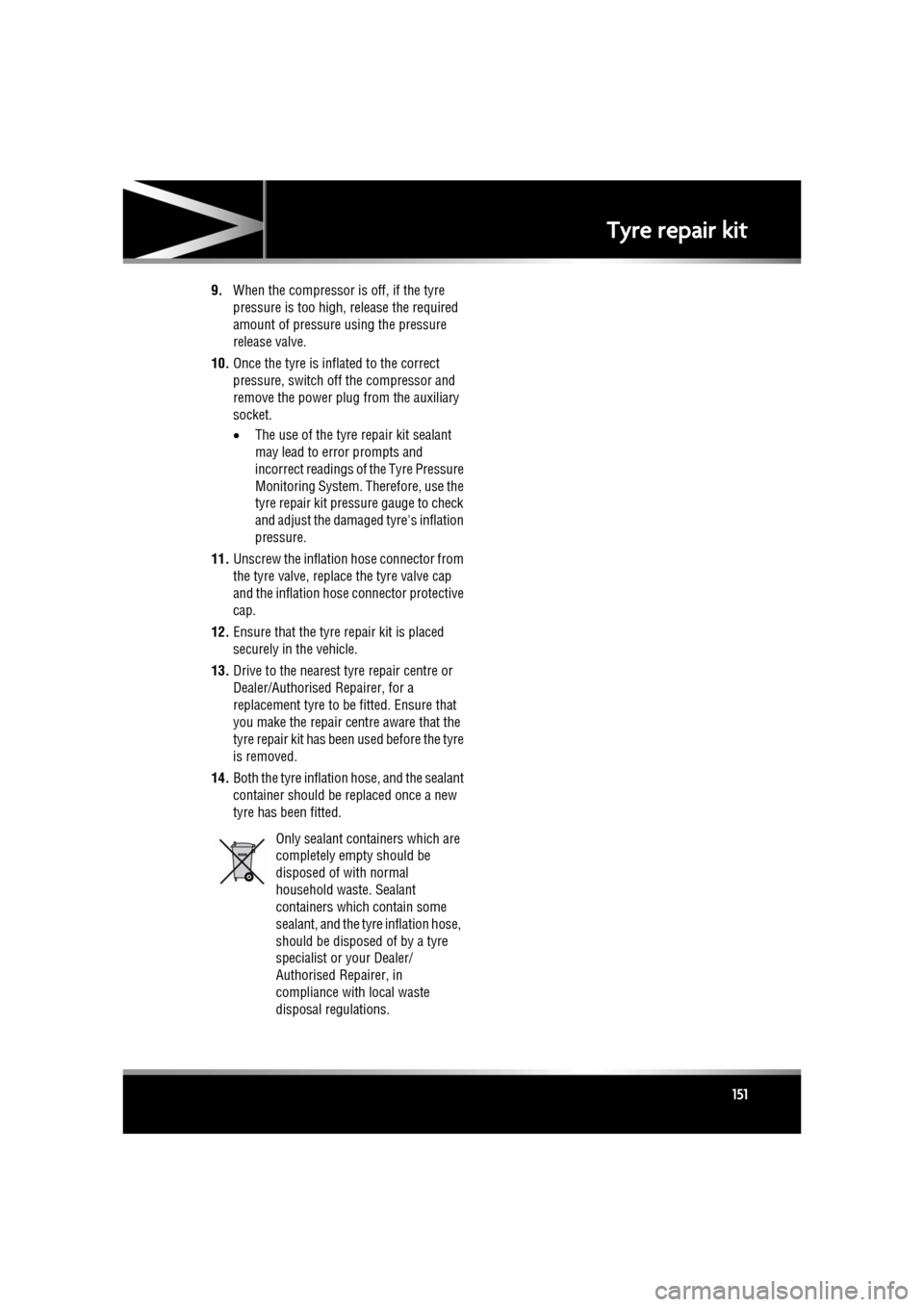
Only sealant containers which are
completely empty should be
disposed of with normal
household waste. Sealant
containers which contain some
sealant, and the tyre inflation hose,
should be disposed of by a tyre
specialist or your Dealer/
Authorised Repairer, in
compliance with local waste
disposal regulations.