air JAGUAR XF 2011 1.G Owner's Guide
[x] Cancel search | Manufacturer: JAGUAR, Model Year: 2011, Model line: XF, Model: JAGUAR XF 2011 1.GPages: 225, PDF Size: 7.32 MB
Page 69 of 225
R
(FM8) SEMCON JLR OWNER GUIDE VER 1.00 EURO
LANGUAGE: english-en; MARQUE: jaguar; MODEL: XF
Towing
69
TowingTOWING A TRAILER
(V6 petrol and diesel vehicles only)
Never exceed the maximum weights
for the vehicle or the trailer. Damage
to the vehicle coul d occur and vehicle
stability and braking could be
adversely affected. This could lead to
loss of control and increased braking
distance, resulting in a rollover or
crash.
To preserve handling and stability,
only fit Jaguar approved towing
accessories.
Never use towing eyes or lashing
points to tow a trailer. They have not
been designed for this purpose and
doing so may cause them to fail,
resulting in injury or death.
When towing, do not exceed 100 km/h
(60 mph). If using a temporary spare
wheel, do not exceed 80 km/h (50
mph).
Note: It is the driver’s re sponsibility to ensure
that the towing vehicle, and the trailer, are
being used correctly and in accordance with
manufacturer’s reco mmendations and any
applicable legislation.
Information on towing, towing weight
capacities and regulati ons is available from
your Dealer and from the main motoring and
caravanning organisations.
The following are important points of safety,
stability and comfort. Seek further advice if
necessary.
• Maximum braked to wing weight is
permissible, provided that long periods of
uphill driving on gradients over 8% are not
undertaken. •
At altitudes above 1000 metres (3250 feet),
the stipulated maximum permitted Gross
Train Weight must be reduced by 10% for
every 1000 metres (3250 feet) in altitude,
because the thinner atmosphere can
reduce engine performance.
Diesel engines : When ambient temperature
exceeds 40°C (104°F), the engine coolant
temperature may increase above normal
operating level. If this occurs, the engine
management system will initiate a series of
actions to restore normal operating conditions,
which may include:
• A message centre message.
• Engine performance reduction.
• Air conditioning system cycling. The air
conditioning temper ature output will
fluctuate between hot and cold, in order to
dissipate engine heat. If engine overheat
persists, the air conditioning will move to
continuous heat output.
It is advisable to bring the vehicle and trailer to
a convenient stop and allo w the engine to idle
until normal temperature is restored. Do not
turn off the engine.
TRAILER ELECTRICAL CONNECTION
Only connect approved electrical
circuits, which are in good condition, to
the trailer socket. Connecting incorrect
or faulty circuits, may seriously damage
the vehicle’s electrical circuits.
The vehicle’s electrical system has been
designed to support all towing requirements
and comply with legal requirements for the
specific territory in which the vehicle is first
sold.
Note: The rear parking se nsors automatically
disable when the trailer electrical connection is
made using Jaguar approved towing
equipment.
Page 77 of 225
R
(FM8) SEMCON JLR OWNER GUIDE VER 1.00 EURO
LANGUAGE: english-en; MARQUE: jaguar; MODEL: XF
Starting the engine
77
PETROL ENGINES
If the engine persistently fails to start, press the
START/STOP button (without applying the
brake pedal) to return the ignition to
convenience mode. Slowly depress the
accelerator pedal fully, ho ld it in this position
and press the START/STOP button with the
brake pedal applied, the engine will start to
crank. Release the accelerator pedal when the
engine starts.
If the engine still fails to start, consult your
Dealer/Authorised Repairer.
DIESEL ENGINES
If the engine persistently fails to start, press
and hold the START/STOP button (with the
brake pedal applied). Keep the START/STOP
button and the brake pedal pressed until the
engine starts, then release.
If the engine still fails to start, consult your
Dealer/Authorised Repairer.
SWITCHING OFF THE ENGINE WHILE
MOVING
It is not advisable to switch off the
engine whilst the vehicle is moving.
However, should such a situation
arise, then the following procedure
applies.
• Press and hold the engine START/STOP
button for 2 seconds, or;
• Press the engine START/STOP button
twice within 2 seconds.
In either case, the warning Engine stop button
pressed will be displayed in the message
centre.
ROLLING RE-START
If the engine is switched off whilst the vehicle
is moving, a rolling re-sta rt can be initiated by
selecting neut ral and pressing the engine
START/STOP button.
ECO STOP/START
The Stop/Start system is designed to improve
fuel efficiency and is automatically activated
when the ignition is turned on. If the vehicle is
stopped (e.g. at traffic lights or in traffic), the
engine will turn off (unl ess it is required to
support other vehicle systems). When the
brake is released and a drive gear is selected,
the engine will restart automatically.
To activate an automatic engine stop:
• Stop the vehicle from a speed greater than
4 km/h (2.5 mph) and apply sufficient
brake pressure to ensure the vehicle is
stationary.
• Alternatively, whilst stationary, select P
(Park) or N (Neutral).
To activate an automatic engine restart release
the brake pedal with D (Drive) or S (Sport)
selected.
The warning lamp in the
instrument panel illuminates when
the engine has been switched off
by the Stop/Start system.
Page 82 of 225

L
(FM8) SEMCON JLR OWNER GUIDE VER 1.00 EURO
LANGUAGE: english-en; MARQUE: jaguar; MODEL: XF
Gearbox
82
Do not allow the vehicle to remain
stationary with a drive gear selected and
the engine running . Always select P or
N if the engine is to idle for a prolonged
period.
ROTARY GEAR SELECTOR
The JaguarDrive selector elevates out of the
centre console when the engine is started, in
readiness for gear selection
P should be selected before switching off the
engine. However, it is possible to switch the
engine off with R, D or S selected - the selector
will automatica lly select P, while retracting into
the centre console.
Note: If the engine is switched off with N
selected, the system will wait for 10 minutes
before selecting P. This procedure is to allow
the vehicle to be conveyed through a car wash
only and should not be used for vehicle
recovery purposes.
In the event of a vehicle breakdown, the
transmission will automatically select P. This
prevents the vehicle from being towed on all
four wheels. Therefore, vehicle recovery
should only be undertaken by suitably qualified
personnel.
IF THE SELECTOR FAILS TO ELEVATE
If the JaguarDrive selector is obstructed
remove the obstruction and then start the
engine. The selector s hould elevate as normal.
If the selector still fails to elevate, even if there
is no obstruction, a faul t in the system is
indicated. The selector ca n still be used in the
lowered position, but be aware that it will not
automatically select P when the engine is
switched off. P should be selected manually.
The fault should be re ctified by a Dealer/
Authorised Repairer at the earliest opportunity.
MANUAL GEAR SELECTION
When the gear selector is in the D position,
manual mode may be directly accessed by the
single action of operating the steering wheel
mounted shift paddles.
If continued use of manua l mode is required,
the gear selector may be subsequently moved
to the S position to enter permanent manual
mode.
If the gear selector remains in the D position,
temporary manual mode will be held whilst the
driver is accelerating, decelerating, cornering
or continuing to request shifts via the paddles.
LIMP-HOME MODE
Note: The driver should be aware that the
vehicle’s performance will be reduced and
must take this into account when driving. Also
the use of the Jaguar Sequential Shift paddles
will be disabled. In this event, seek qualified
assistance as soon as possible.
In the event of an electrical or mechanical
failure, transmission ope ration will be limited.
P , R , N , D and S may still be used to enable the
vehicle to be driven to a safe area.
Some faults will cause the selector to be locked
in position until the ignition is switched off. If
the selected range flashes, it signifies that the
driver request cannot be engaged. Re-select N
and repeat the attempt.
If the transmission is st ill unable to select the
requested gear, contact your Dealer/
Authorised Repairer.
Page 91 of 225

R
(FM8) SEMCON JLR OWNER GUIDE VER 1.00 EURO
LANGUAGE: english-en; MARQUE: jaguar; MODEL: XF
Tyre pressure monitoring system
91
REPLACEMENT TPMS SENSOR
Should the sensor require replacing, it should
be carried out by a Deal er/Authorised Repairer.
A replacement sensor must be fitted to a
running wheel in order to be recognised by the
system. The vehicle needs to be stationary for
15 minutes during the sensor fitment before
the system is ready to detect the new sensor.
The vehicle must be driven for a minimum of
fifteen minutes after th e sensor change, and
then remain stationary for fifteen minutes to
activate full TPM system operation.
If the TPM system warning for any wheel does
not clear, even after ensuring correct inflation
and driving for more than ten minutes above 25
km/h (18 mph), you s hould seek qualified
assistance as soon as possible.
Page 93 of 225
R
(FM8) SEMCON JLR OWNER GUIDE VER 1.00 EURO
LANGUAGE: english-en; MARQUE: jaguar; MODEL: XF
Parking aids
93
CLEANING THE SENSORS
For reliable operation, th e sensors in the front
and rear bumpers should be kept free from ice,
frost and grime.
Do not clean the sensors with abrasive
or sharp objects or materials.
When using a high pressure spray, only
spray the sensors briefly, from a
distance greater than 200 mm
(8 inches).
PARKING AID SYSTEM FAULT
If the system has a fault when engaging reverse
gear or turning on the ignition, then a single, 3
second tone will be heard and a pop-up
warning will appear on the touch screen. If
both front and rear park ing aids are fitted, the
warning indicator in the parking aid switch will
flash for 3 seconds and then switch off.
If a fault is detected, the system is
automatically disabled.
Note: The parking aid may emit spurious tones
if it detects a frequenc y tone using the same
band as the sensors (e.g. air brakes).
REAR VIEW CAMERA
It remains the driver's responsibility
to detect obstacles and estimate the
vehicle's distance from them when
reversing.
When Reverse ( R) is selected, the system uses
a camera to provide a wide-angle colour rear
view image on the touch screen.
The camera display has priority over the
parking aid display. To view the parking aid
display instead, or to cancel camera display at
any time, touch the display.
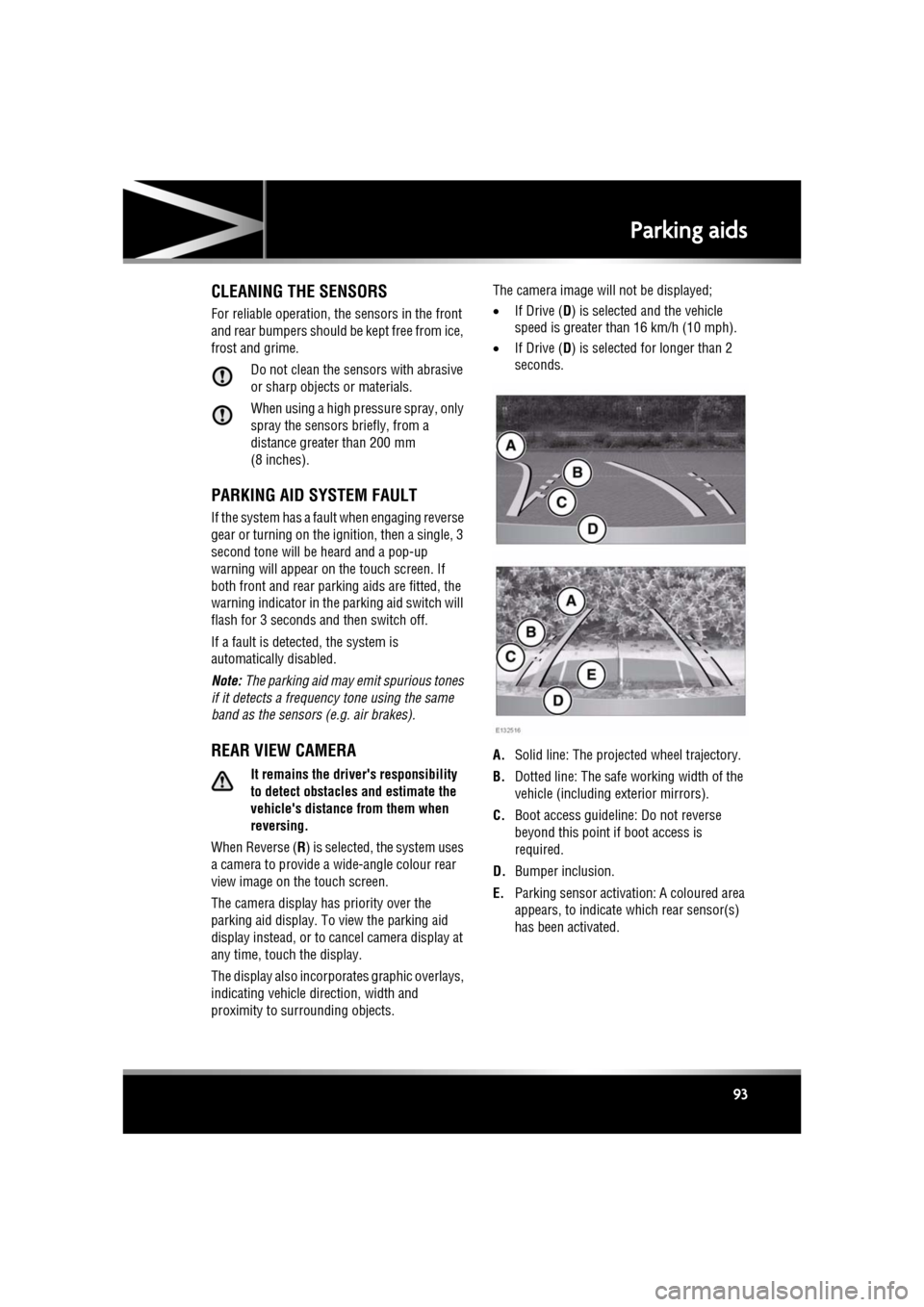
The display also incorporates graphic overlays,
indicating vehicle di rection, width and
proximity to surrounding objects. The camera image will not be displayed;
•
If Drive ( D) is selected and the vehicle
speed is greater than 16 km/h (10 mph).
• If Drive ( D) is selected for longer than 2
seconds.
A. Solid line: The projec ted wheel trajectory.
B. Dotted line: The safe working width of the
vehicle (including exterior mirrors).
C. Boot access guideline: Do not reverse
beyond this point if boot access is
required.
D. Bumper inclusion.
E. Parking sensor activati on: A coloured area
appears, to indicate which rear sensor(s)
has been activated.
Page 102 of 225
L
(FM8) SEMCON JLR OWNER GUIDE VER 1.00 EURO
LANGUAGE: english-en; MARQUE: jaguar; MODEL: XF
Adaptive cruise control
102
INTELLIGENT EMERGENCY BRAKING
The system may not react to slow
moving vehicles.
The system will not react to stationary
vehicles, or vehicles that are not
travelling in the same direction as
your vehicle.
Warnings and automatic braking may
not occur if the dist ance to the vehicle
ahead is very small, or if the steering
wheel and pedal movements are large
(to avoid a collis ion for example).
IEB (Intelligent Em ergency Braking)
uses the same radar sensor as
Adaptive Cruise Control and Forward
Alert. The same performance
limitations apply, see 96, ADAPTIVE
CRUISE CONTROL OVERVIEW.
IEB is available at all speeds to automatically
apply the brakes if an unavoidable collision
with a moving vehicle in front is detected.
If there is an imminent risk of collision, an
audible warning is given. If the collision then
becomes unavoidable, the IEB system applies
the brakes at up to maximum pressure. After
IEB has activated, IEB System Was Activated
is displayed in the message centre and the
system is inhibited from further operation until
reset by a Dealer/Authorised Repairer.
IEB will function even if Forward Alert and ACC
are switched off. If the radar sensor is blocked,
by snow or heavy rain for example, or there is
a fault with the system, IEB Not Available is
displayed in the message centre. The vehicle
can still be driven and the braking system will
still operate, but without IEB. If the cause of
this message being disp layed is thought to be
other than a blocked rada r sensor, consult your
Dealer/Authorised Repairer.
Page 105 of 225
R
(FM8) SEMCON JLR OWNER GUIDE VER 1.00 EURO
LANGUAGE: english-en; MARQUE: jaguar; MODEL: XF
Audio/video overview
105
7. Seek down:
Short press:
•To auto seek down the frequency to the
next radio station.
• To select the previous track or start of
current track on chosen audio source -
CD, MP3 etc.
• To select the previous TV channel on
the channel list or the previous DVD
chapter.
Long press:
• To activate radio manual seek mode.
• To skip backward through current
audio source track.
With radio manual seek mode activated,
further short presse s will change the
frequency in single decrements. A further
long press will scan backward through the
current waveband until the button is
released.
8. CD/DVD eject button.
9. Rotate to adjust volume.
10. Rotate (up or down) and release repeatedly
to scroll through:
•The radio presets.
• The previous track or start of next track
on chosen audio source - CD, MP3 etc.
11. MODE : Press repeatedly to scroll through
all audio/video sources.
12. If Telephone and Voice control are not
fitted, press to mute/un-mute audio.
Otherwise, if Tele phone is fitted, see 128,
TELEPHONE SYSTEM OVERVIEW. If Voice
control is fitted, see 126, USING VOICE
CONTROL .AUDIO SETTINGS
To view the audio settings menu, select
Settings and then Sound on the touch screen.
To adjust the sound settings:
1. Touch the + or - soft keys to adjust Bass,
Treble or Subwoofer levels.
2. If surround sound is fitted, touch the
appropriate soft key to select DPL II X, DTS
Neo6 or select Off to switch surround
sound off.
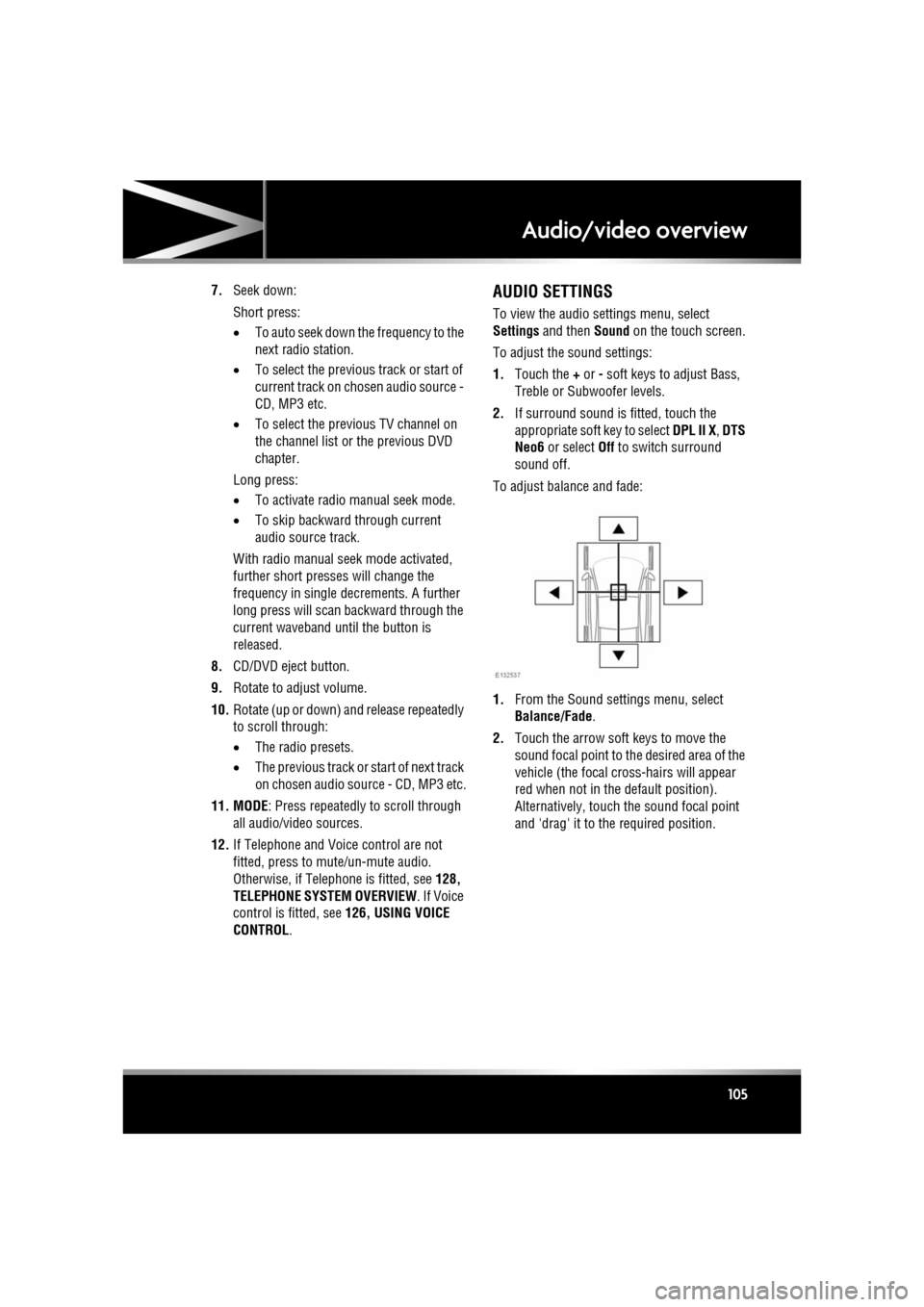
To adjust balance and fade:
1. From the Sound settings menu, select
Balance/Fade.
2. Touch the arrow soft keys to move the
sound focal point to the desired area of the
vehicle (the focal cr oss-hairs will appear
red when not in the default position).
Alternatively, touch the sound focal point
and 'drag' it to the required position.
Page 117 of 225
R
(FM8) SEMCON JLR OWNER GUIDE VER 1.00 EURO
LANGUAGE: english-en; MARQUE: jaguar; MODEL: XF
Portable media
117
PLAYING A PORTABLE DEVICE
If you are using a USB mass storage device or
approved iPod, you can control playback using
the touch screen controls.
If you are using a Blue tooth® device, you can
control playback using the touch screen, but
some controls are unavailable.
If you are using any portable media device via
the AUX socket, then you must control
playback from the device itself.
Jaguar does not recommend the use of
a Hard Disc Drive via the USB link while
the vehicle is in motion. These devices
are not designed for in car use and may
be damaged.
CONNECTING MULTIPLE DEVICES
Do not plug non-audio devices into the
USB port.
You can connect multiple devices
simultaneously to the portable media interface
and switch between th em using the touch
screen. Select iPod, USB , Bluetooth or AUX, to
switch between modes.
The device docked first will remain the active
device until you choose to change.
If, after changing to the newly-docked device,
you change back to the first device, play will
resume at the point you left it (USB and iPod
only).
Note: You cannot use a USB hub to connect
more than one USB devi ce to the audio unit.
Note: Devices connected to the iPod and USB
ports will be charged, but devices that are fully
discharged will not play.
Note: Options such as Repeat and Shuffle
relate to the device curre ntly playing, they will
not apply to any subsequent device.
PAIRING AND CONNECTING USING
THE MEDIA PLAYER
For further information on Bluetooth®, see
129, BLUETOOTH® INFORMATION .
Note: The process of pairing and connecting
your media device with the vehicle, using the
media device, will vary depending on the type
of media device.
1. Switch on the ignition and ensure the touch
screen is active.
2. From the Home menu, select Audio/Video,
then My Music .
3. A menu will appear. Select Search new.
4. Select Device to vehicle option.
Note: The vehicle’s Bluetooth® system is
only discoverable for 3 minutes.
5. Using the media device, search for
Bluetooth® devices. On some media
devices, this is referred to as new paired
device. See your medi a device’s operating
instructions for further information.
6. When the vehicle’s Bluetooth® system is
discovered, follow the on-screen
instructions. Select Yes when prompted, to
confirm the pairing.
Either your device or the vehicle system
will ask for a PIN (Personal Identification
Number). When prompted, enter a PIN of
your choice and select OK to confirm.
7. Enter the same PIN into the other device.
8. Once your device is paired and connected
to the system, a confirmation message will
be displayed, before switching to the My
music: Bluetooth screen.
Note: Some media devices do not
automatically connect and need to be
manually connected, via the device or by
using the Change device option.
Page 118 of 225

L
(FM8) SEMCON JLR OWNER GUIDE VER 1.00 EURO
LANGUAGE: english-en; MARQUE: jaguar; MODEL: XF
Portable media
118
PAIRING AND CONNECTING A
BLUETOOTH® DEVICE USING THE
TOUCH SCREEN
For further informatio n on Bluetooth®, see
129, BLUETOOTH® INFORMATION .
1. Switch on your device’s Bluetooth®
connection. Make sure that it is in
Bluetooth® discov erable mode,
sometimes referred to as find me mode
(see your device’s operating instructions
for more information).
2. Switch on the ignition and ensure the touch
screen is active.
3. From the Home menu, select Audio/Video,
then My Music .
4. A menu will appear. Select Search new.
5. Select Vehicle to device option.
6. Identify your device fr om the displayed list
and select the corresponding Pair and
connect option.
Note: If more than 5 devices are detected,
it may be necessary to use the scroll bar to
see the entire list.
7. When prompted, enter the PIN (Personal
Identification Number) code into your
device. See your device's operating
instructions for more information.
8. Once your device is paired and connected
to the system, a confirmation message will
be displayed before switching to the My
music: Bluetooth screen.
Note: Due to the duration of a Bluetooth®
search, it is advised that the time-out to home
screen feature is switched off before
attempting to search fo r Bluetooth® devices.
This setting can be changed within Set-up,
Screen, Time out home .
AUTOMATIC BLUETOOTH®
RECONNECTION
If devices have already been paired and
connected, when Bluetoot h® is selected from
the My music menu, the system will
automatically connect to th e last used device (a
confirmation pop-up appears) . If the last used
device is not present, then the system will
search for other previously connected devices
and automatically conne ct if one is found.
If no previously connect ed device is found,
Please connect device is displayed and the
Change device option is given.
LOSS OF CONNECTION
If a loss of connection between the vehicle and
the Bluetooth® device occurs, a pop-up is
displayed. Select Reconnect to automatically
restore the connection. A confirmation pop-up
will appear before the touch screen reverts to
its previous mode.
CHANGING/DISCONNECTING A
DEVICE
1. From the menu, select Change device.
2. Select Disconnect . A confirmation pop-up
will appear and then you will be given the
option to Search new or select a different
device from the list of paired devices.
Page 128 of 225
L
(FM8) SEMCON JLR OWNER GUIDE VER 1.00 EURO
LANGUAGE: english-en; MARQUE: jaguar; MODEL: XF
Telephone
128
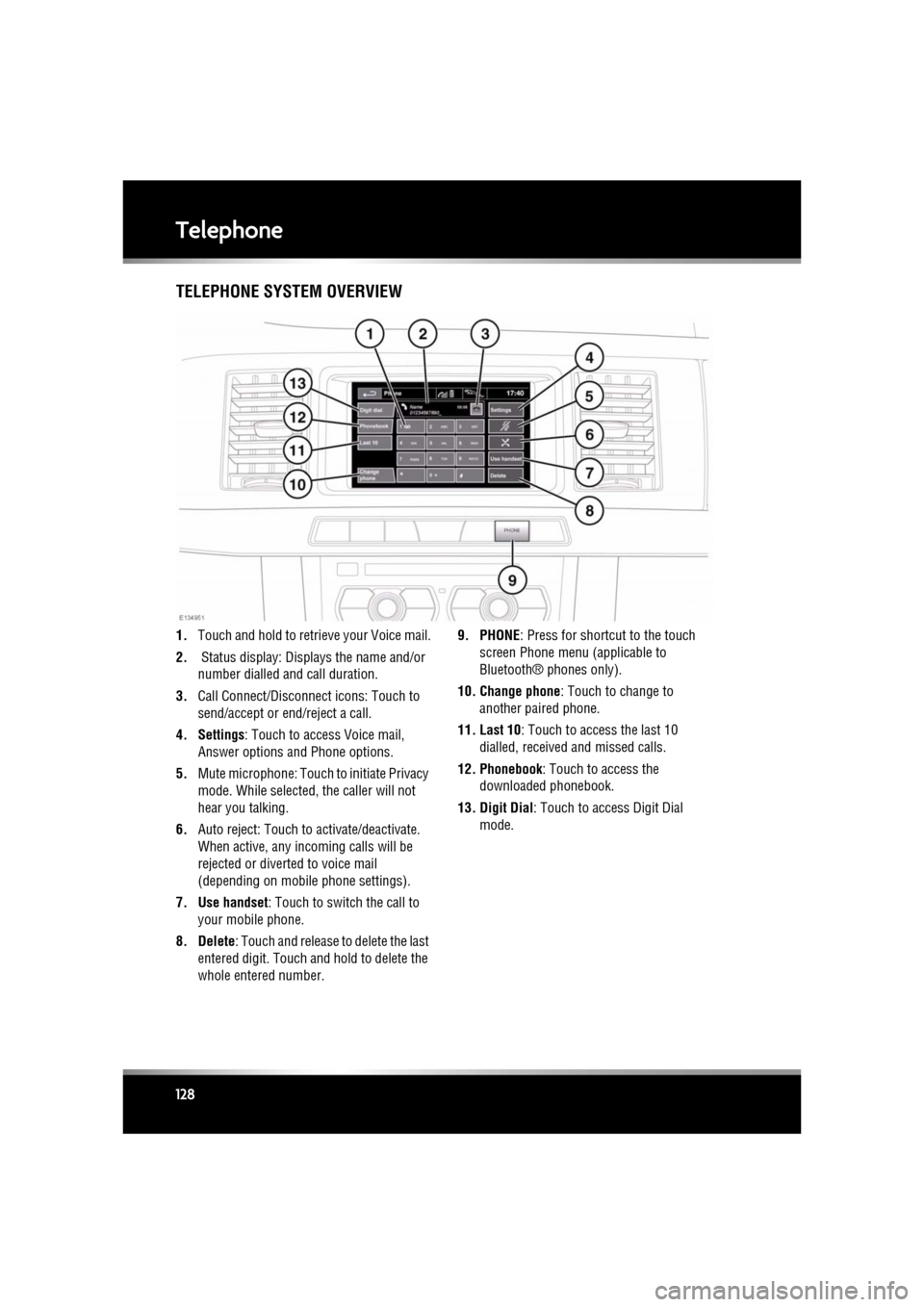
TelephoneTELEPHONE SYSTEM OVERVIEW
1. Touch and hold to retrieve your Voice mail.
2. Status display: Disp lays the name and/or
number dialled a nd call duration.
3. Call Connect/Disconn ect icons: Touch to
send/accept or e nd/reject a call.
4. Settings : Touch to access Voice mail,
Answer options and Phone options.
5. Mute microphone: Touch to initiate Privacy
mode. While selected, the caller will not
hear you talking.
6. Auto reject: Touch to activate/deactivate.
When active, any incoming calls will be
rejected or diverted to voice mail
(depending on mobile phone settings).
7. Use handset : Touch to switch the call to
your mobile phone.
8. Delete : Touch and release to delete the last
entered digit. Touch a nd hold to delete the
whole entered number. 9. PHONE
: Press for shortcut to the touch
screen Phone menu (applicable to
Bluetooth® phones only).
10. Change phone : Touch to change to
another paired phone.
11. Last 10 : Touch to access the last 10
dialled, received and missed calls.
12. Phonebook : Touch to access the
downloaded phonebook.
13. Digit Dial: Touch to access Digit Dial mode.