Pin JAGUAR XF 2011 1.G Owners Manual
[x] Cancel search | Manufacturer: JAGUAR, Model Year: 2011, Model line: XF, Model: JAGUAR XF 2011 1.GPages: 225, PDF Size: 7.32 MB
Page 15 of 225
R
(FM8) SEMCON JLR OWNER GUIDE VER 1.00 EURO
LANGUAGE: english-en; MARQUE: jaguar; MODEL: XF
Front seats
15
DRIVING POSITION MEMORY
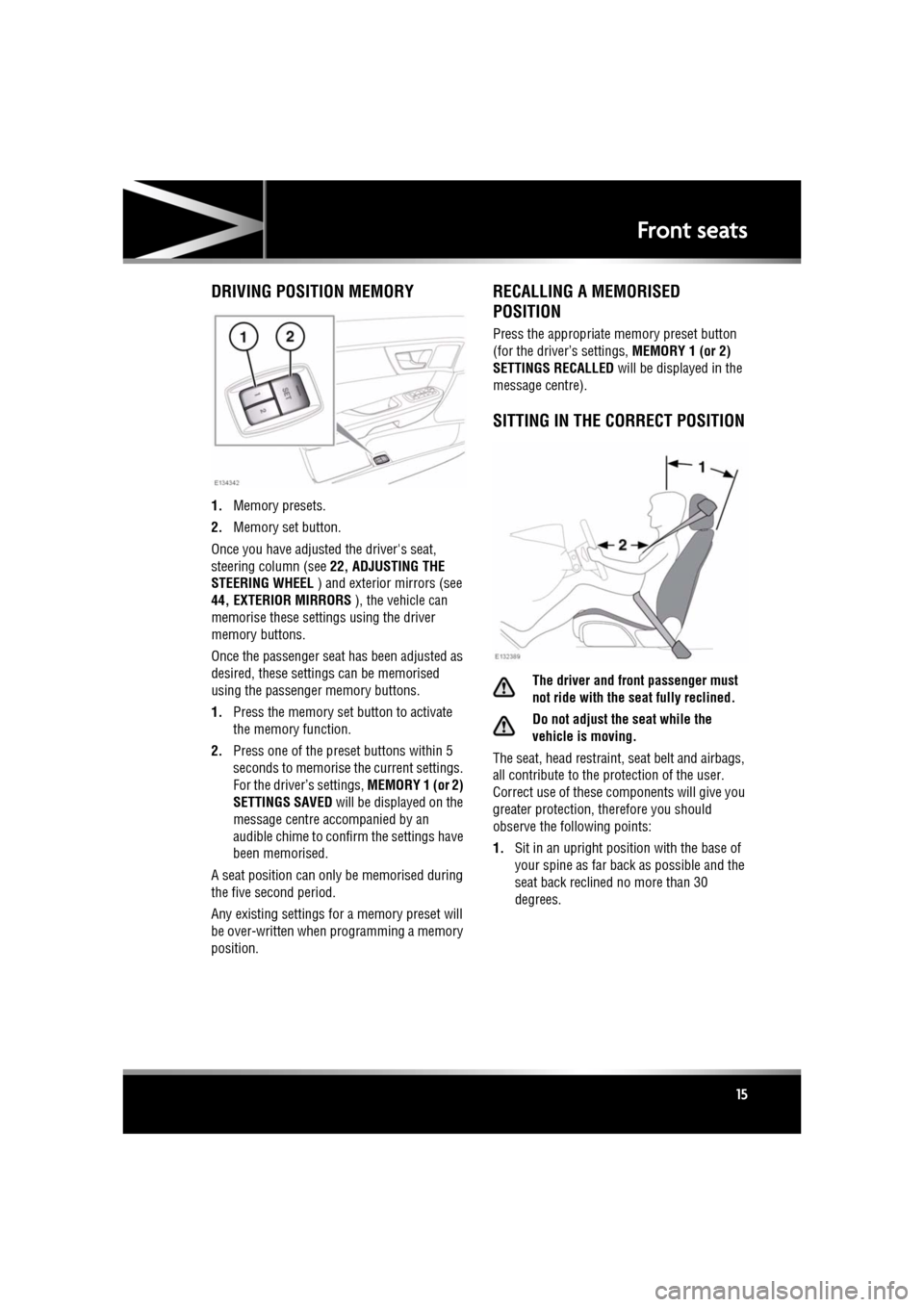
1. Memory presets.
2. Memory set button.
Once you have adjusted the driver's seat,
steering column (see 22, ADJUSTING THE
STEERING WHEEL ) and exterior mirrors (see
44, EXTERIOR MIRRORS ), the vehicle can
memorise these setti ngs using the driver
memory buttons.
Once the passenger seat has been adjusted as
desired, these settings can be memorised
using the passenge r memory buttons.
1. Press the memory set button to activate
the memory function.
2. Press one of the preset buttons within 5
seconds to memorise the current settings.
For the driver’s settings, MEMORY 1 (or 2)
SETTINGS SAVED will be displayed on the
message centre accompanied by an
audible chime to conf irm the settings have
been memorised.
A seat position can only be memorised during
the five second period.
Any existing settings for a memory preset will
be over-written when programming a memory
position.
RECALLING A MEMORISED
POSITION
Press the appropriate memory preset button
(for the driver’s settings, MEMORY 1 (or 2)
SETTINGS RECALLED will be displayed in the
message centre).
SITTING IN THE CORRECT POSITION
The driver and front passenger must
not ride with the seat fully reclined.
Do not adjust the seat while the
vehicle is moving.
The seat, head restraint, seat belt and airbags,
all contribute to the protection of the user.
Correct use of these co mponents will give you
greater protection, therefore you should
observe the following points:
1. Sit in an upright position with the base of
your spine as far back as possible and the
seat back reclined no more than 30
degrees.
Page 27 of 225
R
(FM8) SEMCON JLR OWNER GUIDE VER 1.00 EURO
LANGUAGE: english-en; MARQUE: jaguar; MODEL: XF
Occupant safety
27
If the vehicle is moving at or above 16 km/h (10
mph) and the seat belt of an occupied front
seat is not fastened, the warning lamp will
flash.
The flashing lasts for 10 seconds and repeats
every 10 seconds for approximately 5 minutes
or until the belt(s) is fastened or the vehicle
stops.
If the warning lamp re mains illuminated after
the seat belt(s) fastened, seek qualified
assistance as soon as pos sible. The vehicle can
still be driven with the warning lamp
illuminated, provided the seat belt(s) is
properly fastened.
Note: If a heavy object is placed on the front
passenger seat, it may activate the Beltminder
feature. It is recomme nded that the object be
placed in the luggage compartment or secured
using the seat belt.
Note: Although not advisable, it is possible to
disable the Beltminder function. Please see
your Dealer/Authorised Repairer to disable or
re-instate the function.
ACTIVE SEAT BELTS
The Active Seat Belt System enhances front
seat occupant support during extreme vehicle
manoeuvres such as understeer, oversteer or
high braking forces by te nsioning the seat belt.
Tension is released when the vehicle
manoeuvre is completed. The occupant may
notice a further slight in crease in tension just
prior to release of th e seat belt, which is
entirely normal.
In the unlikely event that tension is not released
after a manoeuvre is completed, bring the
vehicle to a safe stop. Unbuckle and re-buckle
the seat belt, which should then extract and
retract normally, before continuing with the
journey. Seat belts should be worn by all
vehicle occupants, for every journey,
no matter how short.
If the Active Seat Belts Unavailable message
and the yellow general warning symbol are
displayed in the message centre, contact your
Jaguar Dealer/ Authorised Repairer as soon as
possible. The vehicle is still safe to drive and
the Active Seat Belts will still function as
standard seat belts.
CHILD SEATS
For optimum safety, children should
travel in the rear of the vehicle at all
times; front passenger seat travel is
not recommended. However, if it is
essential that a child travels in the
front (not permitted in Australia), set
the vehicle seat fully rearward and
seat the child in an approved
forward-facing child seat. Do not use
a rear-facing child seat - an inflating
airbag could impact with the seat and
cause serious injury.
Do not use a forward facing child seat
until the child usin g it is above the
minimum weight of 9 kg (20 lb.) and
able to sit up unaided. Up to the age of
two, a child's spine and neck are not
sufficiently developed to avoid injury
in a frontal impact.
Do not allow a baby or infant to be
held or carried on the lap. The force of
a crash can increase effective body
weight by as much as thirty times,
making it impossible to hold onto the
child.
Page 32 of 225
L
(FM8) SEMCON JLR OWNER GUIDE VER 1.00 EURO
LANGUAGE: english-en; MARQUE: jaguar; MODEL: XF
Occupant safety
32
AIRBAGS AND ACTIVE HEAD RESTRAINTS
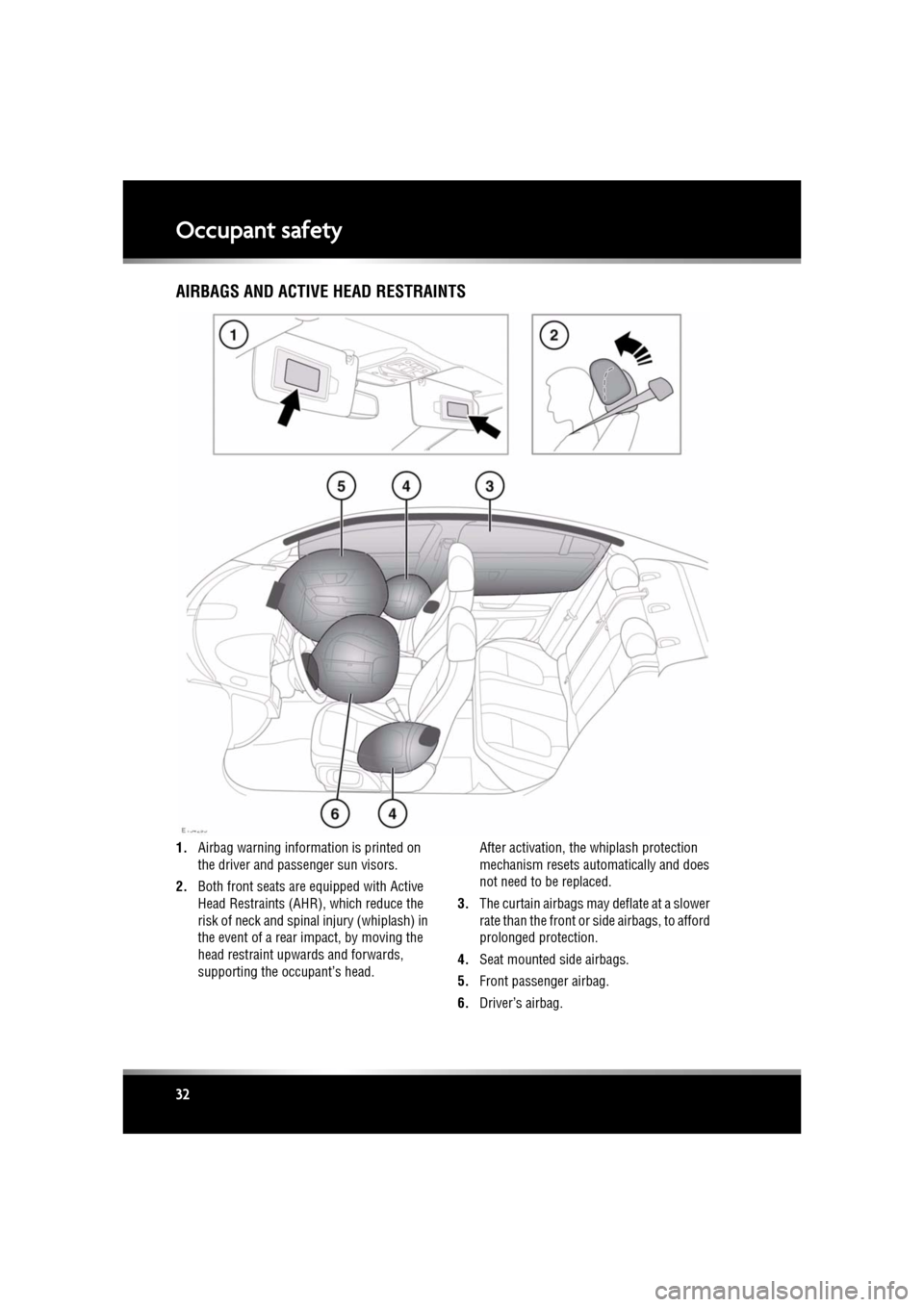
1. Airbag warning information is printed on
the driver and passenger sun visors.
2. Both front seats are equipped with Active
Head Restraints (AHR ), which reduce the
risk of neck and spinal injury (whiplash) in
the event of a rear impact, by moving the
head restraint upwards and forwards,
supporting the occupant’s head. After activation, the whiplash protection
mechanism resets automatically and does
not need to be replaced.
3. The curtain airbags may deflate at a slower
rate than the front or side airbags, to afford
prolonged protection.
4. Seat mounted side airbags.
5. Front passenger airbag.
6. Driver’s airbag.
Page 48 of 225
L
(FM8) SEMCON JLR OWNER GUIDE VER 1.00 EURO
LANGUAGE: english-en; MARQUE: jaguar; MODEL: XF
Garage door opener
48
Garage door openerGARAGE DOOR TRANSCEIVER
Do not use the transceiver with any
garage door opener that lacks the
safety stop and reverse feature as
required by safety standards.
When programming the transceiver to
a garage door opener or entry gate,
ensure the area is clear. This will
prevent potential harm or damage as
the gate or garage door will activate
during the programme.
This device may suffer from
interference if operate d in the vicinity of
a mobile or fixed station transmitter.
This interference is li kely to affect the
hand-held transmitter as well as the
in-car transceiver.
The door transceiver is located in the rear-view
mirror. It can be programmed to transmit the
radio frequencies of up to three different
transmitters, which can be used to operate
garage doors, entry gates, home lighting,
security systems or other radio frequency
operated devices.
Although this section mainly describes the
procedures for a garage door opener, it equally
applies to the previously mentioned
applications.
In some countries, this feature is also known
as the HomeLink® Universal Transceiver.
For further information, see 50,
INFORMATION AND ASSISTANCE .
BEFORE PROGRAMMING
When programming a device that may
require you to press and re-press the
hand-held transmitter (cycle), unplug
the device during the cycling process to
prevent possible motor failure.
For best results, fit a new battery to the
hand-held transmitter of the garage door
opener (or other device ) before programming.
If your garage door opener receiver (located in
the garage) is equippe d with an antenna,
ensure that the antenna is hanging straight
down.
PROGRAMMING
Ensuring that the engine is switched off:
1. Ensure that the ignition system is on.
2. Hold the end of the original garage door
opener hand-held transmitter 50 to
150 mm (2 to 6 inches) away from the
transceiver in the rear-view mirror, keeping
the indicator lamp in view.
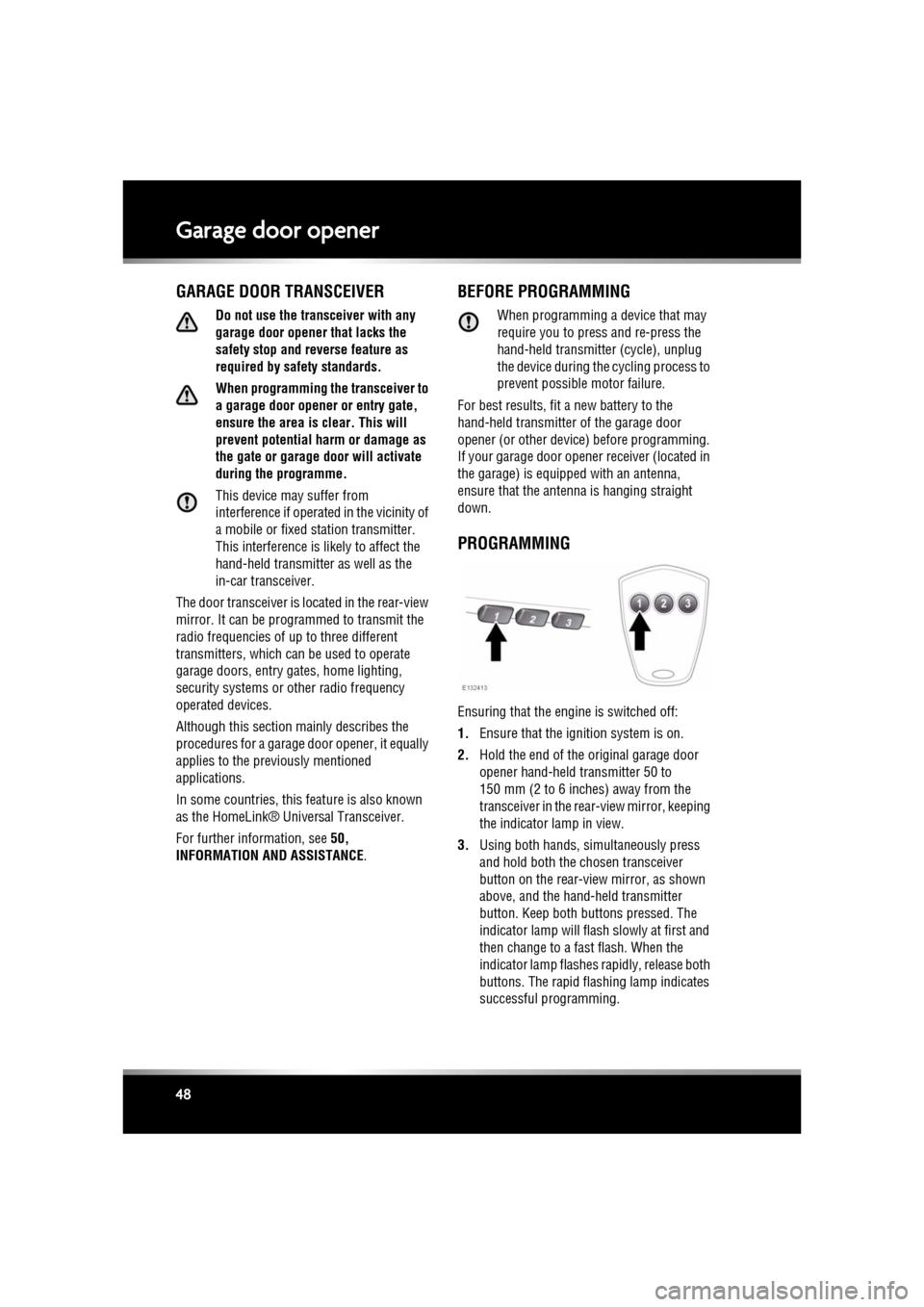
3. Using both hands, simultaneously press
and hold both the chosen transceiver
button on the rear-view mirror, as shown
above, and the hand- held transmitter
button. Keep both but tons pressed. The
indicator lamp will flas h slowly at first and
then change to a fast flash. When the
indicator lamp flashes rapidly, release both
buttons. The rapid flashing lamp indicates
successful programming.
Page 49 of 225

R
(FM8) SEMCON JLR OWNER GUIDE VER 1.00 EURO
LANGUAGE: english-en; MARQUE: jaguar; MODEL: XF
Garage door opener
49
4. If, after 60 seconds, the indicator lamp
does not flash rapidly, release both the
transceiver and the hand-held transmitter
buttons and repeat th e procedure starting
with Step 2. Position the hand-held
transmitter at a different angle and/or
distance.
5. Press and hold the programmed garage
door opener button and observe the
indicator lamp.
•If the indicator is continuous,
programming is complete and your
device should operate when the garage
door opener button is pressed and held
for approximately 1 to 2 seconds and
then released.
• If the indicator lamp blinks rapidly for
two seconds and then illuminates
continuously, proceed with the
following programming instructions
for rolling code de vice equipment.
TO ERASE ALL PROGRAMMING
For first time programming, ensure that the
engine is switched off:
1.Ensure that the igniti on system is in
convenience mode (see 7, CONVENIENCE
MODE ).
2. Press and hold the two outer buttons on
the transceiver in the rear-view mirror.
Keep the buttons pressed until the
indicator lamp begins to flash (this will take
approximately 20 seconds), then release
the buttons.
All memories in the gara ge door opener have
now been cleared.
Note: Do not perform this procedure when
programming the addi tional garage door
opener buttons.
ROLLING CODE DEVICE EQUIPMENT
PROGRAMMING
Note: The assistance of a second person, may
make the following steps quicker and easier.
Once the button has been pressed there are
only 30 seconds in which to complete Step 3.
1. At the garage door opener receiver (motor
head unit) in the garage, locate the learn or
smart button/switch.
•The name of the but ton or switch may
vary between manufacturers.
2. Press and release the learn or smart
button.
3. Return to the vehicle and firmly press and
hold the programmed garage door opener
button for two seconds and release.
4. Repeat the press, hold, release sequence
three times to complete the programming
process.
The garage door opener in the rear-view mirror
should now activate the rolling code device.
REPROGRAMMING A SINGLE
GARAGE DOOR OPENER BUTTON
To programme a device to a previously
programmed button:
1. Press and hold the desired
pre-programmed garage door opener
button for at least 20 seconds, but no
longer than 30 seconds, until the indicator
lamp begins to flash.
2. Without releasing th e rear-view mirror
button, position the ha nd-held transmitter
approximately 50 to 150 mm (2 to 6
inches) away from the transceiver in the
rear-view mirror, keeping the indicator
lamp in view.
3. Carry out Step 3 of Programming .
Page 53 of 225
R
(FM8) SEMCON JLR OWNER GUIDE VER 1.00 EURO
LANGUAGE: english-en; MARQUE: jaguar; MODEL: XF
Warning lamps
53
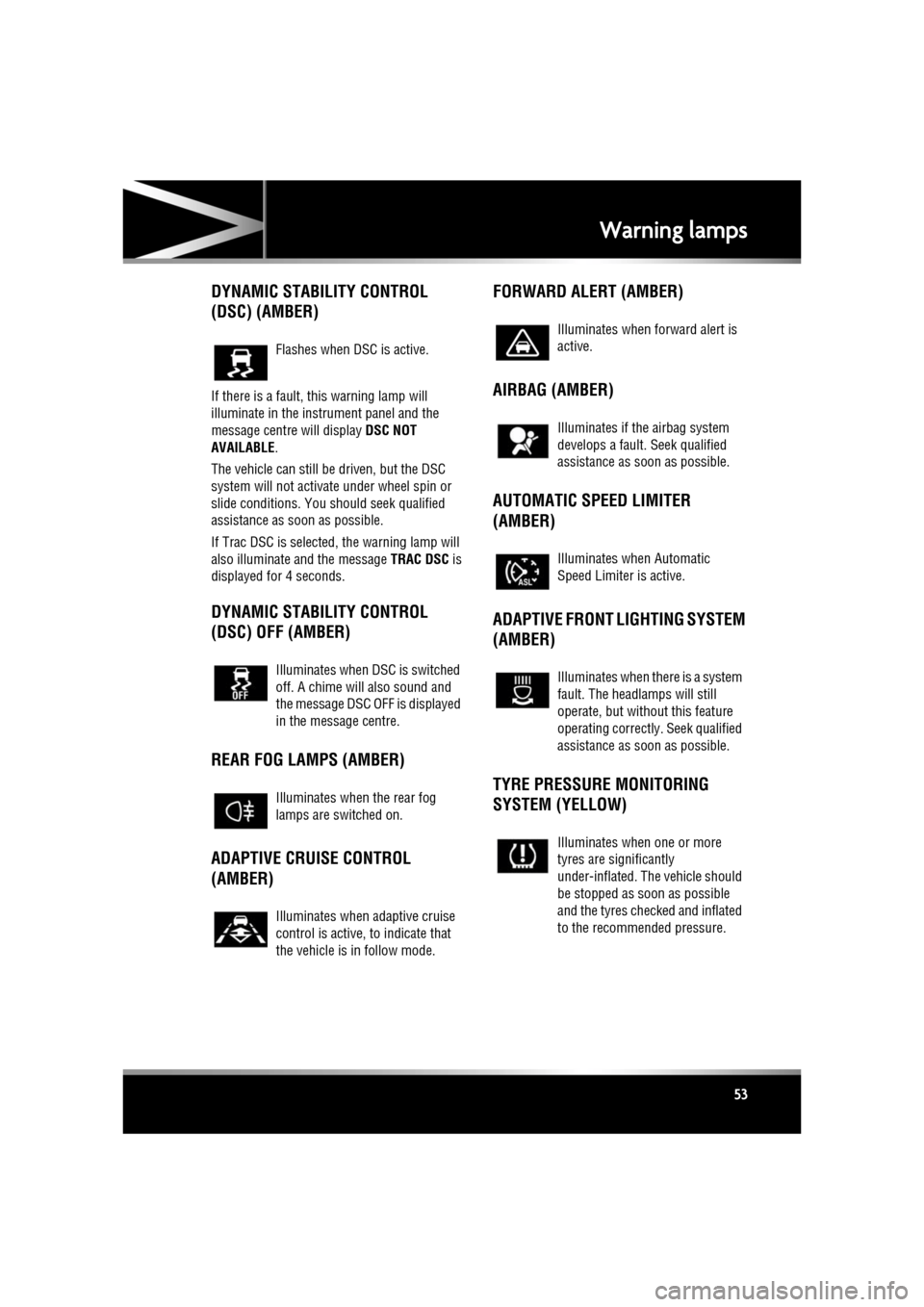
DYNAMIC STABILITY CONTROL
(DSC) (AMBER)
If there is a fault, this warning lamp will
illuminate in the instrument panel and the
message centre will display DSC NOT
AVAILABLE .
The vehicle can still be driven, but the DSC
system will not activate under wheel spin or
slide conditions. You s hould seek qualified
assistance as soon as possible.
If Trac DSC is selected, the warning lamp will
also illuminate and the message TRAC DSC is
displayed for 4 seconds.
DYNAMIC STABILITY CONTROL
(DSC) OFF (AMBER)
REAR FOG LAMPS (AMBER)
ADAPTIVE CRUISE CONTROL
(AMBER) FORWARD ALERT (AMBER)
AIRBAG (AMBER)
AUTOMATIC SPEED LIMITER
(AMBER)
ADAPTIVE FRONT LIGHTING SYSTEM
(AMBER)
TYRE PRESSURE MONITORING
SYSTEM (YELLOW)
Flashes when DSC is active.
Illuminates when DSC is switched
off. A chime will also sound and
the message DSC OFF is displayed
in the message centre.
Illuminates when the rear fog
lamps are switched on.
Illuminates when adaptive cruise
control is active, to indicate that
the vehicle is in follow mode.
Illuminates when forward alert is
active.
Illuminates if the airbag system
develops a fault.
Seek qualified
assistance as soon as possible.
Illuminates when Automatic
Speed Limiter is active.
Illuminates when there is a system
fault. The headlamps will still
operate, but without this feature
operating correctly . Seek qualified
assistance as soon as possible.
Illuminates when one or more
tyres are significantly
under-inflated. The vehicle should
be stopped as soon as possible
and the tyres checked and inflated
to the recommended pressure.
Page 58 of 225
L
(FM8) SEMCON JLR OWNER GUIDE VER 1.00 EURO
LANGUAGE: english-en; MARQUE: jaguar; MODEL: XF
Touch screen
58
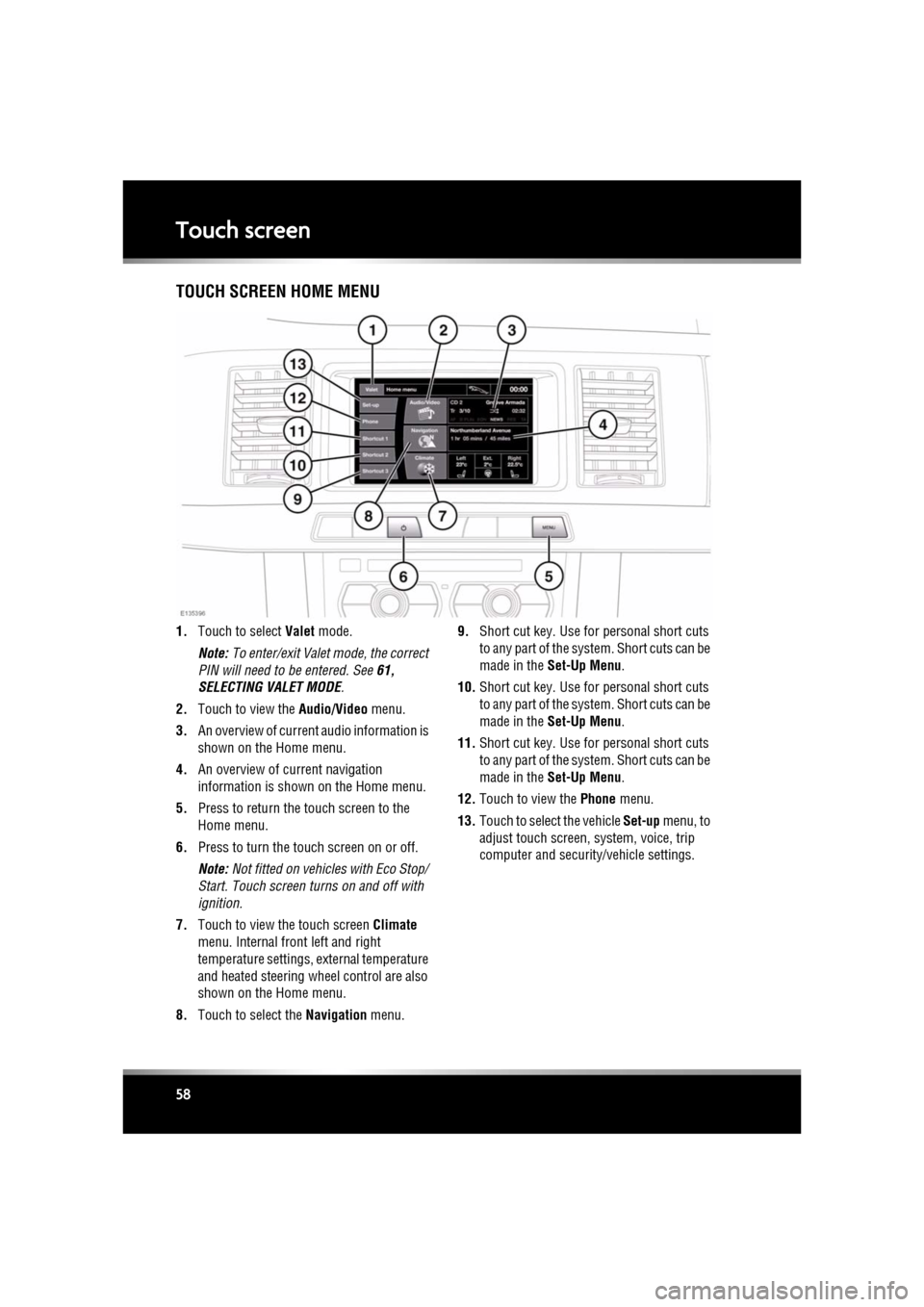
Touch screenTOUCH SCREEN HOME MENU
1. Touch to select Valet mode.
Note: To enter/exit Valet mode, the correct
PIN will need to be entered. See 61,
SELECTING VALET MODE .
2. Touch to view the Audio/Video menu.
3. An overview of current audio information is
shown on the Home menu.
4. An overview of current navigation
information is shown on the Home menu.
5. Press to return the touch screen to the
Home menu.
6. Press to turn the touch screen on or off.
Note: Not fitted on vehicles with Eco Stop/
Start. Touch screen turns on and off with
ignition.
7. Touch to view the touch screen Climate
menu. Internal fr ont left and right
temperature settings, external temperature
and heated steering wheel control are also
shown on the Home menu.
8. Touch to select the Navigation menu. 9.
Short cut key. Use for personal short cuts
to any part of the system. Short cuts can be
made in the Set-Up Menu .
10. Short cut key. Use for personal short cuts
to any part of the system. Short cuts can be
made in the Set-Up Menu .
11. Short cut key. Use for personal short cuts
to any part of the system. Short cuts can be
made in the Set-Up Menu .
12. Touch to view the Phone menu.
13. Touch to select the vehicle Set-up menu, to
adjust touch screen, system, voice, trip
computer and security/vehicle settings.
Page 61 of 225

R
(FM8) SEMCON JLR OWNER GUIDE VER 1.00 EURO
LANGUAGE: english-en; MARQUE: jaguar; MODEL: XF
Touch screen
61
The training session can be cancelled at any
time by touching the on-screen pop-up or by
pressing and holding the Voice button on the
steering wheel. See 126, USING VOICE
CONTROL .
TRIP COMPUTER SETTINGS
Trip Computer : Select to switch trip computer
readings between Trip A, Trip B and Trip Auto .
Select Reset to zero the trip computer
readings. Select Units to switch the trip
computer readings between Imperial and
Metric measurements.
VEHICLE SETTINGS
• Security : Select to enable/disable or alter
the settings of the following:
• Single/multi-point entry (2 stage
unlocking).
• Alarm sensors (interior and tilt).
• Drive-away locking.
Scroll down through the menu until the
desired feature is disp layed, then select On
or Off, as appropriate.
If drive-away locking is switched on, select
the desired speed (8, 16 or 32 km/h or 5,
10 or 20 mph).
• Windows/mirrors : Select to
enable/disable:
• Global opening/closing of windows
and sunroof.
• Exterior mirror dip when reversing.
• Automatic folding/unfo lding of exterior
mirrors when vehicle is locked/
unlocked.
• Interior mirror dimming.
Scroll down through the menu until the
desired feature is disp layed, then select On
or Off, as appropriate. •
Units : Select to switch between Imperial
and Metric measurements.
• Auto (AHB) high beam : Select to turn AHB
on or off, and set AHB for side of road
being driven on.
SELECTING VALET MODE
Valet mode allows the vehi cle to be locked by a
parking attendant, without giving access to the
luggage compartment and glove box. Valet
mode also prevents ope ration of the touch
screen, to prevent access to telephone
numbers or naviga tion addresses.
From the Home menu, select Valet, then enter
a four digit Personal Identification Number
(PIN) (personally chosen ). You will then be
prompted to re-enter the same PIN. On
completion, touch the OK soft key.
If you wish to cancel the PIN, touch the C soft
key. If the PIN is cancelled, or incorrectly
entered, you will be prompted to enter the PIN
again.
Once the PIN has been correctly entered, a
security information pop- up is displayed. Read
the information and remove the emergency key
from the Jaguar Smart Key.
Valet on is displayed to indicate that the PIN
has been accepted. The luggage compartment
and glove box are now securely locked in Valet
mode.
On exiting and securing the vehicle, remove the
emergency key from the Jaguar Smart Key.
Retain the emergency key and give the Jaguar
Smart Key to the attendant.
Note: The emergency key ca n be used to open
the luggage compartment, which may
de-activate Valet mode.
Page 62 of 225

L
(FM8) SEMCON JLR OWNER GUIDE VER 1.00 EURO
LANGUAGE: english-en; MARQUE: jaguar; MODEL: XF
Touch screen
62
DESELECTING VALET MODE
When you enter the vehicle, select the Valet
mode screen.
Enter your four digit PIN and touch the OK
button. A pop-up is displayed. Read the
information and stow th e emergency key in the
Jaguar Smart Key.
Valet off is displayed to indicate that your PIN
has been accepted.
• The luggage compartment will return to the
previously set security requirement.
• The glove box will now open as normal.
Note: If the PIN is forgotten, open the luggage
compartment using the emergency key blade
to cancel Valet mode.
Page 84 of 225
L
(FM8) SEMCON JLR OWNER GUIDE VER 1.00 EURO
LANGUAGE: english-en; MARQUE: jaguar; MODEL: XF
Stability control
84
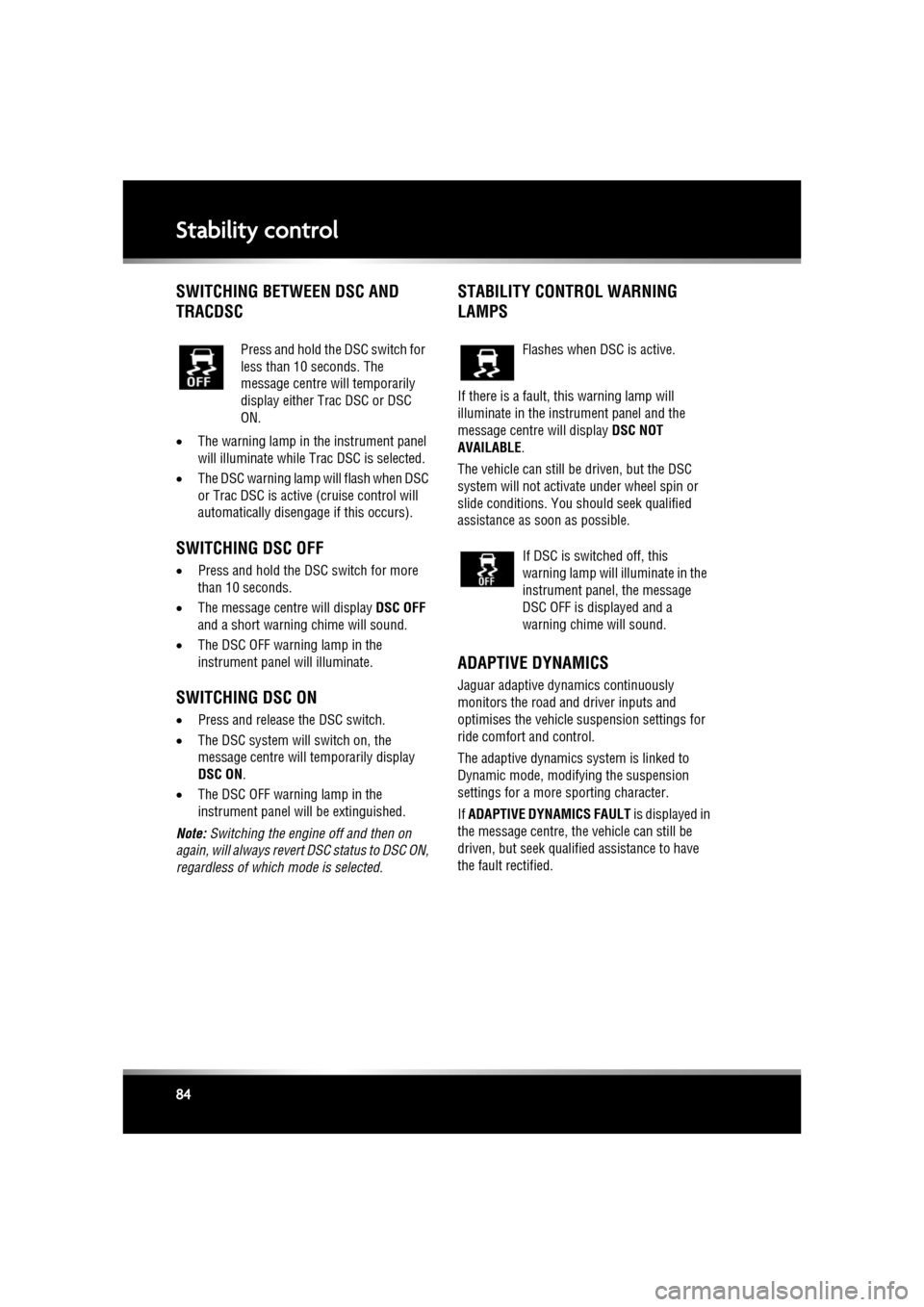
SWITCHING BETWEEN DSC AND
TRACDSC
• The warning lamp in the instrument panel
will illuminate while Trac DSC is selected.
• The DSC warning lamp will flash when DSC
or Trac DSC is active (cruise control will
automatically disengage if this occurs).
SWITCHING DSC OFF
• Press and hold the DSC switch for more
than 10 seconds.
• The message centre will display DSC OFF
and a short warning chime will sound.
• The DSC OFF warning lamp in the
instrument panel will illuminate.
SWITCHING DSC ON
•Press and release the DSC switch.
• The DSC system will switch on, the
message centre will temporarily display
DSC ON .
• The DSC OFF warning lamp in the
instrument panel will be extinguished.
Note: Switching the engine off and then on
again, will always revert DSC status to DSC ON,
regardless of which mode is selected.
STABILITY CONTROL WARNING
LAMPS
If there is a fault, this warning lamp will
illuminate in the inst rument panel and the
message centre will display DSC NOT
AVAILABLE .
The vehicle can still be driven, but the DSC
system will not activate under wheel spin or
slide conditions. You should seek qualified
assistance as soon as possible.
ADAPTIVE DYNAMICS
Jaguar adaptive dyna mics continuously
monitors the road and driver inputs and
optimises the vehicle suspension settings for
ride comfort and control.
The adaptive dynamics system is linked to
Dynamic mode, modify ing the suspension
settings for a more sporting character.
If ADAPTIVE DYNAMICS FAULT is displayed in
the message centre, the vehicle can still be
driven, but seek qualified assistance to have
the fault rectified.
Press and hold the DSC switch for
less than 10 seconds. The
message centre will temporarily
display either Trac DSC or DSC
ON.
Flashes when DSC is active.
If DSC is switched off, this
warning lamp will illuminate in the
instrument panel, the message
DSC OFF is displayed and a
warning chime will sound.