air suspension JAGUAR XFR 2010 1.G User Guide
[x] Cancel search | Manufacturer: JAGUAR, Model Year: 2010, Model line: XFR, Model: JAGUAR XFR 2010 1.GPages: 3039, PDF Size: 58.49 MB
Page 321 of 3039
Published: 16-Oct-2013
Suspension System - General Information - Front Toe Adjustment
General Procedures
CAUTIONS:
Make sure the vehicle is on a flat level surface.
Make sure the tire pressures are within specification.
Make sure that only the manufacturers' recommended four wheel alignment equipment is used.
Make sure the steering is in the straight ahead position.
1. For wheel alignment information, refer to the suspension specification
section.
For additional information, refer to: Specifications (204-00 Suspension System - General Information, Specifications).
2. Check the tie rod ends, suspension joints, wheel bearings and wheels
and tires for damage, wear and free play.
Adjust or repair any worn, damaged or incorrectly adjusted
components.
3. Check and adjust tire pressures.
4. Position the vehicle on a 4 post lift.
5. Release the vehicle parking brake.
6. Vehicles with air suspension.
For additional information, refer to: Air Suspension Manual Tight
Tolerance Setting Mode (204-05, General Procedures).
7. For additional information, refer to: Air Suspension Manual Tight
Tolerance Setting Mode (204-05, General Procedures).
8. Using only four-wheel alignment equipment approved by Jaguar, check
the wheel alignment.
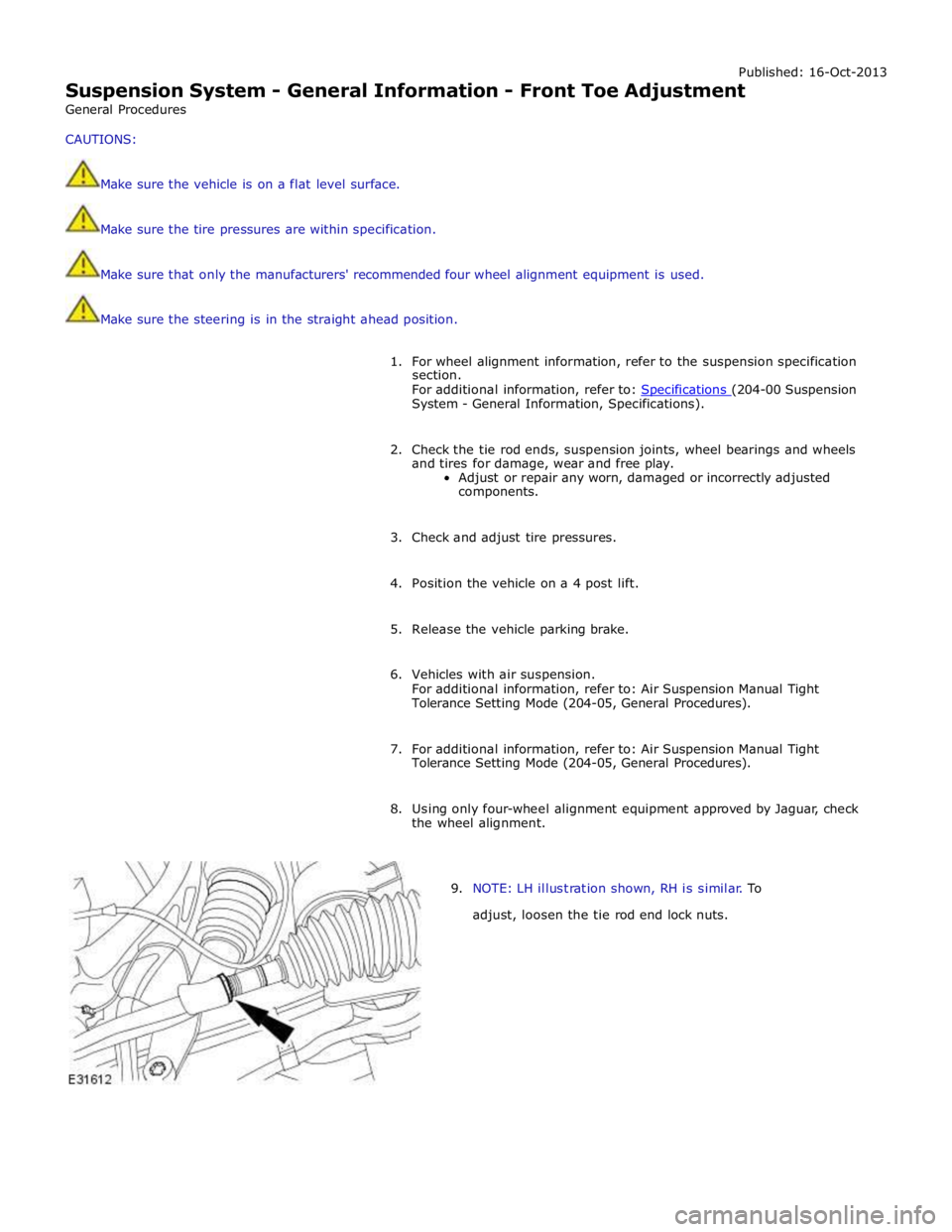
9. NOTE: LH illustration shown, RH is similar. To
adjust, loosen the tie rod end lock nuts.
Page 323 of 3039

Published: 16-Oct-2013
Suspension System - General Information - Rear Toe Adjustment
General Procedures
1. Vehicles with air suspension.
For additional information, refer to: Air Suspension Manual Tight
Tolerance Setting Mode (204-05, General Procedures).
2. Check the toe settings. Follow the equipment manufacturer's
instructions.
3. NOTE: Left-hand, shown right-hand similar.
Loosen the lock nut.
Clean and lubricate the lock nut and toe link threads.
4. Rotate the toe link to adjust the toe settings.
5. Tighten the lock nut.
6. Check the toe settings. Follow the equipment manufacturer's
instructions.
Page 342 of 3039
Front Suspension - Front Lower Arm
Removal and Installation
Removal Published: 11-May-2011
1. WARNING: Do not work on or under a vehicle supported only by a
jack. Always support the vehicle on safety stands.
Raise and support the vehicle.
2. Remove the air deflector.
For additional information, refer to: Air Deflector (501-02 Front End Body Panels, Removal and Installation).
3. Remove the front wheel and tire.
For additional information, refer to: Wheel and Tire (204-04 Wheels and Tires, Removal and Installation).
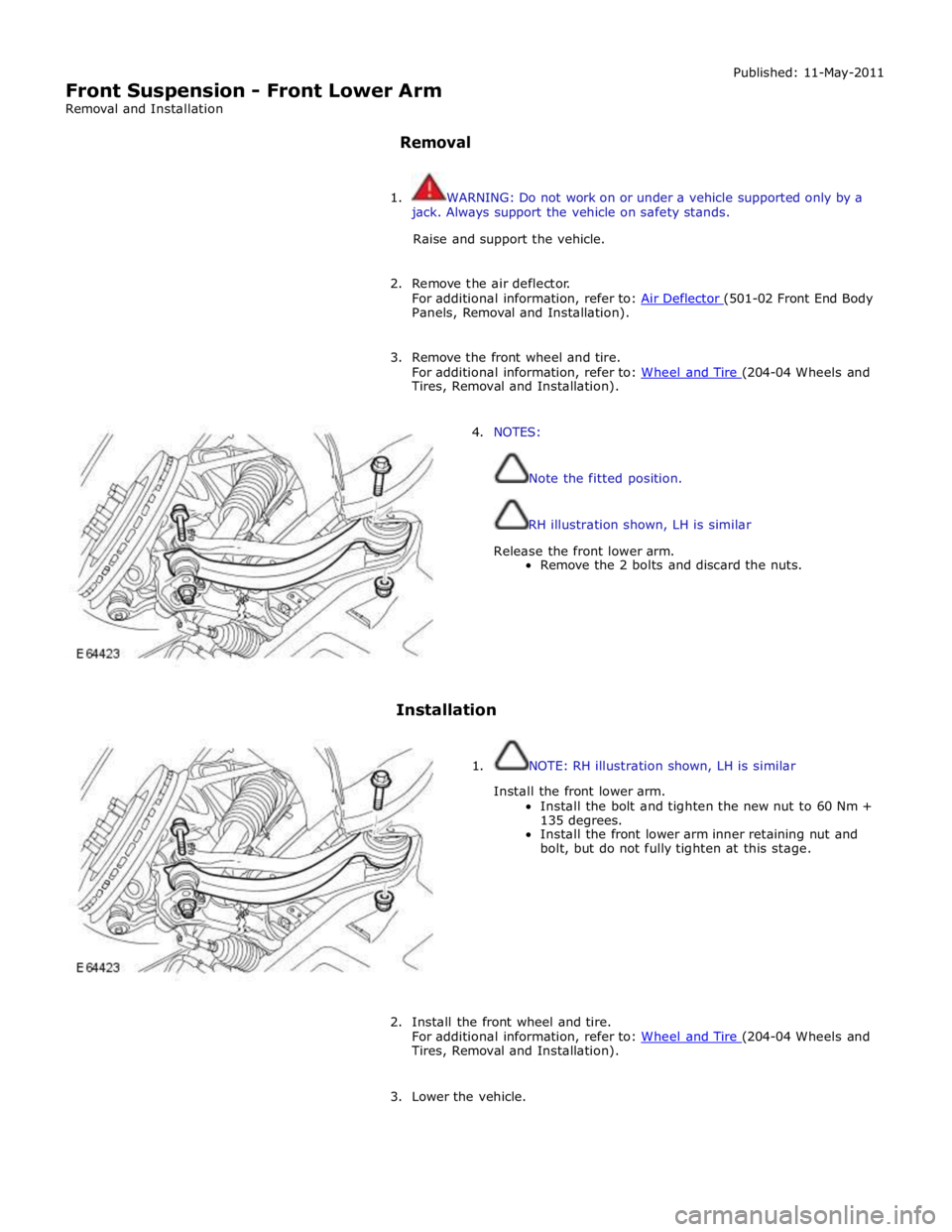
4. NOTES:
Note the fitted position.
RH illustration shown, LH is similar
Release the front lower arm.
Remove the 2 bolts and discard the nuts.
Installation
1. NOTE: RH illustration shown, LH is similar
Install the front lower arm.
Install the bolt and tighten the new nut to 60 Nm +
135 degrees.
Install the front lower arm inner retaining nut and
bolt, but do not fully tighten at this stage.
2. Install the front wheel and tire.
For additional information, refer to: Wheel and Tire (204-04 Wheels and Tires, Removal and Installation).
3. Lower the vehicle.
Page 349 of 3039
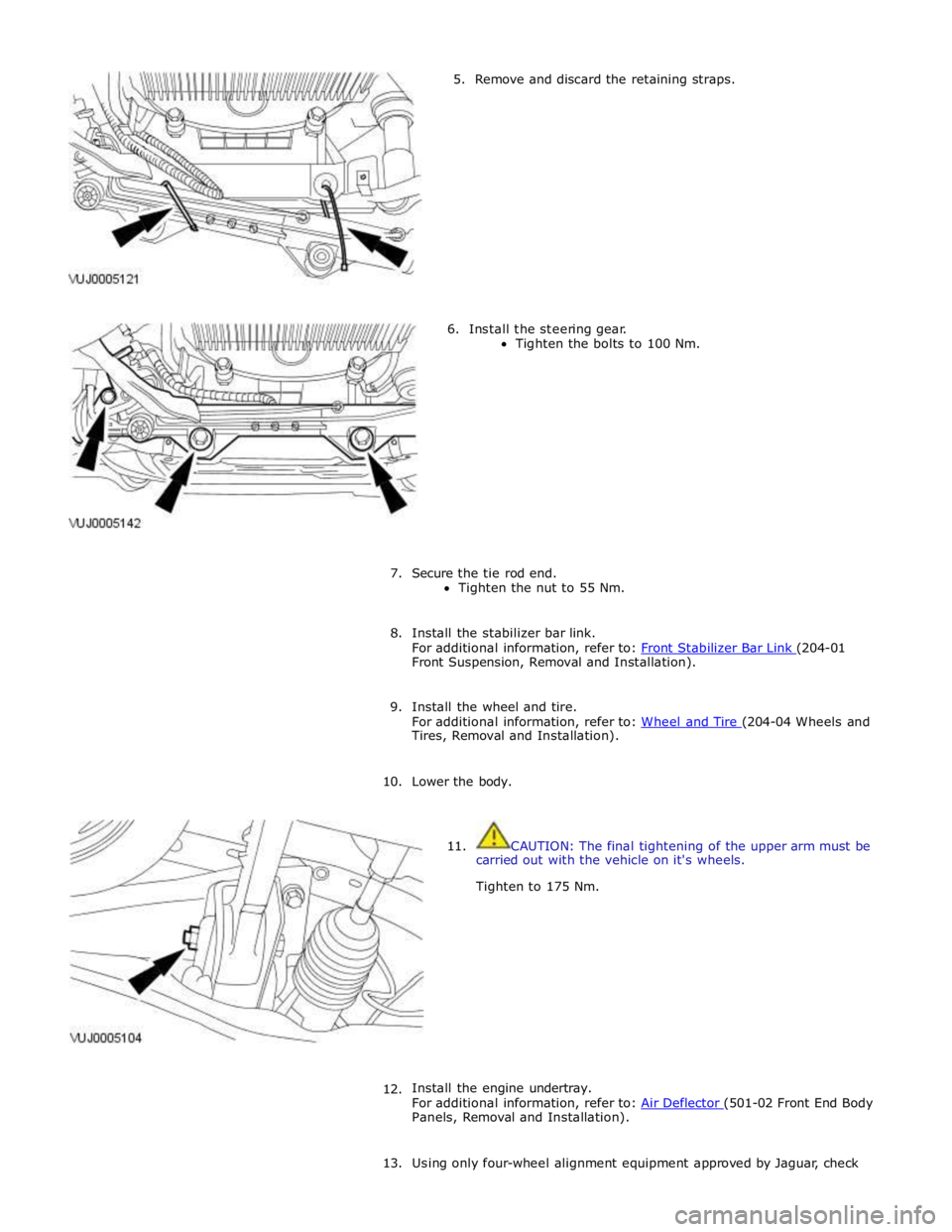
5. Remove and discard the retaining straps.
6. Install the steering gear.
Tighten the bolts to 100 Nm.
7. Secure the tie rod end.
Tighten the nut to 55 Nm.
8. Install the stabilizer bar link.
For additional information, refer to: Front Stabilizer Bar Link (204-01 Front Suspension, Removal and Installation).
9. Install the wheel and tire.
For additional information, refer to: Wheel and Tire (204-04 Wheels and Tires, Removal and Installation).
10. Lower the body.
11. CAUTION: The final tightening of the upper arm must be
carried out with the vehicle on it's wheels.
Tighten to 175 Nm.
12.
Install the engine undertray.
For additional information, refer to: Air Deflector (501-02 Front End Body Panels, Removal and Installation).
13. Using only four-wheel alignment equipment approved by Jaguar, check
Page 356 of 3039
Published: 06-Jun-2013
Front Suspension - Front Stabilizer Bar V8 5.0L Petrol/V8 S/C 5.0L Petrol
Removal and Installation
Removal
NOTE: Removal steps in this procedure may contain installation details.
1. Refer to: Battery Disconnect and Connect (414-01 Battery, Mounting and Cables, General Procedures).
2. WARNING: Do not work on or under a vehicle supported only by a jack.
Always support the vehicle on safety stands.
Raise and support the vehicle.
3. Refer to: Air Conditioning (A/C) System Recovery, Evacuation and Charging (412-00 Climate Control System - General Information, General Procedures).
4. Refer to: Radiator Splash Shield (501-02 Front End Body Panels, Removal and Installation).
5. Refer to: Air Deflector (501-02 Front End Body Panels, Removal and Installation).
6. Refer to: Front Wheel Bearing and Wheel Hub - TDV6 3.0L Diesel /V8 5.0L Petrol/V8 S/C 5.0L Petrol (204-01 Front Suspension, Removal and Installation).
7. Refer to: Engine Cover - V8 5.0L Petrol/V8 S/C 5.0L Petrol (501-05 Interior Trim and Ornamentation, Removal and Installation).
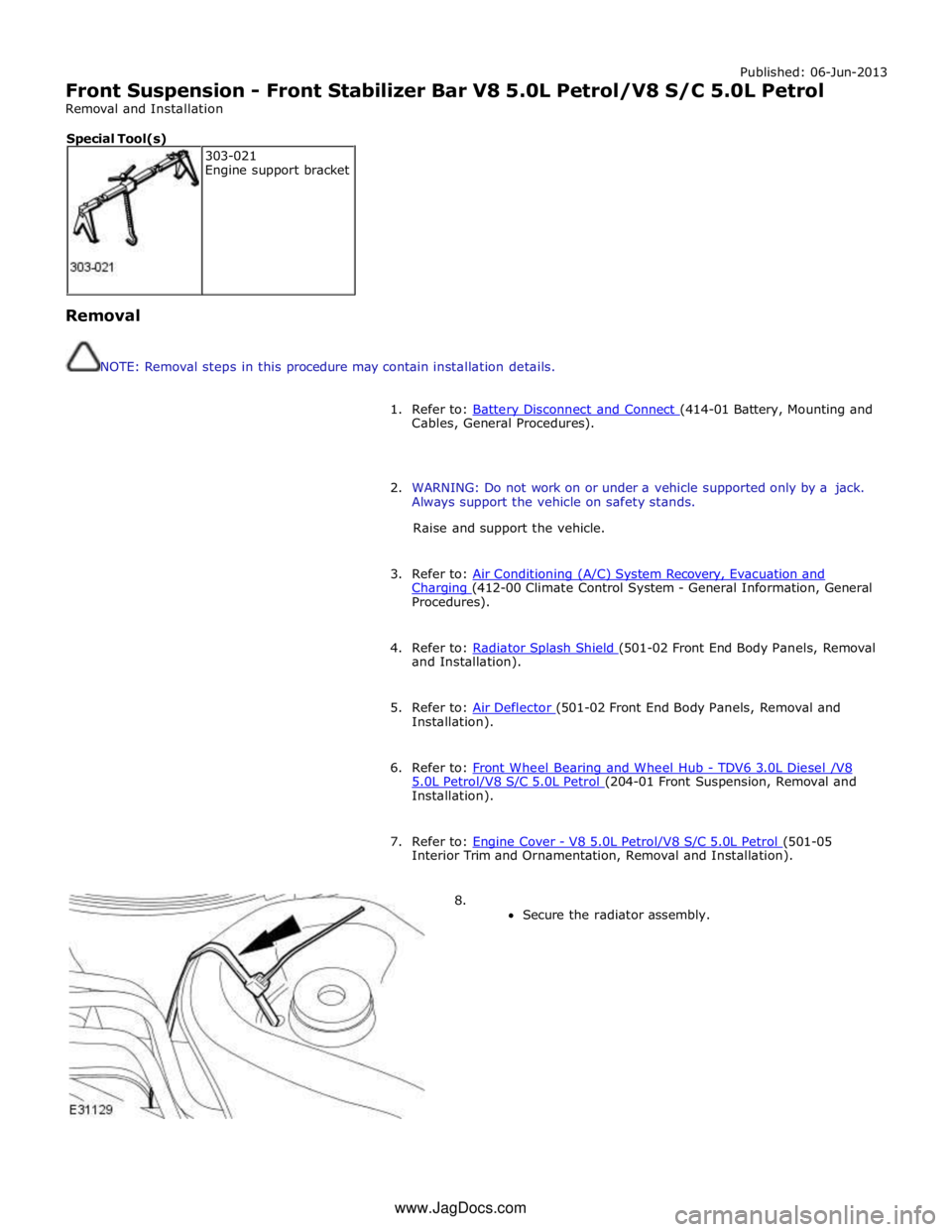
8.
Secure the radiator assembly. 303-021
Engine support bracket Special Tool(s) www.JagDocs.com
Page 367 of 3039
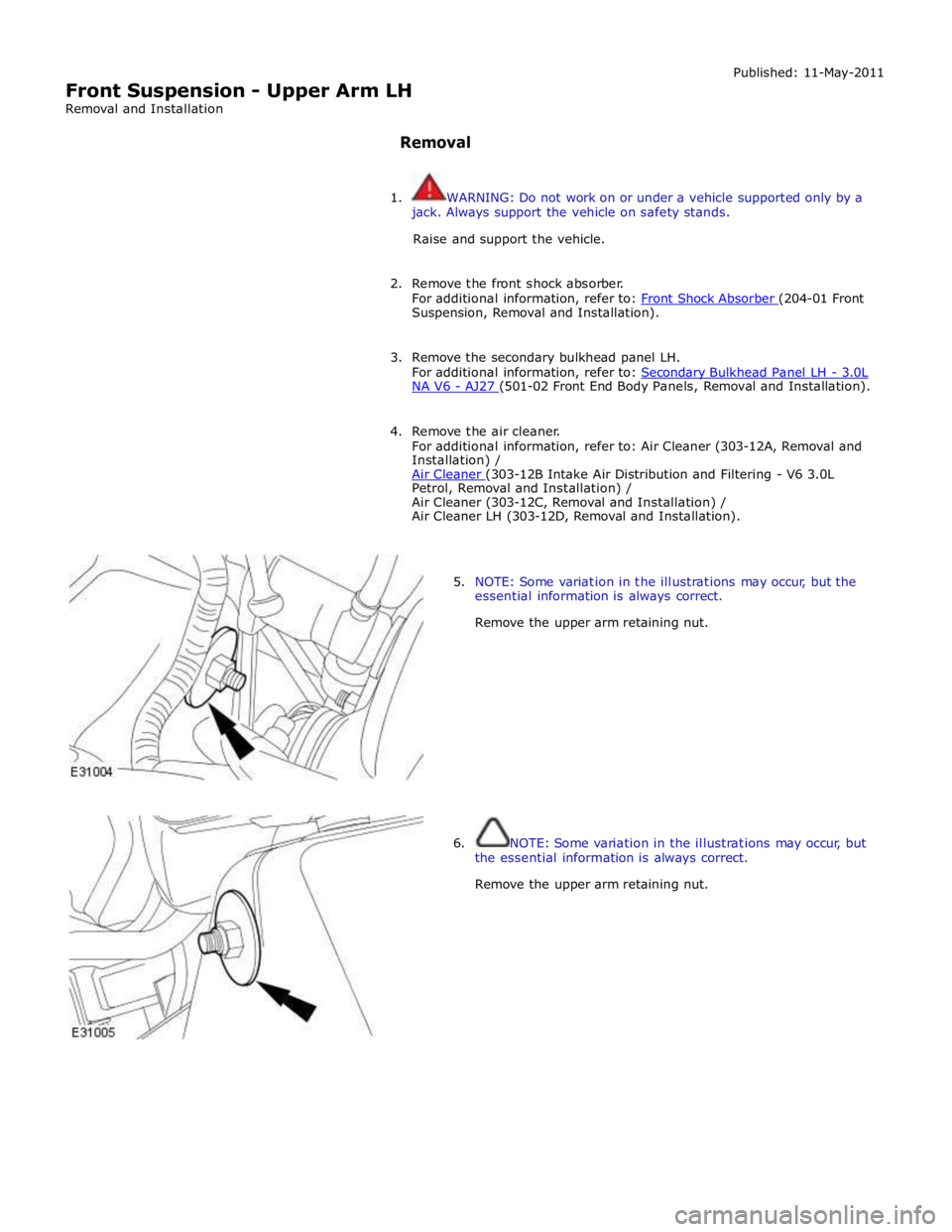
Suspension, Removal and Installation).
3. Remove the secondary bulkhead panel LH.
For additional information, refer to: Secondary Bulkhead Panel LH - 3.0L NA V6 - AJ27 (501-02 Front End Body Panels, Removal and Installation).
4. Remove the air cleaner.
For additional information, refer to: Air Cleaner (303-12A, Removal and
Installation) /
Air Cleaner (303-12B Intake Air Distribution and Filtering - V6 3.0L Petrol, Removal and Installation) /
Air Cleaner (303-12C, Removal and Installation) /
Air Cleaner LH (303-12D, Removal and Installation).
5. NOTE: Some variation in the illustrations may occur, but the
essential information is always correct.
Remove the upper arm retaining nut.
6. NOTE: Some variation in the illustrations may occur, but
the essential information is always correct.
Remove the upper arm retaining nut.
Page 369 of 3039
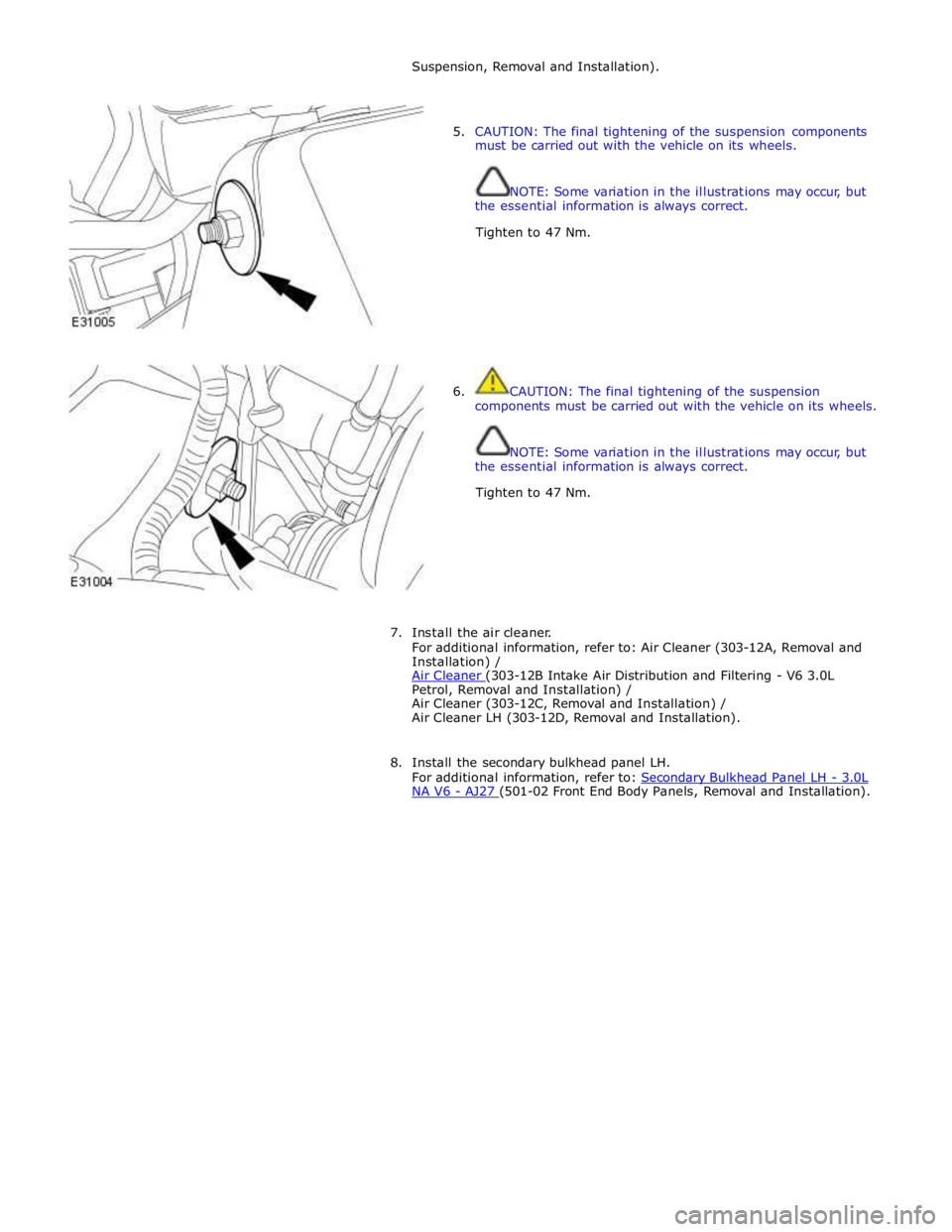
Suspension, Removal and Installation).
5. CAUTION: The final tightening of the suspension components
must be carried out with the vehicle on its wheels.
NOTE: Some variation in the illustrations may occur, but
the essential information is always correct.
Tighten to 47 Nm.
6. CAUTION: The final tightening of the suspension
components must be carried out with the vehicle on its wheels.
NOTE: Some variation in the illustrations may occur, but
the essential information is always correct.
Tighten to 47 Nm.
7. Install the air cleaner.
For additional information, refer to: Air Cleaner (303-12A, Removal and
Installation) /
Air Cleaner (303-12B Intake Air Distribution and Filtering - V6 3.0L Petrol, Removal and Installation) /
Air Cleaner (303-12C, Removal and Installation) /
Air Cleaner LH (303-12D, Removal and Installation).
8. Install the secondary bulkhead panel LH.
For additional information, refer to: Secondary Bulkhead Panel LH - 3.0L NA V6 - AJ27 (501-02 Front End Body Panels, Removal and Installation).
Page 501 of 3039
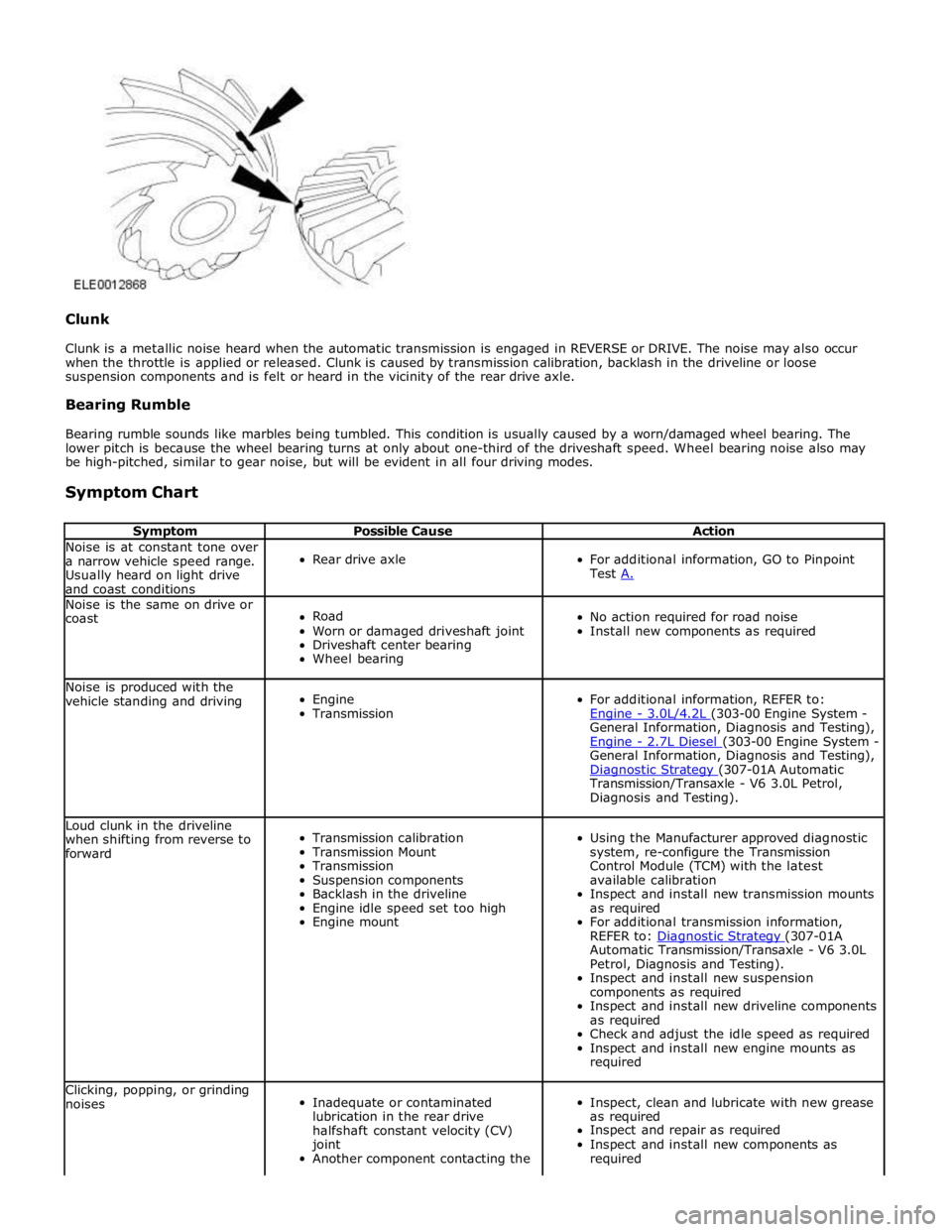
Clunk
Clunk is a metallic noise heard when the automatic transmission is engaged in REVERSE or DRIVE. The noise may also occur
when the throttle is applied or released. Clunk is caused by transmission calibration, backlash in the driveline or loose
suspension components and is felt or heard in the vicinity of the rear drive axle.
Bearing Rumble
Bearing rumble sounds like marbles being tumbled. This condition is usually caused by a worn/damaged wheel bearing. The
lower pitch is because the wheel bearing turns at only about one-third of the driveshaft speed. Wheel bearing noise also may
be high-pitched, similar to gear noise, but will be evident in all four driving modes.
Symptom Chart
Symptom Possible Cause Action Noise is at constant tone over
a narrow vehicle speed range.
Usually heard on light drive
and coast conditions
Rear drive axle
For additional information, GO to Pinpoint
Test A. Noise is the same on drive or
coast
Road
Worn or damaged driveshaft joint
Driveshaft center bearing
Wheel bearing
No action required for road noise
Install new components as required Noise is produced with the
vehicle standing and driving
Engine
Transmission
For additional information, REFER to:
Engine - 3.0L/4.2L (303-00 Engine System - General Information, Diagnosis and Testing),
Engine - 2.7L Diesel (303-00 Engine System - General Information, Diagnosis and Testing),
Diagnostic Strategy (307-01A Automatic Transmission/Transaxle - V6 3.0L Petrol,
Diagnosis and Testing). Loud clunk in the driveline
when shifting from reverse to
forward
Transmission calibration
Transmission Mount
Transmission
Suspension components
Backlash in the driveline
Engine idle speed set too high
Engine mount
Using the Manufacturer approved diagnostic
system, re-configure the Transmission
Control Module (TCM) with the latest
available calibration
Inspect and install new transmission mounts
as required
For additional transmission information,
REFER to: Diagnostic Strategy (307-01A Automatic Transmission/Transaxle - V6 3.0L
Petrol, Diagnosis and Testing).
Inspect and install new suspension
components as required
Inspect and install new driveline components
as required
Check and adjust the idle speed as required
Inspect and install new engine mounts as
required Clicking, popping, or grinding
noises
Inadequate or contaminated
lubrication in the rear drive
halfshaft constant velocity (CV)
joint
Another component contacting the
Inspect, clean and lubricate with new grease
as required
Inspect and repair as required
Inspect and install new components as
required
Page 583 of 3039
If the concern becomes evident during this check, verify it fits the description given before the road test. If the concern is not
evident, attempt to duplicate the condition using the information from the description.
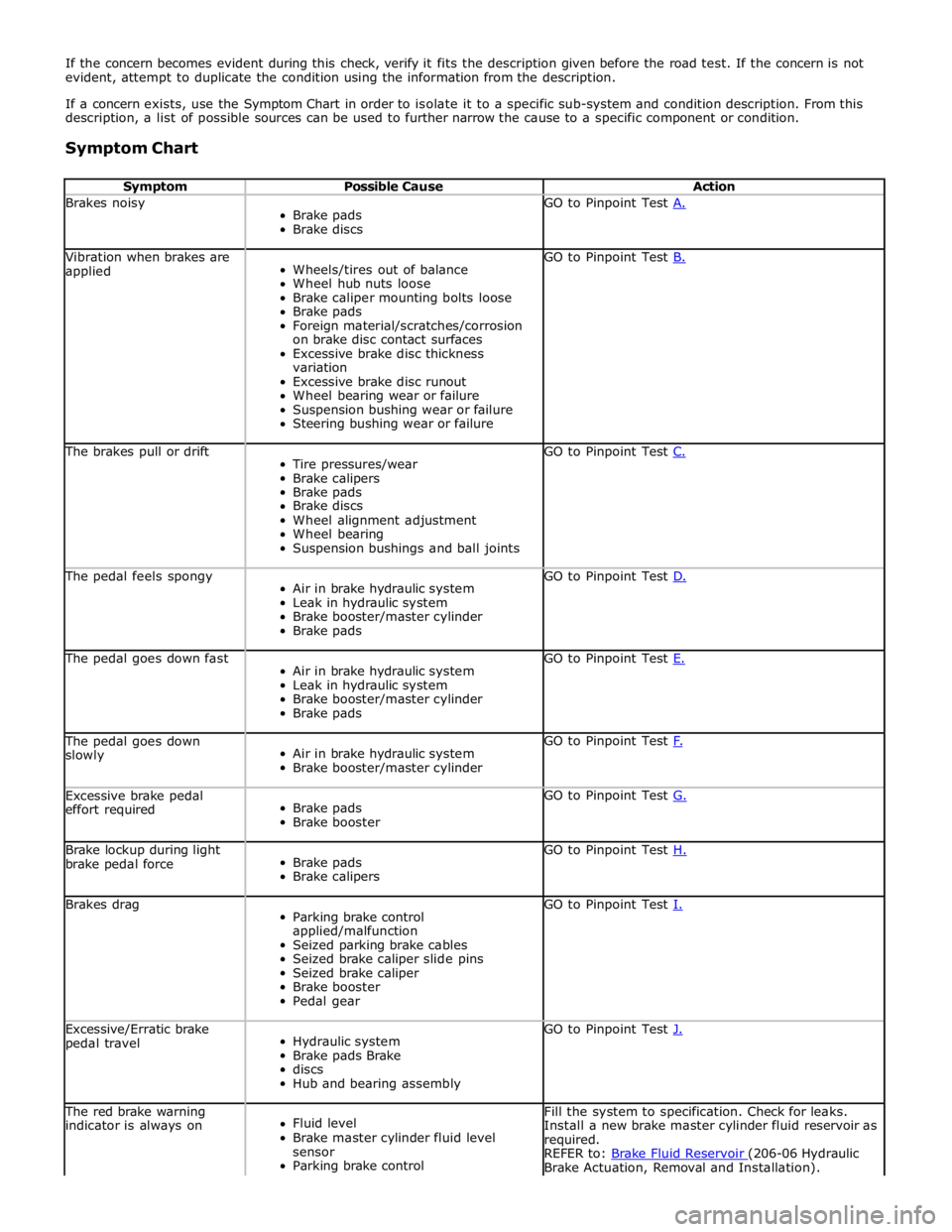
If a concern exists, use the Symptom Chart in order to isolate it to a specific sub-system and condition description. From this
description, a list of possible sources can be used to further narrow the cause to a specific component or condition.
Symptom Chart
Symptom Possible Cause Action Brakes noisy
Brake pads
Brake discs GO to Pinpoint Test A. Vibration when brakes are
applied
Wheels/tires out of balance
Wheel hub nuts loose
Brake caliper mounting bolts loose
Brake pads
Foreign material/scratches/corrosion
on brake disc contact surfaces
Excessive brake disc thickness
variation
Excessive brake disc runout
Wheel bearing wear or failure
Suspension bushing wear or failure
Steering bushing wear or failure GO to Pinpoint Test B. The brakes pull or drift
Tire pressures/wear
Brake calipers
Brake pads
Brake discs
Wheel alignment adjustment
Wheel bearing
Suspension bushings and ball joints GO to Pinpoint Test C. The pedal feels spongy
Air in brake hydraulic system
Leak in hydraulic system
Brake booster/master cylinder
Brake pads GO to Pinpoint Test D. The pedal goes down fast
Air in brake hydraulic system
Leak in hydraulic system
Brake booster/master cylinder
Brake pads GO to Pinpoint Test E. The pedal goes down
slowly
Air in brake hydraulic system
Brake booster/master cylinder GO to Pinpoint Test F. Excessive brake pedal
effort required
Brake pads
Brake booster GO to Pinpoint Test G. Brake lockup during light
brake pedal force
Brake pads
Brake calipers GO to Pinpoint Test H. Brakes drag
Parking brake control
applied/malfunction
Seized parking brake cables
Seized brake caliper slide pins
Seized brake caliper
Brake booster
Pedal gear GO to Pinpoint Test I. Excessive/Erratic brake
pedal travel
Hydraulic system
Brake pads Brake
discs
Hub and bearing assembly GO to Pinpoint Test J. The red brake warning
indicator is always on
Fluid level
Brake master cylinder fluid level
sensor
Parking brake control Fill the system to specification. Check for leaks.
Install a new brake master cylinder fluid reservoir as
required.
REFER to: Brake Fluid Reservoir (206-06 Hydraulic Brake Actuation, Removal and Installation).
Page 723 of 3039
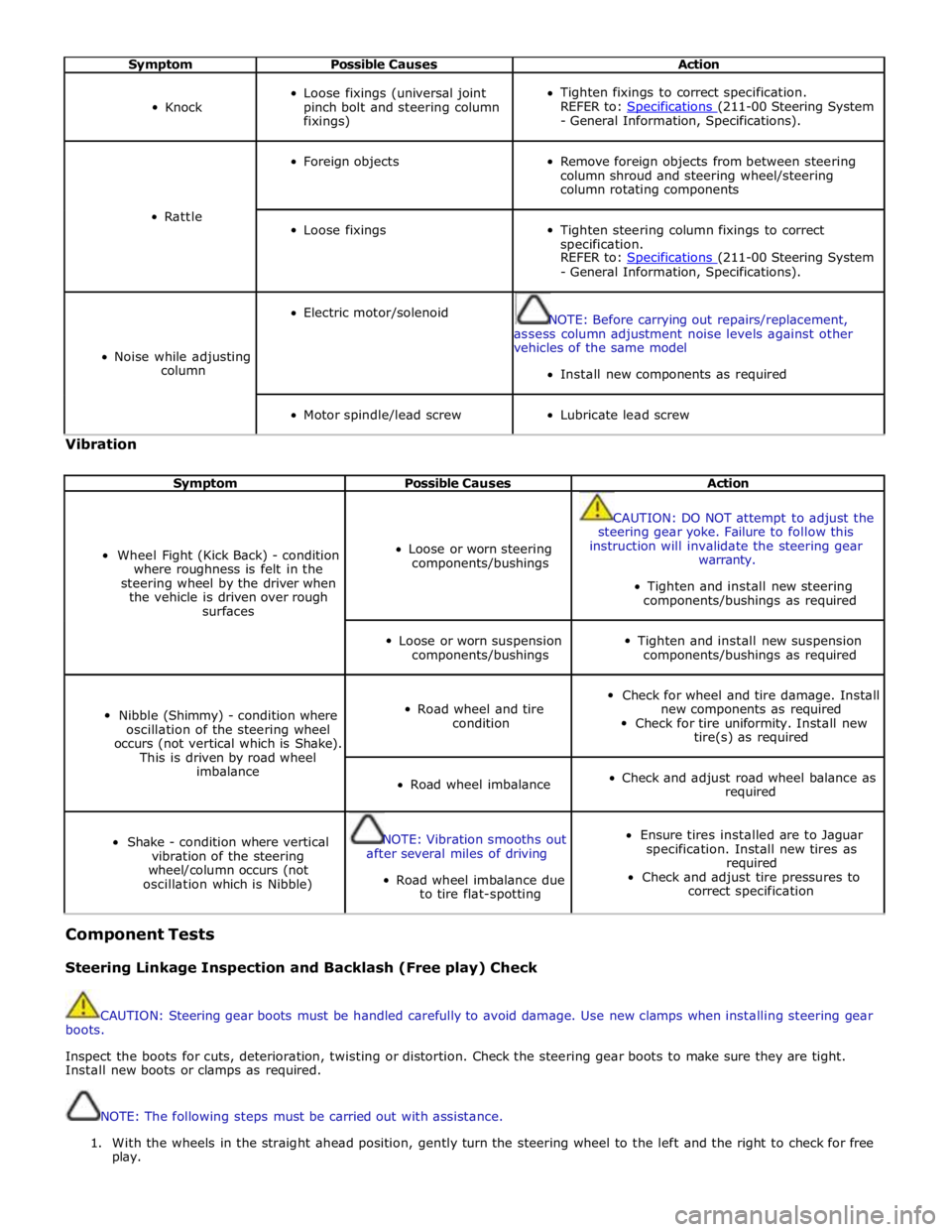
Symptom Possible Causes Action
Knock
Loose fixings (universal joint
pinch bolt and steering column
fixings)
Tighten fixings to correct specification.
REFER to: Specifications (211-00 Steering System - General Information, Specifications).
Rattle
Foreign objects
Remove foreign objects from between steering
column shroud and steering wheel/steering
column rotating components
Loose fixings
Tighten steering column fixings to correct
specification.
REFER to: Specifications (211-00 Steering System - General Information, Specifications).
Noise while adjusting
column
Electric motor/solenoid
NOTE: Before carrying out repairs/replacement,
assess column adjustment noise levels against other
vehicles of the same model
Install new components as required
Motor spindle/lead screw
Lubricate lead screw Vibration
Symptom Possible Causes Action
Wheel Fight (Kick Back) - condition
where roughness is felt in the
steering wheel by the driver when
the vehicle is driven over rough
surfaces
Loose or worn steering
components/bushings
CAUTION: DO NOT attempt to adjust the
steering gear yoke. Failure to follow this
instruction will invalidate the steering gear
warranty.
Tighten and install new steering
components/bushings as required
Loose or worn suspension
components/bushings
Tighten and install new suspension
components/bushings as required
Nibble (Shimmy) - condition where
oscillation of the steering wheel
occurs (not vertical which is Shake).
This is driven by road wheel
imbalance
Road wheel and tire
condition
Check for wheel and tire damage. Install
new components as required
Check for tire uniformity. Install new
tire(s) as required
Road wheel imbalance
Check and adjust road wheel balance as
required
Shake - condition where vertical
vibration of the steering
wheel/column occurs (not
oscillation which is Nibble)
NOTE: Vibration smooths out
after several miles of driving
Road wheel imbalance due
to tire flat-spotting
Ensure tires installed are to Jaguar
specification. Install new tires as
required
Check and adjust tire pressures to
correct specification Component Tests
Steering Linkage Inspection and Backlash (Free play) Check
CAUTION: Steering gear boots must be handled carefully to avoid damage. Use new clamps when installing steering gear
boots.
Inspect the boots for cuts, deterioration, twisting or distortion. Check the steering gear boots to make sure they are tight.
Install new boots or clamps as required.
NOTE: The following steps must be carried out with assistance.
1. With the wheels in the straight ahead position, gently turn the steering wheel to the left and the right to check for free
play.