Parking JAGUAR XFR 2010 1.G Owner's Manual
[x] Cancel search | Manufacturer: JAGUAR, Model Year: 2010, Model line: XFR, Model: JAGUAR XFR 2010 1.GPages: 3039, PDF Size: 58.49 MB
Page 226 of 3039

DTC Description Possible Causes Action U0155-00
Lost Communication
With Instrument Panel
Cluster (IPC) Control
Module - No sub type
information
No sub type information
Carry out any pinpoint test associated with this DTC
using the manufacturer approved diagnostic system U0159-00
Lost Communication
With Parking Assist
Control Module "A" - No
sub type information
No sub type information
Carry out any pinpoint test associated with this DTC
using the manufacturer approved diagnostic system U0164-00
Lost Communication
With HVAC Control
Module - No sub type
information
No sub type information
Carry out any pinpoint test associated with this DTC
using the manufacturer approved diagnostic system U0214-00
Lost Communication
With Remote Function
Actuation - No sub type
information
No sub type information
Carry out any pinpoint test associated with this DTC
using the manufacturer approved diagnostic system U0300-46
Internal Control Module
Software Incompatibility
- Calibration/parameter
memory failure
Calibration/parameter
memory failure
Suspect the RJB. Check and install a new RJB as
required, refer to the new module/component
installation note at the top of the DTC Index U1000-00
Solid State Driver
Protection Active -Driver
Disabled - No sub type
information
No sub type information
Carry out any pinpoint test associated with this DTC
using the manufacturer approved diagnostic system U1A14-49
CAN Initialisation
Failure - Internal
electronic failure
Internal electronic
failure
Suspect the RJB. Check and install a new RJB as
required, refer to the new module/component
installation note at the top of the DTC Index U3000-49
Control Module -
Internal electronic
failure
Internal electronic
failure
Suspect the RJB. Check and install a new RJB as
required, refer to the new module/component
installation note at the top of the DTC Index U3000-55
Control Module - Not
configured
Not configured
Re-configure the RJB using the manufacturer
approved diagnostic system www.JagDocs.com
Page 239 of 3039

DTC Description Possible Causes Action speed control sensor, check and install a new sensor
as required, refer to the new module/component
installation note at the top of the DTC Index C1A67-96 Forward Looking Sensor
- Component internal
Failure
Internal hardware failure
Suspect the speed control sensor. Check and install a
new sensor as required, refer to the new
module/component installation note at the top of
the DTC Index C1A67-97 Forward Looking Sensor
- Component or system
operation obstructed or
blocked
Sensor reduced visibility
Check for blockage in front of radar. Note: This DTC
will be cleared automatically when environmental
conditions allow C1A67-98 Forward Looking Sensor
- Component or system
over temperature
Speed control sensor
internal temperature
exceeded threshold
Allow system to cool. Note: This DTC will be cleared
automatically when environmental conditions allow P174E-81
Output Shaft
Speed/ABS Wheel
Speed Correlation -
Invalid serial data
received
Follow speed is
mis-calculated to too
high a value
Clear DTC and re-test U0001-88
High Speed CAN
Communication Bus -
Bus off
Vehicle CAN Bus off
condition
Carry out any pinpoint tests associated with this
DTC using the manufacturer approved diagnostic
system. Carry out CAN network integrity tests using
the manufacturer approved diagnostic system U0100-00
Lost Communications
With ECM/PCM "A" - No
sub type information
ECM missing message
Carry out any pinpoint tests associated with this
DTC using the manufacturer approved diagnostic
system. Check ECM for related DTCs and refer to the
relevant DTC Index U0101-00
Lost Communications
With TCM - No sub
type information
TCM missing message
Carry out any pinpoint tests associated with this
DTC using the manufacturer approved diagnostic
system. Check TCM for related DTCs and refer to the
relevant DTC Index U0103-00
Lost Communication
With Gear Shift Control
Module A - No sub type
information
No sub type information
Refer to the electrical circuit diagrams and check the
power and ground connections to the Transmission
Shift Module. Using the manufacturer approved
diagnostic system, complete a CAN network integrity
test. Refer to the electrical circuit diagrams and
check the CAN network between the Transmission
Shift Module and Speed Control Module U0103-87
Lost Communication
With Gear Shift Module
- Missing Message
Transmission shift
module missing message
Carry out any pinpoint tests associated with this
DTC using the manufacturer approved diagnostic
system. Check transmission shift module for related
DTCs and refer to the relevant DTC Index U0121-00
Lost Communication
With Anti-lock Brake
System (ABS) Control
Module - No sub type
information
ABS missing message
Carry out any pinpoint tests associated with this
DTC using the manufacturer approved diagnostic
system. Check ABS for related DTCs and refer to the
relevant DTC Index U0128-00
Lost Communications
With Park Brake Module
- No sub type
information
Parking brake missing
message
Carry out any pinpoint tests associated with this
DTC using the manufacturer approved diagnostic
system. Check parking brake module for related
DTCs and refer to the relevant DTC Index U0155-00
Lost Communications
With Instrument Panel
Cluster (IPC) Control
Module - No sub type
information
Instrument cluster
missing message
Carry out any pinpoint tests associated with this
DTC using the manufacturer approved diagnostic
system. Check instrument cluster for related DTCs
and refer to the relevant DTC Index
Page 240 of 3039

DTC Description Possible Causes Action U0300-00
Internal Control Module
Software
Incompatibility - No
sub type information
Invalid configuration
message is received
Re-configure the speed control module using the
manufacturer approved diagnostic system. Clear
DTCs and re-test. If DTC still logged, suspect
incorrect speed control module installed. Check and
install a new module as required, refer to new
module/component installation note at top of DTC
Index U0300-55
Internal Control Module
Software
Incompatibility - Not
configured
RJB - at least one of the
car configuration
parameters is not
configured
Re-configure the RJB using the manufacturer
approved diagnostic system U0401-00
Invalid Data Received
From ECM/PCM A - No
sub type information
ECM did not respond
properly to speed control
cancel or auto brake
cancel request
Check ECM for related DTCs and refer to relevant
DTC Index U0401-67
Invalid Data Received
From ECM/PCM A -
Signal incorrect after
event
ECM did not respond
properly to speed control
resume request
Check ECM for related DTCs and refer to relevant
DTC Index U0401-81
Invalid Data Received
From ECM/PCM A -
Invalid serial data
received
Invalid data received
from engine control
module
Bus signal/message
failure
Speed control inhibited
by ECM
Check the Engine Control Module for related DTCs
and refer to relevant DTC Index. If U040181 is
logged as historic but no other DTCs have logged in
the engine control module at the same time and
distance, it may be caused by cranking with low
voltage conditions. Check battery and charging
system according to instructions in the battery care
manual. Install the latest Engine Control Module
software using the manufacturer approved diagnostic
system, contact Dealer Technical Support before
replacing components U0415-53
Invalid Data Received
From Anti-Lock Braking
System (ABS) Control
Module - De-activated
Event information
Deactivated
Check the Anti-Lock Braking System Module for
related DTCs and refer to the relevant DTC index U0415-81
Invalid Data Received
From Anti-lock Brake
System (ABS) Control
Module - Invalid serial
data received
Stability assist fault
Check ABS module for related DTCs and refer to
relevant DTC Index U0417-67
Invalid Data Received
From Park Brake
Control Module - Signal
incorrect after event
Parking brake module did
not respond properly to
apply request
Check parking brake module for related DTCs and
refer to relevant DTC Index U0417-81
Invalid Data Received
From Park Brake
Control Module -
Invalid serial data
received
Speed control inhibited
by parking brake module
Check parking brake module for related DTCs and
refer to relevant DTC Index U0418-68
Invalid Data Received
From Brake System
Control Module - Event
information
Event information
Check the Anti-Lock Braking System Module for
related DTCs and refer to the relevant DTC index U0421-81
Invalid Data Received
From Suspension
Control Module 'A' -
Invalid serial data
received
Invalid serial data
received
Check the Suspension Control Module for related
DTCs and refer to the relevant DTC index U0423-81
Invalid Data Received
From Instrument Panel
Control Module -
Invalid serial data
received
Speed control inhibited
by instrument cluster
Check instrument cluster, CJB and RJB for related
DTCs and refer to relevant DTC Index U1A00-88
Private Communication
Network - Bus off
Bus off
The module setting this code has disabled CAN
transmission. Check for other bus off codes. Check
the module and circuits. Refer to the electrical circuit
diagrams. Clear all DTCs and road test the vehicle. If
the concern reoccurs contact Dealer Technical
Page 263 of 3039

DTC Description Possible Causes Action P1674-04
Control Module Software
Corrupted - System
Internal Failures
System internal failures
Suspect the Transmission Control Module. Install a
new Transmission Control Module as required,
refer to the warranty policy and procedures manual
if a module/component is suspect. P1674-48
Control Module Software
Corrupted - Supervision
Software Failure
Supervision software
failure
Suspect the Transmission Control Module. Install a
new Transmission Control Module as required,
refer to the warranty policy and procedures manual
if a module/component is suspect. P1707-07 Transfer Case Neutral or
Park/Neutral Indication
Circuit - Commanded
position not reachable
Transfer case neutral or
park/neutral indication
circuit - mechanical
failures
Clear the DTC. Test drive the Vehicle, engaging
and disengaging the parking lock several times. If
the DTC recurs, check parking lock components
and replace as required. If no faulty parklock
component is found Clear DTC and the DTC returns
suspect the Transmission Control Module. Install a
new Transmission Control Module as required,
refer to the warranty policy and procedures manual
if a module/component is suspect. P1707-72 Transfer Case Neutral or
Park/Neutral Indication
Circuit - Actuator Stuck
Open
Transfer case neutral or
park/neutral indication
circuit - Actuator stuck
open
Clear the DTC. Test drive the Vehicle, engaging
and disengaging the parking lock several times. If
the DTC recurs, check parking lock components
and replace as required. If no faulty parklock
component is found Clear DTC and the DTC returns
suspect the Transmission Control Module. Install a
new Transmission Control Module as required,
refer to the warranty policy and procedures manual
if a module/component is suspect. P1707-77 Transfer Case Neutral or
Park/Neutral Indication
Circuit - Commanded
position not reachable
Commanded position not
reachable
Clear the DTC. Test drive the Vehicle, engaging
and disengaging the parking lock several times. If
the DTC recurs, check parking lock components
and replace as required. If no faulty parklock
component is found Clear DTC and the DTC returns
suspect the Transmission Control Module. Install a
new Transmission Control Module as required,
refer to the warranty policy and procedures manual
if a module/component is suspect. P2700-07 Transmission Friction
Element A Apply Time
Range/Performance -
Mechanical Failures
Gear Ratio Monitoring.
Mechanical Failures
Check and correct oil level. Clear DTC. If code
re-detects suspect Transmission (mechanical)
internal fault. Install a new Transmission as
required, refer to the warranty policy and
procedures manual if a module/component is
suspect. P2701-07 Transmission Friction
Element B Apply Time
Range/Performance -
Mechanical Failures
Gear Ratio Monitoring.
Mechanical Failures
Check and correct oil level. Clear DTC. If code
re-detects suspect Transmission (mechanical)
internal fault. Install a new Transmission as
required, refer to the warranty policy and
procedures manual if a module/component is
suspect. P2702-07 Transmission Friction
Element C Apply Time
Range/Performance -
Mechanical Failures
Gear Ratio Monitoring.
Mechanical Failures
Check and correct oil level. Clear DTC. If code
re-detects suspect Transmission (mechanical)
internal fault. Install a new Transmission as
required, refer to the warranty policy and
procedures manual if a module/component is
suspect. P2703-07 Transmission Friction
Element D Apply Time
Range/Performance -
Mechanical Failures
Gear Ratio Monitoring.
Mechanical Failures
Check and correct oil level. Clear DTC. If code
re-detects suspect Transmission (mechanical)
internal fault. Install a new Transmission as
required, refer to the warranty policy and
procedures manual if a module/component is
suspect.
Page 267 of 3039
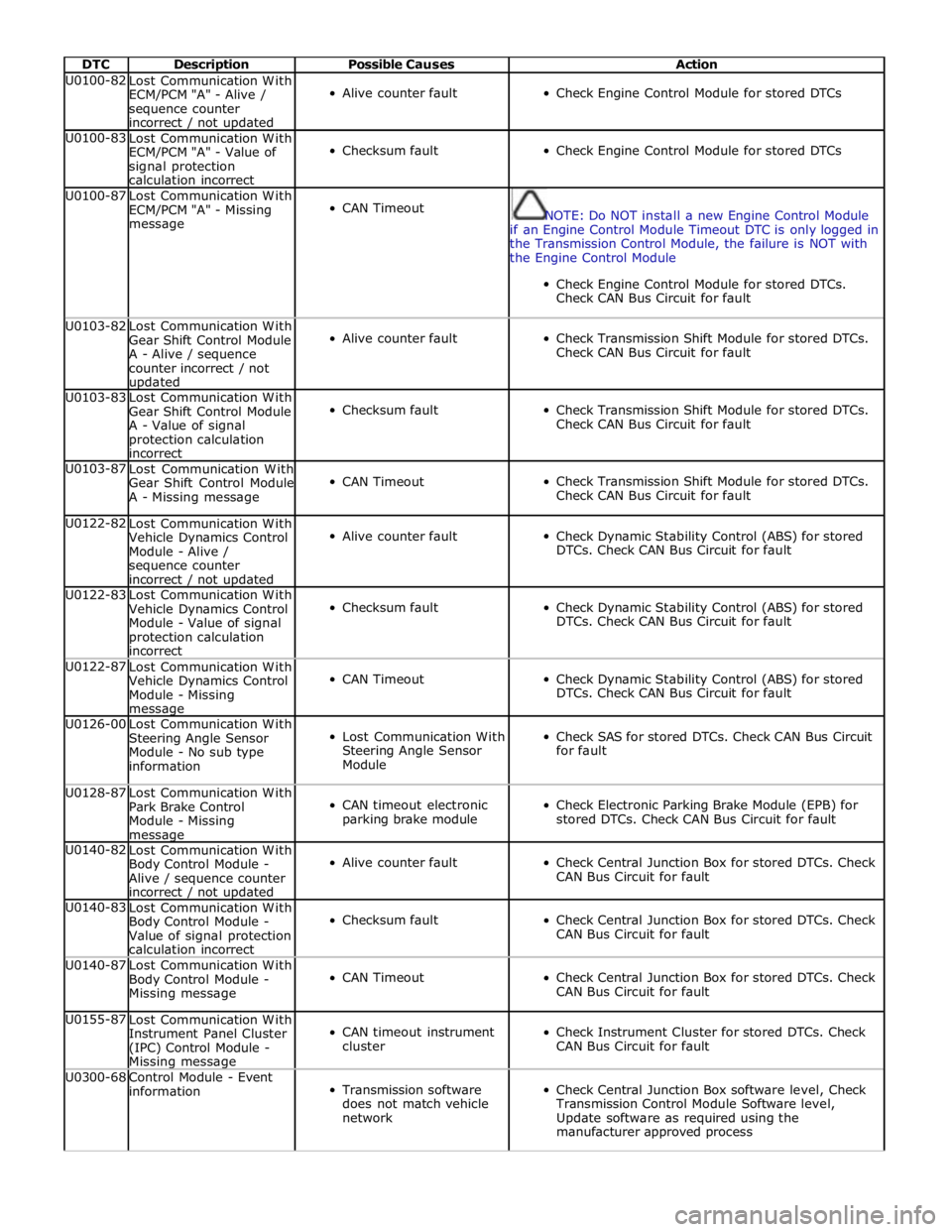
DTC Description Possible Causes Action U0100-82
Lost Communication With
ECM/PCM "A" - Alive /
sequence counter
incorrect / not updated
Alive counter fault
Check Engine Control Module for stored DTCs U0100-83
Lost Communication With
ECM/PCM "A" - Value of
signal protection
calculation incorrect
Checksum fault
Check Engine Control Module for stored DTCs U0100-87
Lost Communication With
ECM/PCM "A" - Missing
message
CAN Timeout
NOTE: Do NOT install a new Engine Control Module
if an Engine Control Module Timeout DTC is only logged in
the Transmission Control Module, the failure is NOT with
the Engine Control Module
Check Engine Control Module for stored DTCs.
Check CAN Bus Circuit for fault U0103-82
Lost Communication With
Gear Shift Control Module
A - Alive / sequence
counter incorrect / not updated
Alive counter fault
Check Transmission Shift Module for stored DTCs.
Check CAN Bus Circuit for fault U0103-83
Lost Communication With
Gear Shift Control Module
A - Value of signal
protection calculation
incorrect
Checksum fault
Check Transmission Shift Module for stored DTCs.
Check CAN Bus Circuit for fault U0103-87
Lost Communication With
Gear Shift Control Module
A - Missing message
CAN Timeout
Check Transmission Shift Module for stored DTCs.
Check CAN Bus Circuit for fault U0122-82
Lost Communication With
Vehicle Dynamics Control
Module - Alive /
sequence counter
incorrect / not updated
Alive counter fault
Check Dynamic Stability Control (ABS) for stored
DTCs. Check CAN Bus Circuit for fault U0122-83
Lost Communication With
Vehicle Dynamics Control
Module - Value of signal
protection calculation
incorrect
Checksum fault
Check Dynamic Stability Control (ABS) for stored
DTCs. Check CAN Bus Circuit for fault U0122-87
Lost Communication With
Vehicle Dynamics Control
Module - Missing message
CAN Timeout
Check Dynamic Stability Control (ABS) for stored
DTCs. Check CAN Bus Circuit for fault U0126-00
Lost Communication With
Steering Angle Sensor
Module - No sub type
information
Lost Communication With
Steering Angle Sensor
Module
Check SAS for stored DTCs. Check CAN Bus Circuit
for fault U0128-87
Lost Communication With
Park Brake Control
Module - Missing message
CAN timeout electronic
parking brake module
Check Electronic Parking Brake Module (EPB) for
stored DTCs. Check CAN Bus Circuit for fault U0140-82
Lost Communication With
Body Control Module -
Alive / sequence counter
incorrect / not updated
Alive counter fault
Check Central Junction Box for stored DTCs. Check
CAN Bus Circuit for fault U0140-83
Lost Communication With
Body Control Module -
Value of signal protection
calculation incorrect
Checksum fault
Check Central Junction Box for stored DTCs. Check
CAN Bus Circuit for fault U0140-87
Lost Communication With
Body Control Module -
Missing message
CAN Timeout
Check Central Junction Box for stored DTCs. Check
CAN Bus Circuit for fault U0155-87
Lost Communication With
Instrument Panel Cluster
(IPC) Control Module - Missing message
CAN timeout instrument
cluster
Check Instrument Cluster for stored DTCs. Check
CAN Bus Circuit for fault U0300-68
Control Module - Event
information
Transmission software
does not match vehicle
network
Check Central Junction Box software level, Check
Transmission Control Module Software level,
Update software as required using the
manufacturer approved process
Page 276 of 3039

DTC Description Possible Causes Action circuit
Short circuit to ground
medium speed CAN positive
circuit
Short circuit between
medium speed CAN positive
circuit and medium speed
CAN negative circuit U0156-4A
Lost communication
with information
center "A" -
Incorrect component
installed
The information and
entertainment module has
detected a mismatch
between the hardware
connected and the expected
hardware
Module has incorrect serial
number
Suspect incorrect instrument cluster installed. Refer
to the warranty policy and procedures manual if
module is suspect. Check the system is operating
correctly and there are no DTCs U0159-00
Lost communication
with parking assist
control module "A" -
No sub type
information
General failure
Parking aid module, battery
supply circuit, open circuit
Parking aid module, ground
supply circuit, open circuit
Parking aid module medium
speed CAN negative circuit,
open circuit
parking aid module medium
speed CAN positive circuit,
open circuit
Carry out any pinpoint tests associated with this
DTC using the manufacturer approved diagnostic
system. Check parking aid module for DTCs and
refer to the relevant DTC Index. Refer to electrical
circuit diagrams, check battery and ground supplies,
to parking aid module for open circuit. Check
medium speed CAN negative and positive harness
to parking aid module, repair as necessary U0163-00
Lost communication
with navigation
control module - No
sub type
information
General failure
Navigation system module,
battery supply circuit, open
circuit
Navigation system module
ground supply circuit, open
circuit
Navigation system module,
MOST network, open circuit
Navigation system module
not configured
Navigation system module
failure
Check the navigation system module for DTCs and
refer to the relevant DTC index. Using the
manufacturing approved diagnostic system carry out
MOST ring test. Using the manufacturers approved
diagnostic system re-configure the navigation
system module. Refer to electrical circuit diagrams
check battery and ground supplies to navigation
system module for open circuit. Repair as necessary.
Refer to the warranty policy and procedures manual
if module is suspect. Check the system is operating
correctly and there are no DTCs U0163-4A
Lost communication
with navigation
control module -
Incorrect component
installed
The information and
entertainment module has
detected a mismatch
between the hardware
connected and the expected
hardware
Module has incorrect serial
number
Suspect incorrect navigation module installed. Refer
to the warranty policy and procedures manual if
module is suspect. Check the system is operating
correctly and there are no DTCs U0184-00
Lost communication
with radio - No sub
type information
General failure
Integrated audio module
battery supply circuit, open
circuit
Integrated audio module
ground supply circuit, open
circuit
Integrated audio module
MOST network, open circuit
Integrated audio module not
configured
Integrated audio module
failure
Check the integrated audio module for DTCs and
refer to the relevant DTC index. Using the
manufacturing approved diagnostic system carry out
MOST ring test. Using the manufacturers approved
diagnostic system re-configure the integrated audio
module. Refer to electrical circuit diagrams check
battery and ground supplies to integrated audio
module for open circuit. Repair as necessary. Refer
to the warranty policy and procedures manual if
module is suspect. Check the system is operating
correctly and there are no DTCs U0184-4A
Lost communication
with radio -
Incorrect component
installed
The information and
entertainment module has
detected a mismatch
between the hardware
connected and the expected
hardware
Suspect incorrect integrated audio module installed.
Refer to the warranty policy and procedures manual
if module is suspect. Check the system is operating
correctly and there are no DTCs
Page 294 of 3039

Jacking and Lifting - Jacking
Description and Operation
Safety Precautions Published: 11-May-2011
WARNING: The jack provided with the vehicle is intended to be used in an emergency for changing a deflated tire. To
avoid damage to the vehicle, never use the jack to raise the vehicle for any other purpose. Refer to the Driver Handbook when
using the jack supplied with the vehicle. Failure to follow these instructions may result in personal injury.
The following safety precautions must be observed when raising the vehicle to carry out service operations:
Never rely on a jack alone to support a vehicle. Always use suitable vehicle stands to provide rigid support.
When working beneath a vehicle, whenever possible use a vehicle hoist instead of a jack and vehicle stands.
Make sure that the vehicle is standing on firm, level ground before using a jack.
Do not rely on the parking brake alone; chock the wheels and put the automatic transmission into Park if possible.
Check that any lifting equipment used has adequate capacity for the load being lifted and is in correct working order.
Page 296 of 3039
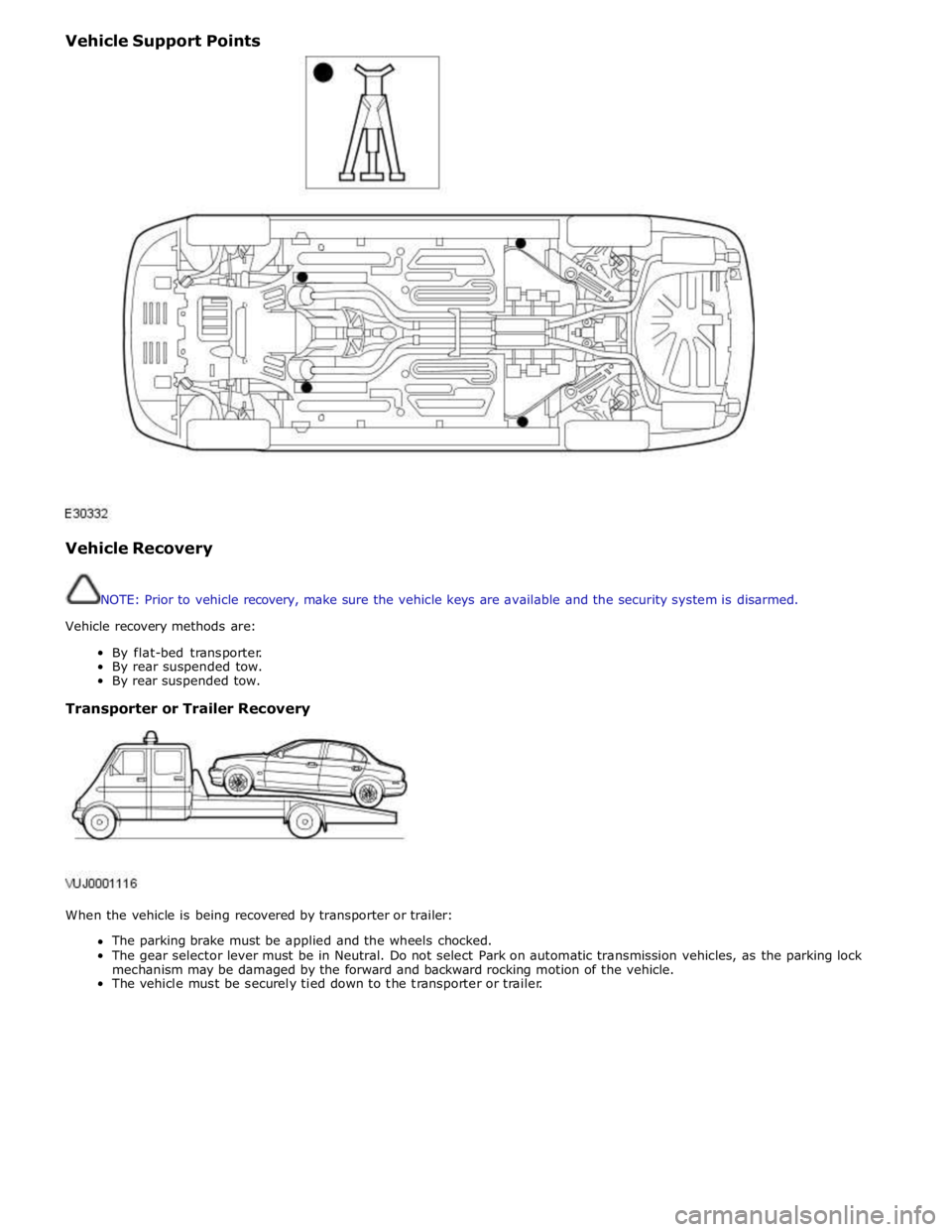
Vehicle Support Points
Vehicle Recovery
NOTE: Prior to vehicle recovery, make sure the vehicle keys are available and the security system is disarmed.
Vehicle recovery methods are:
By flat-bed transporter.
By rear suspended tow.
By rear suspended tow.
Transporter or Trailer Recovery
When the vehicle is being recovered by transporter or trailer:
The parking brake must be applied and the wheels chocked.
The gear selector lever must be in Neutral. Do not select Park on automatic transmission vehicles, as the parking lock
mechanism may be damaged by the forward and backward rocking motion of the vehicle.
The vehicle must be securely tied down to the transporter or trailer.
Page 317 of 3039
Published: 16-Oct-2013
Suspension System - General Information - Four-Wheel Alignment
General Procedures
CAUTIONS:
Make sure the vehicle is on a flat level surface.
Make sure the tire pressures are within specification.
Make sure that only the manufacturers' recommended four wheel alignment equipment is used.
Make sure the steering is in the straight ahead position.
1. For wheel alignment information, refer to the suspension specification
section.
For additional information, refer to: Specifications (204-00 Suspension System - General Information, Specifications).
2. Check the tie rod ends, suspension joints, wheel bearings and wheels
and tires for damage, wear and free play.
Adjust or repair any worn, damaged or incorrectly adjusted
components.
3. Check and adjust tire pressures.
4. Position the vehicle on a calibrated, level, vehicle lift.
5. Vehicles with air suspension.
For additional information, refer to: Air Suspension Manual Tight
Tolerance Setting Mode (204-05, General Procedures).
6. Release the vehicle parking brake.
7. Using only four-wheel alignment equipment approved by Jaguar, check
the wheel alignment.
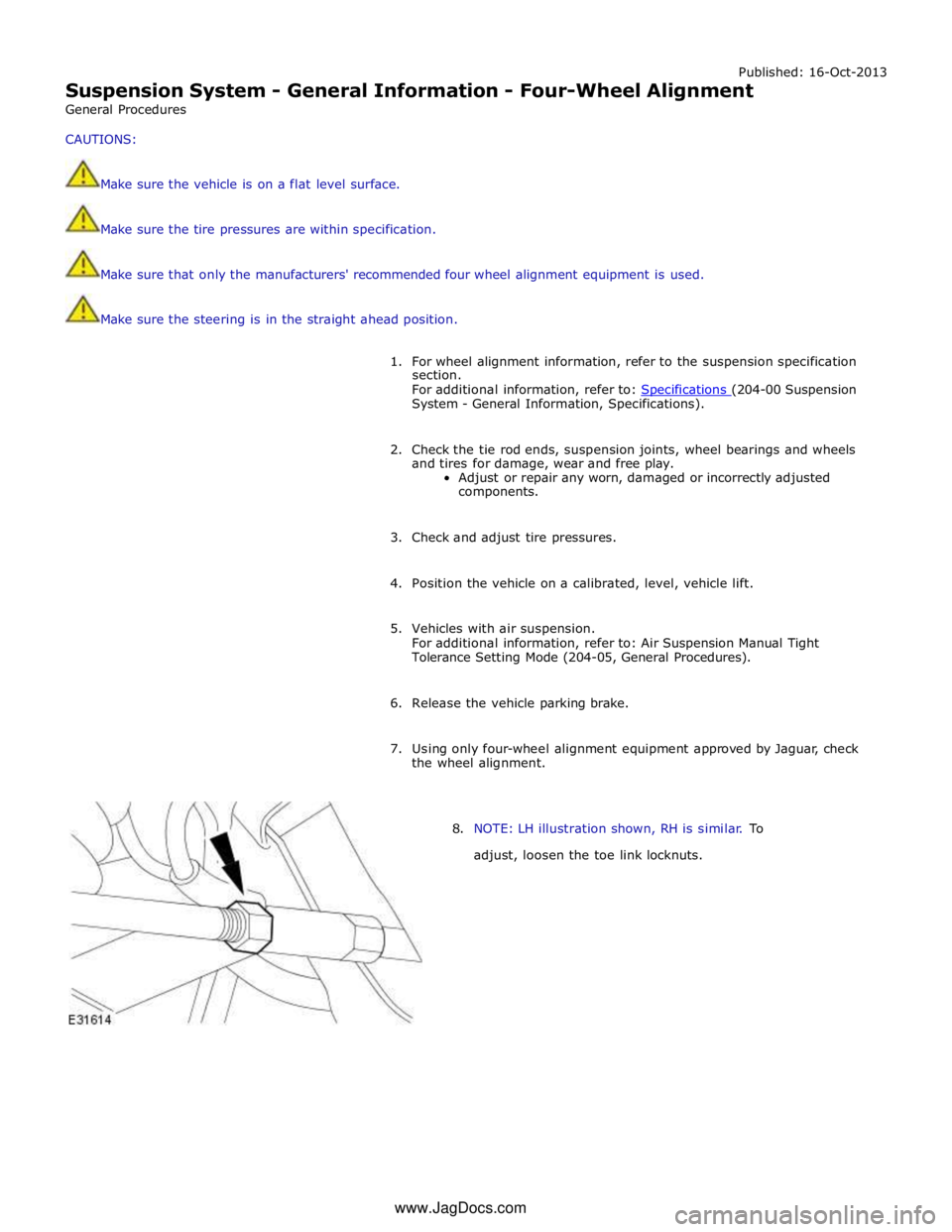
8. NOTE: LH illustration shown, RH is similar. To
adjust, loosen the toe link locknuts. www.JagDocs.com
Page 321 of 3039
Published: 16-Oct-2013
Suspension System - General Information - Front Toe Adjustment
General Procedures
CAUTIONS:
Make sure the vehicle is on a flat level surface.
Make sure the tire pressures are within specification.
Make sure that only the manufacturers' recommended four wheel alignment equipment is used.
Make sure the steering is in the straight ahead position.
1. For wheel alignment information, refer to the suspension specification
section.
For additional information, refer to: Specifications (204-00 Suspension System - General Information, Specifications).
2. Check the tie rod ends, suspension joints, wheel bearings and wheels
and tires for damage, wear and free play.
Adjust or repair any worn, damaged or incorrectly adjusted
components.
3. Check and adjust tire pressures.
4. Position the vehicle on a 4 post lift.
5. Release the vehicle parking brake.
6. Vehicles with air suspension.
For additional information, refer to: Air Suspension Manual Tight
Tolerance Setting Mode (204-05, General Procedures).
7. For additional information, refer to: Air Suspension Manual Tight
Tolerance Setting Mode (204-05, General Procedures).
8. Using only four-wheel alignment equipment approved by Jaguar, check
the wheel alignment.
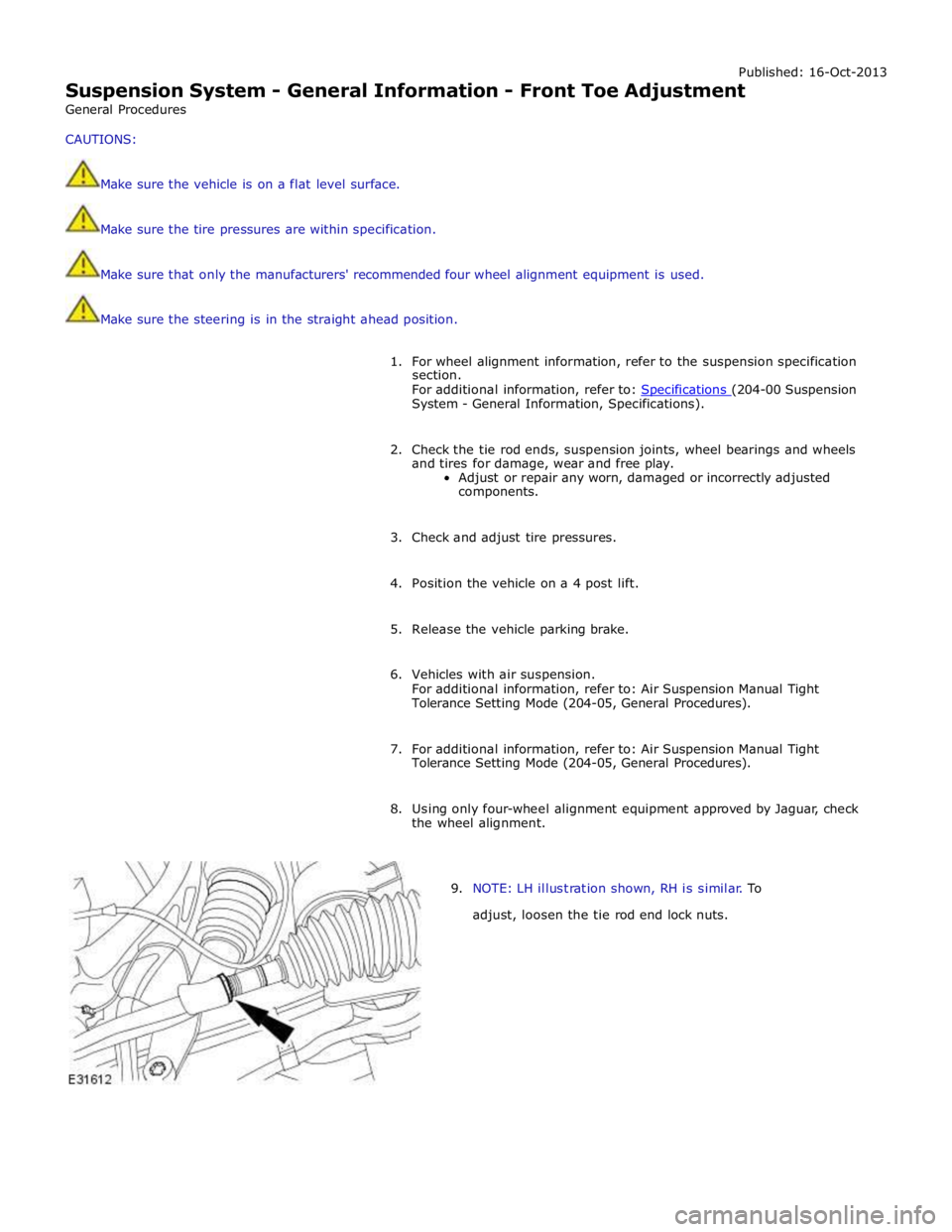
9. NOTE: LH illustration shown, RH is similar. To
adjust, loosen the tie rod end lock nuts.