park assist JAGUAR XFR 2010 1.G Owner's Manual
[x] Cancel search | Manufacturer: JAGUAR, Model Year: 2010, Model line: XFR, Model: JAGUAR XFR 2010 1.GPages: 3039, PDF Size: 58.49 MB
Page 1842 of 3039

Parking Aid - Parking Aid - Overview
Description and Operation
OVERVIEW Published: 11-May-2011
The parking aid system provides an audible warning to the driver when any obstacles are in the path of the vehicle during a
forward (if front sensors are fitted) or reversing manoeuver. The purpose of the system is to assist the driver when parking or
manoeuvring in a restricted space. It is not designed as a crash avoidance system or a replacement for visual interpretation by
the driver.
All vehicles are fitted with rear parking aid sensors. Higher specification vehicles may also be fitted with front parking aid
sensors.
A roof console mounted parking aid switch allows the driver to deactivate the parking aid system if operation is not required.
NOTE: The switch is only fitted to vehicles with front parking aid sensors.
A parking aid camera is a standard fitment on some models and optional on others. The parking aid camera supplements the
information provided by the parking aid system by providing the driver with a visual display of the area directly behind the
vehicle.
www.JagDocs.com
Page 1938 of 3039
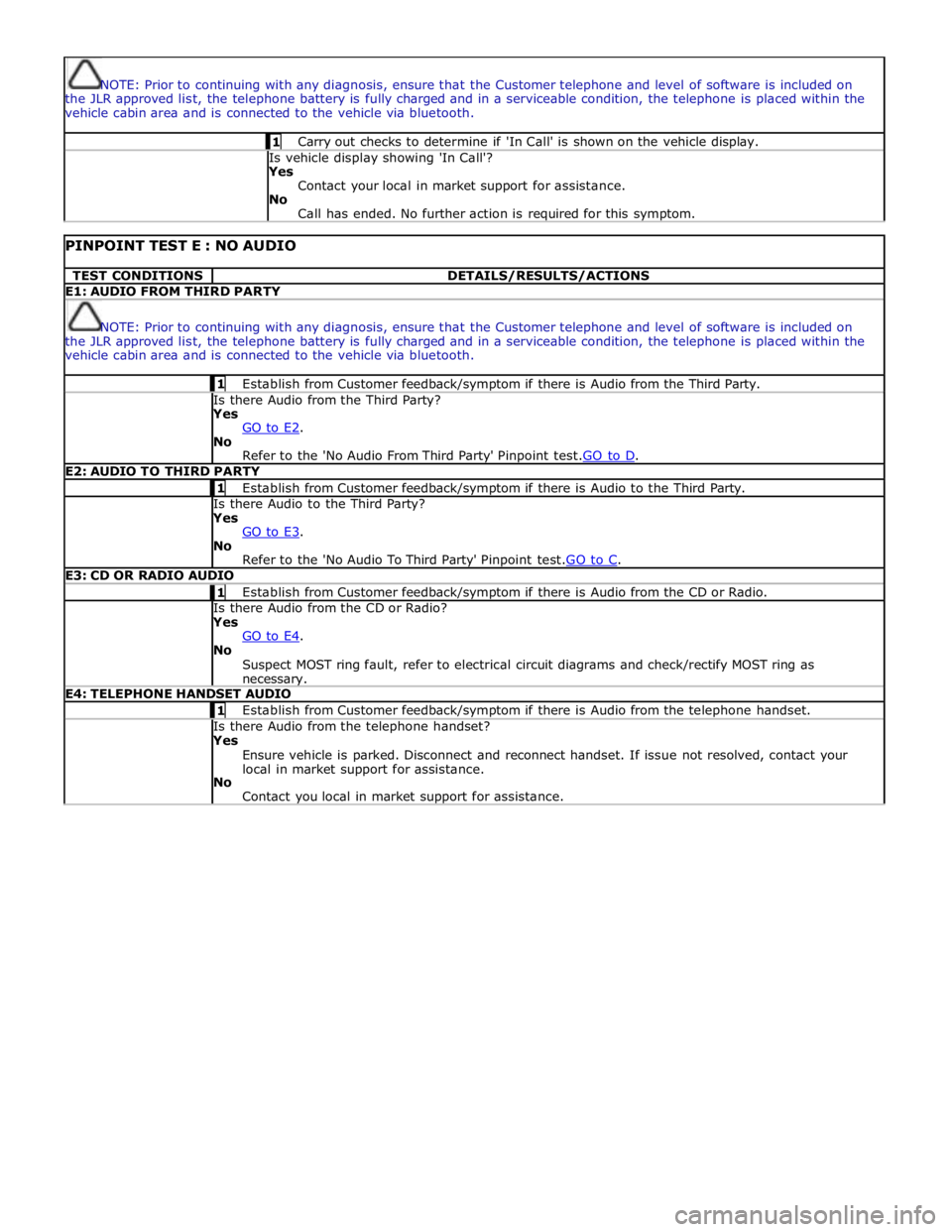
NOTE: Prior to continuing with any diagnosis, ensure that the Customer telephone and level of software is included on
the JLR approved list, the telephone battery is fully charged and in a serviceable condition, the telephone is placed within the
vehicle cabin area and is connected to the vehicle via bluetooth. 1 Carry out checks to determine if 'In Call' is shown on the vehicle display. Is vehicle display showing 'In Call'?
Yes
Contact your local in market support for assistance.
No
Call has ended. No further action is required for this symptom.
PINPOINT TEST E : NO AUDIO TEST CONDITIONS DETAILS/RESULTS/ACTIONS E1: AUDIO FROM THIRD PARTY
NOTE: Prior to continuing with any diagnosis, ensure that the Customer telephone and level of software is included on
the JLR approved list, the telephone battery is fully charged and in a serviceable condition, the telephone is placed within the
vehicle cabin area and is connected to the vehicle via bluetooth. 1 Establish from Customer feedback/symptom if there is Audio from the Third Party. Is there Audio from the Third Party? Yes
GO to E2. No
Refer to the 'No Audio From Third Party' Pinpoint test.GO to D. E2: AUDIO TO THIRD PARTY 1 Establish from Customer feedback/symptom if there is Audio to the Third Party. Is there Audio to the Third Party? Yes
GO to E3. No
Refer to the 'No Audio To Third Party' Pinpoint test.GO to C. E3: CD OR RADIO AUDIO 1 Establish from Customer feedback/symptom if there is Audio from the CD or Radio. Is there Audio from the CD or Radio? Yes
GO to E4. No
Suspect MOST ring fault, refer to electrical circuit diagrams and check/rectify MOST ring as necessary. E4: TELEPHONE HANDSET AUDIO 1 Establish from Customer feedback/symptom if there is Audio from the telephone handset. Is there Audio from the telephone handset? Yes
Ensure vehicle is parked. Disconnect and reconnect handset. If issue not resolved, contact your
local in market support for assistance.
No
Contact you local in market support for assistance.
Page 2034 of 3039

dependant on a particular ignition mode status. The side lamps will also be illuminated when the lighting control switch is in
the AUTO position and a 'lights on' signal is received by the CJB from the rain/light sensor Side Marker Lamps (NAS only)
The side marker lamp is located in the outer part of the headlamp assembly. The side marker lamp uses a W5W wedge fitting
bulb. The bulb is fitted into a holder which connects with contacts in the headlamp housing. The holder is fitted into an
aperture which connects with contacts in the headlamp housing. The side marker lamp is active at all times when the side
lamps are active.
AUTOMATIC HEADLAMP OPERATION
The automatic headlamp function is a driver assistance system. The driver can override the system operation by selection of
side lamp or headlamp on if the ambient light conditions require front and rear lighting to be active. The automatic headlamp
system uses a light sensor and the CJB, which are connected via a LIN (local interconnect network) bus to control the headlamp functionality. The light sensor is incorporated in the rain/light sensor located on the inside of the windshield, below
the rear view mirror. The wiper system also uses the rain/light sensor for automatic wiper operation.
The light sensor measures the ambient light around the vehicle in a vertical direction and also the angular light level from the
front of the vehicle. The rain/light sensor uses vehicle speed signals, wiper switch position and the park position of the front
wipers to control the system. The automatic headlamp operation uses ambient light levels which are monitored by photodiode
incorporated in the rain/light sensor. The rain/light sensor sends a lights on/off request to the CJB on the LIN bus, which responds by switching on the low beam headlamps, front side lamps and rear tail lamps. The automatic headlamps are
activated under the following conditions:
Twilight
Darkness
Rain
Snow
Tunnels
Underground or multistoried car parks.
Operation of the automatic headlamps requires the ignition to be in ignition mode 6, the lighting control switch to be in the
'AUTO' position and a lights on request signal from the light sensor. If the rain sensor signal activates the fast speed wipers,
the low beam headlamps are activated, providing the lighting control switch is in the 'AUTO' position.
HEADLAMP LEVELING
Headlamp leveling provides for the adjustment of the vertical aim of the headlamps. The leveling system is primarily required
to minimise glare to other road users when a heavy load is in the rear of the vehicle. Two systems of headlamp leveling are
available; manual and static dynamic.
Manual Headlamp Leveling
The manual system uses a thumbwheel rheostat to adjust the vertical alignment of the headlamps to compensate for differing
vehicle loading. The rotary thumbwheel is located on the auxiliary lighting switch, adjacent to the illumination dimmer
thumbwheel. Three positions are available to adjust the headlamps to a position to prevent glare to other road users.
Static Dynamic Headlamp Leveling
The static dynamic headlamp leveling system uses the following components:
Front and rear vehicle height sensors
Two headlamp leveling, vertical adjustment motors
Headlamp leveling module
Ignition in mode 6
Vehicle speed information from ABS module.
The static dynamic system uses height sensors fitted to the front and rear suspension and a headlamp leveling module which
periodically monitors the vehicle attitude and adjusts the headlamp vertical alignment accordingly.
Static dynamic headlamp leveling is controlled by a headlamp leveling module located in the lower instrument panel, behind
the glovebox.
The height sensors are both located on the RH side of the vehicle. The front sensor is attached to the front suspension lower arm with a strap and to the front sub frame with a bracket and 2 bolts. The rear sensor is attached to the rear suspension
upper control arm with a cable tied clip and to the rear sub frame with a bracket and 2 bolts. Each sensor has 3 connections to
the headlamp leveling module; power, ground and signal.
DAYTIME RUNNING LAMPS (DRL)
Refer to DRL section for details. Refer to: Daytime Running Lamps (DRL) (417-04 Daytime Running Lamps (DRL), Description and Operation).
REAR LAMP ASSEMBLY
The rear lamp assembly is a 2 piece unit, with one part located in the rear quarter panel and the second part attached to the
luggage compartment lid. The outer rear lamp assembly is located in a recess in the vehicle body. The lamp is secured with 2
studs inboard studs on the lamp body which are secured to the vehicle body with 2 nuts. A third outboard stud and nut secures
Page 2100 of 3039

DTC Description Possible Causes Action B1D3523 Hazard Switch
Hazard warning lamp
switch digital input circuit
- signal stuck low Carry out any pinpoint test associated with this DTC using the
manufacturer approved diagnostic system. Refer to the electrical
circuit diagrams and check hazard warning lamp switch digital
input circuit for short to ground U001988
Low Speed CAN
Communication
Bus
Bus off Carry out any pinpoint test associated with this DTC using the
manufacturer approved diagnostic system U014000
Lost
Communication
With Body
Control Module
No sub type information Carry out any pinpoint test associated with this DTC using the
manufacturer approved diagnostic system U015500
Lost
Communication
With Instrument
Panel Cluster
(IPC) Control
Module
No sub type information Carry out any pinpoint test associated with this DTC using the
manufacturer approved diagnostic system U015900
Lost
Communication
With Parking
Assist Control
Module "A"
No sub type information Carry out any pinpoint test associated with this DTC using the
manufacturer approved diagnostic system U016400
Lost
Communication
With HVAC
Control Module
No sub type information Carry out any pinpoint test associated with this DTC using the
manufacturer approved diagnostic system U021400
Lost
Communication
With Remote
Function
Actuation
No sub type information Carry out any pinpoint test associated with this DTC using the
manufacturer approved diagnostic system U030046
Internal Control
Module Software
Incompatibility
Calibration/parameter
memory failure Suspect the RJB. Check and install a new RJB as required, refer
to the new module/component installation note at the top of the
DTC Index U100000
Solid State Driver
Protection Active
-Driver Disabled
No sub type information Carry out any pinpoint test associated with this DTC using the
manufacturer approved diagnostic system U1A1449
CAN Initialisation
Failure
Internal electronic failure Suspect the RJB. Check and install a new RJB as required, refer
to the new module/component installation note at the top of the
DTC Index U300049 Control Module
Internal electronic failure Suspect the RJB. Check and install a new RJB as required, refer
to the new module/component installation note at the top of the
DTC Index U300055 Control Module
Not configured Re-configure the RJB using the manufacturer approved diagnostic
system www.JagDocs.com