clutch JAGUAR XFR 2010 1.G Service Manual
[x] Cancel search | Manufacturer: JAGUAR, Model Year: 2010, Model line: XFR, Model: JAGUAR XFR 2010 1.GPages: 3039, PDF Size: 58.49 MB
Page 1710 of 3039
control switch on the integrated control panel or the + and - soft buttons on the touch screen display (TSD). The ATC module also adjusts blower speed to compensate for the ram effect on inlet air produced by forward movement of the vehicle. As
vehicle speed and ram effect increases, blower motor speed is reduced, and vice versa.
Air Distribution Control
Two air distribution doors are used to direct air into the passenger compartment. The doors are operated by stepper motors,
which are controlled by the ATC module using LIN bus messages.
When the A/C system is in automatic mode, the ATC module automatically controls air distribution into the passenger compartment in line with its 'comfort' algorithm. Automatic control is overridden if any of the TSD air distribution soft buttons
are selected. Air distribution in the passenger compartment will remain as selected until the 'Auto' switch is pressed or a
different manual selection is made.
A/C Compressor Control
When A/C is selected the ATC module maintains the evaporator at an operating temperature that varies with the passenger compartment cooling requirements. If the requirement for cooled air decreases, the ATC module raises the evaporator operating temperature by reducing the flow of refrigerant provided by the A/C compressor. The ATC module closely controls the rate of temperature increase to avoid introducing moisture into the passenger compartment.
If the requirement for cooled air increases, the ATC module lowers the evaporator operating temperature by increasing the flow of refrigerant provided by the A/C compressor.
When A/C is off, the compressor current signal supplied by the ATC module holds the A/C compressor solenoid valve in the minimum flow position, effectively switching off the A/C function.
The ATC module incorporates limits for the operating pressure of the refrigerant system. If the system approaches the high pressure limit, the compressor current signal is progressively reduced until the system pressure decreases. If the system falls
below the low pressure limit, the compressor current signal is held at its lowest setting so that the A/C compressor is maintained at its minimum stroke. This avoids depletion of the lubricant from the A/C compressor.
A/C Compressor Torque
The ATC module transmits refrigerant pressure and A/C compressor current values to the ECM (engine control module) over the medium speed then high speed CAN bus, using the CJB as a gateway. The ECM uses these values to calculate the torque being used to drive the A/C compressor. The ECM compares the calculated value with its allowable value and if necessary forces the ATC module to inhibit the A/C compressor by transmitting the 'ACClutchInhibit' CAN message. This forces the ATC module to reduce the drive current to the A/C compressor solenoid valve, which reduces refrigerant flow. This in turn reduces the torque required to drive the A/C compressor.
By reducing the maximum A/C compressor torque, the ECM is able to reduce the load on the engine when it needs to maintain vehicle performance or cooling system integrity.
Cooling Fan Control
The ATC module determines the amount of condenser cooling required from the refrigerant pressure sensor, since there is a direct relationship between the temperature and pressure of the refrigerant. The cooling requirement is broadcast to the ECM on the medium speed CAN bus. The ECM then controls the temperature of the condenser using the cooling fan.
Programmed Defrost
The programmed defrost DEF switch is located on the integrated control panel. When the switch is pressed, the ATC module instigates the programmed defrost function. When selected, the ATC module configures the system as follows:
Automatic mode off.
A/C on. Selected temperature unchanged.
Air inlet set to fresh air.
Air distribution set to windshield.
Blower speed set to level 6.
Windshield heater (where fitted) and rear window heater on.
The programmed defrost function can be cancelled by one of the following:
Selecting any air distribution switch on the TSD.
Pressing the AUTO switch on the integrated control panel.
A second press of the DEF button.
Switching the ignition OFF.
The blower speed can be adjusted without terminating the programmed defrost function.
Rear Window Heater
Rear window heater operation is only enabled when the engine is running. The ATC module controls operation of the rear window heater using a relay in the RJB. When rear window heater operation is required, the ATC module broadcasts a message to the RJB on the medium speed CAN bus. On receipt of the message, the RJB energizes the relay by providing a ground path for the relay coil. This allows a battery feed to flow across the relay to power the rear window heater element.
Page 1748 of 3039
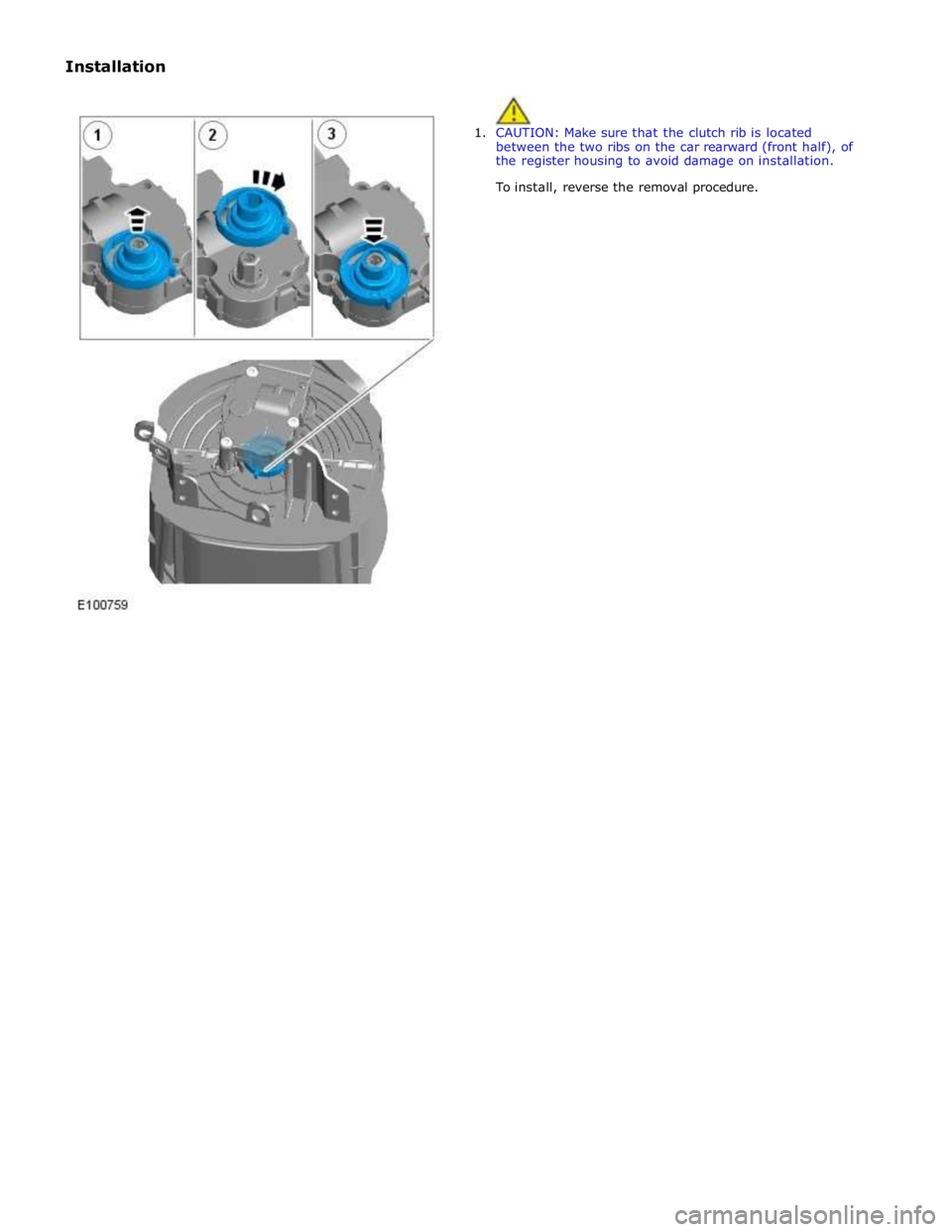
Installation
1. CAUTION: Make sure that the clutch rib is located
between the two ribs on the car rearward (front half), of
the register housing to avoid damage on installation.
To install, reverse the removal procedure.
Page 2179 of 3039

DTC Description Possible Cause Action B102B00 Passive Key
Response Error - general
failure Using the manufacturer approved diagnostic system, clear
all passive keys, re-learn all passive keys B10C100
Left Front Unlock Pull
Switch
No subtype information Carry out any pinpoint tests associated with this DTC using
the manufacturer approved diagnostic system B10C124
Left Front Unlock Pull
Switch
Signal stuck high - button
stuck in active position Carry out any pinpoint tests associated with this DTC using
the manufacturer approved diagnostic system. Check for
stuck left front unlock switch. Refer to the electrical circuit
diagrams and check left front unlock switch circuit for short
to ground B10C200
Left Rear Unlock Pull
Switch
No subtype information Carry out any pinpoint tests associated with this DTC using
the manufacturer approved diagnostic system B10C224
Left Rear Unlock Pull
Switch
Signal stuck high - button
stuck in active position Carry out any pinpoint tests associated with this DTC using
the manufacturer approved diagnostic system. Check for
stuck left rear unlock switch. Refer to the electrical circuit
diagrams and check left rear unlock switch circuit for short
to ground B10C300
Right Front Unlock
Pull Switch
No subtype information Carry out any pinpoint tests associated with this DTC using
the manufacturer approved diagnostic system B10C324
Right Front Unlock
Pull Switch
Signal stuck high - button
stuck in active position Carry out any pinpoint tests associated with this DTC using
the manufacturer approved diagnostic system. Check for
stuck right front unlock switch. Refer to the electrical circuit
diagrams and check right front unlock switch circuit for
short to ground B10C400
Right Rear Unlock Pull
Switch
No subtype information Carry out any pinpoint tests associated with this DTC using
the manufacturer approved diagnostic system B10C424
Right Rear Unlock Pull
Switch
Signal stuck high - button
stuck in active position Carry out any pinpoint tests associated with this DTC using
the manufacturer approved diagnostic system. Check for
stuck right rear unlock switch. Refer to the electrical circuit
diagrams and check right front unlock switch circuit for
short to ground B10C524 Trunk Unlock Pull
Switch
Signal stuck high - button
stuck in active position Carry out any pinpoint tests associated with this DTC using
the manufacturer approved diagnostic system. Check for
stuck luggage compartment lid unlock switch. Refer to the
electrical circuit diagrams and check luggage compartment
lid unlock switch circuit for short to ground B10C61F
Exterior Trunk
Antenna
Circuit intermittent -
general electrical error Carry out any pinpoint tests associated with this DTC using
the manufacturer approved diagnostic system. Refer to the
electrical circuit diagrams and check exterior luggage
compartment antenna circuits for short to ground, power, open circuit B10C71F
Interior Trunk
Antenna
Circuit intermittent -
general electrical error Carry out any pinpoint tests associated with this DTC using
the manufacturer approved diagnostic system. Refer to the
electrical circuit diagrams and check interior luggage
compartment antenna circuits for short to ground, power, open circuit B10C81F
Interior Center
Antenna
Circuit intermittent -
general electrical error Carry out any pinpoint tests associated with this DTC using
the manufacturer approved diagnostic system. Refer to the
electrical circuit diagrams and check interior center antenna
circuits for short to ground, power, open circuit B10C91F Interior Front Antenna
Circuit intermittent -
general electrical error Carry out any pinpoint tests associated with this DTC using
the manufacturer approved diagnostic system. Refer to the
electrical circuit diagrams and check interior front antenna
circuits for short to ground, power, open circuit B10CA1F
Left Rear Door Handle
Antenna
Circuit intermittent -
general electrical error Carry out any pinpoint tests associated with this DTC using
the manufacturer approved diagnostic system. Refer to the
electrical circuit diagrams and check left rear door handle
antenna circuits for short to ground, power, open circuit B10CB1F
Right Rear Door
Handle Antenna
Circuit intermittent -
general electrical error Carry out any pinpoint tests associated with this DTC using
the manufacturer approved diagnostic system. Refer to the
electrical circuit diagrams and check right rear door handle
antenna circuits for short to ground, power, open circuit B10CC24
Left Front Latch
Clutch Switch
Signal stuck high - button
stuck in active position Check for stuck left front door latch clutch switch. Refer to
the electrical circuit diagrams and check left front door
latch clutch switch circuit for short to ground B10CD24
Left Rear Latch Clutch
Switch
Signal stuck high - button
stuck in active position Check for stuck left rear door latch clutch switch. Refer to
the electrical circuit diagrams and check left rear door latch
clutch switch circuit for short to ground
Page 2180 of 3039

DTC Description Possible Cause Action B10CE24
Right Front Latch
Clutch Switch
Signal stuck high - button
stuck in active position Check for stuck right front door latch clutch switch. Refer to
the electrical circuit diagrams and check right front door
latch clutch switch circuit for short to ground B10CF24
Right Rear Latch
Clutch Switch
Signal stuck high - button
stuck in active position Check for stuck right rear door latch clutch switch. Refer to
the electrical circuit diagrams and check right rear door
latch clutch switch circuit for short to ground B10D124 Left Front Lock Button
Signal stuck high - button
stuck in active position Check for stuck left front door handle lock switch. Refer to
the electrical circuit diagrams and check left front door
handle lock switch circuit for short to ground B10D224 Left Rear Lock Button
Signal stuck high - button
stuck in active position Check for stuck left rear door handle lock switch. Refer to
the electrical circuit diagrams and check left rear door
handle lock switch circuit for short to ground B10D324
Right Front Lock
Button
Signal stuck high - button
stuck in active position Check for stuck right front door handle lock switch. Refer to
the electrical circuit diagrams and check right front door
handle lock switch circuit for short to ground B10D424
Right Rear Lock
Button
Signal stuck high - button
stuck in active position Check for stuck right rear door handle lock switch. Refer to
the electrical circuit diagrams and check left front door
handle lock switch circuit for short to ground U001000
Medium Speed CAN
Communication Bus
No subtype information Carry out any pinpoint tests associated with this DTC using
the manufacturer approved diagnostic system. Carry out
CAN network integrity test using the manufacturer approved diagnostic system U014000
Lost Communication
With Body Control
Module
Missing message from CJB Carry out any pinpoint tests associated with this DTC using
the manufacturer approved diagnostic system. Carry out
CAN network integrity test using the manufacturer
approved diagnostic system. Refer to the electrical circuit diagrams and check power and ground supplies to CJB U014200
Lost Communication
With Body Control
Module "B"
Missing message from RJB Carry out any pinpoint tests associated with this DTC using
the manufacturer approved diagnostic system. Carry out
CAN network integrity test using the manufacturer
approved diagnostic system. Refer to the electrical circuit diagrams and check power and ground supplies to RJB U015500
Lost Communication
With Instrument
Panel Cluster (IPC)
Control Module
Missing message from
instrument cluster Carry out any pinpoint tests associated with this DTC using
the manufacturer approved diagnostic system. Carry out
CAN network integrity test using the manufacturer
approved diagnostic system. Refer to the electrical circuit
diagrams and check power and ground supplies to
instrument cluster U030000
Internal Control
Module Software
Incompatibility
Invalid configuration
message is received Re-configure the RJB using the manufacturer approved
diagnostic system. Clear the DTC and retest. If the DTC is
still logged suspect the remote keyless entry module, refer
to the new module installation note at the top of the DTC
Index U201F00 External Receiver
No subtype information -
communication error Suspect the RF receiver, check and install a new RF receiver
as required, refer to the new module/component
installation note at top of DTC Index U201F13 External Receiver
Line open Refer to the electrical circuit diagrams and test RF receiver
communication circuit to remote keyless entry module for
short to ground or open circuit U201F87 External Receiver
Transmission error Refer to the electrical circuit diagrams and check the data
line between the RF receiver and the remote keyless entry
module for short, open circuit. Suspect the RF receiver or
remote keyless entry module, check and install a new RF
receiver or remote keyless entry module as required, refer
to the new module/component installation note at top of
DTC Index U210000
Initial Configuration
Not Complete
No subtype information Configure the Remote Keyless Entry module using the
manufacturer approved diagnostic system U210100
Control Module
Configuration Incompatible
No subtype information Re-configure the RJB using the manufacturer approved
diagnostic system U300049 Control Module
Internal electronic failure Install a new remote keyless entry module, refer to the
new module installation note at the top of the DTC Index U300281
Vehicle Identification
Number
Vehicle/component
mis-match. Module
previously installed to other
vehicle Install correct/new module to vehicle specification, refer to
the new module/component installation note at the top of
the DTC Index www.JagDocs.com