Release JAGUAR XJ 2004 X350 / 3.G User Guide
[x] Cancel search | Manufacturer: JAGUAR, Model Year: 2004, Model line: XJ, Model: JAGUAR XJ 2004 X350 / 3.GPages: 227, PDF Size: 4.22 MB
Page 29 of 227
2 - 14 Security and Locks
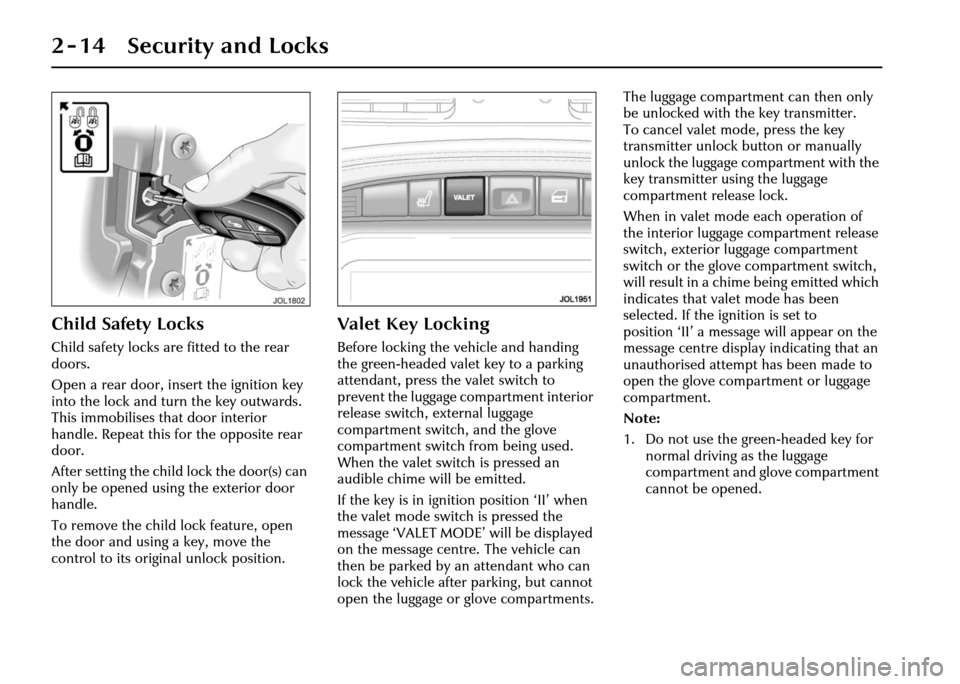
Child Safety Locks
Child safety locks are fitted to the rear
doors.
Open a rear door, insert the ignition key
into the lock and turn the key outwards.
This immobilises that door interior
handle. Repeat this for the opposite rear
door.
After setting the child lock the door(s) can
only be opened using the exterior door
handle.
To remove the child lock feature, open
the door and using a key, move the
control to its original unlock position.
Valet Key Locking
Before locking the vehicle and handing
the green-headed valet key to a parking
attendant, press the valet switch to
prevent the luggage co mpartment interior
release switch, external luggage
compartment switch, and the glove
compartment switch from being used.
When the valet switch is pressed an
audible chime will be emitted.
If the key is in ignition position ‘II’ when
the valet mode switch is pressed the
message ‘VALET MODE’ will be displayed
on the message centre. The vehicle can
then be parked by an attendant who can
lock the vehicle after parking, but cannot
open the luggage or glove compartments. The luggage compartment can then only
be unlocked with th
e key transmitter.
To cancel valet mode, press the key
transmitter unlock button or manually
unlock the luggage compartment with the
key transmitter us ing the luggage
compartment release lock.
When in valet mode each operation of
the interior luggage compartment release
switch, exterior lu ggage compartment
switch or the glove compartment switch,
will result in a chim e being emitted which
indicates that vale t mode has been
selected. If the ignition is set to
position ‘II’ a message will appear on the
message centre display indicating that an
unauthorised attempt has been made to
open the glove compartment or luggage
compartment.
Note:
1. Do not use the green-headed key for normal driving as the luggage
compartment and glove compartment
cannot be opened.
Page 30 of 227
Security and Locks 2 - 15
2. If the vehicle alarm system is armed and the luggage compartment is
opened using the key transmitter,
the alarm will not sound. The system
will be rearmed when the lid is closed,
provided the vehicle has not been
disarmed.
3. Neither the luggage compartment lid release switch on the fascia
switchpack nor the lid release button
will operate when the vehicle is
armed, or in valet mode. An attempt
to operate these switches whilst in
valet mode will result in an audible
warning chime.
4. Operating the inte rnal, external or
remote luggage compartment switches
more than 15 times within
20 seconds, or opening and closing
the luggage compartment will cause
opening to be inhibited for
20 seconds. Should this happen wait
20 seconds for normal operation to
resume. If required, the luggage
compartment may be opened by using
the key during the 20 second waiting
period.Alarms and Audible
Signals
Note: In certain markets, legislation
prohibits the use of audible confirmation
signals. In such cases, the sound source
has been removed from the system.
Audible Signals
Two audible signals will be heard
(if enabled) if an atte mpt is made to lock
the vehicle with a key in the drivers door
lock or the lock button is pressed on the
key transmitter if a door, the hood or the
luggage compartment is not fully closed
or, a key is in the ignition switch.
If the vehicle is unlocked with a key when
it is armed, the vehicle will disarm,
the direction indicators will flash twice
and two audible tones will be heard
(if enabled).
The full alarm will activate, as previously
described, unless the security system is
disarmed, either by pressing the unlock
button on the key tr ansmitter, or by
placing a key into the ignition switch and
turning the key to position ‘II’.
Full Alarm
Once armed, any of the following
circumstances will create a full alarm
state, sound the horns, sound the siren,
or a combination of both (as regional
legislation dictates) and flash the
direction indicators:
• Opening a door, luggage compartment lid (except with
transmitter) or hood.
• Movement in the passenger area (if intrusion sensors are fitted).
• Using a key in the ignition switch which is not programmed to the
vehicle.
• One press of the headlamp convenience button will switch on the
headlamps for 25 seconds or until the
button is pressed again, or until a key
is inserted in the ignition switch.
See Headlight convenience on
page 4 - 24 for more details.
• An attempt to lift, or tow the vehicle (when inclination sensor fitted).
• The vehicle battery is disconnected and the vehicle is fitted with a Battery
Backed Sounder (onl y Battery Backed
Sounder will be audible).
Page 31 of 227
2 - 16 Security and Locks
• If, after 15 seconds (passively armed), from opening the driv er’s door with a
key (as regional legislation dictates),
the key is not inserted into the
ignition switch and turned to
position ‘II’, or a passenger door is
opened before the drivers door.
• Any attempt is made to remove the radio or the front navigation system
(if fitted).
• Pressing the headlamp convenience button on the remo te transmitter
3 times within 3 seconds activates the
panic alarm (if enabled).
Error Audible Signal
Two audible signals will be heard
whenever one of the following conditions
are present:
• I f a n y d o o r i s o p e n w h e n a n a t t e m p t i s made to lock the vehicle.
• The luggage compartment or the hood is not properly closed when an
attempt is made to lock the vehicle.
• A key is present in the ignition switch and a button on the key transmitter is
pressed. See
Direction Indicator Unlock Alerts
on page 2 - 11 for the Notes regarding
error signals during failure of intrusion
sensor (if fitted), and inclination sensor
(if fitted).
Note: The error audible signal can be
disabled and the direction indicator flash
option can be enabled (and vice versa) by
a Jaguar Retailer.
Error Flash Signal (Retailer
Enable Option)
The direction indicators will flash seven
times whenever one of the following
conditions are present.
• If any door is open when an attempt is made to lock the vehicle.
• The luggage compar tment or hood are
not fully closed when an attempt is
made to lock the vehicle.
• A key is present in the ignition switch and a button on the key transm itter is
pressed.
See Direction Indicator Unlock Alerts
on page 2 - 11 for the Notes regarding
error signals during failure of intrusion
sensor (if fitted), and inclination sensor
(if fitted).
Audible Signals
An audible signal will sound when:
• The valet switch is pressed with the luggage compartment closed.
• The vehicle is in valet mode and the interior/luggage compartment release
button, or glove compartment valet
switch is pressed.
• The vehicle is locked (if enabled).
• The vehicle is unlocked (if enabled).
• A door is opened if the vehicle has been passively armed. This mode can
be cancelled by disa rming the security
system using the key transmitter,
or by switching the ignition to
position ‘II’, or by turning a key in the
driver’s door lock towards the front of
the vehicle.
• The lock button is pressed twice within three seconds (if enabled).
Page 34 of 227
Security and Locks 2 - 19
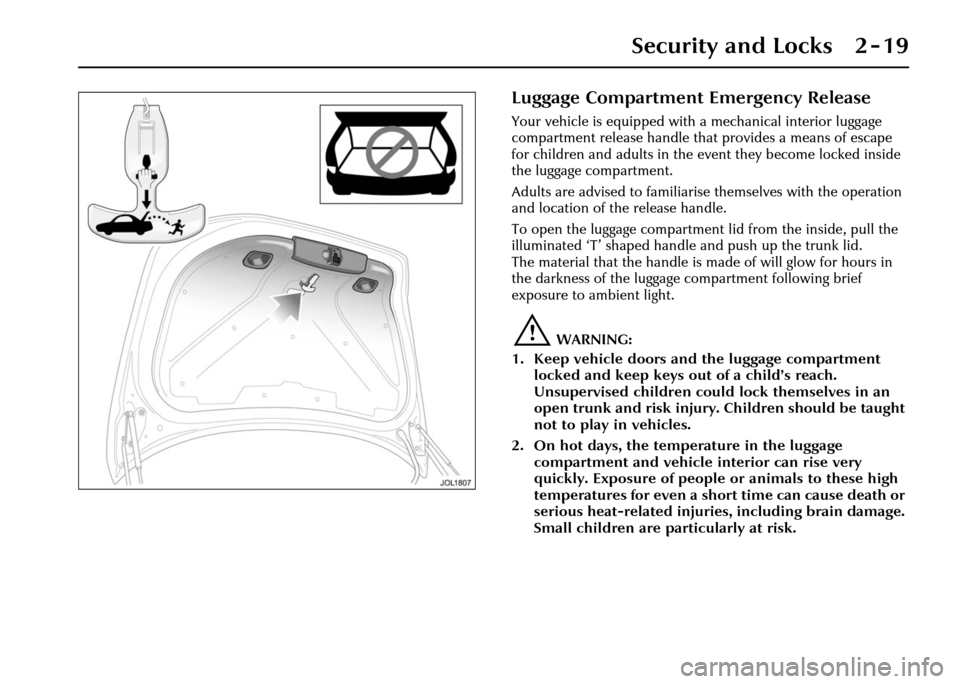
Luggage Compartment Emergency Release
Your vehicle is equipped with a mechanical interior luggage
compartment release handle that provides a means of escape
for children and adults in the event they become locked inside
the luggage compartment.
Adults are advised to familiaris e themselves with the operation
and location of the release handle.
To open the luggage compartment lid from the inside, pull the
illuminated ‘T’ shaped handle and push up the trunk lid.
The material that the handle is made of will glow for hours in
the darkness of the luggage compartment following brief
exposure to ambient light.
!WARNING:
1. Keep vehicle doors and the luggage compartment locked and keep keys out of a child’s reach.
Unsupervised children could lock themselves in an
open trunk and risk injury. Children should be taught
not to play in vehicles.
2. On hot days, the temperature in the luggage compartment and vehicle interior can rise very
quickly. Exposure of people or animals to these high
temperatures for even a short time can cause death or
serious heat-related injuries, including brain damage.
Small children are particularly at risk.
Page 36 of 227
Security and Locks 2 - 21
Before Programming
Caution: When programming a
garage door opener or entry gate that
may require you to press and re-press
the hand-held transmitter (cycle),
unplug the device during the ‘cycling’
process to prevent possible motor
failure.
It is recommended that for best results,
fit a new battery to the hand-held
transmitter of the garage door opener
(or other device) before programming.
If your garage door opener receiver
(located in the garage) is equipped with
an antenna, ensure that the antenna is
hanging straight down.
To Erase All Programming
For first time progra mming, ensure that
the engine is switched off:
1. Turn the ignition switch to position ‘I’.
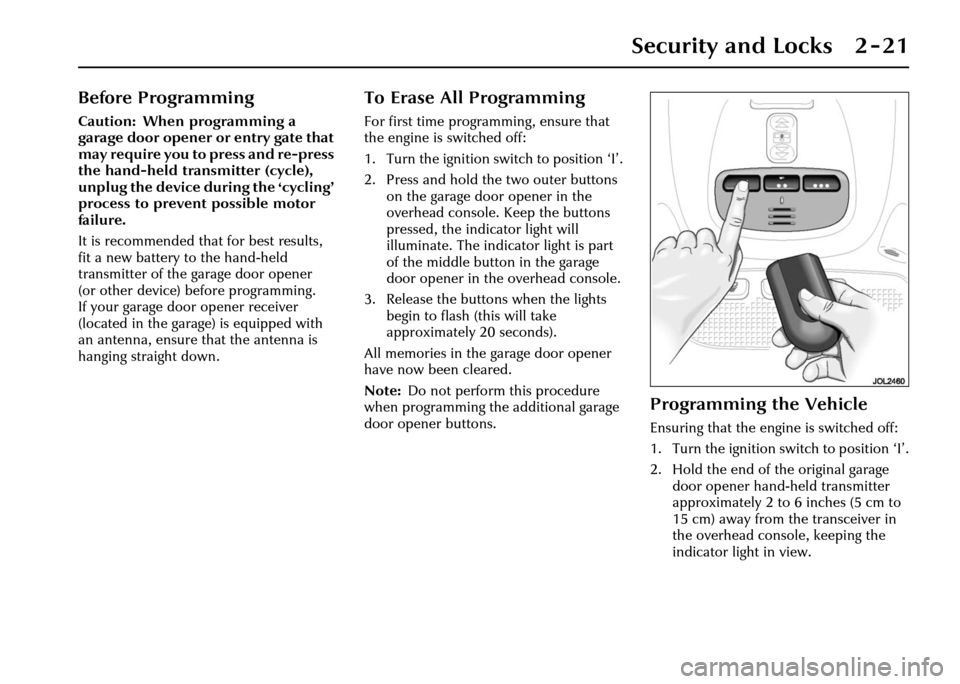
2. Press and hold th e two outer buttons
on the garage door opener in the
overhead console. Keep the buttons
pressed, the indicator light will
illuminate. The indicator light is part
of the middle button in the garage
door opener in the overhead console.
3. Release the buttons when the lights
begin to flash (this will take
approximately 20 seconds).
All memories in the garage door opener
have now been cleared.
Note: Do not perform this procedure
when programming the additional garage
door opener buttons.
Programming the Vehicle
Ensuring that the engine is switched off:
1. Turn the ignition switch to position ‘I’.
2. Hold the end of the original garage door opener hand -held transmitter
approximately 2 to 6 inches (5 cm to
15 cm) away from the transceiver in
the overhead console, keeping the
indicator light in view.
Page 37 of 227
2 - 22 Security and Locks
3. Using both hands, simultaneously press and hold both the desired garage
door opener button on the overhead
console and the hand -held transmitter
button. Keep both buttons pressed.
The light will flash, slowly at first and
then change to a fast flash. When the
indicator light flashes rapidly, release
both buttons. The rapid flashing light
indicates successful programming.
4. If, after 60 seconds, the indicator light does not flash rapidl y, release both the
transceiver and the hand-held
transmitter buttons and repeat the
procedure starting with Step 2.
However, position the hand-held
transmitter at a different angle and/or
distance.
5. Press and hold the programmed overhead console garage door opener
button and observe the indicator light:
• If the indicator light is solid/continuous, programming is
complete. Your device should
activate when the garage door
opener button is pressed and held
for 1 to 2 seconds and then
released. • If the indicator light blinks rapidly
for 2 seconds and then turns a
solid/continuous light, proceed
with the following programming
instructions for ‘rolling code’
device equipment.
Note: To programme additional garage
door opener buttons, begin at Step 2.
Rolling code device equipment
programming
Note: A second person may make the
following steps quicker and easier as once
the button has been pressed there are
30 seconds only in which to complete
Step 3.
1. At the garage door opener receiver (motor head unit) in the garage, locate
the ‘learn’ or ‘smart’ button/switch.
Note: The name of the button/switch
may vary between manufacturers.
2. Press and release the ‘learn’ or ‘smart’ button.
3. Return to the vehicle and firmly press and hold the programmed garage door
opener button for 2 seconds and
release. 4. Repeat the press/hold/release
sequence 3 times to complete the
learning/training process.
The garage door opener in the overhead
console should now activate the ‘rolling
code’ device.
Reprogramming a sing le garage door
opener button
To programme a device to a previously
trained button:
1. Press and hold the desired pre- programmed garage door opener
button for at least 20 seconds, but no
longer than 30 seconds, until the
indicator light begins to flash.
2. Without releasing the overhead console button, position the hand-
held transmitter approximately 2 to
6 inches (5 cm to 15 cm) away from
the transceiver in the overhead
console, keeping the indicator light in
view.
3. Carry out Step 3 of programming the vehicle, see column 1.
Page 50 of 227
Before Driving 3 - 11
Occupant Protection
Seat Belts
The use of front and rear seat belts is
mandatory in most countries. Using seat
belts saves lives. They should be worn by
all occupants whenever the vehicle is in
use, for maximum protection.
Lap/shoulder inertia reel seat belts are
provided for both front occupants and
three rear seat positions.
The inertia operating mechanism of the
seat belts allows the wearers to move
their upper bodies to reach various
controls. The seat belts lock automatically
with accelerated body movement or in
the event of emergency braking.
The seat belt assemblies incorporate
additional safety devices. All have belt
pretensioners and the front belts also
have force limiters. These devices provide
increased protection in the event of a
severe frontal impact.
The pretensioners operate with the air
bags as part of the Advanced Restraints
Technology System (see page 3 - 14). All passenger seat belt mechanisms
incorporate an automatic locking device
to allow child seats to be secured safely.
Forchild safety seepage3-23.
Comfort belts are fitted to both individual
electrically operated rear seats. They are
also fitted to the outer seats only on the
electrically operated rear bench seat.
These belts incorporate a twin tension
facility. When the belt is buckled around
the occupant, a reduced tension is
applied to provide a more comfortable
fitting. When the belt is unfastened,
a higher tension is applied to allow it to
retract correctly.
Beltminder
The Beltminder feature is a supplemental
warning to the seat belt warning function
(see page 4 - 6). This feature provides
additional reminders to the driver that
the driver’s and/or front passenger’s seat
belt is unbuckled by intermittently
sounding a chime and illuminating the
seat belt warning lamp in the instrument
cluster.
Note:
Not all countries have the warning
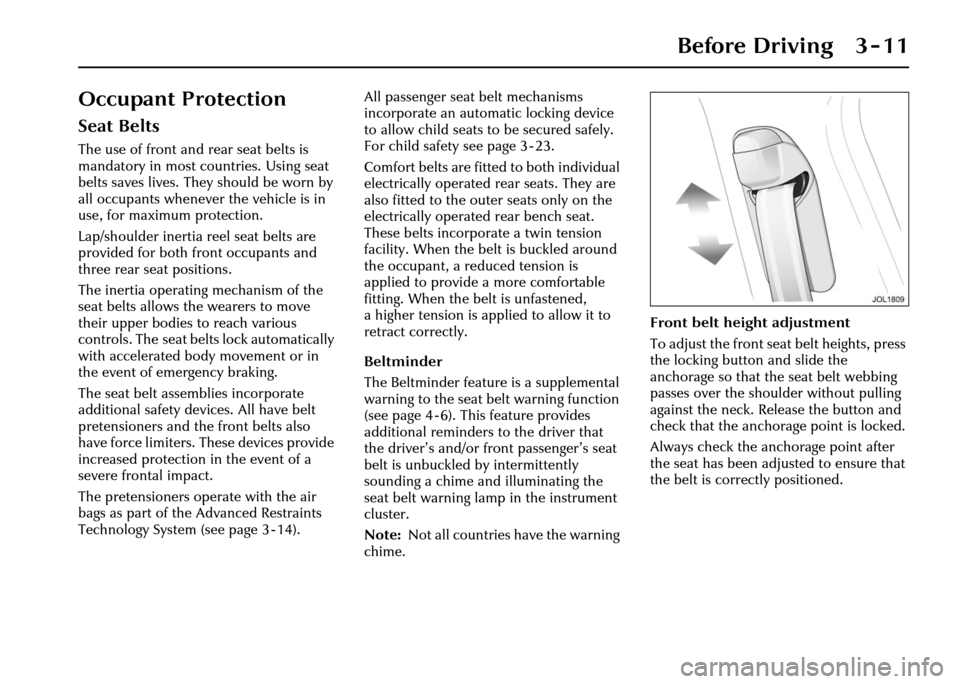
chime. Front belt height adjustment
To adjust the front seat belt heights, press
the locking button and slide the
anchorage so that the seat belt webbing
passes over the shoulder without pulling
against the neck. Release the button and
check that the anchorage point is locked.
Always check the anchorage point after
the seat has been adjusted to ensure that
the belt is correctly positioned.
Page 65 of 227
3 - 26 Before Driving
• Never modify the seat harness or buckles as this may affect the quick
release mechanism.
• Always secure your child correctly, even for a short journey.
• Follow the manufacturer’s instructions for harness adjustments.
Booster seats
If a booster seat is used, position the lap
section of the adult seat belt over the
child’s pelvis. The diagonal seat belt
should rest on the child’s shoulder,
not the neck.Check List – Non-LATCH Child
Restraints
Follow the check list each time a child
travels in the vehicle:
• Always attach the top tether when
installing a forward-facing child seat.
• Carefully follow the instructions provided by the manufacturer of the
restraint system.
• Always use the appropriate child restraints and adjust harnesses for
every child, every trip.
• Avoid dressing a child in bulky clothing and do not place any objects
between the child and the restraint
system.
• No child seat is completely child- proof. Encourage your child not to
play with buckle or harness. • Regularly check the fit of your child
seat and replace seats or harnesses
that show signs of wear.
• Ensure that you have removed all slack from the adult seat belt and that
the automatic locking device is
activated.
• Never leave a child unsupervised in the vehicle.
• Activate the rear door child safety locks (see page 2 - 14).
• Ensure your child does not exit the vehicle from the side where there is
traffic.
• Set your child a good example – always wear your seat belt.
Page 66 of 227
Before Driving 3 - 27
LATCH Child Restraint System
LATCH (Lower Anchors and Tethers for Children) child seats
have two rigid or webbing mounted attachments that connect to
two anchor points provided at specific seating positions in your
vehicle.
This eliminates the need to use seat belts to secure this type of
child seat. If a forward-facing child seat is used it must also be
attached to the top tether anch or point located on the rear
shelf.
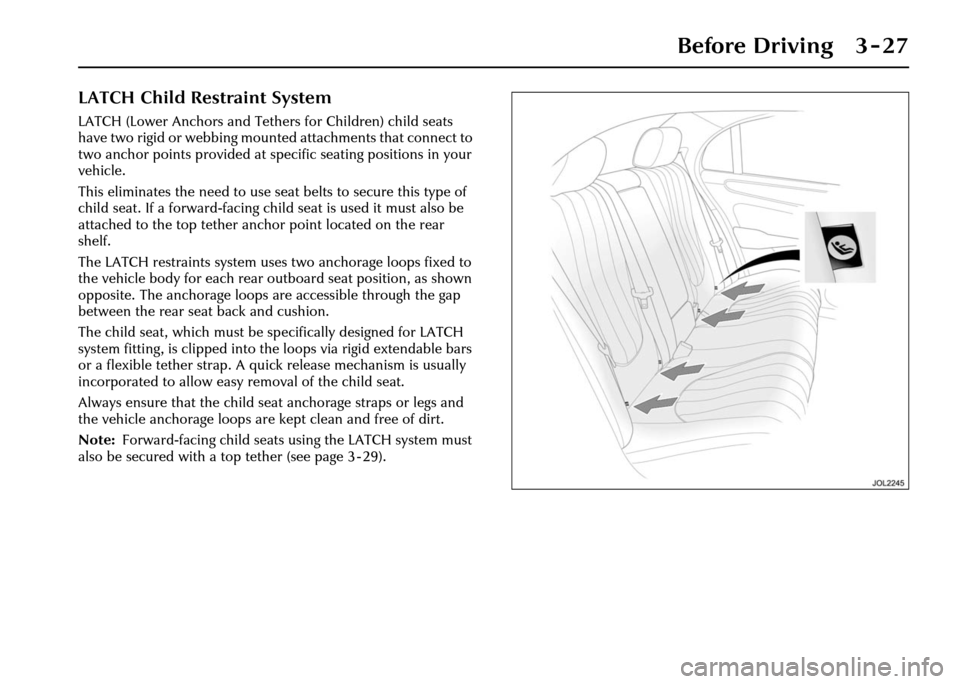
The LATCH restraints system uses two anchorage loops fixed to
the vehicle body for each rear outboard seat position, as shown
opposite. The anchorage loops are accessible through the gap
between the rear seat back and cushion.
The child seat, which must be sp ecifically designed for LATCH
system fitting, is clipped into the loops via rigid extendable bars
or a flexible tether strap. A quick release mechanism is usually
incorporated to allow easy removal of the child seat.
Always ensure that the child seat anchorage straps or legs and
the vehicle anchorage loops are kept clean and free of dirt.
Note: Forward-facing child seats using the LATCH system must
also be secured with a top tether (see page 3 - 29).
Page 70 of 227
Before Driving 3 - 31
Memory Setting
This facility enables three different
comfort positions to be memorised and
recalled for each occupant:
• The driver’s seat, steering column, pedals and exterior rear view mirrors.
• Rear passenger seat positions when memory is fitted to these.
The key does not have to be in the
ignition switch to make seat, steering
column and pedal adjustments but is
required to be in th e switch to set the
memory. Setting a memorised position
To store a driver’s seat position in the
memory:
1. Adjust the seat, steering column,
pedals and exterior rear view mirrors
to the desired positions.
2. Insert a key into the ignition switch and leave in the OFF position.
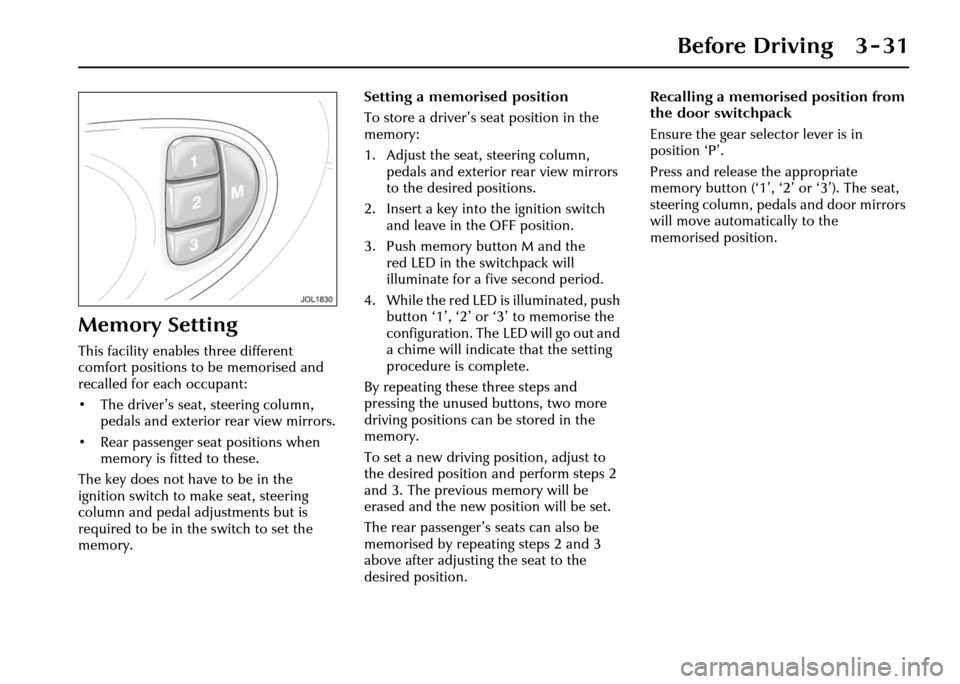
3. Push memory button M and the red LED in the switchpack will
illuminate for a five second period.
4. While the red LED is illuminated, push button ‘1’, ‘2’ or ‘3’ to memorise the
configuration. The LED will go out and
a chime will indicate that the setting
procedure is complete.
By repeating these three steps and
pressing the unused buttons, two more
driving positions can be stored in the
memory.
To set a new driving position, adjust to
the desired position and perform steps 2
and 3. The previous memory will be
erased and the new position will be set.
The rear passenger’s seats can also be
memorised by repeating steps 2 and 3
above after adjusting the seat to the
desired position. Recalling a memorise
d position from
the door switchpack
Ensure the gear selector lever is in
position ‘P’.
Press and release the appropriate
memory button (‘1’, ‘2’ or ‘3’). The seat,
steering column, pedals and door mirrors
will move automatically to the
memorised position.