Release JAGUAR XJ 2004 X350 / 3.G Owner's Manual
[x] Cancel search | Manufacturer: JAGUAR, Model Year: 2004, Model line: XJ, Model: JAGUAR XJ 2004 X350 / 3.GPages: 227, PDF Size: 4.22 MB
Page 78 of 227
On the Road 4 - 7
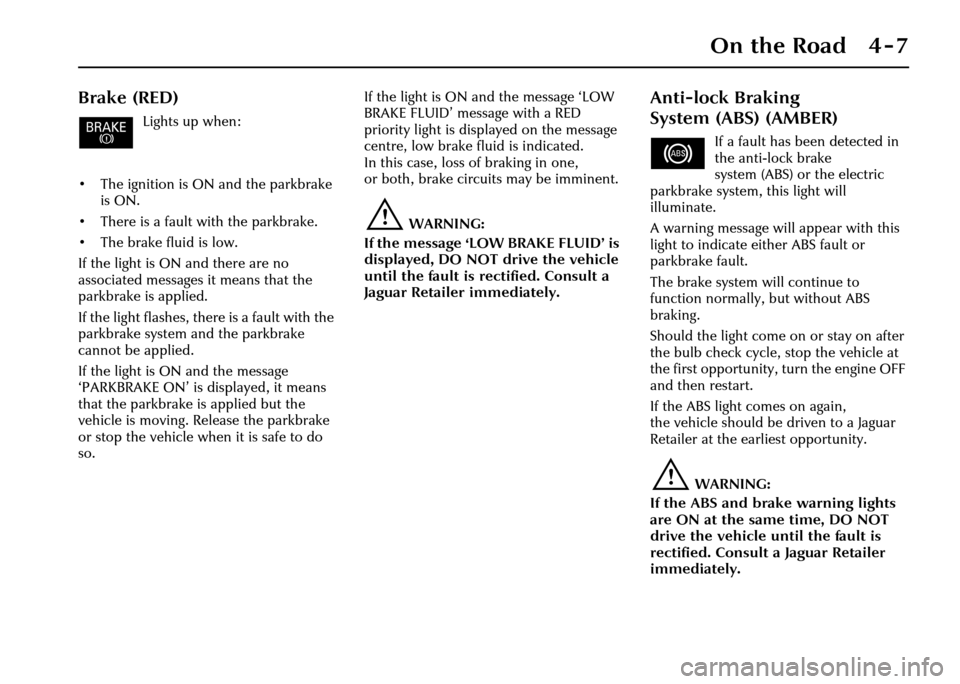
Brake (RED)
Lights up when:
• The ignition is ON and the parkbrake is ON.
• There is a fault with the parkbrake.
• The brake fluid is low.
If the light is ON and there are no
associated messages it means that the
parkbrake is applied.
If the light flashes, th ere is a fault with the
parkbrake system and the parkbrake
cannot be applied.
If the light is ON and the message
‘PARKBRAKE ON’ is displayed, it means
that the parkbrake is applied but the
vehicle is moving. Release the parkbrake
or stop the vehicle when it is safe to do
so. If the light is ON and the message ‘LOW
BRAKE FLUID’ message with a RED
priority light is displayed on the message
centre, low brake fluid is indicated.
In this case, loss of braking in one,
or both, brake circuits may be imminent.
!WARNING:
If the message ‘LOW BRAKE FLUID’ is
displayed, DO NOT drive the vehicle
until the fault is rectified. Consult a
Jaguar Retailer immediately.
Anti-lock Braking
System (ABS) (AMBER)
If a fault has been detected in
the anti-lock brake
system (ABS) or the electric
parkbrake system, this light will
illuminate.
A warning message will appear with this
light to indicate either ABS fault or
parkbrake fault.
The brake system will continue to
function normally, but without ABS
braking.
Should the light come on or stay on after
the bulb check cycle, stop the vehicle at
the first opportunity, turn the engine OFF
and then restart.
If the ABS light comes on again,
the vehicle should be driven to a Jaguar
Retailer at the earliest opportunity.
!WARNING:
If the ABS and brake warning lights
are ON at the same time, DO NOT
drive the vehicle until the fault is
rectified. Consult a Jaguar Retailer
immediately.
Page 82 of 227
On the Road 4 - 11
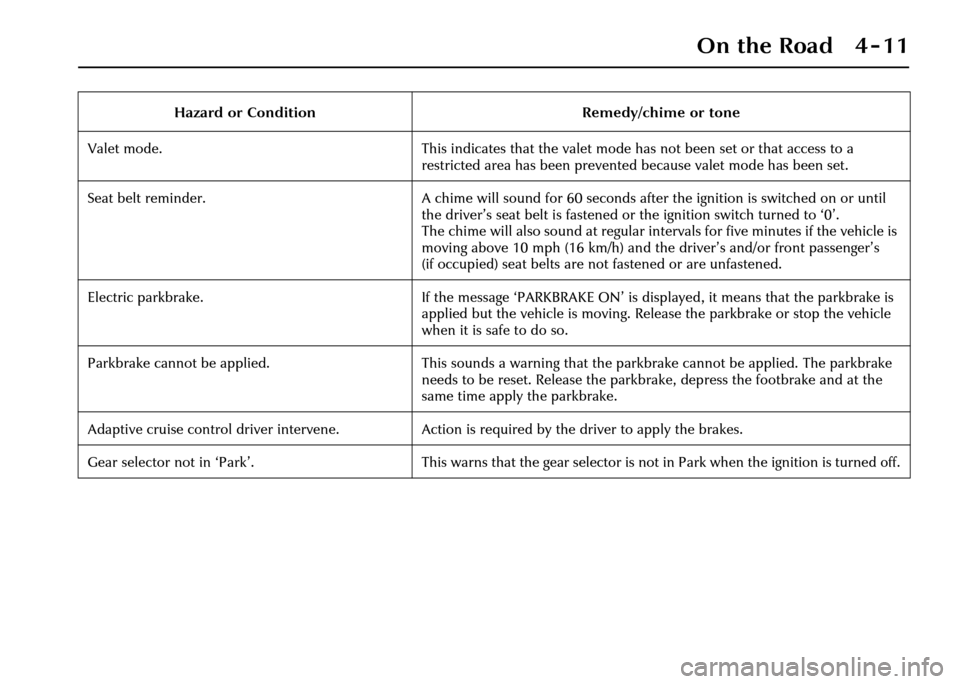
Hazard or ConditionRemedy/chime or tone
Valet mode. This indicates that the valet mode has not been set or that access to a
restricted area has been prevented because valet mode has been set.
Seat belt reminder. A chime will sound for 60 seconds after the ignition is switched on or until
the driver’s seat belt is fastened or the ignition switch turned to ‘0’.
The chime will also sound at regular intervals for five minutes if the vehicle is
moving above 10 mph (16 km/h) and the driver’s and/or front passenger’s
(if occupied) seat belts are not fastened or are unfastened.
Electric parkbrake. If the message ‘PARKBRAKE ON’ is displayed, it means that the parkbrake is
applied but the vehicle is moving. Release the parkbrake or stop the vehicle
when it is safe to do so.
Parkbrake cannot be applied. This sounds a warning that the parkbrake cannot be applied. The parkbrake
needs to be reset. Release the parkbrake, depress the footbrake and at the
same time apply the parkbrake.
Adaptive cruise control driver intervene. Action is required by the driver to apply the brakes.
Gear selector not in ‘Park’. This warns that the gear selector is not in Park when the ignition is turned off.
Page 89 of 227
4-18 On the Road
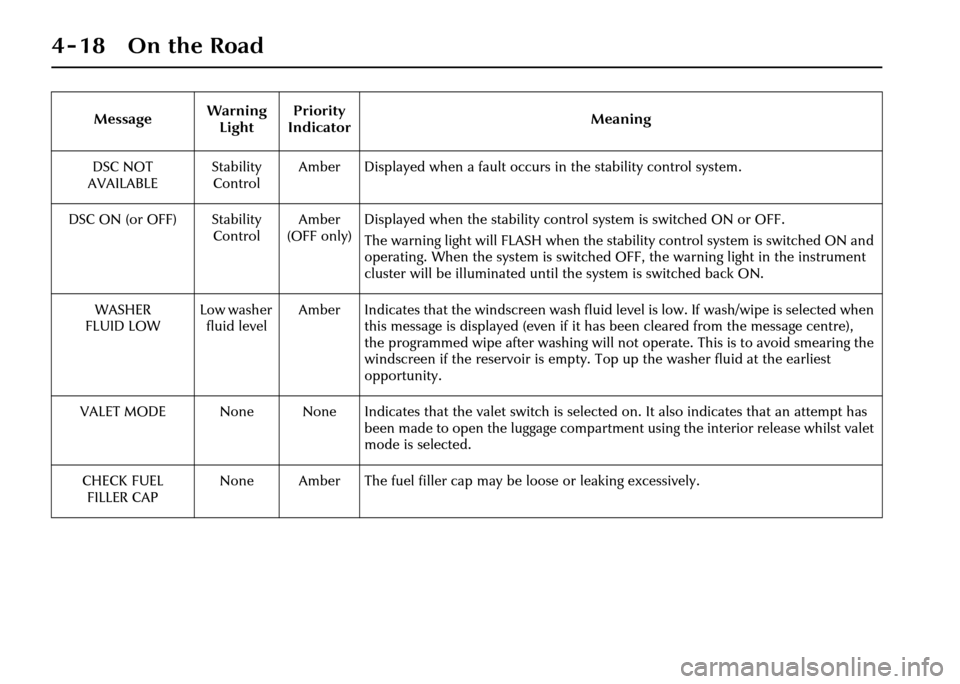
DSC NOT
AVAILABLE Stability
Control Amber Displayed when a fault occurs in the stability control system.
DSC ON (or OFF) Stability ControlAmber
(OFF only) Displayed when the stability contro
l system is switched ON or OFF.
The warning light will FLASH when the stability control system is switched ON and
operating. When the system is switched OFF, the warning light in the instrument
cluster will be illuminated until the system is switched back ON.
WASHER
FLUID LOW Low washer
fluid level Amber Indicates that the windscreen wash fluid level is low. If wash/wipe is selected when
this message is displayed (even if it has been cleared from the message centre),
the programmed wipe after wash ing will not operate. This is to avoid smearing the
windscreen if the reservoir is empty. To p up the washer fluid at the earliest
opportunity.
VALET MODE None None Indicates that the valet switch is selected on. It also indicates that an attempt has been made to open the luggage compartment using the interior release whilst valet
mode is selected.
CHECK FUEL FILLER CAP None Amber The fuel filler cap may be loose or leaking excessively.
Message
Warning
Light Priority
Indicator Meaning
Page 91 of 227
4-20 On the Road
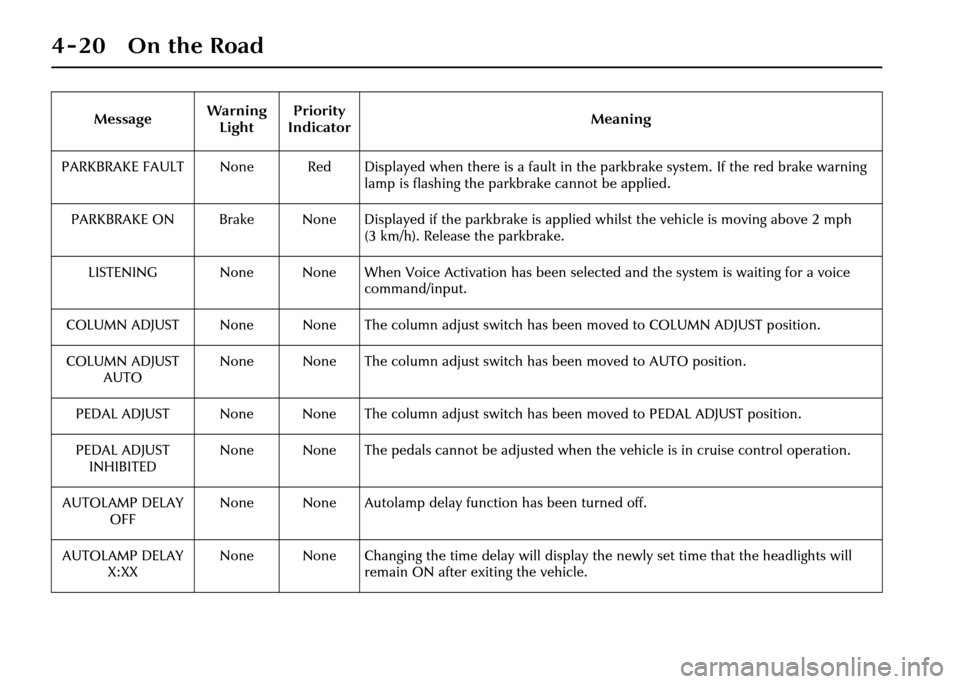
PARKBRAKE FAULT None Red Displayed when there is a fault in the parkbrake system. If the red brake warning lamp is flashing the parkbrake cannot be applied.
PARKBRAKE ON Brake None Displayed if the parkbrake is applied whil st the vehicle is moving above 2 mph
(3 km/h). Release the parkbrake.
LISTENING None None When Voice Activation has been selected and the system is waiting for a voice command/input.
COLUMN ADJUST None None The column adjust switch has been moved to COLUMN ADJUST position.
COLUMN ADJUST AUTO None None The column adjust switch
has been moved to AUTO position.
PEDAL ADJUST None None The column adjust switch has been moved to PEDAL ADJUST position.
PEDAL ADJUST INHIBITED None None The pedals cannot be adjusted when
the vehicle is in cruise control operation.
AUTOLAMP DELAY OFF None None Autolamp delay function has been turned off.
AUTOLAMP DELAY X:XX None None Changing the time delay will display
the newly set time that the headlights will
remain ON after exiting the vehicle.
Message
Warning
Light Priority
Indicator Meaning
Page 95 of 227
4-24 On the Road
At dawn, as light increases, the sidelights
and headlights switch OFF automatically.
Do not cover the sensor and keep the
windscreen clean. Obstructing the light in
this area of the sensor may lead to
unwanted operation of the sidelights and
headlights.
Note:If the windscreen wipers are
switched on in auto, slow or fast modes
for more than 20 seconds then the
exterior lights will be switched on,
if selected to autolamps mode. The lights
will switch off 2 minutes after the wipers
are switched off or will go off straight
away if autolamps is deselected or the
ignition is turned off.
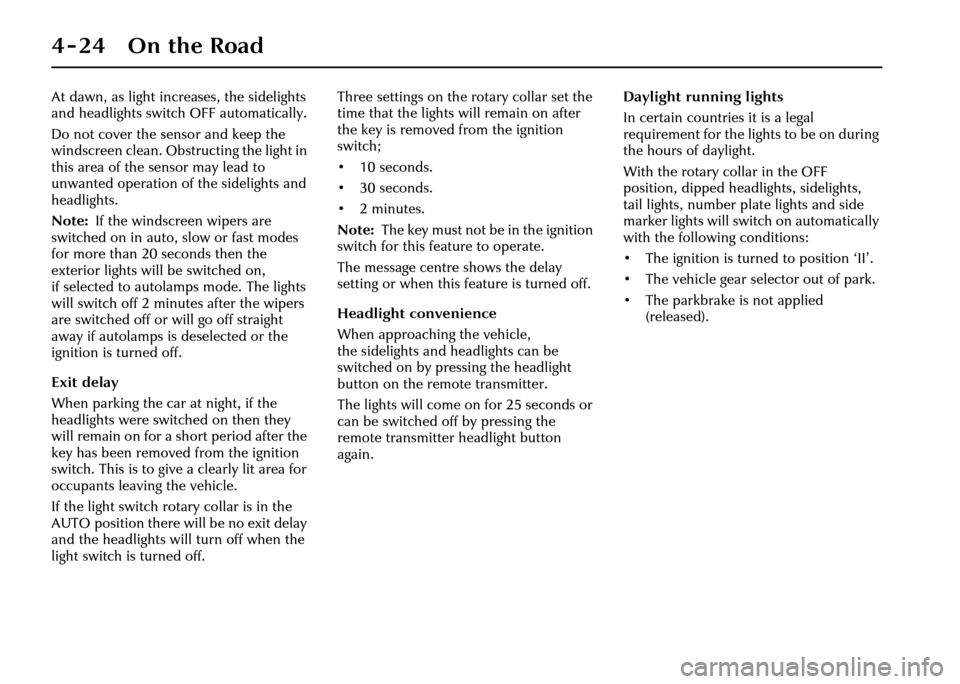
Exit delay
When parking the car at night, if the
headlights were switched on then they
will remain on for a short period after the
key has been removed from the ignition
switch. This is to give a clearly lit area for
occupants leaving the vehicle.
If the light switch rotary collar is in the
AUTO position there will be no exit delay
and the headlights will turn off when the
light switch is turned off. Three settings on the rotary collar set the
time that the lights will remain on after
the key is removed from the ignition
switch;
•10seconds.
•30seconds.
•2minutes.
Note:
The key must not be in the ignition
switch for this feature to operate.
The message centre shows the delay
setting or when this feature is turned off.
Headlight convenience
When approaching the vehicle,
the sidelights and headlights can be
switched on by pressing the headlight
button on the re mote transmitter.
The lights will come on for 25 seconds or
can be switched off by pressing the
remote transmitte r headlight button
again. Daylight running lights
In certain countries it is a legal
requirement for the lights to be on during
the hours of daylight.
With the rotary co
llar in the OFF
position, dipped headlights, sidelights,
tail lights, number plate lights and side
marker lights will switch on automatically
with the following conditions:
• The ignition is turned to position ‘II’.
• The vehicle gear se lector out of park.
• The parkbrake is not applied (released).
Page 96 of 227
On the Road 4 - 25
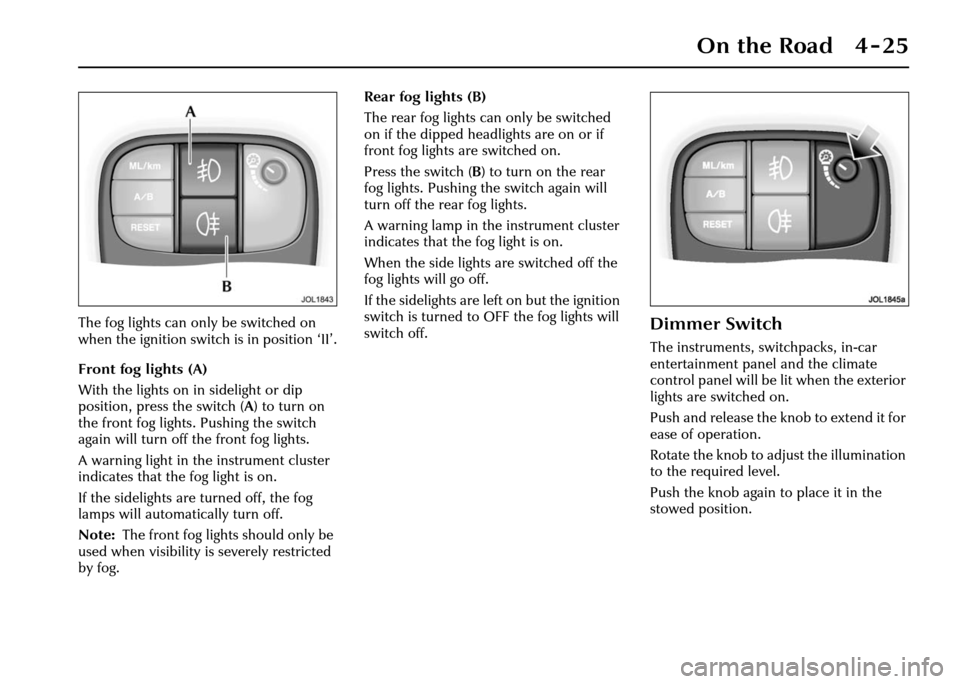
The fog lights can only be switched on
when the ignition switch is in position ‘II’.
Front fog lights (A)
With the lights on in sidelight or dip
position, press the switch (A) to turn on
the front fog lights. Pushing the switch
again will turn off the front fog lights.
A warning light in the instrument cluster
indicates that the fog light is on.
If the sidelights are turned off, the fog
lamps will automatically turn off.
Note: The front fog lights should only be
used when visibility is severely restricted
by fog. Rear fog lights (B)
The rear fog lights can only be switched
on if the dipped headlights are on or if
front fog lights are switched on.
Press the switch (
B) to turn on the rear
fog lights. Pushing the switch again will
turn off the rear fog lights.
A warning lamp in the instrument cluster
indicates that the fog light is on.
When the side lights are switched off the
fog lights will go off.
If the sidelights are le ft on but the ignition
switch is turned to OFF the fog lights will
switch off.Dimmer Switch
The instruments, switchpacks, in-car
entertainment panel and the climate
control panel will be lit when the exterior
lights are switched on.
Push and release the knob to extend it for
ease of operation.
Rotate the knob to adjust the illumination
to the required level.
Push the knob again to place it in the
stowed position.
Page 97 of 227
4-26 On the Road
Direction Indicators
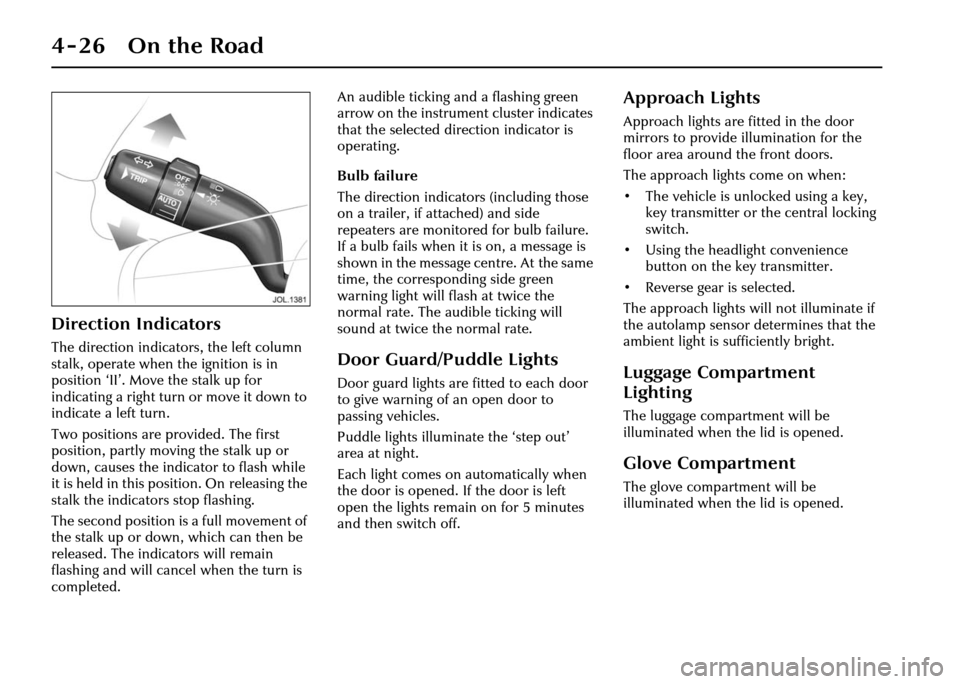
The direction indicators, the left column
stalk, operate when the ignition is in
position ‘II’. Move the stalk up for
indicating a right turn or move it down to
indicate a left turn.
Two positions are provided. The first
position, partly moving the stalk up or
down, causes the indicator to flash while
it is held in this position. On releasing the
stalk the indicators stop flashing.
The second position is a full movement of
the stalk up or down, which can then be
released. The indicators will remain
flashing and will cancel when the turn is
completed. An audible ticking an
d a flashing green
arrow on the instrument cluster indicates
that the selected direction indicator is
operating.
Bulb failure
The direction indicators (including those
on a trailer, if attached) and side
repeaters are monitored for bulb failure.
If a bulb fails when it is on, a message is
shown in the message centre. At the same
time, the corresponding side green
warning light will flash at twice the
normal rate. The audible ticking will
sound at twice the normal rate.Door Guard/Puddle Lights
Door guard lights are fitted to each door
to give warning of an open door to
passing vehicles.
Puddle lights illuminate the ‘step out’
area at night.
Each light comes on automatically when
the door is opened. If the door is left
open the lights remain on for 5 minutes
and then switch off.
Approach Lights
Approach lights are fitted in the door
mirrors to provide illumination for the
floor area around the front doors.
The approach lights come on when:
• The vehicle is unlocked using a key, key transmitter or the central locking
switch.
• Using the headlight convenience button on the key transmitter.
• Reverse gear is selected.
The approach lights will not illuminate if
the autolamp sensor determines that the
ambient light is sufficiently bright.
Luggage Compartment
Lighting
The luggage compar tment will be
illuminated when the lid is opened.
Glove Compartment
The glove compartment will be
illuminated when the lid is opened.
Page 100 of 227
On the Road 4 - 29
Window Operation
The front and rear door windows are
electrically operated by switches located
on each door.
Switches on the driver’s door control all
door windows.
Passengers are provided with a switch to
control their door window only.
These switches will only operate the
windows when the ignition switch is in
position ‘I’ or ‘II’.
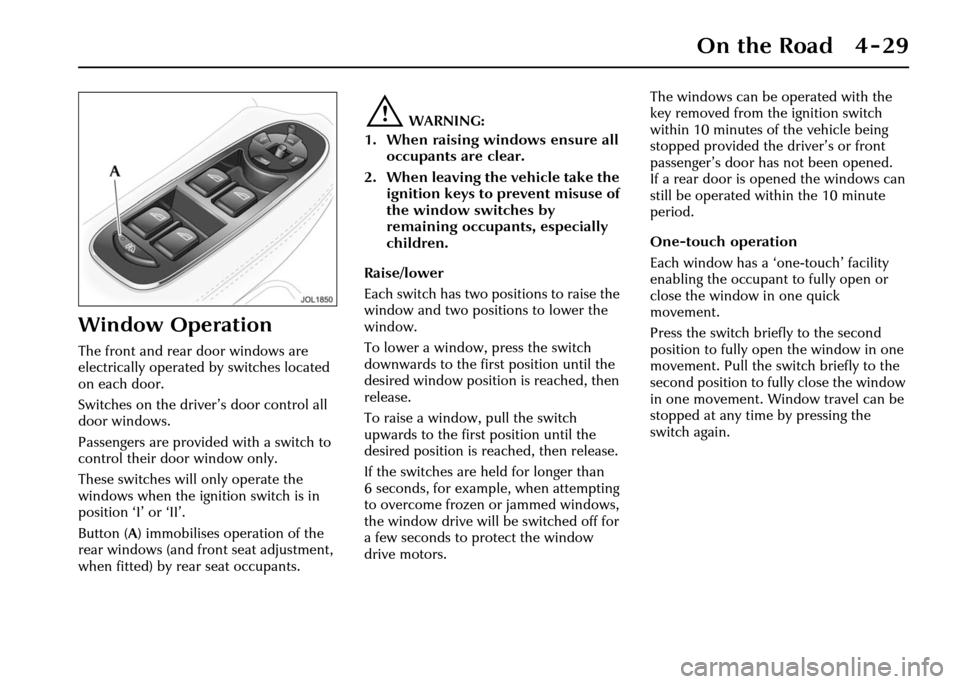
Button (A) immobilises operation of the
rear windows (and front seat adjustment,
when fitted) by rear seat occupants.
!WARNING:
1. When raising windows ensure all occupants are clear.
2. When leaving the vehicle take the ignition keys to prevent misuse of
the window switches by
remaining occupants, especially
children.
Raise/lower
Each switch has two positions to raise the
window and two positions to lower the
window.
To lower a window, press the switch
downwards to the first position until the
desired window position is reached, then
release.
To raise a window, pull the switch
upwards to the first position until the
desired position is re ached, then release.
If the switches are held for longer than
6 seconds, for example, when attempting
to overcome frozen or jammed windows,
the window drive will be switched off for
a few seconds to protect the window
drive motors. The windows can be operated with the
key removed from the ignition switch
within 10 minutes of the vehicle being
stopped provided the driver’s or front
passenger’s door has not been opened.
If a rear door is opened the windows can
still be operated within the 10 minute
period.
One-touch operation
Each window has a ‘one-touch’ facility
enabling the occupant to fully open or
close the window in one quick
movement.
Press the switch briefly to the second
position to fully open the window in one
movement. Pull the swit
ch briefly to the
second position to fully close the window
in one movement. Window travel can be
stopped at any time by pressing the
switch again.
Page 101 of 227
4-30 On the Road
Immobilising the rear windows
To immobilise the rear windows (and
operation of the front seat by a rear seat
passenger, when this feature is fitted),
press button (A) (see previous page
illustration). The LED in the button will
light up showing that the rear windows
cannot be operated by rear seat
occupants. Pressing the button again will
enable occupants to operate the rear
windows. See also Rear Seat
Adjustment on page 3 - 4.
Window Anti-trap Protection
Each electrically operated window has an
anti-trap protection feature.
If the upward movement of the window
detects an obstacle the anti-trap system
will immediately stop the window
closing, then move it downwards for a
short distance.
!WARNING:
If the battery is disconnected or
discharged the window anti-trap
feature is lost. When the battery is
reconnected or recharged the
window anti-trap system must be
reset. To reset the electrically operated
windows anti-trap system
• Fully close the window, hold the
switch in the close position for two
seconds and then release the switch.
Wait for two seconds, do not open
the window.
• Again, select the same window to close, holding the sw itch for a further
two seconds.
• Check to confirm the operation by opening the window and then use
one-touch operation to close the
window.
• Repeat for the remaining electrically operated windows.
To override the anti-trap protection
The anti-trap system will also stop the
window closing if a bl ockage or resistance
occurs e.g. in the wi ndow guide channels.
Typically this might be due to icing in
winter but could also be caused by
damage or mis-alignment of the guide
channels or seals. To override the anti-trap action:
• After the initial attempt to close the
window, operate the close switch a
second time.
• When the window has reversed from the blockage, operate the switch
(within 10 seconds) until the window
stops again (it will not reverse on the
third attempt).
• Immediately operate the close switch again. The window will now move up
a short distance with increased force
to override the blockage.
• Repeat the override action until the window has closed. Each time the
window stops, the switch must be
operated immediately to initiate
further override action.
If this procedure fails to move the
blockage, the anti-trap feature will be lost
and must be reset (see previous column)
after the blockage has been cleared.
Thermal overload
If the windows are repeatedly opened
and closed (e.g. by a child), a protection
system will deactivate window operation
for a short period to avoid overheating of
the window motors.
Page 102 of 227
On the Road 4 - 31
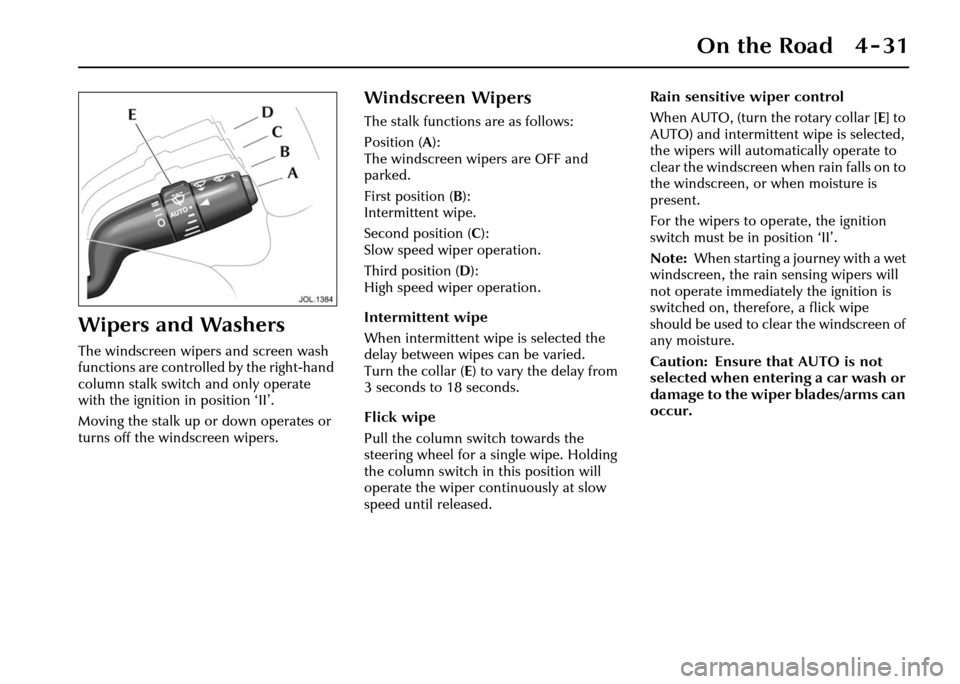
Wipers and Washers
The windscreen wipers and screen wash
functions are controlled by the right-hand
column stalk switch and only operate
with the ignition in position ‘II’.
Moving the stalk up or down operates or
turns off the windscreen wipers.
Windscreen Wipers
The stalk functions are as follows:
Position (A):
The windscreen wipers are OFF and
parked.
First position ( B):
Intermittent wipe.
Second position (C ):
Slow speed wiper operation.
Third position ( D):
High speed wiper operation.
Intermittent wipe
When intermittent w ipe is selected the
delay between wipes can be varied.
Turn the collar ( E) to vary the delay from
3 seconds to 18 seconds.
Flick wipe
Pull the column switch towards the
steering wheel for a single wipe. Holding
the column switch in this position will
operate the wiper continuously at slow
speed until released. Rain sensitive wiper control
When AUTO, (turn the rotary collar [
E] to
AUTO) and intermittent wipe is selected,
the wipers will automatically operate to
clear the windscreen when rain falls on to
the windscreen, or when moisture is
present.
For the wipers to operate, the ignition
switch must be in position ‘II’.
Note: When starting a journey with a wet
windscreen, the rain sensing wipers will
not operate immediately the ignition is
switched on, therefore, a flick wipe
should be used to clear the windscreen of
any moisture.
Caution: Ensure that AUTO is not
selected when entering a car wash or
damage to the wiper blades/arms can
occur.