reset JAGUAR XJ 2004 X350 / 3.G User Guide
[x] Cancel search | Manufacturer: JAGUAR, Model Year: 2004, Model line: XJ, Model: JAGUAR XJ 2004 X350 / 3.GPages: 227, PDF Size: 4.22 MB
Page 90 of 227
On the Road 4 - 19
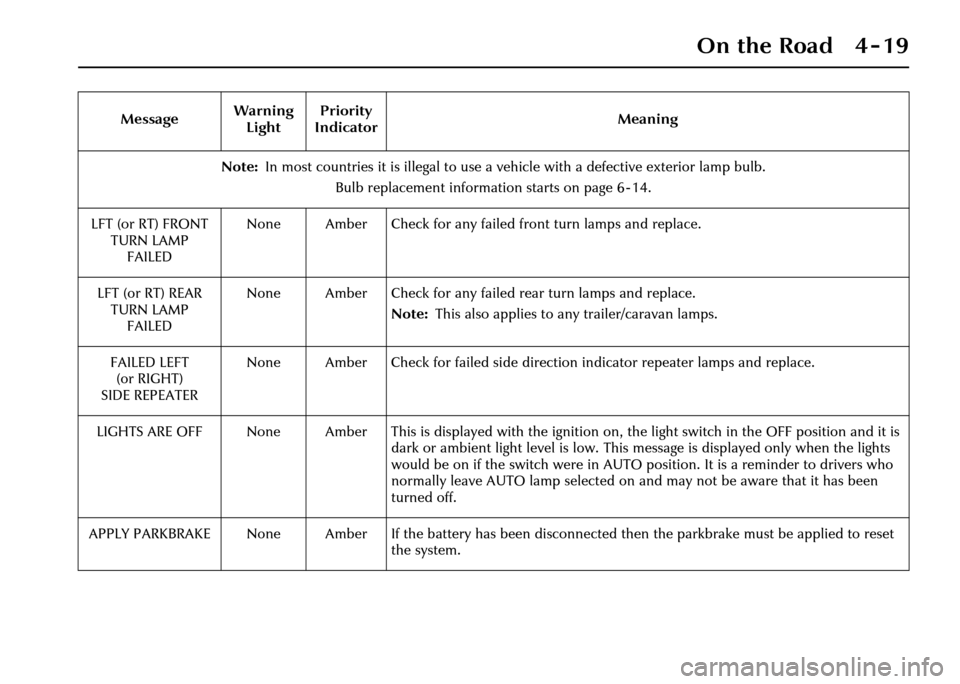
Note:In most countries it is illegal to use a ve hicle with a defective exterior lamp bulb.
Bulb replacement information starts on page 6 - 14.
LFT (or RT) FRONT TURN LAMPFAILED None Amber Check for any failed front turn lamps and replace.
LFT (or RT) REAR TURN LAMP FAILED None Amber Check for any failed rear turn lamps and replace.
Note:This also applies to any trailer/caravan lamps.
FAILED LEFT (or RIGHT)
SIDE REPEATER None Amber Check for failed side directio
n indicator repeater lamps and replace.
LIGHTS ARE OFF None Amber This is displayed with the igniti on on, the light switch in the OFF position and it is
dark or ambient light level is low. This message is displayed only when the lights
would be on if the switch were in AUTO position. It is a reminder to drivers who
normally leave AUTO lamp selected on and may not be aware that it has been
turned off.
APPLY PARKBRAKE None Amber If the battery has been discon nected then the parkbrake must be applied to reset
the system.
Message
Warning
Light Priority
Indicator Meaning
Page 101 of 227
4-30 On the Road
Immobilising the rear windows
To immobilise the rear windows (and
operation of the front seat by a rear seat
passenger, when this feature is fitted),
press button (A) (see previous page
illustration). The LED in the button will
light up showing that the rear windows
cannot be operated by rear seat
occupants. Pressing the button again will
enable occupants to operate the rear
windows. See also Rear Seat
Adjustment on page 3 - 4.
Window Anti-trap Protection
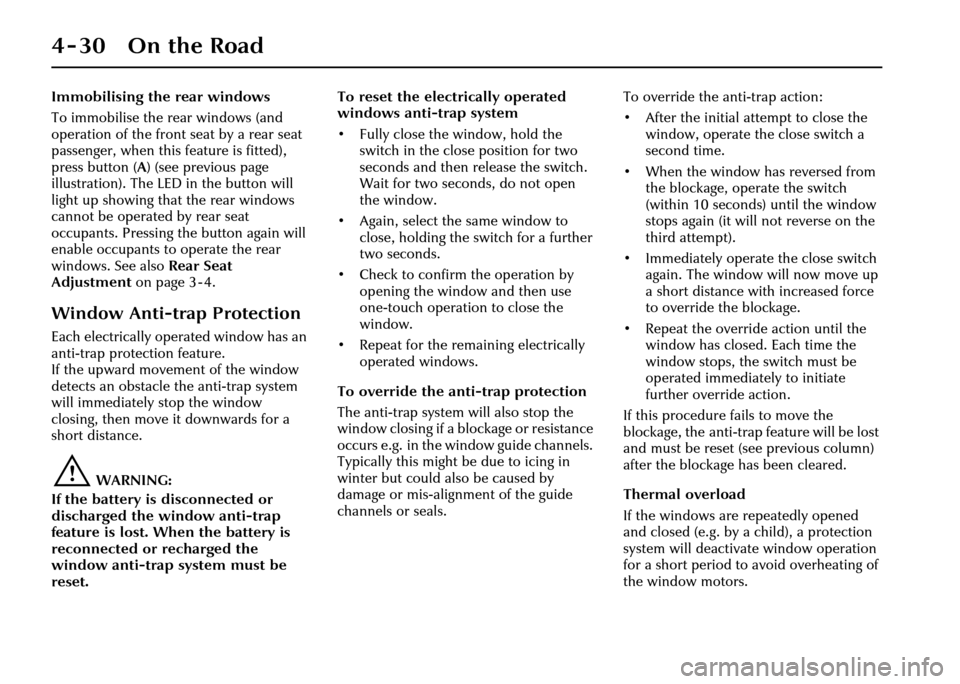
Each electrically operated window has an
anti-trap protection feature.
If the upward movement of the window
detects an obstacle the anti-trap system
will immediately stop the window
closing, then move it downwards for a
short distance.
!WARNING:
If the battery is disconnected or
discharged the window anti-trap
feature is lost. When the battery is
reconnected or recharged the
window anti-trap system must be
reset. To reset the electrically operated
windows anti-trap system
• Fully close the window, hold the
switch in the close position for two
seconds and then release the switch.
Wait for two seconds, do not open
the window.
• Again, select the same window to close, holding the sw itch for a further
two seconds.
• Check to confirm the operation by opening the window and then use
one-touch operation to close the
window.
• Repeat for the remaining electrically operated windows.
To override the anti-trap protection
The anti-trap system will also stop the
window closing if a bl ockage or resistance
occurs e.g. in the wi ndow guide channels.
Typically this might be due to icing in
winter but could also be caused by
damage or mis-alignment of the guide
channels or seals. To override the anti-trap action:
• After the initial attempt to close the
window, operate the close switch a
second time.
• When the window has reversed from the blockage, operate the switch
(within 10 seconds) until the window
stops again (it will not reverse on the
third attempt).
• Immediately operate the close switch again. The window will now move up
a short distance with increased force
to override the blockage.
• Repeat the override action until the window has closed. Each time the
window stops, the switch must be
operated immediately to initiate
further override action.
If this procedure fails to move the
blockage, the anti-trap feature will be lost
and must be reset (see previous column)
after the blockage has been cleared.
Thermal overload
If the windows are repeatedly opened
and closed (e.g. by a child), a protection
system will deactivate window operation
for a short period to avoid overheating of
the window motors.
Page 105 of 227
4-34 On the Road
Parkbrake
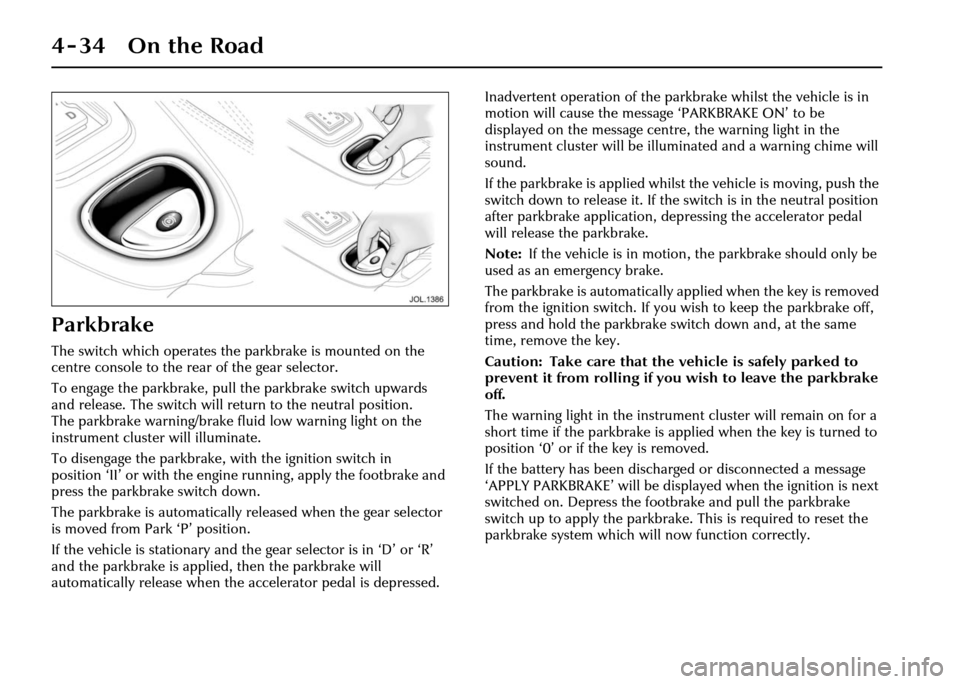
The switch which operates the parkbrake is mounted on the
centre console to the rear of the gear selector.
To engage the parkbrake, pull the parkbrake switch upwards
and release. The switch will return to the neutral position.
The parkbrake warning/brake fluid low warning light on the
instrument cluster will illuminate.
To disengage the parkbrake, with the ignition switch in
position ‘II’ or with the engine running, apply the footbrake and
press the parkbrake switch down.
The parkbrake is automatically released when the gear selector
is moved from Park ‘P’ position.
If the vehicle is stationary and the gear selector is in ‘D’ or ‘R’
and the parkbrake is applied, then the parkbrake will
automatically release when the accelerator pedal is depressed. Inadvertent operation of the parkbrake whilst the vehicle is in
motion will cause the message ‘PARKBRAKE ON’ to be
displayed on the message centre, the warning light in the
instrument cluster will be illuminated and a warning chime will
sound.
If the parkbrake is applied whilst
the vehicle is moving, push the
switch down to release it. If the switch is in the neutral position
after parkbrake application, depressing the accelerator pedal
will release the parkbrake.
Note: If the vehicle is in motion, the parkbrake should only be
used as an emergency brake.
The parkbrake is auto matically applied when the key is removed
from the ignition switch. If you wi sh to keep the parkbrake off,
press and hold the parkbrake switch down and, at the same
time, remove the key.
Caution: Take care that the vehicle is safely parked to
prevent it from rolling if you wish to leave the parkbrake
off.
The warning light in the instrument cluster will remain on for a
short time if the parkbrake is applied when the key is turned to
position ‘0’ or if the key is removed.
If the battery has been discharged or disconnected a message
‘APPLY PARKBRAKE’ will be displa yed when the ignition is next
switched on. Depress the footbrake and pull the parkbrake
switch up to apply the parkbrake. This is required to reset the
parkbrake system which will now function correctly.
Page 113 of 227
4-42 On the Road
Starting/Stopping the
Vehicle
When the vehicle is stationary the
automatic gear selector may be left in ‘D’,
‘ 2 ’, ‘ 3’, ‘ 4’ or ‘ 5’, unless the vehicle is to
be parked. When stopping for traffic
lights, junctions etc., either select ‘ P’ or
apply the parkbrake and select ‘ N’.
Before Starting
Before starting the engine, new owners/
drivers should familiarize themselves with
the layout and operation of the controls
and instruments.
!WARNING:
Before attempting to start the engine,
check parkbrake is ON and gear
selector lever is in position ‘P’ or ‘N’.
To Start the Engine
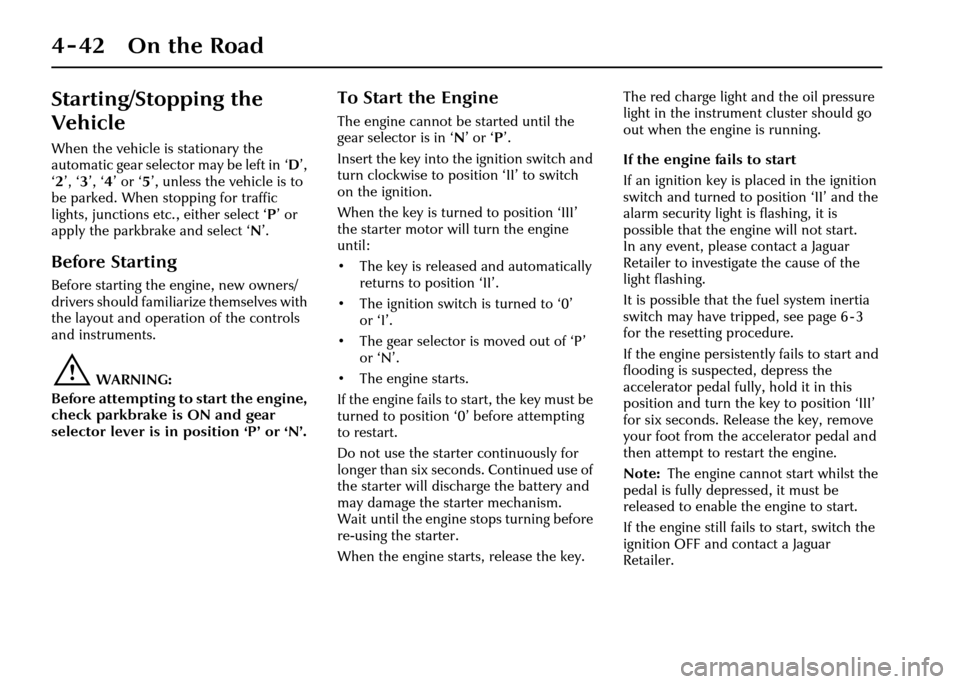
The engine cannot be started until the
gear selector is in ‘ N’ or ‘ P’.
Insert the key into the ignition switch and
turn clockwise to position ‘II’ to switch
on the ignition.
When the key is turned to position ‘III’
the starter motor will turn the engine
until:
• The key is released and automatically returns to position ‘II’.
• The ignition switch is turned to ‘0’ or ‘I’.
• The gear selector is moved out of ‘P’ or ‘N’.
• The engine starts.
If the engine fails to start, the key must be
turned to position ‘0’ before attempting
to restart.
Do not use the starter continuously for
longer than six seconds. Continued use of
the starter will disc harge the battery and
may damage the starter mechanism.
Wait until the engine stops turning before
re-using the starter.
When the engine starts, release the key. The red charge light and the oil pressure
light in the instrument cluster should go
out when the engine is running.
If the engine fails to start
If an ignition key is placed in the ignition
switch and turned to position ‘II’ and the
alarm security light is flashing, it is
possible that the engine will not start.
In any event, please contact a Jaguar
Retailer to investigate the cause of the
light flashing.
It is possible that the fuel system inertia
switch may have tripped, see page 6 - 3
for the resetting procedure.
If the engine persistent
ly fails to start and
flooding is suspected, depress the
accelerator pedal fully, hold it in this
position and turn the key to position ‘III’
for six seconds. Release the key, remove
your foot from the accelerator pedal and
then attempt to restart the engine.
Note: The engine cannot start whilst the
pedal is fully depressed, it must be
released to enable the engine to start.
If the engine still fail s to start, switch the
ignition OFF and contact a Jaguar
Retailer.
Page 124 of 227
On the Road 4 - 53
When a vehicle ahead enters the same
lane or a slower vehicle is ahead in the
same lane, the vehicle speed will be
adjusted automatically until the gap to
the vehicle ahead corresponds to the
preset gap. The vehicle is now in ‘follow
mode’.The warning light in the
instrument cluster will be
illuminated,
and the message centre
will display the gap set.
The vehicle will then maintain the
constant time gap to the vehicle ahead
until:
• The vehicle ahead accelerates to a speed above the set speed.
• The vehicle ahead moves out of lane or out of view.
• The vehicle ahead slows so that ‘low speed automatic switch off’ occurs.
• A new gap distance is set.
If necessary, the vehicle brakes will be
automatically applied to slow the vehicle
to maintain the gap to the vehicle in
front. The maximum braking which is applied
by the ACC system is limited and can be
overridden by the driver applying the
brakes, if required.
Note:
Driver braking will cancel adaptive
cruise control.
If the ACC system predicts that its
maximum braking level will not be
sufficient, then an audible warning will
sound while the ACC continues to brake.
This is accompanied by a red warning
light and ‘DRIVER INTERVENE’ will be
displayed on the message centre.
The driver should take IMMEDIATE
action.
When in follow mode the vehicle will
automatically return to the set speed
when the road ahead is clear, for instance
when:
• The vehicle in front accelerates or changes lane.
• The driver changes lane to either side or enters an exit lane.
The driver should intervene if
appropriate.
Low speed automatic switch off
If the speed of the vehicle decreases
below 18 mph (30 km/h), the ACC system
will be automatically switched OFF and
the instrument warning lamp will go out. If the brakes were
being applied by the
ACC system, they will be slowly released.
This will be accompanied by an audible
warning, a red warning light and ‘DRIVER
INTERVENE’ will be displayed on the
message centre. The driver must take
control.
Overriding the set speed/follow mode
!WARNING:
Whenever the driver is overriding the
ACC by depressing the accelerator
pedal, the ACC will not automatically
apply the brakes to maintain
separation from any vehicle ahead.
The set speed and gap can be overridden
by pressing the accelerator pedal when
cruising at constant speed or in follow
mode. If the vehicle is in follow mode,
the instrument warning lamp will go out
when the ACC is overridden by the driver
using the accelera tor and ‘CRUISE
OVERRIDE’ will be displayed on the
message centre. When the accelerator is
released the ACC function will operate
again and vehicle speed will decrease to
the set speed, or a lower speed if follow
mode is active.
GAP
Page 154 of 227
Roadside Emergency 6 - 3
6 Roadside Emergency
Inertia Switch
In the event of an accident, the inertia switch may trip
(depending on the severity an d type of impact), isolating
operation of the fuel pump. Once the switch has tripped it must
be reset before attempting to restart the engine.
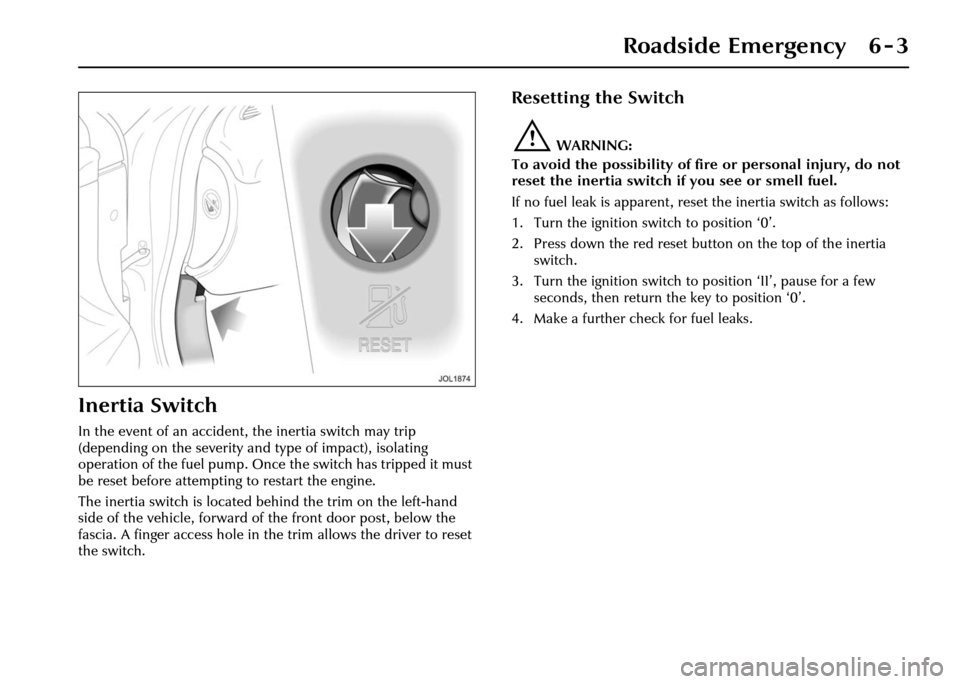
The inertia switch is located behind the trim on the left-hand
side of the vehicle, forward of the front door post, below the
fascia. A finger access hole in the trim allows the driver to reset
the switch.
Resetting the Switch
!WARNING:
To avoid the possibility of fire or personal injury, do not
reset the inertia switch if you see or smell fuel.
If no fuel leak is apparent, reset the inertia switch as follows:
1. Turn the ignition switch to position ‘0’.
2. Press down the red reset butt on on the top of the inertia
switch.
3. Turn the ignition switch to position ‘II’, pause for a few seconds, then return the key to position ‘0’.
4. Make a further check for fuel leaks.
Page 156 of 227
Roadside Emergency 6 - 5
Caution:
1. If using a jump start vehicle, under no circumstances should the
vehicles come into contact with
each other. This could establish an
earth connection, which may
cause sparks and damage.
2. Do not run the engine of the jump start vehicle when boost starting a
Jaguar vehicle. If the jump start
vehicle’s engine is running and
the jump leads ar e disconnected,
damage to the Jaguar vehicle’s
electrical system will result.
3. The booster battery voltage must not exceed 12 volts.
The procedure must be followed exactly,
being careful not to cause sparks:
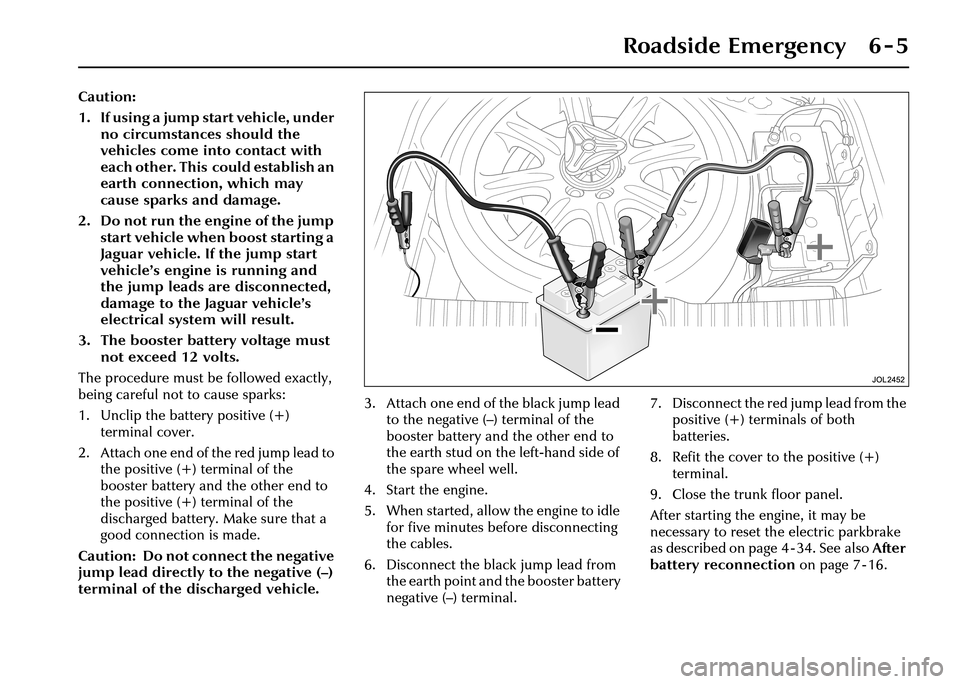
1. Unclip the battery positive (+) terminal cover.
2. Attach one end of the red jump lead to the positive (+) terminal of the
booster battery and the other end to
the positive (+) terminal of the
discharged battery. Make sure that a
good connection is made.
Caution: Do not connect the negative
jump lead directly to the negative (–)
terminal of the discharged vehicle. 3. Attach one end of the black jump lead
to the negative (–) terminal of the
booster battery and the other end to
the earth stud on the left-hand side of
the spare wheel well.
4. Start the engine.
5. When started, allow the engine to idle for five minutes before disconnecting
the cables.
6. Disconnect the black jump lead from the earth point and the booster battery
negative (–) terminal. 7. Disconnect the red jump lead from the
positive (+) terminals of both
batteries.
8. Refit the cover to the positive (+) terminal.
9. Close the trunk floor panel.
After starting the engine, it may be
necessary to reset th e electric parkbrake
as described on page 4 - 34. See also After
battery reconnection on page 7 - 16.
Page 199 of 227
7-16 Maintenance
Battery lead disconnection
Caution:
1. Under no circumstances should a battery be discon nected whilst
the ignition circuit is live,
as permanent damage to the
instrument cluster may occur.
2. Disconnect the negative lead (earth terminal) first.
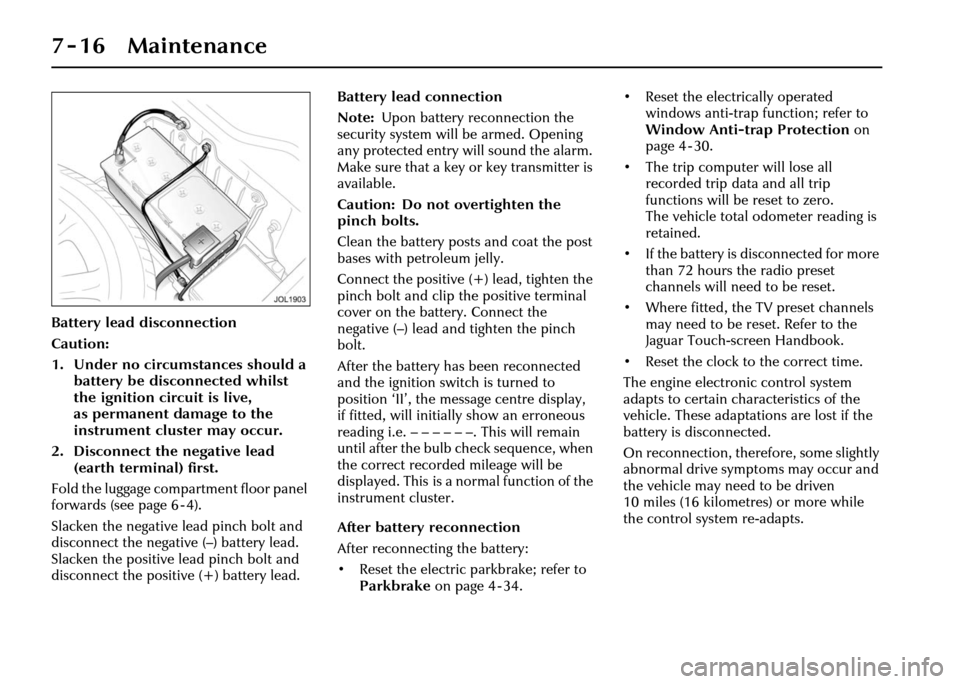
Fold the luggage compartment floor panel
forwards (see page 6 - 4).
Slacken the negative lead pinch bolt and
disconnect the negative (–) battery lead.
Slacken the positive lead pinch bolt and
disconnect the positive (+) battery lead. Battery lead connection
Note:
Upon battery reconnection the
security system will be armed. Opening
any protected entry will sound the alarm.
Make sure that a key or key transmitter is
available.
Caution: Do not overtighten the
pinch bolts.
Clean the battery posts and coat the post
bases with petroleum jelly.
Connect the positive (+) lead, tighten the
pinch bolt and clip the positive terminal
cover on the battery. Connect the
negative (–) lead and tighten the pinch
bolt.
After the battery ha s been reconnected
and the ignition swit ch is turned to
position ‘II’, the message centre display,
if fitted, will initially show an erroneous
reading i.e.––––––. Thiswill remain
until after the bulb check sequence, when
the correct recorded mileage will be
displayed. This is a normal function of the
instrument cluster.
After battery reconnection
After reconnecting the battery:
• Reset the electric parkbrake; refer to Parkbrake on page 4 - 34. • Reset the electrically operated
windows anti-trap function; refer to
Window Anti-trap Protection on
page 4 - 30.
• The trip computer will lose all recorded trip data and all trip
functions will be reset to zero.
The vehicle total odometer reading is
retained.
• If the battery is disconnected for more than 72 hours the radio preset
channels will need to be reset.
• Where fitted, the TV preset channels may need to be reset. Refer to the
Jaguar Touch-screen Handbook.
• Reset the clock to the correct time.
The engine electronic control system
adapts to certain characteristics of the
vehicle. These adaptations are lost if the
battery is disconnected.
On reconnection, therefore, some slightly
abnormal drive symptoms may occur and
the vehicle may need to be driven
10 miles (16 kilometres) or more while
the control system re-adapts.