stereo JAGUAR XJ6 1997 2.G Owner's Guide
[x] Cancel search | Manufacturer: JAGUAR, Model Year: 1997, Model line: XJ6, Model: JAGUAR XJ6 1997 2.GPages: 227, PDF Size: 7.2 MB
Page 115 of 227
e) The silicone boot must be installed in the
correct position to prevent the boot from
being melted and to allow the sensor to
operate properly.
Check
13Locate the oxygen sensor electrical
connector and inspect the oxygen sensor
heater. Disconnect the oxygen sensor
electrical connector and connect an
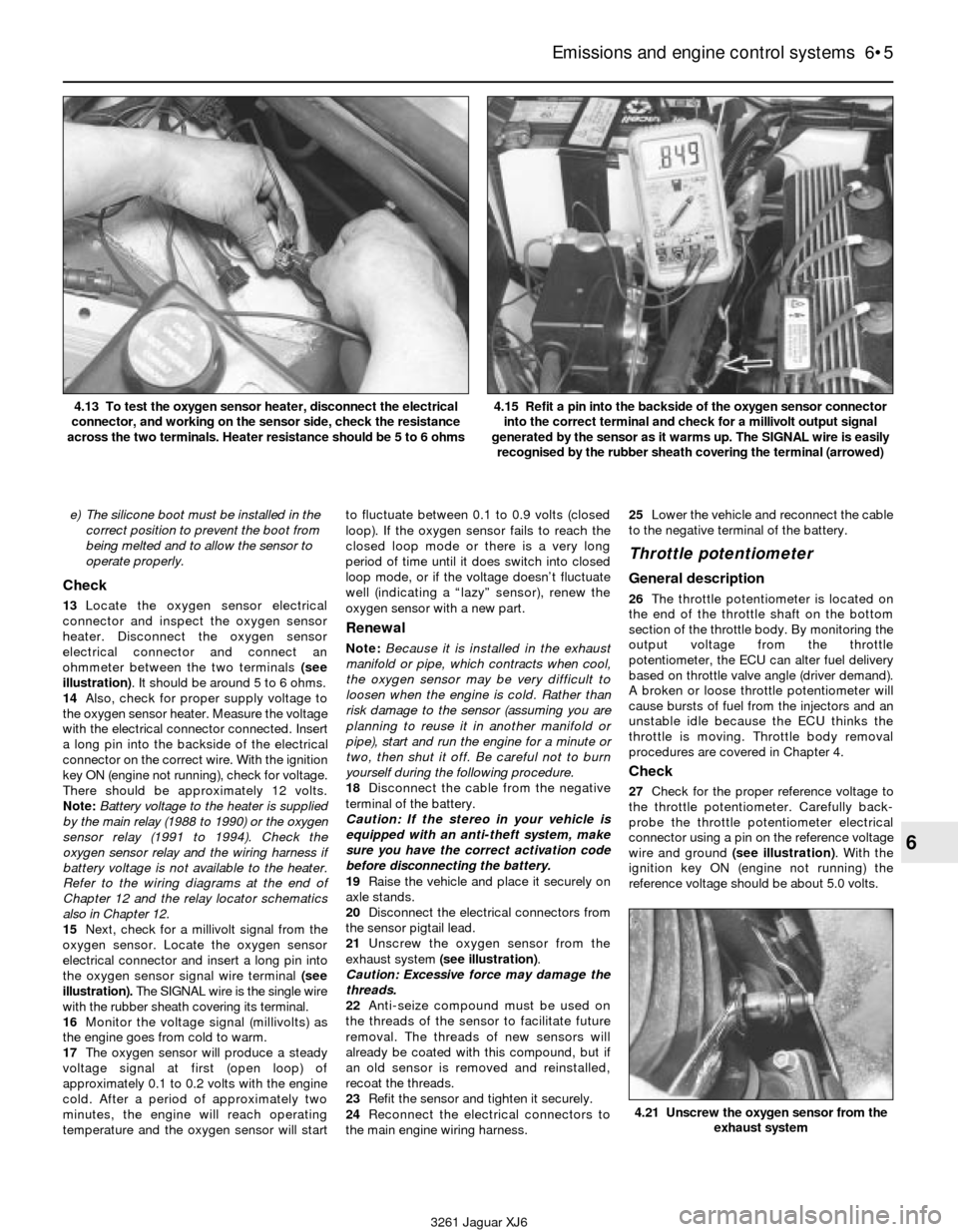
ohmmeter between the two terminals (see
illustration). It should be around 5 to 6 ohms.
14Also, check for proper supply voltage to
the oxygen sensor heater. Measure the voltage
with the electrical connector connected. Insert
a long pin into the backside of the electrical
connector on the correct wire. With the ignition
key ON (engine not running), check for voltage.
There should be approximately 12 volts.
Note:Battery voltage to the heater is supplied
by the main relay (1988 to 1990) or the oxygen
sensor relay (1991 to 1994). Check the
oxygen sensor relay and the wiring harness if
battery voltage is not available to the heater.
Refer to the wiring diagrams at the end of
Chapter 12 and the relay locator schematics
also in Chapter 12.
15Next, check for a millivolt signal from the
oxygen sensor. Locate the oxygen sensor
electrical connector and insert a long pin into
the oxygen sensor signal wire terminal (see
illustration). The SIGNAL wire is the single wire
with the rubber sheath covering its terminal.
16Monitor the voltage signal (millivolts) as
the engine goes from cold to warm.
17The oxygen sensor will produce a steady
voltage signal at first (open loop) of
approximately 0.1 to 0.2 volts with the engine
cold. After a period of approximately two
minutes, the engine will reach operating
temperature and the oxygen sensor will startto fluctuate between 0.1 to 0.9 volts (closed
loop). If the oxygen sensor fails to reach the
closed loop mode or there is a very long
period of time until it does switch into closed
loop mode, or if the voltage doesn’t fluctuate
well (indicating a “lazy” sensor), renew the
oxygen sensor with a new part.
Renewal
Note:Because it is installed in the exhaust
manifold or pipe, which contracts when cool,
the oxygen sensor may be very difficult to
loosen when the engine is cold. Rather than
risk damage to the sensor (assuming you are
planning to reuse it in another manifold or
pipe), start and run the engine for a minute or
two, then shut it off. Be careful not to burn
yourself during the following procedure.
18Disconnect the cable from the negative
terminal of the battery.
Caution: If the stereo in your vehicle is
equipped with an anti-theft system, make
sure you have the correct activation code
before disconnecting the battery.
19Raise the vehicle and place it securely on
axle stands.
20Disconnect the electrical connectors from
the sensor pigtail lead.
21Unscrew the oxygen sensor from the
exhaust system (see illustration).
Caution: Excessive force may damage the
threads.
22Anti-seize compound must be used on
the threads of the sensor to facilitate future
removal. The threads of new sensors will
already be coated with this compound, but if
an old sensor is removed and reinstalled,
recoat the threads.
23Refit the sensor and tighten it securely.
24Reconnect the electrical connectors to
the main engine wiring harness.25Lower the vehicle and reconnect the cable
to the negative terminal of the battery.
Throttle potentiometer
General description
26The throttle potentiometer is located on
the end of the throttle shaft on the bottom
section of the throttle body. By monitoring the
output voltage from the throttle
potentiometer, the ECU can alter fuel delivery
based on throttle valve angle (driver demand).
A broken or loose throttle potentiometer will
cause bursts of fuel from the injectors and an
unstable idle because the ECU thinks the
throttle is moving. Throttle body removal
procedures are covered in Chapter 4.
Check
27Check for the proper reference voltage to
the throttle potentiometer. Carefully back-
probe the throttle potentiometer electrical
connector using a pin on the reference voltage
wire and ground (see illustration). With the
ignition key ON (engine not running) the
reference voltage should be about 5.0 volts.
Emissions and engine control systems 6•5
6
4.21 Unscrew the oxygen sensor from the
exhaust system
3261 Jaguar XJ6 4.13 To test the oxygen sensor heater, disconnect the electrical
connector, and working on the sensor side, check the resistance
across the two terminals. Heater resistance should be 5 to 6 ohms
4.15 Refit a pin into the backside of the oxygen sensor connector
into the correct terminal and check for a millivolt output signal
generated by the sensor as it warms up. The SIGNAL wire is easily
recognised by the rubber sheath covering the terminal (arrowed)
Page 118 of 227

5 Air Injector Reactor
(AIR) system
General information
1The air injection reactor system reduces
carbon monoxide and hydrocarbon content
in the exhaust gases by injecting fresh air into
the hot exhaust gases leaving the exhaust
ports. When fresh air is mixed with hot
exhaust gases, oxidation is increased,
reducing the concentration of hydrocarbons
and carbon monoxide and converting them
into harmless carbon dioxide and water.
2The air injection system is composed of an
air pump, diverter valve (bypass), check valve,
air injection manifold, vacuum delay valve,
vacuum control solenoid, air pump magnetic
clutch, air pump clutch relay and hoses (see
illustration). The air pump is driven by a belt
from the crankshaft and supplies compressed
air to the exhaust manifold(s). The check valve
prevents the reverse flow of exhaust gases into
the system. The vacuum-operated (early
models) or electrically-operated (later models)air cut-off valve prevents air from being drawn
into the exhaust when the air pump is switched
off. System vacuum to the air cut-off valve is
controlled by the solenoid vacuum valve in
parallel circuit with the air pump. A delay valve
prevents vacuum loss to the solenoid valve
during wide open throttle operation.
3Injected air is controlled by the computer,
the air pump clutch and the air pump clutch
relay. The AIR system is used during warm-up
(58 to 83° F) to control emissions while the
engine is running rich. The oxygen sensor
feedback system cannot function while the AIR
system is operating. The computer controls
both systems during warm-up and operating
temperatures. If problems occur with the
AIR system relay or circuit, the on-board
diagnosis system will set a code 66.
Check
4Check the condition of the air pump
drivebelt, the injection hoses and the injection
manifold. Make sure that all components are
intact and there are no leaks.
5Check the operation of the air pump clutch
relay (see illustration)and the air pump
clutch. First remove the relay and check forbattery voltage to the relay. Also, check the
relay itself. Refer to the relay checking
procedure in Chapter 12. Extract codes from
the self-diagnosis system (see Section 3) and
check for a code 66, AIR relay malfunction.
6Make sure the electrical connector is
securely fastened to the diverter valve (see
illustration). If everything appears OK but a
fault code still sets, have the system
diagnosed by a dealer service department or
other qualified repair workshop.
Air pump renewal
7Disconnect the cable from the negative
terminal of the battery.
Caution: If the stereo in your vehicle is
equipped with an anti-theft system, make
sure you have the correct activation code
before disconnecting the battery.
8Disconnect the electrical connector from
the air pump clutch.
9Loosen the clips from the air inlet and outlet
hose and separate them from the air injection
pump.
10Loosen the adjuster and pivot bolts (see
illustration)and nuts but do not remove them
from the air injection pump brackets.
6•8 Emissions and engine control systems
3261 Jaguar XJ6 5.2 Schematic of the Air Injection Reactor (AIR) system
5.6 Location of the AIR diverter valve on a 1992 model - check the
hoses for cracking and the electrical connector for security5.10 Loosen the pivot bolt and then the adjustment nut to remove
the drivebelt from the air pump. The adjustment nut has a lock bolt
that must be loosened before the pump will move down the adjuster
5.5 Location of the AIR pump relay on a 1992 model
Page 155 of 227
8Loosen the bolts or nuts and move the boot
lid into correct alignment. Move it only a little
at a time. Tighten the hinge bolts or nuts and
carefully lower the boot lid to check the
alignment.
9If necessary after refitting, the entire boot
lid striker assembly can be adjusted up and
down as well as from side to side on the boot
lid so the lid closes securely and is flush with
the rear quarter panels. To do this, scribe a
line around the boot lid striker assembly to
provide a reference point. Then loosen the
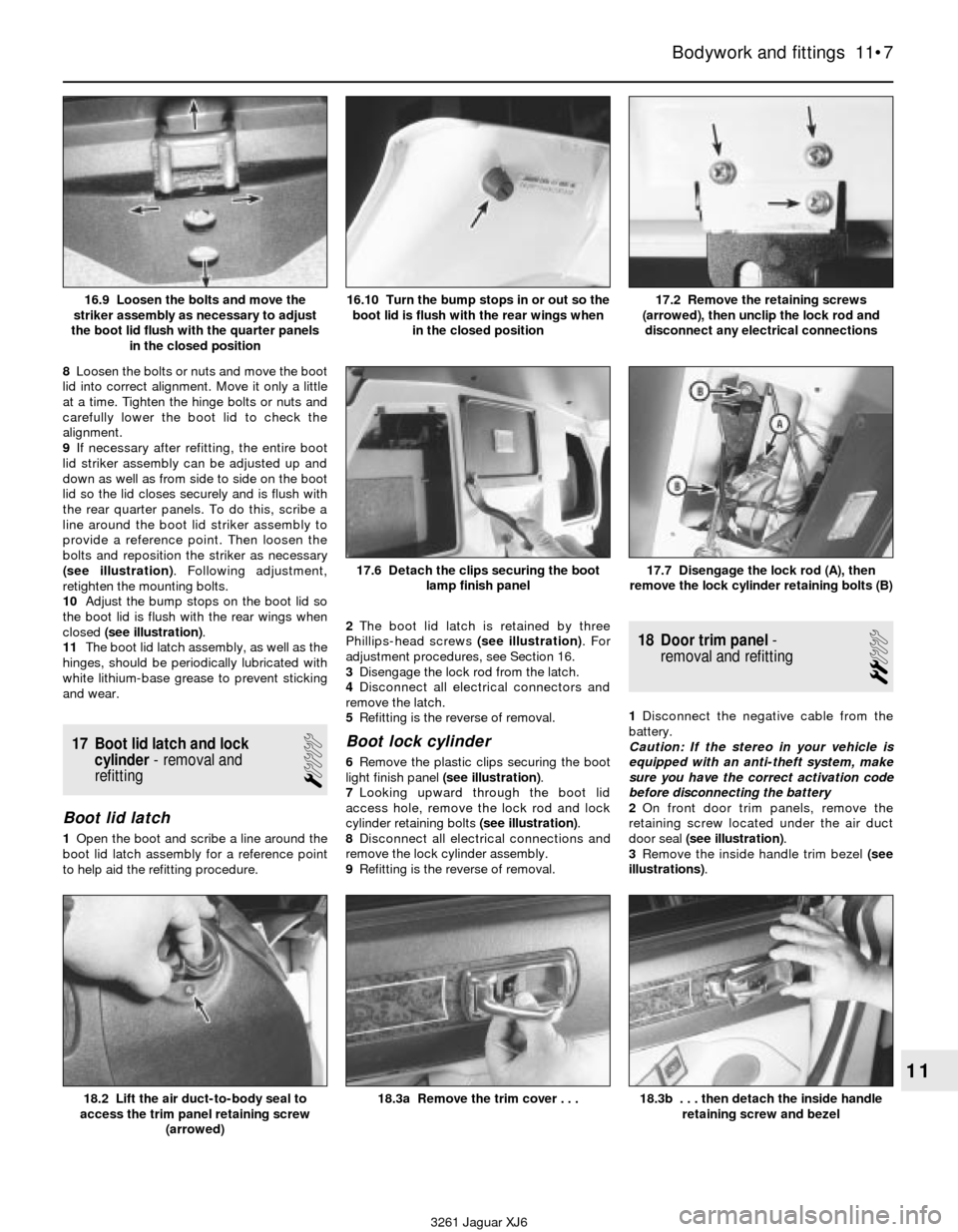
bolts and reposition the striker as necessary
(see illustration). Following adjustment,
retighten the mounting bolts.
10Adjust the bump stops on the boot lid so
the boot lid is flush with the rear wings when
closed (see illustration).
11The boot lid latch assembly, as well as the
hinges, should be periodically lubricated with
white lithium-base grease to prevent sticking
and wear.
17 Boot lid latch and lock
cylinder- removal and
refitting
1
Boot lid latch
1Open the boot and scribe a line around the
boot lid latch assembly for a reference point
to help aid the refitting procedure.2The boot lid latch is retained by three
Phillips-head screws (see illustration). For
adjustment procedures, see Section 16.
3Disengage the lock rod from the latch.
4Disconnect all electrical connectors and
remove the latch.
5Refitting is the reverse of removal.
Boot lock cylinder
6Remove the plastic clips securing the boot
light finish panel (see illustration).
7Looking upward through the boot lid
access hole, remove the lock rod and lock
cylinder retaining bolts (see illustration).
8Disconnect all electrical connections and
remove the lock cylinder assembly.
9Refitting is the reverse of removal.
18 Door trim panel-
removal and refitting
2
1Disconnect the negative cable from the
battery.
Caution: If the stereo in your vehicle is
equipped with an anti-theft system, make
sure you have the correct activation code
before disconnecting the battery
2On front door trim panels, remove the
retaining screw located under the air duct
door seal (see illustration).
3Remove the inside handle trim bezel (see
illustrations).
Bodywork and fittings 11•7
11
17.6 Detach the clips securing the boot
lamp finish panel17.7 Disengage the lock rod (A), then
remove the lock cylinder retaining bolts (B)
18.2 Lift the air duct-to-body seal to
access the trim panel retaining screw
(arrowed)18.3b . . . then detach the inside handle
retaining screw and bezel18.3a Remove the trim cover . . .
3261 Jaguar XJ6 16.9 Loosen the bolts and move the
striker assembly as necessary to adjust
the boot lid flush with the quarter panels
in the closed position
17.2 Remove the retaining screws
(arrowed), then unclip the lock rod and
disconnect any electrical connections16.10 Turn the bump stops in or out so the
boot lid is flush with the rear wings when
in the closed position
Page 156 of 227
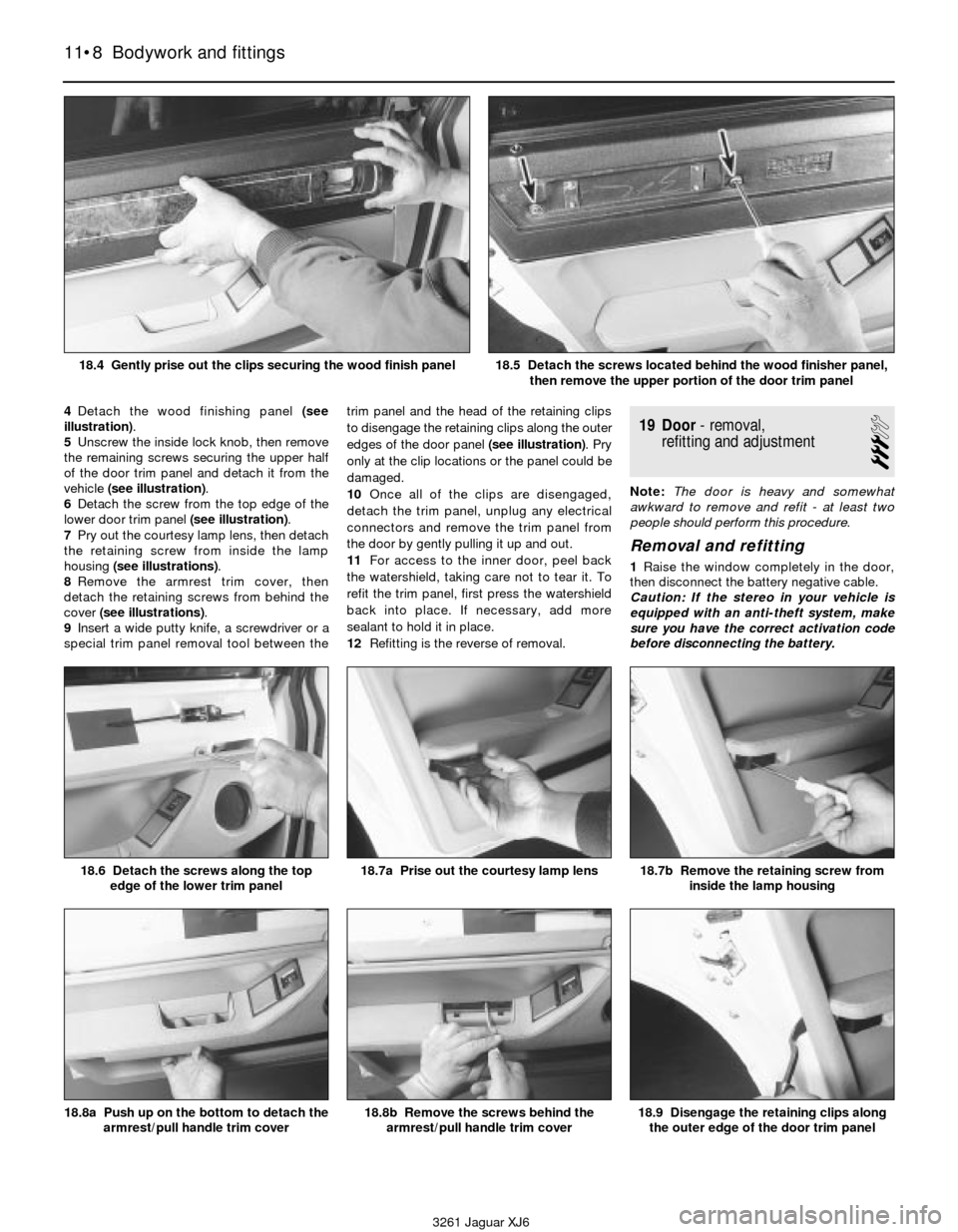
4Detach the wood finishing panel (see
illustration).
5Unscrew the inside lock knob, then remove
the remaining screws securing the upper half
of the door trim panel and detach it from the
vehicle (see illustration).
6Detach the screw from the top edge of the
lower door trim panel (see illustration).
7Pry out the courtesy lamp lens, then detach
the retaining screw from inside the lamp
housing (see illustrations).
8Remove the armrest trim cover, then
detach the retaining screws from behind the
cover (see illustrations).
9Insert a wide putty knife, a screwdriver or a
special trim panel removal tool between thetrim panel and the head of the retaining clips
to disengage the retaining clips along the outer
edges of the door panel (see illustration). Pry
only at the clip locations or the panel could be
damaged.
10Once all of the clips are disengaged,
detach the trim panel, unplug any electrical
connectors and remove the trim panel from
the door by gently pulling it up and out.
11For access to the inner door, peel back
the watershield, taking care not to tear it. To
refit the trim panel, first press the watershield
back into place. If necessary, add more
sealant to hold it in place.
12Refitting is the reverse of removal.19 Door- removal,
refitting and adjustment
3
Note:The door is heavy and somewhat
awkward to remove and refit - at least two
people should perform this procedure.
Removal and refitting
1Raise the window completely in the door,
then disconnect the battery negative cable.
Caution: If the stereo in your vehicle is
equipped with an anti-theft system, make
sure you have the correct activation code
before disconnecting the battery.
11•8 Bodywork and fittings
18.6 Detach the screws along the top
edge of the lower trim panel18.7a Prise out the courtesy lamp lens18.7b Remove the retaining screw from
inside the lamp housing
18.8a Push up on the bottom to detach the
armrest/pull handle trim cover18.8b Remove the screws behind the
armrest/pull handle trim cover18.9 Disengage the retaining clips along
the outer edge of the door trim panel
3261 Jaguar XJ6 18.4 Gently prise out the clips securing the wood finish panel
18.5 Detach the screws located behind the wood finisher panel,
then remove the upper portion of the door trim panel
Page 159 of 227
22 Door window glass-
removal and refitting
3
1Raise the window to its full upright position,
then remove the door trim panel and
watershield as described in Section 18.
2Tape the window to the door glass frame to
secure the window in the full upright position.
3Detach the regulator assembly (Section 21)
and lower it to the bottom of the door.
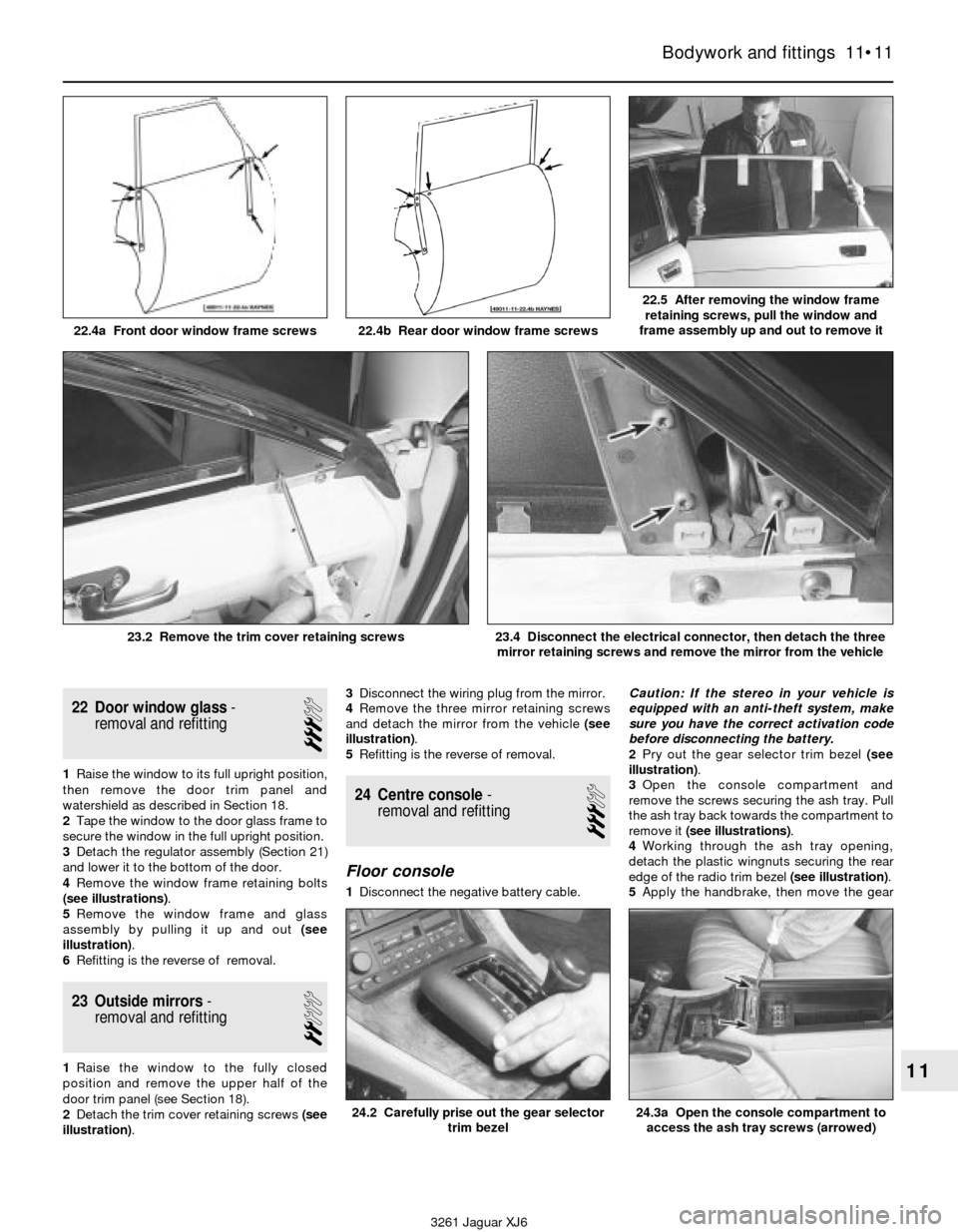
4Remove the window frame retaining bolts
(see illustrations).
5Remove the window frame and glass
assembly by pulling it up and out (see
illustration).
6Refitting is the reverse of removal.
23 Outside mirrors-
removal and refitting
2
1Raise the window to the fully closed
position and remove the upper half of the
door trim panel (see Section 18).
2Detach the trim cover retaining screws (see
illustration).3Disconnect the wiring plug from the mirror.
4Remove the three mirror retaining screws
and detach the mirror from the vehicle (see
illustration).
5Refitting is the reverse of removal.
24 Centre console-
removal and refitting
3
Floor console
1Disconnect the negative battery cable.Caution: If the stereo in your vehicle is
equipped with an anti-theft system, make
sure you have the correct activation code
before disconnecting the battery.
2Pry out the gear selector trim bezel (see
illustration).
3Open the console compartment and
remove the screws securing the ash tray. Pull
the ash tray back towards the compartment to
remove it (see illustrations).
4Working through the ash tray opening,
detach the plastic wingnuts securing the rear
edge of the radio trim bezel (see illustration).
5Apply the handbrake, then move the gear
Bodywork and fittings 11•11
11
22.4a Front door window frame screws 22.4b Rear door window frame screws
22.5 After removing the window frame
retaining screws, pull the window and
frame assembly up and out to remove it
3261 Jaguar XJ6 23.2 Remove the trim cover retaining screws
23.4 Disconnect the electrical connector, then detach the three
mirror retaining screws and remove the mirror from the vehicle
24.3a Open the console compartment to
access the ash tray screws (arrowed)24.2 Carefully prise out the gear selector
trim bezel
Page 160 of 227
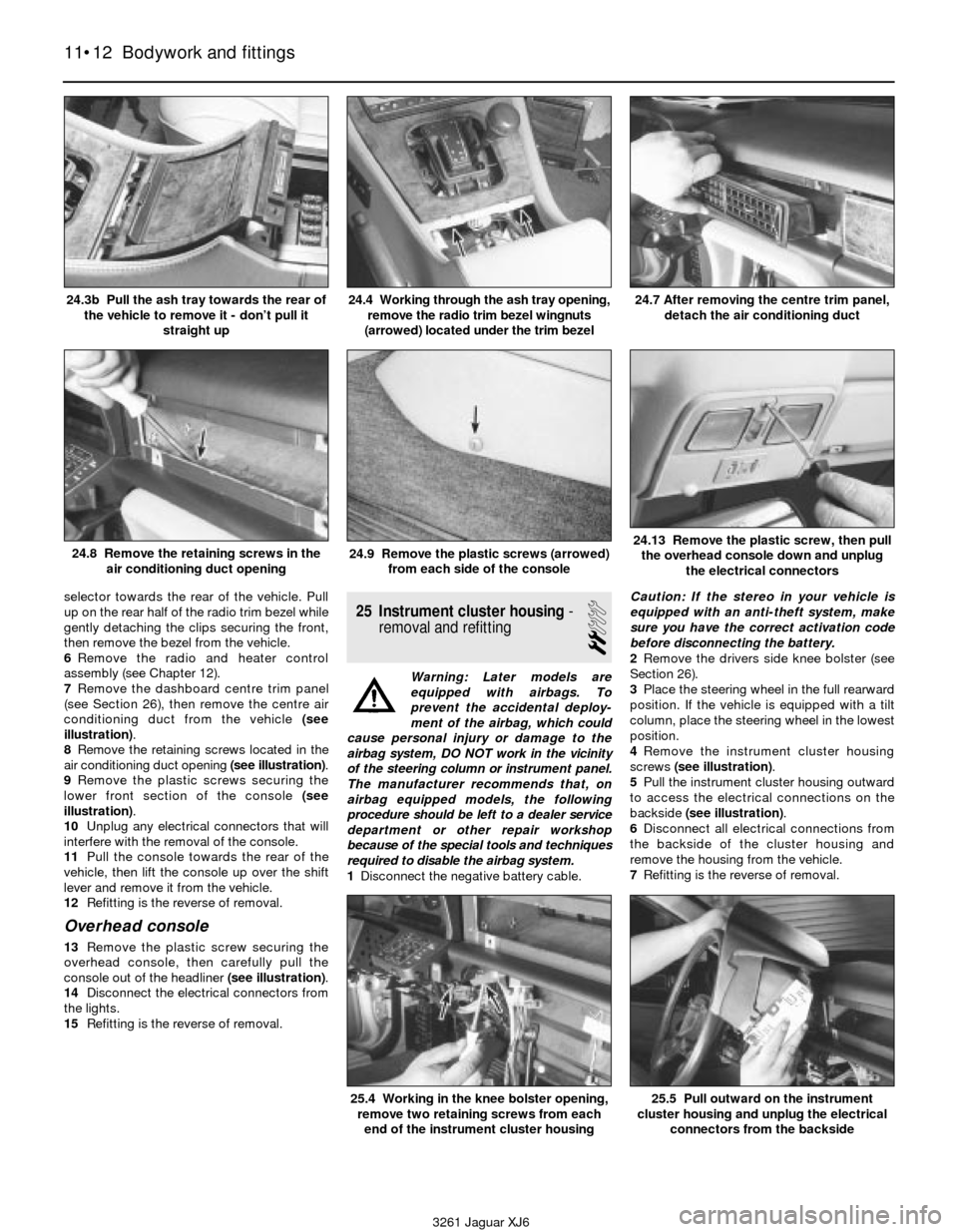
selector towards the rear of the vehicle. Pull
up on the rear half of the radio trim bezel while
gently detaching the clips securing the front,
then remove the bezel from the vehicle.
6Remove the radio and heater control
assembly (see Chapter 12).
7Remove the dashboard centre trim panel
(see Section 26), then remove the centre air
conditioning duct from the vehicle (see
illustration).
8Remove the retaining screws located in the
air conditioning duct opening (see illustration).
9Remove the plastic screws securing the
lower front section of the console (see
illustration).
10Unplug any electrical connectors that will
interfere with the removal of the console.
11Pull the console towards the rear of the
vehicle, then lift the console up over the shift
lever and remove it from the vehicle.
12Refitting is the reverse of removal.
Overhead console
13Remove the plastic screw securing the
overhead console, then carefully pull the
console out of the headliner (see illustration).
14Disconnect the electrical connectors from
the lights.
15Refitting is the reverse of removal.
25 Instrument cluster housing-
removal and refitting
2
Warning: Later models are
equipped with airbags. To
prevent the accidental deploy-
ment of the airbag, which could
cause personal injury or damage to the
airbag system, DO NOT work in the vicinity
of the steering column or instrument panel.
The manufacturer recommends that, on
airbag equipped models, the following
procedure should be left to a dealer service
department or other repair workshop
because of the special tools and techniques
required to disable the airbag system.
1Disconnect the negative battery cable. Caution: If the stereo in your vehicle is
equipped with an anti-theft system, make
sure you have the correct activation code
before disconnecting the battery.
2Remove the drivers side knee bolster (see
Section 26).
3Place the steering wheel in the full rearward
position. If the vehicle is equipped with a tilt
column, place the steering wheel in the lowest
position.
4Remove the instrument cluster housing
screws (see illustration).
5Pull the instrument cluster housing outward
to access the electrical connections on the
backside (see illustration).
6Disconnect all electrical connections from
the backside of the cluster housing and
remove the housing from the vehicle.
7Refitting is the reverse of removal.
11•12 Bodywork and fittings
24.3b Pull the ash tray towards the rear of
the vehicle to remove it - don’t pull it
straight up24.4 Working through the ash tray opening,
remove the radio trim bezel wingnuts
(arrowed) located under the trim bezel24.7 After removing the centre trim panel,
detach the air conditioning duct
24.8 Remove the retaining screws in the
air conditioning duct opening24.9 Remove the plastic screws (arrowed)
from each side of the console24.13 Remove the plastic screw, then pull
the overhead console down and unplug
the electrical connectors
3261 Jaguar XJ6
25.4 Working in the knee bolster opening,
remove two retaining screws from each
end of the instrument cluster housing25.5 Pull outward on the instrument
cluster housing and unplug the electrical
connectors from the backside
Page 161 of 227
26 Dashboard trim panels-
removal and refitting
2
Warning: Later models are
equipped with airbags. To
prevent the accidental deploy-
ment of the airbag, which could
cause personal injury or damage to the
airbag system, DO NOT work in the vicinity
of the steering column or instrument panel.
The manufacturer recommends that, on
airbag equipped models, the following
procedure should be left to a dealer service
department or other repair workshop
because of the special tools and techniques
required to disable the airbag system.
Caution: If the stereo in your vehicle is
equipped with an anti-theft system, make
sure you have the correct activation code
before disconnecting the battery
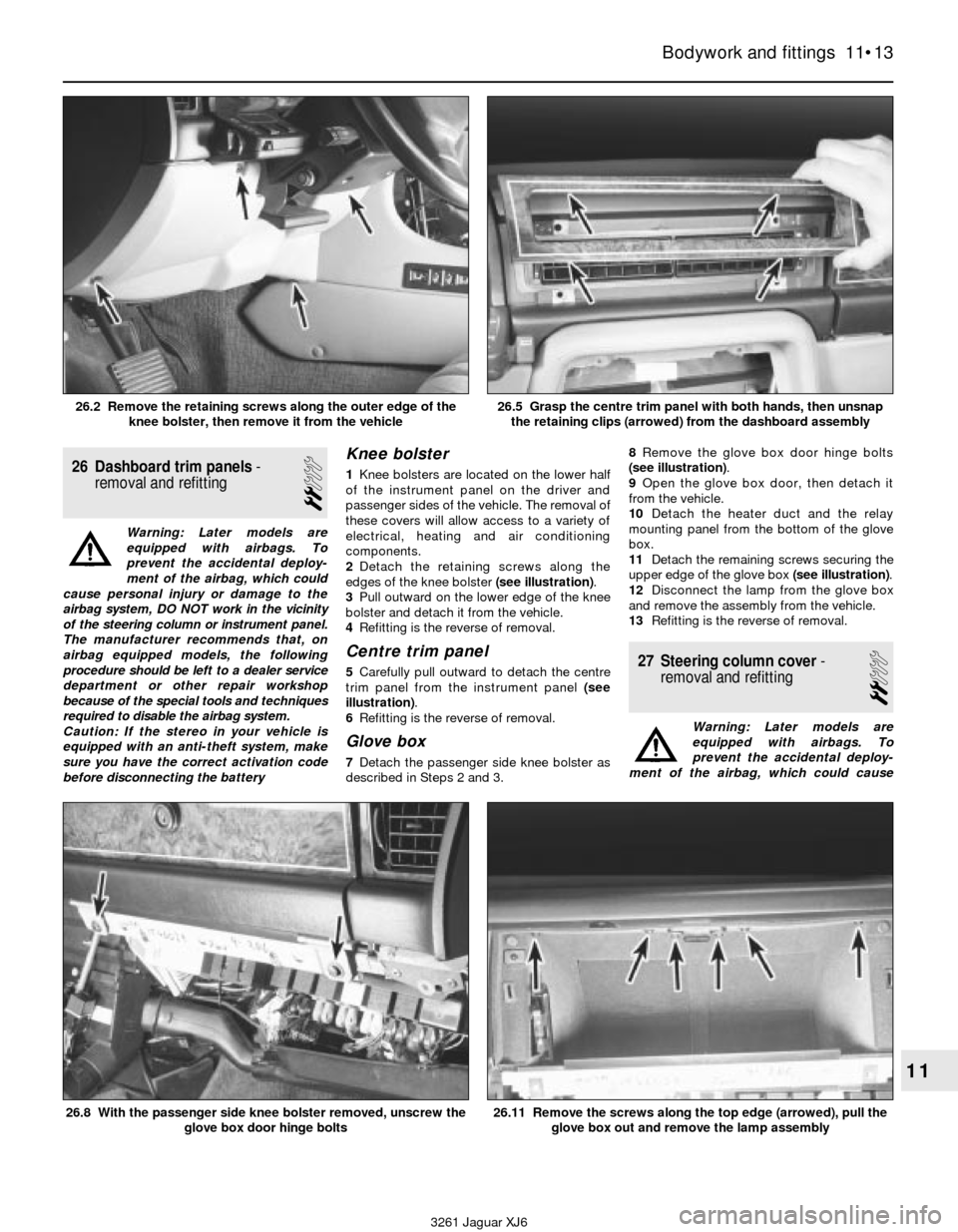
Knee bolster
1Knee bolsters are located on the lower half
of the instrument panel on the driver and
passenger sides of the vehicle. The removal of
these covers will allow access to a variety of
electrical, heating and air conditioning
components.
2Detach the retaining screws along the
edges of the knee bolster (see illustration).
3Pull outward on the lower edge of the knee
bolster and detach it from the vehicle.
4Refitting is the reverse of removal.
Centre trim panel
5Carefully pull outward to detach the centre
trim panel from the instrument panel (see
illustration).
6Refitting is the reverse of removal.
Glove box
7Detach the passenger side knee bolster as
described in Steps 2 and 3.8Remove the glove box door hinge bolts
(see illustration).
9Open the glove box door, then detach it
from the vehicle.
10Detach the heater duct and the relay
mounting panel from the bottom of the glove
box.
11Detach the remaining screws securing the
upper edge of the glove box (see illustration).
12Disconnect the lamp from the glove box
and remove the assembly from the vehicle.
13Refitting is the reverse of removal.
27 Steering column cover-
removal and refitting
2
Warning: Later models are
equipped with airbags. To
prevent the accidental deploy-
ment of the airbag, which could cause
Bodywork and fittings 11•13
11
3261 Jaguar XJ6 26.2 Remove the retaining screws along the outer edge of the
knee bolster, then remove it from the vehicle
26.5 Grasp the centre trim panel with both hands, then unsnap
the retaining clips (arrowed) from the dashboard assembly
26.8 With the passenger side knee bolster removed, unscrew the
glove box door hinge bolts26.11 Remove the screws along the top edge (arrowed), pull the
glove box out and remove the lamp assembly
Page 167 of 227

of the airbag, which could cause personal
injury or damage to the airbag system, DO
NOT work in the vicinity of the steering
column or instrument panel. The
manufacturer recommends that, on airbag
equipped models, the following procedure
be performed at a dealer service
department or other properly equipped
repair facility because of the special tools
and techniques required to disable the
airbag system.
The direction indicator and hazard flasher
systems are governed by the central
processing unit. The central processing unit
requires special testers and diagnostic
procedures which are beyond the scope of
this manual.
If the direction indicator/hazard flasher
system fails and the indicator bulbs are in
working condition take the vehicle to a dealer
service department or an automotive
electrical specialist for further diagnosis and
repair.8 Steering column switches-
removal and refitting
1
Warning: Later models are
equipped with airbags. To
prevent accidental deployment
of the airbag, which could cause
personal injury or damage to the airbag
system, DO NOT work in the vicinity of the
steering column or instrument panel. The
manufacturer recommends that, on airbag
equipped models, the following procedure
be performed at a dealer service
department or other properly equipped
repair facility because of the special tools
and techniques required to disable the
airbag system.
Caution: If the stereo in your vehicle is
equipped with an anti-theft system, make
sure you have the correct activation code
before disconnecting the battery.1Disconnect the negative battery cable.
2Remove the steering wheel (Chapter 10).
3Remove the lower steering column cover
(see Chapter 11).
4Remove the switch retaining screw(s) (see
illustration).
Body electrical system 12•5
12
3261 Jaguar XJ6 1993 to 1994 relay location details
8.4 Remove the switch retaining screws,
disconnect the electrical connectors and
pull the switches outward (arrowed)
Page 168 of 227
5Disconnect the electrical connectors from
underneath the steering column and remove
the switch or switches from the vehicle.
6Refitting is the reverse of removal.
9 Ignition switch
and key lock cylinder-
removal and refitting
2
Warning: Later models are
equipped with airbags. To
prevent accidental deployment
of the airbag, which could cause
personal injury or damage to the airbag
system, DO NOT work in the vicinity of the
steering column or instrument panel. The
manufacturer recommends that, on airbag
equipped models, the following procedure
be performed at a dealer service
department or other properly equipped
repair facility because of the special tools
and techniques required to disable the
airbag system.
Caution: If the stereo in your vehicle is
equipped with an anti-theft system, make
sure you have the correct activation code
before disconnecting the battery.1Disconnect the negative battery cable.
2Remove the steering wheel (Chapter 10).
3Remove the steering column trim covers
(see Chapter 11).
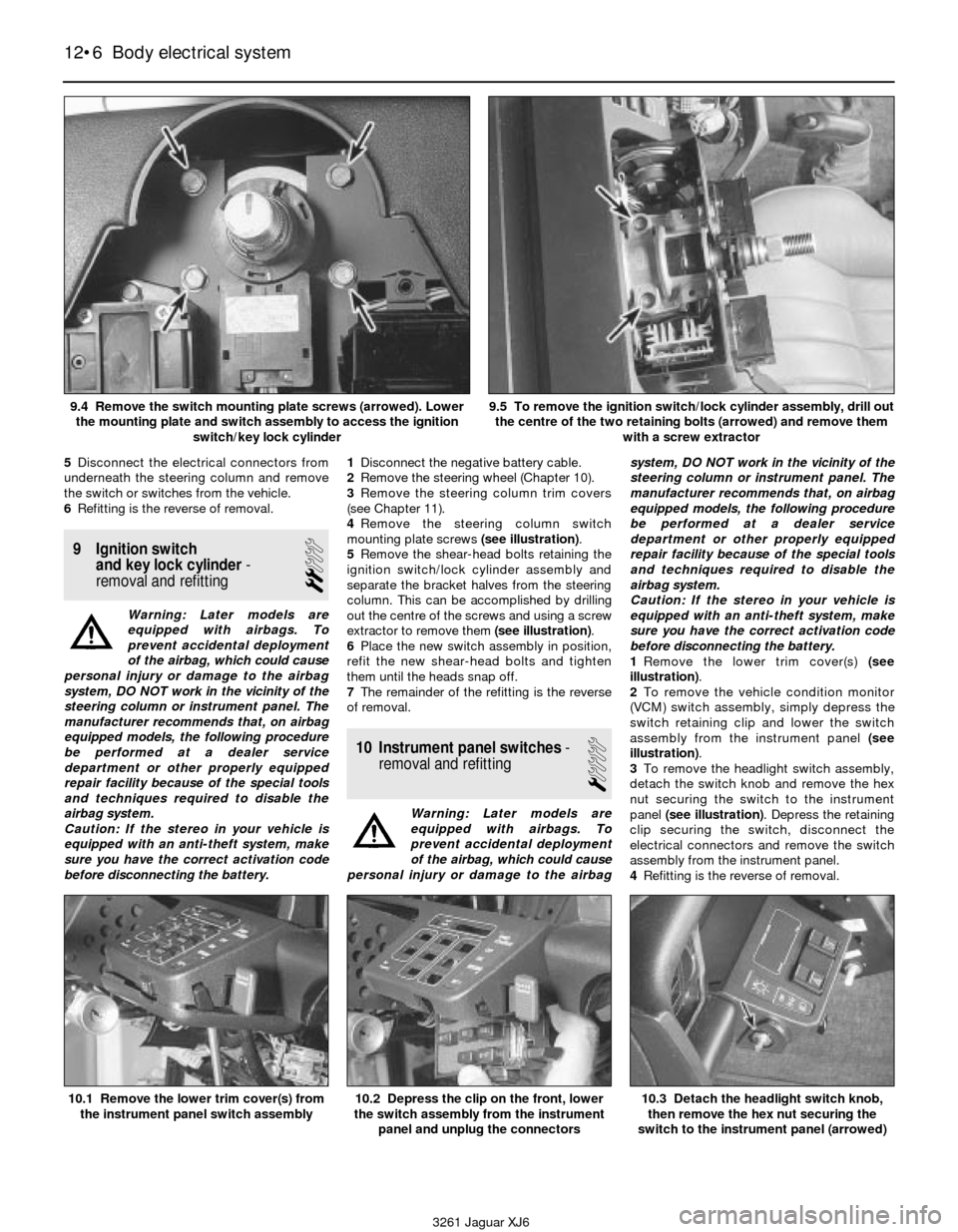
4Remove the steering column switch
mounting plate screws (see illustration).
5Remove the shear-head bolts retaining the
ignition switch/lock cylinder assembly and
separate the bracket halves from the steering
column. This can be accomplished by drilling
out the centre of the screws and using a screw
extractor to remove them (see illustration).
6Place the new switch assembly in position,
refit the new shear-head bolts and tighten
them until the heads snap off.
7The remainder of the refitting is the reverse
of removal.
10 Instrument panel switches-
removal and refitting
1
Warning: Later models are
equipped with airbags. To
prevent accidental deployment
of the airbag, which could cause
personal injury or damage to the airbagsystem, DO NOT work in the vicinity of the
steering column or instrument panel. The
manufacturer recommends that, on airbag
equipped models, the following procedure
be performed at a dealer service
department or other properly equipped
repair facility because of the special tools
and techniques required to disable the
airbag system.
Caution: If the stereo in your vehicle is
equipped with an anti-theft system, make
sure you have the correct activation code
before disconnecting the battery.
1Remove the lower trim cover(s) (see
illustration).
2To remove the vehicle condition monitor
(VCM) switch assembly, simply depress the
switch retaining clip and lower the switch
assembly from the instrument panel (see
illustration).
3To remove the headlight switch assembly,
detach the switch knob and remove the hex
nut securing the switch to the instrument
panel (see illustration). Depress the retaining
clip securing the switch, disconnect the
electrical connectors and remove the switch
assembly from the instrument panel.
4Refitting is the reverse of removal.
12•6 Body electrical system
10.1 Remove the lower trim cover(s) from
the instrument panel switch assembly10.2 Depress the clip on the front, lower
the switch assembly from the instrument
panel and unplug the connectors10.3 Detach the headlight switch knob,
then remove the hex nut securing the
switch to the instrument panel (arrowed)
3261 Jaguar XJ6 9.4 Remove the switch mounting plate screws (arrowed). Lower
the mounting plate and switch assembly to access the ignition
switch/key lock cylinder
9.5 To remove the ignition switch/lock cylinder assembly, drill out
the centre of the two retaining bolts (arrowed) and remove them
with a screw extractor
Page 169 of 227

11 Fuel, oil and temperature
gauges- check
1
Warning: Later models are
equipped with airbags. To
prevent accidental deployment
of the airbag, which could cause
personal injury or damage to the airbag
system, DO NOT work in the vicinity of the
steering column or instrument panel. The
manufacturer recommends that, on airbag
equipped models, the following procedure
be performed at a dealer service
department or other properly equipped
repair facility because of the special tools
and techniques required to disable the
airbag system.
1All tests below require the ignition switch to
be turned to ON position when testing.
2Check the fuse if the gauge pointer does
not move from the empty, low or cold
positions. If the fuse is OK, locate the
particular sender unit for the circuit you’re
working on (see Chapter 4 for fuel sender unit
location, Chapter 2 for oil sender unit location,
or Chapter 3 for temperature sender unit
location). Connect the sender unit connector
to earth If the pointer goes to the full, high or
hot position renew the sender unit. If the
pointer stays in same position use a jumper
wire to earth the terminal on the back of the
gauge. If the pointer moves with the back of
the gauge earthed the problem lies in the wire
between the gauge and the sender unit. If the
pointer does not moves with the back of the
gauge earthed check for voltage at the other
terminal of the gauge. If voltage is present
renew the gauge.
12 Instrument cluster-
removal and refitting
1
Warning: Later models are
equipped with airbags. To
prevent accidental deployment
of the airbag, which could cause
personal injury or damage to the airbag
system, DO NOT work in the vicinity of the
steering column or instrument panel. The
manufacturer recommends that, on airbag
equipped models, the following procedure
be performed at a dealer service
department or other properly equipped
repair facility because of the special tools
and techniques required to disable the
airbag system.
Caution: If the stereo in your vehicle is
equipped with an anti-theft system, make
sure you have the correct activation code
before disconnecting the battery.
1Disconnect the negative battery cable.
2Remove the instrument cluster housing (see
Chapter 11).
3Remove the instrument cluster mounting
screws (see illustration). Separate the
instrument cluster from the cluster housing.
4Refitting is the reverse of removal.
13 Radio and speakers-
removal and refitting
2
Warning: Later models are
equipped with airbags. To
prevent accidental deployment
of the airbag, which could cause
personal injury or damage to the airbag
system, DO NOT work in the vicinity of the
steering column or instrument panel. The
manufacturer recommends that, on airbagequipped models, the following procedure
be performed at a dealer service
department or other properly equipped
repair facility because of the special tools
and techniques required to disable the
airbag system.
Caution: If the stereo in your vehicle is
equipped with an anti-theft system, make
sure you have the correct activation code
before disconnecting the battery.
1Disconnect the negative battery cable.
Radio
2Remove the radio trim bezel (Chapter 11).
3Remove the retaining screws (see
illustration), pull the radio/control panel
outward to access the backside and
disconnect the electrical connectors and
aerial lead. Detach the retaining clips and
separate the radio from the control panel.
4Refitting is the reverse of removal.
Speakers
5Remove the door trim panel (Chapter 11).
6Remove the nuts from the speaker
mounting studs (see illustration). Disconnect
the electrical connector and remove the
speaker from the vehicle.
7Refitting is the reverse of removal.
Body electrical system 12•7
12
3261 Jaguar XJ6 12.3 Remove the instrument cluster retaining screws (arrowed)
then separate the instrument cluster from the cluster housing
13.3 Remove the retaining screws (arrowed) and pull the
radio/control panel out enough to unplug the connectors
13.6 Remove the nuts from the retaining
studs (arrowed) to remove the speaker