ABS JEEP CHEROKEE 1994 Service Manual Online
[x] Cancel search | Manufacturer: JEEP, Model Year: 1994, Model line: CHEROKEE, Model: JEEP CHEROKEE 1994Pages: 1784, PDF Size: 77.09 MB
Page 405 of 1784
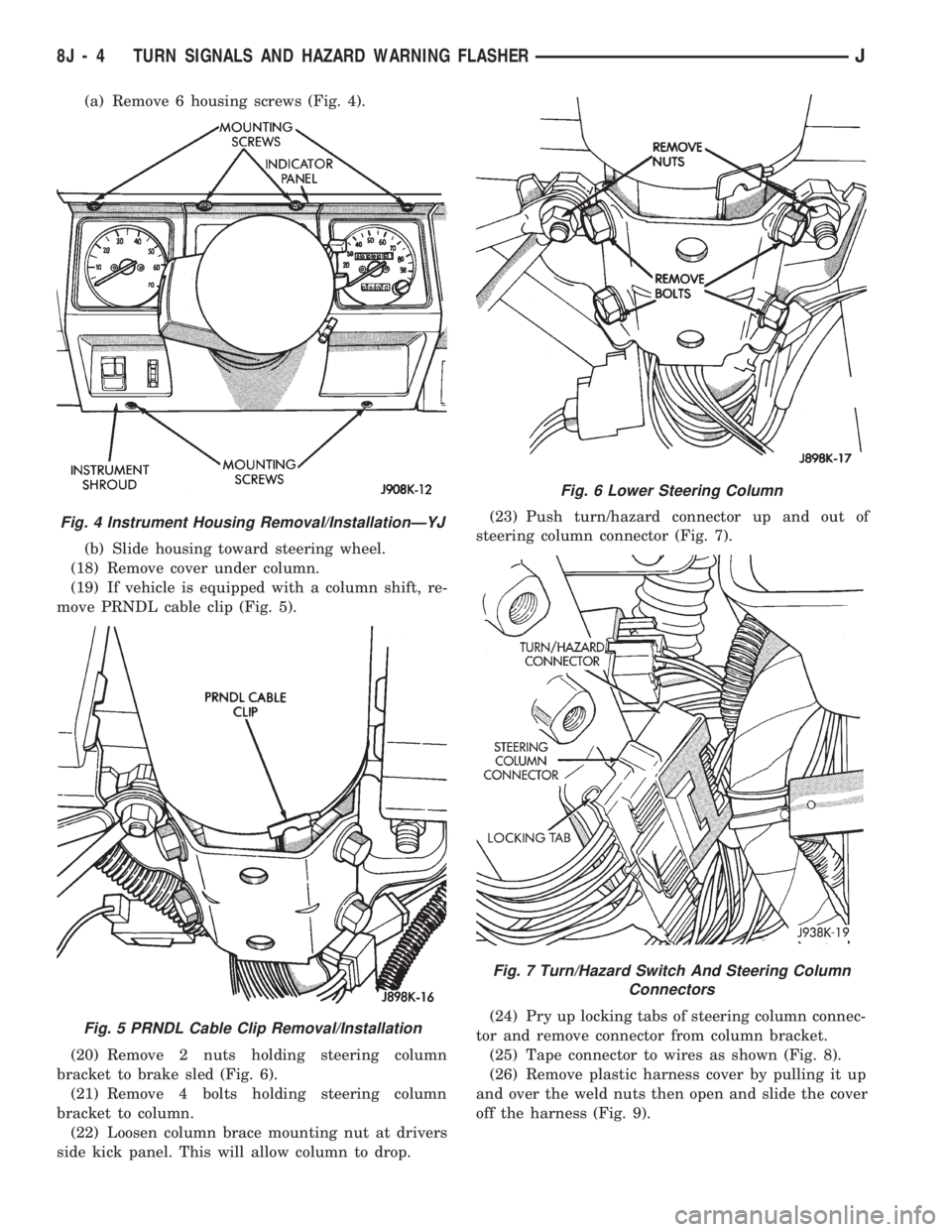
(a) Remove 6 housing screws (Fig. 4).
(b) Slide housing toward steering wheel.
(18) Remove cover under column.
(19) If vehicle is equipped with a column shift, re-
move PRNDL cable clip (Fig. 5).
(20) Remove 2 nuts holding steering column
bracket to brake sled (Fig. 6).
(21) Remove 4 bolts holding steering column
bracket to column.
(22) Loosen column brace mounting nut at drivers
side kick panel. This will allow column to drop.(23) Push turn/hazard connector up and out of
steering column connector (Fig. 7).
(24) Pry up locking tabs of steering column connec-
tor and remove connector from column bracket.
(25) Tape connector to wires as shown (Fig. 8).
(26) Remove plastic harness cover by pulling it up
and over the weld nuts then open and slide the cover
off the harness (Fig. 9).
Fig. 4 Instrument Housing Removal/InstallationÐYJ
Fig. 5 PRNDL Cable Clip Removal/Installation
Fig. 6 Lower Steering Column
Fig. 7 Turn/Hazard Switch And Steering Column
Connectors
8J - 4 TURN SIGNALS AND HAZARD WARNING FLASHERJ
Page 413 of 1784
(2) Install the mounting screws.
(3) Connect the wiring harness.
(4) Install the pivot pin, seal, bezel and attaching
nut (Fig. 2). Torque nut to 4 Nzm (32 in. lbs.).
(5) Connect interior washer hose.
Lubricate the bezel nipples with a small amount
of water and then install the washer hoses.
(6) Install the liftgate trim panel.
(7) Install the wiper arm assembly and connect the
external washer hose to the bezel.
(8) Slide the clip along the hose until it is over
hose mount.
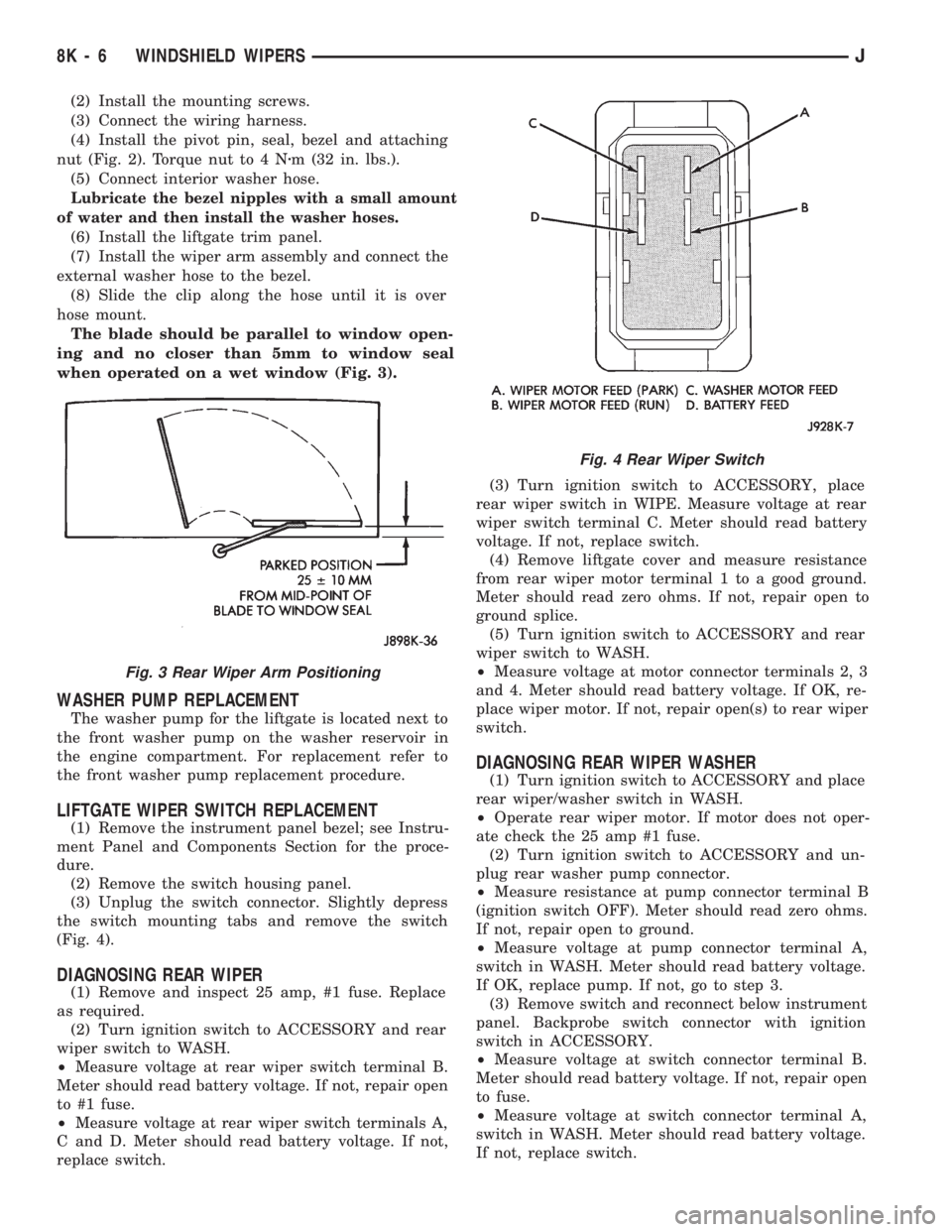
The blade should be parallel to window open-
ing and no closer than 5mm to window seal
when operated on a wet window (Fig. 3).
WASHER PUMP REPLACEMENT
The washer pump for the liftgate is located next to
the front washer pump on the washer reservoir in
the engine compartment. For replacement refer to
the front washer pump replacement procedure.
LIFTGATE WIPER SWITCH REPLACEMENT
(1) Remove the instrument panel bezel; see Instru-
ment Panel and Components Section for the proce-
dure.
(2) Remove the switch housing panel.
(3) Unplug the switch connector. Slightly depress
the switch mounting tabs and remove the switch
(Fig. 4).
DIAGNOSING REAR WIPER
(1) Remove and inspect 25 amp, #1 fuse. Replace
as required.
(2) Turn ignition switch to ACCESSORY and rear
wiper switch to WASH.
²Measure voltage at rear wiper switch terminal B.
Meter should read battery voltage. If not, repair open
to #1 fuse.
²Measure voltage at rear wiper switch terminals A,
C and D. Meter should read battery voltage. If not,
replace switch.(3) Turn ignition switch to ACCESSORY, place
rear wiper switch in WIPE. Measure voltage at rear
wiper switch terminal C. Meter should read battery
voltage. If not, replace switch.
(4) Remove liftgate cover and measure resistance
from rear wiper motor terminal 1 to a good ground.
Meter should read zero ohms. If not, repair open to
ground splice.
(5) Turn ignition switch to ACCESSORY and rear
wiper switch to WASH.
²Measure voltage at motor connector terminals 2, 3
and 4. Meter should read battery voltage. If OK, re-
place wiper motor. If not, repair open(s) to rear wiper
switch.
DIAGNOSING REAR WIPER WASHER
(1) Turn ignition switch to ACCESSORY and place
rear wiper/washer switch in WASH.
²Operate rear wiper motor. If motor does not oper-
ate check the 25 amp #1 fuse.
(2) Turn ignition switch to ACCESSORY and un-
plug rear washer pump connector.
²Measure resistance at pump connector terminal B
(ignition switch OFF). Meter should read zero ohms.
If not, repair open to ground.
²Measure voltage at pump connector terminal A,
switch in WASH. Meter should read battery voltage.
If OK, replace pump. If not, go to step 3.
(3) Remove switch and reconnect below instrument
panel. Backprobe switch connector with ignition
switch in ACCESSORY.
²Measure voltage at switch connector terminal B.
Meter should read battery voltage. If not, repair open
to fuse.
²Measure voltage at switch connector terminal A,
switch in WASH. Meter should read battery voltage.
If not, replace switch.
Fig. 3 Rear Wiper Arm Positioning
Fig. 4 Rear Wiper Switch
8K - 6 WINDSHIELD WIPERSJ
Page 420 of 1784
REAR WASHER PUMP REPLACEMENT
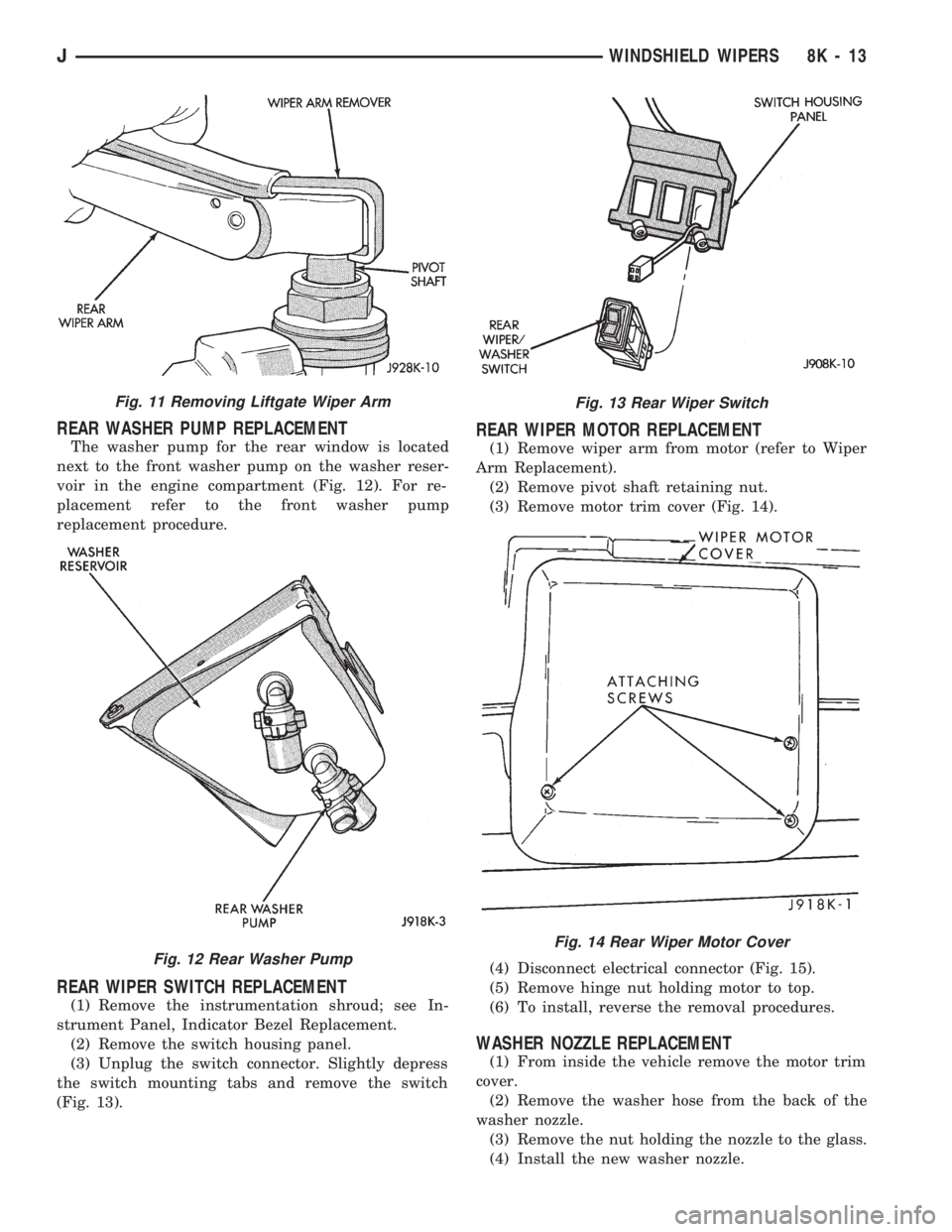
The washer pump for the rear window is located
next to the front washer pump on the washer reser-
voir in the engine compartment (Fig. 12). For re-
placement refer to the front washer pump
replacement procedure.
REAR WIPER SWITCH REPLACEMENT
(1) Remove the instrumentation shroud; see In-
strument Panel, Indicator Bezel Replacement.
(2) Remove the switch housing panel.
(3) Unplug the switch connector. Slightly depress
the switch mounting tabs and remove the switch
(Fig. 13).
REAR WIPER MOTOR REPLACEMENT
(1) Remove wiper arm from motor (refer to Wiper
Arm Replacement).
(2) Remove pivot shaft retaining nut.
(3) Remove motor trim cover (Fig. 14).
(4) Disconnect electrical connector (Fig. 15).
(5) Remove hinge nut holding motor to top.
(6) To install, reverse the removal procedures.
WASHER NOZZLE REPLACEMENT
(1) From inside the vehicle remove the motor trim
cover.
(2) Remove the washer hose from the back of the
washer nozzle.
(3) Remove the nut holding the nozzle to the glass.
(4) Install the new washer nozzle.
Fig. 11 Removing Liftgate Wiper Arm
Fig. 12 Rear Washer Pump
Fig. 13 Rear Wiper Switch
Fig. 14 Rear Wiper Motor Cover
JWINDSHIELD WIPERS 8K - 13
Page 424 of 1784
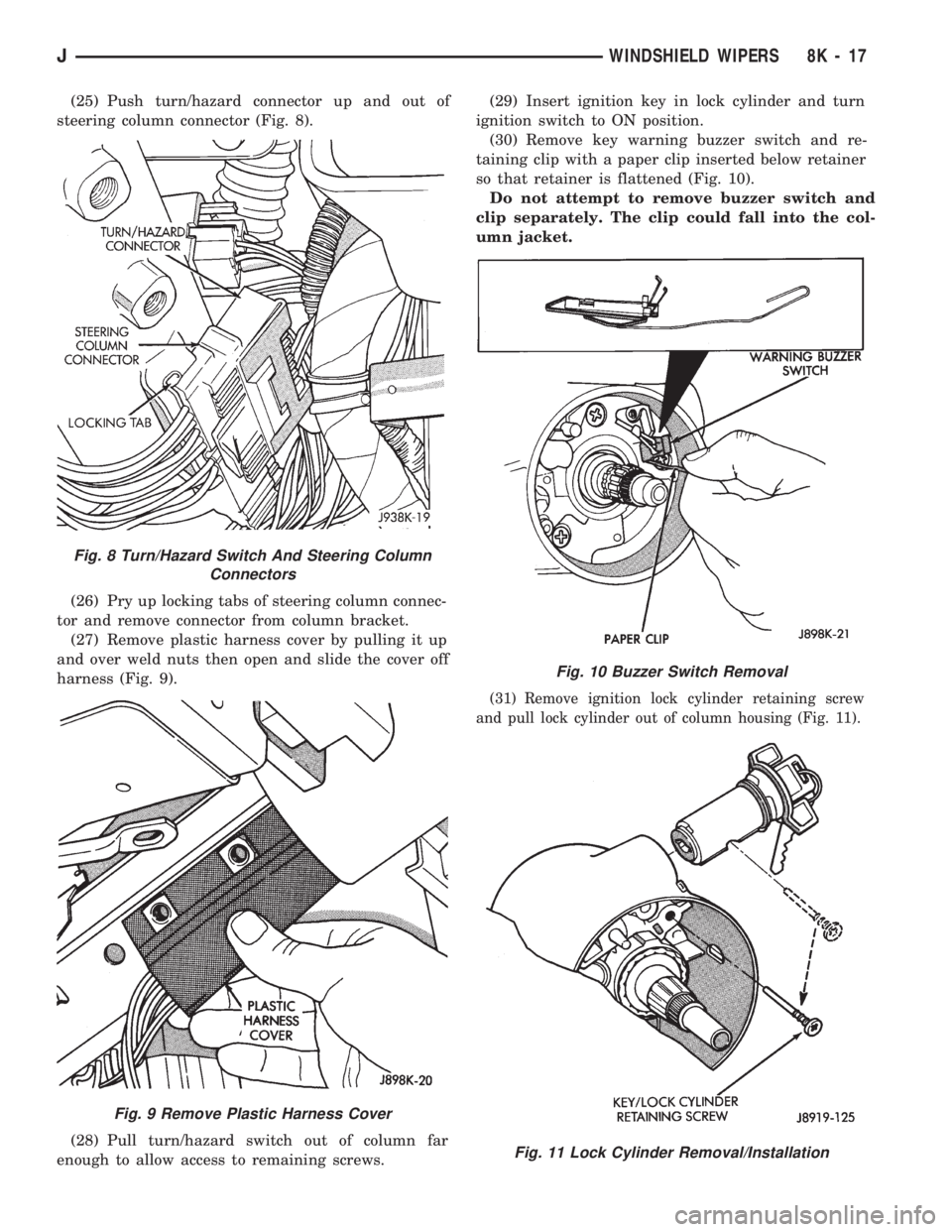
(25) Push turn/hazard connector up and out of
steering column connector (Fig. 8).
(26) Pry up locking tabs of steering column connec-
tor and remove connector from column bracket.
(27) Remove plastic harness cover by pulling it up
and over weld nuts then open and slide the cover off
harness (Fig. 9).
(28) Pull turn/hazard switch out of column far
enough to allow access to remaining screws.(29) Insert ignition key in lock cylinder and turn
ignition switch to ON position.
(30) Remove key warning buzzer switch and re-
taining clip with a paper clip inserted below retainer
so that retainer is flattened (Fig. 10).
Do not attempt to remove buzzer switch and
clip separately. The clip could fall into the col-
umn jacket.
(31) Remove ignition lock cylinder retaining screw
and pull lock cylinder out of column housing (Fig. 11).
Fig. 8 Turn/Hazard Switch And Steering Column
Connectors
Fig. 9 Remove Plastic Harness Cover
Fig. 10 Buzzer Switch Removal
Fig. 11 Lock Cylinder Removal/Installation
JWINDSHIELD WIPERS 8K - 17
Page 431 of 1784
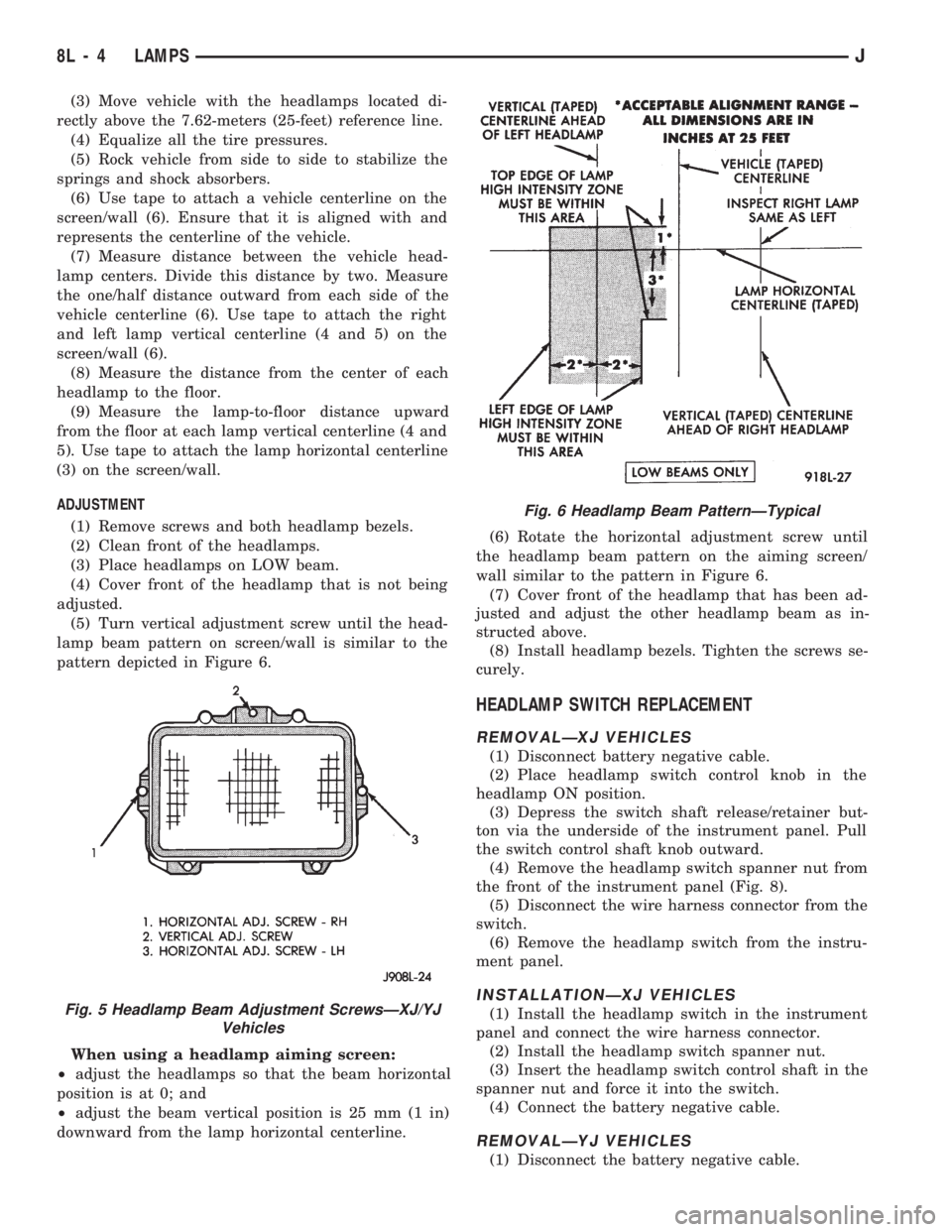
(3) Move vehicle with the headlamps located di-
rectly above the 7.62-meters (25-feet) reference line.
(4) Equalize all the tire pressures.
(5) Rock vehicle from side to side to stabilize the
springs and shock absorbers.
(6) Use tape to attach a vehicle centerline on the
screen/wall (6). Ensure that it is aligned with and
represents the centerline of the vehicle.
(7) Measure distance between the vehicle head-
lamp centers. Divide this distance by two. Measure
the one/half distance outward from each side of the
vehicle centerline (6). Use tape to attach the right
and left lamp vertical centerline (4 and 5) on the
screen/wall (6).
(8) Measure the distance from the center of each
headlamp to the floor.
(9) Measure the lamp-to-floor distance upward
from the floor at each lamp vertical centerline (4 and
5). Use tape to attach the lamp horizontal centerline
(3) on the screen/wall.
ADJUSTMENT
(1) Remove screws and both headlamp bezels.
(2) Clean front of the headlamps.
(3) Place headlamps on LOW beam.
(4) Cover front of the headlamp that is not being
adjusted.
(5) Turn vertical adjustment screw until the head-
lamp beam pattern on screen/wall is similar to the
pattern depicted in Figure 6.
When using a headlamp aiming screen:
²adjust the headlamps so that the beam horizontal
position is at 0; and
²adjust the beam vertical position is 25 mm (1 in)
downward from the lamp horizontal centerline.(6) Rotate the horizontal adjustment screw until
the headlamp beam pattern on the aiming screen/
wall similar to the pattern in Figure 6.
(7) Cover front of the headlamp that has been ad-
justed and adjust the other headlamp beam as in-
structed above.
(8) Install headlamp bezels. Tighten the screws se-
curely.
HEADLAMP SWITCH REPLACEMENT
REMOVALÐXJ VEHICLES
(1) Disconnect battery negative cable.
(2) Place headlamp switch control knob in the
headlamp ON position.
(3) Depress the switch shaft release/retainer but-
ton via the underside of the instrument panel. Pull
the switch control shaft knob outward.
(4) Remove the headlamp switch spanner nut from
the front of the instrument panel (Fig. 8).
(5) Disconnect the wire harness connector from the
switch.
(6) Remove the headlamp switch from the instru-
ment panel.
INSTALLATIONÐXJ VEHICLES
(1) Install the headlamp switch in the instrument
panel and connect the wire harness connector.
(2) Install the headlamp switch spanner nut.
(3) Insert the headlamp switch control shaft in the
spanner nut and force it into the switch.
(4) Connect the battery negative cable.
REMOVALÐYJ VEHICLES
(1) Disconnect the battery negative cable.
Fig. 5 Headlamp Beam Adjustment ScrewsÐXJ/YJ
Vehicles
Fig. 6 Headlamp Beam PatternÐTypical
8L - 4 LAMPSJ
Page 432 of 1784
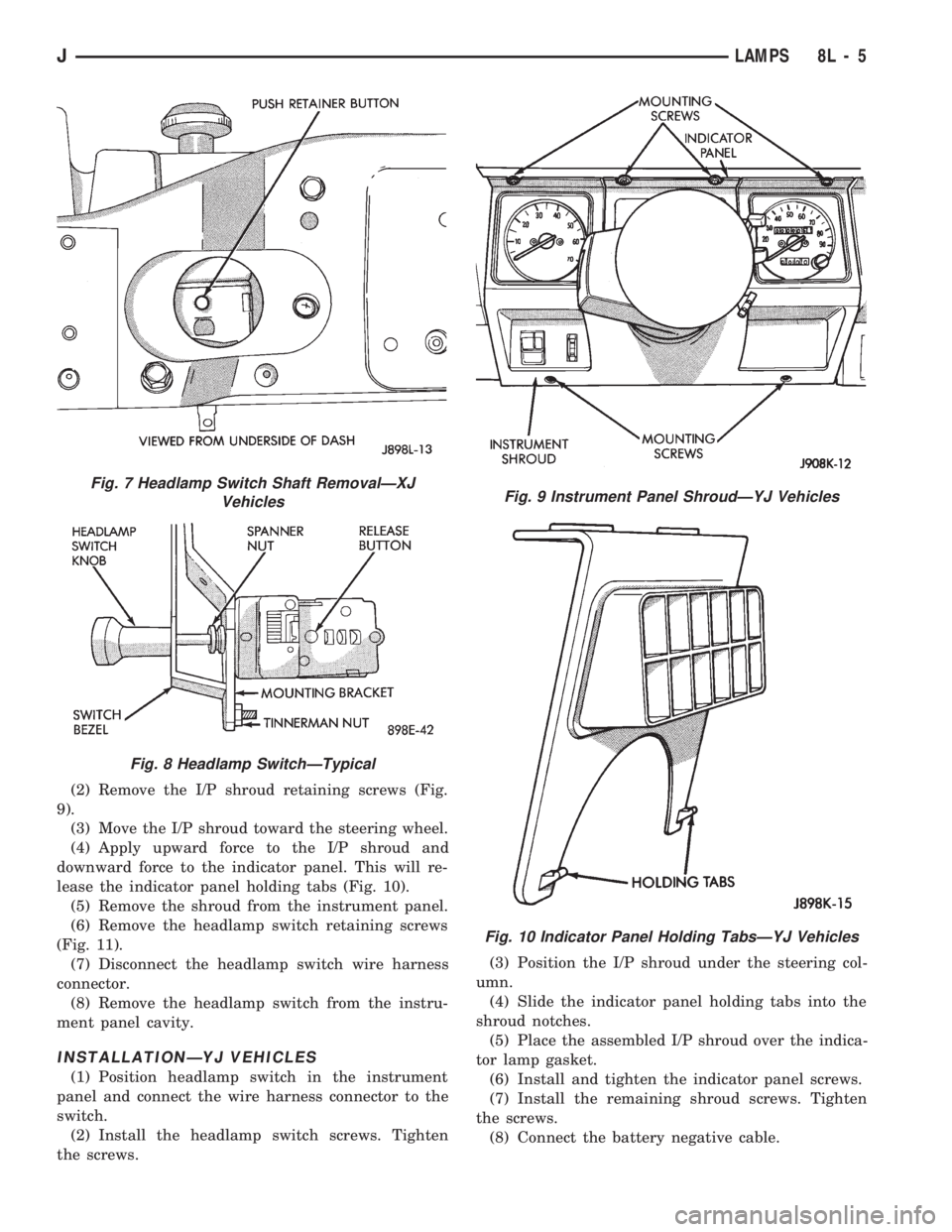
(2) Remove the I/P shroud retaining screws (Fig.
9).
(3) Move the I/P shroud toward the steering wheel.
(4) Apply upward force to the I/P shroud and
downward force to the indicator panel. This will re-
lease the indicator panel holding tabs (Fig. 10).
(5) Remove the shroud from the instrument panel.
(6) Remove the headlamp switch retaining screws
(Fig. 11).
(7) Disconnect the headlamp switch wire harness
connector.
(8) Remove the headlamp switch from the instru-
ment panel cavity.
INSTALLATIONÐYJ VEHICLES
(1) Position headlamp switch in the instrument
panel and connect the wire harness connector to the
switch.
(2) Install the headlamp switch screws. Tighten
the screws.(3) Position the I/P shroud under the steering col-
umn.
(4) Slide the indicator panel holding tabs into the
shroud notches.
(5) Place the assembled I/P shroud over the indica-
tor lamp gasket.
(6) Install and tighten the indicator panel screws.
(7) Install the remaining shroud screws. Tighten
the screws.
(8) Connect the battery negative cable.
Fig. 7 Headlamp Switch Shaft RemovalÐXJ
Vehicles
Fig. 8 Headlamp SwitchÐTypical
Fig. 9 Instrument Panel ShroudÐYJ Vehicles
Fig. 10 Indicator Panel Holding TabsÐYJ Vehicles
JLAMPS 8L - 5
Page 433 of 1784
HEADLAMP DIMMER SWITCH REPLACEMENT
REMOVAL
(1) Disconnect battery negative cable.
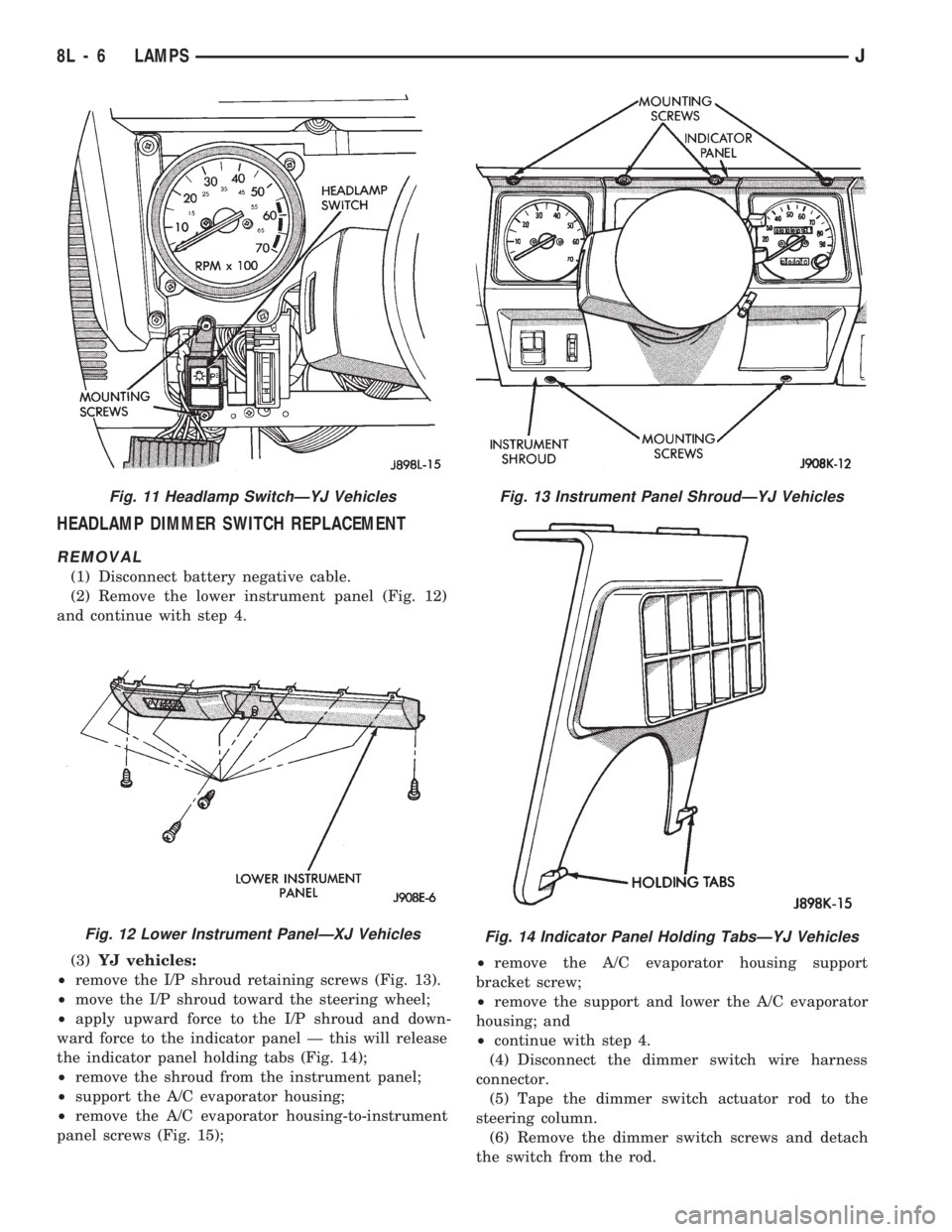
(2) Remove the lower instrument panel (Fig. 12)
and continue with step 4.
(3)YJ vehicles:
²remove the I/P shroud retaining screws (Fig. 13).
²move the I/P shroud toward the steering wheel;
²apply upward force to the I/P shroud and down-
ward force to the indicator panel Ð this will release
the indicator panel holding tabs (Fig. 14);
²remove the shroud from the instrument panel;
²support the A/C evaporator housing;
²remove the A/C evaporator housing-to-instrument
panel screws (Fig. 15);²remove the A/C evaporator housing support
bracket screw;
²remove the support and lower the A/C evaporator
housing; and
²continue with step 4.
(4) Disconnect the dimmer switch wire harness
connector.
(5) Tape the dimmer switch actuator rod to the
steering column.
(6) Remove the dimmer switch screws and detach
the switch from the rod.
Fig. 11 Headlamp SwitchÐYJ Vehicles
Fig. 12 Lower Instrument PanelÐXJ Vehicles
Fig. 13 Instrument Panel ShroudÐYJ Vehicles
Fig. 14 Indicator Panel Holding TabsÐYJ Vehicles
8L - 6 LAMPSJ
Page 434 of 1784
INSTALLATION
(1) Force the dimmer switch onto the actuator rod
and install screws.DO NOT tighten the retaining
screws at this time.
(2) Remove the tape attaching the actuator rod to
the steering column.
(3) Adjust the dimmer switch as follows:
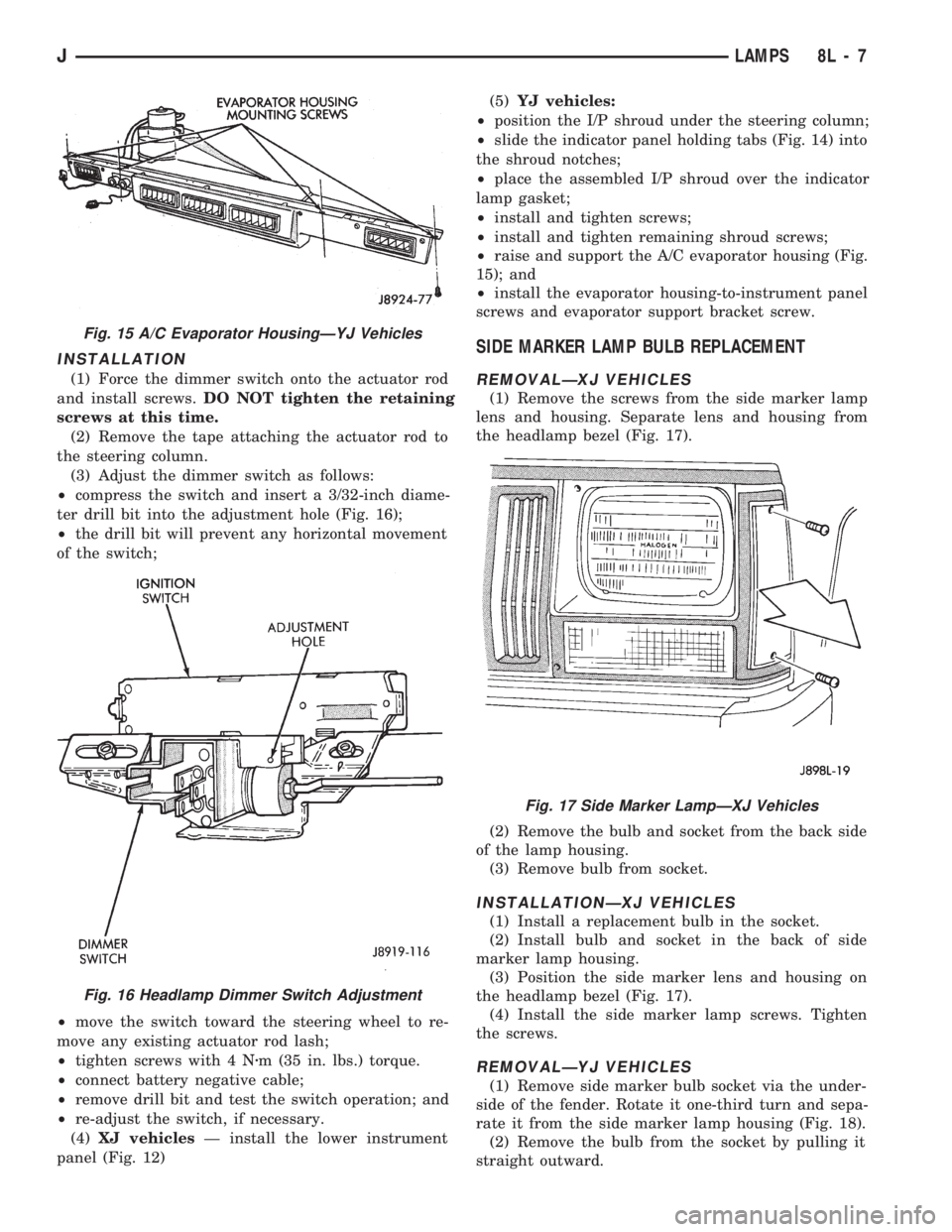
²compress the switch and insert a 3/32-inch diame-
ter drill bit into the adjustment hole (Fig. 16);
²the drill bit will prevent any horizontal movement
of the switch;
²move the switch toward the steering wheel to re-
move any existing actuator rod lash;
²tighten screws with 4 Nzm (35 in. lbs.) torque.
²connect battery negative cable;
²remove drill bit and test the switch operation; and
²re-adjust the switch, if necessary.
(4)XJ vehiclesÐ install the lower instrument
panel (Fig. 12)(5)YJ vehicles:
²position the I/P shroud under the steering column;
²slide the indicator panel holding tabs (Fig. 14) into
the shroud notches;
²place the assembled I/P shroud over the indicator
lamp gasket;
²install and tighten screws;
²install and tighten remaining shroud screws;
²raise and support the A/C evaporator housing (Fig.
15); and
²install the evaporator housing-to-instrument panel
screws and evaporator support bracket screw.
SIDE MARKER LAMP BULB REPLACEMENT
REMOVALÐXJ VEHICLES
(1) Remove the screws from the side marker lamp
lens and housing. Separate lens and housing from
the headlamp bezel (Fig. 17).
(2) Remove the bulb and socket from the back side
of the lamp housing.
(3) Remove bulb from socket.
INSTALLATIONÐXJ VEHICLES
(1) Install a replacement bulb in the socket.
(2) Install bulb and socket in the back of side
marker lamp housing.
(3) Position the side marker lens and housing on
the headlamp bezel (Fig. 17).
(4) Install the side marker lamp screws. Tighten
the screws.
REMOVALÐYJ VEHICLES
(1) Remove side marker bulb socket via the under-
side of the fender. Rotate it one-third turn and sepa-
rate it from the side marker lamp housing (Fig. 18).
(2) Remove the bulb from the socket by pulling it
straight outward.
Fig. 15 A/C Evaporator HousingÐYJ Vehicles
Fig. 16 Headlamp Dimmer Switch Adjustment
Fig. 17 Side Marker LampÐXJ Vehicles
JLAMPS 8L - 7
Page 440 of 1784
(1) Position the vehicle in dark area with a level
floor and with a screen (wall) that has a white sur-
face.
(2) Mark a reference line on the floor 7.62 meters
(25 feet) away from and parallel to the ``aiming''
screen/wall.
(3) Position vehicle with the fog lamps located di-
rectly above the 7.62-meters (25-feet) reference line.
(4) Equalize all the tire pressures.
(5) Rock the vehicle from side to side to stabilize
the springs and shock absorbers.
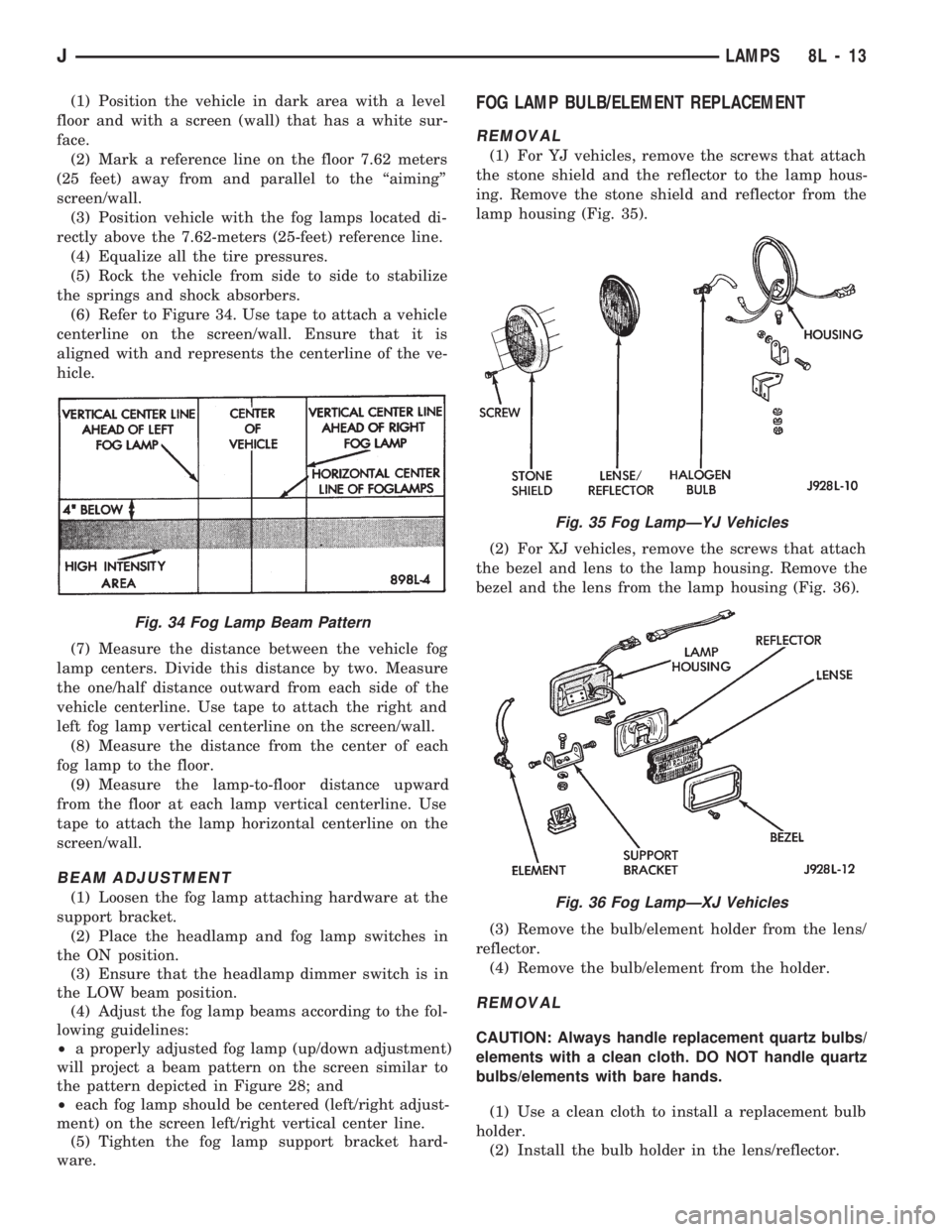
(6) Refer to Figure 34. Use tape to attach a vehicle
centerline on the screen/wall. Ensure that it is
aligned with and represents the centerline of the ve-
hicle.
(7) Measure the distance between the vehicle fog
lamp centers. Divide this distance by two. Measure
the one/half distance outward from each side of the
vehicle centerline. Use tape to attach the right and
left fog lamp vertical centerline on the screen/wall.
(8) Measure the distance from the center of each
fog lamp to the floor.
(9) Measure the lamp-to-floor distance upward
from the floor at each lamp vertical centerline. Use
tape to attach the lamp horizontal centerline on the
screen/wall.
BEAM ADJUSTMENT
(1) Loosen the fog lamp attaching hardware at the
support bracket.
(2) Place the headlamp and fog lamp switches in
the ON position.
(3) Ensure that the headlamp dimmer switch is in
the LOW beam position.
(4) Adjust the fog lamp beams according to the fol-
lowing guidelines:
²a properly adjusted fog lamp (up/down adjustment)
will project a beam pattern on the screen similar to
the pattern depicted in Figure 28; and
²each fog lamp should be centered (left/right adjust-
ment) on the screen left/right vertical center line.
(5) Tighten the fog lamp support bracket hard-
ware.
FOG LAMP BULB/ELEMENT REPLACEMENT
REMOVAL
(1) For YJ vehicles, remove the screws that attach
the stone shield and the reflector to the lamp hous-
ing. Remove the stone shield and reflector from the
lamp housing (Fig. 35).
(2) For XJ vehicles, remove the screws that attach
the bezel and lens to the lamp housing. Remove the
bezel and the lens from the lamp housing (Fig. 36).
(3) Remove the bulb/element holder from the lens/
reflector.
(4) Remove the bulb/element from the holder.
REMOVAL
CAUTION: Always handle replacement quartz bulbs/
elements with a clean cloth. DO NOT handle quartz
bulbs/elements with bare hands.
(1) Use a clean cloth to install a replacement bulb
holder.
(2) Install the bulb holder in the lens/reflector.
Fig. 34 Fog Lamp Beam Pattern
Fig. 35 Fog LampÐYJ Vehicles
Fig. 36 Fog LampÐXJ Vehicles
JLAMPS 8L - 13
Page 441 of 1784
(3) For XJ vehicles, position the bezel and the lens
on the lamp housing. Install the screws that attach
the bezel and lens to the lamp housing. Tighten the
screws securely.
(4) For YJ vehicles, position the stone shield and
reflector on the lamp housing. Install the screws that
attach the stone shield and the reflector to the lamp
housing. Tighten the screws securely.
FOG LAMP SWITCH REPLACEMENT
REMOVALÐXJ VEHICLES
The fog lamp switch is located on the instrument
panel at the left of the steering column.
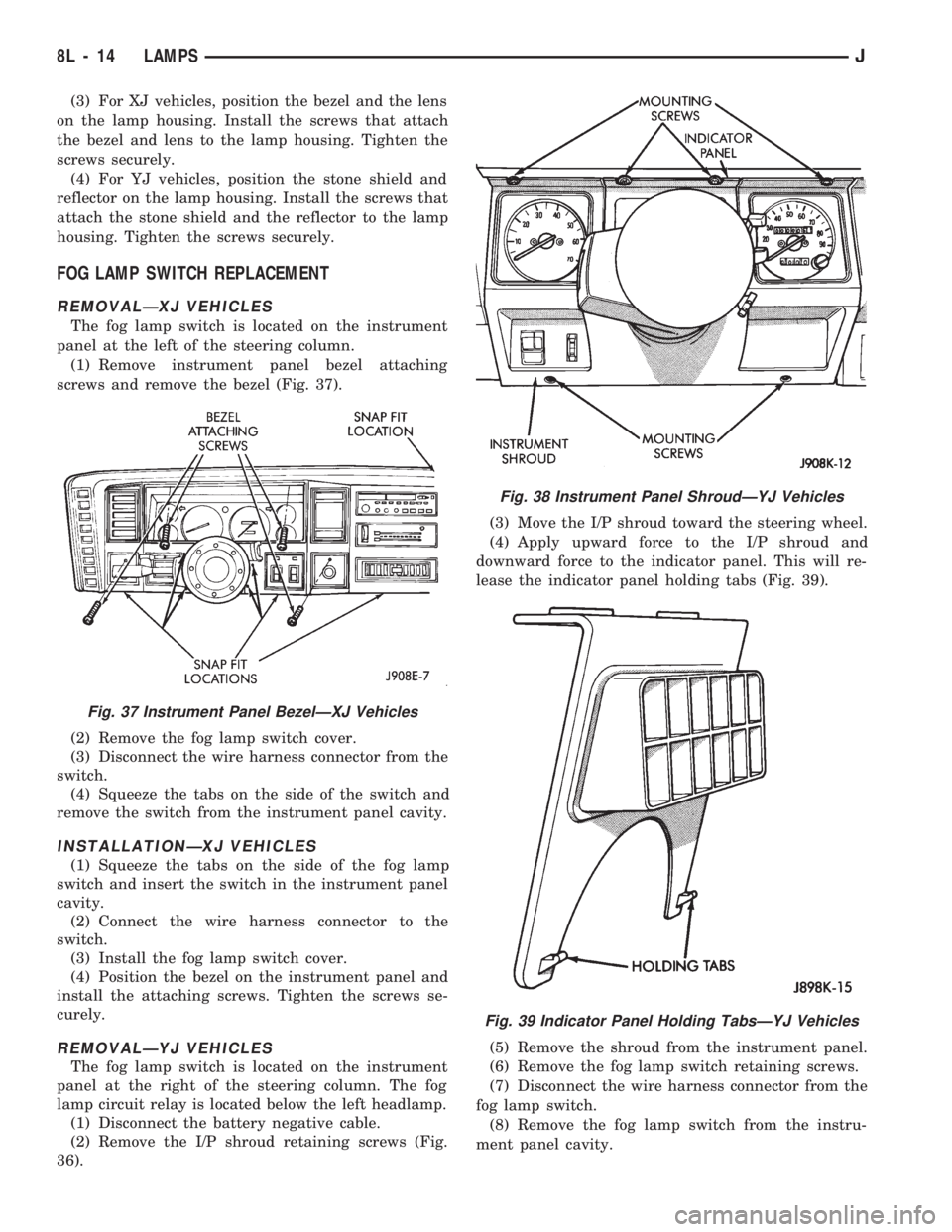
(1) Remove instrument panel bezel attaching
screws and remove the bezel (Fig. 37).
(2) Remove the fog lamp switch cover.
(3) Disconnect the wire harness connector from the
switch.
(4) Squeeze the tabs on the side of the switch and
remove the switch from the instrument panel cavity.
INSTALLATIONÐXJ VEHICLES
(1) Squeeze the tabs on the side of the fog lamp
switch and insert the switch in the instrument panel
cavity.
(2) Connect the wire harness connector to the
switch.
(3) Install the fog lamp switch cover.
(4) Position the bezel on the instrument panel and
install the attaching screws. Tighten the screws se-
curely.
REMOVALÐYJ VEHICLES
The fog lamp switch is located on the instrument
panel at the right of the steering column. The fog
lamp circuit relay is located below the left headlamp.
(1) Disconnect the battery negative cable.
(2) Remove the I/P shroud retaining screws (Fig.
36).(3) Move the I/P shroud toward the steering wheel.
(4) Apply upward force to the I/P shroud and
downward force to the indicator panel. This will re-
lease the indicator panel holding tabs (Fig. 39).
(5) Remove the shroud from the instrument panel.
(6) Remove the fog lamp switch retaining screws.
(7) Disconnect the wire harness connector from the
fog lamp switch.
(8) Remove the fog lamp switch from the instru-
ment panel cavity.
Fig. 37 Instrument Panel BezelÐXJ Vehicles
Fig. 38 Instrument Panel ShroudÐYJ Vehicles
Fig. 39 Indicator Panel Holding TabsÐYJ Vehicles
8L - 14 LAMPSJ