key JEEP CHEROKEE 1995 Service Manual PDF
[x] Cancel search | Manufacturer: JEEP, Model Year: 1995, Model line: CHEROKEE, Model: JEEP CHEROKEE 1995Pages: 2198, PDF Size: 82.83 MB
Page 1352 of 2198
(14) Remove the Interlock cable from the steering
column. Refer to Automatic Transmission Shifter/Ig-
nition Interlock in this group.
(15) Remove the column. Use care to avoid damag-
ing the paint or trim.
INSTALLATION
CAUTION: Bumping, jolting and hammering on the
steering column shaft and gear shift tube must be
avoided during all service procedures.
(1) With the front wheels in the straight ahead po-
sition. Align and install the column to coupler.Do
not apply force at the top of the steering col-
umn shaft.(2) Ensure the ground clip is on the left spacer slot
(Fig. 17).
(3) Install the Interlock cable from the steering col-
umn. Refer to Automatic Transmission Shifter/Igni-
tion Interlock in this group.
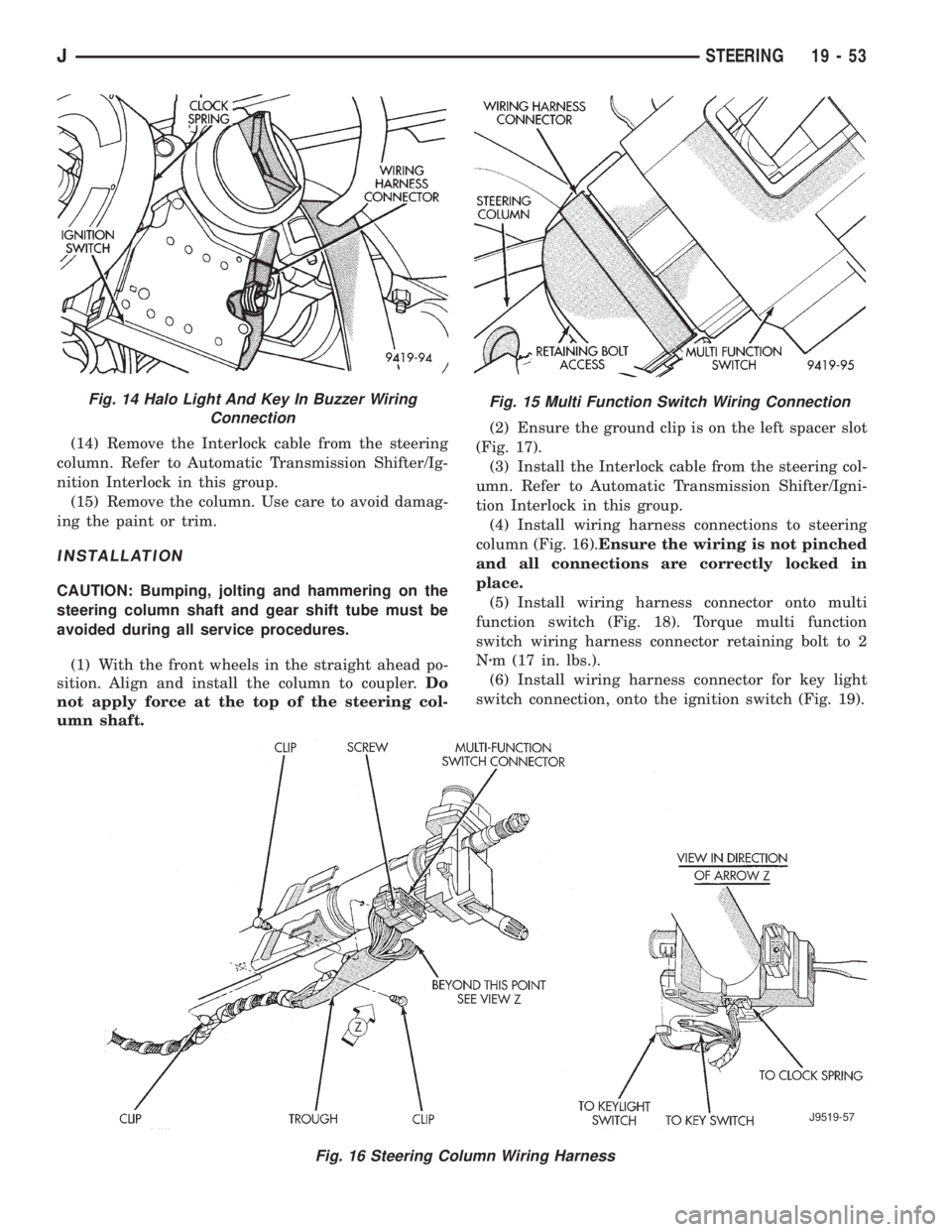
(4) Install wiring harness connections to steering
column (Fig. 16).Ensure the wiring is not pinched
and all connections are correctly locked in
place.
(5) Install wiring harness connector onto multi
function switch (Fig. 18). Torque multi function
switch wiring harness connector retaining bolt to 2
Nzm (17 in. lbs.).
(6) Install wiring harness connector for key light
switch connection, onto the ignition switch (Fig. 19).
Fig. 15 Multi Function Switch Wiring Connection
Fig. 16 Steering Column Wiring Harness
J9519-57
Fig. 14 Halo Light And Key In Buzzer Wiring
Connection
JSTEERING 19 - 53
Page 1353 of 2198
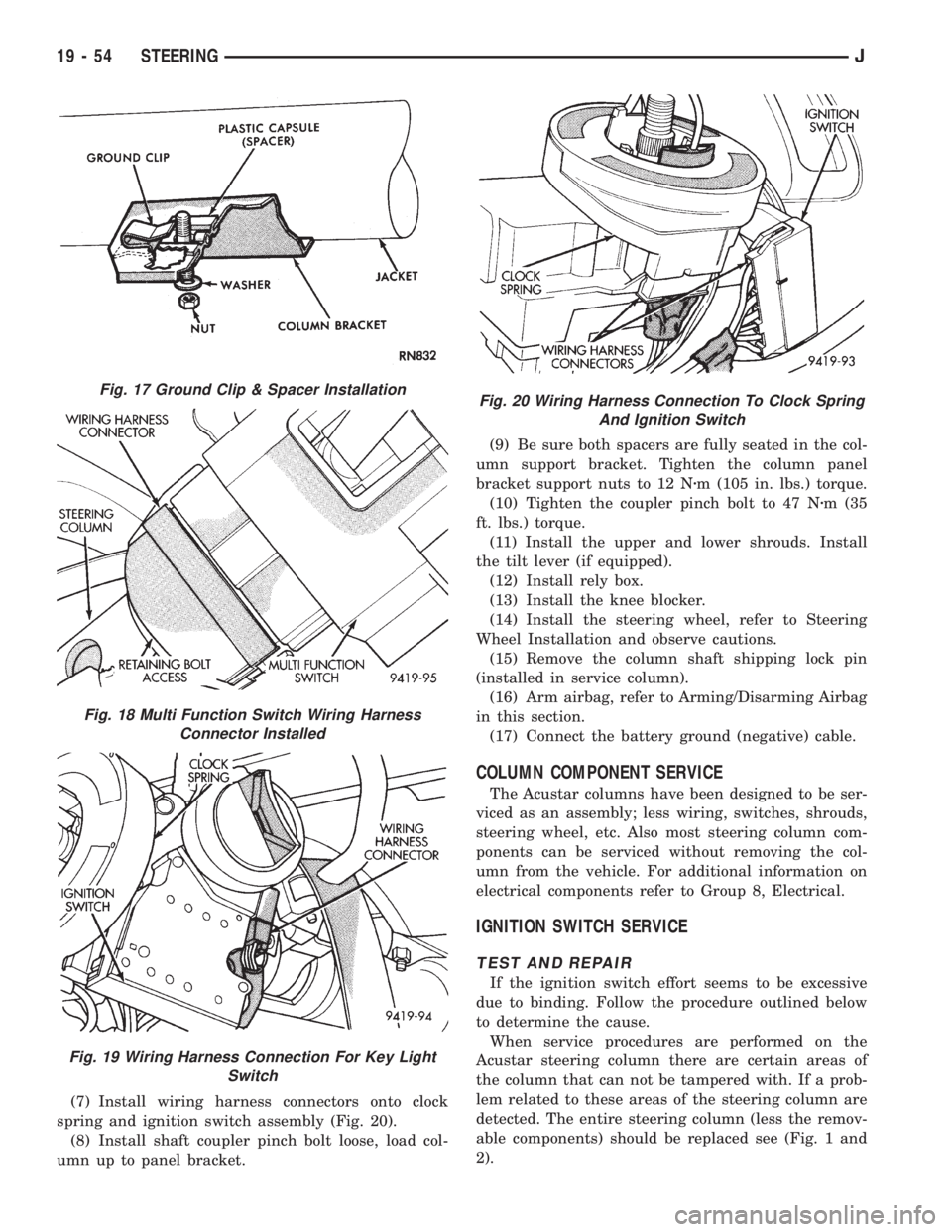
(7) Install wiring harness connectors onto clock
spring and ignition switch assembly (Fig. 20).
(8) Install shaft coupler pinch bolt loose, load col-
umn up to panel bracket.(9) Be sure both spacers are fully seated in the col-
umn support bracket. Tighten the column panel
bracket support nuts to 12 Nzm (105 in. lbs.) torque.
(10) Tighten the coupler pinch bolt to 47 Nzm (35
ft. lbs.) torque.
(11) Install the upper and lower shrouds. Install
the tilt lever (if equipped).
(12) Install rely box.
(13) Install the knee blocker.
(14) Install the steering wheel, refer to Steering
Wheel Installation and observe cautions.
(15) Remove the column shaft shipping lock pin
(installed in service column).
(16) Arm airbag, refer to Arming/Disarming Airbag
in this section.
(17) Connect the battery ground (negative) cable.
COLUMN COMPONENT SERVICE
The Acustar columns have been designed to be ser-
viced as an assembly; less wiring, switches, shrouds,
steering wheel, etc. Also most steering column com-
ponents can be serviced without removing the col-
umn from the vehicle. For additional information on
electrical components refer to Group 8, Electrical.
IGNITION SWITCH SERVICE
TEST AND REPAIR
If the ignition switch effort seems to be excessive
due to binding. Follow the procedure outlined below
to determine the cause.
When service procedures are performed on the
Acustar steering column there are certain areas of
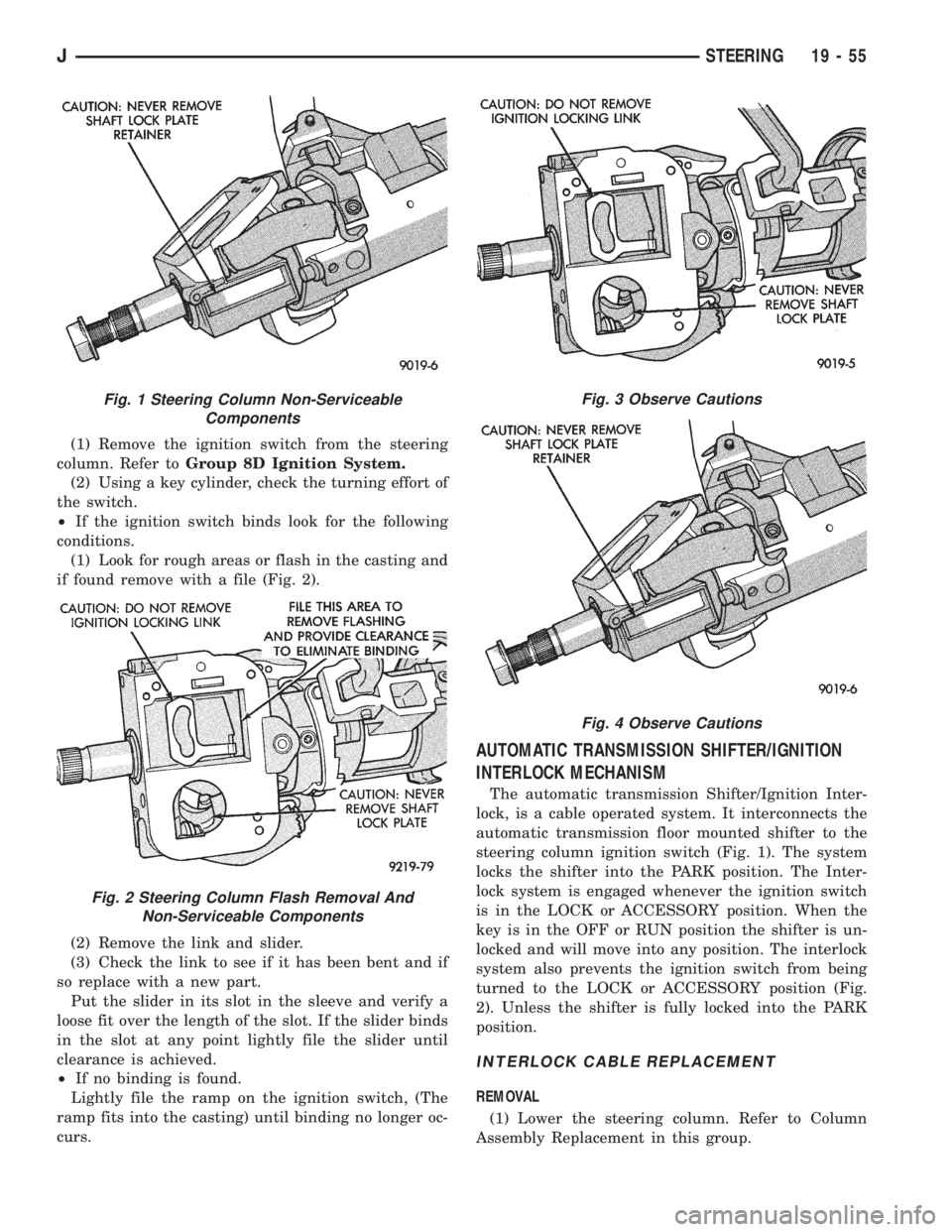
the column that can not be tampered with. If a prob-
lem related to these areas of the steering column are
detected. The entire steering column (less the remov-
able components) should be replaced see (Fig. 1 and
2).
Fig. 17 Ground Clip & Spacer Installation
Fig. 18 Multi Function Switch Wiring Harness
Connector Installed
Fig. 19 Wiring Harness Connection For Key Light
Switch
Fig. 20 Wiring Harness Connection To Clock Spring
And Ignition Switch
19 - 54 STEERINGJ
Page 1354 of 2198
(1) Remove the ignition switch from the steering
column. Refer toGroup 8D Ignition System.
(2) Using a key cylinder, check the turning effort of
the switch.
²If the ignition switch binds look for the following
conditions.
(1) Look for rough areas or flash in the casting and
if found remove with a file (Fig. 2).
(2) Remove the link and slider.
(3) Check the link to see if it has been bent and if
so replace with a new part.
Put the slider in its slot in the sleeve and verify a
loose fit over the length of the slot. If the slider binds
in the slot at any point lightly file the slider until
clearance is achieved.
²If no binding is found.
Lightly file the ramp on the ignition switch, (The
ramp fits into the casting) until binding no longer oc-
curs.
AUTOMATIC TRANSMISSION SHIFTER/IGNITION
INTERLOCK MECHANISM
The automatic transmission Shifter/Ignition Inter-
lock, is a cable operated system. It interconnects the
automatic transmission floor mounted shifter to the
steering column ignition switch (Fig. 1). The system
locks the shifter into the PARK position. The Inter-
lock system is engaged whenever the ignition switch
is in the LOCK or ACCESSORY position. When the
key is in the OFF or RUN position the shifter is un-
locked and will move into any position. The interlock
system also prevents the ignition switch from being
turned to the LOCK or ACCESSORY position (Fig.
2). Unless the shifter is fully locked into the PARK
position.
INTERLOCK CABLE REPLACEMENT
REMOVAL
(1) Lower the steering column. Refer to Column
Assembly Replacement in this group.
Fig. 1 Steering Column Non-Serviceable
Components
Fig. 2 Steering Column Flash Removal And
Non-Serviceable Components
Fig. 3 Observe Cautions
Fig. 4 Observe Cautions
JSTEERING 19 - 55
Page 1355 of 2198
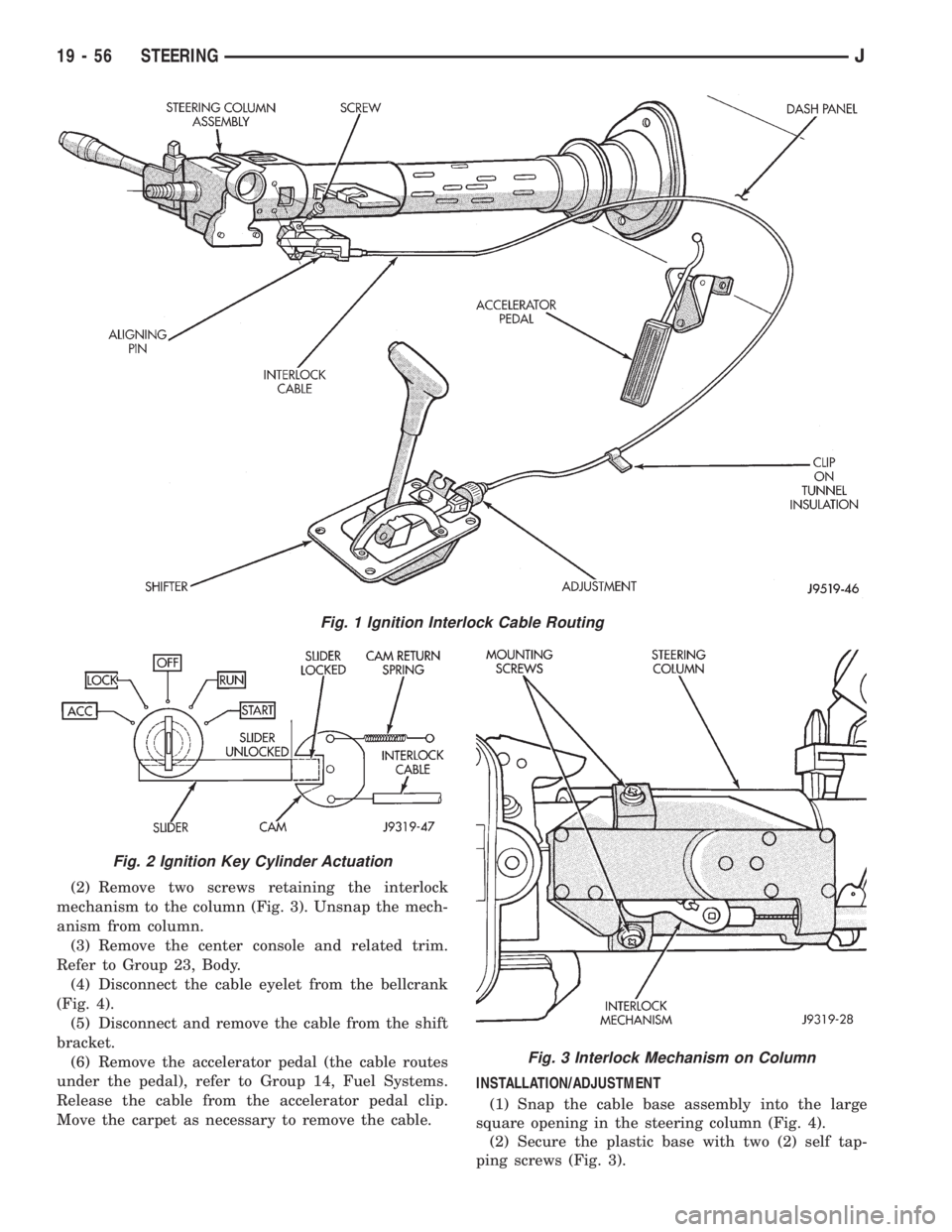
(2) Remove two screws retaining the interlock
mechanism to the column (Fig. 3). Unsnap the mech-
anism from column.
(3) Remove the center console and related trim.
Refer to Group 23, Body.
(4) Disconnect the cable eyelet from the bellcrank
(Fig. 4).
(5) Disconnect and remove the cable from the shift
bracket.
(6) Remove the accelerator pedal (the cable routes
under the pedal), refer to Group 14, Fuel Systems.
Release the cable from the accelerator pedal clip.
Move the carpet as necessary to remove the cable.INSTALLATION/ADJUSTMENT
(1) Snap the cable base assembly into the large
square opening in the steering column (Fig. 4).
(2) Secure the plastic base with two (2) self tap-
ping screws (Fig. 3).
Fig. 1 Ignition Interlock Cable Routing
Fig. 2 Ignition Key Cylinder Actuation
Fig. 3 Interlock Mechanism on Column
19 - 56 STEERINGJ
Page 1356 of 2198
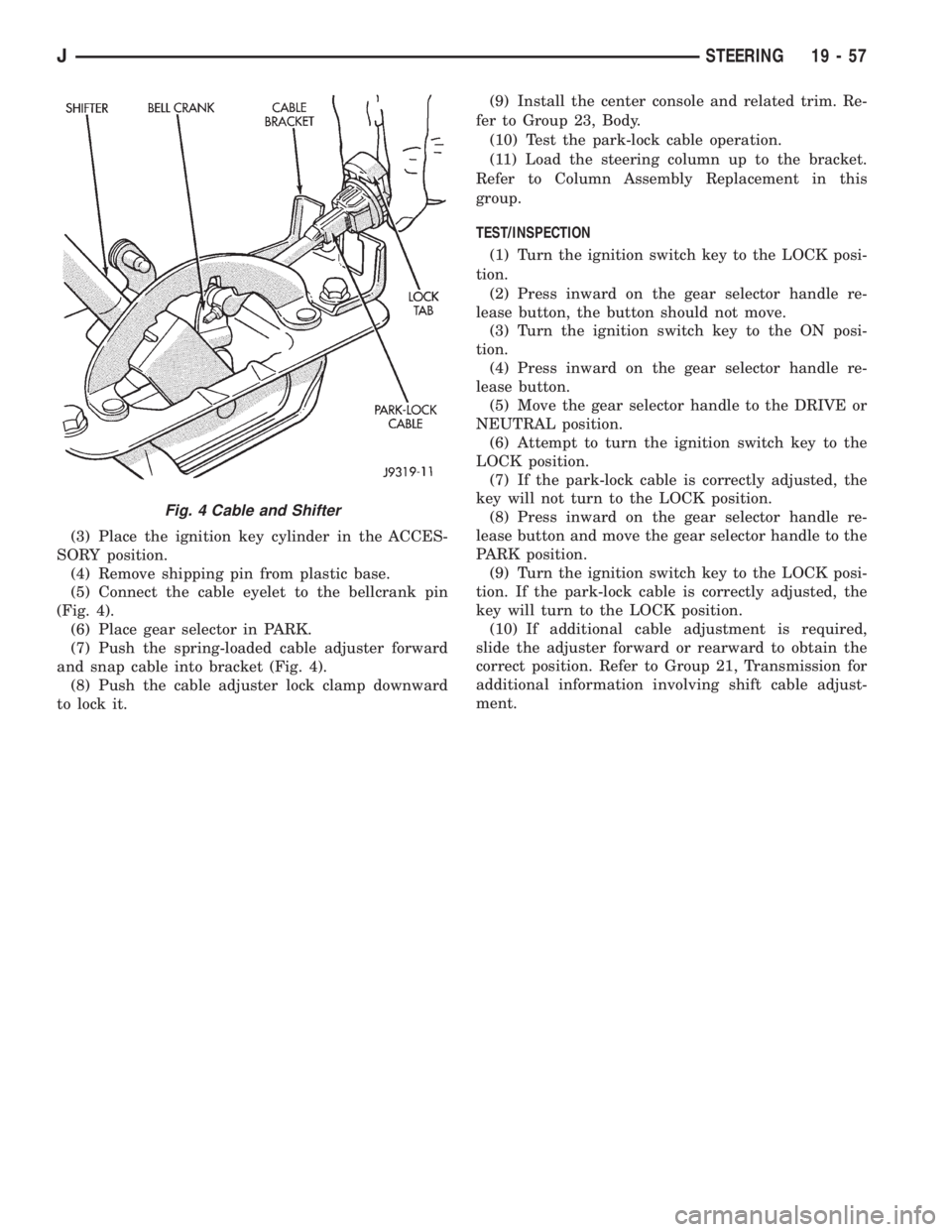
(3) Place the ignition key cylinder in the ACCES-
SORY position.
(4) Remove shipping pin from plastic base.
(5) Connect the cable eyelet to the bellcrank pin
(Fig. 4).
(6) Place gear selector in PARK.
(7) Push the spring-loaded cable adjuster forward
and snap cable into bracket (Fig. 4).
(8) Push the cable adjuster lock clamp downward
to lock it.(9) Install the center console and related trim. Re-
fer to Group 23, Body.
(10) Test the park-lock cable operation.
(11) Load the steering column up to the bracket.
Refer to Column Assembly Replacement in this
group.
TEST/INSPECTION
(1) Turn the ignition switch key to the LOCK posi-
tion.
(2) Press inward on the gear selector handle re-
lease button, the button should not move.
(3) Turn the ignition switch key to the ON posi-
tion.
(4) Press inward on the gear selector handle re-
lease button.
(5) Move the gear selector handle to the DRIVE or
NEUTRAL position.
(6) Attempt to turn the ignition switch key to the
LOCK position.
(7) If the park-lock cable is correctly adjusted, the
key will not turn to the LOCK position.
(8) Press inward on the gear selector handle re-
lease button and move the gear selector handle to the
PARK position.
(9) Turn the ignition switch key to the LOCK posi-
tion. If the park-lock cable is correctly adjusted, the
key will turn to the LOCK position.
(10) If additional cable adjustment is required,
slide the adjuster forward or rearward to obtain the
correct position. Refer to Group 21, Transmission for
additional information involving shift cable adjust-
ment.
Fig. 4 Cable and Shifter
JSTEERING 19 - 57
Page 1359 of 2198
(6) Column shift vehicles, install the shift cable
grommet on the shift lever.
(7) Install and tighten the toe plate to floor pan
bolts/nuts to 21.5 Nzm (192 in. lbs.) torque (Fig. 5).
(8) Install the lower portion of the instrument
panel, refer to Group 8E, Instrument Panel.
(9) Install steering wheel on column, refer to Steer-
ing Wheel-Installation.
(10) Connect the negative (ground) cable to the
battery.
NON-TILT STEERING COLUMN
DISASSEMBLYÐCOLUMN OR CONSOLE SHIFT
Steering column removal from the vehicle is not
necessary for;
²Lockplate cover
²Lockplate
²Steering shaft retaining ring
²Canceling cam
²Turn signal switch
²Upper bearing preload spring
²Ignition key/lock cylinder service
The steering column must be removed from
the vehicle to service any other component.
(1) If the column is removed for service, fabricate a
support fixture to clamp it in a vise (Fig. 1).
(2) Remove the steering wheel. Refer to the re-
moval procedure.
(3) Remove the lockplate cover.
WARNING: THE LOCKPLATE RETAINS A VERY
STRONG, SPRING FORCE. DO NOT ATTEMPT TOREMOVE THE STEERING SHAFT RETAINING SNAP
RING WITHOUT USING LOCKPLATE COMPRESSOR
C-4156.
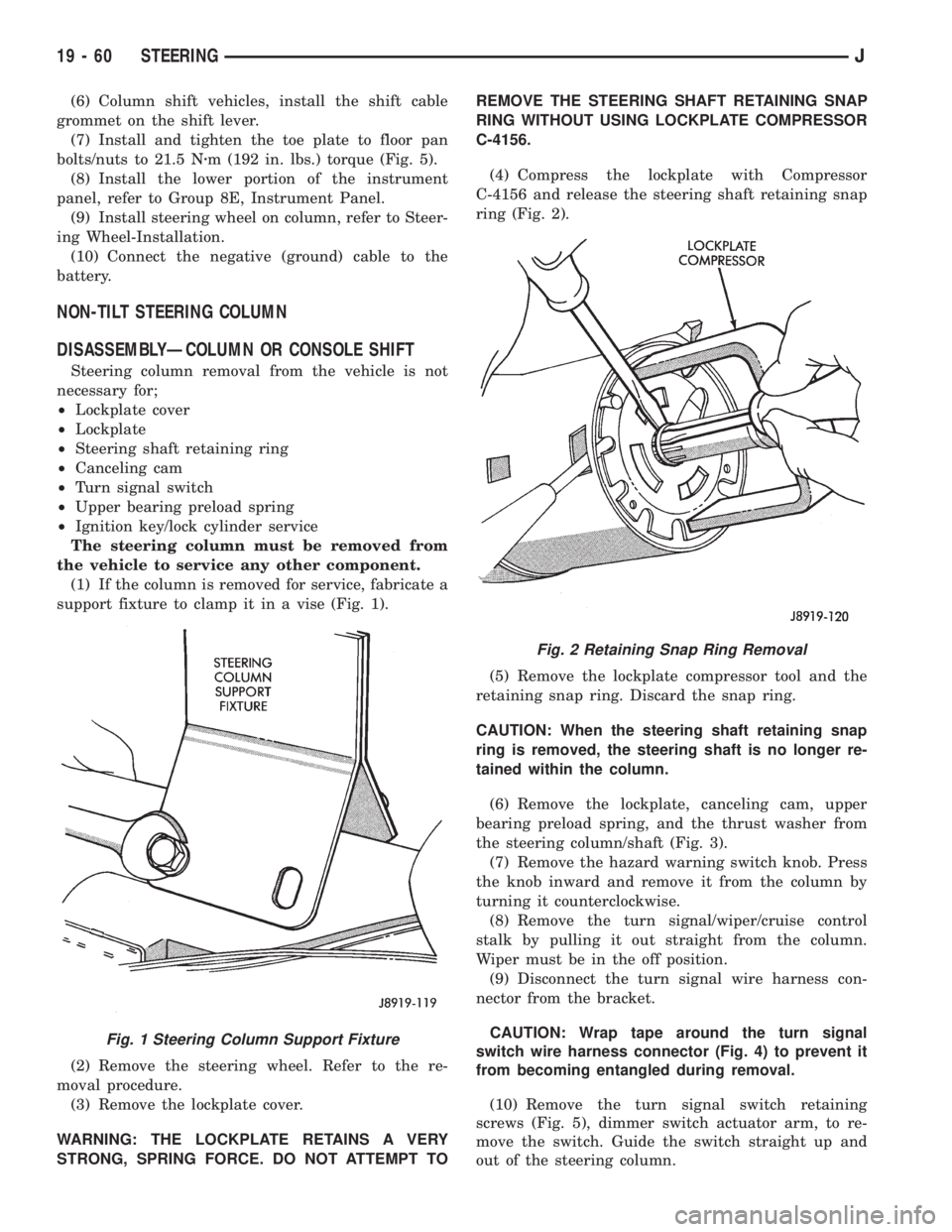
(4) Compress the lockplate with Compressor
C-4156 and release the steering shaft retaining snap
ring (Fig. 2).
(5) Remove the lockplate compressor tool and the
retaining snap ring. Discard the snap ring.
CAUTION: When the steering shaft retaining snap
ring is removed, the steering shaft is no longer re-
tained within the column.
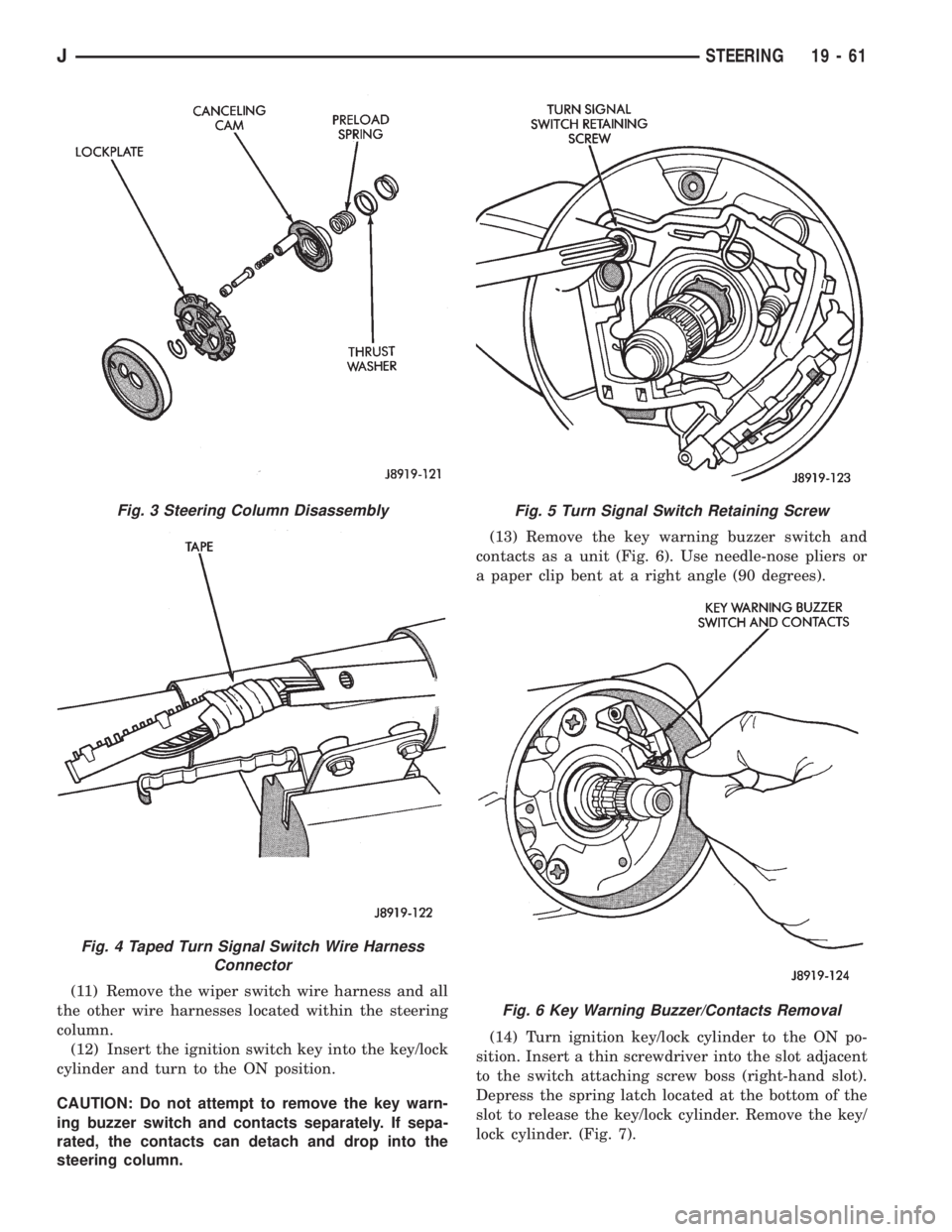
(6) Remove the lockplate, canceling cam, upper
bearing preload spring, and the thrust washer from
the steering column/shaft (Fig. 3).
(7) Remove the hazard warning switch knob. Press
the knob inward and remove it from the column by
turning it counterclockwise.
(8) Remove the turn signal/wiper/cruise control
stalk by pulling it out straight from the column.
Wiper must be in the off position.
(9) Disconnect the turn signal wire harness con-
nector from the bracket.
CAUTION: Wrap tape around the turn signal
switch wire harness connector (Fig. 4) to prevent it
from becoming entangled during removal.
(10) Remove the turn signal switch retaining
screws (Fig. 5), dimmer switch actuator arm, to re-
move the switch. Guide the switch straight up and
out of the steering column.
Fig. 1 Steering Column Support Fixture
Fig. 2 Retaining Snap Ring Removal
19 - 60 STEERINGJ
Page 1360 of 2198
(11) Remove the wiper switch wire harness and all
the other wire harnesses located within the steering
column.
(12) Insert the ignition switch key into the key/lock
cylinder and turn to the ON position.
CAUTION: Do not attempt to remove the key warn-
ing buzzer switch and contacts separately. If sepa-
rated, the contacts can detach and drop into the
steering column.(13) Remove the key warning buzzer switch and
contacts as a unit (Fig. 6). Use needle-nose pliers or
a paper clip bent at a right angle (90 degrees).
(14) Turn ignition key/lock cylinder to the ON po-
sition. Insert a thin screwdriver into the slot adjacent
to the switch attaching screw boss (right-hand slot).
Depress the spring latch located at the bottom of the
slot to release the key/lock cylinder. Remove the key/
lock cylinder. (Fig. 7).
Fig. 3 Steering Column Disassembly
Fig. 4 Taped Turn Signal Switch Wire Harness
Connector
Fig. 5 Turn Signal Switch Retaining Screw
Fig. 6 Key Warning Buzzer/Contacts Removal
JSTEERING 19 - 61
Page 1361 of 2198
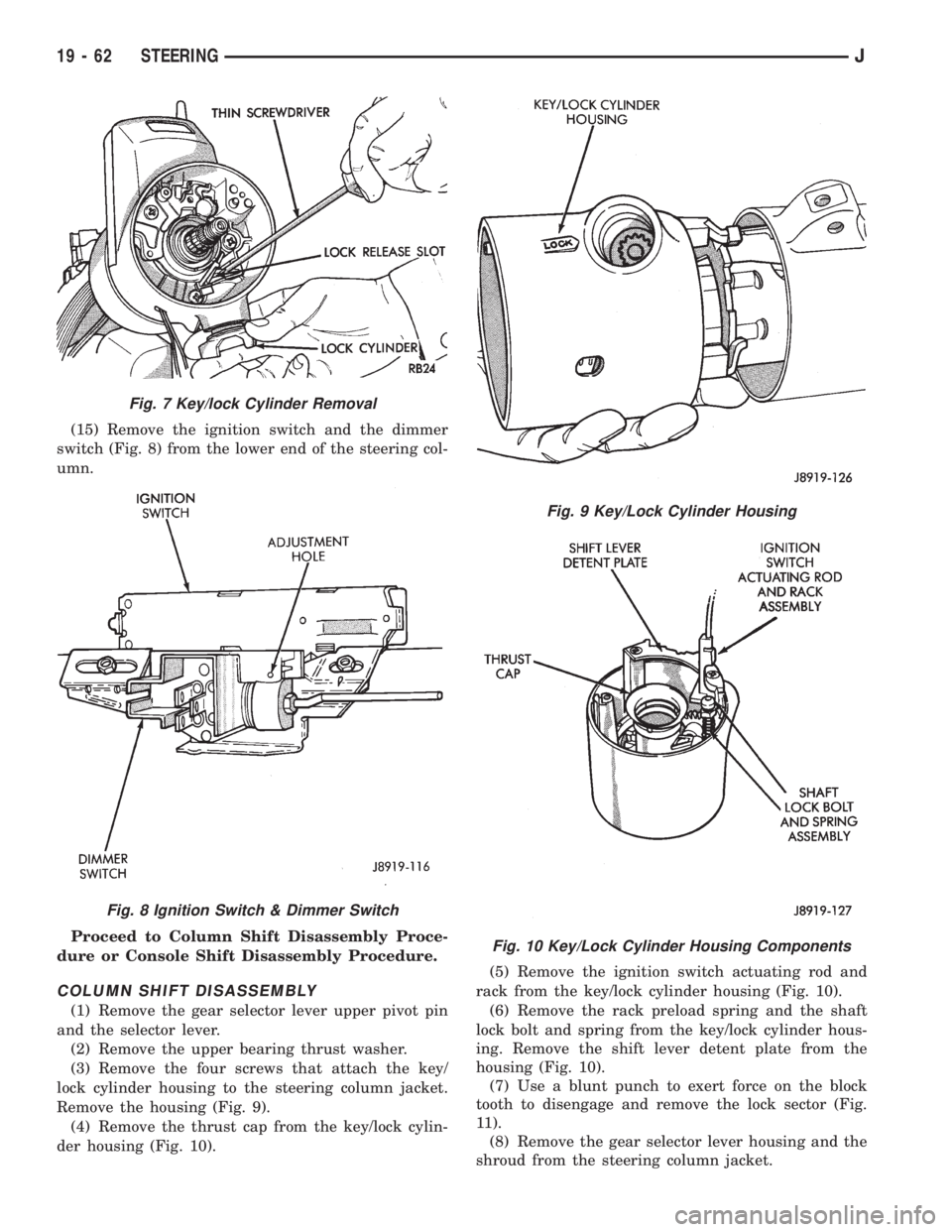
(15) Remove the ignition switch and the dimmer
switch (Fig. 8) from the lower end of the steering col-
umn.
Proceed to Column Shift Disassembly Proce-
dure or Console Shift Disassembly Procedure.
COLUMN SHIFT DISASSEMBLY
(1) Remove the gear selector lever upper pivot pin
and the selector lever.
(2) Remove the upper bearing thrust washer.
(3) Remove the four screws that attach the key/
lock cylinder housing to the steering column jacket.
Remove the housing (Fig. 9).
(4) Remove the thrust cap from the key/lock cylin-
der housing (Fig. 10).(5) Remove the ignition switch actuating rod and
rack from the key/lock cylinder housing (Fig. 10).
(6) Remove the rack preload spring and the shaft
lock bolt and spring from the key/lock cylinder hous-
ing. Remove the shift lever detent plate from the
housing (Fig. 10).
(7) Use a blunt punch to exert force on the block
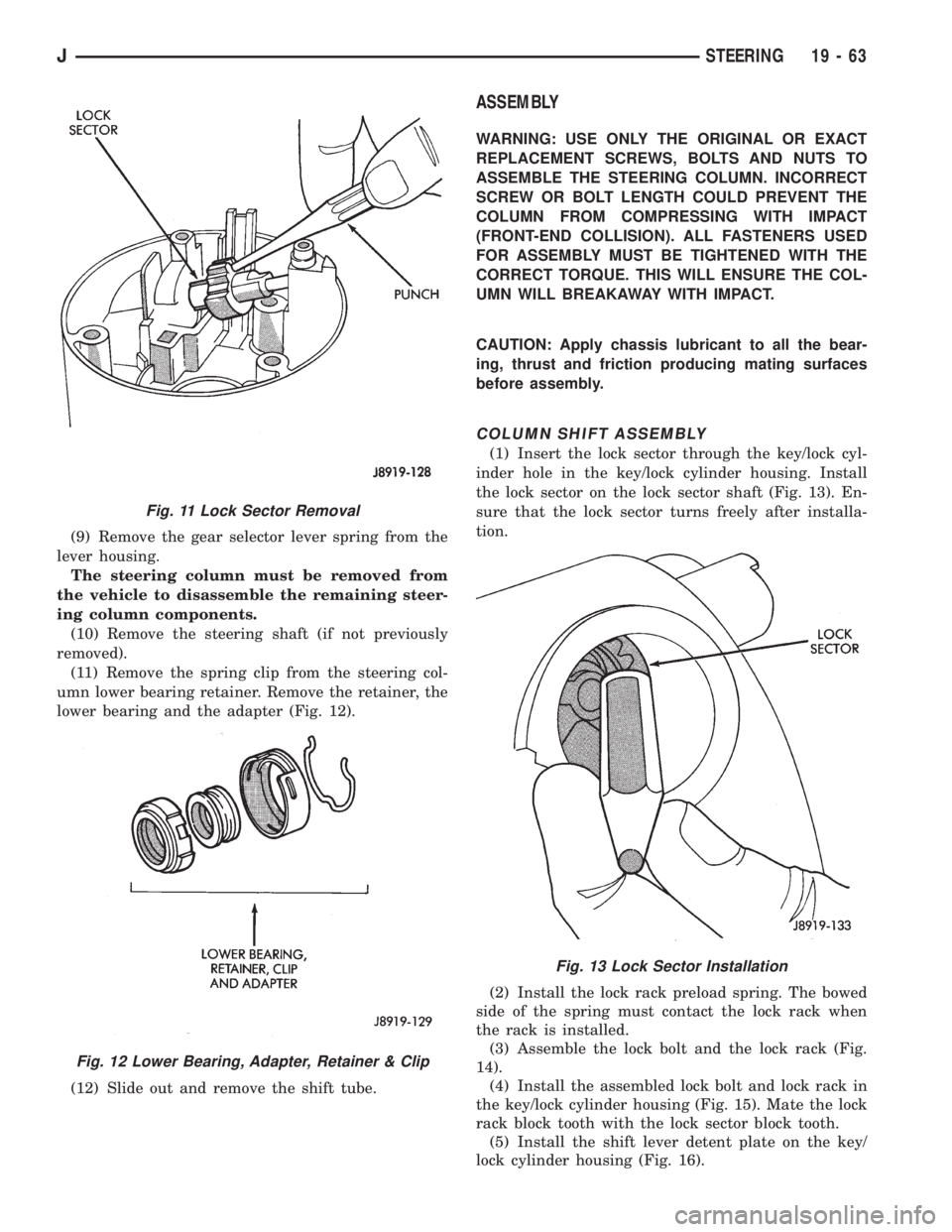
tooth to disengage and remove the lock sector (Fig.
11).
(8) Remove the gear selector lever housing and the
shroud from the steering column jacket.
Fig. 7 Key/lock Cylinder Removal
Fig. 8 Ignition Switch & Dimmer Switch
Fig. 9 Key/Lock Cylinder Housing
Fig. 10 Key/Lock Cylinder Housing Components
19 - 62 STEERINGJ
Page 1362 of 2198
(9) Remove the gear selector lever spring from the
lever housing.
The steering column must be removed from
the vehicle to disassemble the remaining steer-
ing column components.
(10) Remove the steering shaft (if not previously
removed).
(11) Remove the spring clip from the steering col-
umn lower bearing retainer. Remove the retainer, the
lower bearing and the adapter (Fig. 12).
(12) Slide out and remove the shift tube.
ASSEMBLY
WARNING: USE ONLY THE ORIGINAL OR EXACT
REPLACEMENT SCREWS, BOLTS AND NUTS TO
ASSEMBLE THE STEERING COLUMN. INCORRECT
SCREW OR BOLT LENGTH COULD PREVENT THE
COLUMN FROM COMPRESSING WITH IMPACT
(FRONT-END COLLISION). ALL FASTENERS USED
FOR ASSEMBLY MUST BE TIGHTENED WITH THE
CORRECT TORQUE. THIS WILL ENSURE THE COL-
UMN WILL BREAKAWAY WITH IMPACT.
CAUTION: Apply chassis lubricant to all the bear-
ing, thrust and friction producing mating surfaces
before assembly.
COLUMN SHIFT ASSEMBLY
(1) Insert the lock sector through the key/lock cyl-
inder hole in the key/lock cylinder housing. Install
the lock sector on the lock sector shaft (Fig. 13). En-
sure that the lock sector turns freely after installa-
tion.
(2) Install the lock rack preload spring. The bowed
side of the spring must contact the lock rack when
the rack is installed.
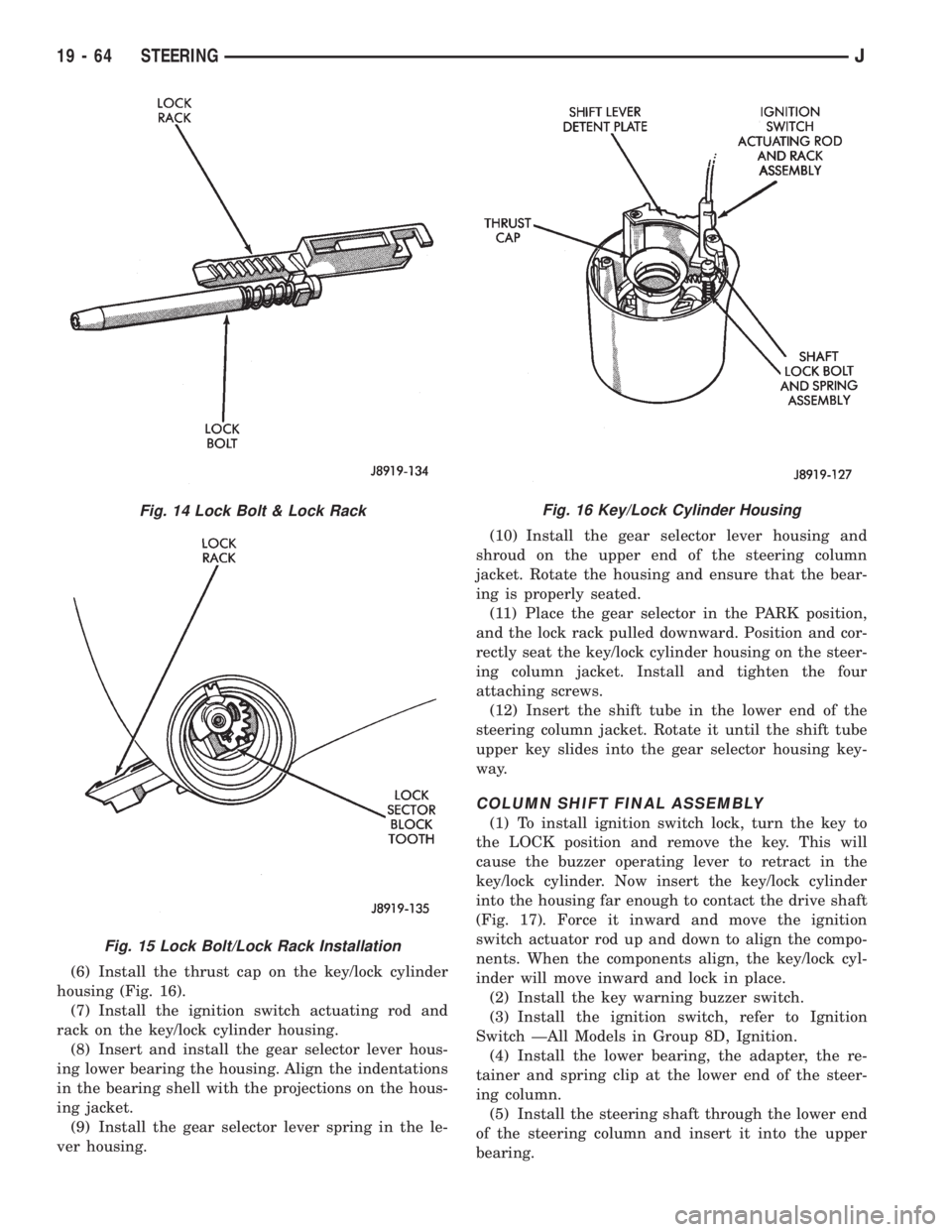
(3) Assemble the lock bolt and the lock rack (Fig.
14).
(4) Install the assembled lock bolt and lock rack in
the key/lock cylinder housing (Fig. 15). Mate the lock
rack block tooth with the lock sector block tooth.
(5) Install the shift lever detent plate on the key/
lock cylinder housing (Fig. 16).
Fig. 11 Lock Sector Removal
Fig. 12 Lower Bearing, Adapter, Retainer & Clip
Fig. 13 Lock Sector Installation
JSTEERING 19 - 63
Page 1363 of 2198
(6) Install the thrust cap on the key/lock cylinder
housing (Fig. 16).
(7) Install the ignition switch actuating rod and
rack on the key/lock cylinder housing.
(8) Insert and install the gear selector lever hous-
ing lower bearing the housing. Align the indentations
in the bearing shell with the projections on the hous-
ing jacket.
(9) Install the gear selector lever spring in the le-
ver housing.(10) Install the gear selector lever housing and
shroud on the upper end of the steering column
jacket. Rotate the housing and ensure that the bear-
ing is properly seated.
(11) Place the gear selector in the PARK position,
and the lock rack pulled downward. Position and cor-
rectly seat the key/lock cylinder housing on the steer-
ing column jacket. Install and tighten the four
attaching screws.
(12) Insert the shift tube in the lower end of the
steering column jacket. Rotate it until the shift tube
upper key slides into the gear selector housing key-
way.
COLUMN SHIFT FINAL ASSEMBLY
(1) To install ignition switch lock, turn the key to
the LOCK position and remove the key. This will
cause the buzzer operating lever to retract in the
key/lock cylinder. Now insert the key/lock cylinder
into the housing far enough to contact the drive shaft
(Fig. 17). Force it inward and move the ignition
switch actuator rod up and down to align the compo-
nents. When the components align, the key/lock cyl-
inder will move inward and lock in place.
(2) Install the key warning buzzer switch.
(3) Install the ignition switch, refer to Ignition
Switch ÐAll Models in Group 8D, Ignition.
(4) Install the lower bearing, the adapter, the re-
tainer and spring clip at the lower end of the steer-
ing column.
(5) Install the steering shaft through the lower end
of the steering column and insert it into the upper
bearing.
Fig. 14 Lock Bolt & Lock Rack
Fig. 15 Lock Bolt/Lock Rack Installation
Fig. 16 Key/Lock Cylinder Housing
19 - 64 STEERINGJ