display JEEP CHEROKEE 2015 KL / 5.G Owners Manual
[x] Cancel search | Manufacturer: JEEP, Model Year: 2015, Model line: CHEROKEE, Model: JEEP CHEROKEE 2015 KL / 5.GPages: 772, PDF Size: 18.21 MB
Page 466 of 772
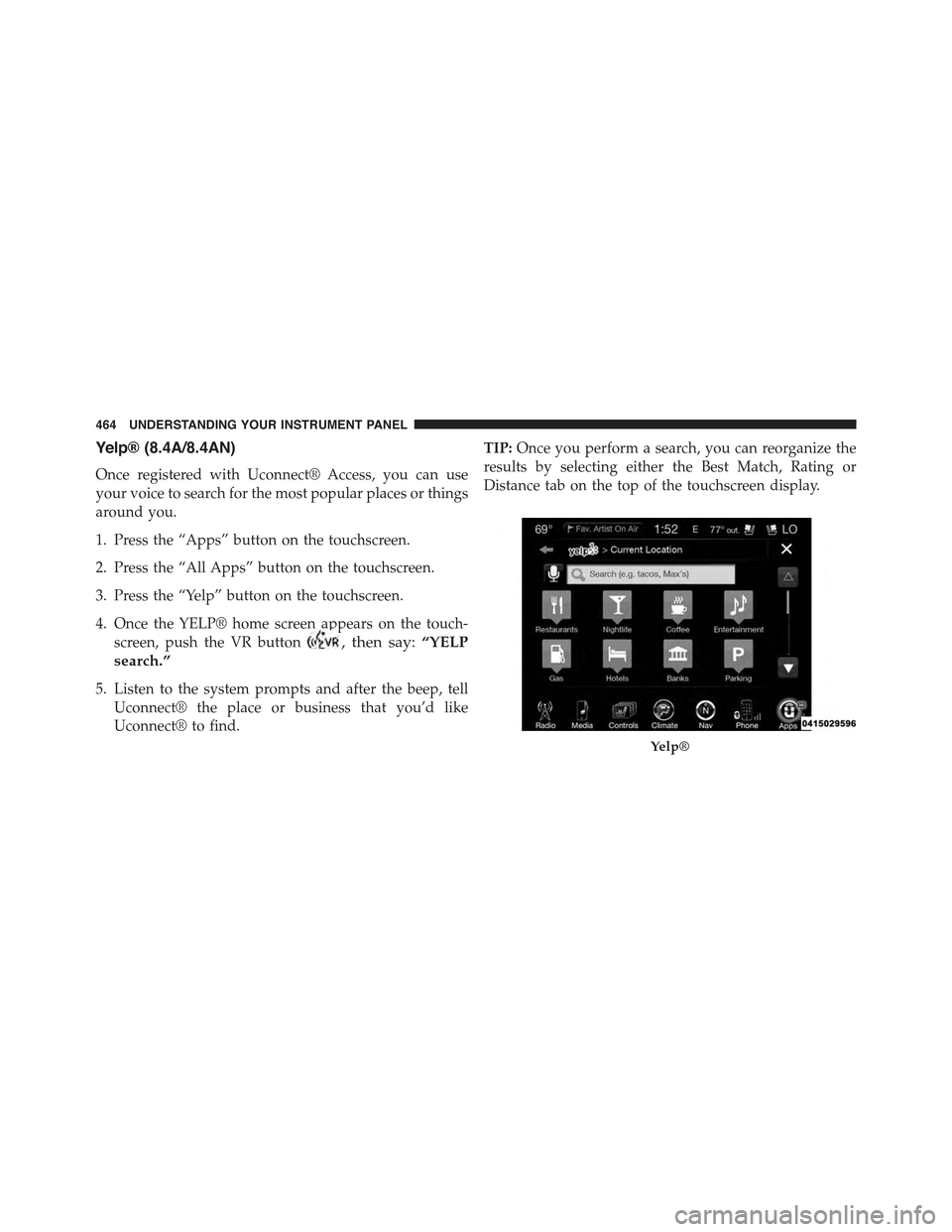
Yelp® (8.4A/8.4AN)
Once registered with Uconnect® Access, you can use
your voice to search for the most popular places or things
around you.
1. Press the “Apps” button on the touchscreen.
2. Press the “All Apps” button on the touchscreen.
3. Press the “Yelp” button on the touchscreen.
4. Once the YELP® home screen appears on the touch-
screen, push the VR button, then say:“YELP
search.”
5. Listen to the system prompts and after the beep, tell
Uconnect® the place or business that you’d like
Uconnect® to find.
TIP:Once you perform a search, you can reorganize the
results by selecting either the Best Match, Rating or
Distance tab on the top of the touchscreen display.
Yelp®
464 UNDERSTANDING YOUR INSTRUMENT PANEL
Page 478 of 772
To Activate The Autostop Mode, The Following Must
Occur:
•The system must be in STOP/START READY state. A
STOP/START READY message will be displayed in
the Electronic Vehicle Information Center (EVIC) or
Driver Information Display (DID) within the Stop/
Start section. Refer to “Electronic Vehicle Information
Center (EVIC)” or “Driver Information Display (DID)”
in “Understanding Your Instrument Panel” for further
information.
•The vehicle must be completely stopped.
•The shifter must be in a forward gear and the brake
pedal depressed.
The engine will shut down, the tachometer will move to
the zero position and the Stop/Start telltale will illumi-
nate indicating you are in Autostop. Customer settings
will be maintained upon return to an engine running
condition.
Possible Reasons The Engine Does Not
AUTOSTOP
Prior to engine shut down, the system will check many
safety and comfort conditions to see if they are fulfilled.
Detailed information about the operation of the Stop/
Start system may be viewed in the EVIC/DID Stop/Start
Screen. In the following situations the engine will not
stop:
•Driver ’s seat belt is not buckled.
•Driver ’s door is not closed.
•Battery temperature is too warm or cold.
476 STARTING AND OPERATING
Page 480 of 772
Conditions That Will Cause The Engine To Start Auto-
matically While In Autostop Mode:
•The transmission selector is moved out of DRIVE.
•To maintain cabin temperature comfort.
•HVAC is set to full defrost mode.
•HVAC system temperature or fan speed is manually
adjusted.
•Battery voltage drops too low.
•Low brake vacuum (e.g. after several brake pedal
applications).
•STOP/START OFF switch is pressed.
•A STOP/START system error occurs.
•4WD system is put into 4LO mode.
Conditions That Force An Application Of The Electric
Park Brake While In Autostop Mode:
•The drivers door is open and brake pedal released.
•The drivers door is open and the drivers seat belt is
unbuckled.
•The engine hood has been opened.
•A STOP/START system error occurs.
If the Electric Park Brake is applied with the engine off,
the engine may require a manual restart and the electric
park brake may require a manual release (depress brake
pedal and press Electric Park Brake switch). Refer to
“Electronic Vehicle Information Center (EVIC)” or
“Driver Information Display (DID)” in “Understanding
Your Instrument Panel” for further information.
478 STARTING AND OPERATING
Page 481 of 772
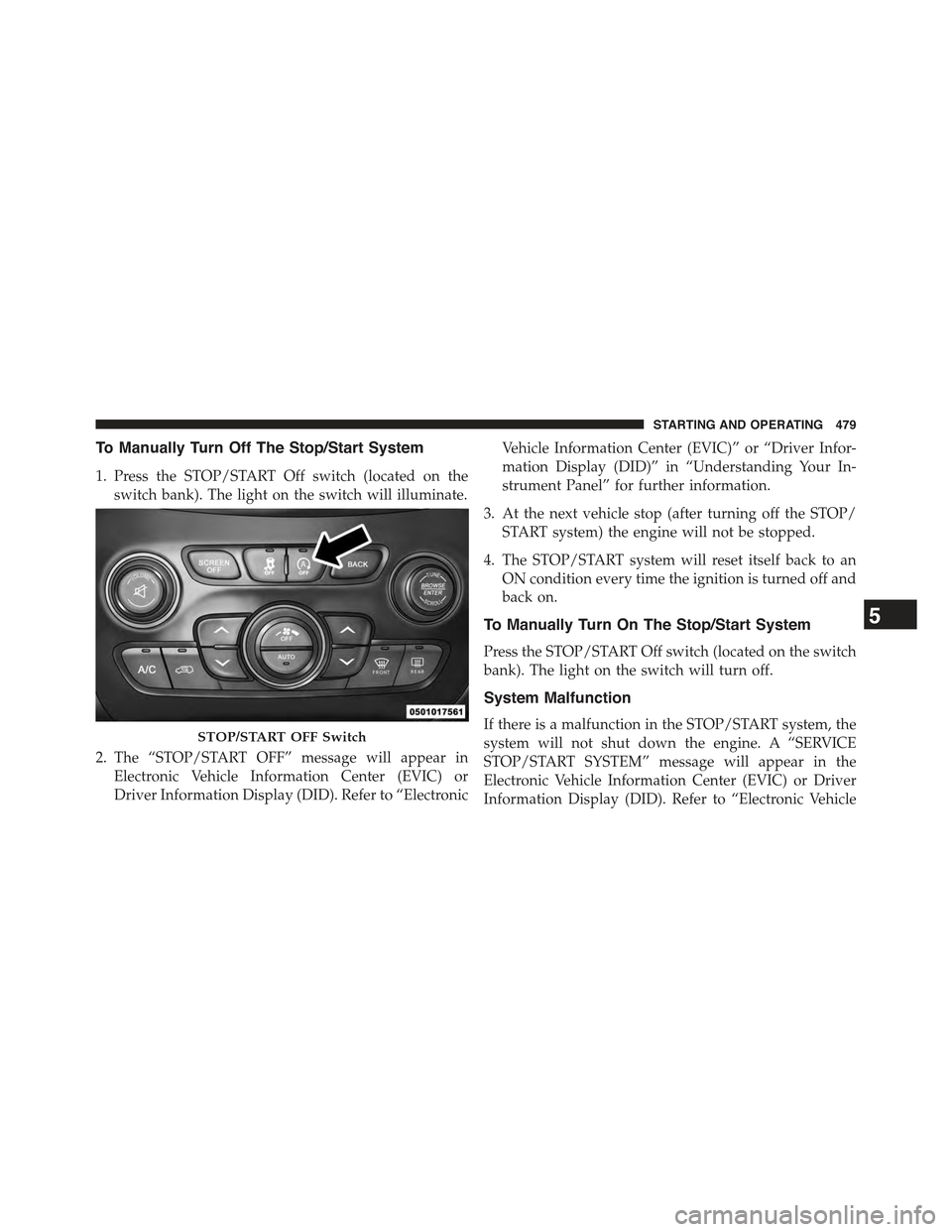
To Manually Turn Off The Stop/Start System
1. Press the STOP/START Off switch (located on the
switch bank). The light on the switch will illuminate.
2. The “STOP/START OFF” message will appear in
Electronic Vehicle Information Center (EVIC) or
Driver Information Display (DID). Refer to “Electronic
Vehicle Information Center (EVIC)” or “Driver Infor-
mation Display (DID)” in “Understanding Your In-
strument Panel” for further information.
3. At the next vehicle stop (after turning off the STOP/
START system) the engine will not be stopped.
4. The STOP/START system will reset itself back to an
ON condition every time the ignition is turned off and
back on.
To Manually Turn On The Stop/Start System
Press the STOP/START Off switch (located on the switch
bank). The light on the switch will turn off.
System Malfunction
If there is a malfunction in the STOP/START system, the
system will not shut down the engine. A “SERVICE
STOP/START SYSTEM” message will appear in the
Electronic Vehicle Information Center (EVIC) or Driver
Information Display (DID). Refer to “Electronic Vehicle
STOP/START OFF Switch
5
STARTING AND OPERATING 479
Page 486 of 772
Fuel Economy (ECO) Mode
The Fuel Economy (ECO) mode can improve the vehi-
cle’s overall fuel economy during normal driving condi-
tions. To activate ECO mode press the “Controls” button
on the touchscreen and then press the “ECO” button on
the touchscreen. When ECO mode is engaged a green
light in the center stack of the instrument panel will be
illuminated and a green ECO light will also illuminate in
the Electronic Vehicle Information Center (EVIC) or
Driver Information Display (DID). In 4WD models, ECO
mode is only active in ’4WD Auto’ driving mode. If you
switch to another driving mode the ECO button will turn
grey and the ECO light in the instrument panel will
disappear indicating it is no longer in ECO mode. It will
automatically re-enable ECO mode when you switch
back into 4WD Auto.
Nine-Speed Automatic Transmission
The transmission gear range (PRND) is displayed both
beside the shift lever and in the Electronic Vehicle Infor-
mation Center (EVIC)/Driver Information Display
(DID). To select a gear range, press the lock button on the
shift lever and move the lever rearward or forward. You
must also press the brake pedal to shift the transmission
out of PARK, or to shift from NEUTRAL into DRIVE or
REVERSE when the vehicle is stopped or moving at low
speeds (refer to#Brake/Transmission Shift Interlock Sys-
tem#in this section). Select the DRIVE range for normal
driving.
The electronically-controlled transmission provides a
precise shift schedule. The transmission electronics are
self-calibrating; therefore, the first few shifts on a new
vehicle may be somewhat abrupt. This is a normal
condition, and precision shifts will develop within a few
hundred miles (kilometers).
484 STARTING AND OPERATING
Page 487 of 772
Only shift from DRIVE to PARK or REVERSE when the
accelerator pedal is released and the vehicle is stopped.
Be sure to keep your foot on the brake pedal when
shifting between these gears.
The transmission shift lever has PARK, REVERSE, NEU-
TRAL, DRIVE, and Electronic Range Select (ERS) shift
positions. Manual downshifts can be made using the ERS
shift control (refer to#Electronic Range Select (ERS)
Operation#in this section for further information). Mov-
ing the shift lever into the ERS (-/+) position (beside the
DRIVE position) activates ERS mode, displays the cur-
rent gear in the instrument cluster, and prevents auto-
matic upshifts beyond this gear. In ERS mode, toggling
the shift lever forward (-) or rearward (+) will change the
highest available gear.
NOTE:If the shift lever cannot be moved to the PARK,
REVERSE, or NEUTRAL position (when pushed for-
ward) it is probably in the ERS (+/-) position (beside the
DRIVE position). In ERS mode, the transmission gear
limit (1, 2, 3, etc.) is displayed in the instrument cluster.
Move the shift lever to the right (into the DRIVE [D]
position) for access to PARK, REVERSE, and NEUTRAL.
5
STARTING AND OPERATING 485
Page 491 of 772
CAUTION!
•Before moving the shift lever out of PARK, you
must turn the ignition switch from the LOCK/OFF
position to the ON/RUN position, and also press
the brake pedal. Otherwise, damage to the shift
lever could result.
•DO NOT race the engine when shifting from
PARK or NEUTRAL into another gear range, as this
can damage the drivetrain.
The following indicators should be used to ensure that
you have engaged the transmission into the PARK posi-
tion:
•When shifting into PARK, press the lock button on the
shift lever and firmly move the lever all the way
forward until it stops and is fully seated.
•Look at the transmission gear position display and
verify that it indicates the PARK position (P).
•With brake pedal released, verify that the shift lever
will not move out of PARK.
REVERSE (R)
This range is for moving the vehicle backward. Shift into
REVERSE only after the vehicle has come to a complete
stop.
NEUTRAL (N)
Use this range when the vehicle is standing for prolonged
periods with the engine running. The engine may be
started in this range. Apply the parking brake and shift
the transmission into PARK if you must leave the vehicle.
5
STARTING AND OPERATING 489
Page 495 of 772
Moving the shift lever to the ERS position (beside
DRIVE) will activate ERS mode, display the current gear
in the instrument cluster, and maintain that gear as the
top available gear. Once in ERS mode, moving the shift
lever forward (-) or rearward (+) will change the top
available gear.
To exit ERS mode, simply return the shift lever to the
DRIVE position.
WARNING!
Do not downshift for additional engine braking on a
slippery surface. The drive wheels could lose their
grip and the vehicle could skid, causing a collision or
personal injury.
NOTE:To select the proper gear position for maximum
deceleration (engine braking), move the shift lever into
the ERS position, then simply press and hold it forward
(-). The transmission will shift to the range from which
the vehicle can best be slowed down.
Torque Converter Clutch
A feature designed to improve fuel economy has been
included in the automatic transmission on your vehicle.
A clutch within the torque converter engages automati-
cally at calibrated speeds. This may result in a slightly
different feeling or response during normal operation in
the upper gears. When the vehicle speed drops or during
some accelerations, the clutch automatically disengages.
5
STARTING AND OPERATING 493
Page 501 of 772
NOTE:If shift conditions/interlocks are not met a mes-
sage will flash from the Electronic Vehicle Information
Center (EVIC)/Driver Information Display (DID) with
instructions on how to complete the requested shift.
Refer to “Electronic Vehicle Information Center (EVIC)/
Driver Information Display (DID) in “Understanding
Your Instrument Panel” for further information.
Shifting Out Of 4X4 LOW
With the vehicle at speeds of 0 to 3 mph (0 to 5 km/h), the
ignition switch in the ON position and the engine run-
ning, shift the transmission into NEUTRAL, and press
the “4WD LOW” button once. The “4WD LOW” indica-
tor light in the instrument cluster will flash and go out
when the shift is complete.
NOTE:
•If shift conditions/interlocks are not met, a message
will flash from the Electronic Vehicle Information
Center (EVIC)/Driver Information Display (DID) with
instructions on how to complete the requested shift.
Refer to “Electronic Vehicle Information Center
(EVIC)/Driver Information Display (DID) in “Under-
standing Your Instrument Panel” for further informa-
tion.
•Shifting into or out of 4WD LOW is possible with the
vehicle completely stopped; however, difficulty may
occur due to the mating clutch teeth not being prop-
erly aligned. Several attempts may be required for
clutch teeth alignment and shift completion to occur.
The preferred method is with the vehicle rolling 0 to
3 mph (0 to 5 km/h). If the vehicle is moving faster
than 3 mph (5 km/h), the 4WD system will not allow
the shift.
5
STARTING AND OPERATING 499
Page 505 of 772
•Shifting into or out of Rear E-Locker is possible with
the vehicle completely stopped; however, difficulty
may occur due to the mating clutch teeth not being
properly aligned. Several attempts may be required for
clutch teeth alignment and shift completion to occur.
The preferred method is for the vehicle to be rolling,
below 15 MPH (24 km/h), while including right and
left steering maneuvers to allow for the clutch teeth to
align.
•The Rear E-Locker System must be disengaged prior to
taking the vehicle out of 4WD LOW range. If 4WD
LOW shift conditions/interlocks are not met, a mes-
sage will flash from the Electronic Vehicle Information
Center (EVIC)/Driver Information Display (DID) with
instructions on how to complete the requested shift.
SELEC-TERRAIN™
Description
Selec-Terrain™ combines the capabilities of the vehicle
control systems, along with driver input, to provide the
best performance for all terrains.
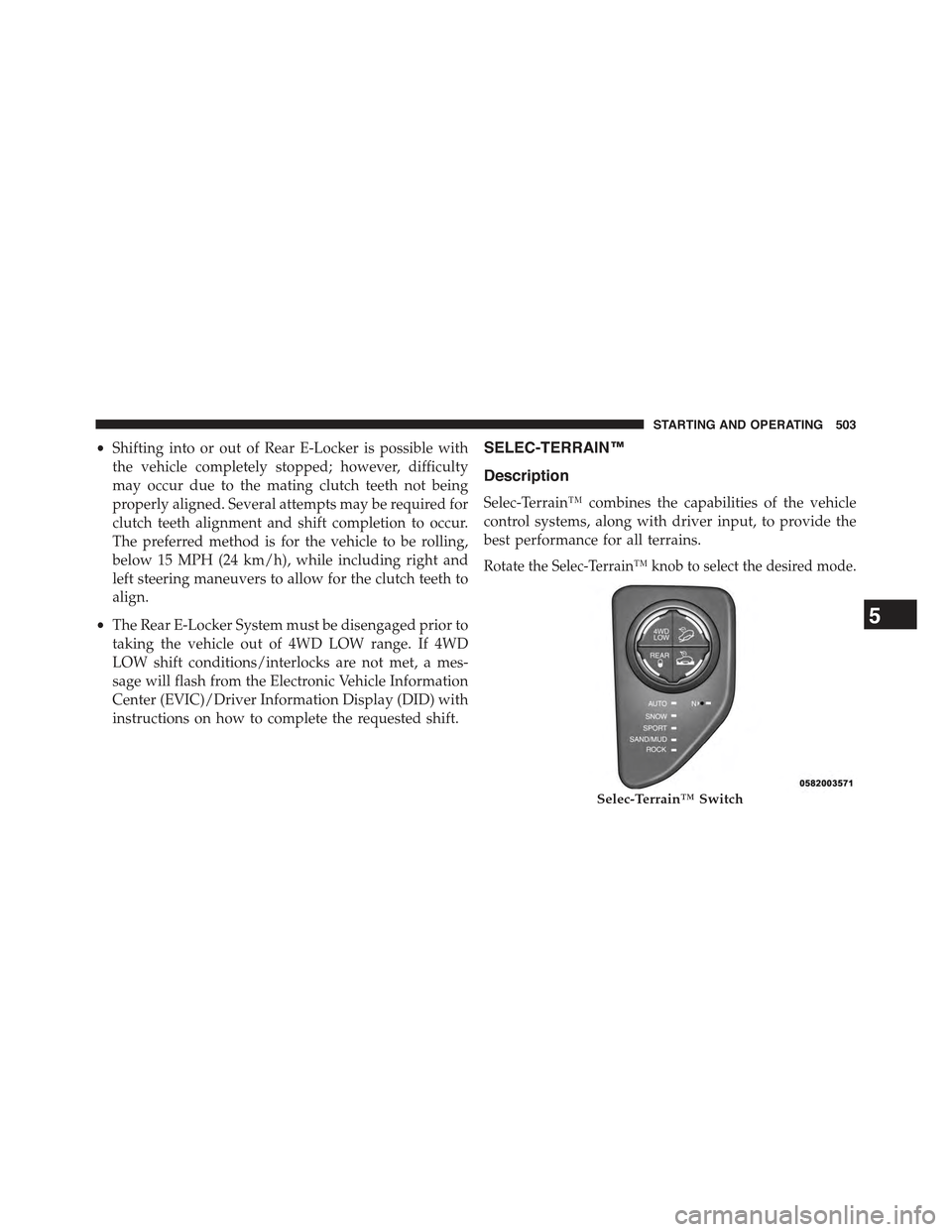
Rotate the Selec-Terrain™ knob to select the desired mode.
Selec-Terrain™ Switch
5
STARTING AND OPERATING 503