radio JEEP CHEROKEE 2015 KL / 5.G User Guide
[x] Cancel search | Manufacturer: JEEP, Model Year: 2015, Model line: CHEROKEE, Model: JEEP CHEROKEE 2015 KL / 5.GPages: 772, PDF Size: 18.21 MB
Page 164 of 772
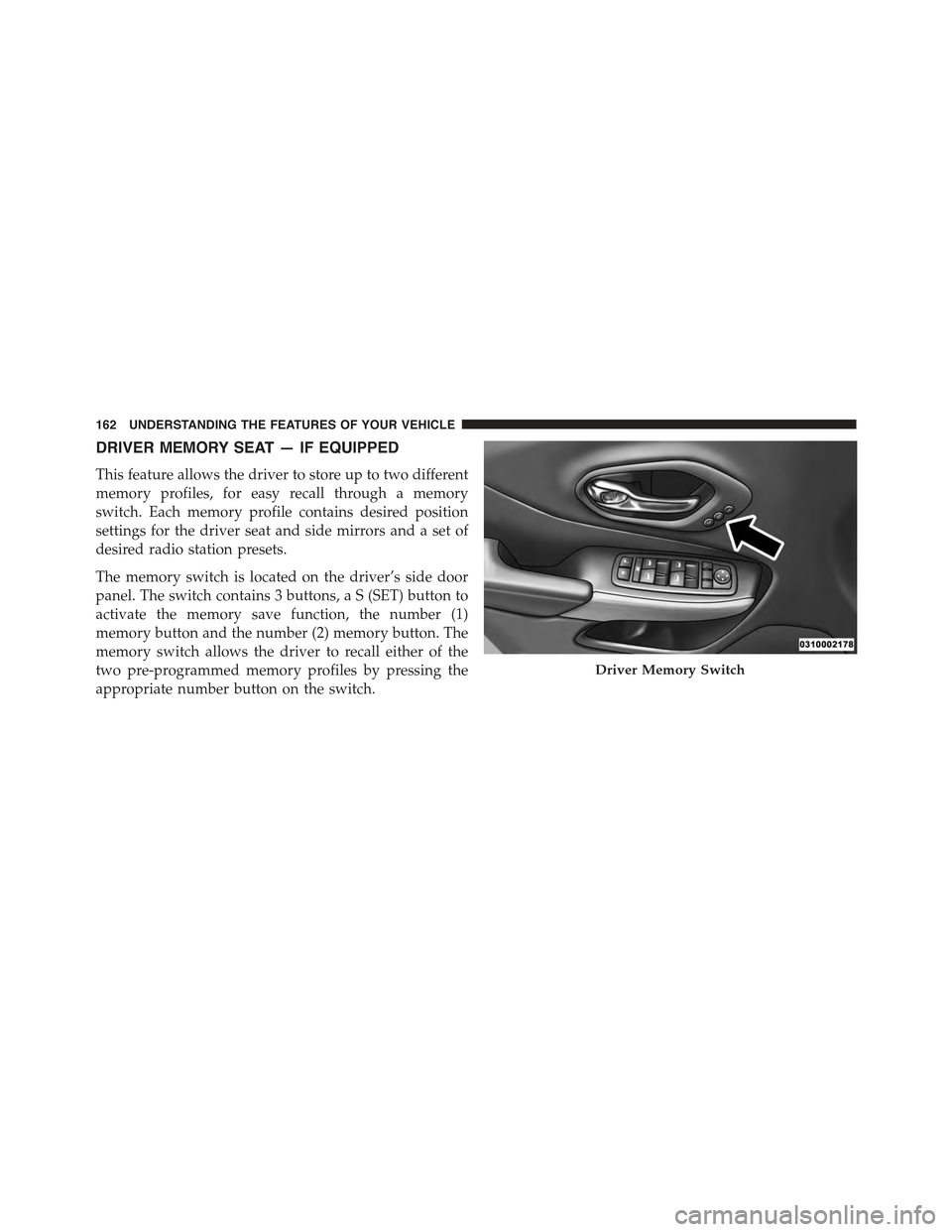
DRIVER MEMORY SEAT — IF EQUIPPED
This feature allows the driver to store up to two different
memory profiles, for easy recall through a memory
switch. Each memory profile contains desired position
settings for the driver seat and side mirrors and a set of
desired radio station presets.
The memory switch is located on the driver’s side door
panel. The switch contains 3 buttons, a S (SET) button to
activate the memory save function, the number (1)
memory button and the number (2) memory button. The
memory switch allows the driver to recall either of the
two pre-programmed memory profiles by pressing the
appropriate number button on the switch.
Driver Memory Switch
162 UNDERSTANDING THE FEATURES OF YOUR VEHICLE
Page 165 of 772
Programming The Memory Feature
To create a new memory profile, perform the following:
NOTE:Saving a new memory profile will erase an
existing profile from memory.
1. Cycle the vehicles ignition to the ON position.
2. Adjust all memory profile settings to desired prefer-
ences (i.e., seat, side mirror and radio station presets).
3. Press and release the SET button on the memory
switch, then press the number (1) button within five
seconds. The Electronic Vehicle Information Center
(EVIC) or Driver Information Display (DID), will
display which memory position is being set.
If desired, a second memory profile can be stored into
memory as follows:
1. Cycle the vehicles ignition to the ON position.
2. Adjust all memory profile settings to desired prefer-
ences (i.e., seat, side mirror and radio station presets).
3. Press and release the SET button on the memory
switch, then press the number (2) button within five
seconds. The EVIC/DID will display which memory
position is being set.
NOTE:
•For vehicles equipped with an automatic transmission,
memory profiles can be set without the vehicle in
PARK, but the vehicle must be in PARK to recall a
memory profile.
•For vehicles equipped with a manual transmission, the
vehicle speed must be at 0 mph (0 km/h) to recall a
memory profile.
•To set a memory profile to your RKE transmitter, refer
to “Linking And Unlinking The Remote Keyless Entry
Transmitter To Memory” in this section.
3
UNDERSTANDING THE FEATURES OF YOUR VEHICLE 163
Page 179 of 772
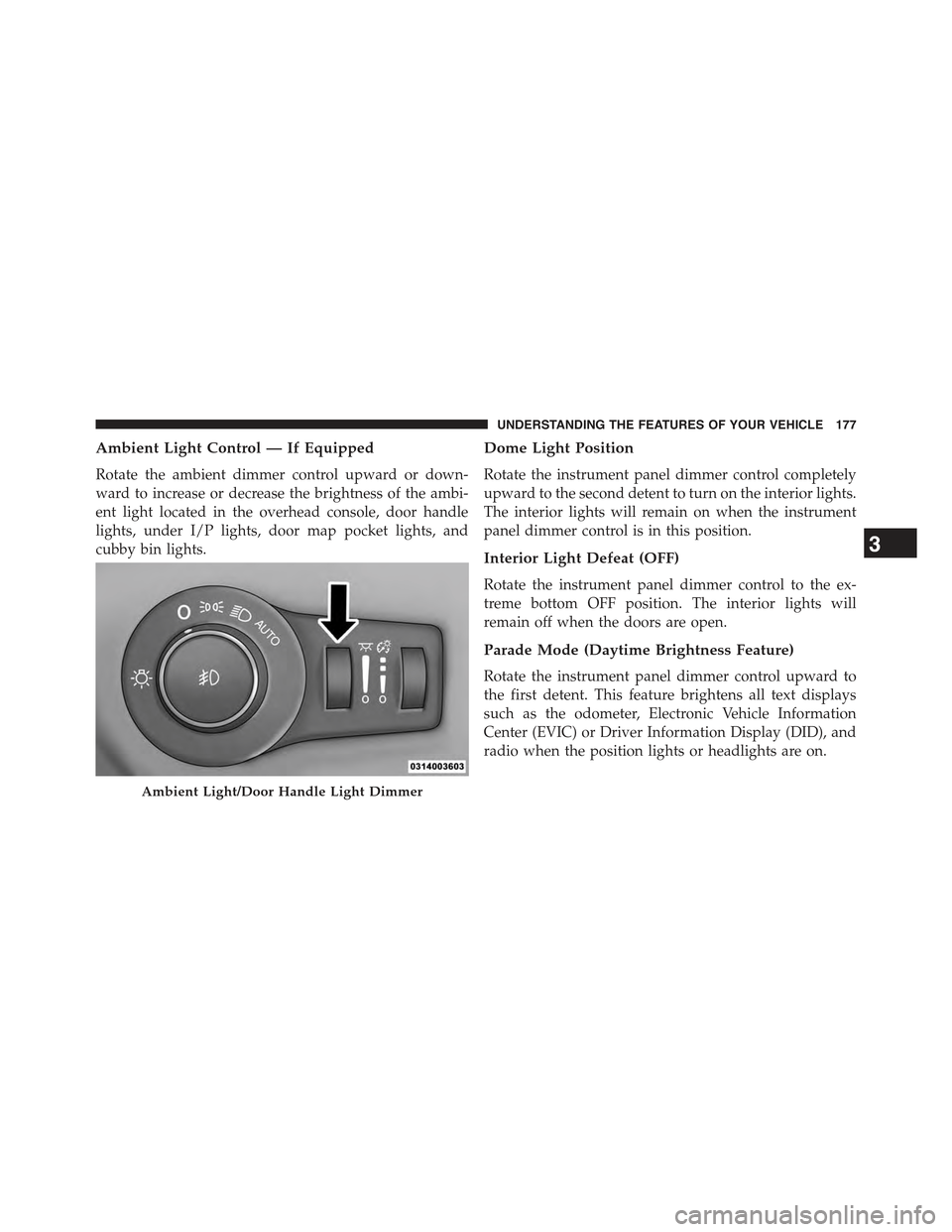
Ambient Light Control — If Equipped
Rotate the ambient dimmer control upward or down-
ward to increase or decrease the brightness of the ambi-
ent light located in the overhead console, door handle
lights, under I/P lights, door map pocket lights, and
cubby bin lights.
Dome Light Position
Rotate the instrument panel dimmer control completely
upward to the second detent to turn on the interior lights.
The interior lights will remain on when the instrument
panel dimmer control is in this position.
Interior Light Defeat (OFF)
Rotate the instrument panel dimmer control to the ex-
treme bottom OFF position. The interior lights will
remain off when the doors are open.
Parade Mode (Daytime Brightness Feature)
Rotate the instrument panel dimmer control upward to
the first detent. This feature brightens all text displays
such as the odometer, Electronic Vehicle Information
Center (EVIC) or Driver Information Display (DID), and
radio when the position lights or headlights are on.
Ambient Light/Door Handle Light Dimmer
3
UNDERSTANDING THE FEATURES OF YOUR VEHICLE 177
Page 216 of 772
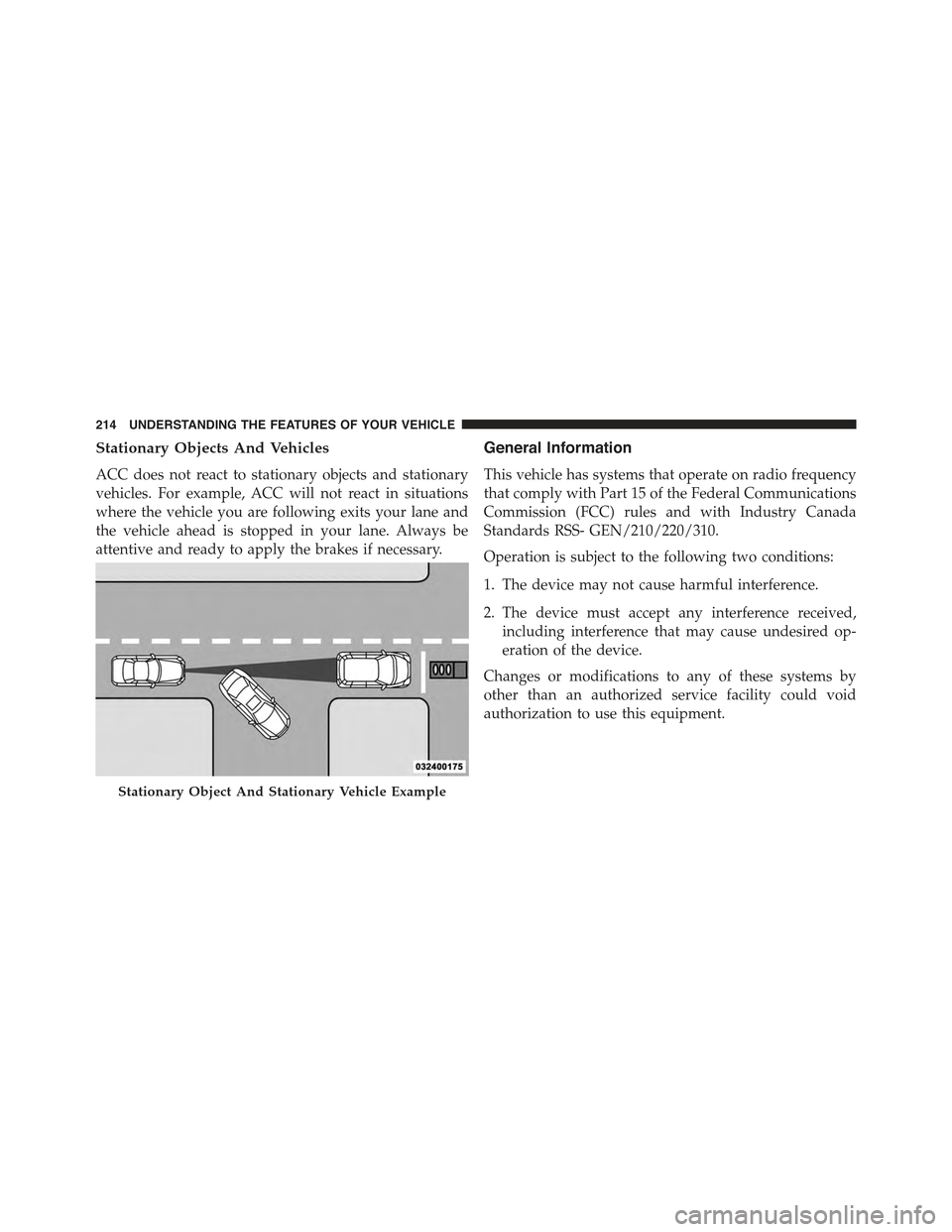
Stationary Objects And Vehicles
ACC does not react to stationary objects and stationary
vehicles. For example, ACC will not react in situations
where the vehicle you are following exits your lane and
the vehicle ahead is stopped in your lane. Always be
attentive and ready to apply the brakes if necessary.
General Information
This vehicle has systems that operate on radio frequency
that comply with Part 15 of the Federal Communications
Commission (FCC) rules and with Industry Canada
Standards RSS- GEN/210/220/310.
Operation is subject to the following two conditions:
1. The device may not cause harmful interference.
2. The device must accept any interference received,
including interference that may cause undesired op-
eration of the device.
Changes or modifications to any of these systems by
other than an authorized service facility could void
authorization to use this equipment.
Stationary Object And Stationary Vehicle Example
214 UNDERSTANDING THE FEATURES OF YOUR VEHICLE
Page 241 of 772
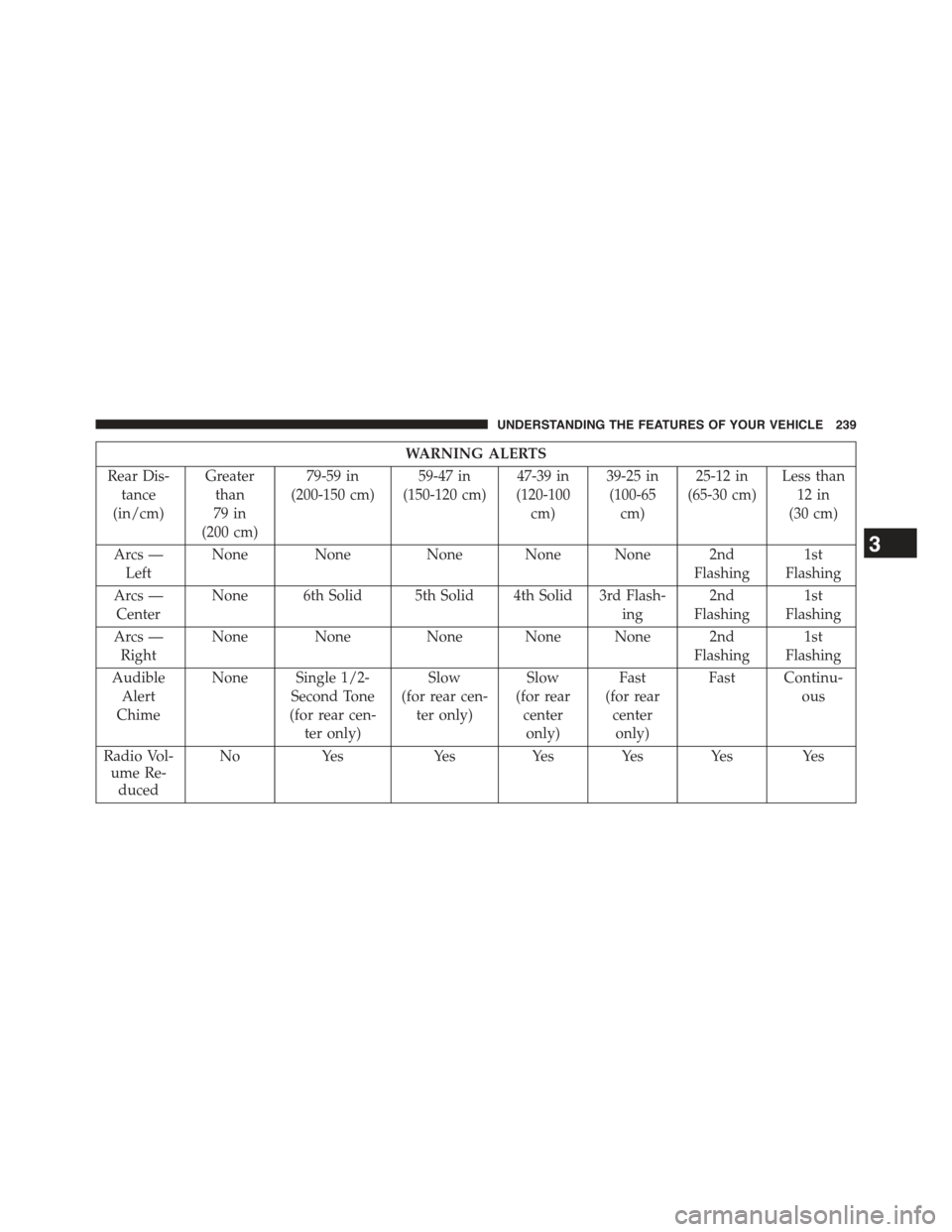
WARNING ALERTS
Rear Dis-
tance
(in/cm)
Greater
than
79 in
(200 cm)
79-59 in
(200-150 cm)
59-47 in
(150-120 cm)
47-39 in
(120-100
cm)
39-25 in
(100-65
cm)
25-12 in
(65-30 cm)
Less than
12 in
(30 cm)
Arcs —
Left
None None None None None 2nd
Flashing
1st
Flashing
Arcs —
Center
None 6th Solid 5th Solid 4th Solid 3rd Flash-
ing
2nd
Flashing
1st
Flashing
Arcs —
Right
None NoneNone None None 2nd
Flashing
1st
Flashing
Audible
Alert
Chime
None Single 1/2-
Second Tone
(for rear cen-
ter only)
Slow
(for rear cen-
ter only)
Slow
(for rear
center
only)
Fast
(for rear
center
only)
Fast Continu-
ous
Radio Vol-
ume Re-
duced
NoYesYesYes Yes Yes Yes
3
UNDERSTANDING THE FEATURES OF YOUR VEHICLE 239
Page 242 of 772
NOTE:ParkSense® will reduce the volume of the radio,
if on, when the system is sounding an audio tone.
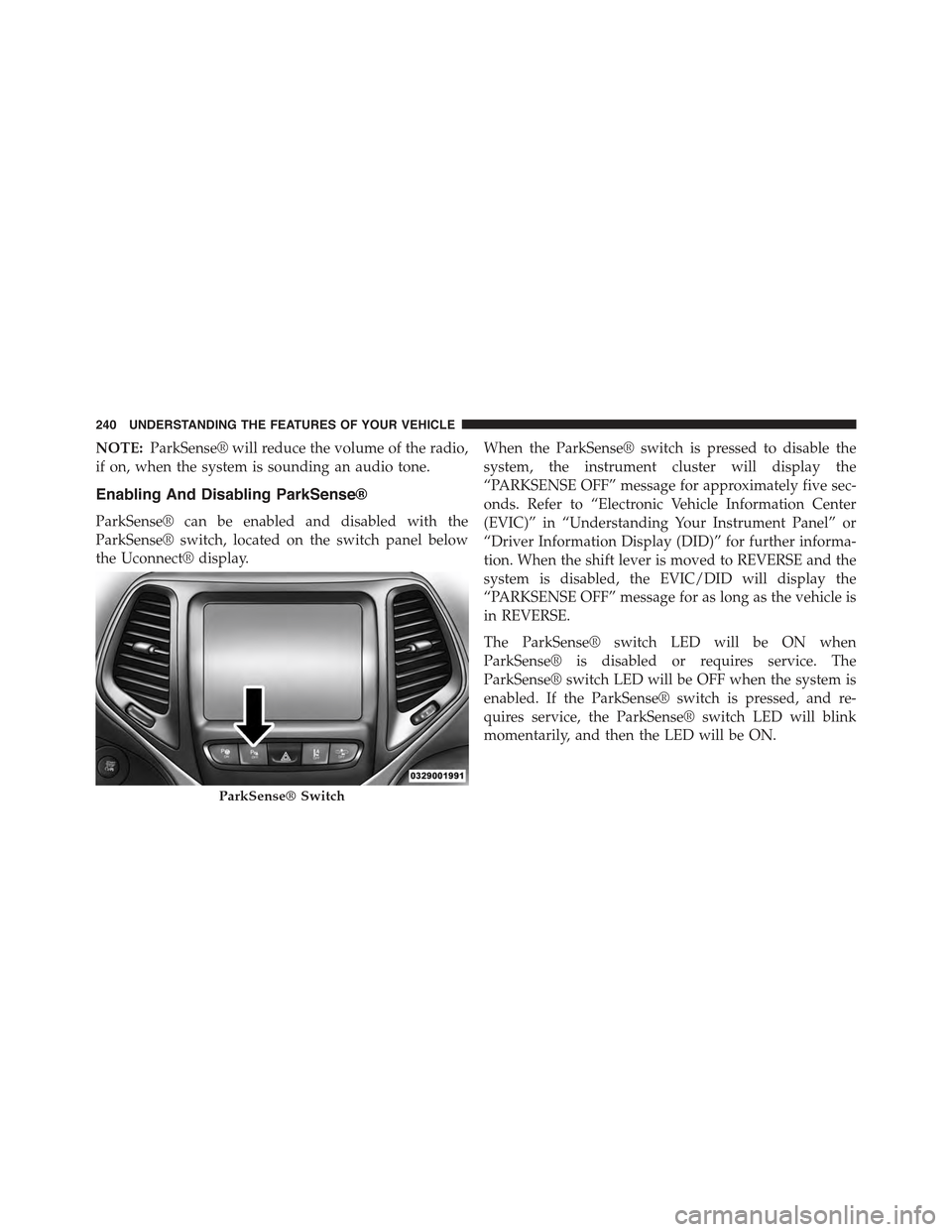
Enabling And Disabling ParkSense®
ParkSense® can be enabled and disabled with the
ParkSense® switch, located on the switch panel below
the Uconnect® display.
When the ParkSense® switch is pressed to disable the
system, the instrument cluster will display the
“PARKSENSE OFF” message for approximately five sec-
onds. Refer to “Electronic Vehicle Information Center
(EVIC)” in “Understanding Your Instrument Panel” or
“Driver Information Display (DID)” for further informa-
tion. When the shift lever is moved to REVERSE and the
system is disabled, the EVIC/DID will display the
“PARKSENSE OFF” message for as long as the vehicle is
in REVERSE.
The ParkSense® switch LED will be ON when
ParkSense® is disabled or requires service. The
ParkSense® switch LED will be OFF when the system is
enabled. If the ParkSense® switch is pressed, and re-
quires service, the ParkSense® switch LED will blink
momentarily, and then the LED will be ON.
ParkSense® Switch
240 UNDERSTANDING THE FEATURES OF YOUR VEHICLE
Page 244 of 772
•Jackhammers, large trucks, and other vibrations could
affect the performance of ParkSense®.
•When you turn ParkSense® OFF, the instrument clus-
ter will display “PARKSENSE OFF” Furthermore, once
you turn ParkSense® off, it remains off until you turn
it on again, even if you cycle the ignition key.
•When you move the shift lever to the REVERSE
position and ParkSense® is turned OFF, the EVIC/
DID will display “PARKSENSE OFF” message for as
long as the vehicle is in REVERSE.
•ParkSense®, when on, will reduce the volume of the
radio when it is sounding a tone.
•Clean the ParkSense® sensors regularly, taking care
not to scratch or damage them. The sensors must not
be covered with ice, snow, slush, mud, dirt or debris.
Failure to do so can result in the system not working
properly. The ParkSense® system might not detect an
obstacle behind the fascia/bumper, or it could provide
a false indication that an obstacle is behind the fascia/
bumper.
•Use the ParkSense® switch to turn the ParkSense®
system OFF if objects such as bicycle carriers, trailer
hitches, etc. are placed within 12 in (30 cm) from the
rear fascia/bumper. Failure to do so can result in the
system misinterpreting a close object as a sensor
problem, causing the “PARKSENSE UNAVAILABLE
SERVICE REQUIRED” message to be displayed in the
EVIC/DID.
•ParkSense® should be disabled when the liftgate is in
the open position and the vehicle is in REVERSE. An
open liftgate could provide a false indication that an
obstacle is behind the vehicle.
242 UNDERSTANDING THE FEATURES OF YOUR VEHICLE
Page 253 of 772
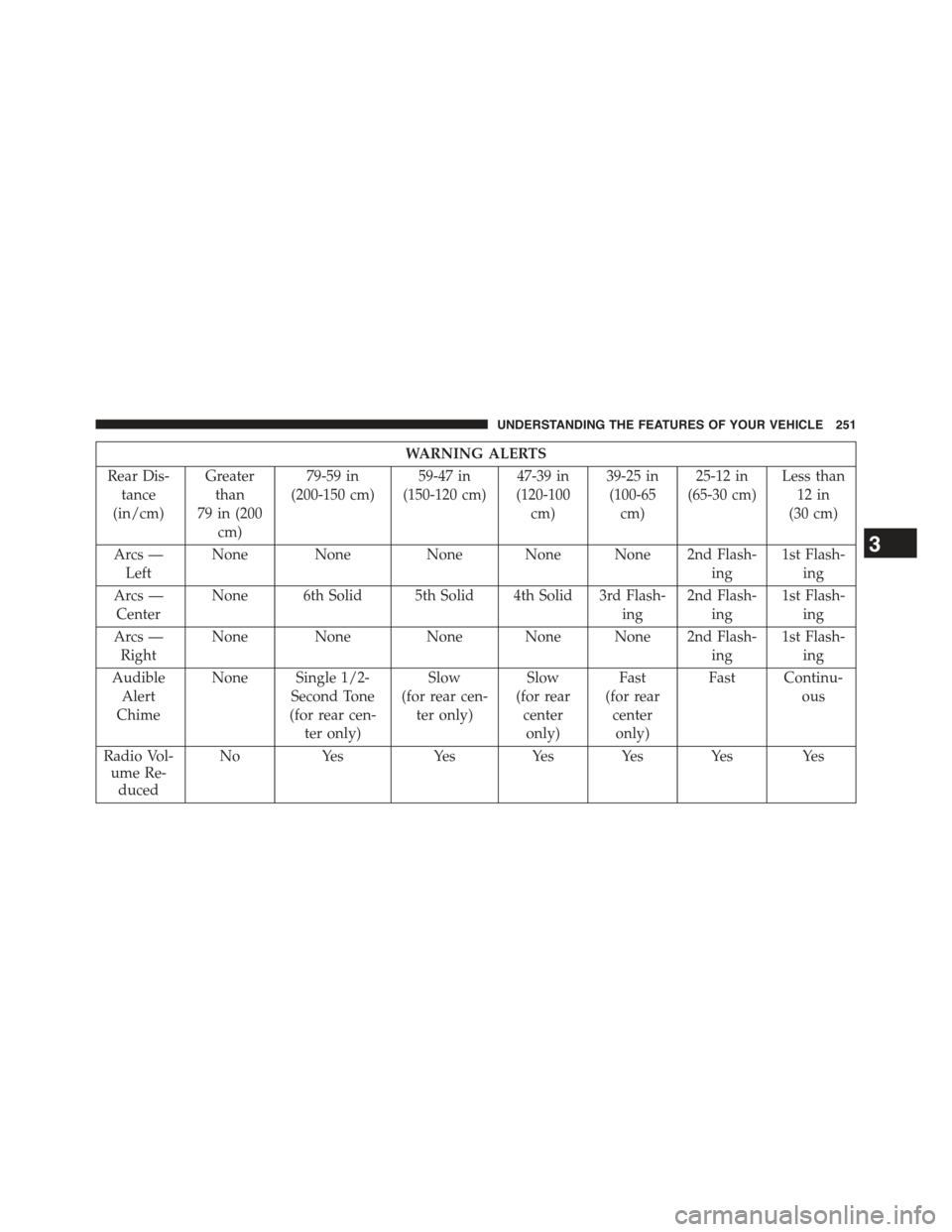
WARNING ALERTS
Rear Dis-
tance
(in/cm)
Greater
than
79 in (200
cm)
79-59 in
(200-150 cm)
59-47 in
(150-120 cm)
47-39 in
(120-100
cm)
39-25 in
(100-65
cm)
25-12 in
(65-30 cm)
Less than
12 in
(30 cm)
Arcs —
Left
None None None None None 2nd Flash-
ing
1st Flash-
ing
Arcs —
Center
None 6th Solid 5th Solid 4th Solid 3rd Flash-
ing
2nd Flash-
ing
1st Flash-
ing
Arcs —
Right
None NoneNone None None 2nd Flash-
ing
1st Flash-
ing
Audible
Alert
Chime
None Single 1/2-
Second Tone
(for rear cen-
ter only)
Slow
(for rear cen-
ter only)
Slow
(for rear
center
only)
Fast
(for rear
center
only)
Fast Continu-
ous
Radio Vol-
ume Re-
duced
NoYesYesYes Yes Yes Yes
3
UNDERSTANDING THE FEATURES OF YOUR VEHICLE 251
Page 254 of 772
NOTE:ParkSense® will reduce the volume of the radio,
if on, when the system is sounding an audio tone.
Front Park Assist
When the vehicle is in DRIVE or NON-REVERSE for
manual transmission, the ParkSense® Warning screen
will be displayed when an obstacle is detected.
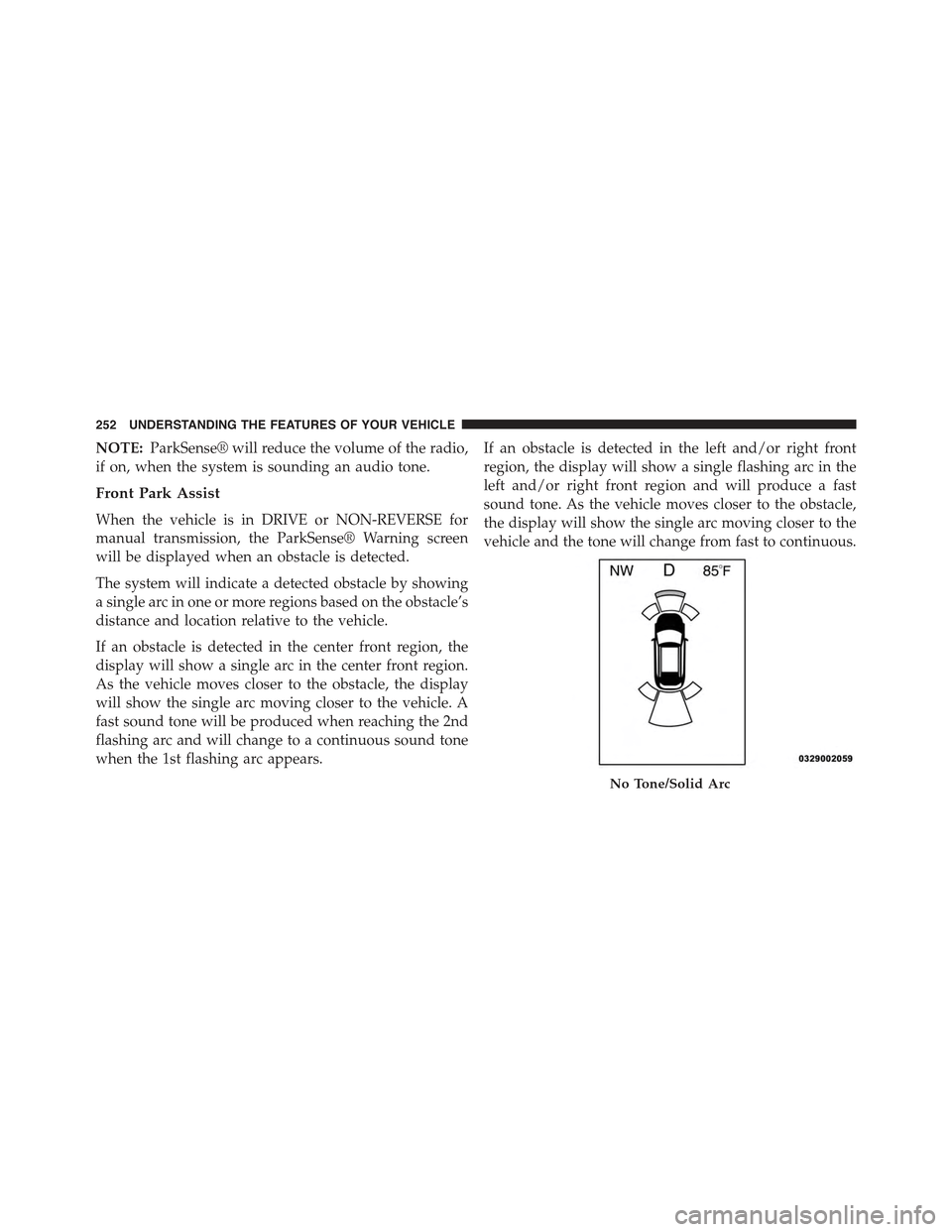
The system will indicate a detected obstacle by showing
a single arc in one or more regions based on the obstacle’s
distance and location relative to the vehicle.
If an obstacle is detected in the center front region, the
display will show a single arc in the center front region.
As the vehicle moves closer to the obstacle, the display
will show the single arc moving closer to the vehicle. A
fast sound tone will be produced when reaching the 2nd
flashing arc and will change to a continuous sound tone
when the 1st flashing arc appears.
If an obstacle is detected in the left and/or right front
region, the display will show a single flashing arc in the
left and/or right front region and will produce a fast
sound tone. As the vehicle moves closer to the obstacle,
the display will show the single arc moving closer to the
vehicle and the tone will change from fast to continuous.
No Tone/Solid Arc
252 UNDERSTANDING THE FEATURES OF YOUR VEHICLE
Page 257 of 772
WARNING ALERTS
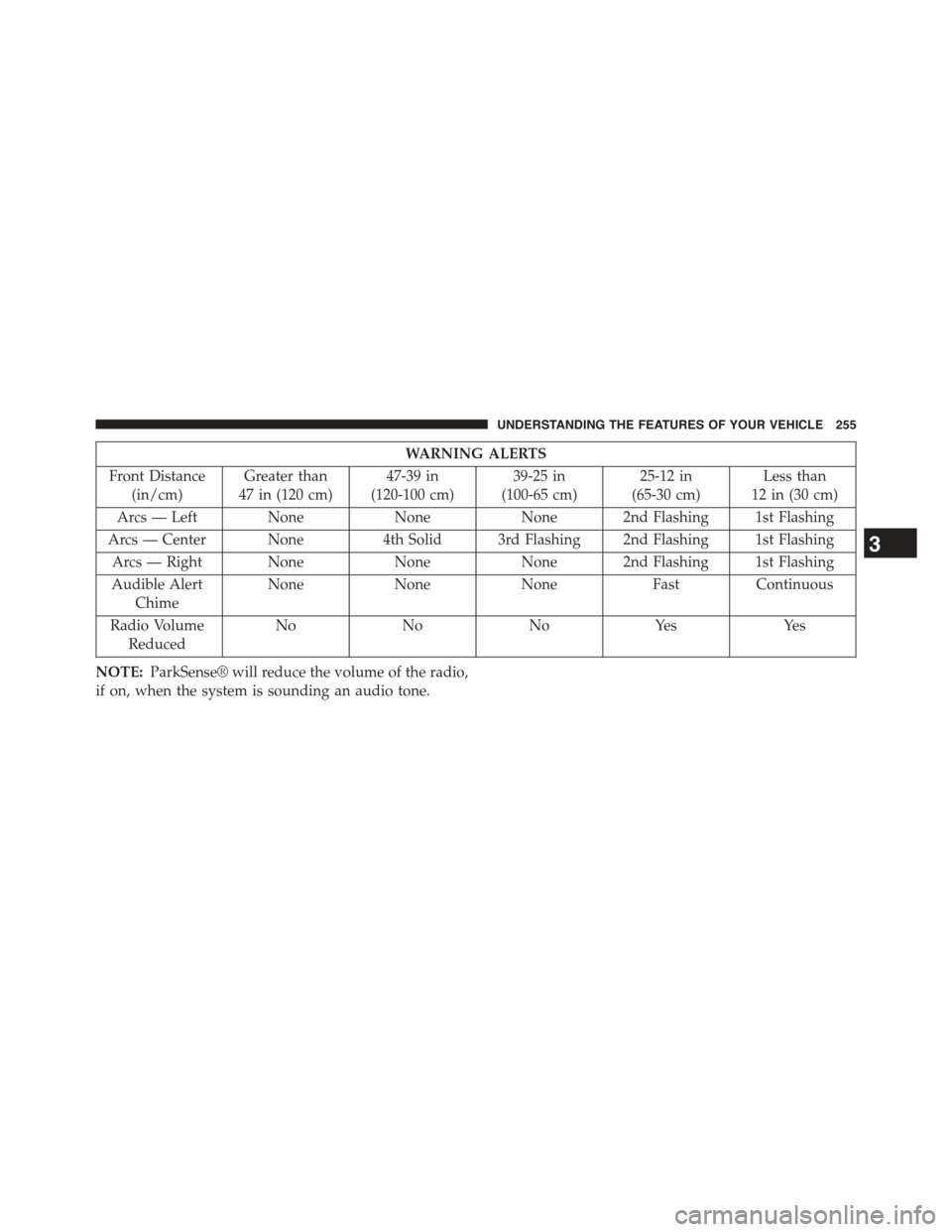
Front Distance
(in/cm)
Greater than
47 in (120 cm)
47-39 in
(120-100 cm)
39-25 in
(100-65 cm)
25-12 in
(65-30 cm)
Less than
12 in (30 cm)
Arcs — Left NoneNoneNone 2nd Flashing 1st Flashing
Arcs — Center None4th Solid 3rd Flashing 2nd Flashing 1st Flashing
Arcs — Right NoneNoneNone 2nd Flashing 1st Flashing
Audible Alert
Chime
NoneNoneNoneFastContinuous
Radio Volume
Reduced
NoNoNoYesYes
NOTE:ParkSense® will reduce the volume of the radio,
if on, when the system is sounding an audio tone.
3
UNDERSTANDING THE FEATURES OF YOUR VEHICLE 255