AUX JEEP CHEROKEE 2015 KL / 5.G Owners Manual
[x] Cancel search | Manufacturer: JEEP, Model Year: 2015, Model line: CHEROKEE, Model: JEEP CHEROKEE 2015 KL / 5.GPages: 772, PDF Size: 18.21 MB
Page 401 of 772
arrows to adjust, tap the “C” icon to readjust to the center.
Press the back arrow/Done button on the touchscreen to
return to the previous menu.
•Speed Adjusted Volume
This feature increases or decreases volume relative to
vehicle speed. To change the Speed Adjusted Volume
press the “Speed Adjusted Volume” button on the touch-
screen and select from “Off,” “1,” “2” or “3” buttons on
the touchscreen. Press the back arrow/Done button on
the touchscreen to return to the previous menu.
•Surround Sound — If Equipped
This feature provides simulated surround sound mode.
To make your selection, press the “Surround Sound”
button on the touchscreen, select “On” or “Off.” Press the
back arrow/Done button on the touchscreen to return to
the previous menu.
•AUX Volume Offset — If Equipped
This feature provides the ability to tune the audio level
for portable devices connected through the AUX input.
To make your selection, press the “AUX Volume Offset”
button on the touchscreen, select “On” or “Off.” Press the
back arrow/Done button on the touchscreen to return to
the previous menu.
•Loudness — If Equipped
This feature improves sound quality at lower volumes.
To make your selection, press the “Loudness” button on
the touchscreen, select “On” or “Off.” Press the back
arrow/Done button on the touchscreen to return to the
previous menu.
4
UNDERSTANDING YOUR INSTRUMENT PANEL 399
Page 420 of 772
to adjust, or tap the ‘C’ icon to readjust to the center. Press
the back arrow button on the touchscreen to return to the
previous menu.
•Equalizer
This feature allows you to adjust the Bass, Mid and Treble
settings. Adjust the settings with the “+” and “–” setting
buttons on the touchscreen or by selecting any point on
the scale between the “+” and “–” buttons on the
touchscreen. Press the back arrow button on the touch-
screen to return to the previous menu.
NOTE:Bass/Mid/Treble allow you to simply slide your
finger up or down to change the setting as well as press
directly on the desired setting.
•Speed Adjusted Volume
This feature increases or decreases volume relative to
vehicle speed. To change the Speed Adjusted Volume
press the “Off,” “1,” “2” or “3” button on the touchscreen.
Press the back arrow button on the touchscreen to return
to the previous menu.
•Surround Sound — If Equipped
This feature provides simulated surround sound mode.
To make your selection, press the “Surround Sound”
button on the touchscreen, select “On” or “Off.” Press the
back arrow button on the touchscreen to return to the
previous menu.
•AUX Volume Offset — If Equipped
This feature provides the ability to tune the audio level
for portable devices connected through the AUX input.
To make your selection, press the AUX Volume Match
button on the touchscreen, choose a level from –3 to +3.
Press the back arrow button on the touchscreen to return
to the previous menu.
418 UNDERSTANDING YOUR INSTRUMENT PANEL
Page 424 of 772
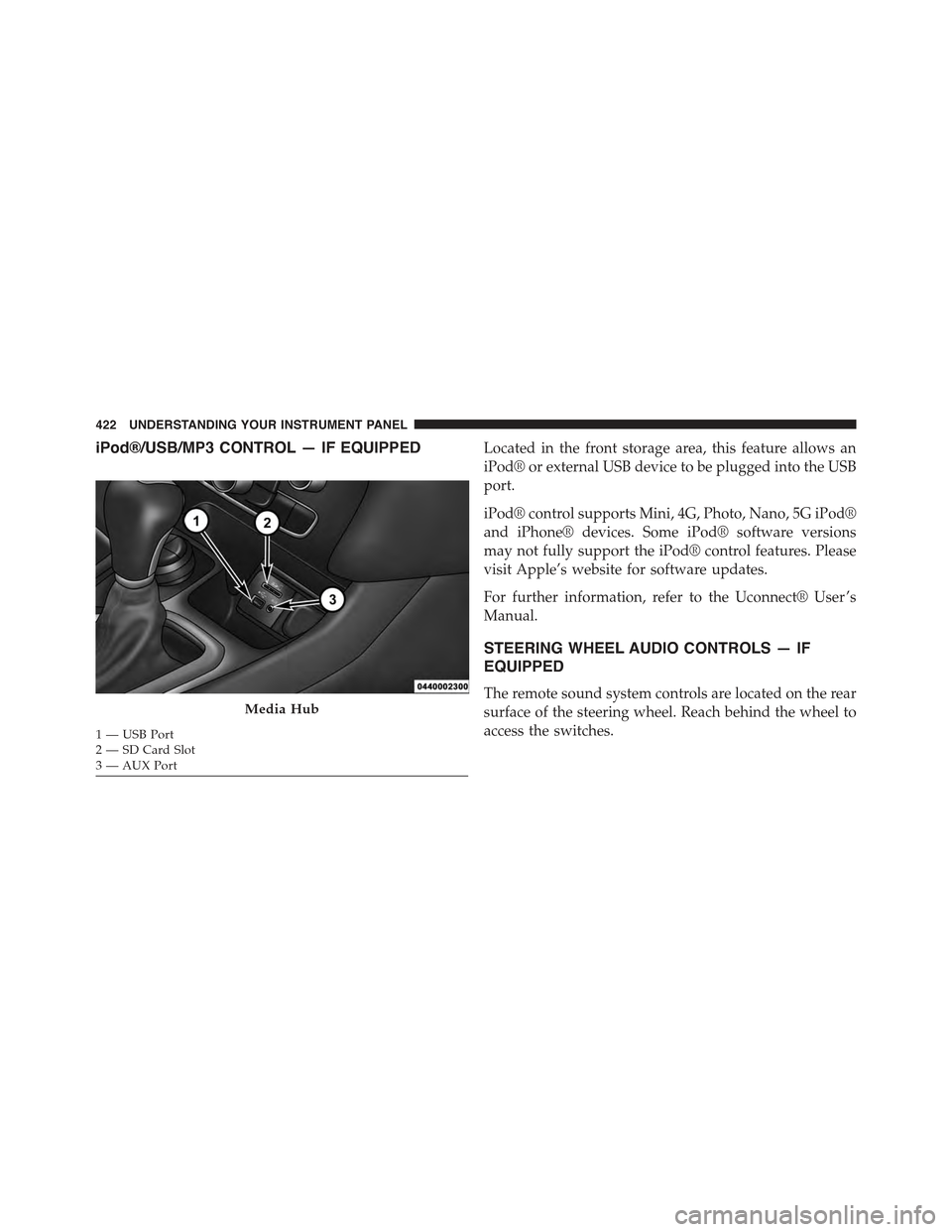
iPod®/USB/MP3 CONTROL — IF EQUIPPEDLocated in the front storage area, this feature allows an
iPod® or external USB device to be plugged into the USB
port.
iPod® control supports Mini, 4G, Photo, Nano, 5G iPod®
and iPhone® devices. Some iPod® software versions
may not fully support the iPod® control features. Please
visit Apple’s website for software updates.
For further information, refer to the Uconnect® User ’s
Manual.
STEERING WHEEL AUDIO CONTROLS — IF
EQUIPPED
The remote sound system controls are located on the rear
surface of the steering wheel. Reach behind the wheel to
access the switches.
Media Hub
1—USBPort2—SDCardSlot3—AUXPort
422 UNDERSTANDING YOUR INSTRUMENT PANEL
Page 425 of 772
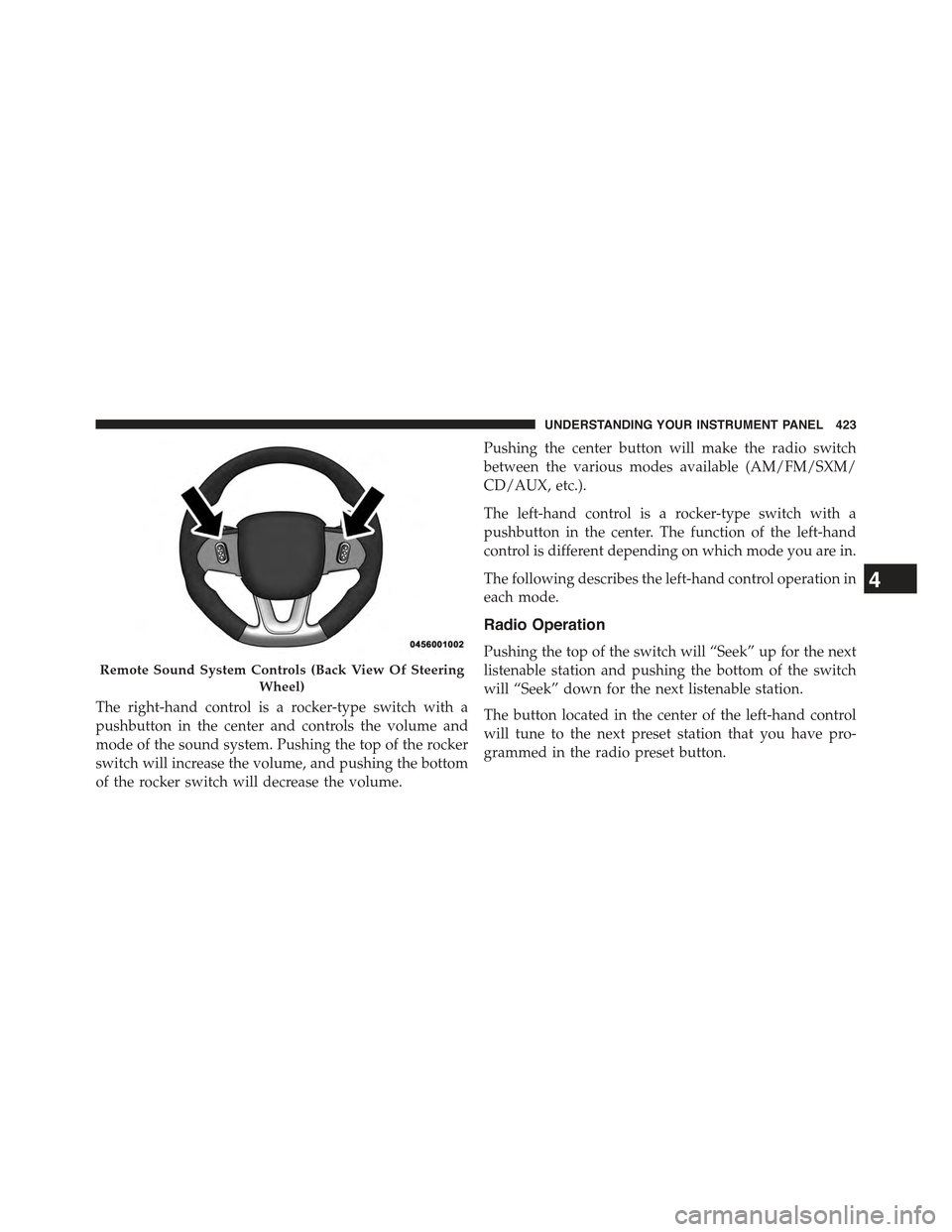
The right-hand control is a rocker-type switch with a
pushbutton in the center and controls the volume and
mode of the sound system. Pushing the top of the rocker
switch will increase the volume, and pushing the bottom
of the rocker switch will decrease the volume.
Pushing the center button will make the radio switch
between the various modes available (AM/FM/SXM/
CD/AUX, etc.).
The left-hand control is a rocker-type switch with a
pushbutton in the center. The function of the left-hand
control is different depending on which mode you are in.
The following describes the left-hand control operation in
each mode.
Radio Operation
Pushing the top of the switch will “Seek” up for the next
listenable station and pushing the bottom of the switch
will “Seek” down for the next listenable station.
The button located in the center of the left-hand control
will tune to the next preset station that you have pro-
grammed in the radio preset button.
Remote Sound System Controls (Back View Of Steering
Wheel)
4
UNDERSTANDING YOUR INSTRUMENT PANEL 423
Page 457 of 772
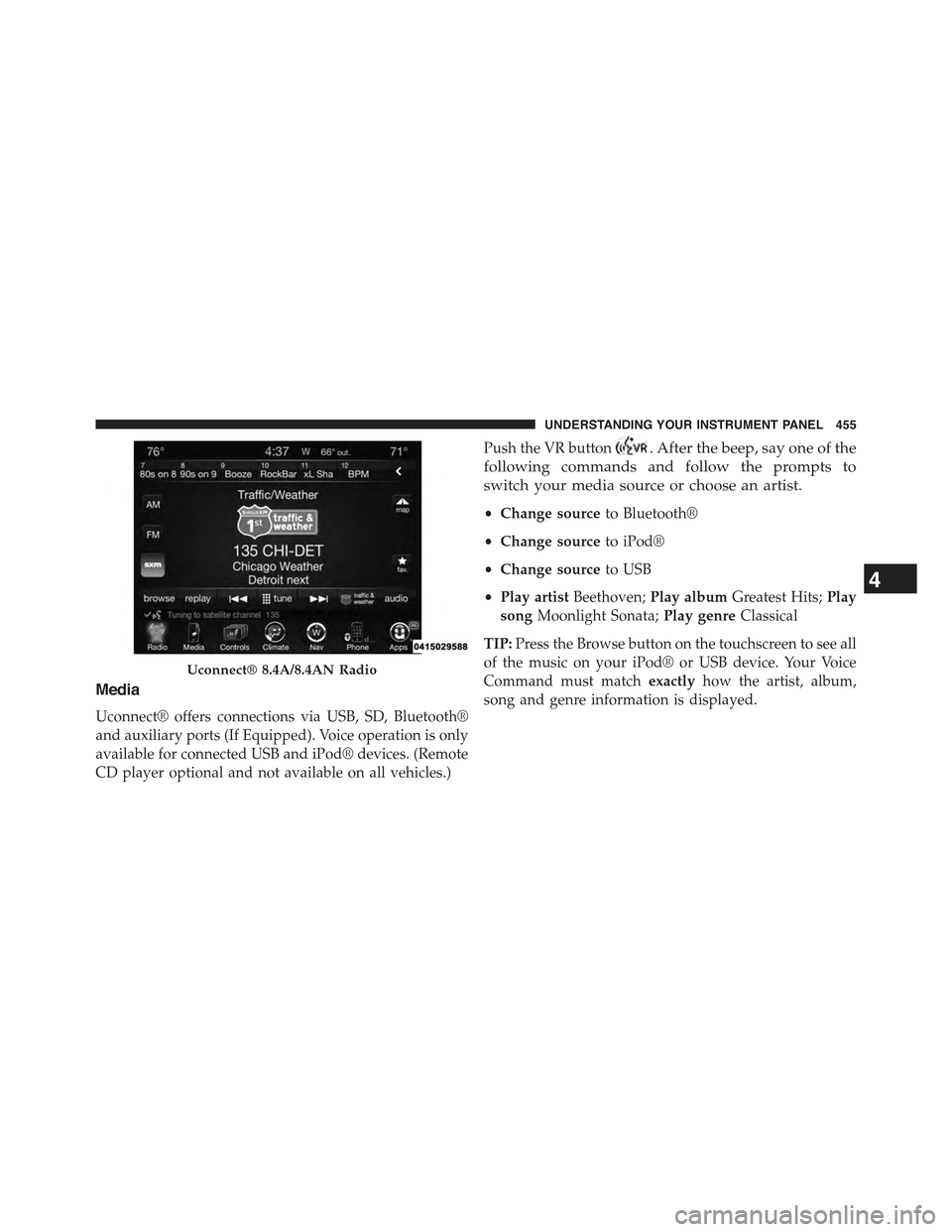
Media
Uconnect® offers connections via USB, SD, Bluetooth®
and auxiliary ports (If Equipped). Voice operation is only
available for connected USB and iPod® devices. (Remote
CD player optional and not available on all vehicles.)
Push the VR button. After the beep, say one of the
following commands and follow the prompts to
switch your media source or choose an artist.
•Change sourceto Bluetooth®
•Change sourceto iPod®
•Change sourceto USB
•Play artistBeethoven;Play albumGreatest Hits;Play
songMoonlight Sonata;Play genreClassical
TIP:Press the Browse button on the touchscreen to see all
of the music on your iPod® or USB device. Your Voice
Command must matchexactlyhow the artist, album,
song and genre information is displayed.
Uconnect® 8.4A/8.4AN Radio
4
UNDERSTANDING YOUR INSTRUMENT PANEL 455
Page 718 of 772
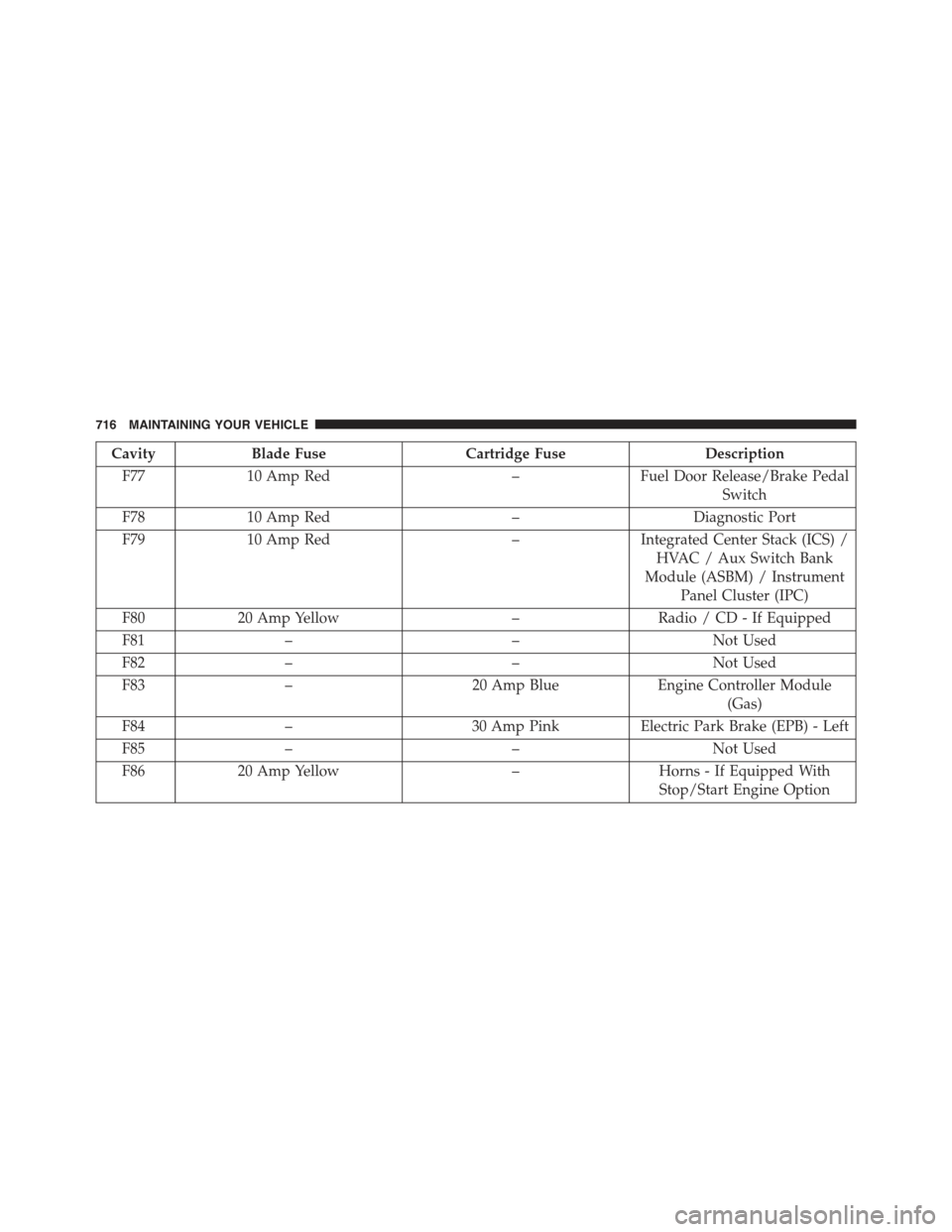
CavityBlade FuseCartridge FuseDescription
F7710 Amp Red–Fuel Door Release/Brake Pedal
Switch
F7810 Amp Red–Diagnostic Port
F7910 Amp Red–Integrated Center Stack (ICS) /
HVAC / Aux Switch Bank
Module (ASBM) / Instrument
Panel Cluster (IPC)
F8020 Amp Yellow–Radio / CD - If Equipped
F81––Not Used
F82––Not Used
F83–20 Amp BlueEngine Controller Module
(Gas)
F84–30 Amp PinkElectric Park Brake (EPB) - Left
F85––Not Used
F8620 Amp Yellow–Horns - If Equipped With
Stop/Start Engine Option
716 MAINTAINING YOUR VEHICLE
Page 721 of 772
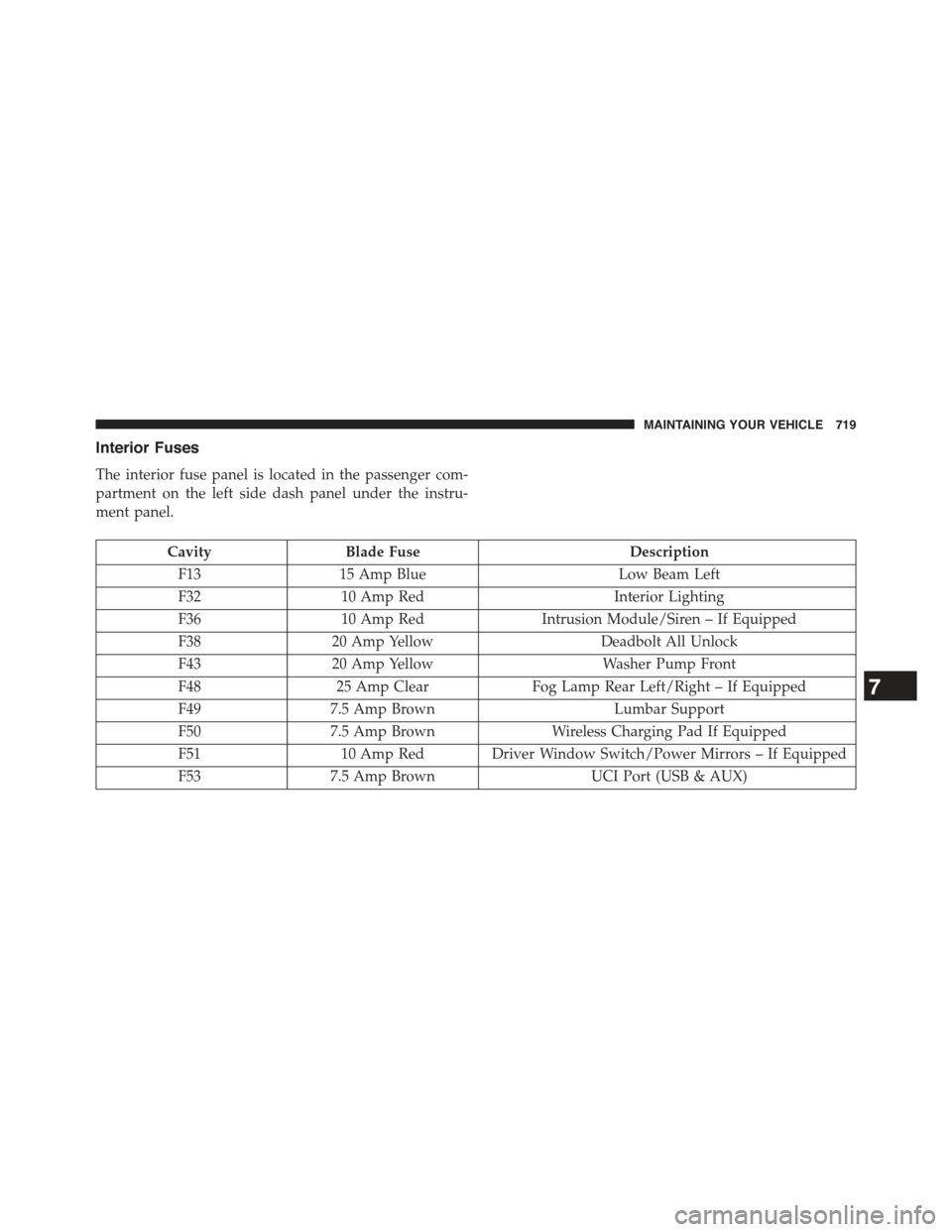
Interior Fuses
The interior fuse panel is located in the passenger com-
partment on the left side dash panel under the instru-
ment panel.
CavityBlade FuseDescription
F1315 Amp BlueLow Beam Left
F3210 Amp RedInterior Lighting
F3610 Amp RedIntrusion Module/Siren – If Equipped
F3820 Amp YellowDeadbolt All Unlock
F4320 Amp YellowWasher Pump Front
F4825 Amp ClearFog Lamp Rear Left/Right – If Equipped
F497.5 Amp BrownLumbar Support
F507.5 Amp BrownWireless Charging Pad If Equipped
F5110 Amp Red Driver Window Switch/Power Mirrors – If Equipped
F537.5 Amp BrownUCI Port (USB & AUX)
7
MAINTAINING YOUR VEHICLE 719
Page 751 of 772
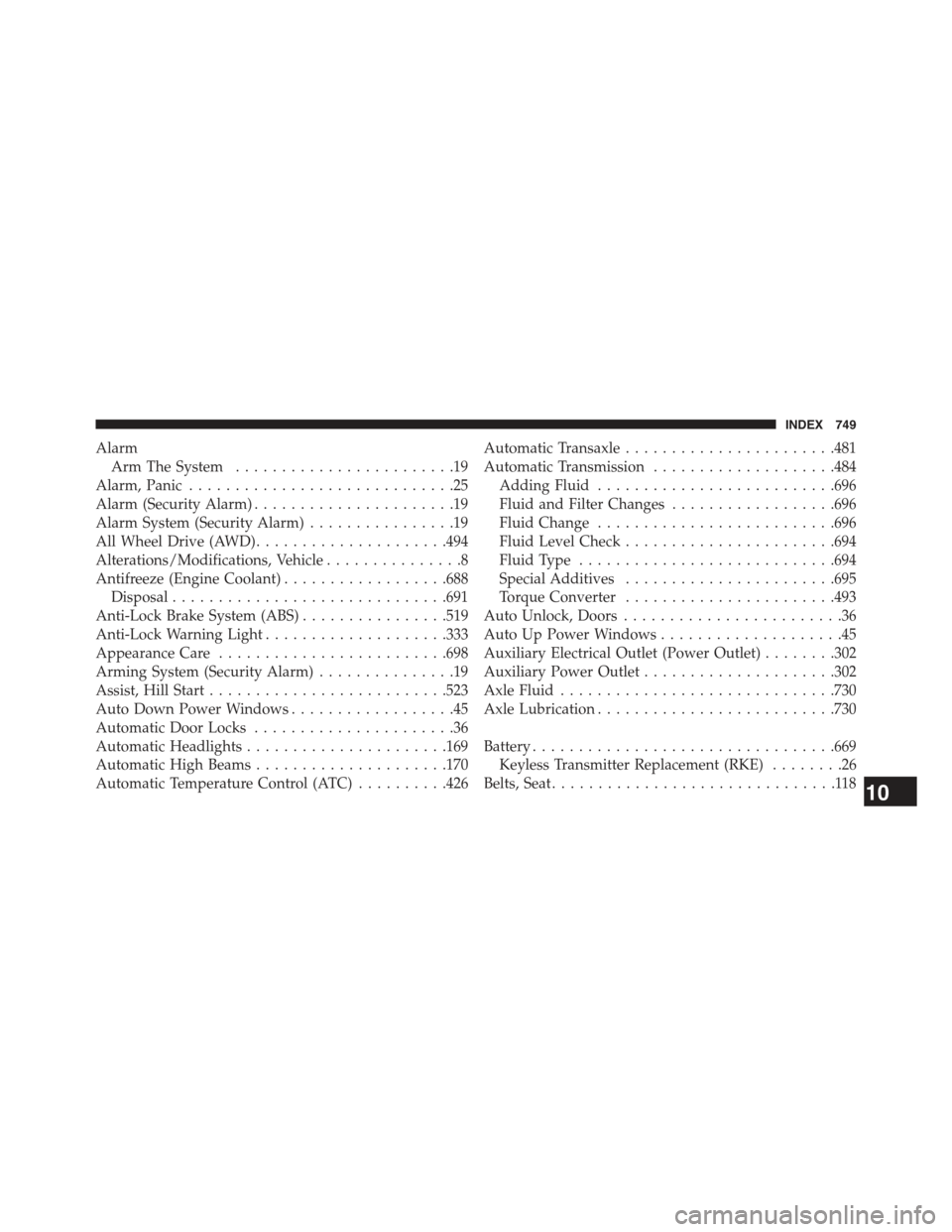
Alarm
Arm The System........................19
Alarm, Panic.............................25
Alarm (Security Alarm)......................19
Alarm System (Security Alarm)................19
All Wheel Drive (AWD).....................494
Alterations/Modifications, Vehicle...............8
Antifreeze (Engine Coolant)..................688
Disposal..............................691
Anti-Lock Brake System (ABS)................519
Anti-Lock Warning Light....................333
Appearance Care.........................698
Arming System (Security Alarm)...............19
Assist, Hill Start..........................523
Auto Down Power Windows..................45
Automatic Door Locks......................36
Automatic Headlights......................169
Automatic High Beams.....................170
Automatic Temperature Control (ATC)..........426
Automatic Transaxle.......................481
Automatic Transmission....................484
Adding Fluid..........................696
Fluid and Filter Changes..................696
Fluid Change..........................696
Fluid Level Check.......................694
Fluid Type............................694
Special Additives.......................695
Torque Converter.......................493
Auto Unlock, Doors........................36
Auto Up Power Windows....................45
Auxiliary Electrical Outlet (Power Outlet)........302
Auxiliary Power Outlet.....................302
Axle Fluid..............................730
Axle Lubrication..........................730
Battery.................................669
Keyless Transmitter Replacement (RKE)........26
Belts, Seat...............................11810
INDEX 749
Page 754 of 772
Selection of Coolant (Antifreeze).............688
Corrosion Protection.......................698
Cruise Control (Speed Control)................191
Cupholders..............................311
Customer Assistance.......................739
Data Recorder, Event.......................91
Daytime Brightness, Interior Lights.............177
Daytime Running Lights....................172
Dealer Service............................659
Defroster, Rear Window.....................321
Defroster, Windshield......................119
Diagnostic System, Onboard.................657
Dimmer Switch, Headlight...................174
Dipsticks
Oil (Engine)...........................661
Disabled Vehicle Towing....................648
Disposal
Antifreeze (Engine Coolant)................691
Door Locks
Door Locks............................34
Key Fob . . . . . . . . . . . . . . . . . . . . . . . . . . . . . . .34
Remote...............................34
Remote Keyless Entry (RKE)................34
Door Locks, Automatic......................36
Door Opener, Garage.......................288
Driver Information Display
DID . . . . . . . . . . . . . . . . . . . . . . . . . . . . . . . ..380
Instrument Cluster Display................380
Driver Information Display (DID)
Instrument Cluster......................374
Oil Change............................374
Driver’s Seat Back Tilt......................153
Driving................................505
E-85 Fuel...............................584
Economy (Fuel) Mode......................484
Electrical Outlet, Auxiliary (Power Outlet)........302
752 INDEX
Page 763 of 772
Owner’s Manual (Operator Manual).............5
Paint Care..............................698
Panic Alarm..............................25
Parking Brake............................511
ParkSense® System, Rear....................234
Passing Light............................174
Pets...................................115
Placard, Tire and Loading Information..........548
Power
Brakes...............................518
Door Locks............................35
Inverter..............................306
Lift Gate..............................49
Mirrors..............................138
Outlet (Auxiliary Electrical Outlet)...........302
Sunroof..............................297
Sunroof (Sky Slider).....................696
Windows..............................44
Pregnant Women and Seat Belts................62
Preparation for Jacking.....................631
Pretensioners
Seat Belts..............................62
Programming Transmitters (Remote Keyless Entry) . .22
Radial Ply Tires..........................555
Radiator Cap (Coolant Pressure Cap)...........690
Radio Operation..........................425
Radio Remote Controls.....................422
Radio (Sound Systems).....................421
Rain Sensitive Wiper System.................183
Rear Camera............................286
Rear Cross Path..........................146
Rear ParkSense System.....................234
Rear Seat, Folding.........................159
Rear Window Defroster.....................321
Rear Window Features.....................320
Rear Wiper/Washer........................32010
INDEX 761