wheel JEEP CHEROKEE 2023 Owner's Manual
[x] Cancel search | Manufacturer: JEEP, Model Year: 2023, Model line: CHEROKEE, Model: JEEP CHEROKEE 2023Pages: 276, PDF Size: 12.55 MB
Page 87 of 276
STARTING AND OPERATING85
The transmission will automatically downshift to FIRST or
SECOND gear (depending on model) when coming to a
stop. After a stop, the driver should manually upshift (+)
the transmission as the vehicle is accelerated.
You can start out (from a stop) in FIRST or SECOND
gear. Starting out in SECOND gear can be helpful in
snow or icy conditions. Tap the gear selector forward or
rearward to select the desired gear after the vehicle is
brought to a stop.
If a requested downshift would cause the engine to
overspeed, that shift will not occur.
The system will ignore attempts to upshift at too low of
a vehicle speed.
Avoid using Cruise Control when AutoStick is engaged
because the transmission will not shift automatically.
Transmission shifting will be more noticeable when
AutoStick is enabled.
The system may revert to automatic shift mode if a
fault or overheat condition is detected.
To disengage AutoStick mode, return the gear selector to
the DRIVE position. You can shift in or out of the AutoStick
position at any time without taking your foot off the
accelerator pedal.Torque Converter Clutch
A feature designed to improve fuel economy has been
included in the automatic transmission on your vehicle. A
clutch within the torque converter engages automatically
at calibrated speeds. This may result in a slightly different
feeling or response during normal operation in the upper
gears. When the vehicle speed drops or during some
accelerations, the clutch automatically disengages.
NOTE:The torque converter clutch will not engage until the trans -
mission fluid is warm (usually after 1 to 3 miles [2 to 5 km]
of driving). Because the engine speed is higher when the
torque converter clutch is not engaged, it may seem as if
the transmission is not shifting properly when cold. This is
normal. The torque converter clutch will function normally
once the transmission is sufficiently warm.
FOUR-WHEEL DRIVE OPERATION
1-SPEED FOUR-WHEEL DRIVE
(4WD) — IF EQUIPPED
This feature provides on-demand four-wheel drive (4WD).
The system is automatic with no driver inputs or additional
driving skills required. Under normal driving conditions,
the front wheels provide most of the traction. If the front
wheels begin to lose traction, power is shifted
automatically to the rear wheels. The greater the front
wheel traction loss, the greater the power transfer to the
rear wheels. Additionally, on dry pavement under heavy throttle input
(where one may have no wheel spin), torque will be sent to
the rear in a preemptive effort to improve vehicle launch
and performance characteristics.
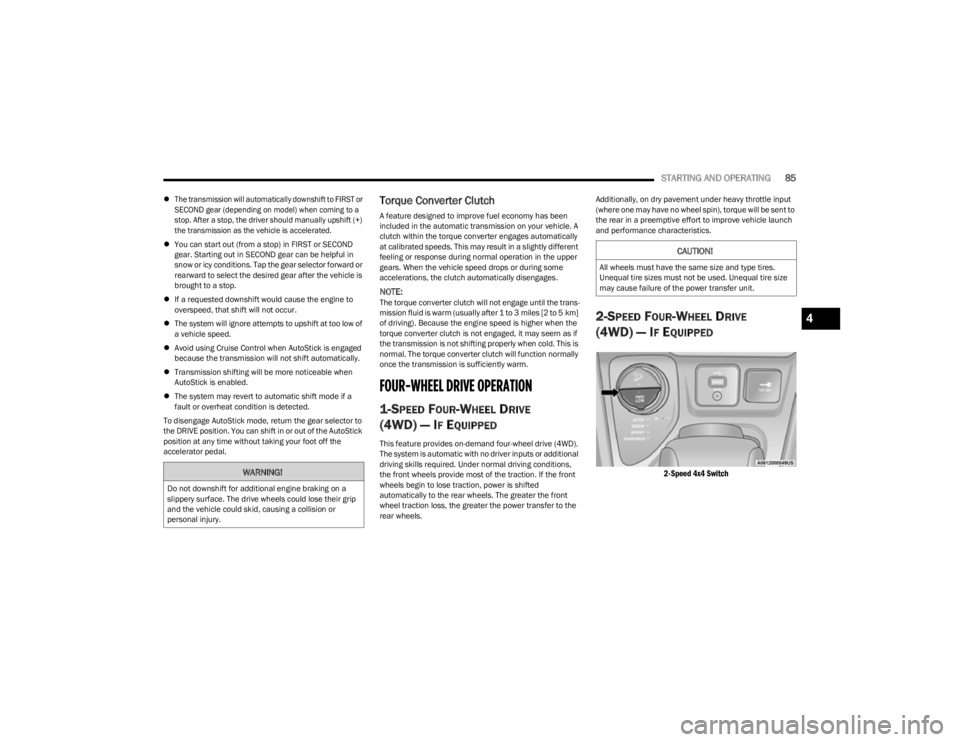
2-SPEED FOUR-WHEEL DRIVE
(4WD) — I
F EQUIPPED
2-Speed 4x4 Switch
WARNING!
Do not downshift for additional engine braking on a
slippery surface. The drive wheels could lose their grip
and the vehicle could skid, causing a collision or
personal injury.
CAUTION!
All wheels must have the same size and type tires.
Unequal tire sizes must not be used. Unequal tire size
may cause failure of the power transfer unit.
4
23_KL_OM_EN_USC_t.book Page 85
Page 88 of 276
86STARTING AND OPERATING
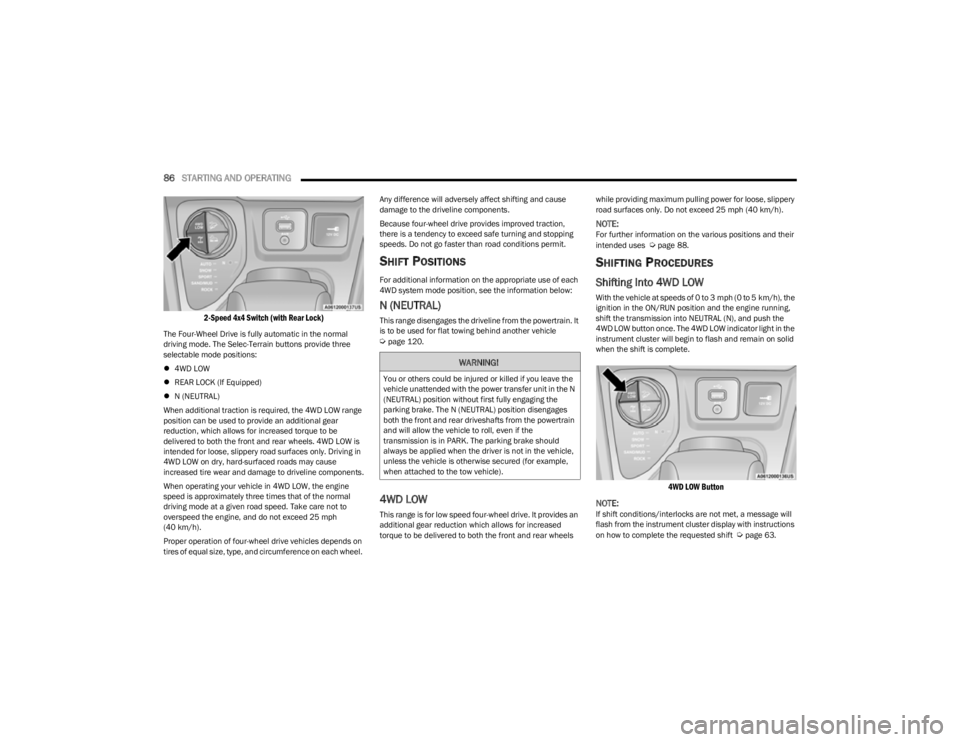
2-Speed 4x4 Switch (with Rear Lock)
The Four-Wheel Drive is fully automatic in the normal
driving mode. The Selec-Terrain buttons provide three
selectable mode positions:
4WD LOW
REAR LOCK (If Equipped)
N (NEUTRAL)
When additional traction is required, the 4WD LOW range
position can be used to provide an additional gear
reduction, which allows for increased torque to be
delivered to both the front and rear wheels. 4WD LOW is
intended for loose, slippery road surfaces only. Driving in
4WD LOW on dry, hard-surfaced roads may cause
increased tire wear and damage to driveline components.
When operating your vehicle in 4WD LOW, the engine
speed is approximately three times that of the normal
driving mode at a given road speed. Take care not to
overspeed the engine, and do not exceed 25 mph
(40 km/h).
Proper operation of four-wheel drive vehicles depends on
tires of equal size, type, and circumference on each wheel. Any difference will adversely affect shifting and cause
damage to the driveline components.
Because four-wheel drive provides improved traction,
there is a tendency to exceed safe turning and stopping
speeds. Do not go faster than road conditions permit.
SHIFT POSITIONS
For additional information on the appropriate use of each
4WD system mode position, see the information below:
N (NEUTRAL)
This range disengages the driveline from the powertrain. It
is to be used for flat towing behind another vehicle
Úpage 120.
4WD LOW
This range is for low speed four-wheel drive. It provides an
additional gear reduction which allows for increased
torque to be delivered to both the front and rear wheels
while providing maximum pulling power for loose, slippery
road surfaces only. Do not exceed 25 mph (40 km/h).
NOTE:For further information on the various positions and their
intended uses Úpage 88.
SHIFTING PROCEDURES
Shifting Into 4WD LOW
With the vehicle at speeds of 0 to 3 mph (0 to 5 km/h), the
ignition in the ON/RUN position and the engine running,
shift the transmission into NEUTRAL (N), and push the
4WD LOW button once. The 4WD LOW indicator light in the
instrument cluster will begin to flash and remain on solid
when the shift is complete.
4WD LOW Button
NOTE:
If shift conditions/interlocks are not met, a message will
flash from the instrument cluster display with instructions
on how to complete the requested shift
Úpage 63.
WARNING!
You or others could be injured or killed if you leave the
vehicle unattended with the power transfer unit in the N
(NEUTRAL) position without first fully engaging the
parking brake. The N (NEUTRAL) position disengages
both the front and rear driveshafts from the powertrain
and will allow the vehicle to roll, even if the
transmission is in PARK. The parking brake should
always be applied when the driver is not in the vehicle,
unless the vehicle is otherwise secured (for example,
when attached to the tow vehicle).
23_KL_OM_EN_USC_t.book Page 86
Page 90 of 276
88STARTING AND OPERATING
SELEC-TERRAIN
DESCRIPTION
Selec-Terrain allows the driver to specify the driving
surface to allow the vehicle systems to provide the best
performance possible across a wide range of conditions.
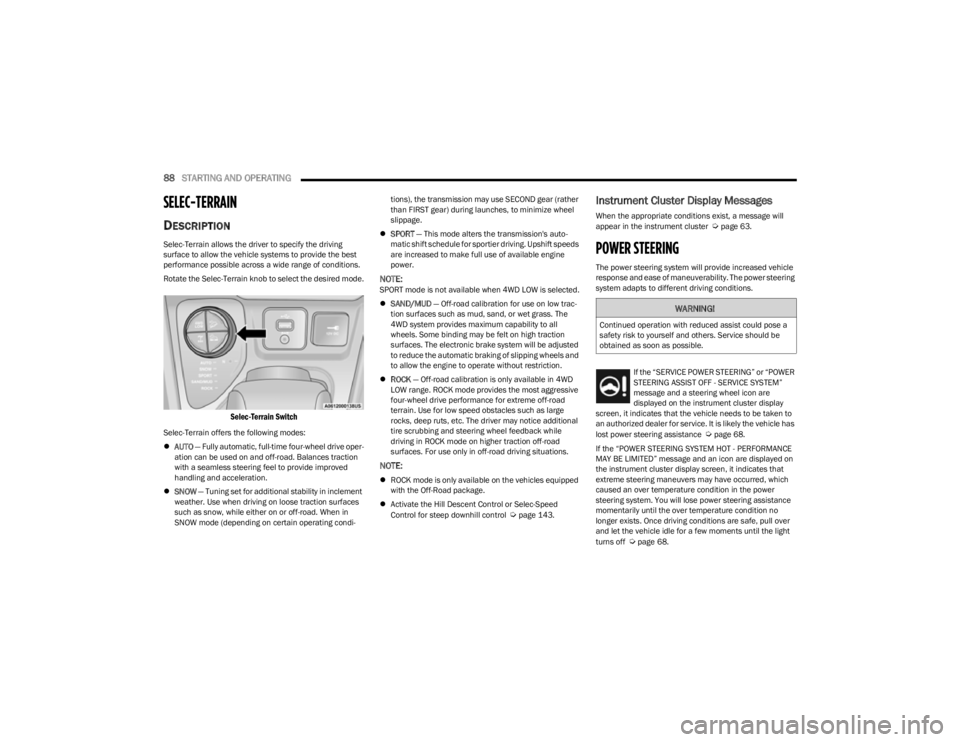
Rotate the Selec-Terrain knob to select the desired mode.
Selec-Terrain Switch
Selec-Terrain offers the following modes:
AUTO — Fully automatic, full-time four-wheel drive oper -
ation can be used on and off-road. Balances traction
with a seamless steering feel to provide improved
handling and acceleration.
SNOW — Tuning set for additional stability in inclement
weather. Use when driving on loose traction surfaces
such as snow, while either on or off-road. When in
SNOW mode (depending on certain operating condi -tions), the transmission may use SECOND gear (rather
than FIRST gear) during launches, to minimize wheel
slippage.
SPORT — This mode alters the transmission's auto -
matic shift schedule for sportier driving. Upshift speeds
are increased to make full use of available engine
power.
NOTE:SPORT mode is not available when 4WD LOW is selected.
SAND/MUD — Off-road calibration for use on low trac -
tion surfaces such as mud, sand, or wet grass. The
4WD system provides maximum capability to all
wheels. Some binding may be felt on high traction
surfaces. The electronic brake system will be adjusted
to reduce the automatic braking of slipping wheels and
to allow the engine to operate without restriction.
ROCK — Off-road calibration is only available in 4WD
LOW range. ROCK mode provides the most aggressive
four-wheel drive performance for extreme off-road
terrain. Use for low speed obstacles such as large
rocks, deep ruts, etc. The driver may notice additional
tire scrubbing and steering wheel feedback while
driving in ROCK mode on higher traction off-road
surfaces. For use only in off-road driving situations.
NOTE:
ROCK mode is only available on the vehicles equipped
with the Off-Road package.
Activate the Hill Descent Control or Selec-Speed
Control for steep downhill control
Úpage 143.
Instrument Cluster Display Messages
When the appropriate conditions exist, a message will
appear in the instrument cluster Úpage 63.
POWER STEERING
The power steering system will provide increased vehicle
response and ease of maneuverability. The power steering
system adapts to different driving conditions.
If the “SERVICE POWER STEERING” or “POWER
STEERING ASSIST OFF - SERVICE SYSTEM”
message and a steering wheel icon are
displayed on the instrument cluster display
screen, it indicates that the vehicle needs to be taken to
an authorized dealer for service. It is likely the vehicle has
lost power steering assistance
Úpage 68.
If the “POWER STEERING SYSTEM HOT - PERFORMANCE
MAY BE LIMITED” message and an icon are displayed on
the instrument cluster display screen, it indicates that
extreme steering maneuvers may have occurred, which
caused an over temperature condition in the power
steering system. You will lose power steering assistance
momentarily until the over temperature condition no
longer exists. Once driving conditions are safe, pull over
and let the vehicle idle for a few moments until the light
turns off
Úpage 68.
WARNING!
Continued operation with reduced assist could pose a
safety risk to yourself and others. Service should be
obtained as soon as possible.
23_KL_OM_EN_USC_t.book Page 88
Page 91 of 276

STARTING AND OPERATING89
NOTE:
Even if the power steering assistance is no longer oper -
ational, it is still possible to steer the vehicle. Under
these conditions there will be a substantial increase in
steering effort, especially at low speeds and during
parking maneuvers.
If the condition persists, see an authorized dealer for
service.
STOP/START SYSTEM
The Stop/Start system was designed to reduce fuel
consumption. The system will stop the engine
automatically during a vehicle stop if the required
conditions are met. Releasing the brake pedal or pressing
the accelerator pedal will automatically restart the engine.
This vehicle has been upgraded with a heavy-duty battery,
starter, as well as other engine parts, to handle the
additional engine starts.
AUTOSTOP MODE
The Stop/Start feature is enabled after every normal
customer engine start. At that time, the system will go into
STOP/START READY.
To Activate The Autostop Mode, The Following Must Occur:
The system must be in STOP/START READY state. A
“STOP/START READY” message will be displayed in the
instrument cluster display within the Stop/Start
section
Úpage 63.
The vehicle must be completely stopped.
The gear selector must be in a forward gear and the
brake pedal pressed. The engine will shut down, the tachometer will move to the
zero position, and the Stop/Start indicator light will
illuminate indicating you are in Autostop. Customer
settings will be maintained upon return to an
engine-running condition.
POSSIBLE REASONS THE ENGINE DOES
N
OT AUTOSTOP
Prior to engine shut down, the system will check many
safety and comfort conditions to see if they are fulfilled.
Detailed information about the operation of the Stop/Start
system may be viewed in the instrument cluster display
Stop/Start Screen. In the following situations, the engine
will not stop:
Driver’s seat belt is not buckled
Driver’s door is not closed
Battery temperature is too warm or cold
Battery charge is low
The vehicle is on a steep grade
Cabin heating or cooling is in process and an accept -
able cabin temperature has not been achieved
HVAC is set to full defrost mode at a high blower speed
HVAC is set to MAX A/C
Engine has not reached normal operating temperature
The transmission is not in a forward or reverse gear
Hood is open
Brake pedal is not pressed with sufficient pressure with
vehicle in DRIVE (D) position
Accelerator pedal input
Engine temperature is too high
5 mph (8 km/h) threshold has not been achieved from
previous Autostop
Steering angle is beyond threshold
It may be possible for the vehicle to be driven several
times without the Stop/Start system going into a STOP/
START READY state under more extreme conditions of the
items listed previously.TO START THE ENGINE WHILE IN
A
UTOSTOP MODE
While in a forward gear, the engine will start when the
brake pedal is released or the accelerator pedal is
pressed. The transmission will automatically re-engage
upon engine restart.
Conditions That Will Cause The Engine To Start
Automatically While In Autostop Mode:
The transmission gear selector is moved out of DRIVE,
except in the PARK position
To maintain cabin temperature comfort
HVAC is set to full defrost mode
HVAC system temperature or fan speed is manually
adjusted
Battery voltage drops too low
Stop/Start OFF switch is pushed
A Stop/Start system error occurs
Steering wheel is turned beyond threshold
4
23_KL_OM_EN_USC_t.book Page 89
Page 92 of 276
90STARTING AND OPERATING
Conditions That Force An Application Of The Electric Park
Brake While In Autostop Mode:
The driver’s door is open and brake pedal released
The driver’s door is open and the driver’s seat belt is
unbuckled
The engine hood has been opened
A Stop/Start system error occurs
If the Electric Park Brake (EPB) is applied with the engine
off, the engine may require a manual restart and the EPB
may require a manual release (press brake pedal and
push EPB switch).
TO MANUALLY TURN OFF THE STOP/
S
TART SYSTEM
Stop/Start OFF Switch
Push the Stop/Start OFF switch (located on the switch
bank). The light on the switch will illuminate. The “STOP/
START OFF” message will appear in the instrument cluster
display and the Autostop mode will be disabled
Úpage 63.
NOTE:The Stop/Start system will reset itself back to the ON
mode every time the ignition is turned OFF and back ON.
TO MANUALLY TURN ON THE STOP/
S
TART SYSTEM
Push the Stop/Start OFF switch (located on the switch
bank). The light on the switch will turn off.
SYSTEM MALFUNCTION
If there is a malfunction in the Stop/Start system, the
system will not shut down the engine. A “SERVICE STOP/
START SYSTEM” message and a yellow Stop/Start telltale
will appear in the instrument cluster display
Úpage 68.
If the “SERVICE STOP/START SYSTEM” message appears
in the instrument cluster display, have the system
checked by an authorized dealer.
CRUISE CONTROL SYSTEMS — IF EQUIPPED
Your vehicle may be equipped with the Cruise Control
system, or the Adaptive Cruise Control (ACC) system:
Cruise Control will keep your vehicle at a constant
preset speed.
Adaptive Cruise Control (ACC) will adjust the vehicle
speed up to the preset speed to maintain a distance
with the vehicle ahead.
NOTE:
In vehicles equipped with ACC, if ACC is not enabled,
Fixed Speed Cruise Control will not detect vehicles
directly ahead of you. Always be aware of the feature
selected.
Only one Cruise Control feature can operate at a time.
For example, if Fixed Speed Cruise Control is enabled,
Adaptive Cruise Control will be unavailable, and vice
versa.
CRUISE CONTROL
When engaged, the Cruise Control takes over accelerator
operations at speeds greater than 20 mph (32 km/h).
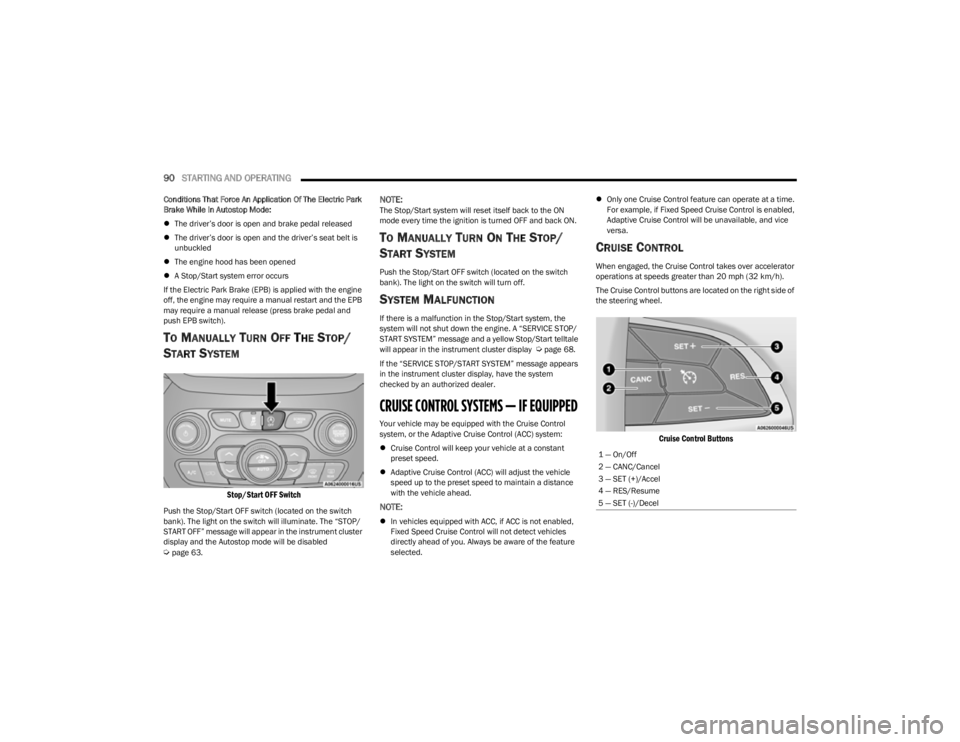
The Cruise Control buttons are located on the right side of
the steering wheel.
Cruise Control Buttons
1 — On/Off
2 — CANC/Cancel
3 — SET (+)/Accel
4 — RES/Resume
5 — SET (-)/Decel
23_KL_OM_EN_USC_t.book Page 90
Page 95 of 276
STARTING AND OPERATING93
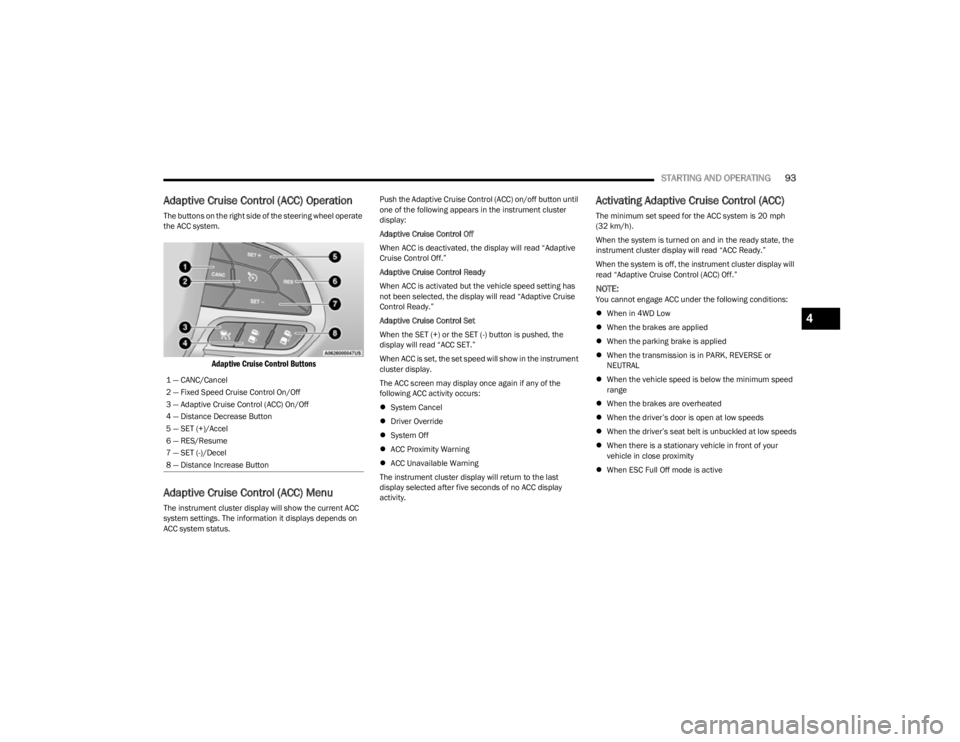
Adaptive Cruise Control (ACC) Operation
The buttons on the right side of the steering wheel operate
the ACC system.
Adaptive Cruise Control Buttons
Adaptive Cruise Control (ACC) Menu
The instrument cluster display will show the current ACC
system settings. The information it displays depends on
ACC system status. Push the Adaptive Cruise Control (ACC) on/off button until
one of the following appears in the instrument cluster
display:
Adaptive Cruise Control Off
When ACC is deactivated, the display will read “Adaptive
Cruise Control Off.”
Adaptive Cruise Control Ready
When ACC is activated but the vehicle speed setting has
not been selected, the display will read “Adaptive Cruise
Control Ready.”
Adaptive Cruise Control Set
When the SET (+) or the SET (-) button is pushed, the
display will read “ACC SET.”
When ACC is set, the set speed will show in the instrument
cluster display.
The ACC screen may display once again if any of the
following ACC activity occurs:
System Cancel
Driver Override
System Off
ACC Proximity Warning
ACC Unavailable Warning
The instrument cluster display will return to the last
display selected after five seconds of no ACC display
activity.
Activating Adaptive Cruise Control (ACC)
The minimum set speed for the ACC system is 20 mph
(32 km/h).
When the system is turned on and in the ready state, the
instrument cluster display will read “ACC Ready.”
When the system is off, the instrument cluster display will
read “Adaptive Cruise Control (ACC) Off.”
NOTE:You cannot engage ACC under the following conditions:
When in 4WD Low
When the brakes are applied
When the parking brake is applied
When the transmission is in PARK, REVERSE or
NEUTRAL
When the vehicle speed is below the minimum speed
range
When the brakes are overheated
When the driver’s door is open at low speeds
When the driver’s seat belt is unbuckled at low speeds
When there is a stationary vehicle in front of your
vehicle in close proximity
When ESC Full Off mode is active
1 — CANC/Cancel
2 — Fixed Speed Cruise Control On/Off
3 — Adaptive Cruise Control (ACC) On/Off
4 — Distance Decrease Button
5 — SET (+)/Accel
6 — RES/Resume
7 — SET (-)/Decel
8 — Distance Increase Button
4
23_KL_OM_EN_USC_t.book Page 93
Page 108 of 276

106STARTING AND OPERATING
PARKSENSE ACTIVE PARK ASSIST
SYSTEM — IF EQUIPPED
The ParkSense Active Park Assist system is intended to
assist the driver during parallel, perpendicular, and
parallel park exit maneuvers by identifying a proper
parking space, providing audible/visual instructions, and
controlling the steering wheel. The ParkSense Active Park
Assist system is defined as “semi-automatic” since the
driver maintains control of the accelerator, gear selector
and brakes. Depending on the driver's parking maneuver
selection, the ParkSense Active Park Assist system is
capable of maneuvering a vehicle into a parallel or a
perpendicular parking space on either side (i.e., driver
side or passenger side), as well as exiting a parallel
parking space.
NOTE:
The driver is always responsible for controlling the
vehicle, responsible for any surrounding objects, and
must intervene as required during a parking maneuver.
The system is designed to assist the driver and not to
substitute the driver.
During a semi-automatic maneuver, if the driver
touches the steering wheel after being instructed to
remove their hands from the steering wheel, the
system will cancel, and the driver will be required to
manually complete the parking maneuver.
The system may not work in all conditions (e.g. environ -
mental conditions such as heavy rain, snow, etc., or if
searching for a parking space that has surfaces that
will absorb the ultrasonic sensor waves).
New vehicles from the dealer must have at least
30 miles (48 km) accumulated before the ParkSense
Active Park Assist system is fully calibrated and
performs accurately. This is due to the system’s
dynamic vehicle calibration to improve the perfor -
mance of the feature. The system will also continuously
perform the dynamic vehicle calibration to account for
differences such as over or under inflated tires and
new tires.
ENABLING AND DISABLING THE
P
ARKSENSE ACTIVE PARK ASSIST
S
YSTEM
The ParkSense Active Park Assist system can
be enabled and disabled with the ParkSense
Active Park Assist switch, located on the switch
panel below the Uconnect display.
To enable or disable the ParkSense Active Park Assist
system, push the ParkSense Active Park Assist switch
once (LED turns on). Pushing the switch a second time will
disable the system (LED turns off). The ParkSense Active Park Assist system will turn off
automatically for any of the following conditions:
Parking maneuver is completed
Vehicle speed is greater than 18 mph (30 km/h) when
searching for a parking space
Vehicle speed is greater than 5 mph (7 km/h) during
active steering guidance into the parking space
Steering wheel is touched during active steering guid -
ance into the parking space
ParkSense switch is pushed
Driver's door is opened
Rear liftgate is opened
Electronic Stability Control/Anti-Lock Braking System
intervention
NOTE:The ParkSense Active Park Assist system allows a
maximum number of shifts between DRIVE and REVERSE.
If the maneuver cannot be completed within the maximum
amount of shifts, the system will cancel and the
instrument cluster display will instruct the driver to
complete the maneuver manually.
The ParkSense Active Park Assist system will only operate
and search for a parking space when the following
conditions are present:
Gear selector is in DRIVE.
Ignition is in the RUN position.
ParkSense Active Park Assist switch is activated.
Driver's door is closed.
Rear liftgate is closed.
The vehicle must be driven slowly when using Park -
Sense in order to be able to stop in time when an
obstacle is detected. It is recommended that the
driver looks over his/her shoulder when using Park -
Sense.
CAUTION!
23_KL_OM_EN_USC_t.book Page 106
Page 109 of 276
STARTING AND OPERATING107
Vehicle speed is less than 15 mph (25 km/h).
Vehicle is not in 4WD Low (if equipped).
The outer surface and the underside of the front and
rear fascias/bumpers are clean and clear of snow, ice,
mud, dirt or other obstruction.
When pushed, the LED on the ParkSense Active Park
Assist switch will blink momentarily, and then the LED will
turn off if any of the previously described conditions are
not present.
NOTE:If the vehicle is driven above approximately 15 mph
(25 km/h) while searching for a parking space, the
instrument cluster display will instruct the driver to slow
down. If the vehicle is driven above approximately 18 mph
(30 km/h), the system will cancel. The driver must then
reactivate the system by pushing the ParkSense Active
Park Assist switch.
PARALLEL/PERPENDICULAR PARKING
S
PACE ASSISTANCE OPERATION
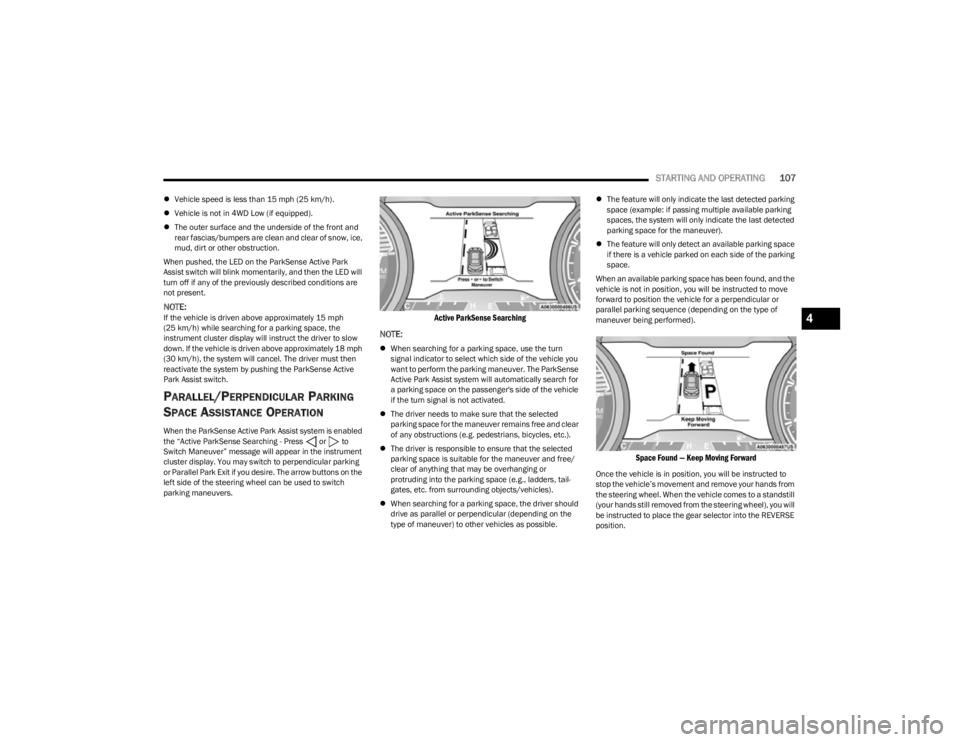
When the ParkSense Active Park Assist system is enabled
the “Active ParkSense Searching - Press or to
Switch Maneuver” message will appear in the instrument
cluster display. You may switch to perpendicular parking
or Parallel Park Exit if you desire. The arrow buttons on the
left side of the steering wheel can be used to switch
parking maneuvers.
Active ParkSense Searching
NOTE:
When searching for a parking space, use the turn
signal indicator to select which side of the vehicle you
want to perform the parking maneuver. The ParkSense
Active Park Assist system will automatically search for
a parking space on the passenger's side of the vehicle
if the turn signal is not activated.
The driver needs to make sure that the selected
parking space for the maneuver remains free and clear
of any obstructions (e.g. pedestrians, bicycles, etc.).
The driver is responsible to ensure that the selected
parking space is suitable for the maneuver and free/
clear of anything that may be overhanging or
protruding into the parking space (e.g., ladders, tail-
gates, etc. from surrounding objects/vehicles).
When searching for a parking space, the driver should
drive as parallel or perpendicular (depending on the
type of maneuver) to other vehicles as possible.
The feature will only indicate the last detected parking
space (example: if passing multiple available parking
spaces, the system will only indicate the last detected
parking space for the maneuver).
The feature will only detect an available parking space
if there is a vehicle parked on each side of the parking
space.
When an available parking space has been found, and the
vehicle is not in position, you will be instructed to move
forward to position the vehicle for a perpendicular or
parallel parking sequence (depending on the type of
maneuver being performed).
Space Found — Keep Moving Forward
Once the vehicle is in position, you will be instructed to
stop the vehicle’s movement and remove your hands from
the steering wheel. When the vehicle comes to a standstill
(your hands still removed from the steering wheel), you will
be instructed to place the gear selector into the REVERSE
position.
4
23_KL_OM_EN_USC_t.book Page 107
Page 110 of 276
108STARTING AND OPERATING
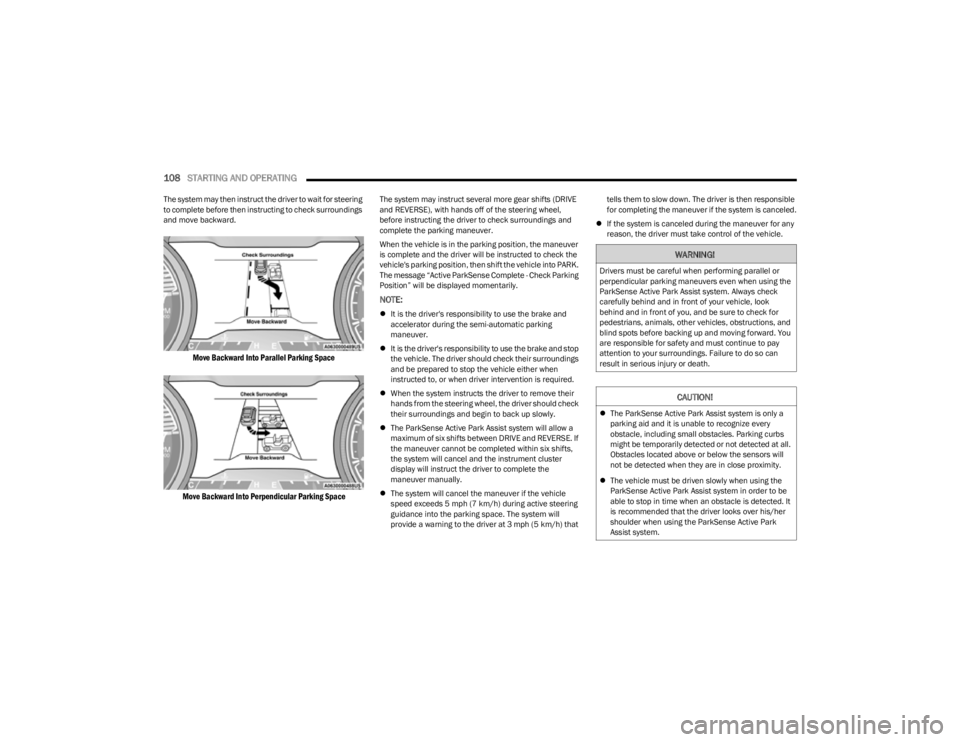
The system may then instruct the driver to wait for steering
to complete before then instructing to check surroundings
and move backward.
Move Backward Into Parallel Parking Space
Move Backward Into Perpendicular Parking Space
The system may instruct several more gear shifts (DRIVE
and REVERSE), with hands off of the steering wheel,
before instructing the driver to check surroundings and
complete the parking maneuver.
When the vehicle is in the parking position, the maneuver
is complete and the driver will be instructed to check the
vehicle's parking position, then shift the vehicle into PARK.
The message “Active ParkSense Complete - Check Parking
Position” will be displayed momentarily.
NOTE:
It is the driver's responsibility to use the brake and
accelerator during the semi-automatic parking
maneuver.
It is the driver's responsibility to use the brake and stop
the vehicle. The driver should check their surroundings
and be prepared to stop the vehicle either when
instructed to, or when driver intervention is required.
When the system instructs the driver to remove their
hands from the steering wheel, the driver should check
their surroundings and begin to back up slowly.
The ParkSense Active Park Assist system will allow a
maximum of six shifts between DRIVE and REVERSE. If
the maneuver cannot be completed within six shifts,
the system will cancel and the instrument cluster
display will instruct the driver to complete the
maneuver manually.
The system will cancel the maneuver if the vehicle
speed exceeds 5 mph (7 km/h) during active steering
guidance into the parking space. The system will
provide a warning to the driver at 3 mph (5 km/h) that tells them to slow down. The driver is then responsible
for completing the maneuver if the system is canceled.
If the system is canceled during the maneuver for any
reason, the driver must take control of the vehicle.
WARNING!
Drivers must be careful when performing parallel or
perpendicular parking maneuvers even when using the
ParkSense Active Park Assist system. Always check
carefully behind and in front of your vehicle, look
behind and in front of you, and be sure to check for
pedestrians, animals, other vehicles, obstructions, and
blind spots before backing up and moving forward. You
are responsible for safety and must continue to pay
attention to your surroundings. Failure to do so can
result in serious injury or death.
CAUTION!
The ParkSense Active Park Assist system is only a
parking aid and it is unable to recognize every
obstacle, including small obstacles. Parking curbs
might be temporarily detected or not detected at all.
Obstacles located above or below the sensors will
not be detected when they are in close proximity.
The vehicle must be driven slowly when using the
ParkSense Active Park Assist system in order to be
able to stop in time when an obstacle is detected. It
is recommended that the driver looks over his/her
shoulder when using the ParkSense Active Park
Assist system.
23_KL_OM_EN_USC_t.book Page 108
Page 111 of 276
STARTING AND OPERATING109
EXITING THE PARKING SPACE
NOTE:The function does not work for exiting a perpendicular
parking space, but only exiting parallel parking spaces.
Activation
To activate this function, shift to DRIVE then push the
Active ParkSense switch once. After selection, the system
activates and warns the driver on the instrument panel
display about the operations that have to be carried out to
perform the maneuver correctly.
Selection Of The Maneuver Side
Use the direction indicators to choose the direction that
you want to perform the maneuver. Use the right arrow
indicator to perform the maneuver to the right side and
use the left arrow indicator to perform the maneuver to the
left.
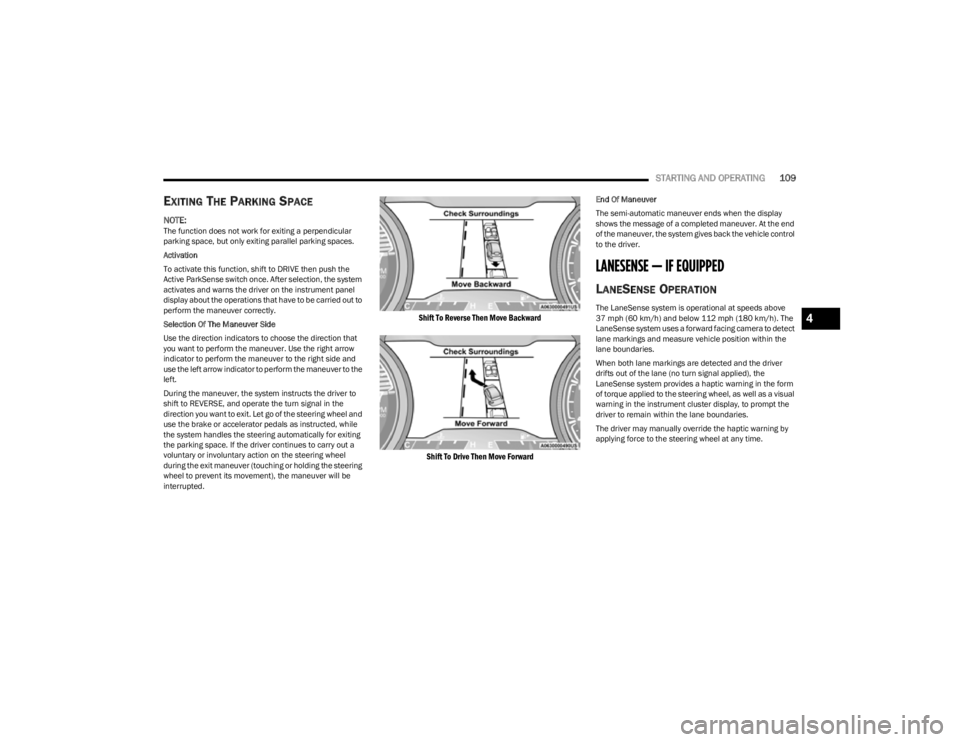
During the maneuver, the system instructs the driver to
shift to REVERSE, and operate the turn signal in the
direction you want to exit. Let go of the steering wheel and
use the brake or accelerator pedals as instructed, while
the system handles the steering automatically for exiting
the parking space. If the driver continues to carry out a
voluntary or involuntary action on the steering wheel
during the exit maneuver (touching or holding the steering
wheel to prevent its movement), the maneuver will be
interrupted.
Shift To Reverse Then Move Backward
Shift To Drive Then Move Forward
End Of Maneuver
The semi-automatic maneuver ends when the display
shows the message of a completed maneuver. At the end
of the maneuver, the system gives back the vehicle control
to the driver.
LANESENSE — IF EQUIPPED
LANESENSE OPERATION
The LaneSense system is operational at speeds above
37 mph (60 km/h) and below 112 mph (180 km/h). The LaneSense system uses a forward facing camera to detect
lane markings and measure vehicle position within the
lane boundaries.
When both lane markings are detected and the driver
drifts out of the lane (no turn signal applied), the
LaneSense system provides a haptic warning in the form
of torque applied to the steering wheel, as well as a visual
warning in the instrument cluster display, to prompt the
driver to remain within the lane boundaries.
The driver may manually override the haptic warning by
applying force to the steering wheel at any time.4
23_KL_OM_EN_USC_t.book Page 109