4WD JEEP CHEROKEE 2023 Owners Manual
[x] Cancel search | Manufacturer: JEEP, Model Year: 2023, Model line: CHEROKEE, Model: JEEP CHEROKEE 2023Pages: 276, PDF Size: 12.55 MB
Page 5 of 276

3
WINDSHIELD WIPERS AND WASHERS ........................... 43Windshield Wiper Operation....................................... 44
Rain Sensing Wipers — If Equipped .......................... 44
Rear Window Wiper/Washer ..................................... 45
Windshield Wiper De-Icer — If Equipped ................... 45
CLIMATE CONTROLS ..........................................................45 Automatic Climate Control Descriptions And
Functions ..................................................................... 45
Automatic Temperature Control (ATC) —
If Equipped ................................................................. 48
Climate Voice Commands .......................................... 48
Operating Tips ............................................................ 48
INTERIOR STORAGE AND EQUIPMENT ............................49 Storage ........................................................................ 49
AUX/USB Control ........................................................ 50
Power Outlets .............................................................. 51
Power Inverter — If Equipped .................................... 52
WINDOWS ...........................................................................53 Power Window Controls .............................................. 53
Automatic Window Features ..................................... 53
Reset Auto-Up.............................................................. 53
Window Lockout Switch.............................................. 54
Wind Buffeting ............................................................ 54
POWER SUNROOF WITH POWER SHADE —
IF EQUIPPED ....................................................................... 54 Opening And Closing The Sunroof ............................. 55
Opening And Closing The Power Shade .................... 55
Pinch Protect Feature ................................................. 56
Venting Sunroof .......................................................... 56
Ignition Off Operation.................................................. 56
Sunroof Maintenance ................................................. 56
HOOD ...................................................................................56 Opening The Hood ...................................................... 56
Closing The Hood ........................................................ 57 LIFTGATE .............................................................................. 57
To Unlock/Open The Liftgate ......................................57
To Lock/Close The Liftgate ......................................... 58
Hands-Free Liftgate — If Equipped ............................ 58
Cargo Area Features ................................................... 59
ROOF LUGGAGE RACK — IF EQUIPPED .......................... 60
GETTING TO KNOW YOUR
INSTRUMENT PANEL
INSTRUMENT CLUSTER ..................................................... 61 Instrument Cluster Descriptions ................................. 63
INSTRUMENT CLUSTER DISPLAY
S
.............................. 63
Instrument Cluster Display Location And Controls.... 63
Oil Life Reset — If Equipped
S
................................. 64
Instrument Cluster Display Menu Items ................... 64
Instrument Cluster Display Selectable Items ............ 67
Battery Saver On/Battery Saver Mode Message —
Electrical Load Reduction Actions — If Equipped .....67
WARNING LIGHTS AND MESSAGES ................................ 68 Red Warning Lights ..................................................... 68
Yellow Warning Lights ................................................. 70
Yellow Indicator Lights ................................................ 73
Green Indicator Lights ................................................. 73
White Indicator Lights.................................................. 74
Blue Indicator Lights.................................................... 75
ONBOARD DIAGNOSTIC SYSTEM — OBD II ..................... 75 Onboard Diagnostic System (OBD II)
Cybersecurity ...............................................................75
EMISSIONS INSPECTION AND MAINTENANCE
PROGRAMS ........................................................................ 75
STARTING AND OPERATING
STARTING THE ENGINE ..................................................... 77 Normal Starting ........................................................... 77
Extreme Cold Weather (Below –20°F Or −29°C) .... 77
Extended Park Starting ............................................... 77
If Engine Fails To Start ............................................... 78
After Starting................................................................ 78
ENGINE BREAK-IN RECOMMENDATIONS........................ 78
PARKING BRAKE ................................................................ 78 Electric Park Brake (EPB) ........................................... 78
AUTOMATIC TRANSMISSION ............................................ 81 Key Ignition Park Interlock.......................................... 81
Brake/Transmission Shift Interlock (BTSI) System ... 81
9-Speed Automatic Transmission ............................. 81
Gear Ranges ................................................................ 82
FOUR-WHEEL DRIVE OPERATION .................................... 85 1-Speed Four-Wheel Drive (4WD) — If Equipped....... 85
2-Speed Four-Wheel Drive (4WD) — If Equipped....... 85
Shift Positions.............................................................. 86
Shifting Procedures ..................................................... 86
Rear Electronic Locker System — If Equipped........... 87
SELEC-TERRAIN .................................................................. 88 Description................................................................... 88
POWER STEERING ............................................................. 88
STOP/START SYSTEM........................................................ 89 Autostop Mode ............................................................ 89
Possible Reasons The Engine Does Not Autostop .... 89
To Start The Engine While In Autostop Mode ............ 89
To Manually Turn Off The Stop/Start System............ 90
To Manually Turn On The Stop/Start System ............ 90
System Malfunction .................................................... 90
23_KL_OM_EN_USC_t.book Page 3
Page 12 of 276
10
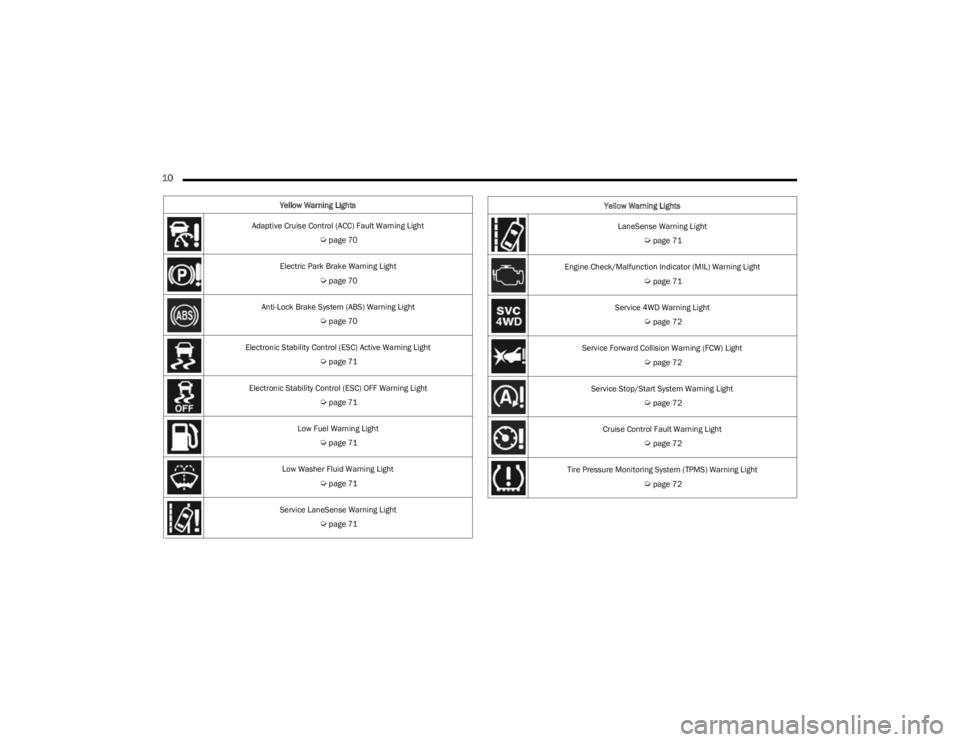
Yellow Warning Lights
Adaptive Cruise Control (ACC) Fault Warning Light
Úpage 70
Electric Park Brake Warning Light
Úpage 70
Anti-Lock Brake System (ABS) Warning Light
Úpage 70
Electronic Stability Control (ESC) Active Warning Light
Úpage 71
Electronic Stability Control (ESC) OFF Warning Light
Úpage 71
Low Fuel Warning Light
Úpage 71
Low Washer Fluid Warning Light
Úpage 71
Service LaneSense Warning Light
Úpage 71
LaneSense Warning Light
Úpage 71
Engine Check/Malfunction Indicator (MIL) Warning Light
Úpage 71
Service 4WD Warning Light
Úpage 72
Service Forward Collision Warning (FCW) Light
Úpage 72
Service Stop/Start System Warning Light
Úpage 72
Cruise Control Fault Warning Light
Úpage 72
Tire Pressure Monitoring System (TPMS) Warning Light
Úpage 72
Yellow Warning Lights
23_KL_OM_EN_USC_t.book Page 10
Page 13 of 276
11
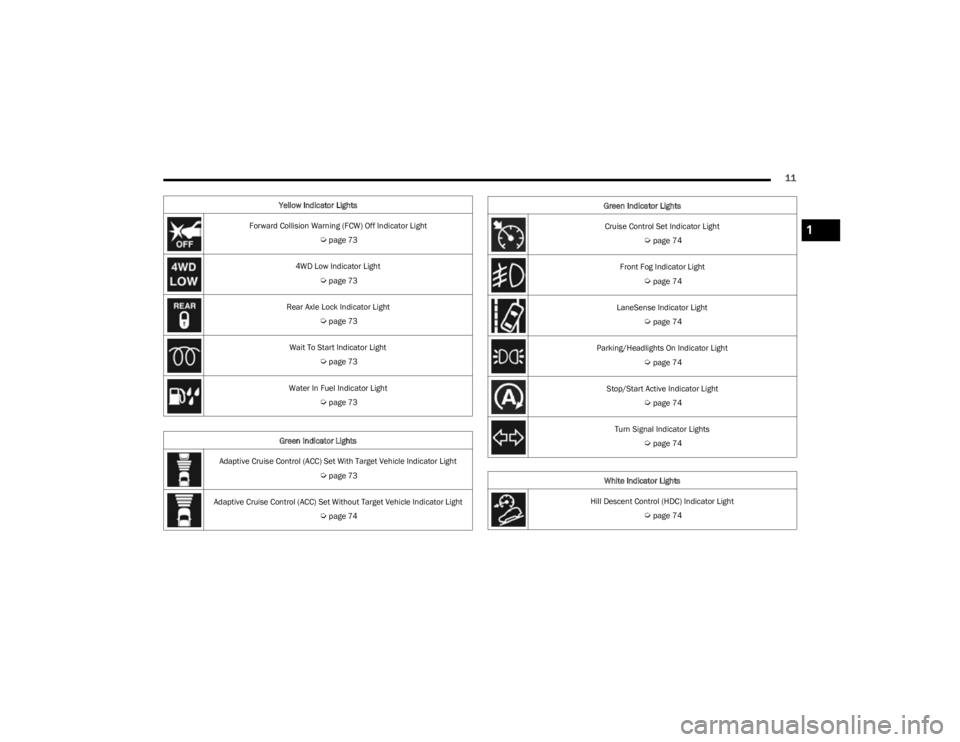
Yellow Indicator Lights
Forward Collision Warning (FCW) Off Indicator Light
Úpage 73
4WD Low Indicator Light
Úpage 73
Rear Axle Lock Indicator Light
Úpage 73
Wait To Start Indicator Light
Úpage 73
Water In Fuel Indicator Light
Úpage 73
Green Indicator Lights
Adaptive Cruise Control (ACC) Set With Target Vehicle Indicator Light
Úpage 73
Adaptive Cruise Control (ACC) Set Without Target Vehicle Indicator Light
Úpage 74
Cruise Control Set Indicator Light
Úpage 74
Front Fog Indicator Light
Úpage 74
LaneSense Indicator Light
Úpage 74
Parking/Headlights On Indicator Light
Úpage 74
Stop/Start Active Indicator Light
Úpage 74
Turn Signal Indicator Lights
Úpage 74
White Indicator Lights
Hill Descent Control (HDC) Indicator Light
Úpage 74
Green Indicator Lights
1
23_KL_OM_EN_USC_t.book Page 11
Page 74 of 276
72GETTING TO KNOW YOUR INSTRUMENT PANEL
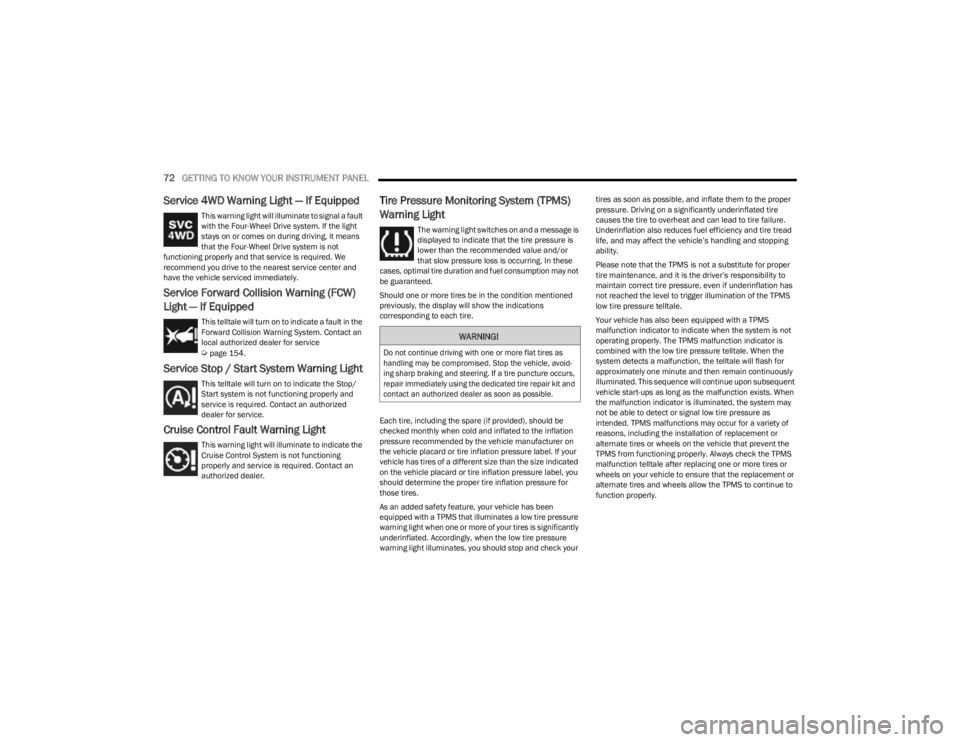
Service 4WD Warning Light — If Equipped
This warning light will illuminate to signal a fault
with the Four-Wheel Drive system. If the light
stays on or comes on during driving, it means
that the Four-Wheel Drive system is not
functioning properly and that service is required. We
recommend you drive to the nearest service center and
have the vehicle serviced immediately.
Service Forward Collision Warning (FCW)
Light — If Equipped
This telltale will turn on to indicate a fault in the
Forward Collision Warning System. Contact an
local authorized dealer for service
Úpage 154.
Service Stop / Start System Warning Light
This telltale will turn on to indicate the Stop/
Start system is not functioning properly and
service is required. Contact an authorized
dealer for service.
Cruise Control Fault Warning Light
This warning light will illuminate to indicate the
Cruise Control System is not functioning
properly and service is required. Contact an
authorized dealer.
Tire Pressure Monitoring System (TPMS)
Warning Light
The warning light switches on and a message is
displayed to indicate that the tire pressure is
lower than the recommended value and/or
that slow pressure loss is occurring. In these
cases, optimal tire duration and fuel consumption may not
be guaranteed.
Should one or more tires be in the condition mentioned
previously, the display will show the indications
corresponding to each tire.
Each tire, including the spare (if provided), should be
checked monthly when cold and inflated to the inflation
pressure recommended by the vehicle manufacturer on
the vehicle placard or tire inflation pressure label. If your
vehicle has tires of a different size than the size indicated
on the vehicle placard or tire inflation pressure label, you
should determine the proper tire inflation pressure for
those tires.
As an added safety feature, your vehicle has been
equipped with a TPMS that illuminates a low tire pressure
warning light when one or more of your tires is significantly
underinflated. Accordingly, when the low tire pressure
warning light illuminates, you should stop and check your tires as soon as possible, and inflate them to the proper
pressure. Driving on a significantly underinflated tire
causes the tire to overheat and can lead to tire failure.
Underinflation also reduces fuel efficiency and tire tread
life, and may affect the vehicle’s handling and stopping
ability.
Please note that the TPMS is not a substitute for proper
tire maintenance, and it is the driver’s responsibility to
maintain correct tire pressure, even if underinflation has
not reached the level to trigger illumination of the TPMS
low tire pressure telltale.
Your vehicle has also been equipped with a TPMS
malfunction indicator to indicate when the system is not
operating properly. The TPMS malfunction indicator is
combined with the low tire pressure telltale. When the
system detects a malfunction, the telltale will flash for
approximately one minute and then remain continuously
illuminated. This sequence will continue upon subsequent
vehicle start-ups as long as the malfunction exists. When
the malfunction indicator is illuminated, the system may
not be able to detect or signal low tire pressure as
intended. TPMS malfunctions may occur for a variety of
reasons, including the installation of replacement or
alternate tires or wheels on the vehicle that prevent the
TPMS from functioning properly. Always check the TPMS
malfunction telltale after replacing one or more tires or
wheels on your vehicle to ensure that the replacement or
alternate tires and wheels allow the TPMS to continue to
function properly.
WARNING!
Do not continue driving with one or more flat tires as
handling may be compromised. Stop the vehicle, avoid
-
ing sharp braking and steering. If a tire puncture occurs,
repair immediately using the dedicated tire repair kit and
contact an authorized dealer as soon as possible.
23_KL_OM_EN_USC_t.book Page 72
Page 75 of 276
GETTING TO KNOW YOUR INSTRUMENT PANEL73
YELLOW INDICATOR LIGHTS
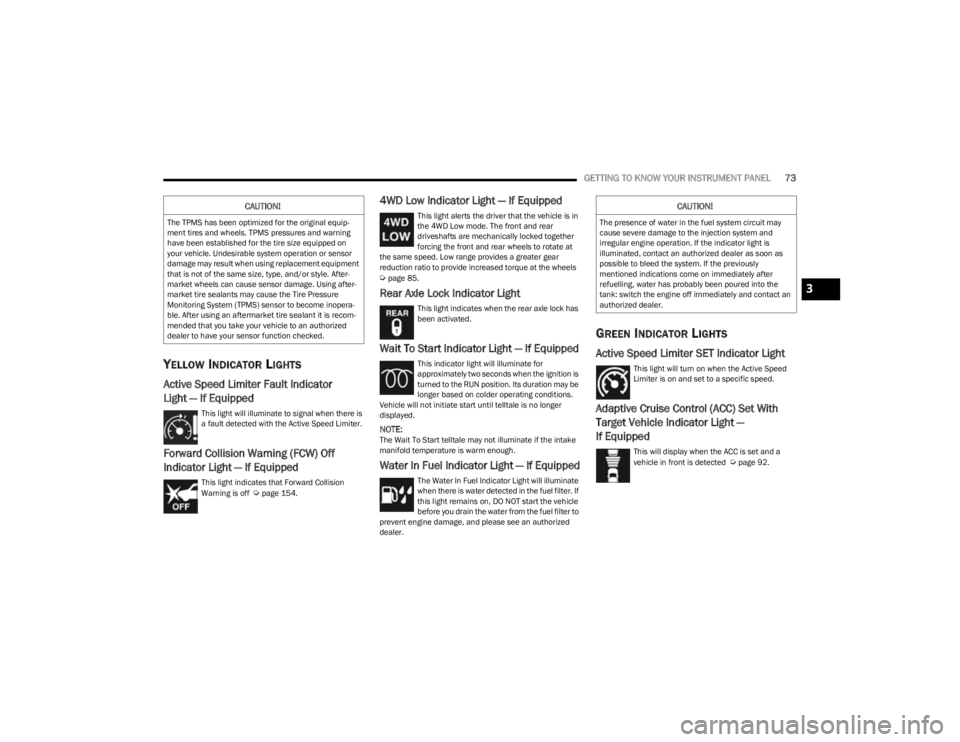
Active Speed Limiter Fault Indicator
Light — If Equipped
This light will illuminate to signal when there is
a fault detected with the Active Speed Limiter.
Forward Collision Warning (FCW) Off
Indicator Light — If Equipped
This light indicates that Forward Collision
Warning is off Úpage 154.
4WD Low Indicator Light — If Equipped
This light alerts the driver that the vehicle is in
the 4WD Low mode. The front and rear
driveshafts are mechanically locked together
forcing the front and rear wheels to rotate at
the same speed. Low range provides a greater gear
reduction ratio to provide increased torque at the wheels
Úpage 85.
Rear Axle Lock Indicator Light
This light indicates when the rear axle lock has
been activated.
Wait To Start Indicator Light — If Equipped
This indicator light will illuminate for
approximately two seconds when the ignition is
turned to the RUN position. Its duration may be
longer based on colder operating conditions.
Vehicle will not initiate start until telltale is no longer
displayed.
NOTE:The Wait To Start telltale may not illuminate if the intake
manifold temperature is warm enough.
Water In Fuel Indicator Light — If Equipped
The Water In Fuel Indicator Light will illuminate
when there is water detected in the fuel filter. If
this light remains on, DO NOT start the vehicle
before you drain the water from the fuel filter to
prevent engine damage, and please see an authorized
dealer.
GREEN INDICATOR LIGHTS
Active Speed Limiter SET Indicator Light
This light will turn on when the Active Speed
Limiter is on and set to a specific speed.
Adaptive Cruise Control (ACC) Set With
Target Vehicle Indicator Light —
If Equipped
This will display when the ACC is set and a
vehicle in front is detected Úpage 92.
CAUTION!
The TPMS has been optimized for the original equip -
ment tires and wheels. TPMS pressures and warning
have been established for the tire size equipped on
your vehicle. Undesirable system operation or sensor
damage may result when using replacement equipment
that is not of the same size, type, and/or style. After -
market wheels can cause sensor damage. Using after -
market tire sealants may cause the Tire Pressure
Monitoring System (TPMS) sensor to become inopera -
ble. After using an aftermarket tire sealant it is recom -
mended that you take your vehicle to an authorized
dealer to have your sensor function checked.
CAUTION!
The presence of water in the fuel system circuit may
cause severe damage to the injection system and
irregular engine operation. If the indicator light is
illuminated, contact an authorized dealer as soon as
possible to bleed the system. If the previously
mentioned indications come on immediately after
refuelling, water has probably been poured into the
tank: switch the engine off immediately and contact an
authorized dealer.
3
23_KL_OM_EN_USC_t.book Page 73
Page 76 of 276
74GETTING TO KNOW YOUR INSTRUMENT PANEL
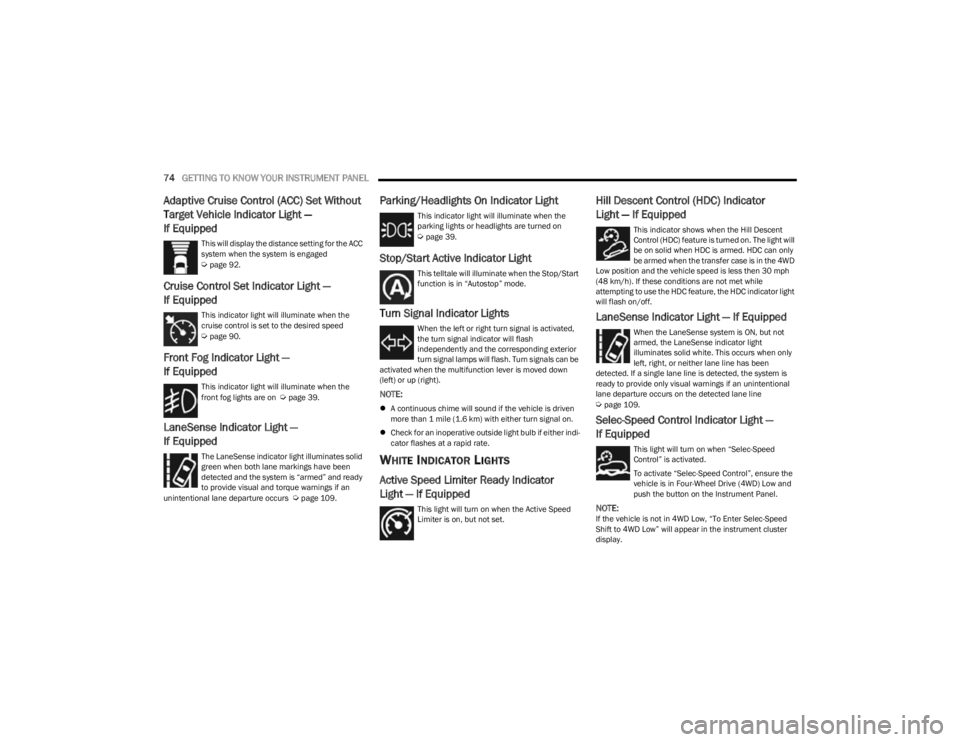
Adaptive Cruise Control (ACC) Set Without
Target Vehicle Indicator Light —
If Equipped
This will display the distance setting for the ACC
system when the system is engaged
Úpage 92.
Cruise Control Set Indicator Light —
If Equipped
This indicator light will illuminate when the
cruise control is set to the desired speed
Úpage 90.
Front Fog Indicator Light —
If Equipped
This indicator light will illuminate when the
front fog lights are on Úpage 39.
LaneSense Indicator Light —
If Equipped
The LaneSense indicator light illuminates solid
green when both lane markings have been
detected and the system is “armed” and ready
to provide visual and torque warnings if an
unintentional lane departure occurs
Úpage 109.
Parking/Headlights On Indicator Light
This indicator light will illuminate when the
parking lights or headlights are turned on
Úpage 39.
Stop/Start Active Indicator Light
This telltale will illuminate when the Stop/Start
function is in “Autostop” mode.
Turn Signal Indicator Lights
When the left or right turn signal is activated,
the turn signal indicator will flash
independently and the corresponding exterior
turn signal lamps will flash. Turn signals can be
activated when the multifunction lever is moved down
(left) or up (right).
NOTE:
A continuous chime will sound if the vehicle is driven
more than 1 mile (1.6 km) with either turn signal on.
Check for an inoperative outside light bulb if either indi -
cator flashes at a rapid rate.
WHITE INDICATOR LIGHTS
Active Speed Limiter Ready Indicator
Light — If Equipped
This light will turn on when the Active Speed
Limiter is on, but not set.
Hill Descent Control (HDC) Indicator
Light — If Equipped
This indicator shows when the Hill Descent
Control (HDC) feature is turned on. The light will
be on solid when HDC is armed. HDC can only
be armed when the transfer case is in the 4WD
Low position and the vehicle speed is less then 30 mph
(48 km/h). If these conditions are not met while
attempting to use the HDC feature, the HDC indicator light
will flash on/off.
LaneSense Indicator Light — If Equipped
When the LaneSense system is ON, but not
armed, the LaneSense indicator light
illuminates solid white. This occurs when only
left, right, or neither lane line has been
detected. If a single lane line is detected, the system is
ready to provide only visual warnings if an unintentional
lane departure occurs on the detected lane line
Úpage 109.
Selec-Speed Control Indicator Light —
If Equipped
This light will turn on when “Selec-Speed
Control” is activated.
To activate “Selec-Speed Control”, ensure the
vehicle is in Four-Wheel Drive (4WD) Low and
push the button on the Instrument Panel.
NOTE:If the vehicle is not in 4WD Low, “To Enter Selec-Speed
Shift to 4WD Low” will appear in the instrument cluster
display.
23_KL_OM_EN_USC_t.book Page 74
Page 87 of 276
STARTING AND OPERATING85
The transmission will automatically downshift to FIRST or
SECOND gear (depending on model) when coming to a
stop. After a stop, the driver should manually upshift (+)
the transmission as the vehicle is accelerated.
You can start out (from a stop) in FIRST or SECOND
gear. Starting out in SECOND gear can be helpful in
snow or icy conditions. Tap the gear selector forward or
rearward to select the desired gear after the vehicle is
brought to a stop.
If a requested downshift would cause the engine to
overspeed, that shift will not occur.
The system will ignore attempts to upshift at too low of
a vehicle speed.
Avoid using Cruise Control when AutoStick is engaged
because the transmission will not shift automatically.
Transmission shifting will be more noticeable when
AutoStick is enabled.
The system may revert to automatic shift mode if a
fault or overheat condition is detected.
To disengage AutoStick mode, return the gear selector to
the DRIVE position. You can shift in or out of the AutoStick
position at any time without taking your foot off the
accelerator pedal.Torque Converter Clutch
A feature designed to improve fuel economy has been
included in the automatic transmission on your vehicle. A
clutch within the torque converter engages automatically
at calibrated speeds. This may result in a slightly different
feeling or response during normal operation in the upper
gears. When the vehicle speed drops or during some
accelerations, the clutch automatically disengages.
NOTE:The torque converter clutch will not engage until the trans -
mission fluid is warm (usually after 1 to 3 miles [2 to 5 km]
of driving). Because the engine speed is higher when the
torque converter clutch is not engaged, it may seem as if
the transmission is not shifting properly when cold. This is
normal. The torque converter clutch will function normally
once the transmission is sufficiently warm.
FOUR-WHEEL DRIVE OPERATION
1-SPEED FOUR-WHEEL DRIVE
(4WD) — IF EQUIPPED
This feature provides on-demand four-wheel drive (4WD).
The system is automatic with no driver inputs or additional
driving skills required. Under normal driving conditions,
the front wheels provide most of the traction. If the front
wheels begin to lose traction, power is shifted
automatically to the rear wheels. The greater the front
wheel traction loss, the greater the power transfer to the
rear wheels. Additionally, on dry pavement under heavy throttle input
(where one may have no wheel spin), torque will be sent to
the rear in a preemptive effort to improve vehicle launch
and performance characteristics.
2-SPEED FOUR-WHEEL DRIVE
(4WD) — I
F EQUIPPED
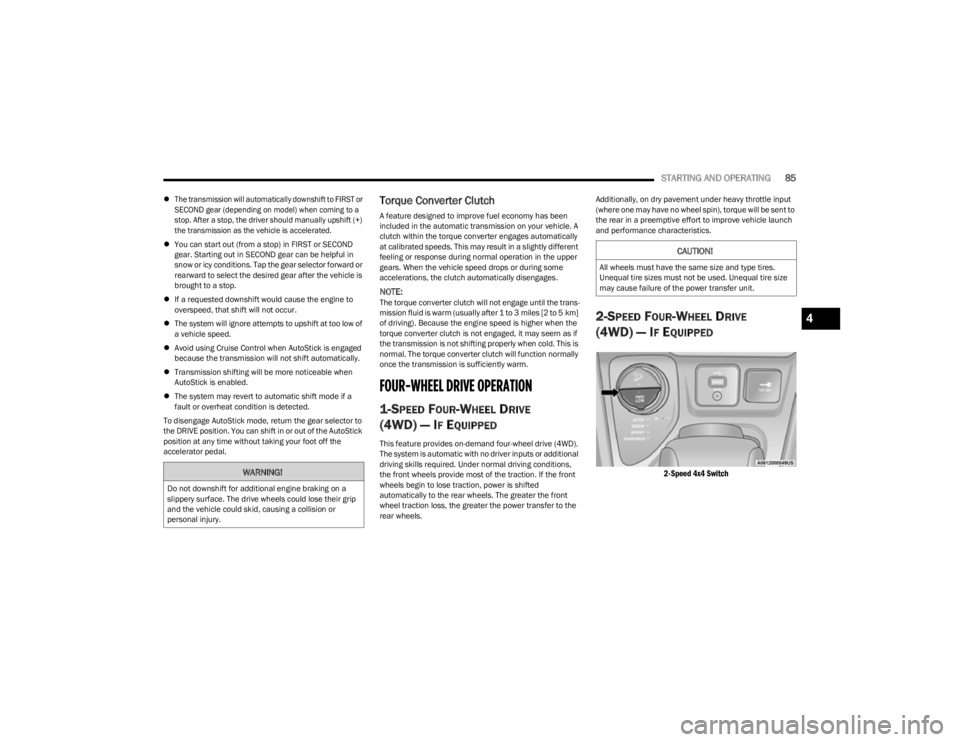
2-Speed 4x4 Switch
WARNING!
Do not downshift for additional engine braking on a
slippery surface. The drive wheels could lose their grip
and the vehicle could skid, causing a collision or
personal injury.
CAUTION!
All wheels must have the same size and type tires.
Unequal tire sizes must not be used. Unequal tire size
may cause failure of the power transfer unit.
4
23_KL_OM_EN_USC_t.book Page 85
Page 88 of 276
86STARTING AND OPERATING
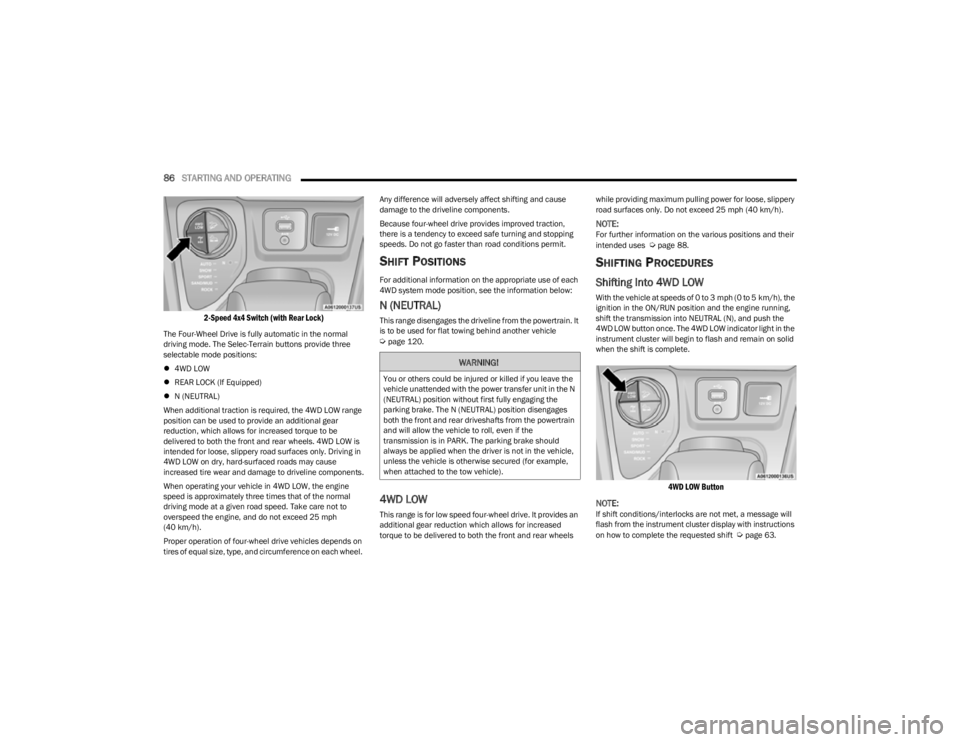
2-Speed 4x4 Switch (with Rear Lock)
The Four-Wheel Drive is fully automatic in the normal
driving mode. The Selec-Terrain buttons provide three
selectable mode positions:
4WD LOW
REAR LOCK (If Equipped)
N (NEUTRAL)
When additional traction is required, the 4WD LOW range
position can be used to provide an additional gear
reduction, which allows for increased torque to be
delivered to both the front and rear wheels. 4WD LOW is
intended for loose, slippery road surfaces only. Driving in
4WD LOW on dry, hard-surfaced roads may cause
increased tire wear and damage to driveline components.
When operating your vehicle in 4WD LOW, the engine
speed is approximately three times that of the normal
driving mode at a given road speed. Take care not to
overspeed the engine, and do not exceed 25 mph
(40 km/h).
Proper operation of four-wheel drive vehicles depends on
tires of equal size, type, and circumference on each wheel. Any difference will adversely affect shifting and cause
damage to the driveline components.
Because four-wheel drive provides improved traction,
there is a tendency to exceed safe turning and stopping
speeds. Do not go faster than road conditions permit.
SHIFT POSITIONS
For additional information on the appropriate use of each
4WD system mode position, see the information below:
N (NEUTRAL)
This range disengages the driveline from the powertrain. It
is to be used for flat towing behind another vehicle
Úpage 120.
4WD LOW
This range is for low speed four-wheel drive. It provides an
additional gear reduction which allows for increased
torque to be delivered to both the front and rear wheels
while providing maximum pulling power for loose, slippery
road surfaces only. Do not exceed 25 mph (40 km/h).
NOTE:For further information on the various positions and their
intended uses Úpage 88.
SHIFTING PROCEDURES
Shifting Into 4WD LOW
With the vehicle at speeds of 0 to 3 mph (0 to 5 km/h), the
ignition in the ON/RUN position and the engine running,
shift the transmission into NEUTRAL (N), and push the
4WD LOW button once. The 4WD LOW indicator light in the
instrument cluster will begin to flash and remain on solid
when the shift is complete.
4WD LOW Button
NOTE:
If shift conditions/interlocks are not met, a message will
flash from the instrument cluster display with instructions
on how to complete the requested shift
Úpage 63.
WARNING!
You or others could be injured or killed if you leave the
vehicle unattended with the power transfer unit in the N
(NEUTRAL) position without first fully engaging the
parking brake. The N (NEUTRAL) position disengages
both the front and rear driveshafts from the powertrain
and will allow the vehicle to roll, even if the
transmission is in PARK. The parking brake should
always be applied when the driver is not in the vehicle,
unless the vehicle is otherwise secured (for example,
when attached to the tow vehicle).
23_KL_OM_EN_USC_t.book Page 86
Page 89 of 276
STARTING AND OPERATING87
Shifting Out Of 4X4 LOW
With the vehicle at speeds of 0 to 3 mph (0 to 5 km/h), the
ignition in the ON/RUN position and the engine running,
shift the transmission into NEUTRAL (N), and push the
4WD LOW button once. The 4WD LOW indicator light in the
instrument cluster will flash and go out when the shift is
complete.
NOTE:
If shift conditions/interlocks are not met, a message
will flash from the instrument cluster display with
instructions on how to complete the requested shift
Úpage 63.
Shifting into or out of 4WD LOW is possible with the
vehicle completely stopped; however, difficulty may
occur due to the mating clutch teeth not being properly
aligned. Several attempts may be required for clutch
teeth alignment and shift completion to occur. The
preferred method is with the vehicle rolling 0 to 3 mph
(0 to 5 km/h). If the vehicle is moving faster than
3 mph (5 km/h), the 4WD system will not allow the
shift.
REAR ELECTRONIC LOCKER SYSTEM —
I
F EQUIPPED
The Rear Electronic Locker System features a mechanical
locking rear differential to provide better traction in the
4WD LOW position. The REAR LOCK button is on the
Selec-Terrain Knob. Activating The Rear Electronic Locker System
To activate the Rear Electronic Locker System, the
following conditions must be met:
1. The 4WD system must be in 4WD LOW.
2. The ignition in the ON/RUN position and the engine
running.
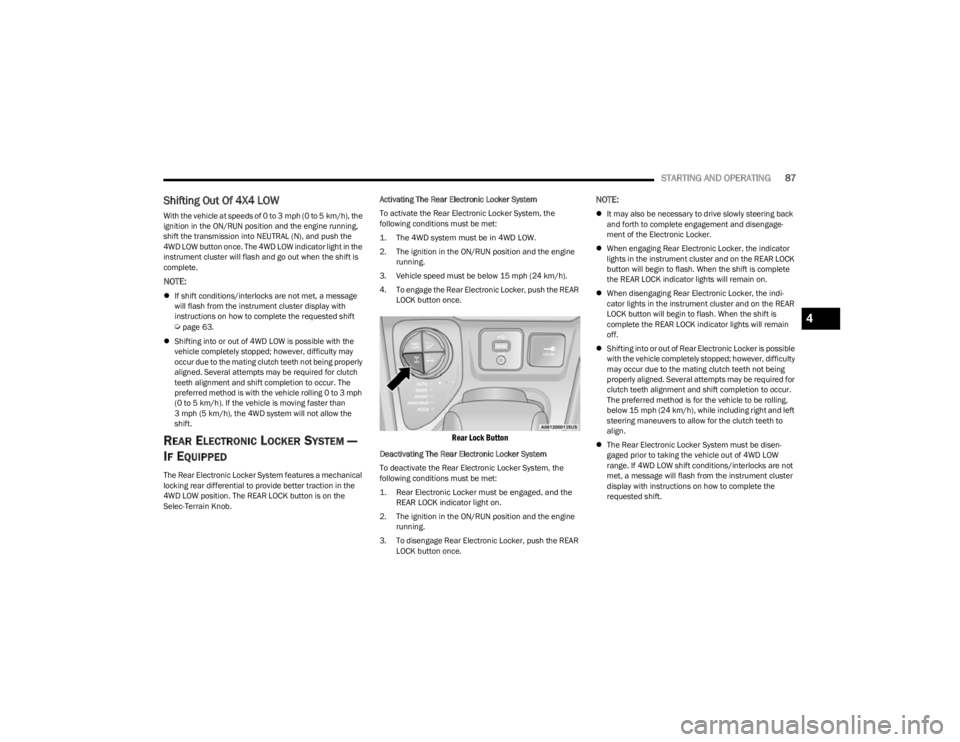
3. Vehicle speed must be below 15 mph (24 km/h). 4. To engage the Rear Electronic Locker, push the REAR LOCK button once.
Rear Lock Button
Deactivating The Rear Electronic Locker System
To deactivate the Rear Electronic Locker System, the
following conditions must be met:
1. Rear Electronic Locker must be engaged, and the REAR LOCK indicator light on.
2. The ignition in the ON/RUN position and the engine running.
3. To disengage Rear Electronic Locker, push the REAR LOCK button once.
NOTE:
It may also be necessary to drive slowly steering back
and forth to complete engagement and disengage -
ment of the Electronic Locker.
When engaging Rear Electronic Locker, the indicator
lights in the instrument cluster and on the REAR LOCK
button will begin to flash. When the shift is complete
the REAR LOCK indicator lights will remain on.
When disengaging Rear Electronic Locker, the indi -
cator lights in the instrument cluster and on the REAR
LOCK button will begin to flash. When the shift is
complete the REAR LOCK indicator lights will remain
off.
Shifting into or out of Rear Electronic Locker is possible
with the vehicle completely stopped; however, difficulty
may occur due to the mating clutch teeth not being
properly aligned. Several attempts may be required for
clutch teeth alignment and shift completion to occur.
The preferred method is for the vehicle to be rolling,
below 15 mph (24 km/h), while including right and left
steering maneuvers to allow for the clutch teeth to
align.
The Rear Electronic Locker System must be disen -
gaged prior to taking the vehicle out of 4WD LOW
range. If 4WD LOW shift conditions/interlocks are not
met, a message will flash from the instrument cluster
display with instructions on how to complete the
requested shift.
4
23_KL_OM_EN_USC_t.book Page 87
Page 90 of 276
88STARTING AND OPERATING
SELEC-TERRAIN
DESCRIPTION
Selec-Terrain allows the driver to specify the driving
surface to allow the vehicle systems to provide the best
performance possible across a wide range of conditions.
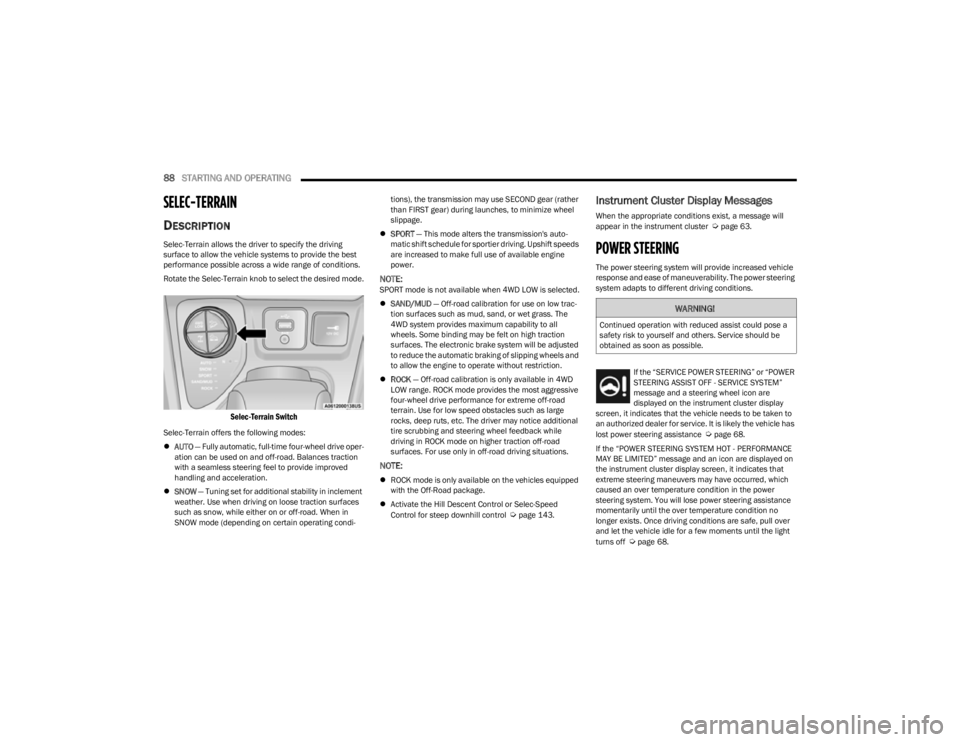
Rotate the Selec-Terrain knob to select the desired mode.
Selec-Terrain Switch
Selec-Terrain offers the following modes:
AUTO — Fully automatic, full-time four-wheel drive oper -
ation can be used on and off-road. Balances traction
with a seamless steering feel to provide improved
handling and acceleration.
SNOW — Tuning set for additional stability in inclement
weather. Use when driving on loose traction surfaces
such as snow, while either on or off-road. When in
SNOW mode (depending on certain operating condi -tions), the transmission may use SECOND gear (rather
than FIRST gear) during launches, to minimize wheel
slippage.
SPORT — This mode alters the transmission's auto -
matic shift schedule for sportier driving. Upshift speeds
are increased to make full use of available engine
power.
NOTE:SPORT mode is not available when 4WD LOW is selected.
SAND/MUD — Off-road calibration for use on low trac -
tion surfaces such as mud, sand, or wet grass. The
4WD system provides maximum capability to all
wheels. Some binding may be felt on high traction
surfaces. The electronic brake system will be adjusted
to reduce the automatic braking of slipping wheels and
to allow the engine to operate without restriction.
ROCK — Off-road calibration is only available in 4WD
LOW range. ROCK mode provides the most aggressive
four-wheel drive performance for extreme off-road
terrain. Use for low speed obstacles such as large
rocks, deep ruts, etc. The driver may notice additional
tire scrubbing and steering wheel feedback while
driving in ROCK mode on higher traction off-road
surfaces. For use only in off-road driving situations.
NOTE:
ROCK mode is only available on the vehicles equipped
with the Off-Road package.
Activate the Hill Descent Control or Selec-Speed
Control for steep downhill control
Úpage 143.
Instrument Cluster Display Messages
When the appropriate conditions exist, a message will
appear in the instrument cluster Úpage 63.
POWER STEERING
The power steering system will provide increased vehicle
response and ease of maneuverability. The power steering
system adapts to different driving conditions.
If the “SERVICE POWER STEERING” or “POWER
STEERING ASSIST OFF - SERVICE SYSTEM”
message and a steering wheel icon are
displayed on the instrument cluster display
screen, it indicates that the vehicle needs to be taken to
an authorized dealer for service. It is likely the vehicle has
lost power steering assistance
Úpage 68.
If the “POWER STEERING SYSTEM HOT - PERFORMANCE
MAY BE LIMITED” message and an icon are displayed on
the instrument cluster display screen, it indicates that
extreme steering maneuvers may have occurred, which
caused an over temperature condition in the power
steering system. You will lose power steering assistance
momentarily until the over temperature condition no
longer exists. Once driving conditions are safe, pull over
and let the vehicle idle for a few moments until the light
turns off
Úpage 68.
WARNING!
Continued operation with reduced assist could pose a
safety risk to yourself and others. Service should be
obtained as soon as possible.
23_KL_OM_EN_USC_t.book Page 88