brake light JEEP COMMANDER 2010 1.G User Guide
[x] Cancel search | Manufacturer: JEEP, Model Year: 2010, Model line: COMMANDER, Model: JEEP COMMANDER 2010 1.GPages: 460, PDF Size: 7.11 MB
Page 259 of 460
“4WD LOW” indicator light in the instrument cluster
will flash and go out when the shift is complete. Release
the T-handle.
NOTE:
•If shift conditions/interlocks are not met, or a transfer
case motor temperature protection condition exists, a
“CHECK SHIFT PROCEDURES” message will flash
from the Electronic Vehicle Information Center (EVIC).
Refer to “Electronic Vehicle Information Center
(EVIC)” in Section 4 of this manual.
•Shifting into or out of 4WD LOW is possible with the
vehicle completely stopped; however, difficulty may
occur due to the mating clutch teeth not being prop-
erly aligned. Several attempts may be required for
clutch teeth alignment and shift completion to occur.
The preferred method is with the vehicle rolling 0 to3 mph (0 to 5 km/h). If the vehicle is moving faster
than 3 mph (5 km/h), the transfer case will not allow
the shift.
NEUTRAL Shift Procedure
1. Key ON, engine off.
2. Vehicle stopped, with foot on brake.
3. Place the transmission into NEUTRAL.
4. Hold down the NEUTRAL “pin” switch (with a pen,
etc.) for four seconds until the LED light by the switch
starts to blink indicating shift in progress. The light will
stop blinking (stay on solid) when the NEUTRAL shift is
complete. A “4WD SYSTEM IN NEUTRAL” message will
display on the Electronic Vehicle Information Center
(EVIC). Refer to “Electronic Vehicle Information Center
(EVIC)” in Section 4 of this manual.
5
STARTING AND OPERATING 259
Page 263 of 460
Driving in Snow, Mud and Sand
In heavy snow, when pulling a load, or for additional
control at slower speeds, shift the transmission to a low
gear and shift the transfer case to 4WD LOW if necessary.
Refer to “Four-Wheel Drive Operation” in this section.
Do not shift to a lower gear than necessary to maintain
forward motion. Over-revving the engine can spin the
wheels and traction will be lost.
Avoid abrupt downshifts on icy or slippery roads, be-
cause engine braking may cause skidding and loss of
control.
Hill Climbing
NOTE:Before attempting to climb a hill, determine the
conditions at the crest and/or on the other side.
Before climbing a steep hill, shift the transmission to a
lower gear and shift the transfer case to 4WD LOW. Use
first gear and 4WD LOW for very steep hills. If you stall or begin to lose forward motion
while
climbing a steep hill, allow your vehicle to come to a stop
and immediately apply the brakes. Restart the engine,
and shift into REVERSE. Back slowly down the hill,
allowing the compression braking of the engine to help
regulate your speed. If the brakes are required to control
vehicle speed, apply them lightly and avoid locking or
skidding the tires.
WARNING!
If the engine stalls, you lose forward motion, or
cannot make it to the top of a steep hill or grade,
never attempt to turn around. To do so may result in
tipping and rolling the vehicle. Always back care-
fully straight down a hill in REVERSE gear. Never
back down a hill in NEUTRAL using only the brake.
Remember, never drive diagonally across a hill always
drive straight up or down.
5
STARTING AND OPERATING 263
Page 267 of 460
apparent, and/or the system is not functioning as antici-
pated. Coordinate inspection efforts through an autho-
rized dealer.
WARNING!
Fluid level should be checked on a level surface and
with the engine off to prevent injury from moving
parts and to ensure accurate fluid level reading. Do
not overfill. Use only manufacturers recommended
power steering fluid.
If necessary, add fluid to restore to the proper indicated
level. With a clean cloth, wipe any spilled fluid from all
surfaces.
PARKING BRAKE
To set the parking brake, pull the lever up as firmly as
possible. When the parking brake is applied with the
ignition ON, the “Brake Warning Light” in the instru-
ment cluster will illuminate. To release the parking brake,
pull up slightly, press the center button, then lower the
lever completely.
NOTE: The “Brake Warning Light” indicates only that
the parking brake is applied. It does not indicate the
degree of brake application.
5
STARTING AND OPERATING 267
Page 269 of 460
When parking on a hill, turn the front wheels toward the
curb on a downhill grade, and away from the curb on an
uphill grade.
The parking brake should always be applied whenever
the driver is not in the vehicle.
ANTI-LOCK BRAKE SYSTEM
The Anti-Lock Brake System (ABS) is designed to aid the
driver in maintaining vehicle control under adverse
braking conditions. The system operates with a separate
computer to modulate hydraulic pressure, to prevent
wheel lock-up and help avoid skidding on slippery
surfaces.
All vehicle wheels and tires must be the same size and
type, and tires must be properly inflated, to produce
accurate signals for the computer.
WARNING!
Significant over or under-inflation of tires or mixing
sizes of tires or wheels on the vehicle can lead to loss
of braking effectiveness.
The ABS conducts a low-speed self-test at about 12 mph
(20 km/h). If you have your foot lightly on the brake
while this test is occurring, you may feel slight pedal
movement. The movement can be more apparent on ice
and snow. This is normal.
The ABS pump motor runs during the self-test at 12 mph
(20 km/h) and during an ABS stop. The pump motor
makes a low humming noise during operation, which is
normal.
5
STARTING AND OPERATING 269
Page 271 of 460
•Do not “ride” the brakes by resting your foot on the
pedal. This could overheat the brakes and result in
unpredictable braking action, longer stopping dis-
tances, or brake damage.
•When descending mountains or hills, repeated brak-
ing can cause brake fade with loss of braking control.
Avoid repeated heavy braking by downshifting the
transmission or locking out overdrive whenever pos-
sible.
•Engines may idle at higher speeds during warm-up,
which could cause rear wheels to spin and result in
loss of vehicle control. Be especially careful while
driving on slippery roads, in close-quarter maneuver-
ing, parking, or stopping.
•Do not drive too fast for road conditions, especially
when roads are wet or slushy. A wedge of water canbuild up between the tire tread and the road. This
hydroplaning action can cause loss of traction, braking
ability, and control.
•After going through deep water or a car wash, brakes
may become wet, resulting in decreased performance
and unpredictable braking action. Dry the brakes by
gentle, intermittent pedal action while driving at very
slow speeds.
MULTI-DISPLACEMENT SYSTEM (MDS) (IF
EQUIPPED) – 5.7L ENGINE ONLY
This feature offers improved fuel economy by shutting
off four of the engine’s eight cylinders during light load
and cruise conditions. The system is automatic with no
driver inputs or additional driving skills required.
NOTE:
The MDS system may take some time to return
to full functionality after a battery disconnect.
5
STARTING AND OPERATING 271
Page 275 of 460
WARNING!
Many factors, such as vehicle loading, road condi-
tions and driving conditions, influence the chance
that wheel lift or rollover may occur. ERM cannot
prevent all wheel lift or rollovers, especially those
that involve leaving the roadway or striking objects
or other vehicles. Only a safe, attentive, and skillful
driver can prevent accidents. The capabilities of an
ERM-equipped vehicle must never be exploited in a
reckless or dangerous manner which could jeopar-
dize the user’s safety or the safety of others.
Electronic Stability Program (ESP)
This system enhances directional control and stability of
the vehicle under various driving conditions. ESP cor-
rects for oversteering or understeering of the vehicle by
applying the brake of the appropriate wheel to assist incounteracting the oversteer or understeer condition. En-
gine power may also be reduced to help the vehicle
maintain the desired path.
ESP uses sensors in the vehicle to determine the vehicle
path intended by the driver and compares it to the actual
path of the vehicle. When the actual path does not match
the intended path, ESP applies the brake of the appropri-
ate wheel to assist in counteracting the oversteer or
understeer condition.
•Oversteer - when the vehicle is turning more than
appropriate for the steering wheel position.
•Understeer - when the vehicle is turning less than
appropriate for the steering wheel position.
The “ESP/TCS Indicator Light” located in the instrument
cluster will start to flash as soon as the tires lose traction
and the ESP system becomes active. The “ESP/TCS
Indicator Light” also flashes when the TCS is active. If the
5
STARTING AND OPERATING 275
Page 280 of 460
WARNING!
With the ESP switched off, the enhanced vehicle
stability offered by ESP and ERM are unavailable. In
an emergency evasive maneuver, the ESP and ERM
systems will not engage to assist in maintaining
stability. The “Full Off” mode is intended for off-
road use only.
Trailer Sway Control (TSC)
TSC uses sensors in the vehicle to recognize an exces-
sively swaying trailer and will take the appropriate
actions to attempt to stop the sway. The system may
reduce engine power and apply the brake of the appro-
priate wheel(s) to counteract the sway of the trailer. TSC
will become active automatically once an excessively
swaying trailer is recognized. No driver action is re-
quired. Note that TSC cannot stop all trailers from
swaying. Always use caution when towing a trailer andfollow the trailer tongue weight recommendations. Refer
to “Trailer Towing” in Section 5 of this manual. When
TSC is functioning, the “ESP/TCS Indicator Light” will
flash, the engine power may be reduced and you may
feel the brakes being applied to individual wheels to
attempt to stop the trailer from swaying. TSC is disabled
when the ESP system is in the “Partial Off” or “Full Off”
modes.
WARNING!
If TSC activates while driving, slow the vehicle
down, stop at the nearest safe location, and adjust the
trailer load to eliminate trailer sway.
Hill Start Assist (HSA) – Four-Wheel Drive Models
With NV245 Two–Speed Transfer Case Only
The HSA system is designed to assist the driver when
starting a vehicle from a stop on a hill. HSA will maintain
the level of brake pressure the driver applied for a short
280 STARTING AND OPERATING
Page 281 of 460
period of time after the driver takes their foot off of the
brake pedal. If the driver does not apply the throttle
during this short period of time, the system will release
brake pressure and the vehicle will roll down the hill. The
system will release brake pressure in proportion to the
amount of throttle applied as the vehicle starts to move in
the intended direction of travel.
HSA Activation Criteria
The following criteria must be met in order for HSA to
activate:
•Vehicle must be stopped.
•Vehicle must be on a 8% grade or greater hill.
•Gear selection matches vehicle uphill direction (i.e.,
vehicle facing uphill is in forward gear; vehicle back-
ing uphill is in REVERSE gear).HSA will work in REVERSE and all forward gears when
the activation criteria have been met. The system will not
activate if the vehicle is placed in NEUTRAL or PARK.
WARNING!
There may be situations on minor hills (i.e., less than
8%), with a loaded vehicle, or while pulling a trailer,
when the system will not activate and slight rolling
may occur. This could cause a collision with another
vehicle or object. Always remember the driver is
responsible for braking the vehicle.
Towing with HSA
HSA will provide assistance when starting on a grade
when pulling a trailer.
5
STARTING AND OPERATING 281
Page 283 of 460
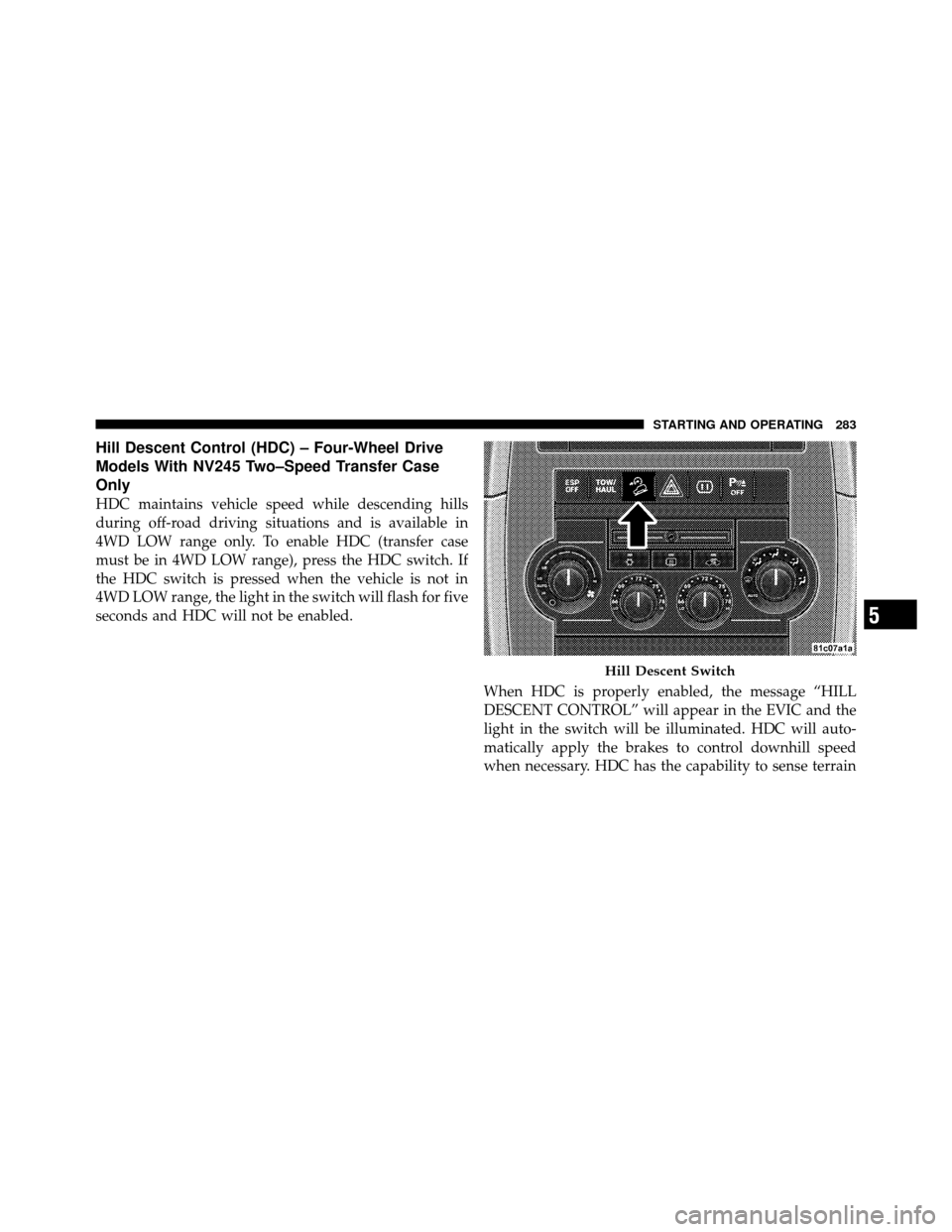
Hill Descent Control (HDC) – Four-Wheel Drive
Models With NV245 Two–Speed Transfer Case
Only
HDC maintains vehicle speed while descending hills
during off-road driving situations and is available in
4WD LOW range only. To enable HDC (transfer case
must be in 4WD LOW range), press the HDC switch. If
the HDC switch is pressed when the vehicle is not in
4WD LOW range, the light in the switch will flash for five
seconds and HDC will not be enabled.When HDC is properly enabled, the message “HILL
DESCENT CONTROL” will appear in the EVIC and the
light in the switch will be illuminated. HDC will auto-
matically apply the brakes to control downhill speed
when necessary. HDC has the capability to sense terrain
Hill Descent Switch
5
STARTING AND OPERATING 283
Page 284 of 460
and will only activate when the vehicle is descending a
hill. It will usually not activate on level ground.
The HDC speed may be adjusted by the driver to suit the
driving conditions. The speed corresponds to the trans-
mission gear selected.
•1st = 1 mph (1.6 km/h)
•2nd = 2.5 mph (4 km/h)
•3rd = 4 mph (6 km/h)
•4th = 5.5 mph (9 km/h)
•5th = 7.5 mph (12 km/h)
•REVERSE = 1 mph (1.6 km/h)
•NEUTRAL = 2.5 mph (4 km/h)
•PARK = HDC will not functionHDC also has the capability to sense rough terrain, and
will automatically adjust to a slightly slower set speed
[about 0.3 mph (0.5 km/h) than normal.]
HDC operation can be overridden with brake application
to slow the vehicle down below the HDC control speed.
Conversely, if more speed is desired during HDC control,
the accelerator pedal will increase vehicle speed in the
usual manner. When either the brake or the accelerator is
released, HDC will control the vehicle back to the origi-
nal set speed.
HDC is intended for low speed off-road driving only.
At vehicle speeds above 30 mph (48 km/h), HDC will no
longer function. When the vehicle speed drops below
30 mph (48 km/h), HDC function will automatically
resume and the vehicle speed will return to the chosen set
speed.
284 STARTING AND OPERATING