tow JEEP COMPASS 2015 1.G User Guide
[x] Cancel search | Manufacturer: JEEP, Model Year: 2015, Model line: COMPASS, Model: JEEP COMPASS 2015 1.GPages: 560, PDF Size: 11.51 MB
Page 114 of 560
Uconnect® Phone allows you to transfer calls between
the system and your mobile phone as you enter or exit
your vehicle and enables you to mute the system’s
microphone for private conversation.
The Uconnect® Phone is driven through your Bluetooth®
“Hands-Free Profile” mobile phone. Uconnect® features
Bluetooth® technology - the global standard that enables
different electronic devices to connect to each other without
wires or a docking station. Uconnect® Phone operates no
matter where you stow your mobile phone (be it your
purse, pocket, or briefcase), as long as your phone is turned
on and has been paired to the vehicle’s Uconnect® Phone.
The Uconnect® Phone allows up to seven mobile phones to
be linked to the system. Only one linked (or paired) mobile
phone can be used with the system at a time. The system is
available in English, Spanish, or French languages.
WARNING!
Any voice commanded system should be used only
in safe driving conditions following all applicable
laws, including laws regarding phone use. Your at-
tention should be focused on safely operating the
vehicle. Failure to do so may result in a collision
causing serious injury or death.
Uconnect® Phone Button
The radio or steering wheel controls (if
equipped) will contain the two control buttons
(Uconnect® Phonebutton and Voice Com-
mandbutton) that will enable you to
access the system. When you push the button you
will hear the word Uconnect® followed by a BEEP.
The beep is your signal to give a command.
11 2 U N D E R S TA N D I N G T H E F E AT U R E S O F Y O U R V E H I C L E
Page 127 of 560
NOTE:
•The emergency number dialed is based on the country
where the vehicle is purchased (911 for the U.S. and
Canada and 060 for Mexico). The number dialed may
not be applicable with the available mobile service and
area.
•If supported, this number may be programmable on
some systems. To do this, push thebutton and say
“Setup,” followed by “Emergency.”
•The Uconnect® Phone does slightly lower your
chances of successfully making a phone call as to that
for the mobile phone directly.
WARNING!
To use your Uconnect® Phone System in an emer-
gency, your mobile phone must be:
•turned on,
•paired to the Uconnect® System,
•and have network coverage.
Roadside Assistance/Towing Assistance
If you need roadside assistance:
•Push thebutton to begin.
•After the “Ready” prompt and the following beep, say
“Towing Assistance.”
NOTE:You should program the desired Towing Assis-
tance phone number using the Voice Command system.
3
UNDERSTANDING THE FEATURES OF YOUR VEHICLE 125
Page 128 of 560
To do this, push thebutton and say “Setup,” fol-
lowed by “Towing Assistance.” When prompted say
1-800-521-2779 for U.S./Canada, say 55-14-3454 for
Mexico City and 1-800-712-3040 for outside Mexico
City in Mexico.
Paging
To learn how to page, refer to “Working with Automated
Systems.” Paging works properly except for pagers of
certain companies, which time out a little too soon to
work properly with the Uconnect® Phone.
Voice Mail Calling
To learn how to access your voice mail, refer to “Working
with Automated Systems.”
Working With Automated Systems
This method is used in instances where one generally has
to press numbers on the mobile phone keypad while
navigating through an automated telephone system.
You can use your Uconnect® Phone to access a voice mail
system or an automated service, such as a paging service
or automated customer service line. Some services re-
quire immediate response selection. In some instances,
that may be too quick for use of the Uconnect® Phone.
When calling a number with your Uconnect® Phone that
normally requires you to enter in a touch-tone sequence
on your mobile phone keypad, you can push the
button and say the sequence you wish to enter,
followed by the word “Send.” For example, if required
to enter your PIN followed with a pound, (3 7 4 6 #),
you can push thebutton and say, “3746#Send.”
Saying a number, or sequence of numbers, followed
by “Send,” is also to be used for navigating through an
automated customer service center menu structure,
and to leave a number on a pager.
You can also send stored Uconnect® phonebook entries
as tones for fast and easy access to voice mail and pager
entries. To use this feature, dial the number you wish to
126 UNDERSTANDING THE FEATURES OF YOUR VEHICLE
Page 143 of 560
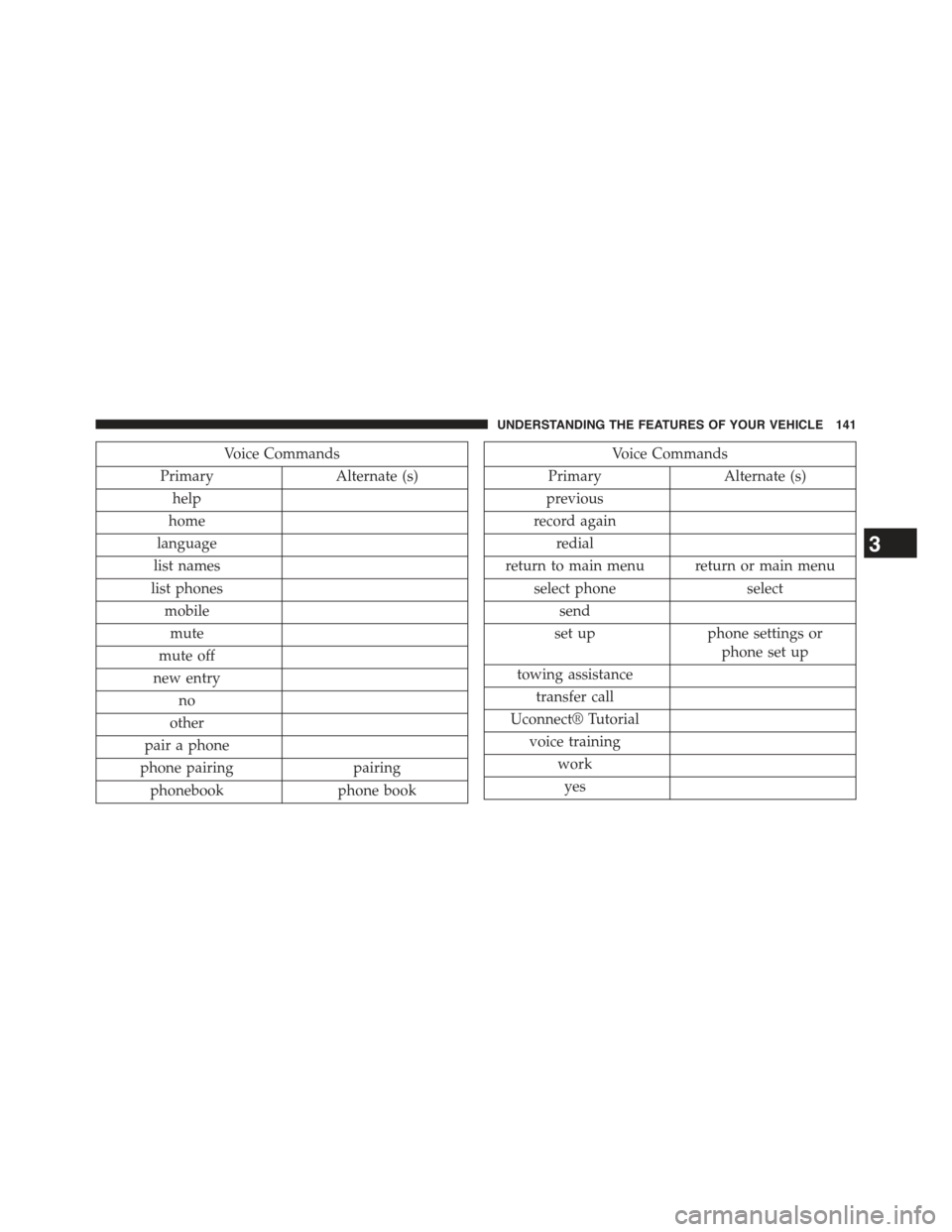
Voice Commands
PrimaryAlternate (s)
help
home
language
list names
list phones
mobile
mute
mute off
new entry
no
other
pair a phone
phone pairingpairing
phonebookphone book
Voice Commands
PrimaryAlternate (s)
previous
record again
redial
return to main menu return or main menu
select phoneselect
send
set upphone settings or
phone set up
towing assistance
transfer call
Uconnect® Tutorial
voice training
work
yes
3
UNDERSTANDING THE FEATURES OF YOUR VEHICLE 141
Page 163 of 560
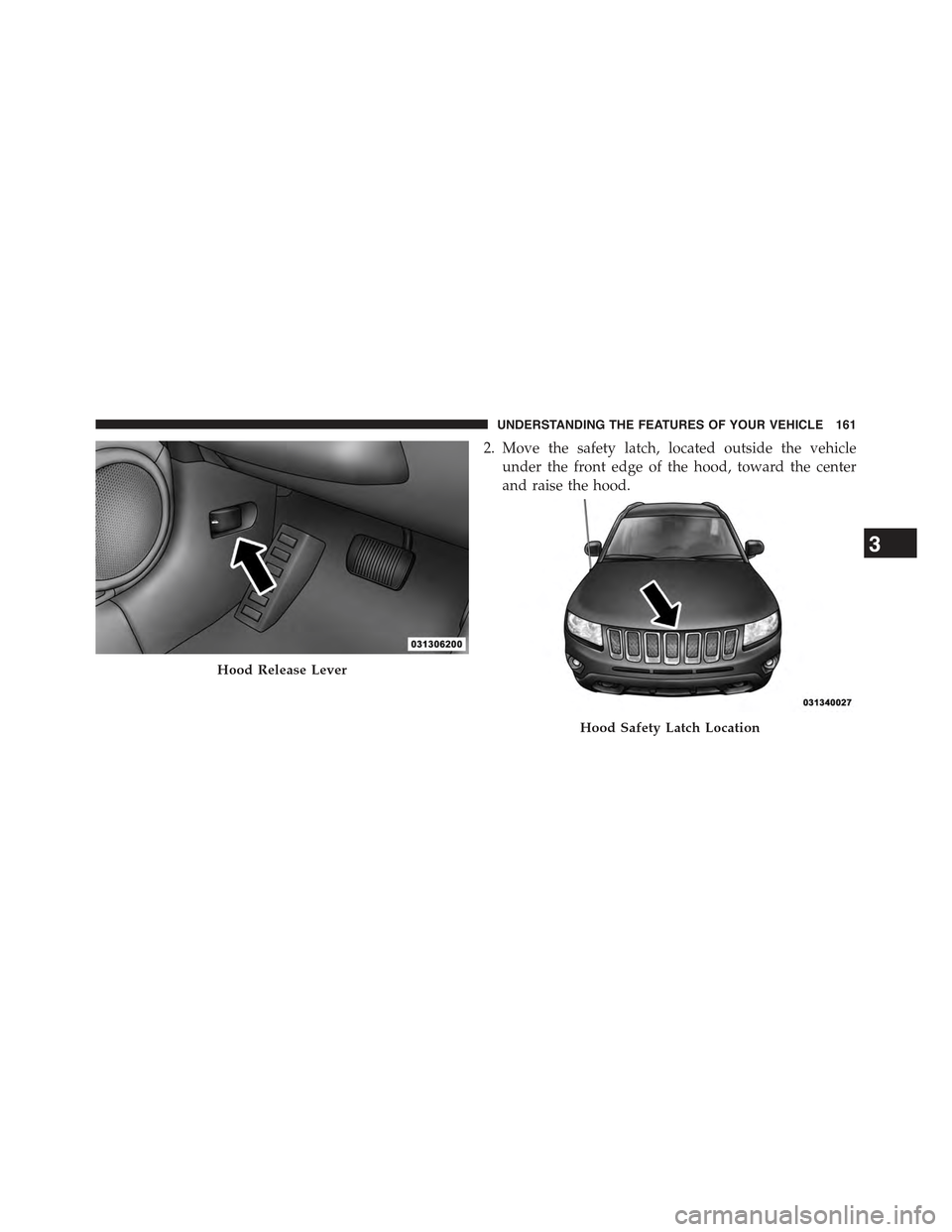
2. Move the safety latch, located outside the vehicle
under the front edge of the hood, toward the center
and raise the hood.
Hood Release Lever
Hood Safety Latch Location
3
UNDERSTANDING THE FEATURES OF YOUR VEHICLE 161
Page 167 of 560
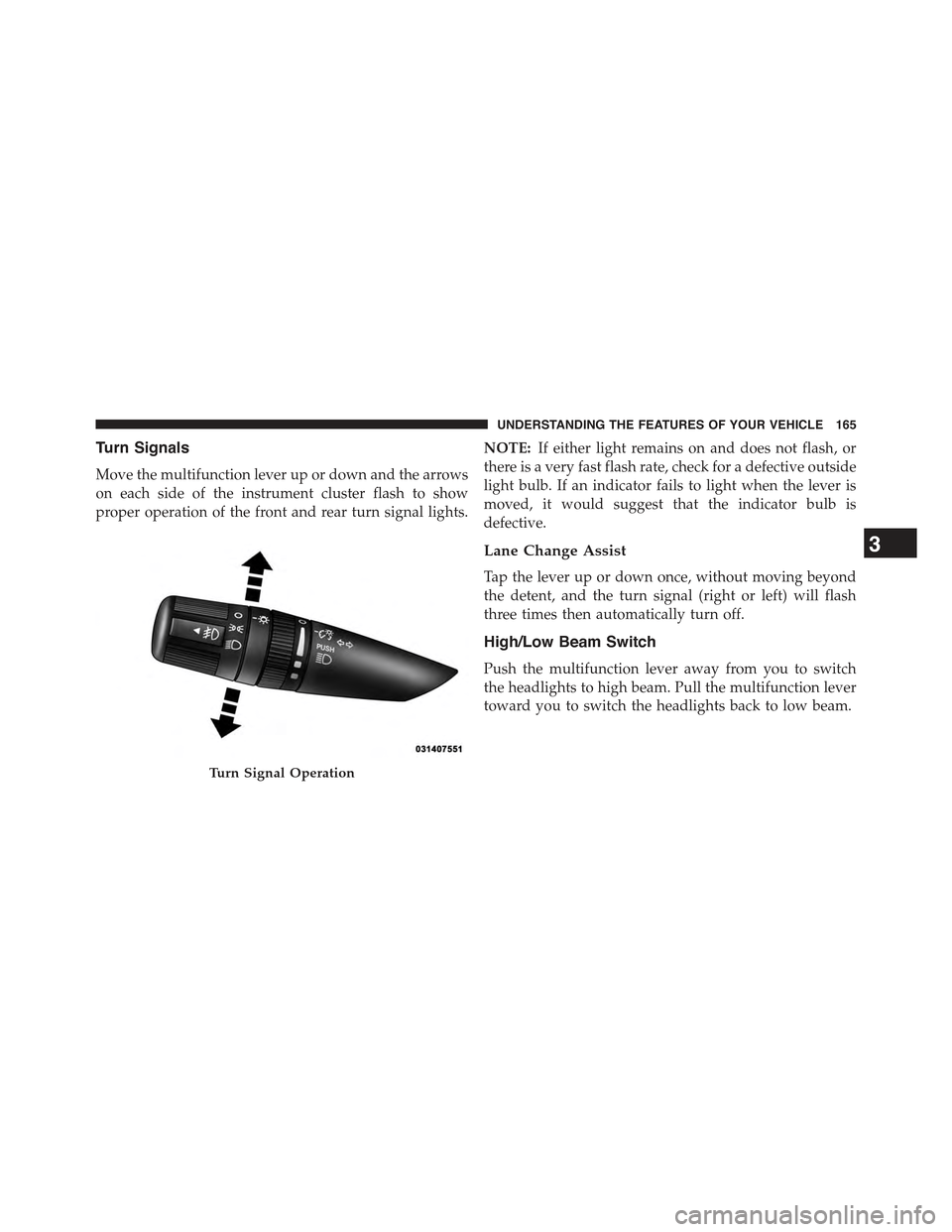
Turn Signals
Move the multifunction lever up or down and the arrows
on each side of the instrument cluster flash to show
proper operation of the front and rear turn signal lights.
NOTE:If either light remains on and does not flash, or
there is a very fast flash rate, check for a defective outside
light bulb. If an indicator fails to light when the lever is
moved, it would suggest that the indicator bulb is
defective.
Lane Change Assist
Tap the lever up or down once, without moving beyond
the detent, and the turn signal (right or left) will flash
three times then automatically turn off.
High/Low Beam Switch
Push the multifunction lever away from you to switch
the headlights to high beam. Pull the multifunction lever
toward you to switch the headlights back to low beam.
Turn Signal Operation
3
UNDERSTANDING THE FEATURES OF YOUR VEHICLE 165
Page 168 of 560
Flash-To-Pass
You can signal another vehicle with your headlights by
lightly pulling the multifunction lever toward you. This
will turn on the high beam headlights until the lever is
released.
NOTE:If the multifunction lever is held in the flash-to-
pass position for more than 20 seconds, the high beams
will shut off. If this occurs, wait 30 seconds for the next
flash-to-pass operation.
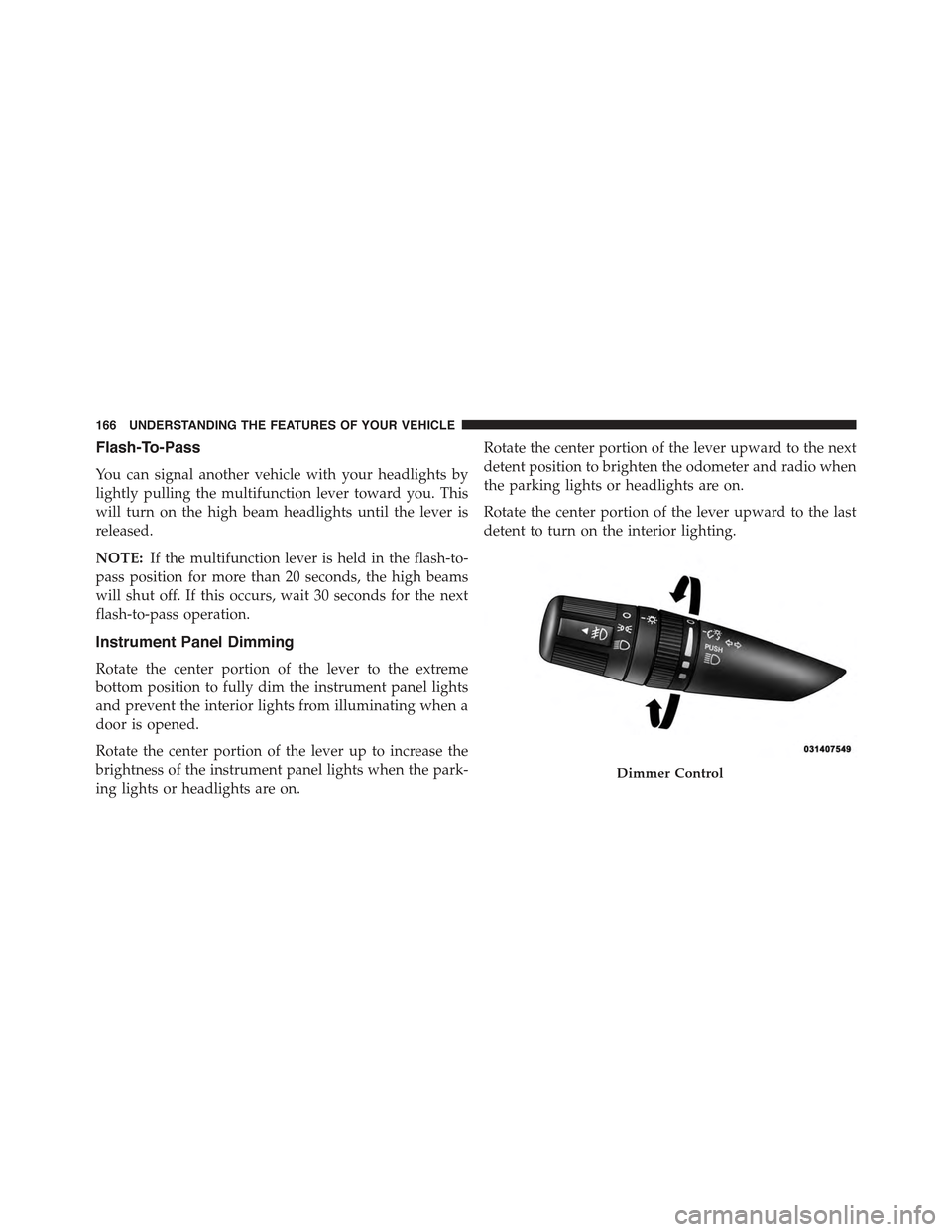
Instrument Panel Dimming
Rotate the center portion of the lever to the extreme
bottom position to fully dim the instrument panel lights
and prevent the interior lights from illuminating when a
door is opened.
Rotate the center portion of the lever up to increase the
brightness of the instrument panel lights when the park-
ing lights or headlights are on.
Rotate the center portion of the lever upward to the next
detent position to brighten the odometer and radio when
the parking lights or headlights are on.
Rotate the center portion of the lever upward to the last
detent to turn on the interior lighting.
Dimmer Control
166 UNDERSTANDING THE FEATURES OF YOUR VEHICLE
Page 171 of 560
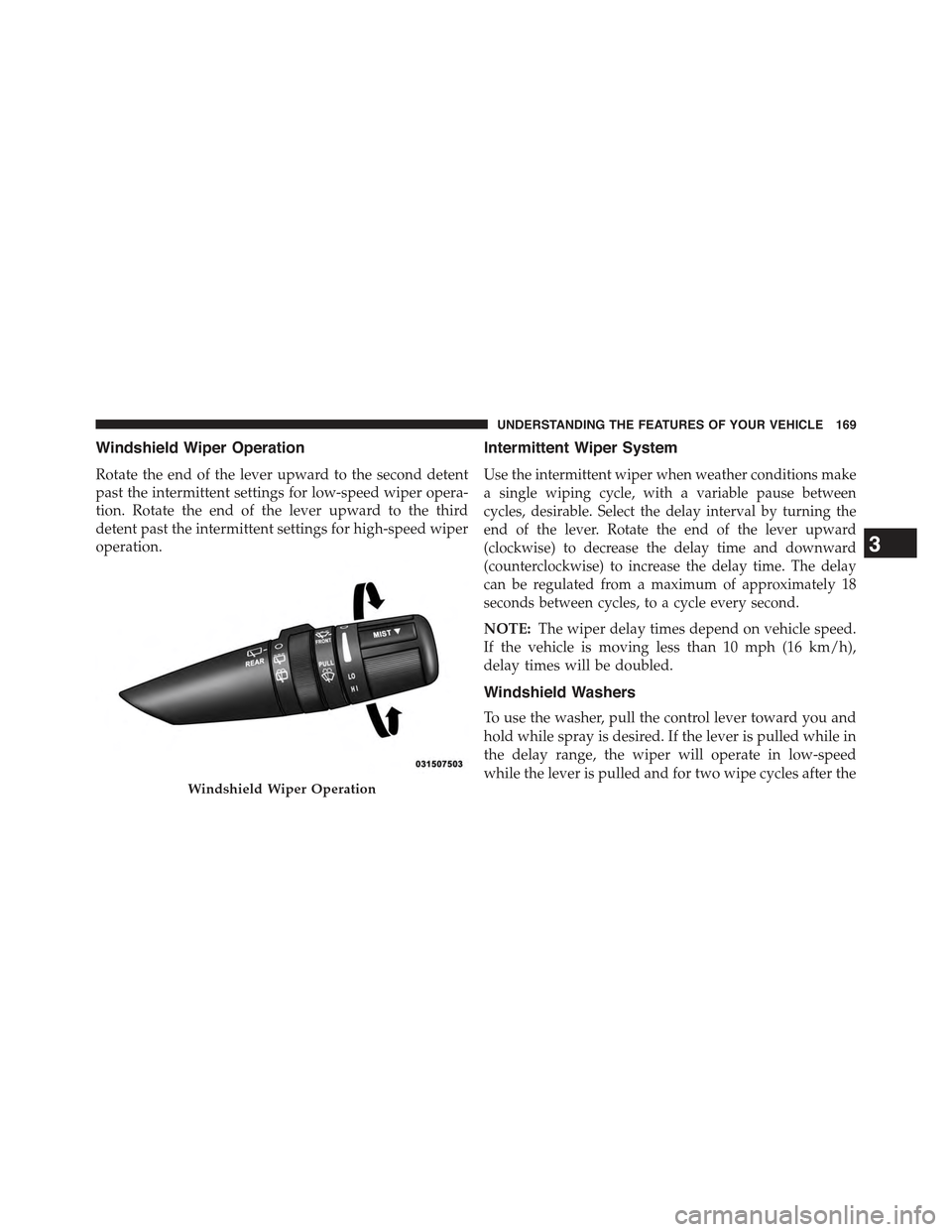
Windshield Wiper Operation
Rotate the end of the lever upward to the second detent
past the intermittent settings for low-speed wiper opera-
tion. Rotate the end of the lever upward to the third
detent past the intermittent settings for high-speed wiper
operation.
Intermittent Wiper System
Use the intermittent wiper when weather conditions make
a single wiping cycle, with a variable pause between
cycles, desirable. Select the delay interval by turning the
end of the lever. Rotate the end of the lever upward
(clockwise) to decrease the delay time and downward
(counterclockwise) to increase the delay time. The delay
can be regulated from a maximum of approximately 18
seconds between cycles, to a cycle every second.
NOTE:The wiper delay times depend on vehicle speed.
If the vehicle is moving less than 10 mph (16 km/h),
delay times will be doubled.
Windshield Washers
To use the washer, pull the control lever toward you and
hold while spray is desired. If the lever is pulled while in
the delay range, the wiper will operate in low-speed
while the lever is pulled and for two wipe cycles after theWindshield Wiper Operation
3
UNDERSTANDING THE FEATURES OF YOUR VEHICLE 169
Page 203 of 560
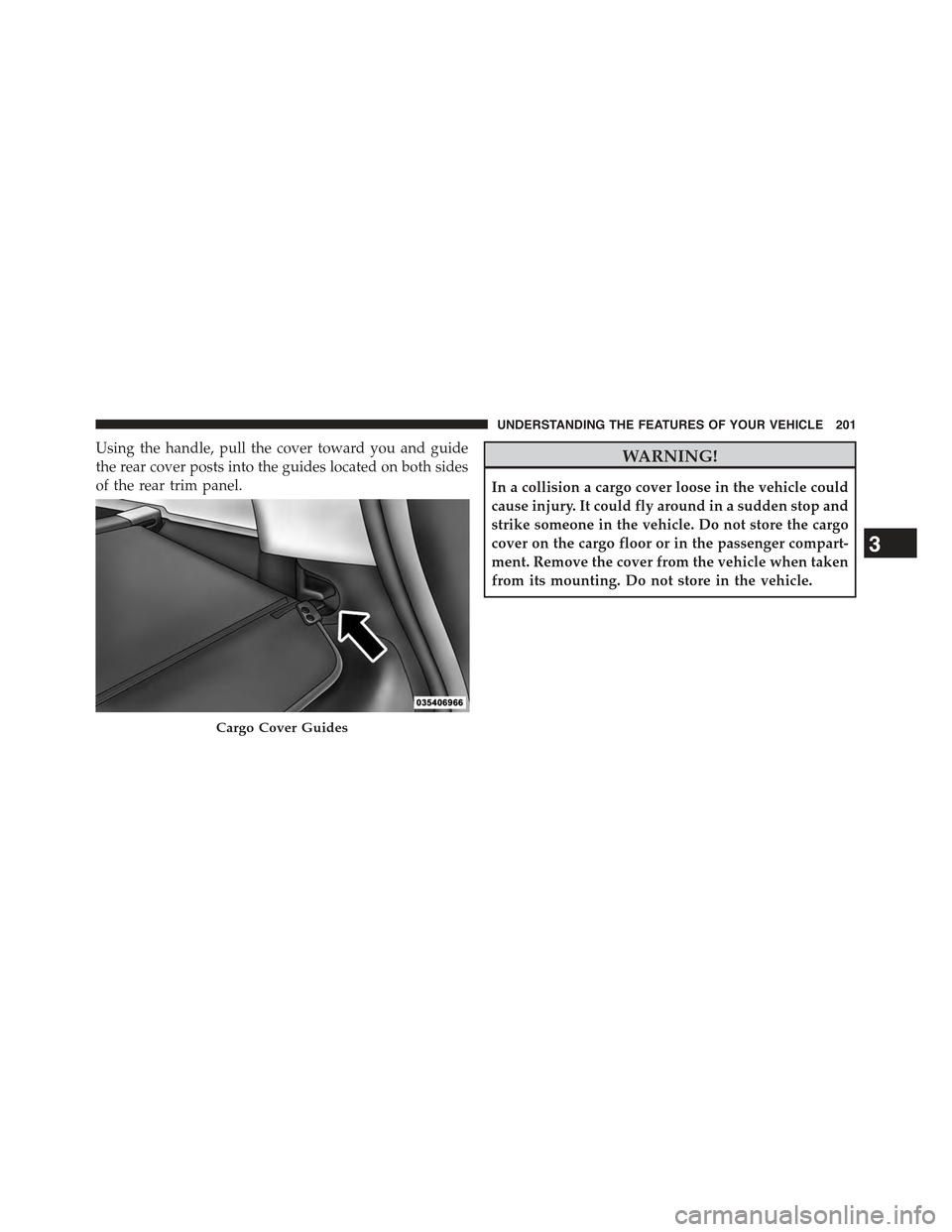
Using the handle, pull the cover toward you and guide
the rear cover posts into the guides located on both sides
of the rear trim panel.
WARNING!
In a collision a cargo cover loose in the vehicle could
cause injury. It could fly around in a sudden stop and
strike someone in the vehicle. Do not store the cargo
cover on the cargo floor or in the passenger compart-
ment. Remove the cover from the vehicle when taken
from its mounting. Do not store in the vehicle.
Cargo Cover Guides
3
UNDERSTANDING THE FEATURES OF YOUR VEHICLE 201
Page 209 of 560
approximately eight turns, then move the crossbar to the
desired position, keeping the crossbars perpendicular to
the luggage rack side rails. Once the crossbar is in one of
the seven detent positions, retighten the thumb screws to
lock the crossbar into position.
NOTE:
•To help control wind noise when the crossbars are not
in use, place the front crossbar in the first detent from
the front of the vehicle and the rear crossbar in the
second detent from the rear of the vehicle.
•If the rear crossbar (or any metallic object) is placed
over the satellite radio antenna (if equipped), you may
experience interruption of satellite radio reception. For
improved satellite radio reception, place the rear cross-
bar in the second detent from the rear of the vehicle
when not in use.
•The grab handles on the back of the vehicle (if
equipped) are not to be used as a towing feature.
CAUTION!
•To prevent damage to the roof of your vehicle, DO
NOT carry any loads on the luggage rack without
crossbars installed. The load should be secured and
placed on top of the crossbars, not directly on the
roof. If it is necessary to place the load on the roof,
place a blanket or some other protection between
the load and the roof surface.
•To avoid damage to the luggage rack and vehicle,
do not exceed the maximum luggage rack load
capacity of 150 lb (68 kg). Always distribute heavy
loads as evenly as possible and secure the load
appropriately.
•Long loads which extend over the windshield, such
as wood panels or surfboards, or loads with large
frontal area should be secured to both the front and
rear of the vehicle.
(Continued)
3
UNDERSTANDING THE FEATURES OF YOUR VEHICLE 207