lock JEEP COMPASS 2018 Owner handbook (in English)
[x] Cancel search | Manufacturer: JEEP, Model Year: 2018, Model line: COMPASS, Model: JEEP COMPASS 2018Pages: 348, PDF Size: 6.03 MB
Page 153 of 348
WARNING!
Allowing children to be in a vehicle un-
attended is dangerous for a number of
reasons. A child or others could be seri-
ously or fatally injured. Children should
be warned not to touch the park brake,
brake pedal or the transmission gear
selector.
• Do not leave the key fob in or near the
vehicle (or in a location accessible to
children), and do not leave the ignition
(in a vehicle equipped with push button
start) in the ON/RUN mode. A child
could operate power windows, other
controls, or move the vehicle.
CAUTION!
Damage to the transmission may occur if
the following precautions are not ob-
served:
• Shift into or out of PARK or REVERSE
only after the vehicle has come to a
complete stop.
CAUTION!
• Do not shift between PARK, REVERSE,
NEUTRAL, or DRIVE when the engine is
above idle speed.
• Before shifting into any gear, make sure
your foot is firmly pressing the brake
pedal.
NOTE:
You must press and hold the brake pedal
while shifting out of PARK.
Ignition Park Interlock
Vehicles with push button start:
This vehicle is equipped with an Ignition Park
Interlock which requires the transmission to
be in PARK before the ignition can be turned
to the OFF mode. This helps the driver avoid
inadvertently leaving the vehicle without
placing the transmission in PARK. This sys-
tem also locks the transmission in PARK
whenever the ignition is in the OFF mode.Vehicles with mechanical key:
This vehicle is equipped with a Key Ignition
Park Interlock which requires the transmis-
sion to be in PARK before the ignition can be
turned to the OFF (key removal) position. The
key can only be removed from the ignition
when the ignition is in the OFF position, and
the transmission is locked in PARK whenever
the ignition is in the OFF position.
If the vehicle's battery becomes discharged,
the key will be trapped in the ignition even
when the gear selector is in PARK. Recharge
the battery to allow key removal.Brake/Transmission Shift Interlock
System
This vehicle is equipped with a Brake Trans-
mission Shift Interlock system (BTSI) that
holds the transmission gear selector in PARK
unless the brakes are applied. To shift the
transmission out of PARK, the ignition must
be in the ON/RUN mode (whether the engine
is running or not), and the brake pedal must
be pressed. The brake pedal must also be
pressed to shift from NEUTRAL into DRIVE or
REVERSE when the vehicle is stopped or
moving at low speeds.
151
Page 154 of 348
Six-Speed Or Nine-Speed Automatic
Transmission
NOTE:
Your vehicle may be equipped with a six-
speed or nine-speed automatic transmission,
depending on model. This section describes
operation of both the six-speed and nine-
speed transmission.
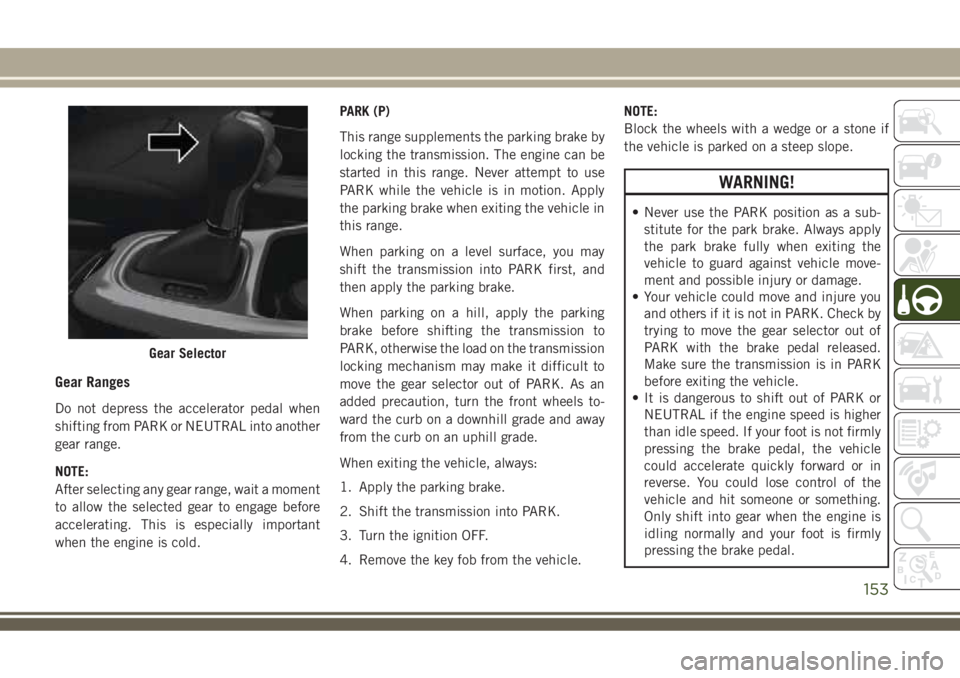
The transmission gear range (PRND) is dis-
played both beside the gear selector and in
the instrument cluster. To select a gear range,
push the lock button on the gear selector and
move the selector rearward or forward. You
must also press the brake pedal to shift the
transmission out of PARK (or NEUTRAL,
when the vehicle is stopped or moving at low
speeds). Select the DRIVE range for normal
driving.
NOTE:
In the event of a mismatch between the gear
selector position and the actual transmission
gear (for example, driver selects REVERSE
while driving forward), the position indicator
will blink continuously until the selector is
returned to the proper position, or the re-
quested shift can be completed.The electronically-controlled transmission
adapts its shift schedule based on driver
inputs, along with environmental and road
conditions. The transmission electronics are
self-calibrating; therefore, the first few shifts
on a new vehicle may be somewhat abrupt.
This is a normal condition, and precision
shifts will develop within a few hundred miles
(kilometers).
The nine-speed transmission has been devel-
oped to meet the needs of current and future
FWD/AWD vehicles. Software and calibration
is refined to optimize the customer’s driving
experience and fuel economy. By design,
some vehicle and driveline combinations uti-
lize 9th gear only in very specific driving
situations and conditions.
Only shift from DRIVE to PARK or REVERSE
when the accelerator pedal is released and
the vehicle is stopped. Be sure to keep your
foot on the brake pedal when shifting be-
tween these gears.
The transmission gear selector provides
PARK, REVERSE, NEUTRAL, DRIVE, and
AutoStick (+/-) shift positions. Manual shifts
can be made using the AutoStick shift con-trol. Moving the gear selector into the
AutoStick (+/-) position (beside the DRIVE
position) activates AutoStick mode, provid-
ing manual shift control and displaying the
current gear in the instrument cluster (as 1,
2, 3, etc.). Toggling the gear selector forward
(-) or rearward (+) while in the AutoStick
position will manually select the transmis-
sion gear. Refer to "AutoStick" in this section
for further information.
NOTE:
If the gear selector cannot be moved to the
PARK, REVERSE, or NEUTRAL position
(when pushed forward) it is probably in the
AutoStick (+/-) position (beside the DRIVE
position). In AutoStick mode, the transmis-
sion gear (1, 2, 3, etc.) is displayed in the
instrument cluster. Move the gear selector to
the right (into the DRIVE [D] position) for
access to PARK, REVERSE, and NEUTRAL.
STARTING AND OPERATING
152
Page 155 of 348
Gear Ranges
Do not depress the accelerator pedal when
shifting from PARK or NEUTRAL into another
gear range.
NOTE:
After selecting any gear range, wait a moment
to allow the selected gear to engage before
accelerating. This is especially important
when the engine is cold.PARK (P)
This range supplements the parking brake by
locking the transmission. The engine can be
started in this range. Never attempt to use
PARK while the vehicle is in motion. Apply
the parking brake when exiting the vehicle in
this range.
When parking on a level surface, you may
shift the transmission into PARK first, and
then apply the parking brake.
When parking on a hill, apply the parking
brake before shifting the transmission to
PARK, otherwise the load on the transmission
locking mechanism may make it difficult to
move the gear selector out of PARK. As an
added precaution, turn the front wheels to-
ward the curb on a downhill grade and away
from the curb on an uphill grade.
When exiting the vehicle, always:
1. Apply the parking brake.
2. Shift the transmission into PARK.
3. Turn the ignition OFF.
4. Remove the key fob from the vehicle.NOTE:
Block the wheels with a wedge or a stone if
the vehicle is parked on a steep slope.
WARNING!
• Never use the PARK position as a sub-
stitute for the park brake. Always apply
the park brake fully when exiting the
vehicle to guard against vehicle move-
ment and possible injury or damage.
• Your vehicle could move and injure you
and others if it is not in PARK. Check by
trying to move the gear selector out of
PARK with the brake pedal released.
Make sure the transmission is in PARK
before exiting the vehicle.
• It is dangerous to shift out of PARK or
NEUTRAL if the engine speed is higher
than idle speed. If your foot is not firmly
pressing the brake pedal, the vehicle
could accelerate quickly forward or in
reverse. You could lose control of the
vehicle and hit someone or something.
Only shift into gear when the engine is
idling normally and your foot is firmly
pressing the brake pedal.
Gear Selector
153
Page 156 of 348
WARNING!
• The vehicle may not engage a newly
selected gear if the vehicle is moving
while shifting.
• Unintended movement of a vehicle
could injure those in or near the vehicle.
As with all vehicles, you should never
exit a vehicle while the engine is run-
ning. Before exiting a vehicle always
come to a complete stop, then apply the
park brake, shift the transmission into
PARK, turn the engine OFF, and remove
the key fob. When the ignition is in the
LOCK/OFF (key removal) position (or,
with push button start, when the ignition
is in the OFF mode), the transmission is
locked in PARK, securing the vehicle
against unwanted movement.
• When leaving the vehicle, always make
sure the ignition is in the OFF mode,
remove the key fob from the vehicle, and
lock the vehicle.
• Never leave children alone in a vehicle,
or with access to an unlocked vehicle.
Allowing children to be in a vehicle un-
attended is dangerous for a number of
WARNING!
reasons. A child or others could be seri-
ously or fatally injured. Children should
be warned not to touch the park brake,
brake pedal or the transmission gear
selector.
• Do not leave the key fob in or near the
vehicle (or in a location accessible to
children), and do not leave the ignition
(in a vehicle equipped with push button
start) in the ON/RUN mode. A child
could operate power windows, other con-
trols, or move the vehicle.
CAUTION!
• Before moving the transmission gear se-
lector out of PARK, you must turn the
ignition to the ON/RUN mode, and also
press the brake pedal. Otherwise, dam-
age to the gear selector could result.
• DO NOT race the engine when shifting
from PARK or NEUTRAL into another
gear range, as this can damage the
drivetrain.The following indicators should be used to
ensure that you have properly engaged the
transmission into the PARK position:
• When shifting into PARK, push the lock
button on the gear selector, and firmly
move the selector all the way forward until
it stops and is fully seated.
• Look at the transmission gear position dis-
play and verify that it indicates the PARK
position (P).
• With brake pedal released, verify that the
gear selector will not move out of PARK.
REVERSE (R)
This range is for moving the vehicle back-
ward. Shift into REVERSE only after the ve-
hicle has come to a complete stop.
NEUTRAL (N)
Use this range when the vehicle is standing
for prolonged periods with the engine run-
ning. The engine may be started in this range.
Apply the park brake and shift the transmis-
sion into PARK if you must exit the vehicle.
STARTING AND OPERATING
154
Page 160 of 348
CAUTION!
All wheels must have the same size and
type tires. Unequal tire sizes must not be
used. Unequal tire size may cause failure
of the power transfer unit.
Four Wheel Drive (4x4)
The four wheel drive (4WD) is fully automatic
in normal driving mode.
NOTE:
It is not possible to carry out the change of
mode when the vehicle exceeds the speed of
75 mph (120 km/h).
Enabling Four Wheel Drive (4x4)
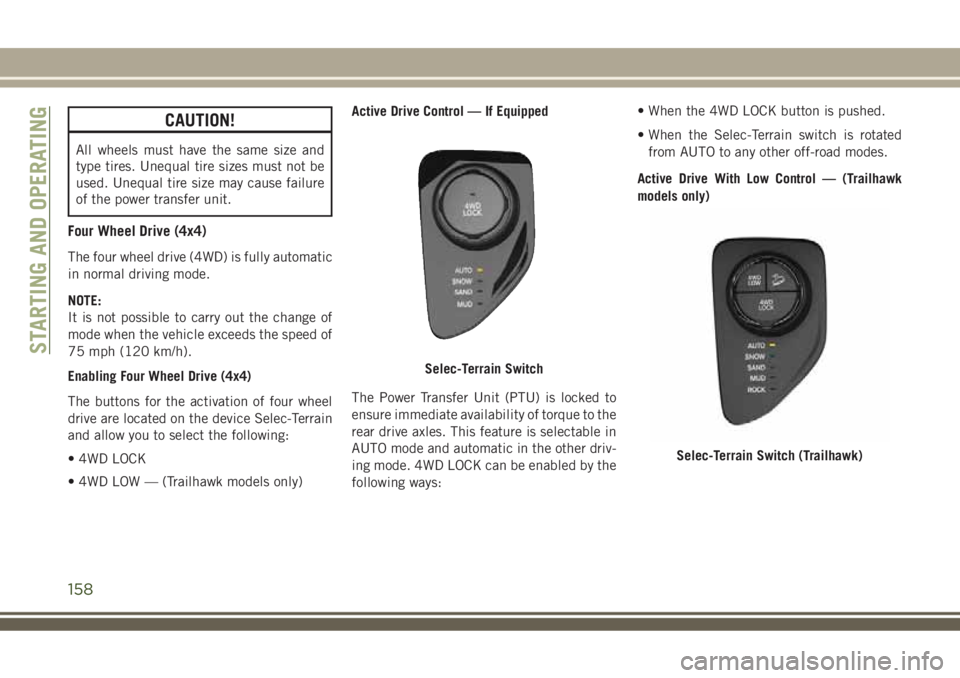
The buttons for the activation of four wheel
drive are located on the device Selec-Terrain
and allow you to select the following:
• 4WD LOCK
• 4WD LOW — (Trailhawk models only)Active Drive Control — If Equipped
The Power Transfer Unit (PTU) is locked to
ensure immediate availability of torque to the
rear drive axles. This feature is selectable in
AUTO mode and automatic in the other driv-
ing mode. 4WD LOCK can be enabled by the
following ways:• When the 4WD LOCK button is pushed.
• When the Selec-Terrain switch is rotated
from AUTO to any other off-road modes.
Active Drive With Low Control — (Trailhawk
models only)
Selec-Terrain Switch
Selec-Terrain Switch (Trailhawk)
STARTING AND OPERATING
158
Page 161 of 348
The 4WD LOW mode helps to improve the
off-road performance in all modes. To enable
4WD LOW, please follow the steps below:
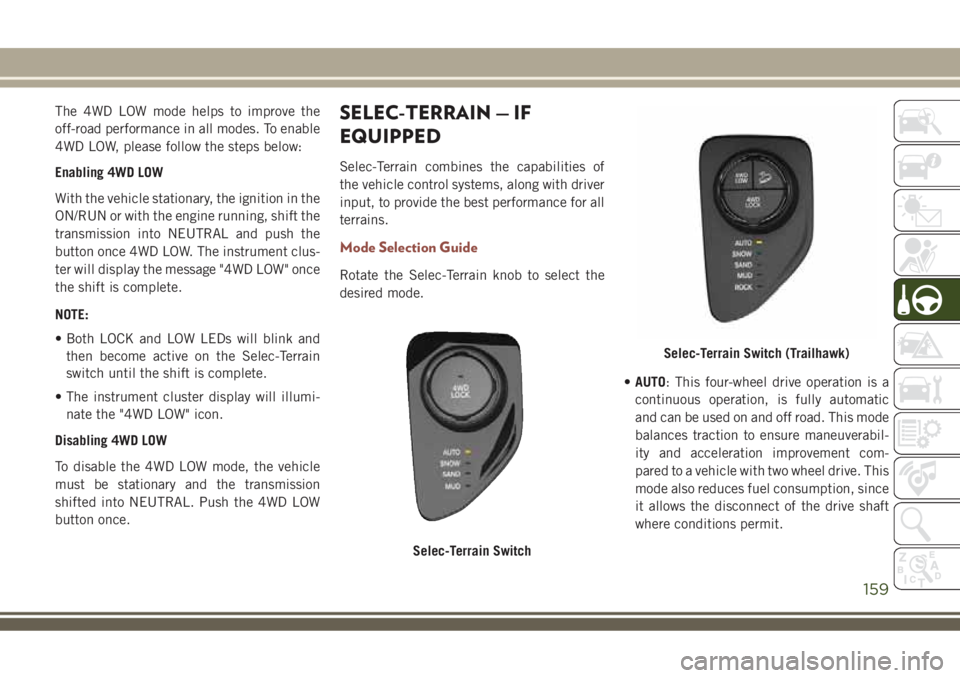
Enabling 4WD LOW
With the vehicle stationary, the ignition in the
ON/RUN or with the engine running, shift the
transmission into NEUTRAL and push the
button once 4WD LOW. The instrument clus-
ter will display the message "4WD LOW" once
the shift is complete.
NOTE:
• Both LOCK and LOW LEDs will blink and
then become active on the Selec-Terrain
switch until the shift is complete.
• The instrument cluster display will illumi-
nate the "4WD LOW" icon.
Disabling 4WD LOW
To disable the 4WD LOW mode, the vehicle
must be stationary and the transmission
shifted into NEUTRAL. Push the 4WD LOW
button once.SELEC-TERRAIN — IF
EQUIPPED
Selec-Terrain combines the capabilities of
the vehicle control systems, along with driver
input, to provide the best performance for all
terrains.
Mode Selection Guide
Rotate the Selec-Terrain knob to select the
desired mode.
•AUTO: This four-wheel drive operation is a
continuous operation, is fully automatic
and can be used on and off road. This mode
balances traction to ensure maneuverabil-
ity and acceleration improvement com-
pared to a vehicle with two wheel drive. This
mode also reduces fuel consumption, since
it allows the disconnect of the drive shaft
where conditions permit.
Selec-Terrain Switch
Selec-Terrain Switch (Trailhawk)
159
Page 178 of 348
NOTE:
• The system will not apply torque to the
steering wheel whenever a safety system
engages. (anti-lock brakes, traction control
system, electronic stability control, forward
collision warning, etc.).
• Use of the turn signals and Hazard Warning
flashers also suppresses the warnings.
PARKVIEW REAR BACK-UP
CAMERA
Symbols And Messages On The Display
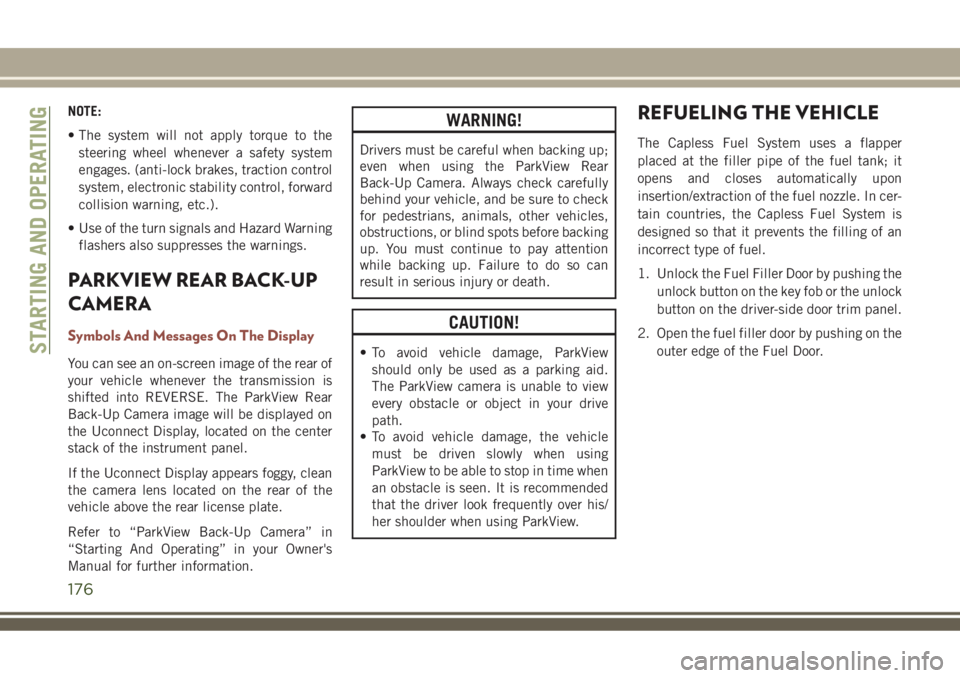
You can see an on-screen image of the rear of
your vehicle whenever the transmission is
shifted into REVERSE. The ParkView Rear
Back-Up Camera image will be displayed on
the Uconnect Display, located on the center
stack of the instrument panel.
If the Uconnect Display appears foggy, clean
the camera lens located on the rear of the
vehicle above the rear license plate.
Refer to “ParkView Back-Up Camera” in
“Starting And Operating” in your Owner's
Manual for further information.
WARNING!
Drivers must be careful when backing up;
even when using the ParkView Rear
Back-Up Camera. Always check carefully
behind your vehicle, and be sure to check
for pedestrians, animals, other vehicles,
obstructions, or blind spots before backing
up. You must continue to pay attention
while backing up. Failure to do so can
result in serious injury or death.
CAUTION!
• To avoid vehicle damage, ParkView
should only be used as a parking aid.
The ParkView camera is unable to view
every obstacle or object in your drive
path.
• To avoid vehicle damage, the vehicle
must be driven slowly when using
ParkView to be able to stop in time when
an obstacle is seen. It is recommended
that the driver look frequently over his/
her shoulder when using ParkView.
REFUELING THE VEHICLE
The Capless Fuel System uses a flapper
placed at the filler pipe of the fuel tank; it
opens and closes automatically upon
insertion/extraction of the fuel nozzle. In cer-
tain countries, the Capless Fuel System is
designed so that it prevents the filling of an
incorrect type of fuel.
1. Unlock the Fuel Filler Door by pushing the
unlock button on the key fob or the unlock
button on the driver-side door trim panel.
2. Open the fuel filler door by pushing on the
outer edge of the Fuel Door.
STARTING AND OPERATING
176
Page 180 of 348
3. Ensure funnel is inserted fully to hold
flapper door open.
4. Pour fuel into funnel opening.
5. Remove funnel from filler pipe, clean off
prior to putting back in the spare tire
storage area.
NOTE:
• In certain cold conditions, ice may prevent
the fuel door from opening. If this occurs,
lightly push on the fuel door to break the ice
buildup and re-release the fuel door using
the inside release button. Do not pry on the
door.
• When the fuel nozzle “clicks” or shuts off,
the fuel tank is full.
WARNING!
• Never have any smoking materials lit in
or near the vehicle when the gas cap is
removed or the tank is being filled.
WARNING!
• Never add fuel when the engine is run-
ning. This is in violation of most state
fire regulations and may cause the MIL
to turn on.
• A fire may result if gasoline is pumped
into a portable container that is inside of
a vehicle. You could be burned. Always
place gas containers on the ground while
filling.
Emergency Fuel Filler Door Release
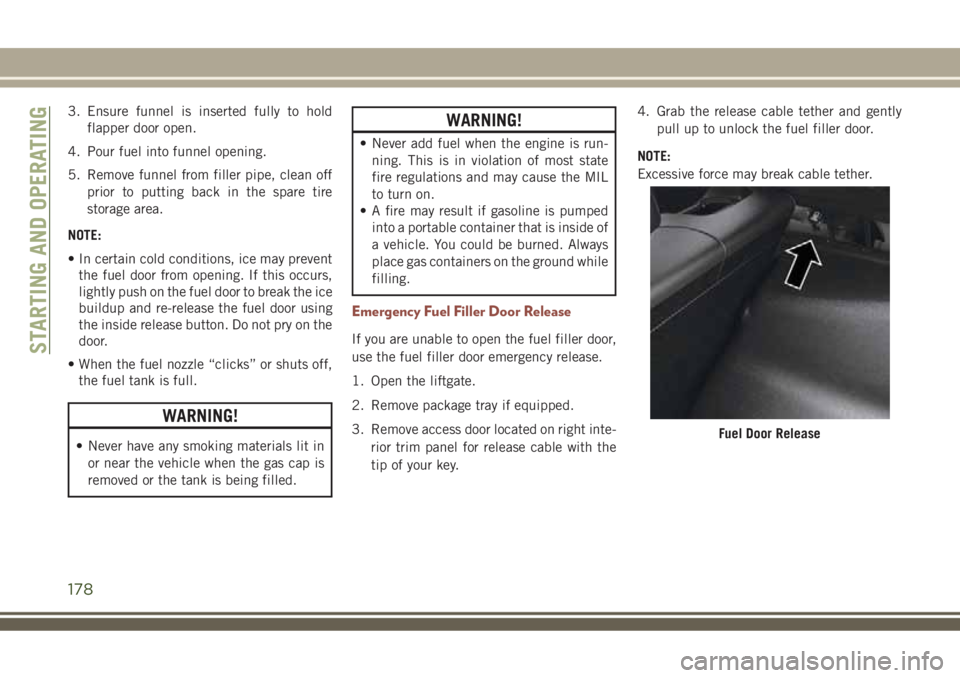
If you are unable to open the fuel filler door,
use the fuel filler door emergency release.
1. Open the liftgate.
2. Remove package tray if equipped.
3. Remove access door located on right inte-
rior trim panel for release cable with the
tip of your key.4. Grab the release cable tether and gently
pull up to unlock the fuel filler door.
NOTE:
Excessive force may break cable tether.
Fuel Door Release
STARTING AND OPERATING
178
Page 184 of 348
Perform the maintenance listed in the
“Scheduled Servicing”. Refer to “Scheduled
Servicing” in “Servicing And Maintenance”
for the proper maintenance intervals. When
towing a trailer, never exceed the GAWR or
GCWR ratings.
WARNING!
Improper towing can lead to a collision.
Follow these guidelines to make your
trailer towing as safe as possible:
• Make certain that the load is secured in
the trailer and will not shift during
travel. When trailering cargo that is not
fully secured, dynamic load shifts can
occur that may be difficult for the driver
to control. You could lose control of your
vehicle and have a collision.
WARNING!
• When hauling cargo or towing a trailer,
do not overload your vehicle or trailer.
Overloading can cause a loss of control,
poor performance or damage to brakes,
axle, engine, transmission, steering,
suspension, chassis structure or tires.
• Safety chains must always be used be-
tween your vehicle and trailer. Always
connect the chains to the hook retainers
of the vehicle hitch. Cross the chains
under the trailer tongue and allow
enough slack for turning corners.
• Vehicles with trailers should not be
parked on a grade. When parking, apply
the parking brake on the tow vehicle. Put
the tow vehicle transmission in PARK.
For four-wheel drive vehicles, make sure
WARNING!
the transfer case is not in NEUTRAL.
Always, block or "chock" the trailer
wheels.
• GCWR must not be exceeded.
•
Total weight must be distributed between
the tow vehicle and the trailer such that
the following four ratings are not ex-
ceeded:
1. GVWR
2. GTW
3. GAWR
4. Tongue weight rating for the trailer
hitch utilized.
STARTING AND OPERATING
182
Page 190 of 348
Replacing Exterior Bulbs
Headlamps
Hi/Lo Beam Light Halogen
The bulbs can be accessed from the wheel
liner with the following procedure:
1. Turn the front wheels completely.
2. Remove the wheel liner.
3. Remove the headlamp bulb cap.
4. Rotate the headlamp bulb socket counter-
clockwise then pull outwards.5. Push on the locking tab on the headlamp
bulb connector and remove the bulb and
socket.
6. Install the new headlamp bulb making
sure it’s properly locked.
7. Install the headlamp bulb and socket;
turn it clockwise making sure it is properly
locked.
8. Reinstall the wheel liner.
Headlamp
1 — Low Beam Bulb Cap
2 — High Beam Bulb Cap
Headlamp Bulb Socket
IN CASE OF EMERGENCY
188