light JEEP COMPASS 2019 Owner handbook (in English)
[x] Cancel search | Manufacturer: JEEP, Model Year: 2019, Model line: COMPASS, Model: JEEP COMPASS 2019Pages: 362, PDF Size: 6.23 MB
Page 23 of 362
liftgate button will not disarm the vehicle
security alarm. If someone enters the ve-
hicle through the liftgate and opens any
door the alarm will sound.
• When the vehicle security alarm is armed,
the interior power door lock switches will
not unlock the doors.
• The ultrasonic intrusion sensor (motion de-
tector) actively monitors your vehicle every
time you arm the security system. If you
prefer, you can turn off the ultrasonic intru-
sion sensor when arming the security sys-
tem. To do so, push the lock button on the
key fob five times within five seconds of
arming the system (while the vehicle secu-
rity light is flashing rapidly).
The vehicle security alarm is designed to
protect your vehicle; however, you can create
conditions where the system will give you a
false alarm. If one of the previously described
arming sequences has occurred, the vehicle
security alarm will arm regardless of whether
you are in the vehicle or not. If you remain in
the vehicle and open a door, the alarm will
sound. If this occurs, disarm the vehicle
security alarm.If the vehicle security alarm is armed and the
battery becomes disconnected, the vehicle
security alarm will remain armed when the
battery is reconnected; the exterior lights will
flash, the horn will sound. If this occurs,
disarm the vehicle security alarm.
Security System Manual Override
The system will not arm if you lock the doors
using the manual door lock plunger.
DOORS
Keyless Enter-N-Go — Passive Entry
The Passive Entry system is an enhancement
to the vehicle’s Remote Keyless Entry system
and a feature of Keyless Enter-N-Go — Pas-
sive Entry. This feature allows you to lock and
unlock the vehicle’s door(s) and fuel door
without having to push the key fob lock or
unlock buttons.
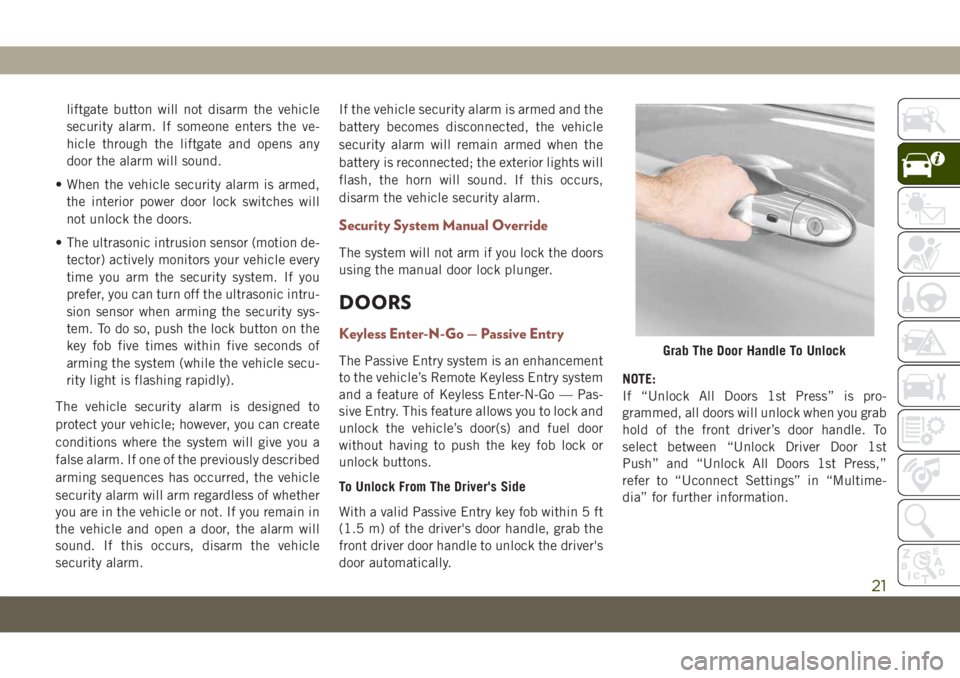
To Unlock From The Driver's Side
With a valid Passive Entry key fob within 5 ft
(1.5 m) of the driver's door handle, grab the
front driver door handle to unlock the driver's
door automatically.NOTE:
If “Unlock All Doors 1st Press” is pro-
grammed, all doors will unlock when you grab
hold of the front driver’s door handle. To
select between “Unlock Driver Door 1st
Push” and “Unlock All Doors 1st Press,”
refer to “Uconnect Settings” in “Multime-
dia” for further information.Grab The Door Handle To Unlock
21
Page 35 of 362
Vehicles Equipped With Remote Start
On models that are equipped with remote
start, the heated steering wheel can be pro-
grammed to come on during a remote start.
This feature can be programmed through the
Uconnect system. Refer to “Uconnect Set-
tings” in “Multimedia” in the Owner’s
Manual for further information.
WARNING!
• Persons who are unable to feel pain to
the skin because of advanced age,
chronic illness, diabetes, spinal cord in-
jury, medication, alcohol use, exhaus-
tion, or other physical conditions must
exercise care when using the steering
wheel heater. It may cause burns even at
low temperatures, especially if used for
long periods.
• Do not place anything on the steering
wheel that insulates against heat, such
as a blanket or steering wheel covers of
any type and material. This may cause
the steering wheel heater to overheat.
EXTERIOR LIGHTS
Multifunction Lever
The multifunction lever controls the opera-
tion of the turn signals, headlight beam se-
lection and passing lights. The multifunction
lever is located on the left side of the steering
column.
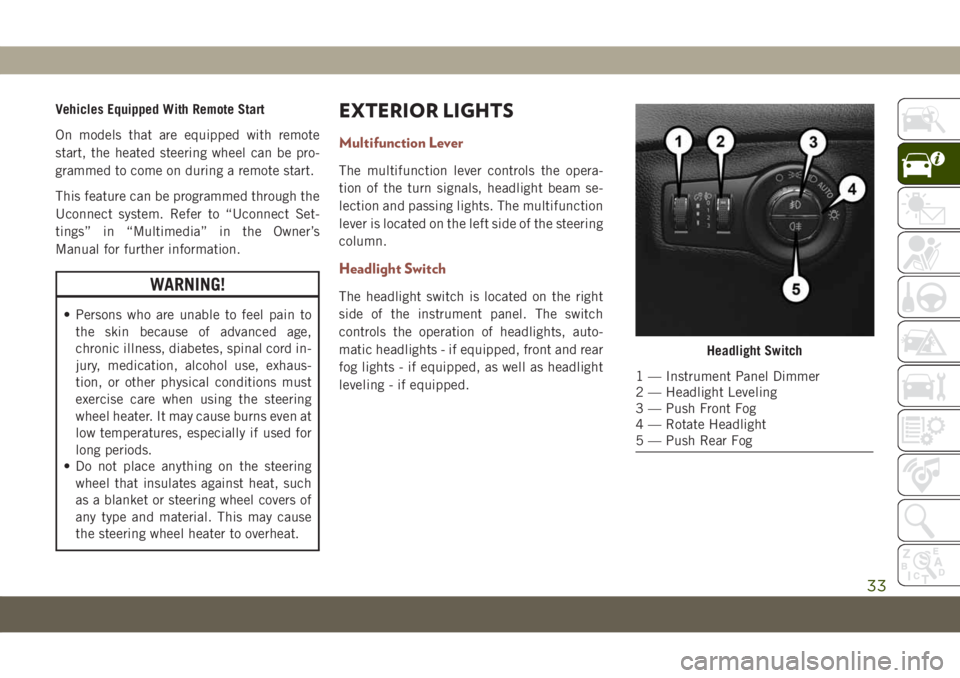
Headlight Switch
The headlight switch is located on the right
side of the instrument panel. The switch
controls the operation of headlights, auto-
matic headlights - if equipped, front and rear
fog lights - if equipped, as well as headlight
leveling - if equipped.
Headlight Switch
1 — Instrument Panel Dimmer
2 — Headlight Leveling
3 — Push Front Fog
4 — Rotate Headlight
5 — Push Rear Fog
33
Page 36 of 362
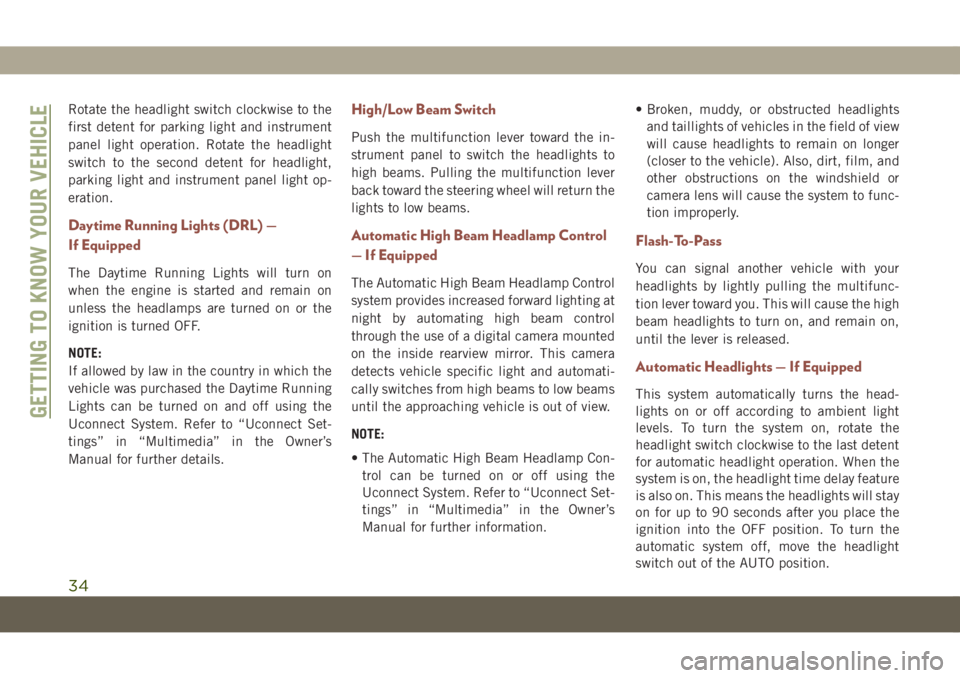
Rotate the headlight switch clockwise to the
first detent for parking light and instrument
panel light operation. Rotate the headlight
switch to the second detent for headlight,
parking light and instrument panel light op-
eration.
Daytime Running Lights (DRL) —
If Equipped
The Daytime Running Lights will turn on
when the engine is started and remain on
unless the headlamps are turned on or the
ignition is turned OFF.
NOTE:
If allowed by law in the country in which the
vehicle was purchased the Daytime Running
Lights can be turned on and off using the
Uconnect System. Refer to “Uconnect Set-
tings” in “Multimedia” in the Owner’s
Manual for further details.
High/Low Beam Switch
Push the multifunction lever toward the in-
strument panel to switch the headlights to
high beams. Pulling the multifunction lever
back toward the steering wheel will return the
lights to low beams.
Automatic High Beam Headlamp Control
— If Equipped
The Automatic High Beam Headlamp Control
system provides increased forward lighting at
night by automating high beam control
through the use of a digital camera mounted
on the inside rearview mirror. This camera
detects vehicle specific light and automati-
cally switches from high beams to low beams
until the approaching vehicle is out of view.
NOTE:
• The Automatic High Beam Headlamp Con-
trol can be turned on or off using the
Uconnect System. Refer to “Uconnect Set-
tings” in “Multimedia” in the Owner’s
Manual for further information.• Broken, muddy, or obstructed headlights
and taillights of vehicles in the field of view
will cause headlights to remain on longer
(closer to the vehicle). Also, dirt, film, and
other obstructions on the windshield or
camera lens will cause the system to func-
tion improperly.
Flash-To-Pass
You can signal another vehicle with your
headlights by lightly pulling the multifunc-
tion lever toward you. This will cause the high
beam headlights to turn on, and remain on,
until the lever is released.
Automatic Headlights — If Equipped
This system automatically turns the head-
lights on or off according to ambient light
levels. To turn the system on, rotate the
headlight switch clockwise to the last detent
for automatic headlight operation. When the
system is on, the headlight time delay feature
is also on. This means the headlights will stay
on for up to 90 seconds after you place the
ignition into the OFF position. To turn the
automatic system off, move the headlight
switch out of the AUTO position.
GETTING TO KNOW YOUR VEHICLE
34
Page 37 of 362
NOTE:
The engine must be running before the head-
lights will come on in the automatic mode.
Headlight Time Delay
This feature provides the safety of headlight
illumination for up to 90 seconds (program-
mable) when leaving your vehicle in an unlit
area.
To activate the delay feature, place the igni-
tion in the OFF position while the headlights
are still on. Then, turn off the headlights
within 45 seconds. The delay interval begins
when the headlight switch is turned off.
If you turn the headlights or parking lights on,
or place the ignition in ACC or RUN, the
system will cancel the delay.
If you turn the headlights off before the
ignition, they will turn off in the normal
manner.NOTE:
• The lights must be turned off within 45 sec-
onds of placing the ignition in the OFF
position to activate this feature. If the
headlight switch is in the AUTO position
prior to turning the ignition OFF, there is no
need to turn the headlight switch to off to
activate Headlight Delay.
• The headlight delay time is programmable
using the Uconnect System. Refer to
“Uconnect Settings” in “Multimedia” in
the Owner’s Manual for further details.
Lights-On Reminder — If Equipped
If the headlights or parking lights are on after
the ignition is in the OFF position, a chime
will sound to alert the driver when the driver's
door is opened.
NOTE:
Leaving the headlights, or parking lights, on
after the ignition is in the OFF position (when
the vehicle is not equipped with the
Lights-On Reminder feature) may result in
vehicle battery discharge.
Front And Rear Fog Lights — If Equipped
The fog light switches are built into the head-
light switch.
To activate the front fog lights, push the
upper half of the headlight switch. To turn off
the front fog lights, push the upper half of the
headlight switch a second time.
NOTE:
To activate the front fog lights, the parking
lights or low beam headlights must first be
activated.
To activate the rear fog lights, push the lower
half of the headlight switch. To turn off the
rear fog lights, push the lower half of the
headlight switch a second time.
NOTE:
To turn on the rear fog lights, the low beam
headlights or front fog lights must first be
active. If the vehicle is only equipped with
rear fog lights, only a single button will be
available in the center of the headlight
switch. Push once to turn the rear fog lights
on, and a second time to turn them off.
35
Page 38 of 362
An indicator light in the instrument cluster
illuminates when the fog lights are turned on.
Turn Signals
Move the multifunction lever up or down and
the arrows on each side of the instrument
cluster display flash to show proper operation
of the front and rear turn signal lights.
NOTE:
• If either light remains on and does not
flash, or there is a very fast flash rate, check
for a defective outside light bulb. If an
indicator fails to light when the lever is
moved, it would suggest that the indicator
bulb is defective.
• A “Turn Signal On” message will appear in
the instrument cluster display and a con-
tinuous chime will sound if the vehicle is
driven more than 1 mile (1.6 km) with
either turn signal on.
•
When the Daytime Running Lights are on and
a turn signal is activated, the Daytime Run-
ning Lamp will turn off on the side of the
vehicle in which the turn signal is flashing.
The Daytime Running Lamp will turn back on
when the turn signal is turned off.
Headlight Leveling System — If Equipped
This system allows the driver to maintain
proper headlight beam position with the road
surface regardless of vehicle load.
The control switch is located on the instru-
ment panel next to the dimmer control.
To operate, rotate the control switch until the
appropriate number, which corresponds to
the load listed on the chart, aligns with the
indicator line on the switch.
0/1Driver only, or driver
and front passenger.
2All seating positions
occupied, plus an
evenly distributed
load in the luggage
compartment. The
total weight of pas-
sengers and load
does not exceed the
maximum load ca-
pacity of the vehicle.
3Driver, plus an evenly
distributed load in
the luggage compart-
ment. The total
weight of the driver
and load does not
exceed the maximum
load capacity of the
vehicle.
Battery Saver Feature
To protect the battery, the interior lights will
turn off automatically 15 minutes after the
ignition switch is moved to the OFF/LOCK
position. This will occur if the interior lights
were switched on manually or are on because
a door is open.
GETTING TO KNOW YOUR VEHICLE
36
Page 47 of 362
Icon Description
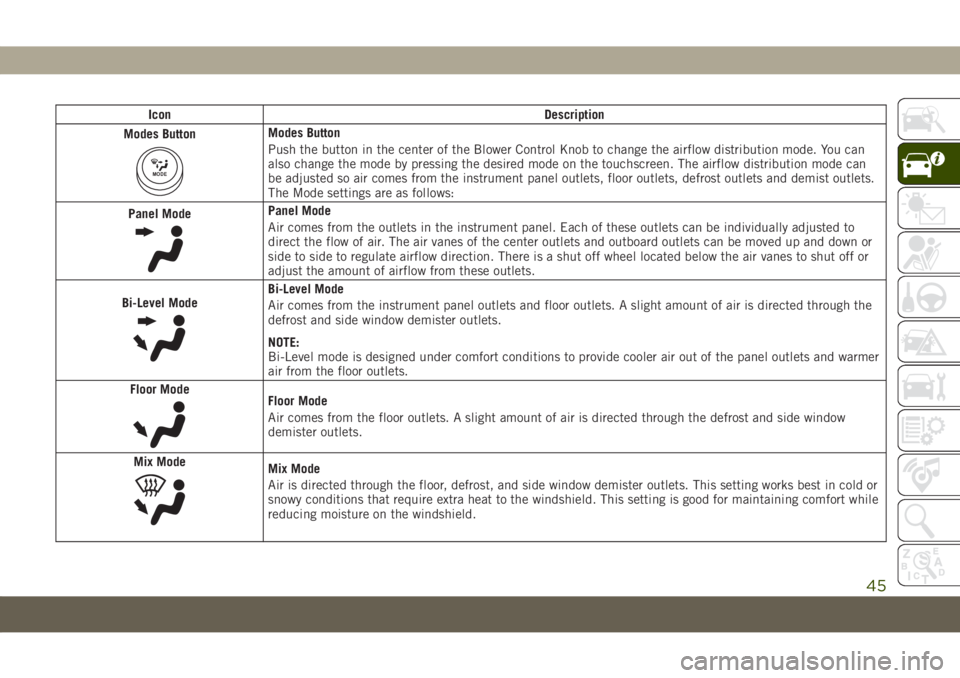
Modes Button
MODE
Modes Button
Push the button in the center of the Blower Control Knob to change the airflow distribution mode. You can
also change the mode by pressing the desired mode on the touchscreen. The airflow distribution mode can
be adjusted so air comes from the instrument panel outlets, floor outlets, defrost outlets and demist outlets.
The Mode settings are as follows:
Panel Mode
Panel Mode
Air comes from the outlets in the instrument panel. Each of these outlets can be individually adjusted to
direct the flow of air. The air vanes of the center outlets and outboard outlets can be moved up and down or
side to side to regulate airflow direction. There is a shut off wheel located below the air vanes to shut off or
adjust the amount of airflow from these outlets.
Bi-Level Mode
Bi-Level Mode
Air comes from the instrument panel outlets and floor outlets. A slight amount of air is directed through the
defrost and side window demister outlets.
NOTE:
Bi-Level mode is designed under comfort conditions to provide cooler air out of the panel outlets and warmer
air from the floor outlets.
Floor Mode
Floor Mode
Air comes from the floor outlets. A slight amount of air is directed through the defrost and side window
demister outlets.
Mix Mode
Mix Mode
Air is directed through the floor, defrost, and side window demister outlets. This setting works best in cold or
snowy conditions that require extra heat to the windshield. This setting is good for maintaining comfort while
reducing moisture on the windshield.
45
Page 51 of 362
Auto-Down Feature
The driver door power window switch and the
passenger door power window switches have
an Auto-Down feature. Push the window
switch down, for a short period of time, and
release and the window will go down auto-
matically.
To open the window part way, push the win-
dow switch down briefly and release it when
you want the window to stop.
To stop the window from going all the way
down during the Auto-Down operation, pull
up on the switch briefly.
Auto-Up Feature With Anti-Pinch
Protection
NOTE:
• If the window runs into any obstacle during
auto-closure, it will reverse direction and
then go back down. Remove the obstacle
and use the window switch again to close
the window.
• Any impact due to rough road conditions
may trigger the auto-reverse function unex-
pectedly during auto-closure. If this hap-
pens, pull the switch lightly and hold to
close the window manually.
WARNING!
There is no anti-pinch protection when the
window is almost closed. To avoid personal
injury be sure to clear your arms, hands,
fingers and all objects from the window
path before closing.
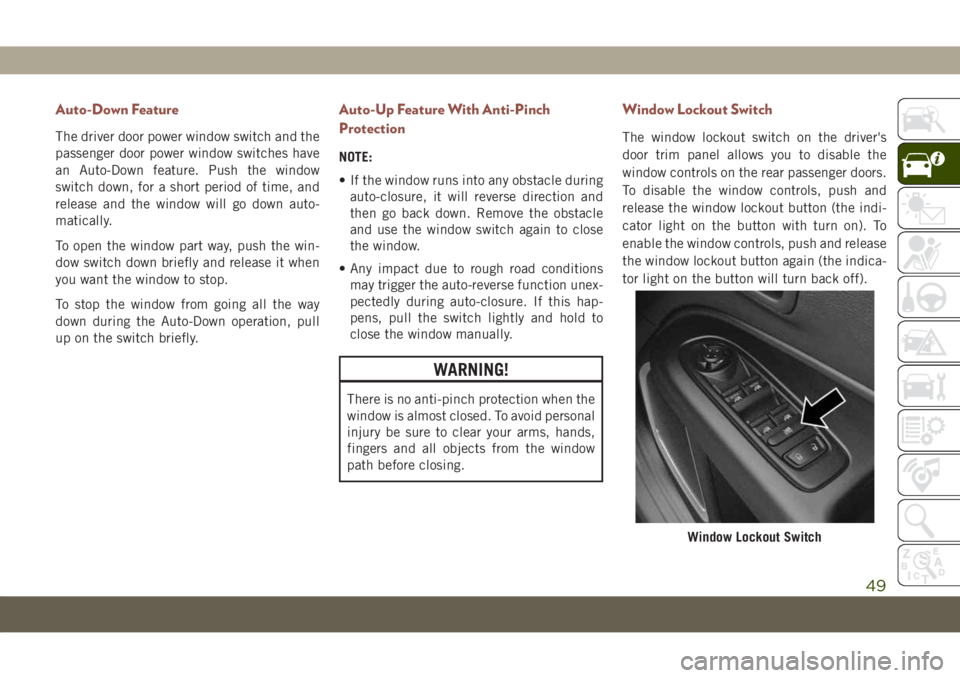
Window Lockout Switch
The window lockout switch on the driver's
door trim panel allows you to disable the
window controls on the rear passenger doors.
To disable the window controls, push and
release the window lockout button (the indi-
cator light on the button with turn on). To
enable the window controls, push and release
the window lockout button again (the indica-
tor light on the button will turn back off).
Window Lockout Switch
49
Page 57 of 362
The key fob and the overhead console switch
will open the liftgate when the liftgate is
locked. The outside handle requires the lift-
gate to be unlocked. Push the button on the
key fob twice within five seconds to open or
close the liftgate.
When the liftgate button on the key fob is
pushed two times, the turn signals will flash
twice to signal that the liftgate is opening or
closing (if Flash Lamps with Lock is enabled
in the Uconnect settings), and the liftgate
chime will be audible. Refer to “Uconnect
Settings” in “Multimedia” in the Owner’s
Manual for further information.
NOTE:
• Before closing the liftgate, make sure to be
in possession of the key because the lift-
gate may be locked.
• Use the interior door lock/unlock button on
the door panel or the key fob to lock and
unlock the liftgate. The manual door locks
on the doors and the exterior door lock
cylinder will not lock and unlock the
liftgate.Lock The Vehicle
WARNING!
During power operation, personal injury or
cargo damage may occur. Ensure the lift-
gate travel path is clear. Make sure the
liftgate is closed and latched before driv-
ing away.
NOTE:
• The liftgate will not power open or close if
the gear selector is in gear or the vehicle
speed is above 0 mph (0 km/h).
• If anything obstructs the power liftgate
while it is closing or opening, the liftgate
will automatically reverse to the closed or
open position, provided it meets sufficient
resistance.
• There are pinch sensors attached to the
side of the liftgate opening. Light pressure
anywhere along these strips will cause the
liftgate to return to the open position.• If the power liftgate encounters multiple
obstructions within the same cycle, the
system will automatically stop. If this oc-
curs, the liftgate must be opened or closed
manually.
• The power liftgate will not operate in tem-
peratures below −22° F (−30° C) or tem-
peratures above 150° F (65° C). Be sure to
remove any buildup of snow or ice from the
liftgate before pushing any of the power
liftgate switches.
• If the liftgate is left open for an extended
period of time, the liftgate may need to be
closed manually to reset power liftgate
functionality.
• Gas props support the liftgate in the open
position. However, because the gas pres-
sure drops with temperature, it may be
necessary to assist the props when opening
the liftgate in cold weather.
• Before driving off, check the instrument
cluster for a liftgate or door open message
or warning indicator. Failure to do this
could result in unintentionally leaving the
liftgate open while driving.
55
Page 60 of 362
CAUTION!
• Accessories that draw higher power (i.e.,
coolers, vacuum cleaners, lights, etc.)
will degrade the battery even more
quickly. Only use these intermittently
and with greater caution.
• After the use of high power draw acces-
sories, or long periods of the vehicle not
being started (with accessories still
plugged in), the vehicle must be driven a
sufficient length of time to allow the
generator to recharge the vehicle's bat-
tery.
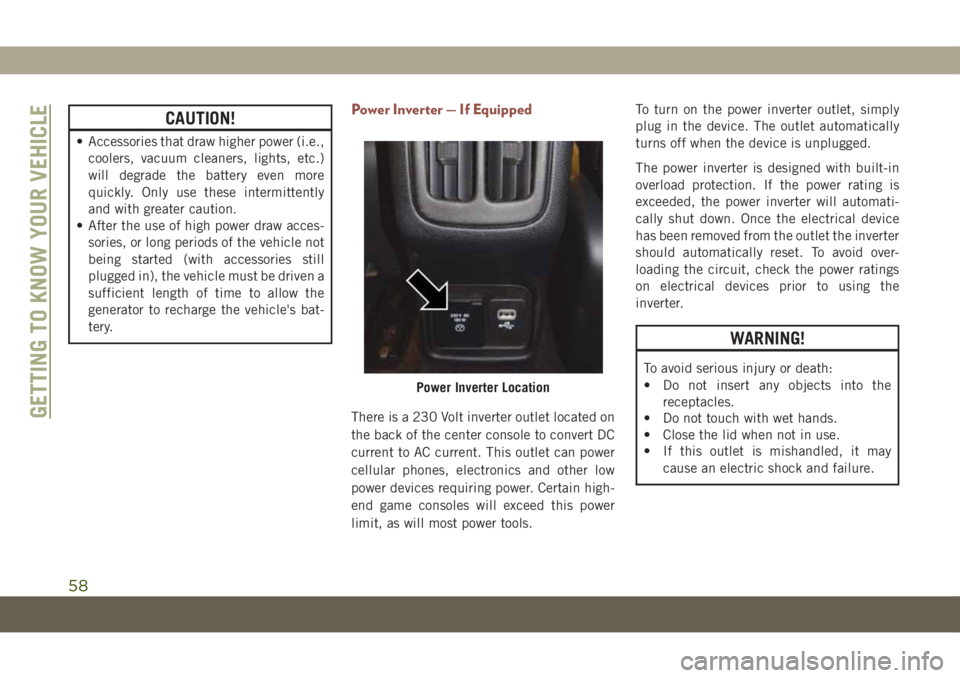
Power Inverter — If Equipped
There is a 230 Volt inverter outlet located on
the back of the center console to convert DC
current to AC current. This outlet can power
cellular phones, electronics and other low
power devices requiring power. Certain high-
end game consoles will exceed this power
limit, as will most power tools.To turn on the power inverter outlet, simply
plug in the device. The outlet automatically
turns off when the device is unplugged.
The power inverter is designed with built-in
overload protection. If the power rating is
exceeded, the power inverter will automati-
cally shut down. Once the electrical device
has been removed from the outlet the inverter
should automatically reset. To avoid over-
loading the circuit, check the power ratings
on electrical devices prior to using the
inverter.
WARNING!
To avoid serious injury or death:
• Do not insert any objects into the
receptacles.
• Do not touch with wet hands.
• Close the lid when not in use.
• If this outlet is mishandled, it may
cause an electric shock and failure.
Power Inverter Location
GETTING TO KNOW YOUR VEHICLE
58
Page 65 of 362
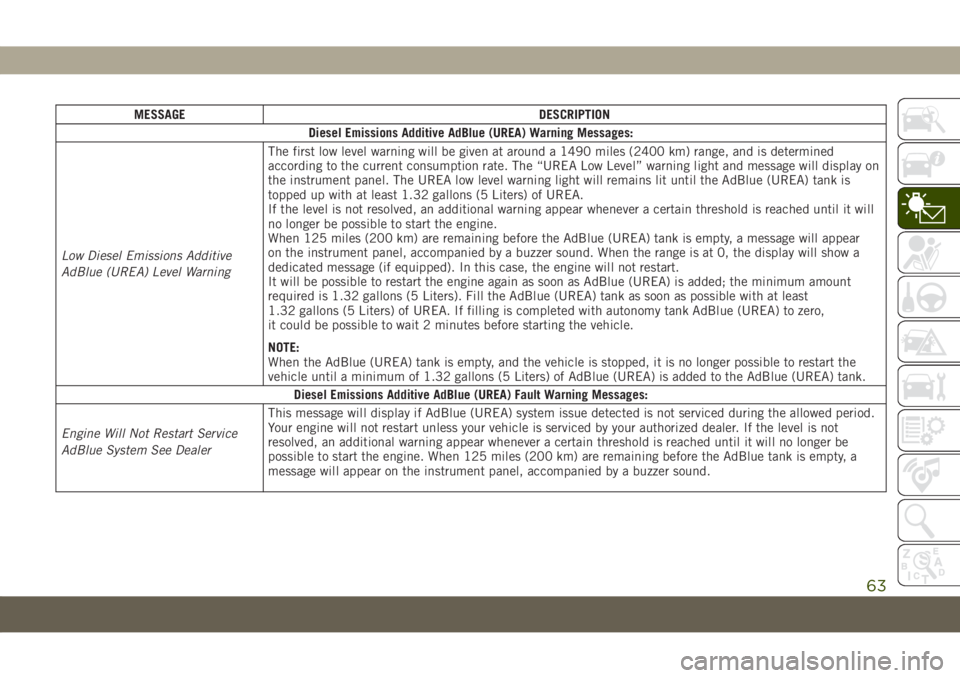
MESSAGE DESCRIPTION
Diesel Emissions Additive AdBlue (UREA) Warning Messages:
Low Diesel Emissions Additive
AdBlue (UREA) Level WarningThe first low level warning will be given at around a 1490 miles (2400 km) range, and is determined
according to the current consumption rate. The “UREA Low Level” warning light and message will display on
the instrument panel. The UREA low level warning light will remains lit until the AdBlue (UREA) tank is
topped up with at least 1.32 gallons (5 Liters) of UREA.
If the level is not resolved, an additional warning appear whenever a certain threshold is reached until it will
no longer be possible to start the engine.
When 125 miles (200 km) are remaining before the AdBlue (UREA) tank is empty, a message will appear
on the instrument panel, accompanied by a buzzer sound. When the range is at 0, the display will show a
dedicated message (if equipped). In this case, the engine will not restart.
It will be possible to restart the engine again as soon as AdBlue (UREA) is added; the minimum amount
required is 1.32 gallons (5 Liters). Fill the AdBlue (UREA) tank as soon as possible with at least
1.32 gallons (5 Liters) of UREA. If filling is completed with autonomy tank AdBlue (UREA) to zero,
it could be possible to wait 2 minutes before starting the vehicle.
NOTE:
When the AdBlue (UREA) tank is empty, and the vehicle is stopped, it is no longer possible to restart the
vehicle until a minimum of 1.32 gallons (5 Liters) of AdBlue (UREA) is added to the AdBlue (UREA) tank.
Diesel Emissions Additive AdBlue (UREA) Fault Warning Messages:
Engine Will Not Restart Service
AdBlue System See DealerThis message will display if AdBlue (UREA) system issue detected is not serviced during the allowed period.
Your engine will not restart unless your vehicle is serviced by your authorized dealer. If the level is not
resolved, an additional warning appear whenever a certain threshold is reached until it will no longer be
possible to start the engine. When 125 miles (200 km) are remaining before the AdBlue tank is empty, a
message will appear on the instrument panel, accompanied by a buzzer sound.
63