power steering JEEP COMPASS 2019 Owner handbook (in English)
[x] Cancel search | Manufacturer: JEEP, Model Year: 2019, Model line: COMPASS, Model: JEEP COMPASS 2019Pages: 362, PDF Size: 6.23 MB
Page 207 of 362
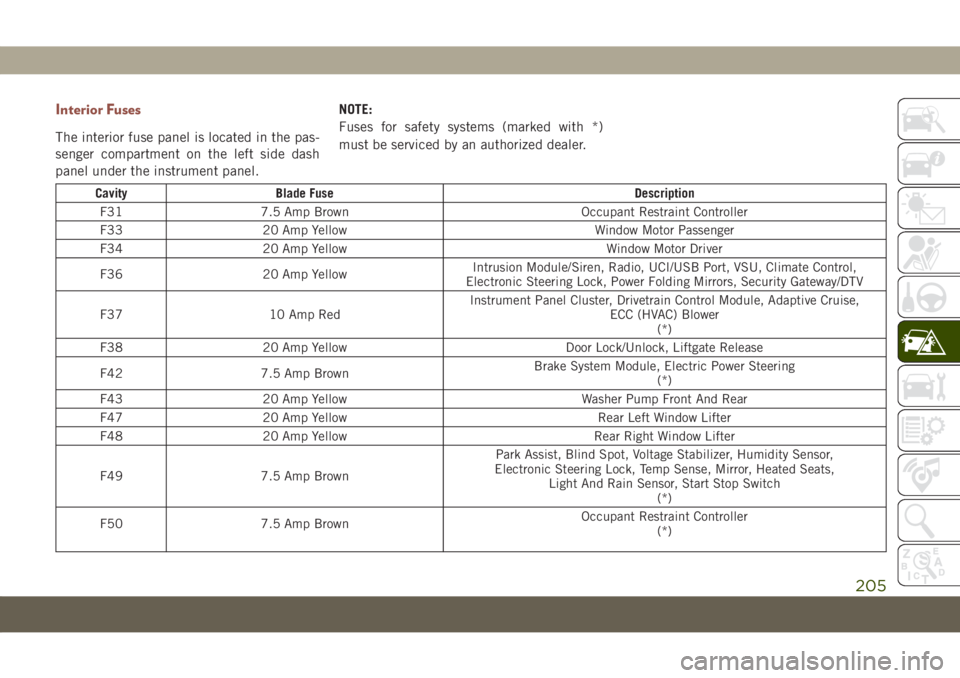
Interior Fuses
The interior fuse panel is located in the pas-
senger compartment on the left side dash
panel under the instrument panel.NOTE:
Fuses for safety systems (marked with *)
must be serviced by an authorized dealer.
Cavity Blade Fuse Description
F31 7.5 Amp Brown Occupant Restraint Controller
F33 20 Amp Yellow Window Motor Passenger
F34 20 Amp Yellow Window Motor Driver
F36 20 Amp YellowIntrusion Module/Siren, Radio, UCI/USB Port, VSU, Climate Control,
Electronic Steering Lock, Power Folding Mirrors, Security Gateway/DTV
F37 10 Amp RedInstrument Panel Cluster, Drivetrain Control Module, Adaptive Cruise,
ECC (HVAC) Blower
(*)
F38 20 Amp Yellow Door Lock/Unlock, Liftgate Release
F42 7.5 Amp BrownBrake System Module, Electric Power Steering
(*)
F43 20 Amp Yellow Washer Pump Front And Rear
F47 20 Amp Yellow Rear Left Window Lifter
F48 20 Amp Yellow Rear Right Window Lifter
F49 7.5 Amp BrownPark Assist, Blind Spot, Voltage Stabilizer, Humidity Sensor,
Electronic Steering Lock, Temp Sense, Mirror, Heated Seats,
Light And Rain Sensor, Start Stop Switch
(*)
F50 7.5 Amp BrownOccupant Restraint Controller
(*)
205
Page 208 of 362
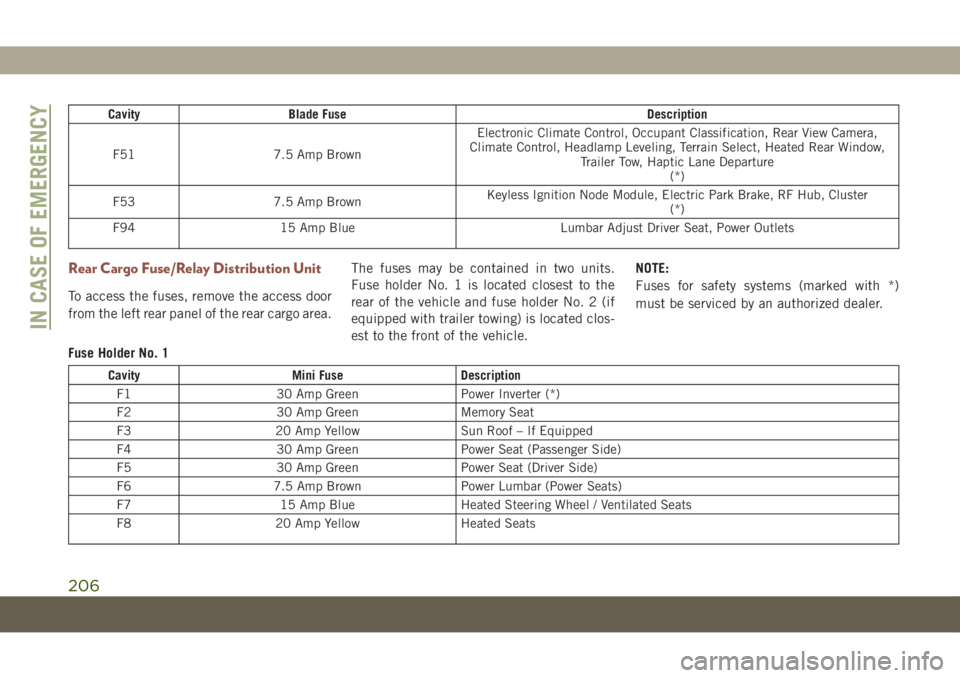
Cavity Blade Fuse Description
F51 7.5 Amp BrownElectronic Climate Control, Occupant Classification, Rear View Camera,
Climate Control, Headlamp Leveling, Terrain Select, Heated Rear Window,
Trailer Tow, Haptic Lane Departure
(*)
F53 7.5 Amp BrownKeyless Ignition Node Module, Electric Park Brake, RF Hub, Cluster
(*)
F94 15 Amp Blue Lumbar Adjust Driver Seat, Power Outlets
Rear Cargo Fuse/Relay Distribution Unit
To access the fuses, remove the access door
from the left rear panel of the rear cargo area.The fuses may be contained in two units.
Fuse holder No. 1 is located closest to the
rear of the vehicle and fuse holder No. 2 (if
equipped with trailer towing) is located clos-
est to the front of the vehicle.NOTE:
Fuses for safety systems (marked with *)
must be serviced by an authorized dealer.
Fuse Holder No. 1
Cavity Mini Fuse Description
F1 30 Amp Green Power Inverter (*)
F2 30 Amp Green Memory Seat
F3 20 Amp Yellow Sun Roof – If Equipped
F4 30 Amp Green Power Seat (Passenger Side)
F5 30 Amp Green Power Seat (Driver Side)
F6 7.5 Amp Brown Power Lumbar (Power Seats)
F7 15 Amp Blue Heated Steering Wheel / Ventilated Seats
F8 20 Amp Yellow Heated Seats
IN CASE OF EMERGENCY
206
Page 222 of 362
4. Have the tire inspected and repaired or
replaced at the earliest opportunity at an
authorized dealer or tire service center.
WARNING!
You must always indicate that the tire was
repaired using the Tire Service Kit. Give
the booklet to the technicians who will be
handling the tire that was treated using
the Tire Service Kit.
5. Remove the Speed Limit sticker from the
steering wheel after the tire has been
repaired.
6. Replace the Sealant Bottle at an autho-
rized dealer as soon as possible. Refer to
“Sealant Bottle Replacement”.
NOTE:
When having the tire serviced, advise the
authorized dealer or service center that the
tire has been sealed using the Tire Service
Kit.
Sealant Bottle Replacement:
1. Unwrap the power cord.
2. Unwrap the hose.3. Remove the bottle cover.
4. Rotate the bottle up beyond vertical to
release.
5. Pull the bottle away from the Compressor.
NOTE:
• For sealant bottle installation, follow these
steps in reverse order.
• Replacement sealant bottles are available
at authorized service centers.
WARNING!
As required by current regulations, the in-
formation on chemical substances for the
protection of human health and the environ-
ment and on the safe use of the sealing fluid
are on the packaging label. Compliance with
the indications on the label is an essential
condition to ensure the safety and effective-
ness of the product. Remember to carefully
read the label before use. The user of the
product is responsible for any damages
caused by improper use. The sealing fluid
has an expiration date. Replace the bottle if
the sealant has expired.
CAUTION!
Dispose of the bottle and the sealant liq-
uid properly. Have them disposed of in
compliance with national and local regu-
lations.
JUMP STARTING
If your vehicle has a discharged battery, it can
be jump started using a set of jumper cables
and a battery in another vehicle or by using a
portable battery booster pack. Jump starting
can be dangerous if done improperly, so
please follow the procedures in this section
carefully.
NOTE:
When using a portable battery booster pack,
follow the manufacturer’s operating instruc-
tions and precautions.
WARNING!
Do not attempt jump starting if the battery
is frozen. It could rupture or explode and
cause personal injury.
IN CASE OF EMERGENCY
220
Page 230 of 362
CAUTION!
• Towing this vehicle in violation of the
above requirements can cause severe
transmission and/or transfer case dam-
age. Damage from improper towing is
not covered under the New Vehicle Lim-
ited Warranty.
• Proper towing or lifting equipment is
required to prevent damage to your ve-
hicle. Use only tow bars and other equip-
ment designed for this purpose, following
equipment manufacturer's instructions.
• Use of safety chains in mandatory. At-
tach a tow bar or other towing devices to
main structural members of the vehicle,
not to bumpers or associated brackets.
Emergency Tow Hooks
If your vehicle is equipped with tow hooks,
there will be one in the rear and two mounted
on the front of the vehicle. The rear hook will
be located on the driver's side of the vehicle.
NOTE:
For off-road recovery, it is recommended to
use both of the front tow hooks to minimize
the risk of damage to the vehicle.
Vehicles Equipped With Key Fob With
An Integrated Vehicle Key
Turn the ignition key to the ON/RUN and then
the OFF/LOCK position, without removing it.
By extracting the key this will automatically
engage the steering wheel lock. Place the
transmission into NEUTRAL.Vehicles With Keyless Enter-N-Go
Place the ignition in the ON/RUN position,
and subsequently in OFF/LOCK, without
opening the door. During towing, remember
that not having the aid of the power brakes
and the electromechanical power steering
will require greater force when applying the
brakes and steering of the vehicle.
WARNING!
• Do not use a chain for freeing a stuck
vehicle. Chains may break, causing seri-
ous injury or death.
• Stand clear of vehicles when pulling
with tow hooks. Tow straps may become
disengaged, causing serious injury.
CAUTION!
Tow hooks are for emergency use only, to
rescue a vehicle stranded off road. Do not
use tow hooks for tow truck hookup or
highway towing. You could damage your
vehicle.
IN CASE OF EMERGENCY
228
Page 232 of 362
WARNING!
• Failure to follow proper tow eye usage
may cause components to break result-
ing in serious injury or death.
• The brake and steering power assist sys-
tems will not function while the vehicle
is being towed. You will, therefore, need
to apply more force on the brake pedal
and steering wheel. Do not use flexible
ropes when towing, and avoid jerky
movements. Do not start the engine
while towing the car. Before tightening
the ring, clean the threaded housing
thoroughly. Make sure that the ring is
fully screwed into the housing before
towing the car.
Tow Eye Installation
Front Tow Eye
The front tow eye receptacle is located be-
hind a door on the front bumper fascia.To install the tow eye, open the door using the
vehicle key or a small screwdriver, and thread
the tow eye into the receptacle.
Insert the flat end of the jack handle through
the tow eye and tighten, refer to “Jacking And
Tire Changing” in this section for further
information. The tow eye must be fully seated
to the attaching bracket through the lower
front fascia. If the tow eye is not fully seated
to the attaching bracket, the vehicle should
not be moved.
Rear Tow Eye
The rear tow eye receptacle is located behind
a door, located on the right rear bumper
fascia.
To install the tow eye, open the door using the
vehicle key or a small screwdriver, and thread
the tow eye into the receptacle.
Insert the flat end of the jack handle through
the eye and tighten. The tow eye must be fully
seated to the attaching bracket through the
lower rear fascia. If the tow eye is not fully
seated to the attaching bracket, the vehicle
should not be moved.
ENHANCED ACCIDENT
RESPONSE SYSTEM (EARS)
This vehicle is equipped with an Enhanced
Accident Response System.
Please refer to “Occupant Restraint Sys-
tems” in “Safety” for further information on
the Enhanced Accident Response System
(EARS) function.
EVENT DATA RECORDER
(EDR)
This vehicle is equipped with an Event Data
Recorder (EDR). The main purpose of an EDR
is to record data that will assist in under-
standing how a vehicle’s systems performed
under certain crash or near crash-like situa-
tions, such as an air bag deployment or hit-
ting a road obstacle.
Please refer to “Occupant Restraint Sys-
tems” in “Safety” for further information on
the Event Data Recorder (EDR).
IN CASE OF EMERGENCY
230
Page 295 of 362
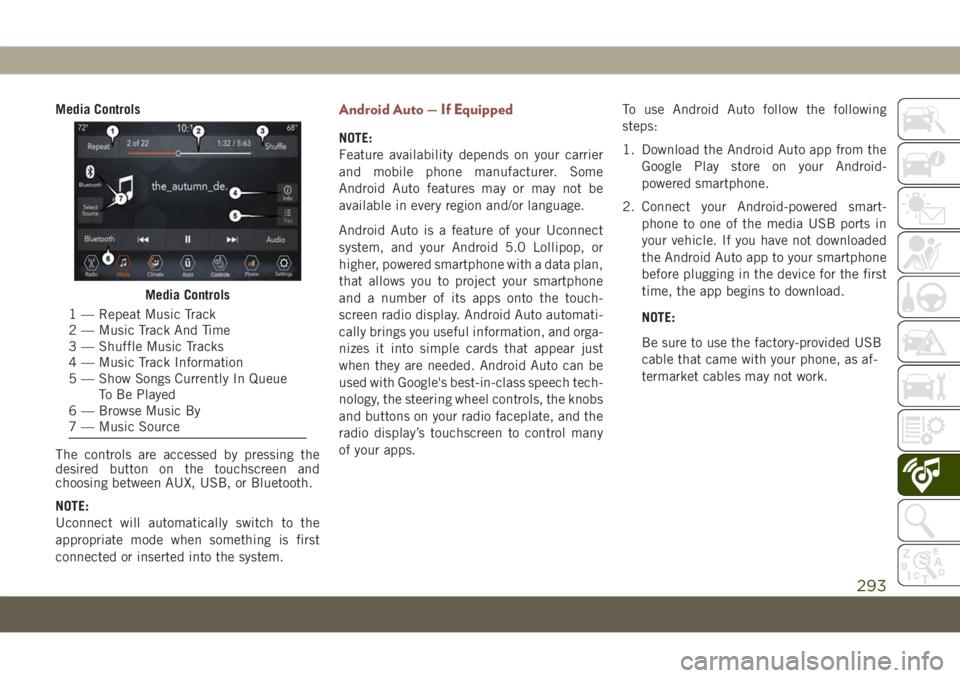
Media Controls
The controls are accessed by pressing the
desired button on the touchscreen and
choosing between AUX, USB, or Bluetooth.
NOTE:
Uconnect will automatically switch to the
appropriate mode when something is first
connected or inserted into the system.Android Auto — If Equipped
NOTE:
Feature availability depends on your carrier
and mobile phone manufacturer. Some
Android Auto features may or may not be
available in every region and/or language.
Android Auto is a feature of your Uconnect
system, and your Android 5.0 Lollipop, or
higher, powered smartphone with a data plan,
that allows you to project your smartphone
and a number of its apps onto the touch-
screen radio display. Android Auto automati-
cally brings you useful information, and orga-
nizes it into simple cards that appear just
when they are needed. Android Auto can be
used with Google's best-in-class speech tech-
nology, the steering wheel controls, the knobs
and buttons on your radio faceplate, and the
radio display’s touchscreen to control many
of your apps.To use Android Auto follow the following
steps:
1. Download the Android Auto app from the
Google Play store on your Android-
powered smartphone.
2. Connect your Android-powered smart-
phone to one of the media USB ports in
your vehicle. If you have not downloaded
the Android Auto app to your smartphone
before plugging in the device for the first
time, the app begins to download.
NOTE:
Be sure to use the factory-provided USB
cable that came with your phone, as af-
termarket cables may not work.
Media Controls
1 — Repeat Music Track
2 — Music Track And Time
3 — Shuffle Music Tracks
4 — Music Track Information
5 — Show Songs Currently In Queue
To Be Played
6 — Browse Music By
7 — Music Source
293
Page 303 of 362
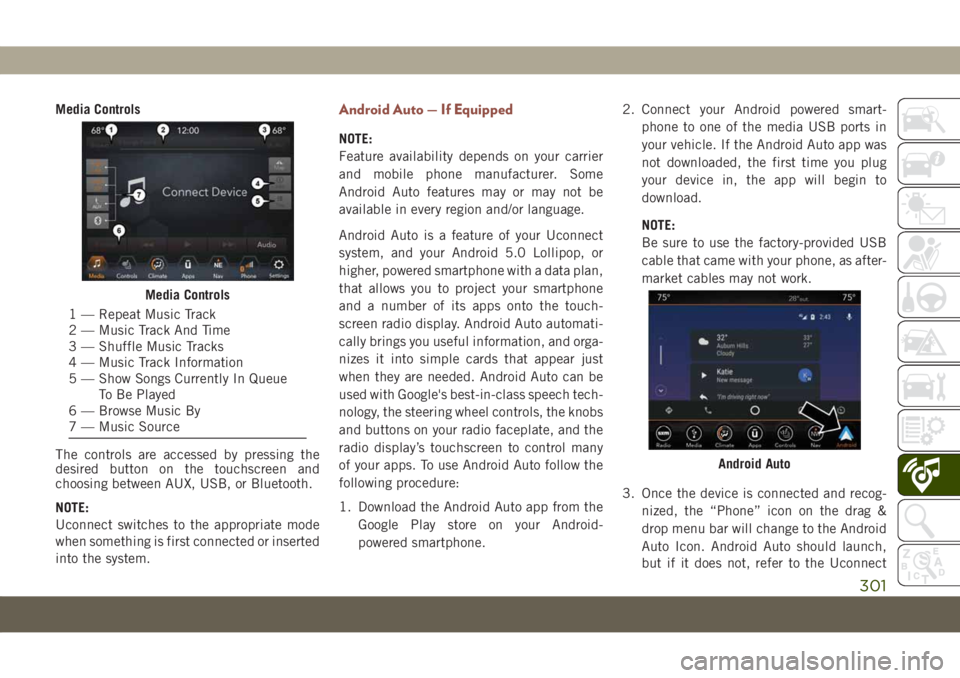
Media Controls
The controls are accessed by pressing the
desired button on the touchscreen and
choosing between AUX, USB, or Bluetooth.
NOTE:
Uconnect switches to the appropriate mode
when something is first connected or inserted
into the system.Android Auto — If Equipped
NOTE:
Feature availability depends on your carrier
and mobile phone manufacturer. Some
Android Auto features may or may not be
available in every region and/or language.
Android Auto is a feature of your Uconnect
system, and your Android 5.0 Lollipop, or
higher, powered smartphone with a data plan,
that allows you to project your smartphone
and a number of its apps onto the touch-
screen radio display. Android Auto automati-
cally brings you useful information, and orga-
nizes it into simple cards that appear just
when they are needed. Android Auto can be
used with Google's best-in-class speech tech-
nology, the steering wheel controls, the knobs
and buttons on your radio faceplate, and the
radio display’s touchscreen to control many
of your apps. To use Android Auto follow the
following procedure:
1. Download the Android Auto app from the
Google Play store on your Android-
powered smartphone.2. Connect your Android powered smart-
phone to one of the media USB ports in
your vehicle. If the Android Auto app was
not downloaded, the first time you plug
your device in, the app will begin to
download.
NOTE:
Be sure to use the factory-provided USB
cable that came with your phone, as after-
market cables may not work.
3. Once the device is connected and recog-
nized, the “Phone” icon on the drag &
drop menu bar will change to the Android
Auto Icon. Android Auto should launch,
but if it does not, refer to the Uconnect
Media Controls
1 — Repeat Music Track
2 — Music Track And Time
3 — Shuffle Music Tracks
4 — Music Track Information
5 — Show Songs Currently In Queue
To Be Played
6 — Browse Music By
7 — Music Source
Android Auto
301
Page 332 of 362
NOTE:
• Only the beginning of your custom message
will be seen on the touchscreen.
• Reply with text message is not compatible
with iPhones.
•
Auto reply with text message is only available
on phones that support Bluetooth MAP.
Android Auto — If Equipped
NOTE:
Feature availability depends on your carrier
and mobile phone manufacturer. Some
Android Auto features may or may not be
available in every region and/or language.
Android Auto allows you to use your voice to
interact with Android’s best-in-class speech
technology through your vehicle’s voice rec-
ognition system, and use your smartphone’s
data plan to project your Android powered
smartphone and a number of its apps onto
your Uconnect touchscreen. Connect your
Android 5.0 (Lollipop), or higher, to one of
the media USB ports, using the factory-
provided USB cable, and press the new
Android Auto icon that replaces your
“Phone” icon on the main menu bar to beginAndroid Auto. Push and hold the VR button
on the steering wheel, or press and hold the
“Microphone” icon within Android Auto, to
activate Android’s VR, which recognizes
natural voice commands, to use a list of your
smartphone’s features:
• Maps
• Music
• Phone
• Text Messages
• Additional AppsRefer to your Uconnect Owner’s Manual
Supplement for further information.
NOTE:
Requires compatible smartphone running
Android 5.0 Lollipop or higher and download
app on Google Play. Android, Android Auto,
and Google Play are trademarks of Google
Inc.
Apple CarPlay — If Equipped
NOTE:
Feature availability depends on your carrier
and mobile phone manufacturer. Some Apple
CarPlay features may or may not be available
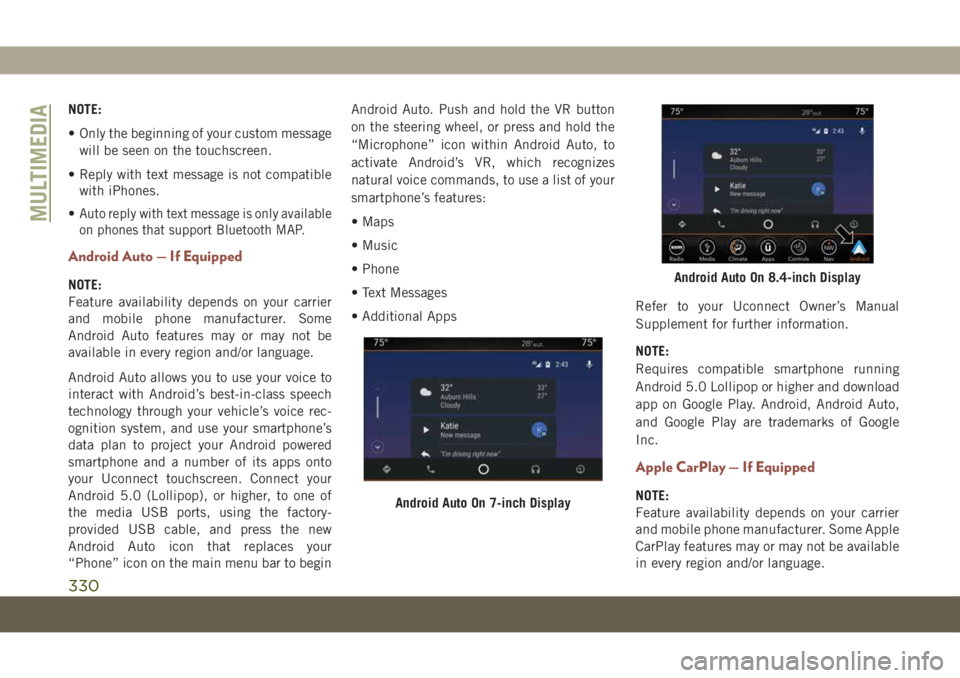
in every region and/or language.Android Auto On 7-inch Display
Android Auto On 8.4-inch Display
MULTIMEDIA
330
Page 354 of 362
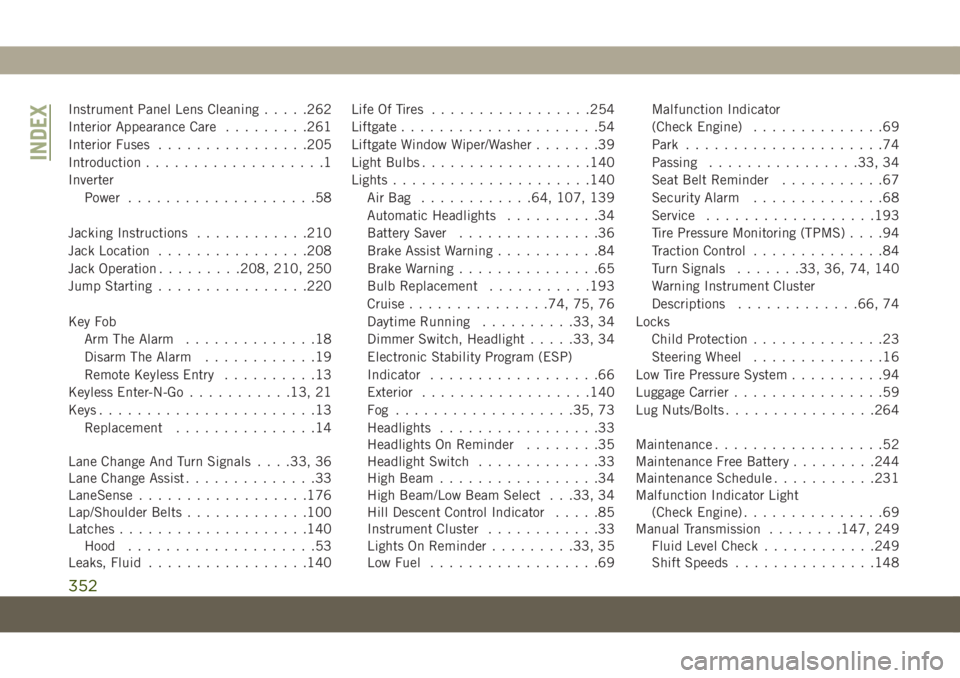
Instrument Panel Lens Cleaning.....262
Interior Appearance Care.........261
Interior Fuses................205
Introduction...................1
Inverter
Power....................58
Jacking Instructions............210
Jack Location................208
Jack Operation.........208, 210, 250
Jump Starting................220
Key Fob
Arm The Alarm..............18
Disarm The Alarm............19
Remote Keyless Entry..........13
Keyless Enter-N-Go...........13, 21
Keys.......................13
Replacement...............14
Lane Change And Turn Signals. . . .33, 36
Lane Change Assist..............33
LaneSense..................176
Lap/Shoulder Belts.............100
Latches....................140
Hood....................53
Leaks, Fluid.................140Life Of Tires.................254
Liftgate.....................54
Liftgate Window Wiper/Washer.......39
Light Bulbs..................140
Lights.....................140
AirBag ............64, 107, 139
Automatic Headlights..........34
Battery Saver...............36
Brake Assist Warning...........84
Brake Warning...............65
Bulb Replacement...........193
Cruise...............74, 75, 76
Daytime Running..........33, 34
Dimmer Switch, Headlight.....33, 34
Electronic Stability Program (ESP)
Indicator..................66
Exterior..................140
Fog ...................35, 73
Headlights
.................33
Headlights On Reminder........35
Headlight Switch.............33
High Beam.................34
High Beam/Low Beam Select . . .33, 34
Hill Descent Control Indicator.....85
Instrument Cluster............33
Lights On Reminder.........33, 35
Low Fuel..................69Malfunction Indicator
(Check Engine)..............69
Park.....................74
Passing................33, 34
Seat Belt Reminder...........67
Security Alarm..............68
Service..................193
Tire Pressure Monitoring (TPMS)....94
Traction Control..............84
Turn Signals.......33, 36, 74, 140
Warning Instrument Cluster
Descriptions.............66, 74
Locks
Child Protection..............23
Steering Wheel..............16
Low Tire Pressure System..........94
Luggage Carrier................59
Lug Nuts/Bolts................264
Maintenance..................52
Maintenance Free Battery.........244
Maintenance Schedule...........231
Malfunction Indicator Light
(Check Engine)...............69
Manual Transmission........147, 249
Fluid Level Check............249
Shift Speeds...............148
INDEX
352