phone JEEP COMPASS 2019 Owner handbook (in English)
[x] Cancel search | Manufacturer: JEEP, Model Year: 2019, Model line: COMPASS, Model: JEEP COMPASS 2019Pages: 362, PDF Size: 6.23 MB
Page 309 of 362
UCONNECT SETTINGS
The Uconnect system allows you to access
Customer Programmable feature settings
such as Display, Units, Voice, Clock, Safety &
Driving Assistance, Lights, Doors & Locks,
Auto-On Comfort, Engine Off Options, Audio,
Phone/Bluetooth, Restore Settings, Clear
Personal Data, and System Information
through buttons on the touchscreen.
Push the SETTINGS button (Uconnect
3 With 5–inch Display and Uconnect 4 With
7–inch Display), or press the “Apps” button
(Uconnect 4C/4C NAV With 8.4–inch Dis-
play) located near the bottom of the touch-
screen, then press the “Settings” button on
the touchscreen to access the Settings
screen. When making a selection, scroll up or
down until the preferred setting is high-
lighted, then press the preferred setting until
a check-mark appears next to the setting,
showing that setting has been selected.The following feature settings are available:• Language • Auto-On Comfort
& Remote Start
— If Equipped
• Display • Engine Off
Options
• Units • Audio
• Voice • Radio Setup
• Clock or
Time & Date• Phone/Bluetooth
• Safety & Driving
Assistance• Restore Settings
• Brakes • Clear Personal
Data
• Lights • System
Information
• Doors & Locks
NOTE:
Depending on the vehicles options, feature
settings may vary.
Refer to “Uconnect Settings” in “Multimedia”
in the Owner’s Manual for further information.
TIPS CONTROLS AND
GENERAL INFORMATION
Steering Wheel Audio Controls
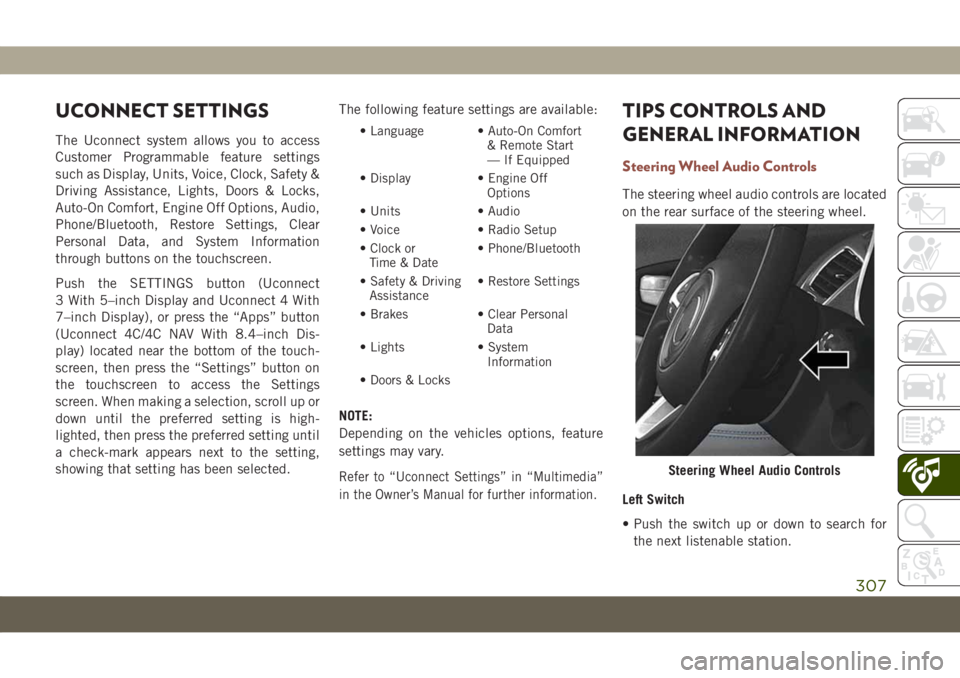
The steering wheel audio controls are located
on the rear surface of the steering wheel.
Left Switch
• Push the switch up or down to search for
the next listenable station.
Steering Wheel Audio Controls
307
Page 315 of 362
UCONNECT PHONE
Uconnect Phone (Bluetooth Hands Free Calling)
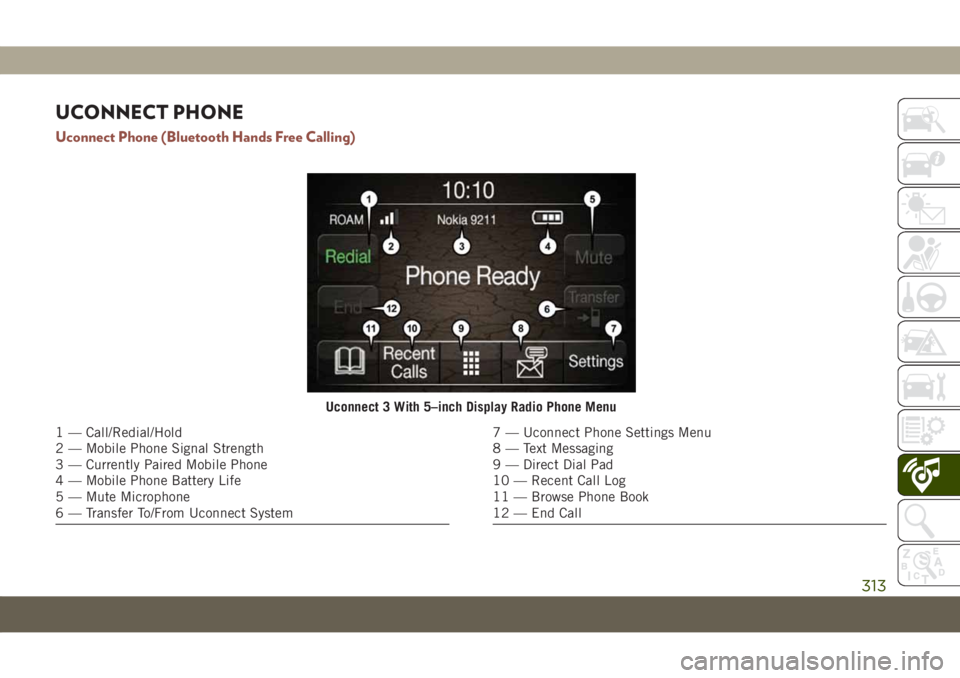
Uconnect 3 With 5–inch Display Radio Phone Menu
1 — Call/Redial/Hold
2 — Mobile Phone Signal Strength
3 — Currently Paired Mobile Phone
4 — Mobile Phone Battery Life
5 — Mute Microphone
6 — Transfer To/From Uconnect System7 — Uconnect Phone Settings Menu
8 — Text Messaging
9 — Direct Dial Pad
10 — Recent Call Log
11 — Browse Phone Book
12 — End Call
313
Page 316 of 362
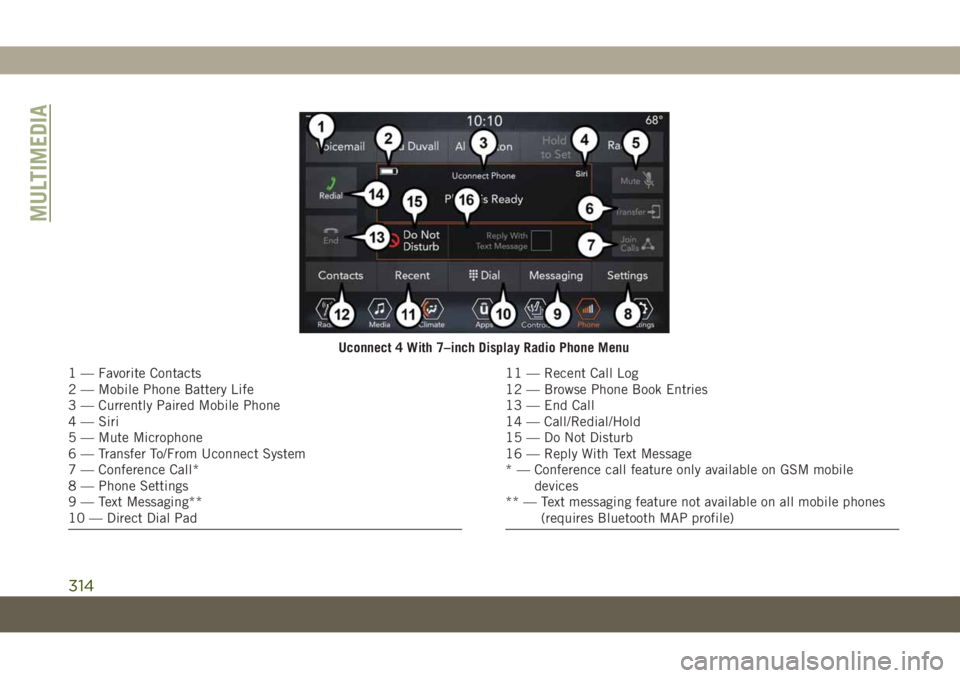
Uconnect 4 With 7–inch Display Radio Phone Menu
1 — Favorite Contacts
2 — Mobile Phone Battery Life
3 — Currently Paired Mobile Phone
4 — Siri
5 — Mute Microphone
6 — Transfer To/From Uconnect System
7 — Conference Call*
8 — Phone Settings
9 — Text Messaging**
10 — Direct Dial Pad11 — Recent Call Log
12 — Browse Phone Book Entries
13 — End Call
14 — Call/Redial/Hold
15 — Do Not Disturb
16 — Reply With Text Message
* — Conference call feature only available on GSM mobile
devices
** — Text messaging feature not available on all mobile phones
(requires Bluetooth MAP profile)
MULTIMEDIA
314
Page 317 of 362
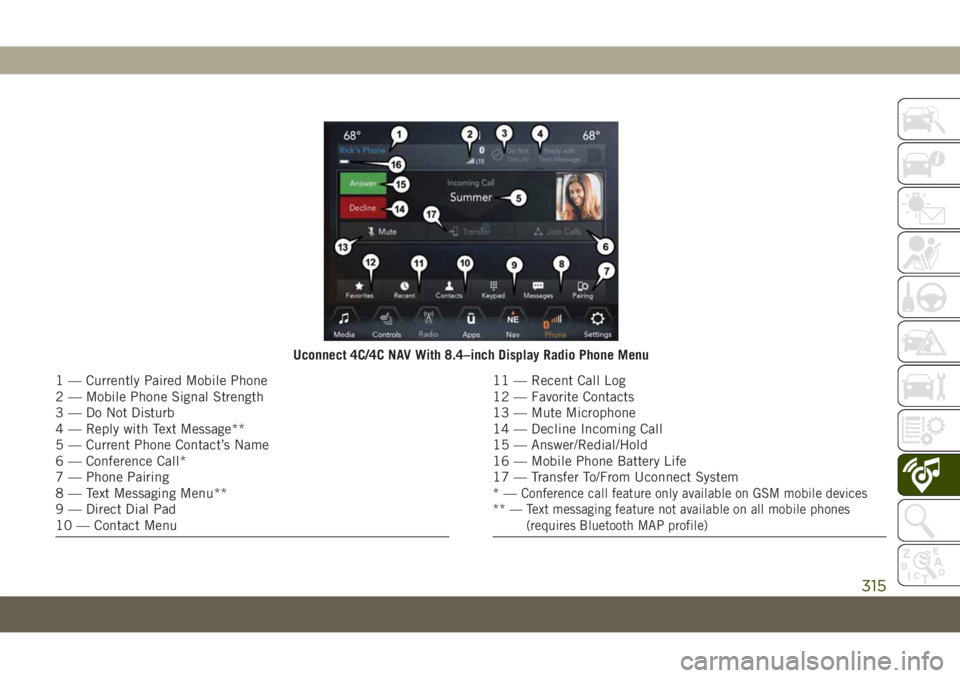
Uconnect 4C/4C NAV With 8.4–inch Display Radio Phone Menu
1 — Currently Paired Mobile Phone
2 — Mobile Phone Signal Strength
3 — Do Not Disturb
4 — Reply with Text Message**
5 — Current Phone Contact’s Name
6 — Conference Call*
7 — Phone Pairing
8 — Text Messaging Menu**
9 — Direct Dial Pad
10 — Contact Menu11 — Recent Call Log
12 — Favorite Contacts
13 — Mute Microphone
14 — Decline Incoming Call
15 — Answer/Redial/Hold
16 — Mobile Phone Battery Life
17 — Transfer To/From Uconnect System
*—
Conference call feature only available on GSM mobile devices
** — Text messaging feature not available on all mobile phones
(requires Bluetooth MAP profile)
315
Page 318 of 362
The Uconnect Phone feature enables you to
place and receive hands-free mobile phone
calls. Drivers can also place mobile phone
calls using their voice or by using the buttons
on the touchscreen (see Voice Command sec-
tion).
The hands-free calling feature is made pos-
sible through Bluetooth technology — the
global standard that enables different elec-
tronic devices to connect to each other wire-
lessly.
If the Uconnect Phone Button
exists on
your steering wheel, you then have the
Uconnect Phone features.
NOTE:
• The Uconnect Phone requires a mobile
phone equipped with the Bluetooth Hands-
Free Profile, Version 1.0 or higher.
• Most mobile phones/devices are compat-
ible with the Uconnect system, however
some mobile phones/devices may not be
equipped with all of the required features
to utilize all of the Uconnect system fea-
tures.• For Uconnect Customer Care:
• Visit: DriveUconnect.eu
• Or visit an authorized dealer
Pairing (Wirelessly Connecting) Your
Mobile Phone To The Uconnect System
Mobile phone pairing is the process of estab-
lishing a wireless connection between a cel-
lular phone and the Uconnect system.
NOTE:
• To use the Uconnect Phone feature, you
first must determine if your mobile phone
and software are compatible with the
Uconnect system. Please visit
www.DriveUconnect.eu or an authorized
dealer for complete mobile phone compat-
ibility information.
• Mobile phone pairing is not available while
the vehicle is in motion.
• A maximum of ten mobile phones can be
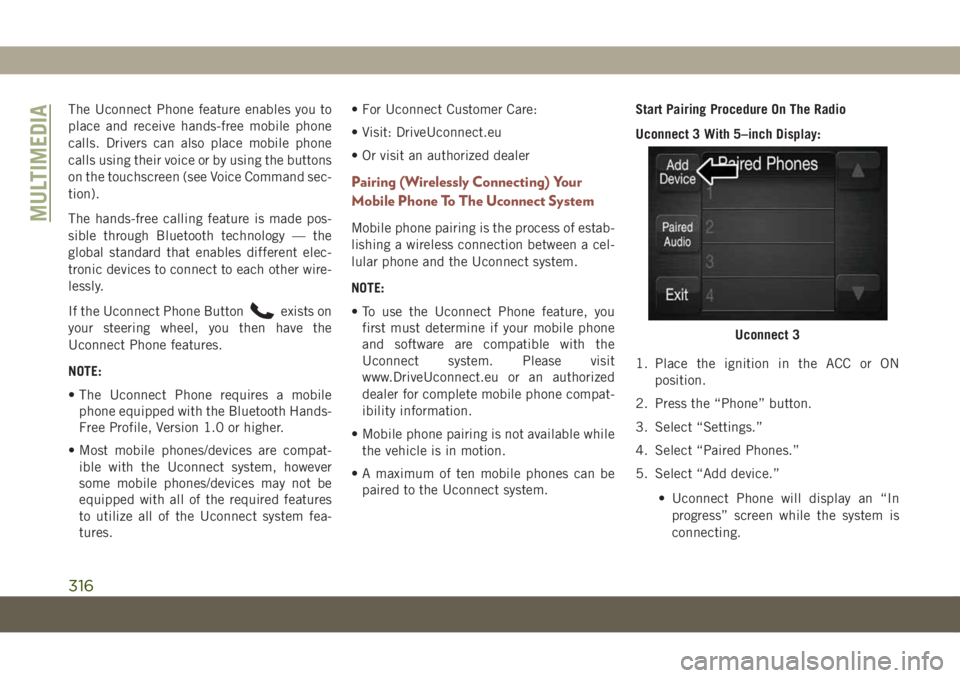
paired to the Uconnect system.Start Pairing Procedure On The Radio
Uconnect 3 With 5–inch Display:
1. Place the ignition in the ACC or ON
position.
2. Press the “Phone” button.
3. Select “Settings.”
4. Select “Paired Phones.”
5. Select “Add device.”
• Uconnect Phone will display an “In
progress” screen while the system is
connecting.
Uconnect 3
MULTIMEDIA
316
Page 319 of 362
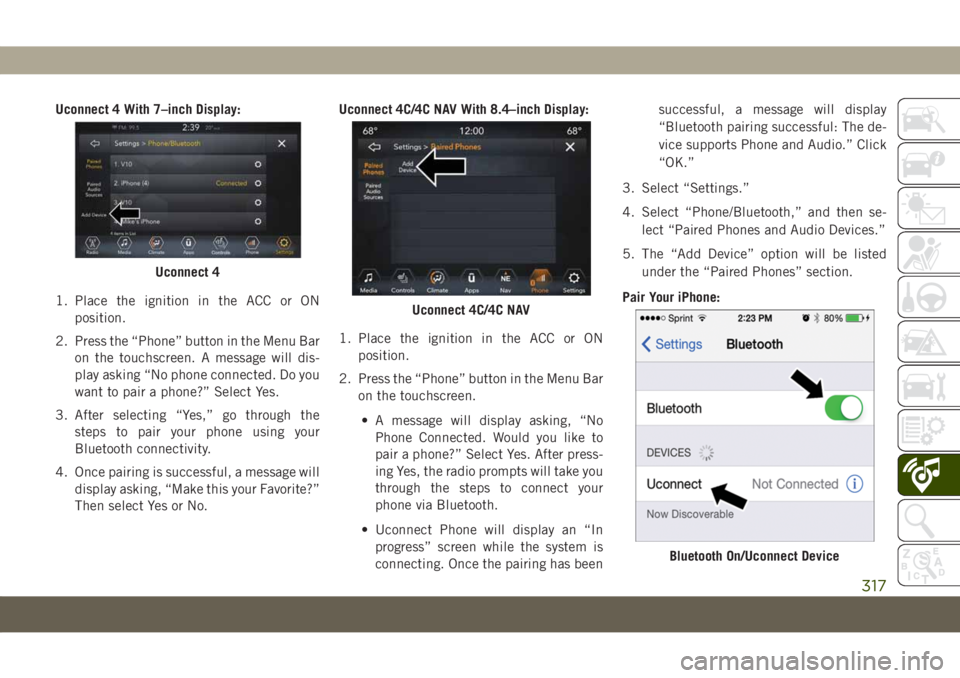
Uconnect 4 With 7–inch Display:
1. Place the ignition in the ACC or ON
position.
2. Press the “Phone” button in the Menu Bar
on the touchscreen. A message will dis-
play asking “No phone connected. Do you
want to pair a phone?” Select Yes.
3. After selecting “Yes,” go through the
steps to pair your phone using your
Bluetooth connectivity.
4. Once pairing is successful, a message will
display asking, “Make this your Favorite?”
Then select Yes or No.Uconnect 4C/4C NAV With 8.4–inch Display:
1. Place the ignition in the ACC or ON
position.
2. Press the “Phone” button in the Menu Bar
on the touchscreen.
• A message will display asking, “No
Phone Connected. Would you like to
pair a phone?” Select Yes. After press-
ing Yes, the radio prompts will take you
through the steps to connect your
phone via Bluetooth.
• Uconnect Phone will display an “In
progress” screen while the system is
connecting. Once the pairing has beensuccessful, a message will display
“Bluetooth pairing successful: The de-
vice supports Phone and Audio.” Click
“OK.”
3. Select “Settings.”
4. Select “Phone/Bluetooth,” and then se-
lect “Paired Phones and Audio Devices.”
5. The “Add Device” option will be listed
under the “Paired Phones” section.
Pair Your iPhone:
Uconnect 4
Uconnect 4C/4C NAV
Bluetooth On/Uconnect Device
317
Page 320 of 362
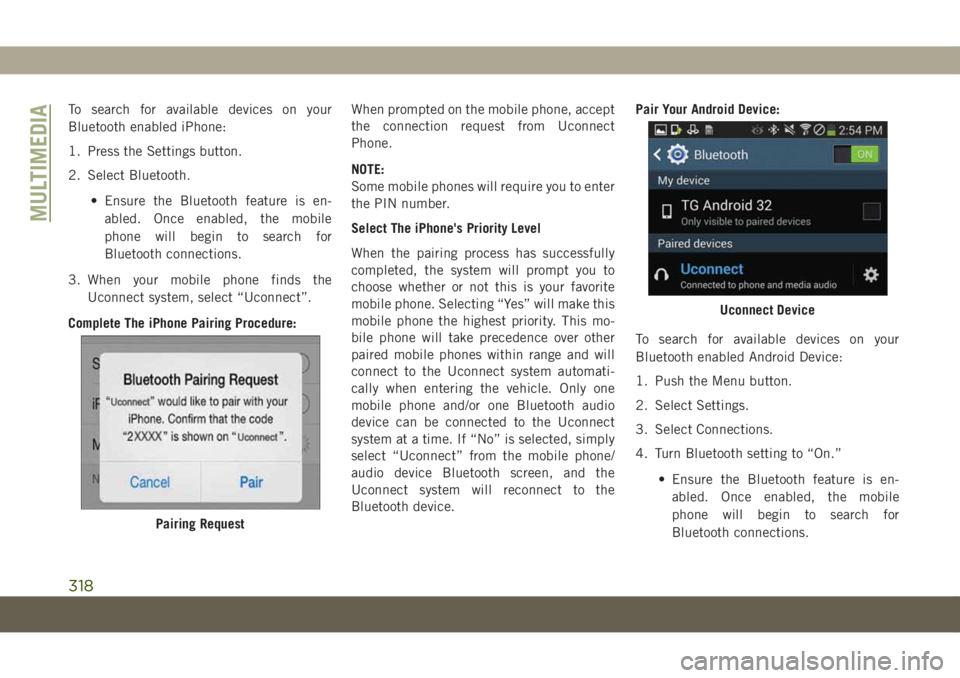
To search for available devices on your
Bluetooth enabled iPhone:
1. Press the Settings button.
2. Select Bluetooth.
• Ensure the Bluetooth feature is en-
abled. Once enabled, the mobile
phone will begin to search for
Bluetooth connections.
3. When your mobile phone finds the
Uconnect system, select “Uconnect”.
Complete The iPhone Pairing Procedure:When prompted on the mobile phone, accept
the connection request from Uconnect
Phone.
NOTE:
Some mobile phones will require you to enter
the PIN number.
Select The iPhone's Priority Level
When the pairing process has successfully
completed, the system will prompt you to
choose whether or not this is your favorite
mobile phone. Selecting “Yes” will make this
mobile phone the highest priority. This mo-
bile phone will take precedence over other
paired mobile phones within range and will
connect to the Uconnect system automati-
cally when entering the vehicle. Only one
mobile phone and/or one Bluetooth audio
device can be connected to the Uconnect
system at a time. If “No” is selected, simply
select “Uconnect” from the mobile phone/
audio device Bluetooth screen, and the
Uconnect system will reconnect to the
Bluetooth device.Pair Your Android Device:
To search for available devices on your
Bluetooth enabled Android Device:
1. Push the Menu button.
2. Select Settings.
3. Select Connections.
4. Turn Bluetooth setting to “On.”
• Ensure the Bluetooth feature is en-
abled. Once enabled, the mobile
phone will begin to search for
Bluetooth connections.
Pairing Request
Uconnect Device
MULTIMEDIA
318
Page 321 of 362
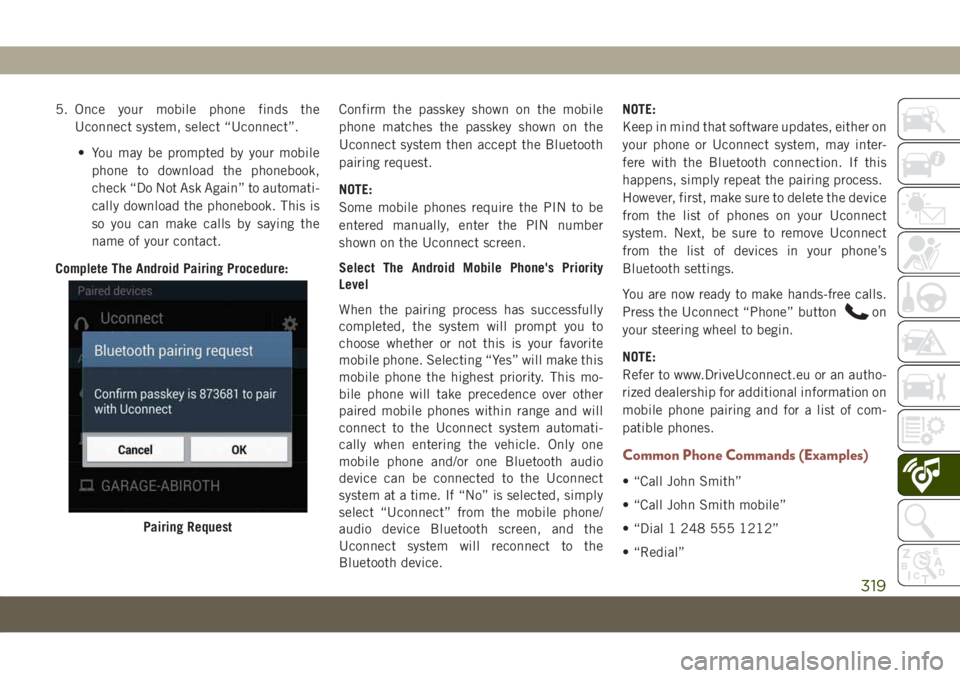
5. Once your mobile phone finds the
Uconnect system, select “Uconnect”.
• You may be prompted by your mobile
phone to download the phonebook,
check “Do Not Ask Again” to automati-
cally download the phonebook. This is
so you can make calls by saying the
name of your contact.
Complete The Android Pairing Procedure:Confirm the passkey shown on the mobile
phone matches the passkey shown on the
Uconnect system then accept the Bluetooth
pairing request.
NOTE:
Some mobile phones require the PIN to be
entered manually, enter the PIN number
shown on the Uconnect screen.
Select The Android Mobile Phone's Priority
Level
When the pairing process has successfully
completed, the system will prompt you to
choose whether or not this is your favorite
mobile phone. Selecting “Yes” will make this
mobile phone the highest priority. This mo-
bile phone will take precedence over other
paired mobile phones within range and will
connect to the Uconnect system automati-
cally when entering the vehicle. Only one
mobile phone and/or one Bluetooth audio
device can be connected to the Uconnect
system at a time. If “No” is selected, simply
select “Uconnect” from the mobile phone/
audio device Bluetooth screen, and the
Uconnect system will reconnect to the
Bluetooth device.NOTE:
Keep in mind that software updates, either on
your phone or Uconnect system, may inter-
fere with the Bluetooth connection. If this
happens, simply repeat the pairing process.
However, first, make sure to delete the device
from the list of phones on your Uconnect
system. Next, be sure to remove Uconnect
from the list of devices in your phone’s
Bluetooth settings.
You are now ready to make hands-free calls.
Press the Uconnect “Phone” button
on
your steering wheel to begin.
NOTE:
Refer to www.DriveUconnect.eu or an autho-
rized dealership for additional information on
mobile phone pairing and for a list of com-
patible phones.
Common Phone Commands (Examples)
• “Call John Smith”
• “Call John Smith mobile”
• “Dial 1 248 555 1212”
• “Redial”
Pairing Request
319
Page 322 of 362
Mute (Or Unmute) Microphone
During Call
• During a call, press the “Mute” button on
the Phone main screen, that appears only
when a call is in progress, to mute and
unmute the call.
Transfer Ongoing Call Between Handset
And Vehicle
• During an on-going call, press the “Trans-
fer” button on the Phone main screen to
transfer an on-going call between handset
and vehicle.
Phonebook
The Uconnect system will automatically sync
your phonebook from your paired phone, if
this feature is supported by your phone.
Phonebook contacts are updated each time
that the phone is connected. Phonebook en-
tries are displayed in the Contacts menu. If
your phone book entries do not appear, check
the settings on your phone. Some phones
require you to enable this feature manually.• Your phonebook can be browsed on the
Uconnect system touchscreen, but editing
can only be done on your phone. To browse,
press the “Phone” button on the touch-
screen, then the “Phonebook” button on
the touchscreen.
Favorite phonebook entries can be saved as
Favorites for quicker access. Favorites are
shown in the Favorites menu.
Voice Command Tips
• Speaking complete names (i.e; Call John
Doe vs. Call John) will result in greater
system accuracy.
• You can “link” commands together for
faster results. Say “Call John Doe, mobile,”
for example.
• If you are listening to available voice com-
mand options, you do not have to listen to
the entire list. When you hear the command
that you need, push the
button on the
steering wheel, wait for the beep and say
your command.
Changing The Volume
• Start a dialogue by pushing the VR button
, then say a command. For example,
"Help".
• Use the radio VOLUME/MUTE rotary knob
to adjust the volume to a comfortable level
while the Uconnect system is speaking.
NOTE:
The volume setting for Uconnect is different
than the audio system.
NOTE:
To access help, push the VR button
on the
steering wheel and say "help." Push the VR
button
and say "cancel" to cancel the
help session.
Using Do Not Disturb
With Do Not Disturb, you can disable notifi-
cations from incoming calls and texts, allow-
ing you to keep your eyes on the road and
hands on the wheel. For your convenience,
there is a counter display to keep track of
your missed calls and text messages while
you were using Do Not Disturb.
MULTIMEDIA
320
Page 323 of 362
To activate Do Not Disturb, select “Pairing”
on the phone menu bar, and select “Do Not
Disturb” from the Settings menu. You can
also activate it using the “Do Not Disturb”
button at the top of every Phone screen.
Do Not Disturb can automatically reply with a
text message, a call or both, when declining
an incoming call and send it to voicemail.
Automatic reply messages can be:
• “I am driving right now, I will get back to
you shortly.”
• Create a custom auto reply message up to
160 characters.
While in Do Not Disturb, Conference Call can
be selected so you can still place a second
call without being interrupted by incoming
calls.
NOTE:
• Only the beginning of your custom message
will be seen on the touchscreen.
• Reply with text message is not compatible
with iPhones.• Auto reply with text message is only avail-
able on phones that supporting Bluetooth
MAP.
Incoming Text Messages
After pairing your Uconnect system with a
Bluetooth enabled mobile device with the
Message Access Profile (MAP), the Uconnect
system can announce a new incoming text
message and read it to you over the vehicle’s
audio system.
To listen to incoming text messages, or any
messages currently on the mobile phone,
select the “Messages” menu and press the
“Listen” button next to the message you want
to listen to.
NOTE:
Only incoming text messages received during
the current ignition cycle can be viewed/read.
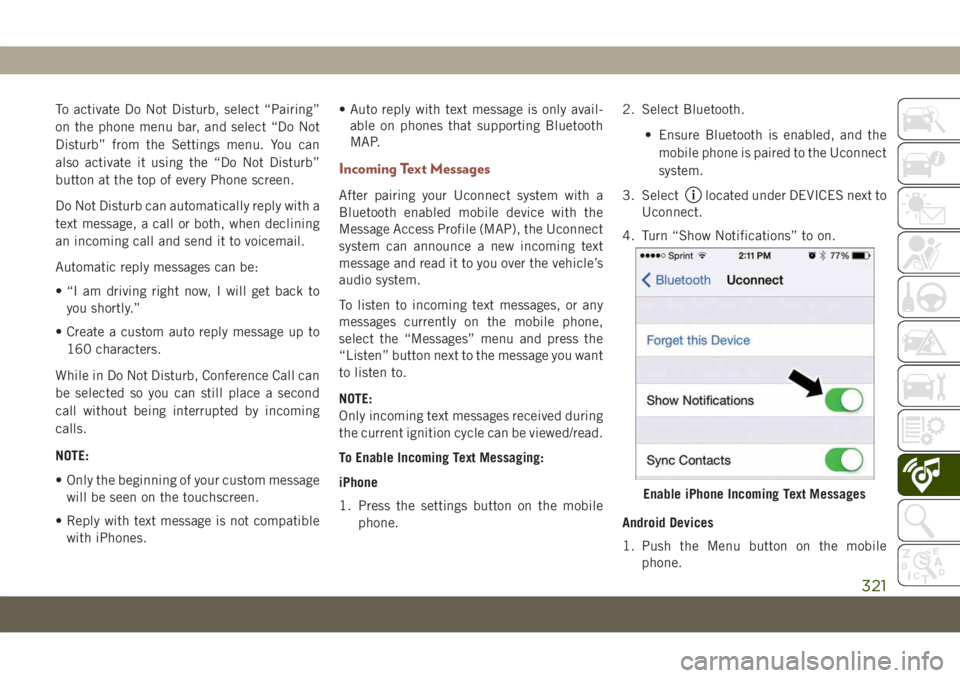
To Enable Incoming Text Messaging:
iPhone
1. Press the settings button on the mobile
phone.2. Select Bluetooth.
• Ensure Bluetooth is enabled, and the
mobile phone is paired to the Uconnect
system.
3. Selectlocated under DEVICES next to
Uconnect.
4. Turn “Show Notifications” to on.
Android Devices
1. Push the Menu button on the mobile
phone.
Enable iPhone Incoming Text Messages
321