ECO mode JEEP COMPASS 2023 User Guide
[x] Cancel search | Manufacturer: JEEP, Model Year: 2023, Model line: COMPASS, Model: JEEP COMPASS 2023Pages: 344, PDF Size: 18.8 MB
Page 47 of 344
GETTING TO KNOW YOUR VEHICLE45
AUTOMATIC HIGH BEAM HEADLAMP
C
ONTROL — IF EQUIPPED
The Automatic High Beam Headlamp Control
system provides increased forward lighting at night
by automating high beam control through the use
of a digital camera mounted on the windshield.
This camera detects vehicle specific light and
automatically switches from high beams to low
beams until the approaching vehicle is out of view.
NOTE:
The Automatic High Beam Headlamp Control
can be turned on or off through Uconnect
Settings Ú page 165.
Broken, muddy, or obstructed headlights and
taillights of vehicles in the field of view will
cause headlights to remain on longer (closer to
the vehicle). Also, dirt, film, and other obstruc -
tions on the windshield or camera lens will
cause the system to function improperly.
FLASH-TO-PASS
You can signal another vehicle with your headlights
by lightly pulling the multifunction lever toward you.
This will cause the high beam headlights to turn on,
and remain on, until the lever is released.
AUTOMATIC HEADLIGHTS — IF EQUIPPED
This system automatically turns the headlights on
or off according to ambient light levels. To turn the
system on, rotate the headlight switch clockwise to
the last detent for automatic headlight operation.
When the system is on, the headlight time delay
feature is also on. This means the headlights will
stay on for up to 90 seconds after you place the
ignition into the OFF position. To turn the
automatic system off, move the headlight switch
out of the AUTO position.
NOTE:The engine must be running before the headlights
will come on in the automatic mode.
HEADLIGHT TIME DELAY
To assist when exiting the vehicle, the headlight
delay feature will leave the headlights on for up to
90 seconds.
To activate the delay feature, place the ignition in
the OFF position while the headlights are still on.
Then, turn off the headlights within 45 seconds.
The delay interval begins when the headlight
switch is turned off. Headlight delay can be cancelled by either turning
the headlights or parking lights on, or placing the
ignition in the ON/RUN position.
If you turn the headlights off before the ignition,
they will turn off in the normal manner.
NOTE:
The lights must be turned off within 45 seconds
of placing the ignition in the OFF position to acti
-
vate this feature. If the headlight switch is in the
AUTO position prior to placing the ignition in the
OFF position, there is no need to turn the head-
light switch to off to activate Headlight Delay.
The headlight delay timing is programmable
through Uconnect Settings Ú page 165.
LIGHTS-ON REMINDER
If the headlights or parking lights are on after the
ignition is in the OFF position, a chime will sound to
alert the driver when the driver's door is opened.
2
22_MP_OM_EN_USC_t.book Page 45
Page 51 of 344
GETTING TO KNOW YOUR VEHICLE49
Mist
Push the lever upward to the MIST position and
release for a single wiping cycle.
NOTE:The mist feature does not activate the washer
pump; therefore, no washer fluid will be sprayed on
the windshield. The wash function must be used in
order to spray the windshield with washer fluid.
For information on wiper care and replacement,
see Ú page 275.
RAIN SENSING WIPERS — IF EQUIPPED
This feature senses rain or snow fall on the
windshield and automatically activates the wipers.
Rotate the end of the multifunction lever to one of
two detent positions to activate this feature.
The sensitivity of the system can be adjusted with
the multifunction lever. Wiper delay position one is
the least sensitive, and wiper delay position two is
the most sensitive. Place the wiper switch in the
O (off) position when not using the system.
NOTE:
The Rain Sensing feature will not operate when
the wiper switch is in the low or high-speed posi -
tion.
The Rain Sensing feature may not function prop -
erly when ice, or dried salt water is present on
the windshield.
Use of Rain-X or products containing wax or sili-
cone may reduce Rain Sensing performance.
The Rain Sensing feature can be turned on and
off through Uconnect Settings Ú page 165.
The Rain Sensing system has protection features
for the wiper blades and arms, and will not operate
under the following conditions:
Change In Ignition Position — If the vehicle is in
Rain Sensing mode and the ignition is cycled
from OFF to ON, the auto wiper will be
suppressed until vehicle speed is greater than
3 mph (5 km/h), or the wiper switch is moved
out of and back into the Intermittent wipe posi -
tion.
Transmission In NEUTRAL Position — The Rain
Sensing system will not operate if the NEUTRAL
gear is selected at speeds of 3 mph (5 km/h) or
less unless the wiper switch is moved or the
gear selector is moved out of NEUTRAL.
Remote Start Mode Inhibit — On vehicles
equipped with the Remote Start system, Rain
Sensing wipers are not operational when the
vehicle is in Remote Start mode. Once the oper -
ator is in the vehicle and has placed the ignition
switch in the ON/RUN position, Rain Sensing
wiper operation can resume, if it has been
selected, and no other inhibit conditions
(mentioned previously) exist.
REAR WINDOW WIPER/WASHER
The rear wiper/washer controls are located on the
windshield wiper/washer lever on the right side of
the steering column. The rear wiper/washer is
operated by rotating a switch, located at the
middle of the lever.
The rear wiper/washer controls are located on the
windshield wiper/washer lever on the right side of
the steering column. The rear wiper has different
operation modes:
Intermittent mode
Synchronous mode (at half speed of the front
window wiper) when the front window wiper is
operating
Continuous mode
Vehicle in REVERSE: If the front wiper is active
and the REVERSE gear is selected, the wiper will
turn on for one wipe
Rotate the center portion of the lever
upward to the first detent for intermittent
operation and to the second detent for
continuous rear wiper operation.
To use the washer, push the lever
forward and hold while spray is desired.
If the lever is pushed while the wiper is in
the off position, the wiper will operate for
several wipe cycles, then turn off.
2
22_MP_OM_EN_USC_t.book Page 49
Page 53 of 344
GETTING TO KNOW YOUR VEHICLE51
A/C Button
Press and release the A/C button on
the touchscreen, or push the button on
the faceplate to change the current
setting. The A/C indicator illuminates
when A/C is ON.
The Air Conditioning (A/C) button allows the
operator to manually activate or deactivate the air
conditioning system. When the air conditioning
system is turned on, dehumidified air will flow
through the outlets into the cabin.
If your air conditioning performance seems lower
than expected, check the front of the A/C
condenser (located in front of the radiator), for an
accumulation of dirt or insects. Clean with a gentle
water spray from the front of the radiator and
through the condenser. If the problem persists,
please contact an authorized dealer.
Recirculation Button
Press and release this button on the
touchscreen, or push the button on the
faceplate, to change the system between
recirculation mode and outside air mode.
The Recirculation indicator and the A/C indicator
illuminate when the Recirculation button is
pressed. Recirculation can be used when outside
conditions such as smoke, odors, dust, or high
humidity are present. Recirculation can be used in
all modes. Recirculation may be unavailable (button on the touchscreen grayed out) if
conditions exist that could create fogging on
the inside of the windshield. The A/C can be
deselected manually without disturbing the
mode control selection. Continuous use of the
Recirculation mode may make the inside air stuffy
and window fogging may occur. Extended use of
this mode is not recommended.
NOTE:
After 25 minutes of continuous use, Recircula
-
tion mode will automatically shut off for two
minutes to allow fresh air intake inside the
cabin to maintain sufficient oxygen levels.
Recirculation mode will function in this way, in
either automatic or manual override mode.
AUTO Button
Press and release this button on the
touchscreen, or push the button on the
faceplate, to change the current setting.
The AUTO indicator illuminates when
AUTO is on. This feature automatically controls the
interior cabin temperature by adjusting distribution
and amount of airflow. Toggling this function will
cause the system to switch between manual
override mode and automatic modes Ú page 56.
Front Defrost Button
Press and release the touchscreen
button, or push and release the button
on the faceplate, to change the current
airflow setting to Defrost mode. The Front
Defrost indicator illuminates when Front Defrost is
on. Air comes from the windshield and side window
demist outlets. When the defrost button is
selected, the blower level may increase. Use
Defrost mode with maximum temperature settings
for best windshield and side window defrosting
and defogging. When toggling the front defrost
mode button, the Climate Control system will
return to the previous setting.
Rear Defrost Button
Press and release the button on the
touchscreen, or push and release the
button on the faceplate, to turn on the
rear window defroster and the heated
outside mirrors (if equipped). The Rear Defrost
indicator illuminates when the rear window
defroster is on. The rear window defroster
automatically turns off after 10 minutes.
2
22_MP_OM_EN_USC_t.book Page 51
Page 56 of 344
54GETTING TO KNOW YOUR VEHICLE
A/C Button
Push the A/C button to engage the Air
Conditioning (A/C). The A/C indicator
illuminates when A/C is on.
NOTE:
For Manual Climate Controls, if the system is in
Mix, Floor or Defrost Mode, the A/C can be
turned off, but the A/C system shall remain
active to prevent fogging of the windows.
If fog or mist appears on the windshield or side
glass, select Defrost mode, and increase blower
speed if needed.
If your air conditioning performance seems
lower than expected, check the front of the A/C
condenser (located in front of the radiator), for
an accumulation of dirt or insects. Clean with a
gentle water spray from the front of the radiator
and through the condenser.
Recirculation Button
Push the Recirculation button to change
the system between recirculation mode
and outside air mode. The Recirculation
indicator and the A/C indicator illuminate
when the Recirculation button is pressed.
Recirculation can be used when outside
conditions, such as smoke, odors, dust, or
humidity are present. Recirculation can be used in
all modes except for Defrost. Recirculation may be
unavailable if conditions exist that could create fogging on the inside of the windshield. The A/C
can be deselected manually without disturbing the
mode control selection. Continuous use of the
Recirculation mode may make the inside air stuffy
and window fogging may occur. Extended use of
this mode is not recommended.
On systems with Manual Climate Controls, if
equipped, the Recirculation mode is not allowed in
Defrost mode to improve window clearing
operation. Recirculation is disabled automatically
if this mode is selected. Attempting to use
Recirculation while in this mode causes the LED in
the control button to blink and then turns off.
Front Defrost Setting
Press and release the touchscreen
button, or push and release the button
on the faceplate, to change the current
airflow setting to Defrost mode. The Front
Defrost indicator illuminates when Front Defrost is
on. Air comes from the windshield and side window
demist outlets. When the defrost button is
selected, the blower level may increase. Use
Defrost mode with maximum temperature settings
for best windshield and side window defrosting
and defogging. When toggling the front defrost
mode button, the Climate Control system will
return to the previous setting.
Rear Defrost Button
Press and release the button on the
touchscreen, or push and release the
button on the faceplate, to turn on the
rear window defroster and the heated
outside mirrors (if equipped). The Rear Defrost
indicator illuminates when the rear window
defroster is on. The rear window defroster
automatically turns off after 10 minutes.
CAUTION!
Failure to follow these cautions can cause
damage to the heating elements:
Use care when washing the inside of the rear
window. Do not use abrasive window cleaners
on the interior surface of the window. Use a
soft cloth and a mild washing solution, wiping
parallel to the heating elements. Labels can
be peeled off after soaking with warm water.
Do not use scrapers, sharp instruments, or
abrasive window cleaners on the interior
surface of the window.
Keep all objects a safe distance from the
window.
22_MP_OM_EN_USC_t.book Page 54
Page 58 of 344
56GETTING TO KNOW YOUR VEHICLE
Climate Control OFF
Press and release this button on the
touchscreen, or push and release the
button on the faceplate to turn the
Climate Control ON/OFF.
AUTOMATIC TEMPERATURE CONTROL
(ATC)
Automatic Operation
1. Push the AUTO button on the faceplate, or the
AUTO button on the touchscreen (if equipped)
on the Automatic Temperature Control (ATC)
Panel.
2. Next, adjust the temperature you would like the system to maintain by adjusting the
temperature control buttons. Once the desired
temperature is displayed, the system achieves
and automatically maintains that comfort level.
3. When the system is set up for your comfort level, it is not necessary to change the
settings. You experience the greatest
efficiency by simply allowing the system to
function automatically.
NOTE:
It is not necessary to move the temperature
settings for cold or hot vehicles. The system
automatically adjusts the temperature, mode,
and blower speed to provide comfort as quickly
as possible.
The temperature can be displayed in US or
Metric units by selecting the US/Metric
customer-programmable feature.
To provide you with maximum comfort in the
Automatic mode during cold start-ups, the blower
fan remains on low until the engine warms up.
The blower increases in speed and transition into
Auto mode.
Manual Operation Override
This system offers a full complement of manual
override features. The AUTO symbol in the front
ATC display will be turned off when the system is
being used in the manual mode.
CLIMATE VOICE COMMANDS
Adjust vehicle temperatures hands-free and keep
everyone comfortable while you keep moving ahead.
Push the VR button on the steering wheel. After the
beep, say one of the following commands:
“ Set the driver temperature to 70 degrees ”
“Set the passenger temperature to 70 degrees ”Did You Know:
Voice Command for Climate may
only be used to adjust the interior temperature of
your vehicle. Voice Command will not work to
adjust the heated seats or steering wheel if
equipped.
OPERATING TIPS
Refer to the chart at the end of this section for
suggested control settings for various weather
conditions.
Summer Operation
The engine cooling system must be protected with
a high-quality antifreeze coolant to provide proper
corrosion protection and to protect against engine
overheating. OAT coolant (conforming to
MS.90032) is recommended.
Winter Operation
To ensure the best possible heater and defroster
performance, make sure the engine cooling
system is functioning properly and the proper
amount, type, and concentration of coolant is
used. Use of the Air Recirculation mode during
Winter months is not recommended, because it
may cause window fogging.
Vacation/Storage
For information on maintaining the Climate Control
system when the vehicle is being stored for an
extended period of time, see Ú page 315.
22_MP_OM_EN_USC_t.book Page 56
Page 67 of 344
GETTING TO KNOW YOUR VEHICLE65
OPENING AND CLOSING THE POWER
S
UNSHADE
The sunshade has two programmed open
positions: half open and full open. When opening
the sunshade from the closed position, the
sunshade will always stop at the half open position
regardless of express or manual operation. The
switch must be pushed again to continue on to full
open position.
Express Open/Close
Push the sunshade switch to open and release it
within one-half second and the sunshade will open
to the half open position and stop automatically.
Push the switch and release it again, and the
sunshade will open to the full open position and
stop automatically.
Pull the sunshade switch to close and release it
within one-half second. If the sunroof is in closed
position, the sunshade will full close automatically
from any position. If the sunroof is open or vented,
the sunshade cannot be closed beyond the half
open position. Pulling the sunshade switch when
the sunshade is in the half open position will
automatically close sunroof prior to the sunshade
closing. During Express Open or Express Close operation,
any movement of the sunshade switch will stop the
shade.
Manual Open/Close
Push and hold the sunshade switch to open. The
sunshade will open to the half open position and
stop automatically. Push and hold the switch
again, and the sunshade will open to the full open
position.
Pull and hold the sunshade switch to close. If the
sunroof is in closed position, the sunshade will fully
close from any position. If the sunroof is open or
vented, the sunshade will close to the half open
position and stop. Pulling and holding the switch
again will close both the sunroof and sunshade
completely.
Any release of the switch will stop the movement
and the sunshade will remain in a partially opened
position until the switch is pushed again.
PINCH PROTECT FEATURE
This feature will detect an obstruction in the
opening of the sunroof during Express Close
operation. If an obstruction in the path of the
sunroof is detected, the sunroof will automatically
retract. Remove the obstruction if this occurs.
Next, pull the sunroof close switch and release to
Express Close.
NOTE:If three consecutive sunroof close attempts result
in Pinch Protect reversals, Pinch Protect will
disable and the sunroof must be closed in Manual
Mode.
SUNROOF MAINTENANCE
Use only a non-abrasive cleaner and a soft cloth to
clean the glass panel. Periodically check for and
clear out any debris that may have collected in the
tracks.
2
22_MP_OM_EN_USC_t.book Page 65
Page 70 of 344
68GETTING TO KNOW YOUR VEHICLE
The key fob and the overhead console switch will
open the liftgate when the liftgate is locked. The
outside handle requires the liftgate to be unlocked.
If the vehicle is equipped with Passive Entry, and a
valid Passive Entry key fob is within 5 ft (1.5 m) of the liftgate, pulling the outside handle will unlock
and open the liftgate.
NOTE:
Before closing the liftgate, make sure to be in
possession of the key because the liftgate may
be locked.
Use the interior door lock/unlock button on the
door panel or the key fob to lock and unlock the
liftgate. The manual door locks on the doors and
the exterior door lock cylinder will not lock and
unlock the liftgate.
The liftgate will either unlock along with the
vehicle doors, or it will need to be unlocked by
pushing the electronic liftgate release,
depending on the selected setting in the
Uconnect system Ú page 165.
The power liftgate buttons will not operate if the
vehicle is in gear or the vehicle speed is above
0 mph (0 km/h).
The power liftgate will not operate in tempera -
tures below −22°F (−30°C) or temperatures
above 150°F (65°C). Be sure to remove any
buildup of snow or ice from the liftgate before
pushing any of the power liftgate switches.
If anything obstructs the power liftgate while it is
closing or opening, the liftgate will automatically
reverse to the closed or open position. After
multiple obstructions in the same cycle, the lift -
gate will automatically stop and must be opened
or closed manually.
There are pinch sensors attached to the side of
the liftgate. Light pressure anywhere along
these strips will cause the liftgate to return to
the open position.
The power liftgate must be in the full open posi -
tion in order for the rear liftgate close button, on
the left rear trim near the liftgate opening, to
operate. If the liftgate is not fully open, push the
liftgate button on the key fob to fully open the
liftgate and then push it again to close.
If the electronic liftgate release handle is
pushed a second time while the power liftgate is
opening, the liftgate motor will disengage to
allow manual operation.
If your liftgate is power closing and you put the
vehicle in gear, the liftgate will continue to
power close. However, vehicle movement may
result in the detection of an obstruction.
Allow the power system to open the liftgate.
Manually pushing or pulling the liftgate may acti -
vate the liftgate obstacle detection feature and
stop the power operation or reverse its direc -
tion. Lock The Vehicle
With a valid Passive Entry key fob within 5 ft
(1.5 m) of the liftgate, pushing the Passive Entry
lock button located to the right of the electronic
liftgate release handle will lock the vehicle.
WARNING!
Driving with the liftgate open can allow
poisonous exhaust gases into your vehicle.
You and your passengers could be injured by
these fumes. Keep the liftgate closed when
you are operating the vehicle.
If you are required to drive with the liftgate
open, make sure that all windows are closed,
and the climate control blower switch is set at
high speed. Do not use the recirculation
mode.
During power operation, personal injury or
cargo damage may occur. Ensure the liftgate
travel path is clear. Make sure the liftgate is
closed and latched before driving away.
Personal injury or cargo damage may occur if
caught in the path of the liftgate. Make sure
the liftgate path is clear before activating the
liftgate.
22_MP_OM_EN_USC_t.book Page 68
Page 71 of 344
GETTING TO KNOW YOUR VEHICLE69
(Continued)
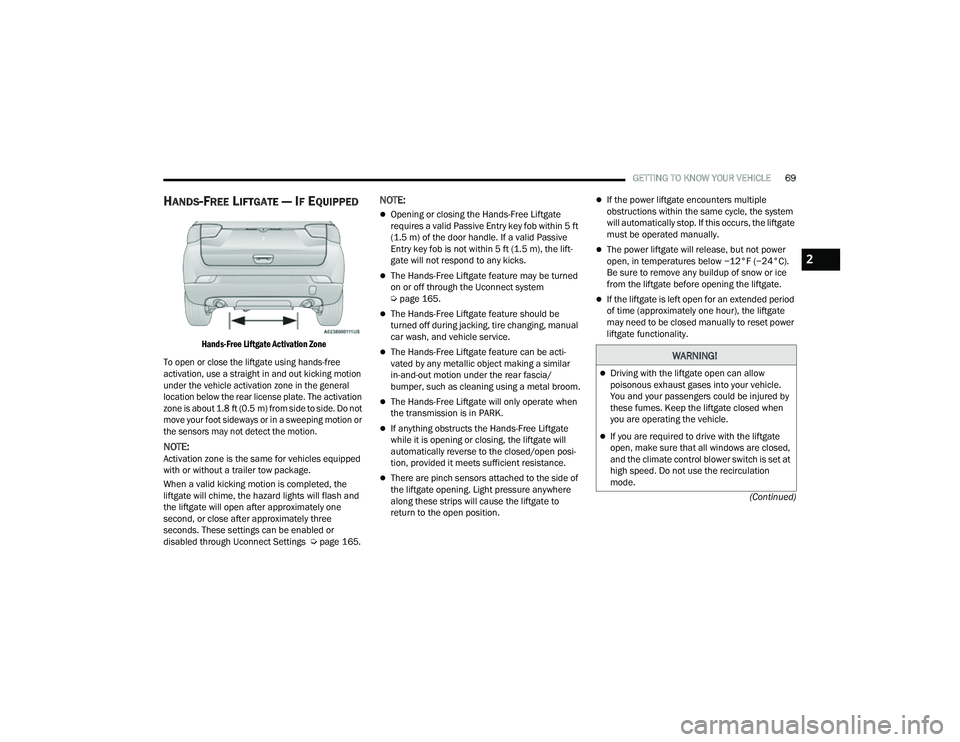
HANDS-FREE LIFTGATE — IF EQUIPPED
Hands-Free Liftgate Activation Zone
To open or close the liftgate using hands-free
activation, use a straight in and out kicking motion
under the vehicle activation zone in the general
location below the rear license plate. The activation
zone is about 1.8 ft (0.5 m) from side to side. Do not move your foot sideways or in a sweeping motion or
the sensors may not detect the motion.
NOTE:Activation zone is the same for vehicles equipped
with or without a trailer tow package.
When a valid kicking motion is completed, the
liftgate will chime, the hazard lights will flash and
the liftgate will open after approximately one
second, or close after approximately three
seconds. These settings can be enabled or
disabled through Uconnect Settings Ú page 165.
NOTE:
Opening or closing the Hands-Free Liftgate
requires a valid Passive Entry key fob within 5 ft
(1.5 m) of the door handle. If a valid Passive
Entry key fob is not within 5 ft (1.5 m), the lift -
gate will not respond to any kicks.
The Hands-Free Liftgate feature may be turned
on or off through the Uconnect system
Ú page 165.
The Hands-Free Liftgate feature should be
turned off during jacking, tire changing, manual
car wash, and vehicle service.
The Hands-Free Liftgate feature can be acti -
vated by any metallic object making a similar
in-and-out motion under the rear fascia/
bumper, such as cleaning using a metal broom.
The Hands-Free Liftgate will only operate when
the transmission is in PARK.
If anything obstructs the Hands-Free Liftgate
while it is opening or closing, the liftgate will
automatically reverse to the closed/open posi -
tion, provided it meets sufficient resistance.
There are pinch sensors attached to the side of
the liftgate opening. Light pressure anywhere
along these strips will cause the liftgate to
return to the open position.
If the power liftgate encounters multiple
obstructions within the same cycle, the system
will automatically stop. If this occurs, the liftgate
must be operated manually.
The power liftgate will release, but not power
open, in temperatures below −12°F (−24°C).
Be sure to remove any buildup of snow or ice
from the liftgate before opening the liftgate.
If the liftgate is left open for an extended period
of time (approximately one hour), the liftgate
may need to be closed manually to reset power
liftgate functionality.
WARNING!
Driving with the liftgate open can allow
poisonous exhaust gases into your vehicle.
You and your passengers could be injured by
these fumes. Keep the liftgate closed when
you are operating the vehicle.
If you are required to drive with the liftgate
open, make sure that all windows are closed,
and the climate control blower switch is set at
high speed. Do not use the recirculation
mode.
2
22_MP_OM_EN_USC_t.book Page 69
Page 79 of 344
GETTING TO KNOW YOUR INSTRUMENT PANEL77
PREMIUM INSTRUMENT CLUSTER
D
ESCRIPTIONS
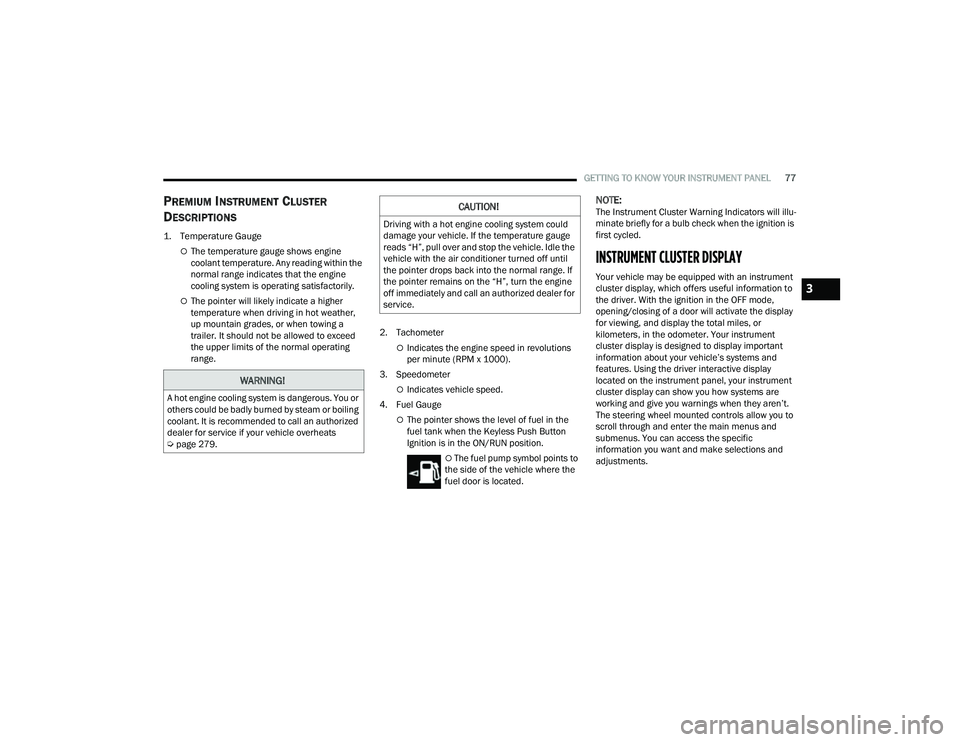
1. Temperature Gauge
The temperature gauge shows engine
coolant temperature. Any reading within the
normal range indicates that the engine
cooling system is operating satisfactorily.
The pointer will likely indicate a higher
temperature when driving in hot weather,
up mountain grades, or when towing a
trailer. It should not be allowed to exceed
the upper limits of the normal operating
range. 2. Tachometer
Indicates the engine speed in revolutions
per minute (RPM x 1000).
3. Speedometer
Indicates vehicle speed.
4. Fuel Gauge
The pointer shows the level of fuel in the
fuel tank when the Keyless Push Button
Ignition is in the ON/RUN position.
The fuel pump symbol points to
the side of the vehicle where the
fuel door is located.
NOTE:The Instrument Cluster Warning Indicators will illu -
minate briefly for a bulb check when the ignition is
first cycled.
INSTRUMENT CLUSTER DISPLAY
Your vehicle may be equipped with an instrument
cluster display, which offers useful information to
the driver. With the ignition in the OFF mode,
opening/closing of a door will activate the display
for viewing, and display the total miles, or
kilometers, in the odometer. Your instrument
cluster display is designed to display important
information about your vehicle’s systems and
features. Using the driver interactive display
located on the instrument panel, your instrument
cluster display can show you how systems are
working and give you warnings when they aren’t.
The steering wheel mounted controls allow you to
scroll through and enter the main menus and
submenus. You can access the specific
information you want and make selections and
adjustments.
WARNING!
A hot engine cooling system is dangerous. You or
others could be badly burned by steam or boiling
coolant. It is recommended to call an authorized
dealer for service if your vehicle overheats
Ú page 279.
CAUTION!
Driving with a hot engine cooling system could
damage your vehicle. If the temperature gauge
reads “H”, pull over and stop the vehicle. Idle the
vehicle with the air conditioner turned off until
the pointer drops back into the normal range. If
the pointer remains on the “H”, turn the engine
off immediately and call an authorized dealer for
service.
3
22_MP_OM_EN_USC_t.book Page 77
Page 80 of 344
78GETTING TO KNOW YOUR INSTRUMENT PANEL
INSTRUMENT CLUSTER DISPLAY
L
OCATION AND CONTROLS
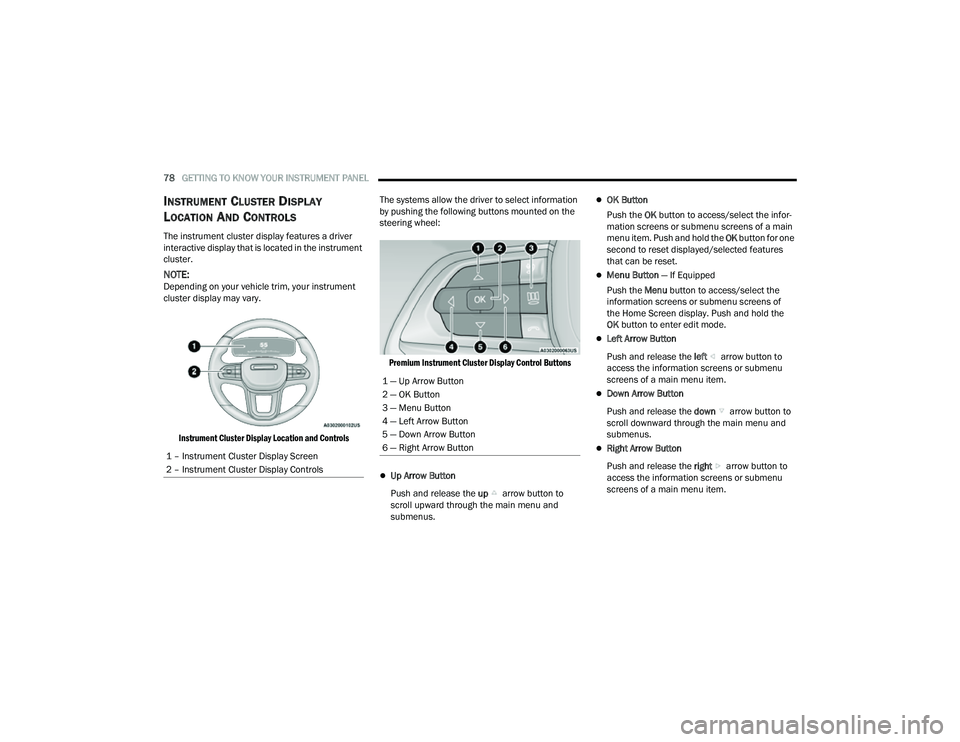
The instrument cluster display features a driver
interactive display that is located in the instrument
cluster.
NOTE:Depending on your vehicle trim, your instrument
cluster display may vary.
Instrument Cluster Display Location and Controls
The systems allow the driver to select information
by pushing the following buttons mounted on the
steering wheel:
Premium Instrument Cluster Display Control Buttons
Up Arrow Button
Push and release the up arrow button to
scroll upward through the main menu and
submenus.
OK Button
Push the OK button to access/select the infor -
mation screens or submenu screens of a main
menu item. Push and hold the OK button for one
second to reset displayed/selected features
that can be reset.
Menu Button — If Equipped
Push the Menu button to access/select the
information screens or submenu screens of
the Home Screen display. Push and hold the
OK button to enter edit mode.
Left Arrow Button
Push and release the left arrow button to
access the information screens or submenu
screens of a main menu item.
Down Arrow Button
Push and release the down arrow button to
scroll downward through the main menu and
submenus.
Right Arrow Button
Push and release the right arrow button to
access the information screens or submenu
screens of a main menu item.
1 – Instrument Cluster Display Screen
2 – Instrument Cluster Display Controls
1 — Up Arrow Button
2 — OK Button
3 — Menu Button
4 — Left Arrow Button
5 — Down Arrow Button
6 — Right Arrow Button
22_MP_OM_EN_USC_t.book Page 78