lights JEEP COMPASS 2023 User Guide
[x] Cancel search | Manufacturer: JEEP, Model Year: 2023, Model line: COMPASS, Model: JEEP COMPASS 2023Pages: 344, PDF Size: 18.8 MB
Page 45 of 344
GETTING TO KNOW YOUR VEHICLE43
It may be helpful to unplug the device during the
cycling process to prevent possible overheating of
the garage door or gate motor.
1. Place the ignition in the ON/RUN position.
2. Place the hand-held transmitter 1 to 3 inches (3 to 8 cm) away from the HomeLink® button
you wish to program while keeping the
HomeLink® indicator light in view.
3. Continue to press and hold the HomeLink® button, while you press and release (cycle)
your hand-held transmitter every two seconds
until HomeLink® has successfully accepted
the frequency signal. The indicator light will
flash slowly and then rapidly when fully
trained.
4. Watch for the HomeLink® indicator to change flash rates. When it changes, it is
programmed. It may take up to 30 seconds or
longer in rare cases. The garage door may
open and close while you are programming. 5. Press and hold the programmed HomeLink®
button and observe the indicator light.
NOTE:
If the indicator light stays on constantly,
programming is complete and the garage
door/device should activate when the
HomeLink® button is pressed.
To program the two remaining HomeLink®
buttons, repeat each step for each
remaining button. DO NOT erase the
channels.
If you unplugged the garage door opener/device
for programming, plug it back in at this time.
Reprogramming A Single HomeLink® Button
(Canadian/Gate Operator)
To reprogram a channel that has been previously
trained, follow these steps:
1. Place the ignition in the ON/RUN position.
2. Press and hold the desired HomeLink® button until the indicator light begins to flash after
20 seconds. Do not release the button. 3. Without releasing the button, proceed with
“Canadian/Gate Operator Programming”
Step 2 and follow all remaining steps.
EXTERIOR LIGHTS
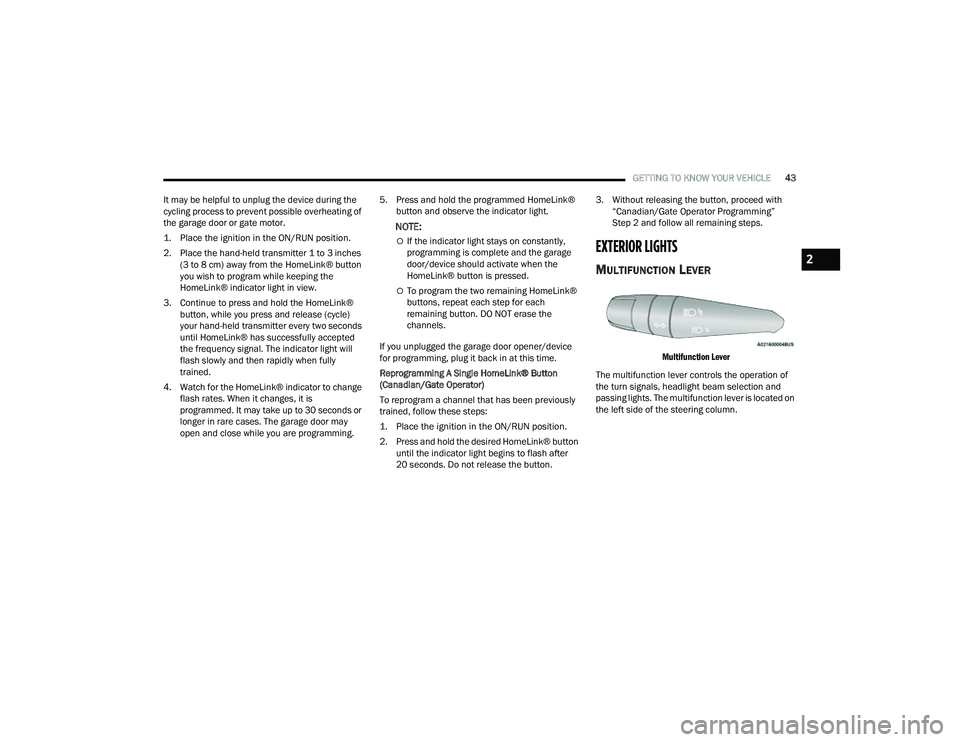
MULTIFUNCTION LEVER
Multifunction Lever
The multifunction lever controls the operation of
the turn signals, headlight beam selection and
passing lights. The multifunction lever is located on
the left side of the steering column.
2
22_MP_OM_EN_USC_t.book Page 43
Page 46 of 344
44GETTING TO KNOW YOUR VEHICLE
HEADLIGHT SWITCH
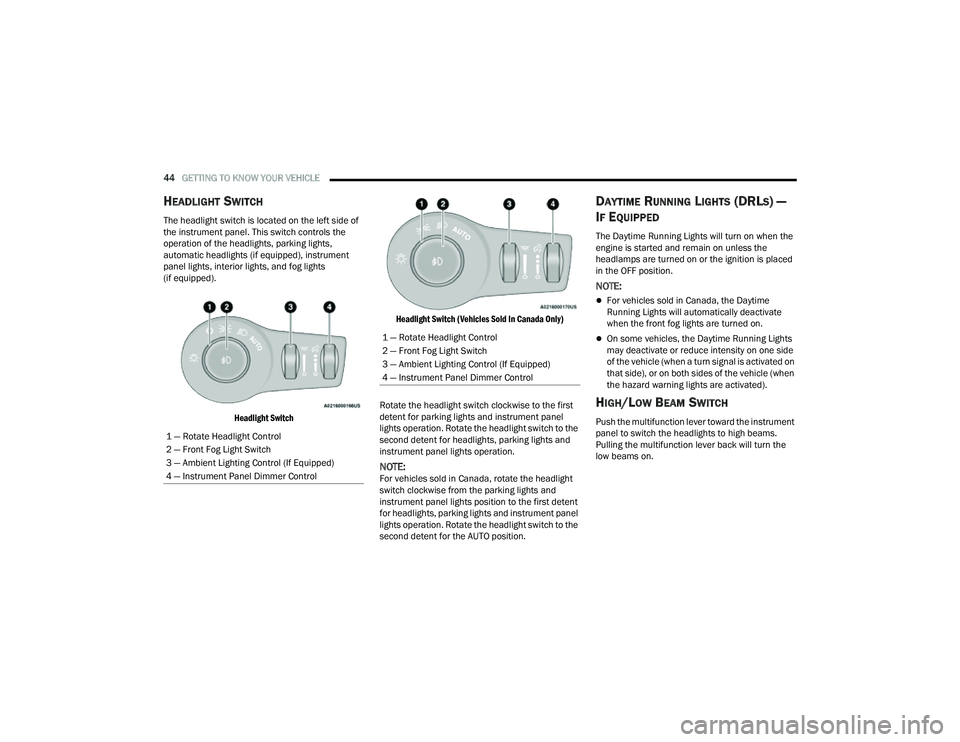
The headlight switch is located on the left side of
the instrument panel. This switch controls the
operation of the headlights, parking lights,
automatic headlights (if equipped), instrument
panel lights, interior lights, and fog lights
(if equipped).
Headlight Switch Headlight Switch (Vehicles Sold In Canada Only)
Rotate the headlight switch clockwise to the first
detent for parking lights and instrument panel
lights operation. Rotate the headlight switch to the
second detent for headlights, parking lights and
instrument panel lights operation.
NOTE:For vehicles sold in Canada, rotate the headlight
switch clockwise from the parking lights and
instrument panel lights position to the first detent
for headlights, parking lights and instrument panel
lights operation. Rotate the headlight switch to the
second detent for the AUTO position.
DAYTIME RUNNING LIGHTS (DRLS) —
I
F EQUIPPED
The Daytime Running Lights will turn on when the
engine is started and remain on unless the
headlamps are turned on or the ignition is placed
in the OFF position.
NOTE:
For vehicles sold in Canada, the Daytime
Running Lights will automatically deactivate
when the front fog lights are turned on.
On some vehicles, the Daytime Running Lights
may deactivate or reduce intensity on one side
of the vehicle (when a turn signal is activated on
that side), or on both sides of the vehicle (when
the hazard warning lights are activated).
HIGH/LOW BEAM SWITCH
Push the multifunction lever toward the instrument
panel to switch the headlights to high beams.
Pulling the multifunction lever back will turn the
low beams on.
1 — Rotate Headlight Control
2 — Front Fog Light Switch
3 — Ambient Lighting Control (If Equipped)
4 — Instrument Panel Dimmer Control
1 — Rotate Headlight Control
2 — Front Fog Light Switch
3 — Ambient Lighting Control (If Equipped)
4 — Instrument Panel Dimmer Control
22_MP_OM_EN_USC_t.book Page 44
Page 47 of 344
GETTING TO KNOW YOUR VEHICLE45
AUTOMATIC HIGH BEAM HEADLAMP
C
ONTROL — IF EQUIPPED
The Automatic High Beam Headlamp Control
system provides increased forward lighting at night
by automating high beam control through the use
of a digital camera mounted on the windshield.
This camera detects vehicle specific light and
automatically switches from high beams to low
beams until the approaching vehicle is out of view.
NOTE:
The Automatic High Beam Headlamp Control
can be turned on or off through Uconnect
Settings Ú page 165.
Broken, muddy, or obstructed headlights and
taillights of vehicles in the field of view will
cause headlights to remain on longer (closer to
the vehicle). Also, dirt, film, and other obstruc -
tions on the windshield or camera lens will
cause the system to function improperly.
FLASH-TO-PASS
You can signal another vehicle with your headlights
by lightly pulling the multifunction lever toward you.
This will cause the high beam headlights to turn on,
and remain on, until the lever is released.
AUTOMATIC HEADLIGHTS — IF EQUIPPED
This system automatically turns the headlights on
or off according to ambient light levels. To turn the
system on, rotate the headlight switch clockwise to
the last detent for automatic headlight operation.
When the system is on, the headlight time delay
feature is also on. This means the headlights will
stay on for up to 90 seconds after you place the
ignition into the OFF position. To turn the
automatic system off, move the headlight switch
out of the AUTO position.
NOTE:The engine must be running before the headlights
will come on in the automatic mode.
HEADLIGHT TIME DELAY
To assist when exiting the vehicle, the headlight
delay feature will leave the headlights on for up to
90 seconds.
To activate the delay feature, place the ignition in
the OFF position while the headlights are still on.
Then, turn off the headlights within 45 seconds.
The delay interval begins when the headlight
switch is turned off. Headlight delay can be cancelled by either turning
the headlights or parking lights on, or placing the
ignition in the ON/RUN position.
If you turn the headlights off before the ignition,
they will turn off in the normal manner.
NOTE:
The lights must be turned off within 45 seconds
of placing the ignition in the OFF position to acti
-
vate this feature. If the headlight switch is in the
AUTO position prior to placing the ignition in the
OFF position, there is no need to turn the head-
light switch to off to activate Headlight Delay.
The headlight delay timing is programmable
through Uconnect Settings Ú page 165.
LIGHTS-ON REMINDER
If the headlights or parking lights are on after the
ignition is in the OFF position, a chime will sound to
alert the driver when the driver's door is opened.
2
22_MP_OM_EN_USC_t.book Page 45
Page 48 of 344
46GETTING TO KNOW YOUR VEHICLE
FOG LIGHTS — IF EQUIPPED
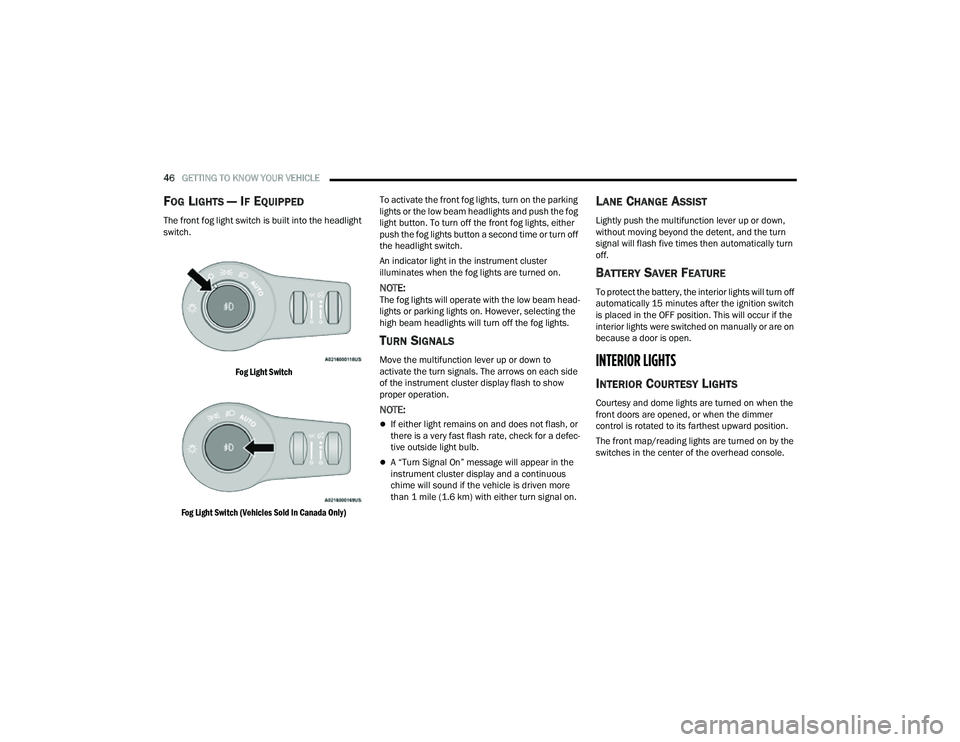
The front fog light switch is built into the headlight
switch.
Fog Light Switch
Fog Light Switch (Vehicles Sold In Canada Only)
To activate the front fog lights, turn on the parking
lights or the low beam headlights and push the fog
light button. To turn off the front fog lights, either
push the fog lights button a second time or turn off
the headlight switch.
An indicator light in the instrument cluster
illuminates when the fog lights are turned on.
NOTE:The fog lights will operate with the low beam head
-
lights or parking lights on. However, selecting the
high beam headlights will turn off the fog lights.
TURN SIGNALS
Move the multifunction lever up or down to
activate the turn signals. The arrows on each side
of the instrument cluster display flash to show
proper operation.
NOTE:
If either light remains on and does not flash, or
there is a very fast flash rate, check for a defec -
tive outside light bulb.
A “Turn Signal On” message will appear in the
instrument cluster display and a continuous
chime will sound if the vehicle is driven more
than 1 mile (1.6 km) with either turn signal on.
LANE CHANGE ASSIST
Lightly push the multifunction lever up or down,
without moving beyond the detent, and the turn
signal will flash five times then automatically turn
off.
BATTERY SAVER FEATURE
To protect the battery, the interior lights will turn off
automatically 15 minutes after the ignition switch
is placed in the OFF position. This will occur if the
interior lights were switched on manually or are on
because a door is open.
INTERIOR LIGHTS
INTERIOR COURTESY LIGHTS
Courtesy and dome lights are turned on when the
front doors are opened, or when the dimmer
control is rotated to its farthest upward position.
The front map/reading lights are turned on by the
switches in the center of the overhead console.
22_MP_OM_EN_USC_t.book Page 46
Page 49 of 344
GETTING TO KNOW YOUR VEHICLE47
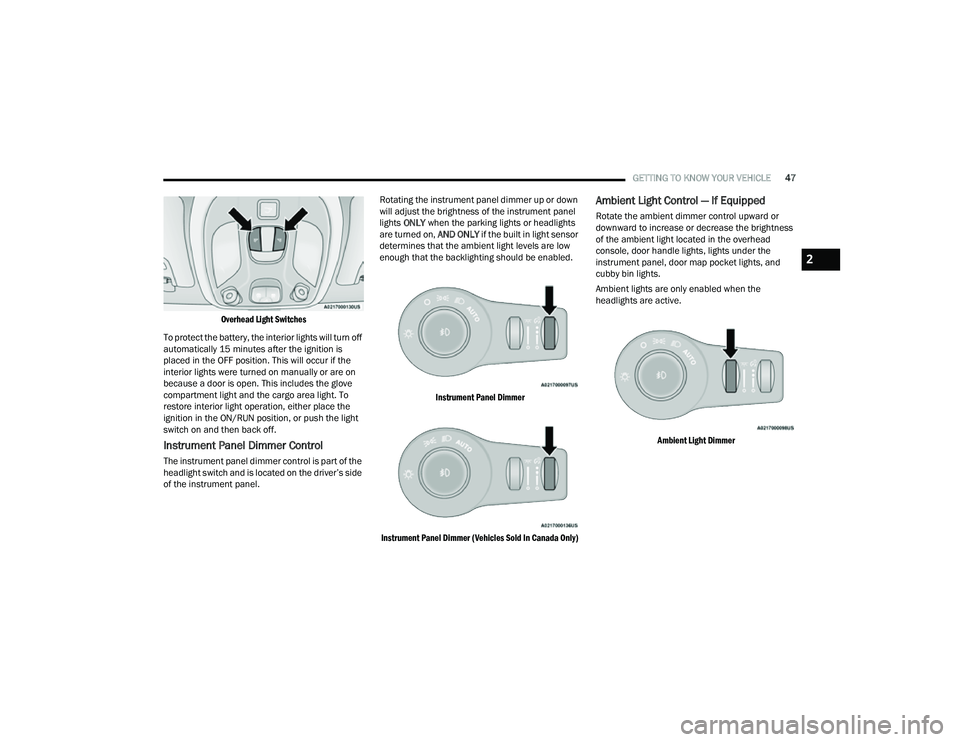
Overhead Light Switches
To protect the battery, the interior lights will turn off
automatically 15 minutes after the ignition is
placed in the OFF position. This will occur if the
interior lights were turned on manually or are on
because a door is open. This includes the glove
compartment light and the cargo area light. To
restore interior light operation, either place the
ignition in the ON/RUN position, or push the light
switch on and then back off.
Instrument Panel Dimmer Control
The instrument panel dimmer control is part of the
headlight switch and is located on the driver’s side
of the instrument panel. Rotating the instrument panel dimmer up or down
will adjust the brightness of the instrument panel
lights
ONLY when the parking lights or headlights
are turned on, AND ONLY if the built in light sensor
determines that the ambient light levels are low
enough that the backlighting should be enabled.
Instrument Panel Dimmer
Instrument Panel Dimmer (Vehicles Sold In Canada Only)
Ambient Light Control — If Equipped
Rotate the ambient dimmer control upward or
downward to increase or decrease the brightness
of the ambient light located in the overhead
console, door handle lights, lights under the
instrument panel, door map pocket lights, and
cubby bin lights.
Ambient lights are only enabled when the
headlights are active.
Ambient Light Dimmer
2
22_MP_OM_EN_USC_t.book Page 47
Page 62 of 344
60GETTING TO KNOW YOUR VEHICLE
(Continued)
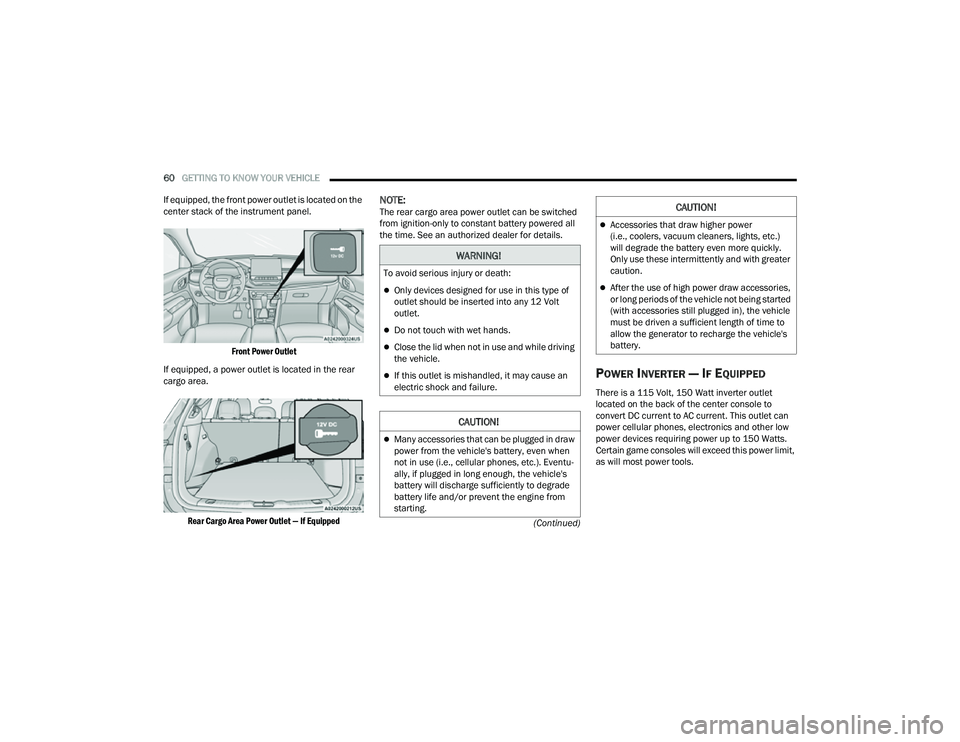
If equipped, the front power outlet is located on the
center stack of the instrument panel.
Front Power Outlet
If equipped, a power outlet is located in the rear
cargo area.
Rear Cargo Area Power Outlet — If Equipped
NOTE:The rear cargo area power outlet can be switched
from ignition-only to constant battery powered all
the time. See an authorized dealer for details.
POWER INVERTER — IF EQUIPPED
There is a 115 Volt, 150 Watt inverter outlet
located on the back of the center console to
convert DC current to AC current. This outlet can
power cellular phones, electronics and other low
power devices requiring power up to 150 Watts.
Certain game consoles will exceed this power limit,
as will most power tools.
WARNING!
To avoid serious injury or death:
Only devices designed for use in this type of
outlet should be inserted into any 12 Volt
outlet.
Do not touch with wet hands.
Close the lid when not in use and while driving
the vehicle.
If this outlet is mishandled, it may cause an
electric shock and failure.
CAUTION!
Many accessories that can be plugged in draw
power from the vehicle's battery, even when
not in use (i.e., cellular phones, etc.). Eventu -
ally, if plugged in long enough, the vehicle's
battery will discharge sufficiently to degrade
battery life and/or prevent the engine from
starting.
Accessories that draw higher power
(i.e., coolers, vacuum cleaners, lights, etc.)
will degrade the battery even more quickly.
Only use these intermittently and with greater
caution.
After the use of high power draw accessories,
or long periods of the vehicle not being started
(with accessories still plugged in), the vehicle
must be driven a sufficient length of time to
allow the generator to recharge the vehicle's
battery.
CAUTION!
22_MP_OM_EN_USC_t.book Page 60
Page 71 of 344
GETTING TO KNOW YOUR VEHICLE69
(Continued)
HANDS-FREE LIFTGATE — IF EQUIPPED
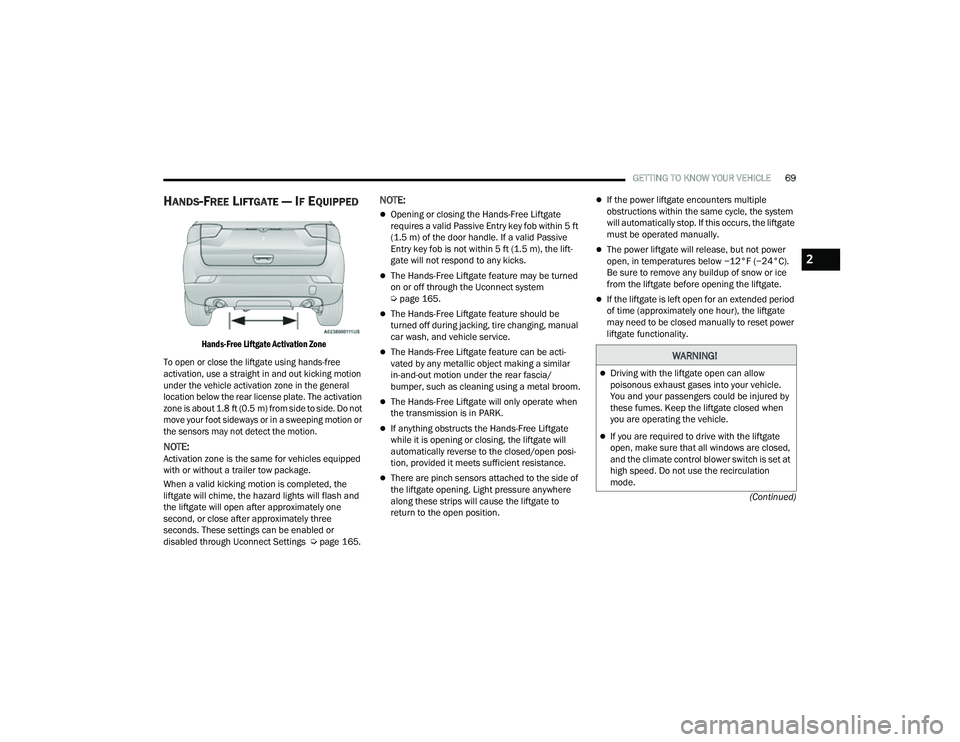
Hands-Free Liftgate Activation Zone
To open or close the liftgate using hands-free
activation, use a straight in and out kicking motion
under the vehicle activation zone in the general
location below the rear license plate. The activation
zone is about 1.8 ft (0.5 m) from side to side. Do not move your foot sideways or in a sweeping motion or
the sensors may not detect the motion.
NOTE:Activation zone is the same for vehicles equipped
with or without a trailer tow package.
When a valid kicking motion is completed, the
liftgate will chime, the hazard lights will flash and
the liftgate will open after approximately one
second, or close after approximately three
seconds. These settings can be enabled or
disabled through Uconnect Settings Ú page 165.
NOTE:
Opening or closing the Hands-Free Liftgate
requires a valid Passive Entry key fob within 5 ft
(1.5 m) of the door handle. If a valid Passive
Entry key fob is not within 5 ft (1.5 m), the lift -
gate will not respond to any kicks.
The Hands-Free Liftgate feature may be turned
on or off through the Uconnect system
Ú page 165.
The Hands-Free Liftgate feature should be
turned off during jacking, tire changing, manual
car wash, and vehicle service.
The Hands-Free Liftgate feature can be acti -
vated by any metallic object making a similar
in-and-out motion under the rear fascia/
bumper, such as cleaning using a metal broom.
The Hands-Free Liftgate will only operate when
the transmission is in PARK.
If anything obstructs the Hands-Free Liftgate
while it is opening or closing, the liftgate will
automatically reverse to the closed/open posi -
tion, provided it meets sufficient resistance.
There are pinch sensors attached to the side of
the liftgate opening. Light pressure anywhere
along these strips will cause the liftgate to
return to the open position.
If the power liftgate encounters multiple
obstructions within the same cycle, the system
will automatically stop. If this occurs, the liftgate
must be operated manually.
The power liftgate will release, but not power
open, in temperatures below −12°F (−24°C).
Be sure to remove any buildup of snow or ice
from the liftgate before opening the liftgate.
If the liftgate is left open for an extended period
of time (approximately one hour), the liftgate
may need to be closed manually to reset power
liftgate functionality.
WARNING!
Driving with the liftgate open can allow
poisonous exhaust gases into your vehicle.
You and your passengers could be injured by
these fumes. Keep the liftgate closed when
you are operating the vehicle.
If you are required to drive with the liftgate
open, make sure that all windows are closed,
and the climate control blower switch is set at
high speed. Do not use the recirculation
mode.
2
22_MP_OM_EN_USC_t.book Page 69
Page 82 of 344
80GETTING TO KNOW YOUR INSTRUMENT PANEL
The instrument cluster display will normally display
the main menu or the screens of a selected feature
of the main menu. The main display area also
displays pop-up messages that consist of
approximately 60 possible warning or information
messages. These pop-up messages fall into
several categories:
Five Second Stored Messages
When the appropriate conditions occur, this
type of message takes control of the main
display area for five seconds and then returns to
the previous screen. Most of the messages of
this type are then stored (as long as the condi-
tion that activated it remains active) and can be
reviewed from the “Messages” main menu item.
Examples of this message type are “Right Front
Turn Signal Lamp Out” and “Low Tire Pressure.”
Unstored Messages
This message type is displayed indefinitely or
until the condition that activated the message is
cleared. Examples of this message type are
“Turn Signal On” (if a turn signal is left on) and
“Lights On” (if driver leaves the vehicle with the
lights on).
Unstored Messages Until RUN
These messages deal primarily with the Remote
Start feature. This message type is displayed
until the ignition is in the RUN state. Examples of
this message type are “Remote Start Canceled -
Door Ajar” and “Press Brake Pedal and Push
Button to Start.”
Five Second Unstored Messages
When the appropriate conditions occur, this
type of message takes control of the main
display area for five seconds and then returns to
the previous screen. An example of this
message type is “Automatic High Beams On.”
OIL CHANGE RESET
Your vehicle is equipped with an engine oil
change indicator system. The “Oil Change Due”
message will display in the instrument cluster
display for five seconds after a single chime has
sounded, to indicate the next scheduled oil
change interval. The engine oil change indicator
system is duty cycle based, which means the
engine oil change interval may fluctuate, depen -
dent upon your personal driving style.
Unless reset, this message will continue to
display each time the ignition is cycled to the
ON/RUN position.
To reset the oil change indicator after performing
the scheduled maintenance, refer to the following
procedure:
1. Without pressing the brake pedal, push the ENGINE START/STOP button and cycle the
ignition to the ON/RUN position (do not start
the engine).
2. Fully press the accelerator pedal, slowly, three times within ten seconds.
3. Cycle the ignition to the OFF position.
NOTE:If the indicator message illuminates when you start
the vehicle, the oil change indicator system did not
reset. If necessary, repeat this procedure.
22_MP_OM_EN_USC_t.book Page 80
Page 83 of 344
GETTING TO KNOW YOUR INSTRUMENT PANEL81
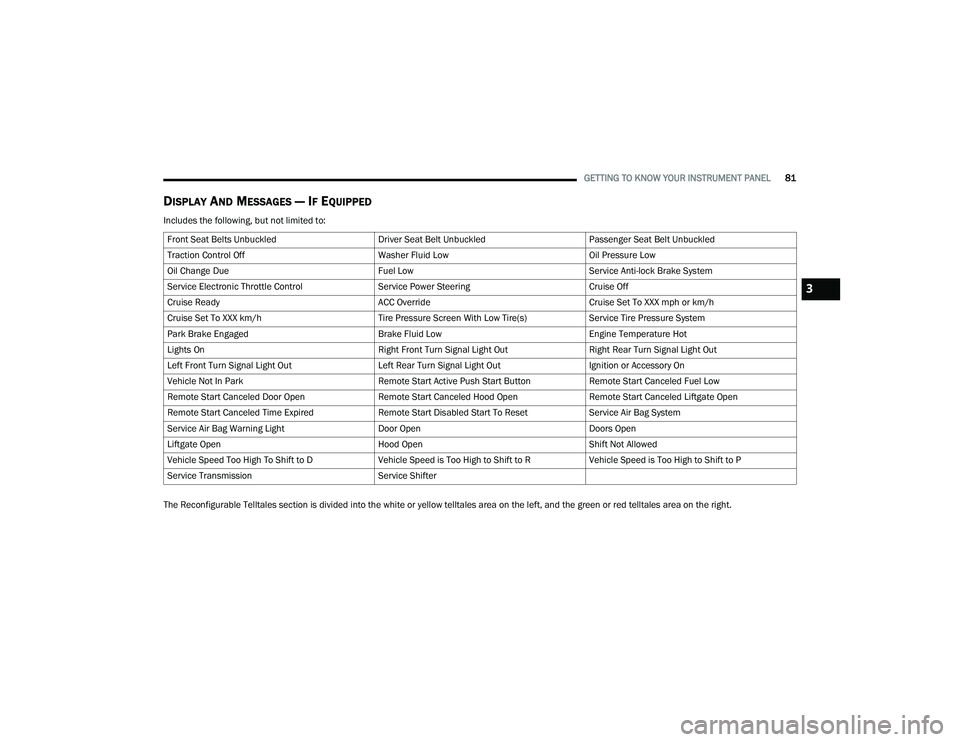
DISPLAY AND MESSAGES — IF EQUIPPED
Includes the following, but not limited to:
The Reconfigurable Telltales section is divided into the white or yellow telltales area on the left, and the green or red telltales area on the right.Front Seat Belts Unbuckled
Driver Seat Belt UnbuckledPassenger Seat Belt Unbuckled
Traction Control Off Washer Fluid LowOil Pressure Low
Oil Change Due Fuel LowService Anti-lock Brake System
Service Electronic Throttle Control Service Power SteeringCruise Off
Cruise Ready ACC OverrideCruise Set To XXX mph or km/h
Cruise Set To XXX km/h Tire Pressure Screen With Low Tire(s)Service Tire Pressure System
Park Brake Engaged Brake Fluid LowEngine Temperature Hot
Lights On Right Front Turn Signal Light OutRight Rear Turn Signal Light Out
Left Front Turn Signal Light Out Left Rear Turn Signal Light OutIgnition or Accessory On
Vehicle Not In Park Remote Start Active Push Start ButtonRemote Start Canceled Fuel Low
Remote Start Canceled Door Open Remote Start Canceled Hood OpenRemote Start Canceled Liftgate Open
Remote Start Canceled Time Expired Remote Start Disabled Start To ResetService Air Bag System
Service Air Bag Warning Light Door OpenDoors Open
Liftgate Open Hood OpenShift Not Allowed
Vehicle Speed Too High To Shift to D Vehicle Speed is Too High to Shift to RVehicle Speed is Too High to Shift to P
Service Transmission Service Shifter
3
22_MP_OM_EN_USC_t.book Page 81
Page 89 of 344
GETTING TO KNOW YOUR INSTRUMENT PANEL87
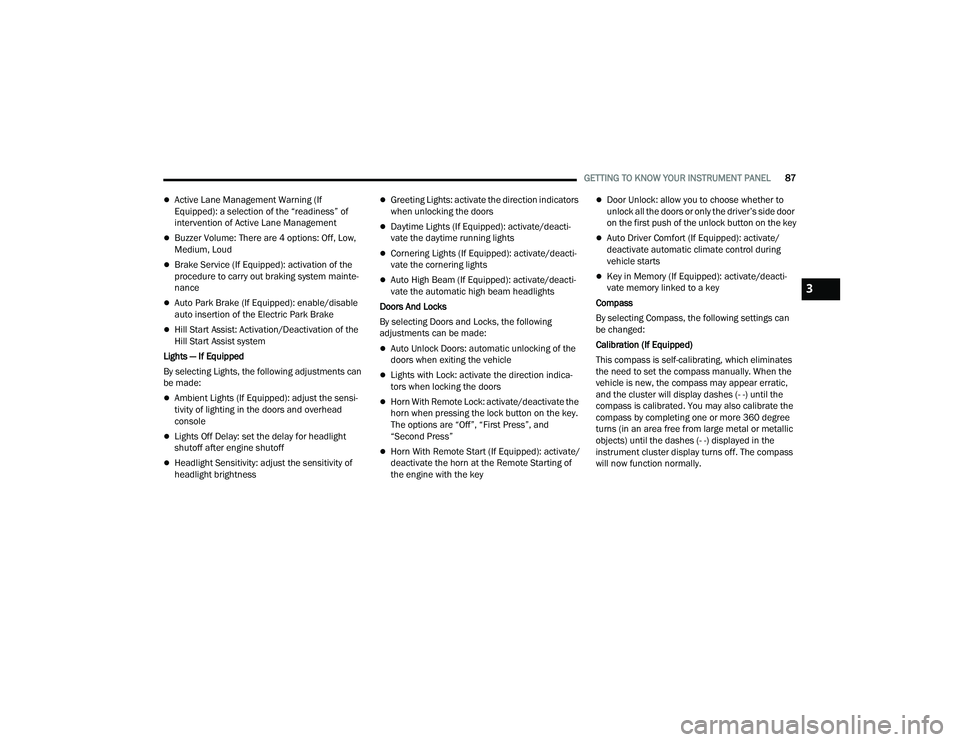
Active Lane Management Warning (If
Equipped): a selection of the “readiness” of
intervention of Active Lane Management
Buzzer Volume: There are 4 options: Off, Low,
Medium, Loud
Brake Service (If Equipped): activation of the
procedure to carry out braking system mainte-
nance
Auto Park Brake (If Equipped): enable/disable
auto insertion of the Electric Park Brake
Hill Start Assist: Activation/Deactivation of the
Hill Start Assist system
Lights — If Equipped
By selecting Lights, the following adjustments can
be made:
Ambient Lights (If Equipped): adjust the sensi -
tivity of lighting in the doors and overhead
console
Lights Off Delay: set the delay for headlight
shutoff after engine shutoff
Headlight Sensitivity: adjust the sensitivity of
headlight brightness
Greeting Lights: activate the direction indicators
when unlocking the doors
Daytime Lights (If Equipped): activate/deacti -
vate the daytime running lights
Cornering Lights (If Equipped): activate/deacti-
vate the cornering lights
Auto High Beam (If Equipped): activate/deacti -
vate the automatic high beam headlights
Doors And Locks
By selecting Doors and Locks, the following
adjustments can be made:
Auto Unlock Doors: automatic unlocking of the
doors when exiting the vehicle
Lights with Lock: activate the direction indica -
tors when locking the doors
Horn With Remote Lock: activate/deactivate the
horn when pressing the lock button on the key.
The options are “Off”, “First Press”, and
“Second Press”
Horn With Remote Start (If Equipped): activate/
deactivate the horn at the Remote Starting of
the engine with the key
Door Unlock: allow you to choose whether to
unlock all the doors or only the driver’s side door
on the first push of the unlock button on the key
Auto Driver Comfort (If Equipped): activate/
deactivate automatic climate control during
vehicle starts
Key in Memory (If Equipped): activate/deacti -
vate memory linked to a key
Compass
By selecting Compass, the following settings can
be changed:
Calibration (If Equipped)
This compass is self-calibrating, which eliminates
the need to set the compass manually. When the
vehicle is new, the compass may appear erratic,
and the cluster will display dashes (- -) until the
compass is calibrated. You may also calibrate the
compass by completing one or more 360 degree
turns (in an area free from large metal or metallic
objects) until the dashes (- -) displayed in the
instrument cluster display turns off. The compass
will now function normally.
3
22_MP_OM_EN_USC_t.book Page 87