warning lights JEEP COMPASS 2023 Owner's Manual
[x] Cancel search | Manufacturer: JEEP, Model Year: 2023, Model line: COMPASS, Model: JEEP COMPASS 2023Pages: 344, PDF Size: 18.8 MB
Page 160 of 344
158STARTING AND OPERATING
Towing Requirements — Trailer Lights And
Wiring
Whenever you pull a trailer, regardless of the trailer
size, stoplights and turn signals on the trailer are
required for motoring safety.
The Trailer Tow Package may include a four- and
seven-pin wiring harness. Use a factory approved
trailer harness and connector.
NOTE:Do not cut or splice wiring into the vehicle’s wiring
harness.
The electrical connections are all complete to the
vehicle but you must mate the harness to a trailer
connector. Refer to the following illustrations.
NOTE:
Disconnect trailer wiring connector from the
vehicle before launching a boat (or any other
device plugged into vehicle’s electrical connect)
into water.
Be sure to reconnect once clear from water
area.
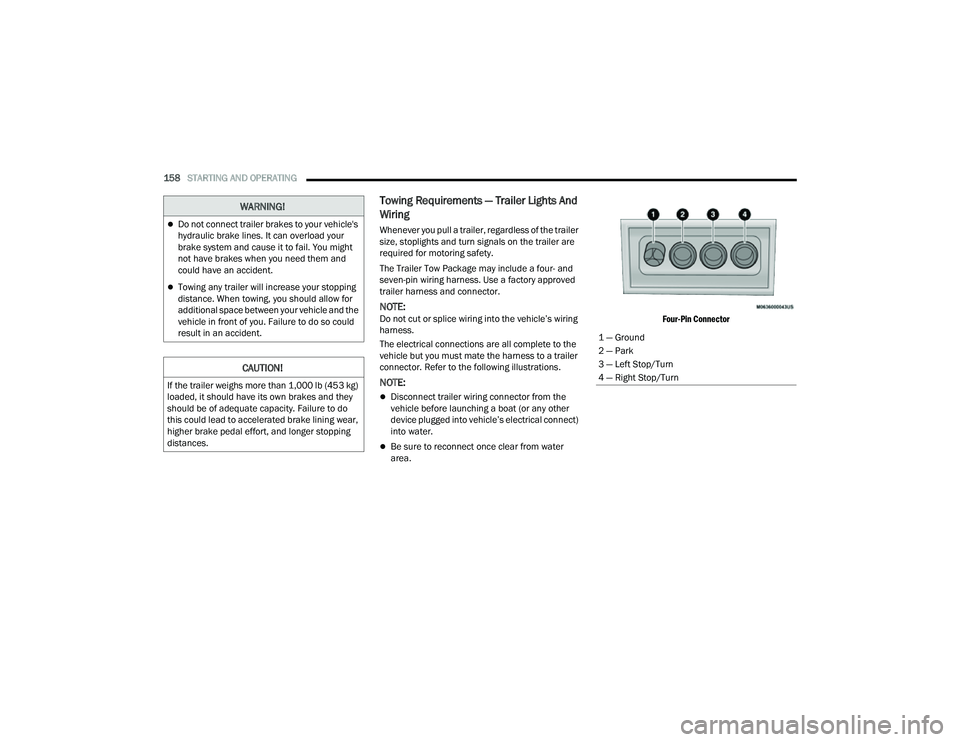
Four-Pin Connector
WARNING!
Do not connect trailer brakes to your vehicle's
hydraulic brake lines. It can overload your
brake system and cause it to fail. You might
not have brakes when you need them and
could have an accident.
Towing any trailer will increase your stopping
distance. When towing, you should allow for
additional space between your vehicle and the
vehicle in front of you. Failure to do so could
result in an accident.
CAUTION!
If the trailer weighs more than 1,000 lb (453 kg)
loaded, it should have its own brakes and they
should be of adequate capacity. Failure to do
this could lead to accelerated brake lining wear,
higher brake pedal effort, and longer stopping
distances.
1 — Ground
2 — Park
3 — Left Stop/Turn
4 — Right Stop/Turn
22_MP_OM_EN_USC_t.book Page 158
Page 174 of 344
172MULTIMEDIA
Rear ParkSense Braking Assist This setting will provide braking assistance if the Rear ParkSense system
senses a collision with an object.
Active ParkSense Mode This setting will control Active ParkSense functionality between fully
autonomous parking and semi-autonomous parking. The available options
are “Full Auto” and “Steering Only”.
Active ParkSense Proximity Chime This setting will turn the Active ParkSense Proximity Chimes on or off. This
setting in only available when Active ParkSense Mode is set to “Full Auto”.
Blind Spot Alert This setting will change the type of alert provided when an object is detected
in the vehicle’s blind spot. The “Off” setting will turn off Blind Spot Alert. The
“Lights” setting will activate the Blind Spot Alert lights on the outside mirrors.
The “Lights & Chime” setting will activate both the lights on the outside
mirrors and an audible chime.
Traffic Sign Assist This setting will turn Traffic Sign Assist on or off.
Traffic Sign Assist Warning This setting will allow you to set the warning type related to the traffic sign.
The available options are “Off”, “Visual”, and “Visual + Chime”.
New Speed Zone Indication This setting will allow you to set if the system will warn you that the speed limit
has changed in an area. The available options are “Off”, “Visual”, and
“Visual + Chime”.
Drowsy Driver Alert This setting will monitor the driver’s driving habits and warn you of any
changes, indicating that the driver may be drowsy. The available options are
“On” and “Off”.
Highway Assist Steering Wheel Vibration This setting will vibrate the steering wheel when a lane departure is detected.
The available options are “On” and “Off”.
Setting Name
Description
22_MP_OM_EN_USC_t.book Page 172
Page 193 of 344
SAFETY191
To turn ESC on again, momentarily push the ESC
OFF button. This will restore the “ESC On” mode of
operation.
NOTE:The “ESC OFF” message will display and an audible
chime will sound when the gear selector is placed
into the PARK position from any other position, and
then moved out of the PARK position. This will
occur even if the message was previously cleared.
ESC Activation/Malfunction Indicator Light
And ESC OFF Indicator Light
The ESC Activation/Malfunction Indicator
Light in the instrument cluster will come
on when the ignition is placed in the ON
mode. It should go out with the engine
running. If the ESC Activation/Malfunction
Indicator Light comes on continuously with the
engine running, a malfunction has been detected
in the ESC system. If this light remains on after
several ignition cycles, and the vehicle has been driven several miles (km) at speeds greater than
30 mph (48 km/h), see an authorized dealer as
soon as possible to have the problem diagnosed
and corrected.
The ESC Activation/Malfunction Indicator Light
starts to flash as soon as the tires lose traction and
the ESC system becomes active. The ESC
Activation/Malfunction Indicator Light also flashes
when Traction Control System (TCS) is active. If the
ESC Activation/Malfunction Indicator Light begins
to flash during acceleration, ease up on the
accelerator and apply as little throttle as possible.
Be sure to adapt your speed and driving to the
prevailing road conditions.
The ESC OFF Indicator Light indicates the
customer has elected to have the
Electronic Stability Control (ESC) in a
reduced mode.
NOTE:
The ESC Activation/Malfunction Indicator Light
and the ESC OFF Indicator Light come on
momentarily each time the ignition is placed in
the ON/RUN position.
Each time the ignition is placed in the ON/RUN
position, the ESC system will be on even if it was
turned off previously.
The ESC system will make buzzing or clicking
sounds when it is active. This is normal; the
sounds will stop when ESC becomes inactive
following the maneuver that caused the ESC
activation.
Emergency Stop Signal (ESS) —
If Equipped
The ESS activates the hazard lights at a faster than
normal speed when heavy brake pressure is
applied. ESS will only activate when the speed is
above 31 mph (50 km/h). The ESS operates
independently of other lamps, and will turn on and
off automatically. This indicates to others that the
vehicle is stopping quickly.
NOTE:
A warning light will illuminate within the instru -
ment cluster to inform the driver that the ESS
feature has been activated.
When towing a trailer, ESS will also activate the
rear indicator lights of the trailer.
Hill Descent Control (HDC) — If Equipped
Hill Descent Control (HDC) is intended for low
speed off-road driving while in 4WD Low. HDC
maintains vehicle speed while descending hills
during various driving situations. HDC controls
vehicle speed by actively controlling the brakes.
WARNING!
In the "Full Off" mode, the engine torque
reduction and stability features are disabled. In
an emergency evasive maneuver, the ESC
system will not engage to assist in maintaining
stability. “Full Off” mode is intended for
off-highway or off-road use only.
6
22_MP_OM_EN_USC_t.book Page 191
Page 197 of 344
SAFETY195
The BSM detection zone covers approximately
one lane width, 12 ft (3.8 m), on both sides of the
vehicle. The zone length starts at the outside
mirror and extends approximately 10 ft (3 m)
beyond the rear fascia/bumper of the vehicle. The
BSM system monitors the detection zones on both
sides of the vehicle when the vehicle speed
reaches approximately 6 mph (10 km/h) or higher
and will alert the driver of vehicles in these areas.
NOTE:
The BSM system DOES NOT alert the driver
about rapidly approaching vehicles that are
outside the detection zones.
The BSM system will automatically disable when
a trailer is detected. If the attached trailer is not
detected, the system detection zone DOES NOT
change. Therefore, visually verify the adjacent
lane is clear for both your vehicle and trailer
before making a lane change. If the trailer or
other object (i.e., bicycle, sports equipment)
extends beyond the side of your vehicle, this
may result in the BSM warning light remaining
illuminated the entire time the vehicle is in a
forward gear. It may be necessary to deactivate
the BSM system manually to avoid misdetection
Ú page 165.
The BSM system can become blocked if snow, ice,
mud, or other road contaminations accumulate on
the rear fascia/bumper where the radar sensors
are located. The system may also detect blockage if the vehicle is operated in areas with extremely
low radar returns such as a desert or parallel to a
large elevation drop. If blockage is detected, a
“Blind Spot Temporarily Unavailable, Sensor
Blocked” message will display in the cluster, both
mirror lights will illuminate, and BSM and RCP
alerts will not occur. This is normal operation. The
system will automatically recover and resume
function when the condition clears or when an
ignition cycle occurs. To minimize system
blockage, do not block the area of the rear fascia/
bumper where the radar sensors are located with
foreign objects (bumper stickers, bicycle racks,
etc.) and keep it clear of road contaminations.
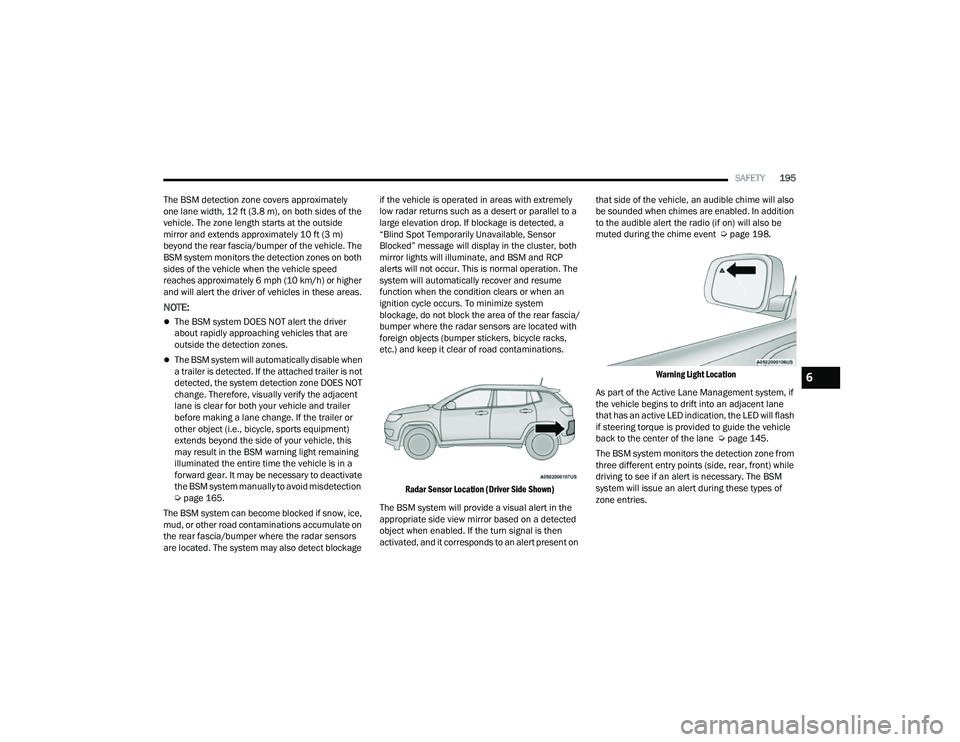
Radar Sensor Location (Driver Side Shown)
The BSM system will provide a visual alert in the
appropriate side view mirror based on a detected
object when enabled. If the turn signal is then
activated, and it corresponds to an alert present on that side of the vehicle, an audible chime will also
be sounded when chimes are enabled. In addition
to the audible alert the radio (if on) will also be
muted during the chime event Ú
page 198.
Warning Light Location
As part of the Active Lane Management system, if
the vehicle begins to drift into an adjacent lane
that has an active LED indication, the LED will flash
if steering torque is provided to guide the vehicle
back to the center of the lane Ú page 145.
The BSM system monitors the detection zone from
three different entry points (side, rear, front) while
driving to see if an alert is necessary. The BSM
system will issue an alert during these types of
zone entries.
6
22_MP_OM_EN_USC_t.book Page 195
Page 200 of 344
198SAFETY
Blind Spot Modes
Blind Spot Alert has three selectable modes of
operation that are available in the Uconnect
system.
Blind Spot Alert Lights Only (Default Setting)
When operating in Lights Only mode, the BSM
system will provide a visual alert in the appropriate
side view mirror based on a detected object.
However, when the system is operating in Rear
Cross Path (RCP) mode, the system will respond
with both visual and audible alerts when a
detected object is present. Whenever an audible
alert is requested, the radio is muted for the
duration of the chime.
Blind Spot Alert Lights/Chime
When operating in Blind Spot Alert Lights/Chime
mode, the BSM system will provide a visual alert in
the appropriate side view mirror based on a
detected object. If the turn signal is then activated,
and it corresponds to an alert present on that side
of the vehicle, an audible chime will also be
sounded. Whenever a turn signal and detected
object are present on the same side at the same
time, both the visual and audible alerts will be
issued. In addition to the audible alert the radio
(if on) will also be muted. When the system is in RCP, the system shall
respond with both visual and audible alerts when a
detected object is present. Whenever an audible
alert is requested, the radio volume is reduced.
Turn/hazard signal status is ignored; the RCP state
always requests the chime.
Blind Spot Alert Off
When the BSM system is turned off, there will be
no visual or audible alerts from either the BSM or
RCP systems.
NOTE:The BSM system will store the current operating
mode when the vehicle is shut off. Each time the
vehicle is started the previously stored mode will
be recalled and used.
Blocked Sensor
If the system detects degraded performance due
to contamination or foreign objects, a message will
warn you of a blocked sensor and the warning
indicators in side view mirrors will be illuminated.
The warning indicators will remain illuminated until
blockage clearing conditions are met. First clear
the fascia/bumper area around the sensors of the
blockage. After removing the blockage, reset the
system by cycling the ignition from ON to OFF and
then back ON.
FORWARD COLLISION WARNING (FCW)
W
ITH MITIGATION — IF EQUIPPED
FCW with Mitigation provides the driver with
audible warnings, visual warnings (within the
instrument cluster display), and may apply a brake
jerk to warn the driver when it detects a potential
frontal collision. The warnings and limited braking
are intended to provide the driver with enough time
to react, avoid or mitigate the potential collision.
NOTE:FCW monitors the information from the forward
looking sensors as well as the Electronic Brake
Controller (EBC), to calculate the probability of a
forward collision. When the system determines
that a forward collision is probable, the driver will
be provided with audible and visual warnings and
may provide a brake jerk warning.
If the driver does not take action based upon these
progressive warnings, then the system will provide
a limited level of active braking to help slow the
vehicle and mitigate the potential forward collision.
If the driver reacts to the warnings by braking and
the system determines that the driver intends to
avoid the collision by braking but has not applied
sufficient brake force, the system will compensate
and provide additional brake force as required.
22_MP_OM_EN_USC_t.book Page 198
Page 221 of 344
SAFETY219
The Air Bag Warning Light in the instrument
panel will turn on whenever the OCS is unable to
classify the front passenger seat status. A
malfunction in the OCS may affect the operation of
the air bag system.
If the Air Bag Warning Light does not come on,
or stays on after you start the vehicle, or it comes
on as you drive, take the vehicle to an authorized
dealer for service immediately.
The passenger seat assembly contains critical
OCS components that may affect the Passenger
Advanced Front Air Bag inflation. In order for the OCS
to properly classify the seated weight of a front seat
passenger, the OCS components must function as
designed. Do not make any modifications to the front
passenger seat components, assembly, or to the
seat cover. If the seat, trim cover, or cushion needs
service for any reason, take the vehicle to an
authorized dealer. Only FCA US LLC approved seat
accessories may be used.
The following requirements must be strictly
followed:
Do not modify the front passenger seat
assembly or components in any way.
Do not use prior or future model year seat
covers or cushions not designated by
FCA US LLC for the specific model being
repaired. Always use the correct seat cover and
cushion specified for the vehicle.
Do not replace the seat cover or cushion with an
aftermarket seat cover or cushion.
Do not add a secondary seat cover or mat.
At no time should any Supplemental Restraint
System (SRS) component or SRS related
component or fastener be modified or replaced
with any part except those which are approved
by FCA US LLC.
Knee Impact Bolsters
The Knee Impact Bolsters help protect the knees
of the driver and front passenger, and position the
front occupants for improved interaction with the
front air bags.
Supplemental Driver Knee Air Bag
This vehicle is equipped with a Supplemental
Driver Knee Air Bag mounted in the instrument
panel below the steering column. The
Supplemental Driver Knee Air Bag provides
enhanced protection during a frontal impact by
working together with the seat belts,
pretensioners, and front air bags.
WARNING!
Unapproved modifications or service proce-
dures to the passenger seat assembly, its
related components, seat cover or cushion
may inadvertently change the air bag deploy -
ment in case of a frontal collision. This could
result in death or serious injury to the front
passenger if the vehicle is involved in a colli -
sion. A modified vehicle may not comply with
required Federal Motor Vehicle Safety Stan -
dards (FMVSS) and/or Canadian Motor
Vehicle Safety Standards (CMVSS).
If it is necessary to modify the air bag system
for persons with disabilities, contact an autho -
rized dealer.
WARNING!
Do not drill, cut, or tamper with the knee
impact bolsters in any way.
Do not mount any accessories to the knee
impact bolsters such as alarm lights, stereos,
citizen band radios, etc.
6
22_MP_OM_EN_USC_t.book Page 219
Page 244 of 344
242SAFETY
(Continued)
PERIODIC SAFETY CHECKS YOU SHOULD
M
AKE OUTSIDE THE VEHICLE
Tires
Examine tires for excessive tread wear and uneven
wear patterns. Check for stones, nails, glass, or
other objects lodged in the tread or sidewall.
Inspect the tread for cuts and cracks. Inspect
sidewalls for cuts, cracks, and bulges. Check the
lug nut/bolt torque for tightness. Check the tires
(including spare) for proper cold inflation pressure.
Lights
Have someone observe the operation of brake
lights and exterior lights while you work the
controls. Check turn signal and high beam
indicator lights on the instrument panel.
Door Latches
Check for proper closing, latching, and locking.
Fluid Leaks
Check area under the vehicle after overnight
parking for fuel, coolant, oil, or other fluid leaks.
Also, if gasoline fumes are detected or if fuel or
brake fluid leaks are suspected, the cause should
be located and corrected immediately.
ONLY use the driver’s side floor mat on the
driver’s side floor area. To check for interfer -
ence, with the vehicle properly parked with the
engine off, fully depress the accelerator, the
brake, and the clutch pedal (if present) to
check for interference. If your floor mat inter -
feres with the operation of any pedal, or is not
secure to the floor, remove the floor mat from
the vehicle and place the floor mat in your
trunk.
ONLY use the passenger’s side floor mat on
the passenger’s side floor area.
ALWAYS make sure objects cannot fall or slide
into the driver’s side floor area when the
vehicle is moving. Objects can become
trapped under accelerator, brake, or clutch
pedals and could cause a loss of vehicle
control.
WARNING!
NEVER place any objects under the floor mat
(e.g., towels, keys, etc.). These objects could
change the position of the floor mat and may
cause interference with the accelerator,
brake, or clutch pedals.
If the vehicle carpet has been removed and
re-installed, always properly attach carpet to
the floor and check the floor mat fasteners are
secure to the vehicle carpet. Fully depress
each pedal to check for interference with the
accelerator, brake, or clutch pedals then
re-install the floor mats.
It is recommended to only use mild soap and
water to clean your floor mats. After cleaning,
always check your floor mat has been properly
installed and is secured to your vehicle using
the floor mat fasteners by lightly pulling mat.
WARNING!
22_MP_OM_EN_USC_t.book Page 242
Page 295 of 344
SERVICING AND MAINTENANCE293
Replacing Exterior Bulbs
Turn Signal Light/Position Lights (Base)
To replace the bulbs proceed as follows:
1. Open hood.
2. Reach behind headlamp near the radiator.
3. Remove the electrical connectors.
4. For the turn signal bulb, rotate in a counter -
clockwise direction and remove the bulb and
bulb socket. Pull the bulb axially to remove it
from the socket.
5. Install the bulb and sockets and rotate them clockwise making sure that it is properly
locked.
6. Reconnect the electrical connectors.
7. Close hood.
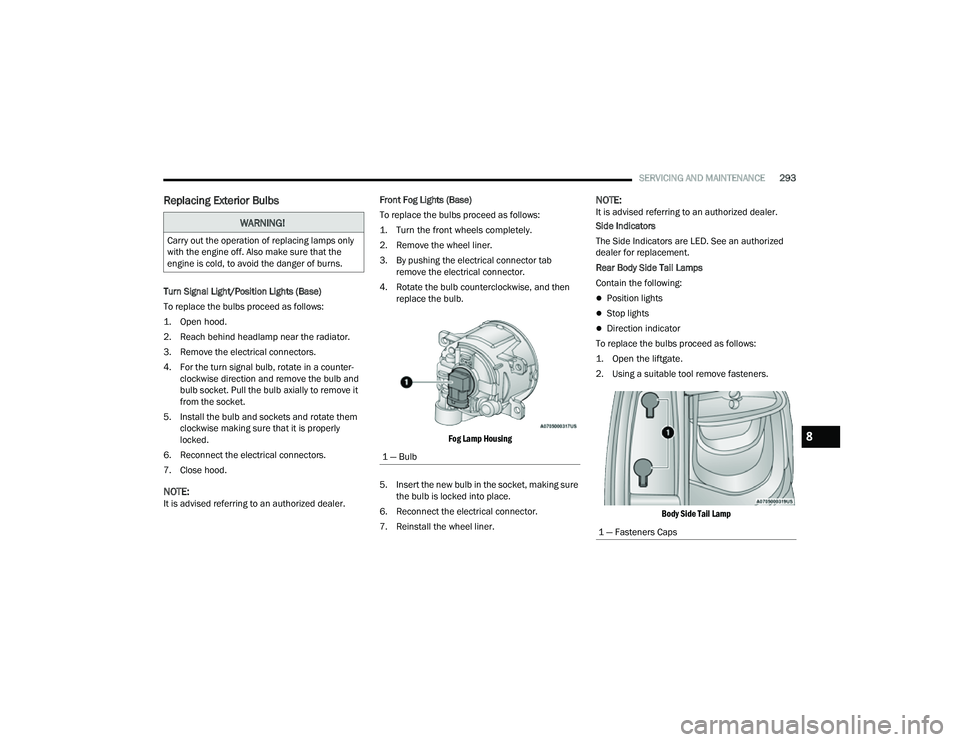
NOTE:It is advised referring to an authorized dealer. Front Fog Lights (Base)
To replace the bulbs proceed as follows:
1. Turn the front wheels completely.
2. Remove the wheel liner.
3. By pushing the electrical connector tab
remove the electrical connector.
4. Rotate the bulb counterclockwise, and then replace the bulb.
Fog Lamp Housing
5. Insert the new bulb in the socket, making sure the bulb is locked into place.
6. Reconnect the electrical connector.
7. Reinstall the wheel liner.
NOTE:It is advised referring to an authorized dealer.
Side Indicators
The Side Indicators are LED. See an authorized
dealer for replacement.
Rear Body Side Tail Lamps
Contain the following:
Position lights
Stop lights
Direction indicator
To replace the bulbs proceed as follows:
1. Open the liftgate.
2. Using a suitable tool remove fasteners.
Body Side Tail Lamp
WARNING!
Carry out the operation of replacing lamps only
with the engine off. Also make sure that the
engine is cold, to avoid the danger of burns.
1 — Bulb
1 — Fasteners Caps
8
22_MP_OM_EN_USC_t.book Page 293
Page 331 of 344
329
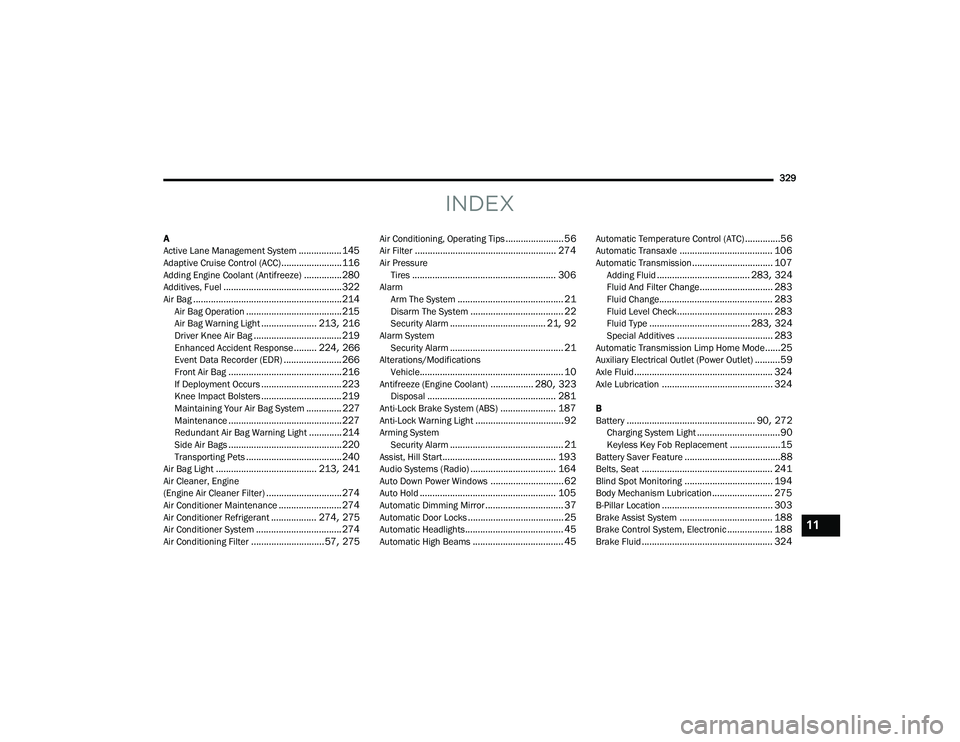
INDEX
A
Active Lane Management System................. 145Adaptive Cruise Control (ACC)........................ 116Adding Engine Coolant (Antifreeze)............... 280Additives, Fuel............................................... 322Air Bag........................................................... 214Air Bag Operation...................................... 215Air Bag Warning Light...................... 213, 216Driver Knee Air Bag................................... 219Enhanced Accident Response......... 224, 266Event Data Recorder (EDR)....................... 266Front Air Bag............................................. 216If Deployment Occurs................................ 223Knee Impact Bolsters................................ 219Maintaining Your Air Bag System.............. 227Maintenance............................................. 227Redundant Air Bag Warning Light.............214Side Air Bags............................................. 220Transporting Pets...................................... 240Air Bag Light........................................ 213, 241Air Cleaner, Engine
(Engine Air Cleaner Filter).............................. 274Air Conditioner Maintenance......................... 274Air Conditioner Refrigerant.................. 274, 275Air Conditioner System.................................. 274Air Conditioning Filter............................. 57, 275
Air Conditioning, Operating Tips....................... 56Air Filter........................................................ 274Air PressureTires......................................................... 306AlarmArm The System.......................................... 21Disarm The System..................................... 22Security Alarm...................................... 21, 92Alarm SystemSecurity Alarm............................................. 21Alterations/ModificationsVehicle......................................................... 10Antifreeze (Engine Coolant)................. 280, 323Disposal................................................... 281Anti-Lock Brake System (ABS)...................... 187Anti-Lock Warning Light................................... 92Arming SystemSecurity Alarm............................................. 21Assist, Hill Start............................................. 193Audio Systems (Radio).................................. 164Auto Down Power Windows............................. 62Auto Hold...................................................... 105Automatic Dimming Mirror............................... 37Automatic Door Locks...................................... 25Automatic Headlights....................................... 45Automatic High Beams.................................... 45
Automatic Temperature Control (ATC)..............56Automatic Transaxle..................................... 106Automatic Transmission................................ 107Adding Fluid..................................... 283, 324Fluid And Filter Change............................. 283Fluid Change............................................. 283Fluid Level Check...................................... 283Fluid Type........................................ 283, 324Special Additives...................................... 283Automatic Transmission Limp Home Mode......25Auxiliary Electrical Outlet (Power Outlet)..........59Axle Fluid....................................................... 324Axle Lubrication............................................ 324
B
Battery................................................... 90, 272Charging System Light.................................90Keyless Key Fob Replacement....................15Battery Saver Feature......................................88Belts, Seat.................................................... 241Blind Spot Monitoring................................... 194Body Mechanism Lubrication........................ 275B-Pillar Location............................................ 303Brake Assist System..................................... 188Brake Control System, Electronic.................. 188Brake Fluid.................................................... 324
11
22_MP_OM_EN_USC_t.book Page 329
Page 332 of 344
330 Brake System
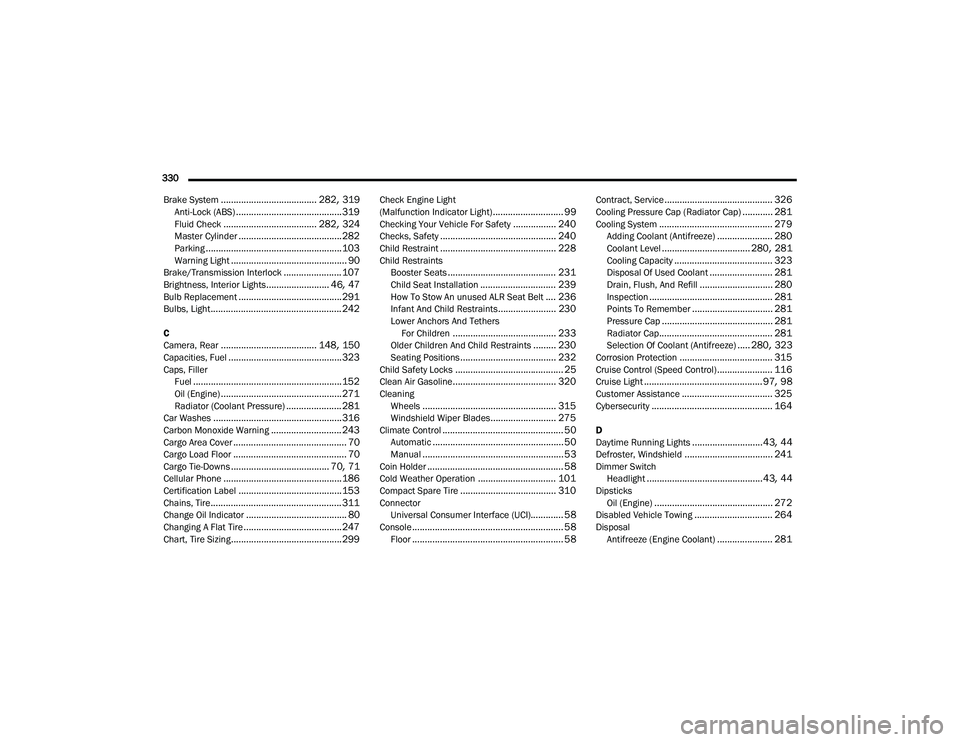
...................................... 282, 319Anti-Lock (ABS).......................................... 319Fluid Check..................................... 282, 324Master Cylinder......................................... 282Parking...................................................... 103Warning Light.............................................. 90Brake/Transmission Interlock....................... 107Brightness, Interior Lights......................... 46, 47Bulb Replacement......................................... 291Bulbs, Light.................................................... 242
C
Camera, Rear...................................... 148, 150Capacities, Fuel............................................. 323Caps, Filler Fuel........................................................... 152Oil (Engine)................................................ 271Radiator (Coolant Pressure)...................... 281Car Washes................................................... 316Carbon Monoxide Warning............................ 243Cargo Area Cover............................................. 70Cargo Load Floor............................................. 70Cargo Tie-Downs....................................... 70, 71Cellular Phone............................................... 186Certification Label......................................... 153Chains, Tire.................................................... 311Change Oil Indicator........................................ 80Changing A Flat Tire....................................... 247Chart, Tire Sizing............................................ 299
Check Engine Light
(Malfunction Indicator Light)............................ 99Checking Your Vehicle For Safety................. 240Checks, Safety.............................................. 240Child Restraint.............................................. 228Child RestraintsBooster Seats........................................... 231Child Seat Installation.............................. 239How To Stow An unused ALR Seat Belt.... 236Infant And Child Restraints....................... 230Lower Anchors And TethersFor Children......................................... 233Older Children And Child Restraints......... 230Seating Positions...................................... 232Child Safety Locks........................................... 25Clean Air Gasoline......................................... 320CleaningWheels..................................................... 315Windshield Wiper Blades.......................... 275Climate Control................................................ 50Automatic.................................................... 50Manual........................................................ 53Coin Holder...................................................... 58Cold Weather Operation............................... 101Compact Spare Tire...................................... 310ConnectorUniversal Consumer Interface (UCI)............. 58Console............................................................ 58Floor............................................................ 58
Contract, Service........................................... 326Cooling Pressure Cap (Radiator Cap)............ 281Cooling System............................................. 279Adding Coolant (Antifreeze)...................... 280Coolant Level................................... 280, 281Cooling Capacity....................................... 323Disposal Of Used Coolant......................... 281Drain, Flush, And Refill............................. 280Inspection................................................. 281Points To Remember................................ 281Pressure Cap............................................ 281Radiator Cap............................................. 281Selection Of Coolant (Antifreeze)..... 280, 323Corrosion Protection..................................... 315Cruise Control (Speed Control)...................... 116Cruise Light............................................... 97, 98Customer Assistance.................................... 325Cybersecurity................................................ 164
D
Daytime Running Lights............................43, 44Defroster, Windshield................................... 241Dimmer SwitchHeadlight..............................................43, 44DipsticksOil (Engine)............................................... 272Disabled Vehicle Towing............................... 264DisposalAntifreeze (Engine Coolant)...................... 281
22_MP_OM_EN_USC_t.book Page 330