warning lights JEEP COMPASS 2023 Owners Manual
[x] Cancel search | Manufacturer: JEEP, Model Year: 2023, Model line: COMPASS, Model: JEEP COMPASS 2023Pages: 344, PDF Size: 18.8 MB
Page 6 of 344
4
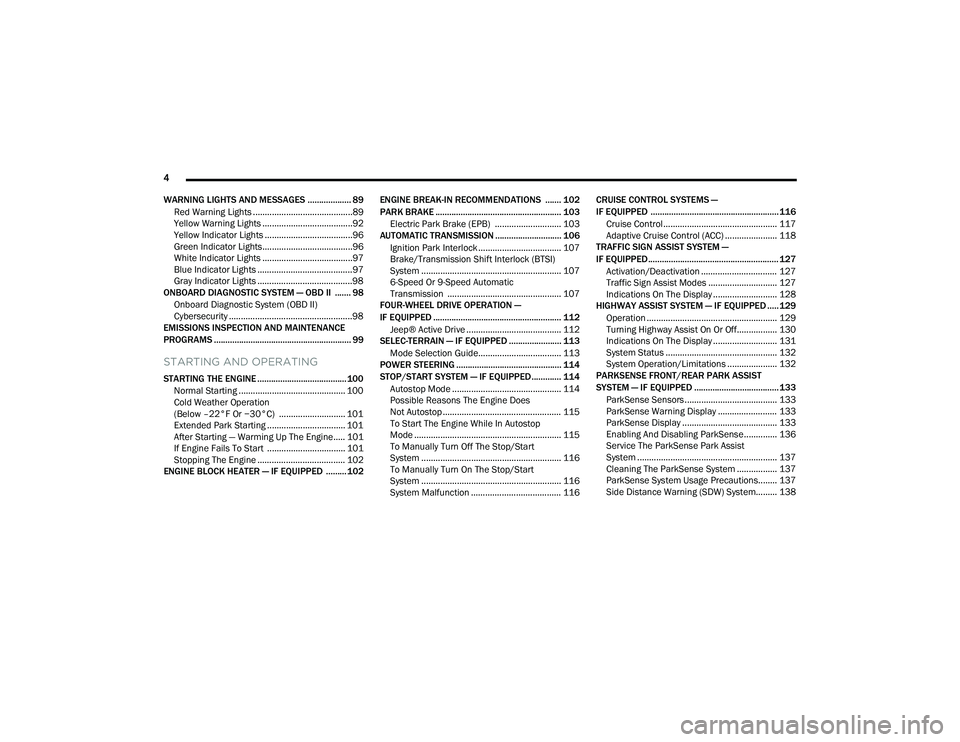
WARNING LIGHTS AND MESSAGES ................... 89 Red Warning Lights ..........................................89
Yellow Warning Lights ......................................92
Yellow Indicator Lights .....................................96
Green Indicator Lights......................................96
White Indicator Lights ......................................97
Blue Indicator Lights ........................................97
Gray Indicator Lights ........................................98
ONBOARD DIAGNOSTIC SYSTEM — OBD II ....... 98
Onboard Diagnostic System (OBD II)
Cybersecurity ....................................................98
EMISSIONS INSPECTION AND MAINTENANCE
PROGRAMS ............................................................ 99
STARTING AND OPERATING
STARTING THE ENGINE ....................................... 100
Normal Starting ............................................. 100
Cold Weather Operation
(Below –22°F Or −30°C) ............................ 101
Extended Park Starting ................................. 101After Starting — Warming Up The Engine..... 101
If Engine Fails To Start ................................. 101Stopping The Engine ..................................... 102
ENGINE BLOCK HEATER — IF EQUIPPED ......... 102 ENGINE BREAK-IN RECOMMENDATIONS ....... 102
PARK BRAKE ....................................................... 103
Electric Park Brake (EPB) ............................ 103
AUTOMATIC TRANSMISSION ............................. 106
Ignition Park Interlock ................................... 107Brake/Transmission Shift Interlock (BTSI)
System ........................................................... 107
6-Speed Or 9-Speed Automatic
Transmission ................................................ 107
FOUR-WHEEL DRIVE OPERATION —
IF EQUIPPED ........................................................ 112
Jeep® Active Drive ........................................ 112
SELEC-TERRAIN — IF EQUIPPED ....................... 113
Mode Selection Guide................................... 113
POWER STEERING .............................................. 114
STOP/START SYSTEM — IF EQUIPPED ............. 114
Autostop Mode .............................................. 114
Possible Reasons The Engine Does
Not Autostop .................................................. 115
To Start The Engine While In Autostop
Mode .............................................................. 115
To Manually Turn Off The Stop/Start
System ........................................................... 116
To Manually Turn On The Stop/Start
System ........................................................... 116
System Malfunction ...................................... 116 CRUISE CONTROL SYSTEMS —
IF EQUIPPED ........................................................ 116
Cruise Control................................................ 117
Adaptive Cruise Control (ACC) ...................... 118
TRAFFIC SIGN ASSIST SYSTEM —
IF EQUIPPED ......................................................... 127
Activation/Deactivation ................................ 127Traffic Sign Assist Modes ............................. 127Indications On The Display ........................... 128
HIGHWAY ASSIST SYSTEM — IF EQUIPPED ..... 129
Operation ....................................................... 129Turning Highway Assist On Or Off................. 130
Indications On The Display ........................... 131
System Status ............................................... 132System Operation/Limitations ..................... 132
PARKSENSE FRONT/REAR PARK ASSIST
SYSTEM — IF EQUIPPED ..................................... 133
ParkSense Sensors ....................................... 133
ParkSense Warning Display ......................... 133
ParkSense Display ........................................ 133
Enabling And Disabling ParkSense.............. 136
Service The ParkSense Park Assist
System ........................................................... 137
Cleaning The ParkSense System ................. 137
ParkSense System Usage Precautions........ 137Side Distance Warning (SDW) System......... 138
22_MP_OM_EN_USC_t.book Page 4
Page 12 of 344
10
VEHICLE MODIFICATIONS/ALTERATIONS
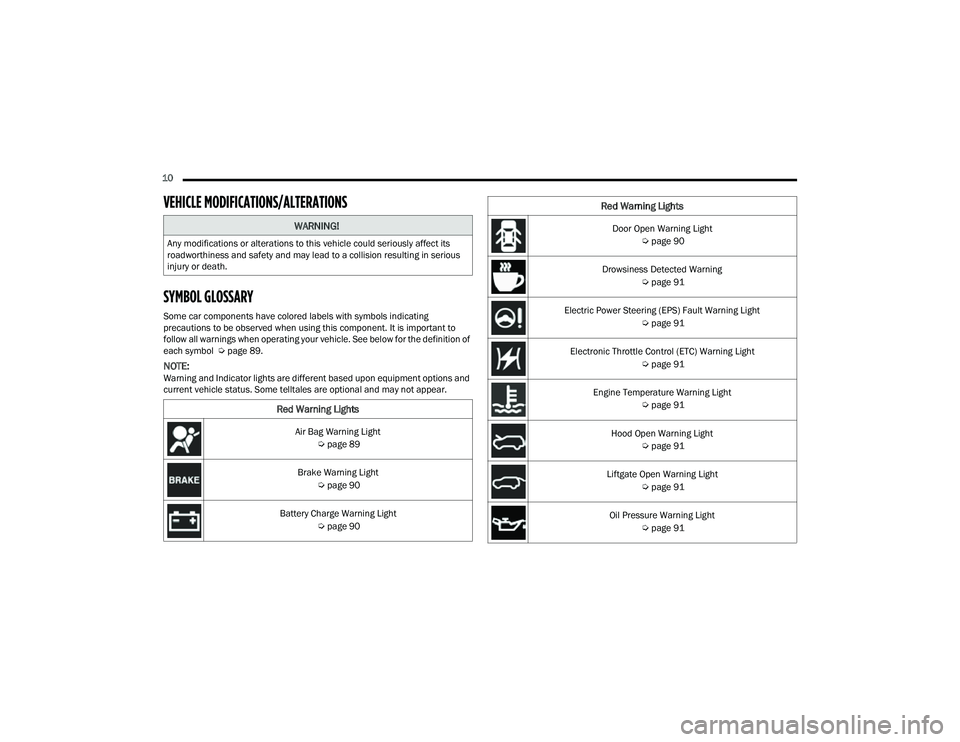
SYMBOL GLOSSARY
Some car components have colored labels with symbols indicating
precautions to be observed when using this component. It is important to
follow all warnings when operating your vehicle. See below for the definition of
each symbol Úpage 89.
NOTE:Warning and Indicator lights are different based upon equipment options and
current vehicle status. Some telltales are optional and may not appear.
WARNING!
Any modifications or alterations to this vehicle could seriously affect its
roadworthiness and safety and may lead to a collision resulting in serious
injury or death.
Red Warning Lights
Air Bag Warning Light
Úpage 89
Brake Warning Light Úpage 90
Battery Charge Warning Light Úpage 90
Door Open Warning Light
Úpage 90
Drowsiness Detected Warning Úpage 91
Electric Power Steering (EPS) Fault Warning Light Úpage 91
Electronic Throttle Control (ETC) Warning Light Úpage 91
Engine Temperature Warning Light Úpage 91
Hood Open Warning Light Úpage 91
Liftgate Open Warning Light Úpage 91
Oil Pressure Warning Light Úpage 91
Red Warning Lights
22_MP_OM_EN_USC_t.book Page 10
Page 13 of 344
11
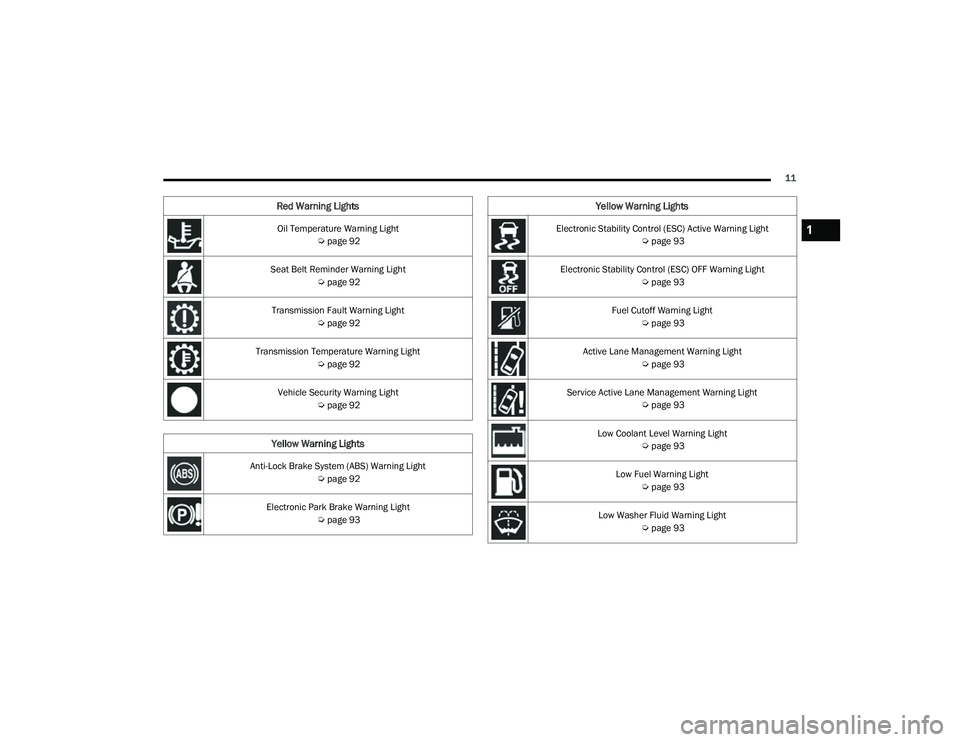
Oil Temperature Warning Light Úpage 92
Seat Belt Reminder Warning Light Úpage 92
Transmission Fault Warning Light Úpage 92
Transmission Temperature Warning Light Úpage 92
Vehicle Security Warning Light Úpage 92
Yellow Warning Lights
Anti-Lock Brake System (ABS) Warning Light
Úpage 92
Electronic Park Brake Warning Light Úpage 93
Red Warning Lights
Electronic Stability Control (ESC) Active Warning Light
Úpage 93
Electronic Stability Control (ESC) OFF Warning Light Úpage 93
Fuel Cutoff Warning Light Úpage 93
Active Lane Management Warning Light Úpage 93
Service Active Lane Management Warning Light Úpage 93
Low Coolant Level Warning Light Úpage 93
Low Fuel Warning Light Úpage 93
Low Washer Fluid Warning Light Úpage 93
Yellow Warning Lights
1
22_MP_OM_EN_USC_t.book Page 11
Page 14 of 344
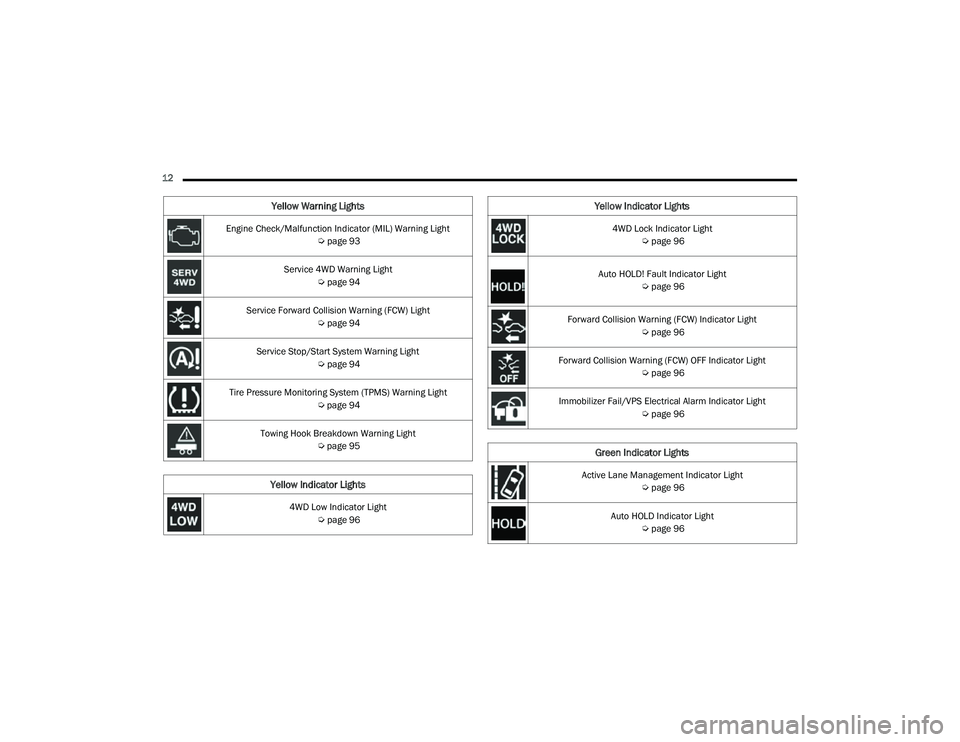
12 Engine Check/Malfunction Indicator (MIL) Warning Light Úpage 93
Service 4WD Warning Light Úpage 94
Service Forward Collision Warning (FCW) Light Úpage 94
Service Stop/Start System Warning Light Úpage 94
Tire Pressure Monitoring System (TPMS) Warning Light Úpage 94
Towing Hook Breakdown Warning Light Úpage 95
Yellow Indicator Lights
4WD Low Indicator Light
Úpage 96
Yellow Warning Lights
4WD Lock Indicator Light
Úpage 96
Auto HOLD! Fault Indicator Light Úpage 96
Forward Collision Warning (FCW) Indicator Light Úpage 96
Forward Collision Warning (FCW) OFF Indicator Light Úpage 96
Immobilizer Fail/VPS Electrical Alarm Indicator Light Úpage 96
Green Indicator Lights
Active Lane Management Indicator Light
Úpage 96
Auto HOLD Indicator Light Úpage 96
Yellow Indicator Lights
22_MP_OM_EN_USC_t.book Page 12
Page 21 of 344
GETTING TO KNOW YOUR VEHICLE19
(Continued)
REMOTE START — IF EQUIPPED
This system uses the key fob to start the
engine conveniently from outside the
vehicle while still maintaining security.
The system has a range of approximately
328 ft (100 m).
Remote Start is used to defrost windows in cold
weather and to reach a comfortable climate in all
ambient conditions before the customer enters the
vehicle.
NOTE:Obstructions between the vehicle and key fob may
reduce this range Ú page 328.
HOW TO USE REMOTE START
Push and release the Remote Start button on the
key fob twice within five seconds. The vehicle
doors will lock, the parking lights will flash, and the
horn will chirp twice (if programmed). Then, the
engine will start, and the vehicle will remain in the
Remote Start mode for a 15 minute cycle. Pushing
the Remote Start button a third time shuts the
engine off.
To drive the vehicle, push the unlock button and
place the ignition in the ON/RUN position.
NOTE:
With Remote Start, the engine will only run for
15 minutes.
Remote Start can only be used twice.
If an engine fault is present or fuel level is low,
the vehicle will start and then shut down in
10 seconds.
The parking lights will turn on and remain on
during Remote Start mode.
For security, power window and power sunroof
operation (if equipped) are disabled when the
vehicle is in the Remote Start mode.
The ignition must be placed in the ON/RUN posi -
tion before the Remote Start sequence can be
repeated for a third cycle. All of the following conditions must be met before
the engine will remote start:
Gear selector in PARK
Doors closed
Hood closed
Liftgate closed
Hazard switch off
Brake switch inactive (brake pedal not pressed)
Battery at an acceptable charge level
PANIC button not pushed
System not disabled from previous Remote
Start event
Vehicle Security Light flashing (if equipped)
Ignition in the OFF position
Fuel level meets minimum requirement
Vehicle Security system is not signaling an intru
-
sion
Malfunction Indicator Light is not illuminated
WARNING!
Do not start or run an engine in a closed
garage or confined area. Exhaust gas contains
Carbon Monoxide (CO) which is odorless and
colorless. Carbon Monoxide is poisonous and
can cause serious injury or death when
inhaled.
Keep key fobs away from children. Operation
of the Remote Start system, windows, door
locks or other controls could cause serious
injury or death.WARNING!
Do not start or run an engine in a closed garage
or confined area. Exhaust gas contains Carbon
Monoxide (CO) which is odorless and colorless.
Carbon Monoxide is poisonous and can cause
serious injury or death when inhaled.
2
22_MP_OM_EN_USC_t.book Page 19
Page 36 of 344
34GETTING TO KNOW YOUR VEHICLE
Rear Heated Seats
On some models, the two outboard
rear seats are equipped with heated
seats. The heated seat switches for these
seats are located on the rear of the
center console.
There are two heated seat switches that allow
the rear passengers to operate the seats
independently. Indicator lights in each switch
indicate the level of heat in use. Two indicator
lights will illuminate for HI, one for LO and none
for off.
Push the heated seat button once to turn the
HI setting on.
Push the heated seat button a second time to
turn the LO setting on.
Push the heated seat button a third time to turn
the heating elements off.
NOTE:The level of heat selected will stay on until the
operator changes it.
FRONT VENTILATED SEATS —
I
F EQUIPPED
Located in the seat cushion and seat
back are fans that draw the air from the
passenger compartment and move air
through fine perforations in the seat
cover to help keep the driver and front passenger
cooler in higher ambient temperatures. The fans
operate at two speeds, HI and LO.
The front ventilated seats control buttons are
located within the Uconnect system. You can gain
access to the control buttons through the climate
screen or the controls screen.
Press the ventilated seat button once to
choose HI.
Press the ventilated seat button a second time
to choose LO.
Press the ventilated seat button a third time to
turn the ventilated seat off.
NOTE:The engine must be running for the ventilated
seats to operate.
For information on use with the Remote Start
system, see Ú page 20.
HEAD RESTRAINTS
Head restraints are designed to reduce the risk of
injury by restricting head movement in the event of
a rear impact. Head restraints should be adjusted
so that the top of the head restraint is located
above the top of your ear.
NOTE:Do not reverse the head restraints (making the
rear of the head restraint face forward) in an
attempt to gain additional clearance to the back of
your head.
WARNING!
All occupants, including the driver, should not
operate a vehicle or sit in a vehicle’s seat until
the head restraints are placed in their proper
positions in order to minimize the risk of neck
injury in the event of a crash.
Head restraints should never be adjusted
while the vehicle is in motion. Driving a vehicle
with the head restraints improperly adjusted
or removed could cause serious injury or
death in the event of a collision.
22_MP_OM_EN_USC_t.book Page 34
Page 46 of 344
44GETTING TO KNOW YOUR VEHICLE
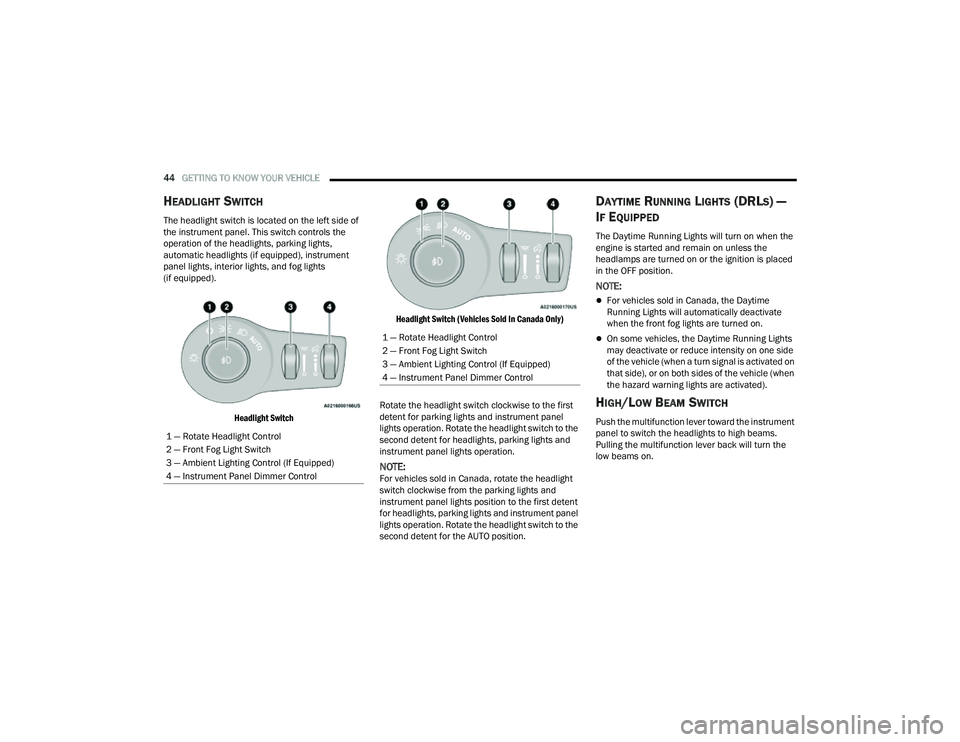
HEADLIGHT SWITCH
The headlight switch is located on the left side of
the instrument panel. This switch controls the
operation of the headlights, parking lights,
automatic headlights (if equipped), instrument
panel lights, interior lights, and fog lights
(if equipped).
Headlight Switch Headlight Switch (Vehicles Sold In Canada Only)
Rotate the headlight switch clockwise to the first
detent for parking lights and instrument panel
lights operation. Rotate the headlight switch to the
second detent for headlights, parking lights and
instrument panel lights operation.
NOTE:For vehicles sold in Canada, rotate the headlight
switch clockwise from the parking lights and
instrument panel lights position to the first detent
for headlights, parking lights and instrument panel
lights operation. Rotate the headlight switch to the
second detent for the AUTO position.
DAYTIME RUNNING LIGHTS (DRLS) —
I
F EQUIPPED
The Daytime Running Lights will turn on when the
engine is started and remain on unless the
headlamps are turned on or the ignition is placed
in the OFF position.
NOTE:
For vehicles sold in Canada, the Daytime
Running Lights will automatically deactivate
when the front fog lights are turned on.
On some vehicles, the Daytime Running Lights
may deactivate or reduce intensity on one side
of the vehicle (when a turn signal is activated on
that side), or on both sides of the vehicle (when
the hazard warning lights are activated).
HIGH/LOW BEAM SWITCH
Push the multifunction lever toward the instrument
panel to switch the headlights to high beams.
Pulling the multifunction lever back will turn the
low beams on.
1 — Rotate Headlight Control
2 — Front Fog Light Switch
3 — Ambient Lighting Control (If Equipped)
4 — Instrument Panel Dimmer Control
1 — Rotate Headlight Control
2 — Front Fog Light Switch
3 — Ambient Lighting Control (If Equipped)
4 — Instrument Panel Dimmer Control
22_MP_OM_EN_USC_t.book Page 44
Page 62 of 344
60GETTING TO KNOW YOUR VEHICLE
(Continued)
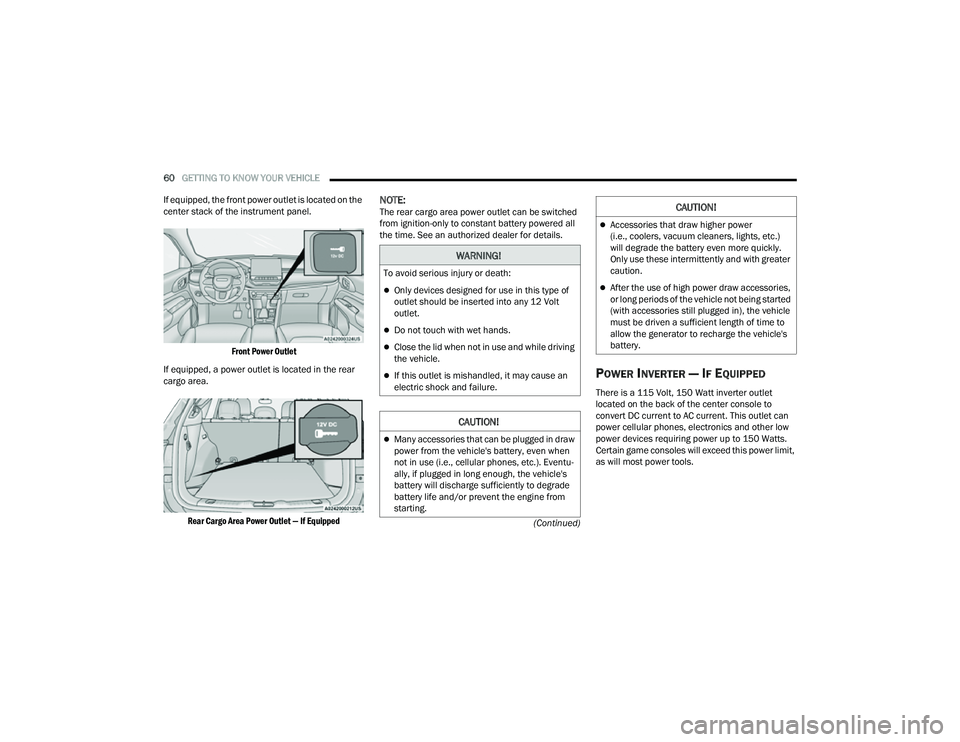
If equipped, the front power outlet is located on the
center stack of the instrument panel.
Front Power Outlet
If equipped, a power outlet is located in the rear
cargo area.
Rear Cargo Area Power Outlet — If Equipped
NOTE:The rear cargo area power outlet can be switched
from ignition-only to constant battery powered all
the time. See an authorized dealer for details.
POWER INVERTER — IF EQUIPPED
There is a 115 Volt, 150 Watt inverter outlet
located on the back of the center console to
convert DC current to AC current. This outlet can
power cellular phones, electronics and other low
power devices requiring power up to 150 Watts.
Certain game consoles will exceed this power limit,
as will most power tools.
WARNING!
To avoid serious injury or death:
Only devices designed for use in this type of
outlet should be inserted into any 12 Volt
outlet.
Do not touch with wet hands.
Close the lid when not in use and while driving
the vehicle.
If this outlet is mishandled, it may cause an
electric shock and failure.
CAUTION!
Many accessories that can be plugged in draw
power from the vehicle's battery, even when
not in use (i.e., cellular phones, etc.). Eventu -
ally, if plugged in long enough, the vehicle's
battery will discharge sufficiently to degrade
battery life and/or prevent the engine from
starting.
Accessories that draw higher power
(i.e., coolers, vacuum cleaners, lights, etc.)
will degrade the battery even more quickly.
Only use these intermittently and with greater
caution.
After the use of high power draw accessories,
or long periods of the vehicle not being started
(with accessories still plugged in), the vehicle
must be driven a sufficient length of time to
allow the generator to recharge the vehicle's
battery.
CAUTION!
22_MP_OM_EN_USC_t.book Page 60
Page 71 of 344
GETTING TO KNOW YOUR VEHICLE69
(Continued)
HANDS-FREE LIFTGATE — IF EQUIPPED
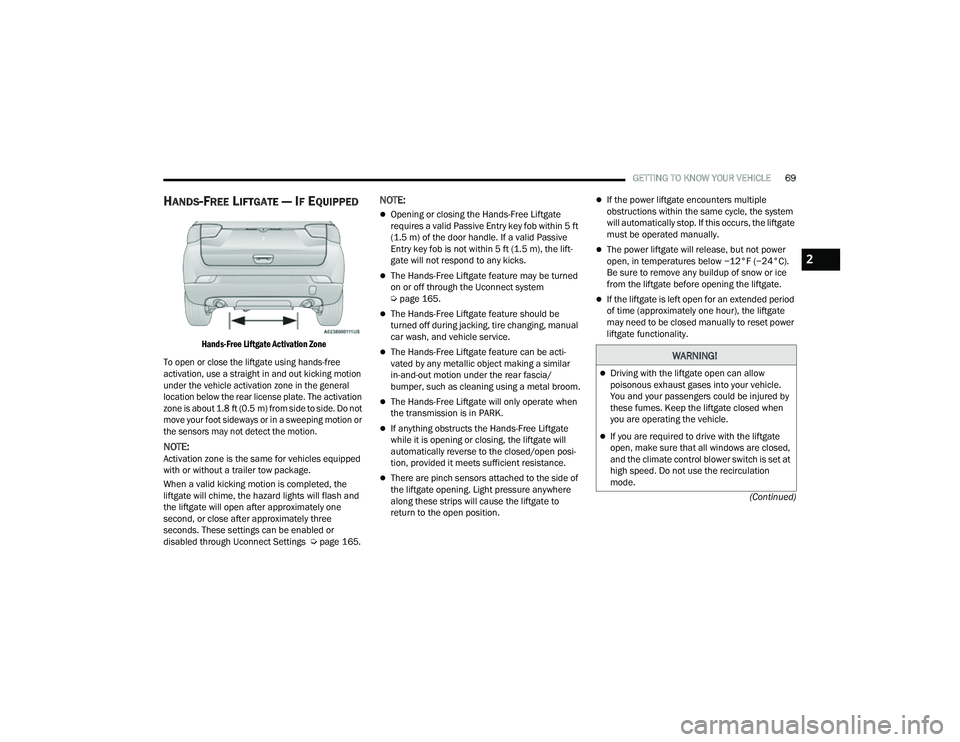
Hands-Free Liftgate Activation Zone
To open or close the liftgate using hands-free
activation, use a straight in and out kicking motion
under the vehicle activation zone in the general
location below the rear license plate. The activation
zone is about 1.8 ft (0.5 m) from side to side. Do not move your foot sideways or in a sweeping motion or
the sensors may not detect the motion.
NOTE:Activation zone is the same for vehicles equipped
with or without a trailer tow package.
When a valid kicking motion is completed, the
liftgate will chime, the hazard lights will flash and
the liftgate will open after approximately one
second, or close after approximately three
seconds. These settings can be enabled or
disabled through Uconnect Settings Ú page 165.
NOTE:
Opening or closing the Hands-Free Liftgate
requires a valid Passive Entry key fob within 5 ft
(1.5 m) of the door handle. If a valid Passive
Entry key fob is not within 5 ft (1.5 m), the lift -
gate will not respond to any kicks.
The Hands-Free Liftgate feature may be turned
on or off through the Uconnect system
Ú page 165.
The Hands-Free Liftgate feature should be
turned off during jacking, tire changing, manual
car wash, and vehicle service.
The Hands-Free Liftgate feature can be acti -
vated by any metallic object making a similar
in-and-out motion under the rear fascia/
bumper, such as cleaning using a metal broom.
The Hands-Free Liftgate will only operate when
the transmission is in PARK.
If anything obstructs the Hands-Free Liftgate
while it is opening or closing, the liftgate will
automatically reverse to the closed/open posi -
tion, provided it meets sufficient resistance.
There are pinch sensors attached to the side of
the liftgate opening. Light pressure anywhere
along these strips will cause the liftgate to
return to the open position.
If the power liftgate encounters multiple
obstructions within the same cycle, the system
will automatically stop. If this occurs, the liftgate
must be operated manually.
The power liftgate will release, but not power
open, in temperatures below −12°F (−24°C).
Be sure to remove any buildup of snow or ice
from the liftgate before opening the liftgate.
If the liftgate is left open for an extended period
of time (approximately one hour), the liftgate
may need to be closed manually to reset power
liftgate functionality.
WARNING!
Driving with the liftgate open can allow
poisonous exhaust gases into your vehicle.
You and your passengers could be injured by
these fumes. Keep the liftgate closed when
you are operating the vehicle.
If you are required to drive with the liftgate
open, make sure that all windows are closed,
and the climate control blower switch is set at
high speed. Do not use the recirculation
mode.
2
22_MP_OM_EN_USC_t.book Page 69
Page 82 of 344
80GETTING TO KNOW YOUR INSTRUMENT PANEL
The instrument cluster display will normally display
the main menu or the screens of a selected feature
of the main menu. The main display area also
displays pop-up messages that consist of
approximately 60 possible warning or information
messages. These pop-up messages fall into
several categories:
Five Second Stored Messages
When the appropriate conditions occur, this
type of message takes control of the main
display area for five seconds and then returns to
the previous screen. Most of the messages of
this type are then stored (as long as the condi-
tion that activated it remains active) and can be
reviewed from the “Messages” main menu item.
Examples of this message type are “Right Front
Turn Signal Lamp Out” and “Low Tire Pressure.”
Unstored Messages
This message type is displayed indefinitely or
until the condition that activated the message is
cleared. Examples of this message type are
“Turn Signal On” (if a turn signal is left on) and
“Lights On” (if driver leaves the vehicle with the
lights on).
Unstored Messages Until RUN
These messages deal primarily with the Remote
Start feature. This message type is displayed
until the ignition is in the RUN state. Examples of
this message type are “Remote Start Canceled -
Door Ajar” and “Press Brake Pedal and Push
Button to Start.”
Five Second Unstored Messages
When the appropriate conditions occur, this
type of message takes control of the main
display area for five seconds and then returns to
the previous screen. An example of this
message type is “Automatic High Beams On.”
OIL CHANGE RESET
Your vehicle is equipped with an engine oil
change indicator system. The “Oil Change Due”
message will display in the instrument cluster
display for five seconds after a single chime has
sounded, to indicate the next scheduled oil
change interval. The engine oil change indicator
system is duty cycle based, which means the
engine oil change interval may fluctuate, depen -
dent upon your personal driving style.
Unless reset, this message will continue to
display each time the ignition is cycled to the
ON/RUN position.
To reset the oil change indicator after performing
the scheduled maintenance, refer to the following
procedure:
1. Without pressing the brake pedal, push the ENGINE START/STOP button and cycle the
ignition to the ON/RUN position (do not start
the engine).
2. Fully press the accelerator pedal, slowly, three times within ten seconds.
3. Cycle the ignition to the OFF position.
NOTE:If the indicator message illuminates when you start
the vehicle, the oil change indicator system did not
reset. If necessary, repeat this procedure.
22_MP_OM_EN_USC_t.book Page 80