oil JEEP GLADIATOR 2023 User Guide
[x] Cancel search | Manufacturer: JEEP, Model Year: 2023, Model line: GLADIATOR, Model: JEEP GLADIATOR 2023Pages: 448, PDF Size: 17.37 MB
Page 136 of 448
134GETTING TO KNOW YOUR INSTRUMENT PANEL
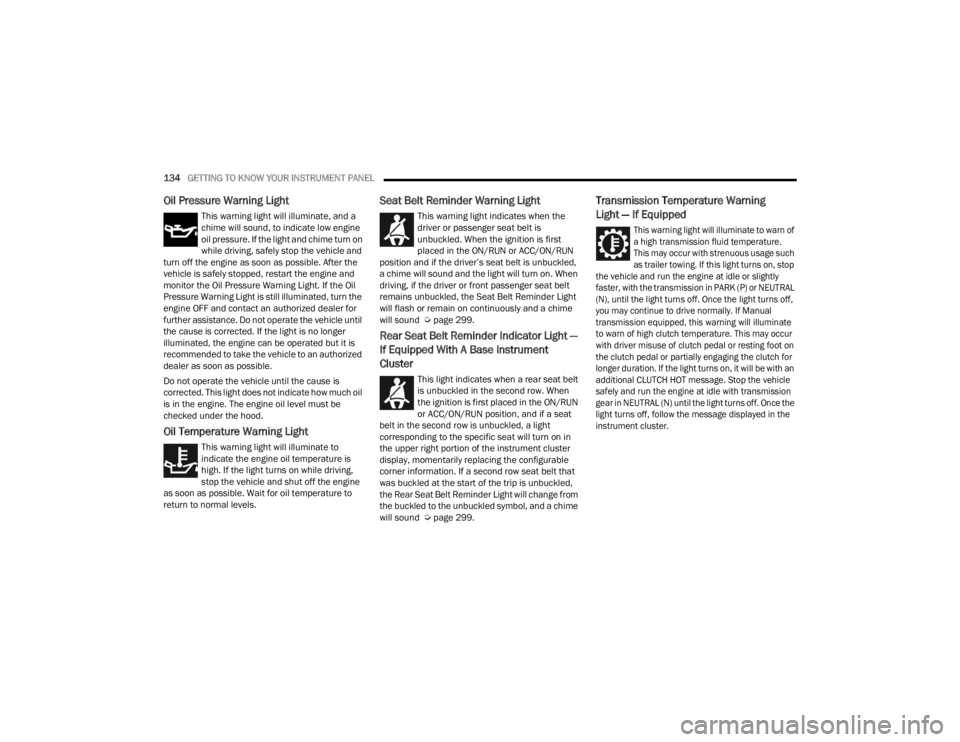
Oil Pressure Warning Light
This warning light will illuminate, and a
chime will sound, to indicate low engine
oil pressure. If the light and chime turn on
while driving, safely stop the vehicle and
turn off the engine as soon as possible. After the
vehicle is safely stopped, restart the engine and
monitor the Oil Pressure Warning Light. If the Oil
Pressure Warning Light is still illuminated, turn the
engine OFF and contact an authorized dealer for
further assistance. Do not operate the vehicle until
the cause is corrected. If the light is no longer
illuminated, the engine can be operated but it is
recommended to take the vehicle to an authorized
dealer as soon as possible.
Do not operate the vehicle until the cause is
corrected. This light does not indicate how much oil
is in the engine. The engine oil level must be
checked under the hood.
Oil Temperature Warning Light
This warning light will illuminate to
indicate the engine oil temperature is
high. If the light turns on while driving,
stop the vehicle and shut off the engine
as soon as possible. Wait for oil temperature to
return to normal levels.
Seat Belt Reminder Warning Light
This warning light indicates when the
driver or passenger seat belt is
unbuckled. When the ignition is first
placed in the ON/RUN or ACC/ON/RUN
position and if the driver’s seat belt is unbuckled,
a chime will sound and the light will turn on. When
driving, if the driver or front passenger seat belt
remains unbuckled, the Seat Belt Reminder Light
will flash or remain on continuously and a chime
will sound Ú page 299.
Rear Seat Belt Reminder Indicator Light —
If Equipped With A Base Instrument
Cluster
This light indicates when a rear seat belt
is unbuckled in the second row. When
the ignition is first placed in the ON/RUN
or ACC/ON/RUN position, and if a seat
belt in the second row is unbuckled, a light
corresponding to the specific seat will turn on in
the upper right portion of the instrument cluster
display, momentarily replacing the configurable
corner information. If a second row seat belt that
was buckled at the start of the trip is unbuckled,
the Rear Seat Belt Reminder Light will change from
the buckled to the unbuckled symbol, and a chime
will sound Ú page 299.
Transmission Temperature Warning
Light — If Equipped
This warning light will illuminate to warn of
a high transmission fluid temperature.
This may occur with strenuous usage such
as trailer towing. If this light turns on, stop
the vehicle and run the engine at idle or slightly
faster, with the transmission in PARK (P) or NEUTRAL
(N), until the light turns off. Once the light turns off,
you may continue to drive normally. If Manual
transmission equipped, this warning will illuminate
to warn of high clutch temperature. This may occur
with driver misuse of clutch pedal or resting foot on
the clutch pedal or partially engaging the clutch for
longer duration. If the light turns on, it will be with an
additional CLUTCH HOT message. Stop the vehicle
safely and run the engine at idle with transmission
gear in NEUTRAL (N) until the light turns off. Once the
light turns off, follow the message displayed in the
instrument cluster.
23_JT_OM_EN_USC_t.book Page 134
Page 137 of 448
GETTING TO KNOW YOUR INSTRUMENT PANEL135
Vehicle Security Warning Light —
If Equipped
This light will flash at a fast rate for
approximately 15 seconds when the
vehicle security system is arming, and
then will flash slowly until the vehicle is
disarmed.
YELLOW WARNING LIGHTS
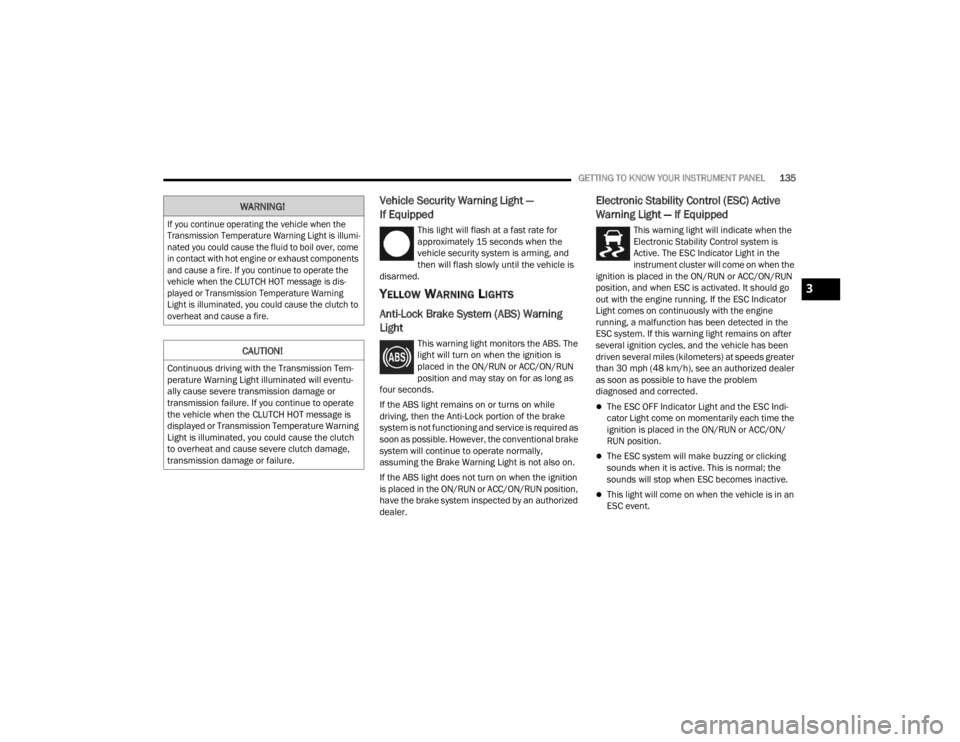
Anti-Lock Brake System (ABS) Warning
Light
This warning light monitors the ABS. The
light will turn on when the ignition is
placed in the ON/RUN or ACC/ON/RUN
position and may stay on for as long as
four seconds.
If the ABS light remains on or turns on while
driving, then the Anti-Lock portion of the brake
system is not functioning and service is required as
soon as possible. However, the conventional brake
system will continue to operate normally,
assuming the Brake Warning Light is not also on.
If the ABS light does not turn on when the ignition
is placed in the ON/RUN or ACC/ON/RUN position,
have the brake system inspected by an authorized
dealer.
Electronic Stability Control (ESC) Active
Warning Light — If Equipped
This warning light will indicate when the
Electronic Stability Control system is
Active. The ESC Indicator Light in the
instrument cluster will come on when the
ignition is placed in the ON/RUN or ACC/ON/RUN
position, and when ESC is activated. It should go
out with the engine running. If the ESC Indicator
Light comes on continuously with the engine
running, a malfunction has been detected in the
ESC system. If this warning light remains on after
several ignition cycles, and the vehicle has been
driven several miles (kilometers) at speeds greater
than 30 mph (48 km/h), see an authorized dealer
as soon as possible to have the problem
diagnosed and corrected.
The ESC OFF Indicator Light and the ESC Indi -
cator Light come on momentarily each time the
ignition is placed in the ON/RUN or ACC/ON/
RUN position.
The ESC system will make buzzing or clicking
sounds when it is active. This is normal; the
sounds will stop when ESC becomes inactive.
This light will come on when the vehicle is in an
ESC event.
WARNING!
If you continue operating the vehicle when the
Transmission Temperature Warning Light is illumi -
nated you could cause the fluid to boil over, come
in contact with hot engine or exhaust components
and cause a fire. If you continue to operate the
vehicle when the CLUTCH HOT message is dis -
played or Transmission Temperature Warning
Light is illuminated, you could cause the clutch to
overheat and cause a fire.
CAUTION!
Continuous driving with the Transmission Tem -
perature Warning Light illuminated will eventu -
ally cause severe transmission damage or
transmission failure. If you continue to operate
the vehicle when the CLUTCH HOT message is
displayed or Transmission Temperature Warning
Light is illuminated, you could cause the clutch
to overheat and cause severe clutch damage,
transmission damage or failure.
3
23_JT_OM_EN_USC_t.book Page 135
Page 151 of 448
STARTING AND OPERATING149
(Continued)
3. The system will automatically engage the
starter to crank the engine. If the vehicle fails
to start, the starter will disengage automat-
ically after 25 seconds.
4. If you wish to stop the cranking of the engine prior to the engine starting, push the ENGINE
START/STOP button again.
5. Check that the Oil Pressure Warning Light has turned off.
6. Release the parking brake.
STARTING FLUIDS
The engine is equipped with a glow plug preheating
system. If the instructions in this manual are
followed, the engine should start in all conditions
and no type of starting fluid should be used.
NORMAL OPERATION — DIESEL ENGINE
Observe the following when the diesel engine is
operating:
All message center lights are off.
Malfunction Indicator Light (MIL) is off.
Engine Oil Pressure telltale is not illuminated.
Voltmeter operation.
The voltmeter may show a gauge fluctuation at
various engine temperatures. This is caused by the
glow plug heating system. The number of cycles
and the length of the cycling operation is controlled by the engine control module. Glow plug heater
operation can run for several minutes. Once the
heater operation is complete the voltmeter needle
will stabilize.
COLD WEATHER PRECAUTIONS
Operation in ambient temperature below 32°F
(0°C) may require special considerations. The
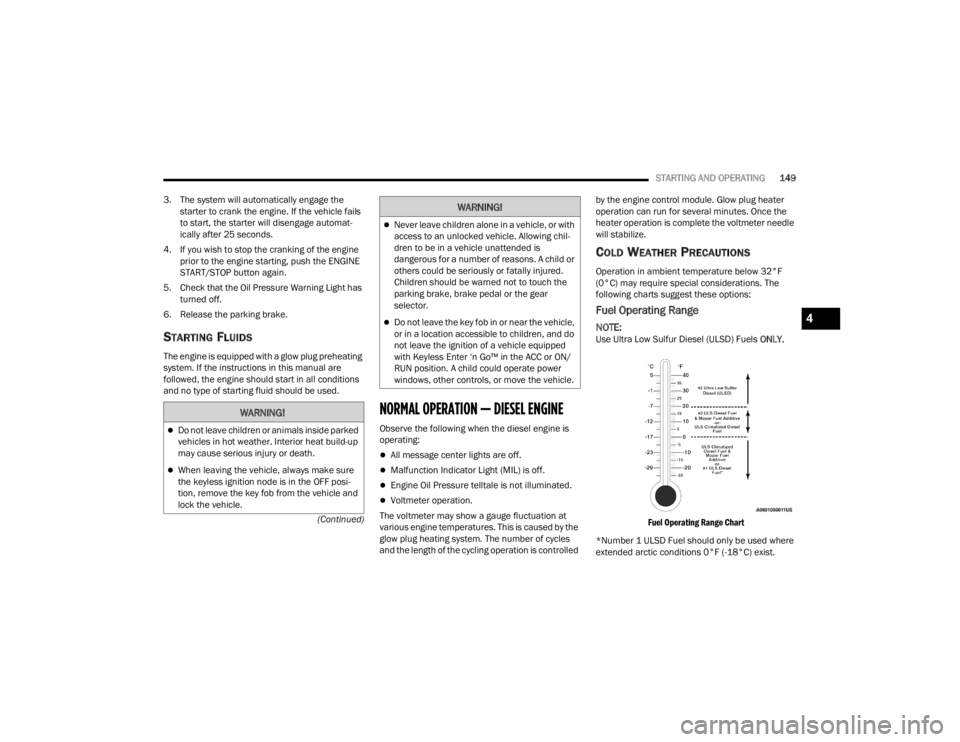
following charts suggest these options:
Fuel Operating Range
NOTE:Use Ultra Low Sulfur Diesel (ULSD) Fuels
ONLY.
Fuel Operating Range Chart
*Number 1 ULSD Fuel should only be used where
extended arctic conditions 0°F (-18°C) exist.
WARNING!
Do not leave children or animals inside parked
vehicles in hot weather. Interior heat build-up
may cause serious injury or death.
When leaving the vehicle, always make sure
the keyless ignition node is in the OFF posi -
tion, remove the key fob from the vehicle and
lock the vehicle.
Never leave children alone in a vehicle, or with
access to an unlocked vehicle. Allowing chil -
dren to be in a vehicle unattended is
dangerous for a number of reasons. A child or
others could be seriously or fatally injured.
Children should be warned not to touch the
parking brake, brake pedal or the gear
selector.
Do not leave the key fob in or near the vehicle,
or in a location accessible to children, and do
not leave the ignition of a vehicle equipped
with Keyless Enter ‘n Go™ in the ACC or ON/
RUN position. A child could operate power
windows, other controls, or move the vehicle.
WARNING!
4
23_JT_OM_EN_USC_t.book Page 149
Page 152 of 448

150STARTING AND OPERATING
NOTE:
Use of Climatized ULSD Fuel or Number 1 ULSD
fuel results in a noticeable decrease in fuel
economy.
Climatized ULSD fuel is a blend of Number 2
ULSD fuel and Number 1 ULSD fuel which
reduces the temperature at which wax crystals
form in fuel.
The fuel grade should be clearly marked on the
pump at the fuel station.
The engine requires the use of Ultra Low Sulfur
Diesel Fuel . Use of incorrect fuel could result in
engine and exhaust system damage
Ú page 421.
If climatized or Number 1 ULSD fuel is not avail -
able, and you are operating below 20°F (-6°C),
in sustained arctic conditions, Mopar®
Premium Diesel Fuel Treatment (or equivalent) is recommended to avoid gelling (see Fuel Oper
-
ating Range Chart).
Engine Oil Usage
See Engine Fluids and Lubricants for the correct
engine oil viscosity Ú page 424.
Engine Warm-Up
Avoid full throttle operation when the engine is
cold. When starting a cold engine, bring the engine
up to operating speed slowly to allow the oil
pressure to stabilize as the engine warms up.
If temperatures are below 32°F (0°C), operate the
engine at moderate speeds for five minutes before
full loads are applied.
ENGINE IDLING
Avoid prolonged idling. Long periods of idling may
be harmful to your engine because combustion chamber temperatures can drop so low that the
fuel may not burn completely. Incomplete
combustion allows carbon and varnish to form on
piston rings, cylinder head valves, turbocharger,
and injector nozzles. Also, the unburned fuel can
enter the crankcase, diluting the oil and causing
rapid wear to the engine.
STOPPING THE ENGINE
After full load operation, idle the engine for a few
minutes before shutting it down. This idle period
will allow the lubricating oil and coolant to carry
excess heat away from the turbocharger.
NOTE:Refer to the following chart for proper engine
shutdown.
Driving Condition Load Turbocharger Temperature Idle Time (min.) Before Engine
Shutdown
Stop and Go EmptyCoolNone
Stop and Go Medium 0.5
Highway Speeds MediumWarm 1.0
City Traffic Maximum GCWR 1.5
Highway Speeds Maximum GCWR 2.0
Uphill Grade Maximum GCWR Hot2.5
23_JT_OM_EN_USC_t.book Page 150
Page 153 of 448

STARTING AND OPERATING151
NOTE:Under certain conditions the Stop/Start system
may be temporarily disabled and the engine fan
will run after the engine is turned off to protect the
engine. These conditions are under high load and
high temperature conditions.
COOLING SYSTEM TIPS — AUTOMATIC
T
RANSMISSION
To reduce the potential for engine and
transmission overheating in high ambient
temperature conditions, take the following actions:
City Driving — When stopped, shift the transmis -
sion into NEUTRAL (N) and increase engine idle
speed.
Highway Driving — Reduce your speed.
Up Steep Hills — Select a lower transmission
gear.
Air Conditioning — Turn it off temporarily.
NOTE:If the coolant temperature is too high, the A/C will
automatically turn off.
Do Not Operate The Engine With Low Oil
Pressure
If the Low Oil Pressure Warning Light turns on while
driving, stop the vehicle and shut down the engine
as soon as possible. After the vehicle is safely
stopped, restart the engine and monitor the lamp. If the lamp is still illuminated, shut the engine off,
contact an authorized dealer, and do not operate
the vehicle until the cause is corrected. If the lamp
is no longer illuminated, the engine can be
operated, but should be taken to an authorized
dealer as soon as possible for further inspection.
NOTE:Do not operate the vehicle until the cause is
corrected. This light does not show how much oil is
in the engine. The engine oil level must be checked
under the hood.
Do Not Operate The Engine With Failed
Parts
All engine failures give some warning before the
parts fail. Be on the alert for changes in
performance, sounds, and visual evidence that the
engine requires service. Some important clues are:
Engine misfiring or vibrating severely
Sudden loss of power
Unusual engine noises
Fuel, oil or coolant leaks
Sudden change, outside the normal operating
range, in the engine operating temperature
Excessive smoke
Oil pressure drop
ENGINE BREAK-IN RECOMMENDATIONS —
GASOLINE ENGINE (IF EQUIPPED)
A long break-in period is not required for the engine
and drivetrain (transmission and axle) in your
vehicle.
Drive moderately during the first 300 miles
(500 km). After the initial 60 miles (100 km),
speeds up to 50 or 55 mph (80 or 90 km/h) are
desirable.
While cruising, brief full-throttle acceleration within
the limits of local traffic laws contributes to a good
break-in. Wide-open throttle acceleration in low
gear can be detrimental and should be avoided.
The engine oil installed in the engine at the factory
is a high-quality energy conserving type lubricant.
Oil changes should be consistent with anticipated
climate conditions under which vehicle operations
will occur.
For the recommended viscosity and quality grades
see Ú page 424.
CAUTION!
If oil pressure falls to less than normal readings,
shut the engine off immediately. Failure to do so
could result in immediate and severe engine
damage.
4
23_JT_OM_EN_USC_t.book Page 151
Page 154 of 448
152STARTING AND OPERATING
NOTE:A new engine may consume some oil during its first
few thousand miles (kilometers) of operation. This
should be considered a normal part of the break-in
and not interpreted as a problem.
ENGINE BREAK-IN RECOMMENDATIONS —
DIESEL ENGINE (IF EQUIPPED)
The diesel engine does not require a break-in
period due to its construction. Normal operation is
allowed, providing the following recommendations
are followed:
Warm up the engine before placing it under
load.
Do not operate the engine at idle for prolonged
periods.
Use the appropriate transmission gear to
prevent engine lugging.
Observe vehicle oil pressure and temperature
indicators.
Check the coolant and oil levels frequently.
Vary throttle position at highway speeds when
carrying or towing significant weight.
NOTE:Light duty operation such as light trailer towing or
no load operation will extend the time before the
engine is at full efficiency. Reduced fuel economy
and power may be seen at this time.
The engine oil installed in the engine at the factory
is a high-quality energy conserving type lubricant.
Oil changes should be consistent with anticipated
climate conditions under which vehicle operations
will occur. For recommended viscosity and quality
grades Úpage 424. NON-DETERGENT OR
STRAIGHT MINERAL OILS MUST NEVER BE USED.
PARKING BRAKE
Before exiting the vehicle, make sure that the
parking brake is fully applied. Also, be certain to
leave an automatic transmission in PARK, or
manual transmission in REVERSE or FIRST gear.
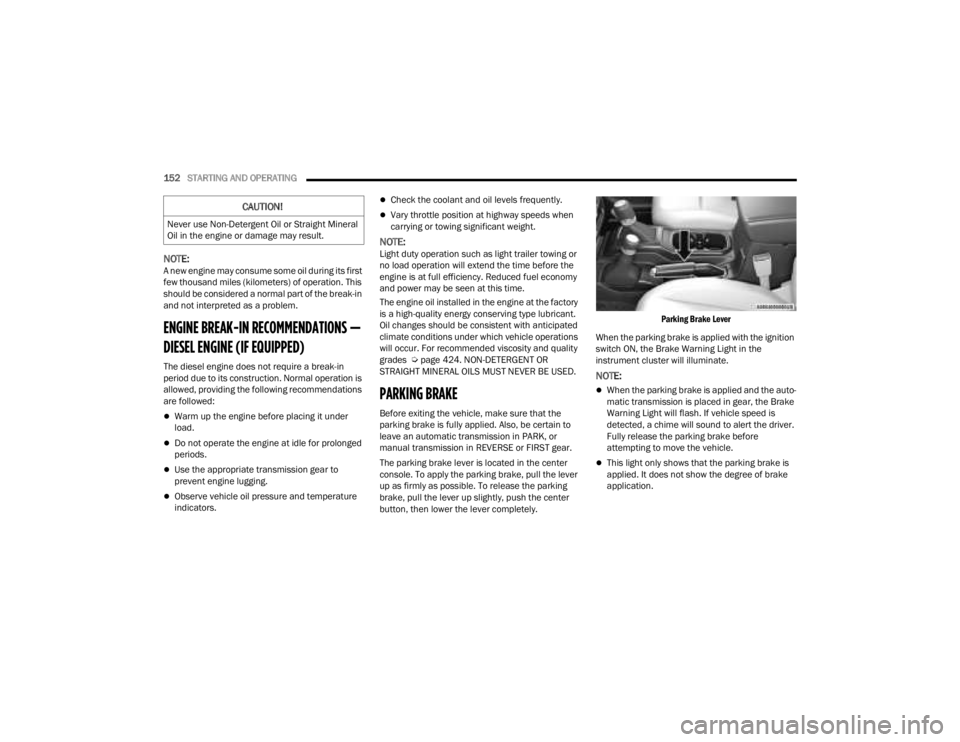
The parking brake lever is located in the center
console. To apply the parking brake, pull the lever
up as firmly as possible. To release the parking
brake, pull the lever up slightly, push the center
button, then lower the lever completely.
Parking Brake Lever
When the parking brake is applied with the ignition
switch ON, the Brake Warning Light in the
instrument cluster will illuminate.
NOTE:
When the parking brake is applied and the auto -
matic transmission is placed in gear, the Brake
Warning Light will flash. If vehicle speed is
detected, a chime will sound to alert the driver.
Fully release the parking brake before
attempting to move the vehicle.
This light only shows that the parking brake is
applied. It does not show the degree of brake
application.
CAUTION!
Never use Non-Detergent Oil or Straight Mineral
Oil in the engine or damage may result.
23_JT_OM_EN_USC_t.book Page 152
Page 213 of 448

STARTING AND OPERATING211
Hill Climbing
Hill climbing requires good judgment and a good
understanding of your abilities and your vehicle's
limitations. Hills can cause serious problems.
Some are just too steep to climb and should not be
attempted. You should always feel confident with
the vehicle and your abilities. You should always
climb hills straight up and down. Never attempt to
climb a hill on an angle.
BEFORE CLIMBING A STEEP HILL
As you approach a hill, consider its grade or
steepness. Determine if it is too steep. Look to see
what the traction is on the hill side trail. Is the trail
straight up and down? What is on top and the other
side? Are there ruts, rocks, branches or other
obstacles on the path? Can you safely recover the
vehicle if something goes wrong? If everything
looks good and you feel confident, shift the
transmission into a lower gear with 4L engaged,
and proceed with caution, maintaining your
momentum as you climb the hill.
DRIVING UP HILL
Once you have determined your ability to proceed
and have shifted into the appropriate gear, line
your vehicle up for the straightest possible run.
Accelerate with an easy constant throttle and apply
more power as you start up the hill. Do not race
forward into a steep grade; the abrupt change of grade could cause you to lose control. If the front
end begins to bounce, ease off the throttle slightly
to bring all four tires back on the ground. As you
approach the crest of the hill, ease off the throttle
and slowly proceed over the top. If the wheels start
to slip as you approach the crest of a hill, ease off
the accelerator and maintain headway by turning
the steering wheel no more than a quarter turn
quickly back and forth. This will provide a fresh
"bite" into the surface and will usually provide
enough traction to complete the climb. If you do
not make it to the top, place the vehicle in
REVERSE and back straight down the grade using
engine resistance along with the vehicle brakes.
DRIVING DOWNHILL
Before driving down a steep hill, you need to
determine if it is too steep for a safe descent. What
is the surface traction? Is the grade too steep to
maintain a slow, controlled descent? Are there
obstacles? Is it a straight descent? Is there plenty
of distance at the base of the hill to regain control
if the vehicle descends too fast? If you feel
confident in your ability to proceed, then make sure you are in 4L and proceed with caution. Allow
engine braking to control the descent and apply
your brakes, if necessary, but do not allow the tires
to lock.
DRIVING ACROSS AN INCLINE
If at all possible, avoid driving across an incline. If
it is necessary, know your vehicle's abilities. Driving
across an incline places more weight on the
downhill wheels, which increases the possibilities
of a downhill slide or rollover. Make sure the
surface has good traction with firm and stable
soils. If possible, transverse the incline at an angle
heading slightly up or down.WARNING!
Never attempt to climb a hill at an angle or turn
around on a steep grade. Driving across an
incline increases the risk of a rollover, which may
result in severe injury.
WARNING!
Do not descend a steep grade in NEUTRAL. Use
vehicle brakes in conjunction with engine
braking. Descending a grade too fast could
cause you to lose control and be seriously
injured or killed.
WARNING!
Driving across an incline increases the risk of a
rollover, which may result in severe injury.
4
23_JT_OM_EN_USC_t.book Page 211
Page 268 of 448

266MULTIMEDIA
The doors, hood, and trunk/liftgate are closed.
The vehicle’s check engine light must be off.
The vehicle must have at least a quarter tank of
fuel, along with oil and battery power.
The vehicle’s hazard lights must be off.
If equipped, the vehicle must have an automatic
transmission.
The vehicle must be in an open area with cell
tower reception.
Your mobile device must have a cellular or Wi-Fi
connection.
If the Panic button has been pressed, the
vehicle must be started at least once after
alarming the system.
NOTE:
The SiriusXM Guardian™ Customer Care agents are
not authorized for Remote Vehicle Start services.
Contact the Uconnect Care Team for assistance.
Remote Horn & Lights
Description
It is easy to locate a vehicle in a dark, crowded or
noisy parking area by activating the horn and
lights. It may also help if you need to draw attention
to your vehicle for any reason.
If you want, you can set up push notifications every
time a command is sent to turn on the horn and
lights. Working Vehicle Conditions
The vehicle must in PARK or at a standstill.
The vehicle must be in an open area with cell
tower reception.
Your mobile device must have a cellular or Wi-Fi
connection.
NOTE:The Remote Horn & Lights feature is designed to
be loud and get noticed. Please keep in mind the
surroundings when using this feature. You are
responsible for compliance with local laws, rules
and ordinances in the location of your vehicle
when using Remote Horn & Lights.
Assist — If Equipped
Description
Vehicles equipped with the SiriusXM Guardian™
connected services feature may contain an ASSIST
button in the vehicle. Once your SiriusXM
Guardian™ connected services have been
activated, the ASSIST button can connect you
directly to the Customer Care call center (if
equipped). You will be directed to one of the
following four services:
Roadside Assistance
— If you get a flat tire or
need a tow, you’ll be connected to someone
who can help anytime.
Connected Services — Contact the SiriusXM
Guardian™ Customer Care call center to acti -vate your services, renew after your trial has
expired, for in-vehicle support for your SiriusXM
Guardian™ connected services, or help
answering any general questions surrounding
your connected services.
Uconnect Care — In-vehicle support for all
non-connected Uconnect system features, such
as radio and Bluetooth® connections.
Vehicle Care
— Total support for your vehicle.
SiriusXM Guardian™ In-Vehicle Assistance
Features — If Equipped
With SiriusXM Guardian™, your vehicle has
onboard assistance features located on the
rearview mirror or overhead console designed to
enhance your driving experience if you should ever
need assistance or support.
How It Works
Simply push the ASSIST button in the vehicle and
you will be presented with your ASSIST options on
the touchscreen. Make your selection by pressing
the touchscreen.
Requirements
This feature is available only on vehicles sold in
the US and Canada.
Vehicle must be properly equipped with the
SiriusXM Guardian™ connected services.
Vehicle must have an operable LTE (voice/data)
or 4G (data) network connection.
23_JT_OM_EN_USC_t.book Page 266
Page 273 of 448

MULTIMEDIA271
To link your Uconnect account with Google
Assistant, follow these steps:
1. Download and install the Google Assistant app on your smart phone from the App
Store® or Google Play.
2. After installation, log in to the Google Assistant app with your Gmail ID. Verify your account by
pressing the icon in the upper right-hand
corner.
3. Press the Discover button in the bottom left corner of the screen. Enter the vehicle brand
name.
4. A prompt will appear to link your Uconnect account. Press “Link Uconnect to Google”.
5. Press “Sign In” and enter the email address and password you created when you activated
SiriusXM Guardian™. There will be additional
settings to confirm on the following screen.
6. Lastly, press “Authorize” to complete the linking process.
Now, you can ask Google Assistant to help you:
Remotely start the engine, or cancel a remote
start
Send a destination to your vehicle’s built-in
Uconnect Navigation system
Monitor vehicle vitals, such as tire pressure, fuel
level and oil life
And more!
Family Drive Alerts — If Equipped
Description
Family Drive Alerts help promote safer driving and
give you peace of mind when your loved ones are
out on the road. You can set boundary limits,
monitor driving speed, and pinpoint your vehicle’s
location any time, any place. Use the Vehicle
Branded App to set alerts:
Boundary Alert
Receive a notification the moment your vehicle
is driven either out of or into a geographic
boundary that you set.
Curfew Alert
Receive a notification when your car is being
driven outside of the curfew time.
Speed Alert
Receive a notification whenever your car
exceeds a speed limit you set.
Valet Alert
Receive a notification if and when your vehicle is
driven outside a quarter-mile radius of a valet
drop-off zone.
SmartWatch Integration — If Equipped
Description
SmartWatch Integration puts the Vehicle Branded
App right on your Apple® Watch or Android™ Wear.
To get started, follow these steps:
1. Download the Vehicle Branded App from the App Store® or Google Play.
2. Log onto the app from your smartphone using the username and password you created when
you first set up your account.
3. Make sure your watch and smartphone are connected through Bluetooth®.
4. The Vehicle Branded App should appear on your SmartWatch.
Once the app is downloaded on your SmartWatch,
you can enjoy these features:
Lock or unlock your vehicle by tapping the
remote lock button in the app and entering your
security PIN.
Remote start or stop your vehicle.
View important vehicle stats, such as fuel level,
vehicle location, tire pressure warning, and
more.
For help, refer to the Uconnect YouTube channel
for SmartWatch Integration.
5
23_JT_OM_EN_USC_t.book Page 271
Page 280 of 448
278MULTIMEDIA
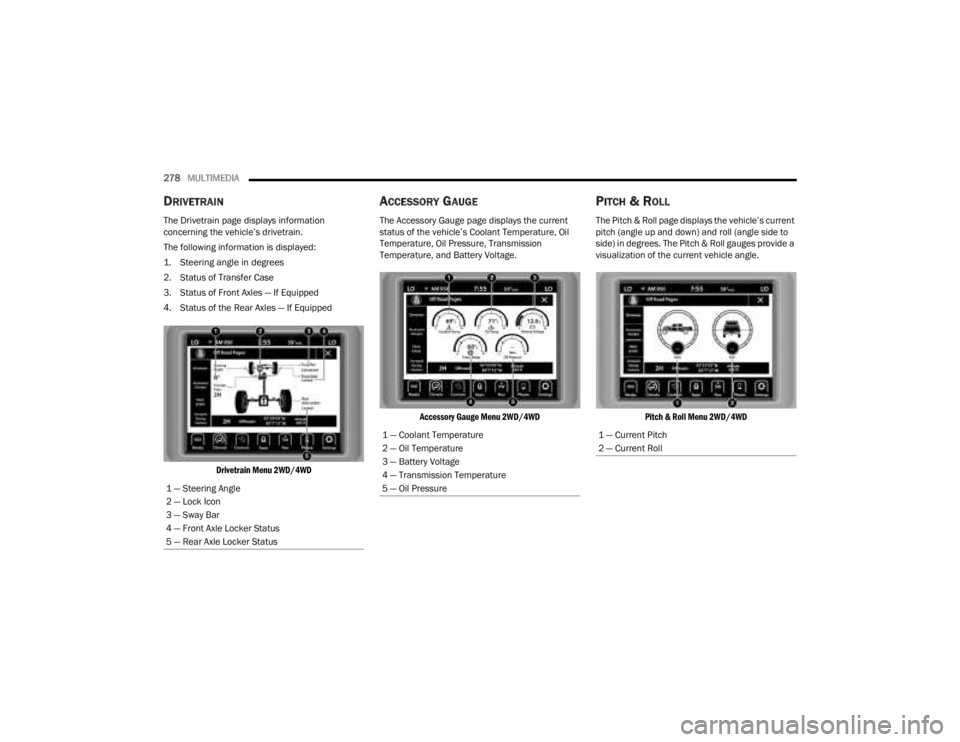
DRIVETRAIN
The Drivetrain page displays information
concerning the vehicle’s drivetrain.
The following information is displayed:
1. Steering angle in degrees
2. Status of Transfer Case
3. Status of Front Axles — If Equipped
4. Status of the Rear Axles — If Equipped
Drivetrain Menu 2WD/4WD
ACCESSORY GAUGE
The Accessory Gauge page displays the current
status of the vehicle’s Coolant Temperature, Oil
Temperature, Oil Pressure, Transmission
Temperature, and Battery Voltage.
Accessory Gauge Menu 2WD/4WD
PITCH & ROLL
The Pitch & Roll page displays the vehicle’s current
pitch (angle up and down) and roll (angle side to
side) in degrees. The Pitch & Roll gauges provide a
visualization of the current vehicle angle.
Pitch & Roll Menu 2WD/4WD
1 — Steering Angle
2 — Lock Icon
3 — Sway Bar
4 — Front Axle Locker Status
5 — Rear Axle Locker Status
1 — Coolant Temperature
2 — Oil Temperature
3 — Battery Voltage
4 — Transmission Temperature
5 — Oil Pressure1 — Current Pitch
2 — Current Roll
23_JT_OM_EN_USC_t.book Page 278