brakes JEEP GLADIATOR 2023 Owner's Manual
[x] Cancel search | Manufacturer: JEEP, Model Year: 2023, Model line: GLADIATOR, Model: JEEP GLADIATOR 2023Pages: 448, PDF Size: 17.37 MB
Page 288 of 448
286SAFETY
actively controlling SSC, the transmission will
shift appropriately for the driver-selected set
speed and corresponding driving conditions.
SSC operation is influenced by Off Road+ drive
mode if active. The differences may be notable
to the driver as a varying level of aggressive -
ness.
Driver Override
The driver may override SSC activation with throttle
or brake application at any time.
Deactivating SSC
SSC will be deactivated but remain available if any
of the following conditions occur:
The driver overrides SSC set speed with throttle
or brake application.
The vehicle speed exceeds 20 mph (32 km/h)
but remains below 40 mph (64 km/h).
The vehicle is shifted into PARK.
Disabling SSC
SSC will deactivate and be disabled if any of the
following conditions occur:
The driver pushes the SSC switch.
The driveline is shifted out of the 4WD Low.
The parking brake is applied.
The vehicle is driven greater than 20 mph
(32 km/h) for greater than 70 seconds.
The vehicle is driven greater than 40 mph
(64 km/h). SSC will exist immediately.
The driver door opens (Driver door opens if
doors are attached or driver seat belt is
unbuckled if doors are detached).
Feedback To The Driver
The instrument cluster has an SSC icon and the
SSC switch has a lamp that offers feedback to the
driver about the state SSC is in.
The cluster icon and switch lamp will illuminate
and remain on solid when SSC is enabled or
activated. These are the normal operating
conditions for SSC.
The cluster icon and switch lamp will flash for
several seconds then extinguish when the driver
pushes the SSC switch but enabled conditions
are not met.
The cluster icon and switch lamp will flash for
several seconds then extinguish when SSC
disables due to excess speed.
The cluster icon and switch lamp will flash then
extinguish when SSC deactivates due to over -
heated brakes.
Traction Control System (TCS)
The TCS monitors the amount of wheel spin for
each of the driven wheels. If wheel spin is
detected, the TCS may apply brake pressure to the
spinning wheel(s) and/or reduce engine power to
provide enhanced acceleration and stability. A
feature of the TCS, Brake Limited Differential (BLD)
functions similarly to a limited slip differential and
controls the wheel spin across a driven axle. If one
wheel on a driven axle is spinning faster than the
other, the system will apply the brake of the
spinning wheel. This will allow more engine torque
to be applied to the wheel that is not spinning. BLD
may remain enabled even if TCS and ESC are in
reduced modes.
Trailer Sway Control (TSC)
TSC uses sensors in the vehicle to recognize an
excessively swaying trailer and will take the
appropriate actions to attempt to stop the sway.
WARNING!
SSC is only intended to assist the driver in
controlling vehicle speed when driving in
off-road conditions. The driver must remain
attentive to the driving conditions and is
responsible for maintaining a safe vehicle
speed.
23_JT_OM_EN_USC_t.book Page 286
Page 289 of 448
SAFETY287
NOTE:TSC cannot stop all trailers from swaying. Always
use caution when towing a trailer and follow the
trailer tongue weight recommendations. See
Úpage 197 for further information.
When TSC is functioning, the ESC Activation/
Malfunction Indicator Light will flash, the engine
power may be reduced, and you may feel the
brakes being applied to individual wheels to
attempt to stop the trailer from swaying. TSC is
disabled when the ESC system is in the “Partial
Off” or “Full Off” modes.
AUXILIARY DRIVING SYSTEMS
BLIND SPOT MONITORING (BSM) —
I
F EQUIPPED
The BSM system uses two radar sensors, located
inside the taillights, to detect highway licensable
vehicles (automobiles, trucks, motorcycles, etc.)
that enter the blind spot zones from the rear/front/
side of the vehicle.
Rear Detection Zones
When the vehicle is started, the BSM Warning Light
will momentarily illuminate in both outside
rearview mirrors to let the driver know that the
system is operational. The BSM system sensors
operate when the vehicle is in any forward gear.
The BSM detection zone covers approximately one
lane width on both sides of the vehicle 12 ft
(3.8 m). The zone starts at the outside rearview
mirror and extends approximately 10 ft (3 m)
beyond the rear fascia/bumper of the vehicle. The
BSM system monitors the detection zones on both
sides of the vehicle when the vehicle speed
reaches approximately 6 mph (10 km/h) or higher
and will alert the driver of vehicles in these areas.
NOTE:
The BSM system DOES NOT alert the driver
about rapidly approaching vehicles that are
outside the detection zones.
The BSM system detection zone DOES NOT
change if your vehicle is towing a trailer. There -
fore, visually verify the adjacent lane is clear for
both your vehicle and trailer before making a
lane change. If the trailer or other object (i.e.,
bicycle, sports equipment) extends beyond the
side of your vehicle, this may result in the BSM
Warning Light remaining illuminated the entire
time the vehicle is in a forward gear. See
Ú page 215 for more information.
The Blind Spot Monitoring (BSM) system may
experience dropouts (blinking on and off) of the
side mirror warning indicator lights when a
motorcycle or any small object remains at the
side of the vehicle for extended periods of time
(more than a couple of seconds).
The BSM system can become blocked if snow, ice,
mud, or other road contaminations accumulate on
the rear fascia/bumper where the radar sensors
are located. The system may also detect a
blockage if the vehicle is operated in areas with
extremely low radar returns, such as a desert, or
parallel to a large elevation drop. If a blockage is
detected, a “Blind Spot Temporarily Unavailable,
Wipe Rear Corners” message will display in the
instrument cluster, both mirror lights will
illuminate, and BSM and RCP alerts will be
disabled. This is normal operation. The system will
automatically resume function when the condition
clears. To minimize system blockage, do not block
WARNING!
If TSC activates while driving, slow the vehicle
down, stop at the nearest safe location, and
adjust the trailer load to eliminate trailer sway.6
23_JT_OM_EN_USC_t.book Page 287
Page 293 of 448
SAFETY291
Blind Spot Alert Off
When the BSM system is turned off there will be no
visual or audible alerts from either the BSM or RCP
systems.
NOTE:The BSM system will store the current operating
mode when the vehicle is shut off. Each time the
vehicle is started the previously stored mode will
be recalled and used.
Door Removal
When either the front driver or passenger door is
removed, the instrument cluster will display “Blind
Spot Temporarily Unavailable” and the BSM
system will disable. While the system will continue
to indicate whatever blind spot mode it was
previously in within the Uconnect system, no visual
or audible alerts will be provided. As long as the
doors are removed, the instrument cluster will
provide the “Blind Spot Temporarily Unavailable”
pop up as a reminder that the system is disabled
every time the ignition is cycled.
Upon re-installation of both doors, the system will
resume functionality based on the personalized
mode selected.
FORWARD COLLISION WARNING (FCW)
W
ITH MITIGATION — IF EQUIPPED
FCW with Mitigation provides the driver with
audible warnings, visual warnings (within the
instrument cluster display), and may apply a brake
jerk to warn the driver when it detects a potential
frontal collision. The warnings and limited braking
are intended to provide the driver with enough time
to react, avoid or mitigate the potential collision.
NOTE:FCW monitors the information from the forward
looking sensors as well as the Electronic Brake
Controller (EBC), to calculate the probability of a
forward collision. When the system determines
that a forward collision is probable, the driver will
be provided with audible and visual warnings as
well as a possible brake jerk warning.
If the driver does not take action based upon these
progressive warnings, then the system will provide
a limited level of active braking to help slow the
vehicle and mitigate the potential forward collision.
If the driver reacts to the warnings by braking and
the system determines that the driver intends to
avoid the collision by braking but has not applied
sufficient brake force, the system will compensate
and provide additional brake force as required. If a FCW with Mitigation event begins at a speed
below 32 mph (52 km/h), the system may provide
the maximum braking possible to mitigate the
potential forward collision. If the Forward Collision
Warning with Mitigation event stops the vehicle
completely, the system will hold the vehicle at
standstill for two seconds and then release the
brakes.
FCW Message
When the system determines a collision with the
vehicle in front of you is no longer probable, the
warning message will be deactivated.
6
23_JT_OM_EN_USC_t.book Page 291
Page 295 of 448
SAFETY293
NOTE:The “Near” setting may result in a lesser number of
FCW possible collision warnings experienced.
NOTE:
Changing the FCW status to “Only Warning”
prevents the system from providing limited
active braking, or additional brake support if the
driver is not braking adequately in the event of
a potential frontal collision, but maintains the
audible and visual warnings.
Changing the FCW status to “Off” prevents the
system from providing autonomous braking, or
additional brake support if the driver is not
braking adequately in the event of a potential
frontal collision.
The system will retain the last setting selected
by the driver after ignition shut down.
FCW may not react to irrelevant objects such as
overhead objects, ground reflections, objects
not in the path of the vehicle, stationary objects
that are far away, oncoming traffic, or leading
vehicles with the same or higher rates of speed.
FCW will be disabled like ACC, with the unavail -
able screens.
FCW Limited Warning
If the instrument cluster displays “ACC/FCW
Limited Functionality” or “ACC/FCW Limited
Functionality Clean Front Windshield” momentarily, there may be a condition that limits
FCW functionality. Although the vehicle is still
drivable under normal conditions, the active
braking may not be fully available. Once the
condition that limited the system performance is
no longer present, the system will return to its full
performance state. If the problem persists, see an
authorized dealer.
Service FCW Warning
If the system turns off, and the instrument cluster
displays:
ACC/FCW Unavailable Service Required
Cruise/FCW Unavailable Service Required
This indicates there is an internal system fault.
Although the vehicle is still drivable under normal
conditions, have the system checked by an
authorized dealer.
Pedestrian Emergency Braking (PEB) —
If Equipped
PEB is a subsystem of the Forward Collision
Warning (FCW) system which provides the driver
with audible warnings and visual warnings, in the
instrument cluster display. It may apply limited
automatic braking when it detects a potential
frontal collision with a pedestrian/cyclist.
PEB Message
If a PEB event begins at a speed below 39 mph
(62 km/h), the system may provide maximum
braking to mitigate the potential collision with a
pedestrian/cyclist. If the PEB event stops the
vehicle completely, the system will hold the vehicle
at a standstill for two seconds and then release the
brakes. When the system determines a collision
with the pedestrian/cyclist in front of you is no
longer probable, the warning message will be
deactivated.
The minimum speed for PEB activation is 3 mph
(5 km/h).
6
23_JT_OM_EN_USC_t.book Page 293
Page 350 of 448
348IN CASE OF EMERGENCY
In the event it is observed that the temperature
gauge is moving towards or close to the HOT (H)
position, you can reduce the potential for
overheating by taking the appropriate action.
On the highways — slow down.
In city traffic — while stopped, place the trans -
mission in NEUTRAL (N), but do not increase the
engine idle speed while preventing vehicle
motion with the brakes.
If your Air Conditioner (A/C) is on, turn it off. The
A/C system adds heat to the engine cooling
system and turning the A/C off can help remove
this heat.
You can also turn the temperature control to
maximum heat, the mode control to floor and
the blower control to high. This allows the heater
core to act as a supplement to the radiator and
aids in removing heat from the engine cooling
system.
MANUAL PARK RELEASE
In order to move the vehicle in cases where the
transmission will not shift out of Park (P) (such as
a depleted battery), a Manual Park Release is
available. See the following steps to use the Manual Park
Release:
1. Firmly apply the parking brake.
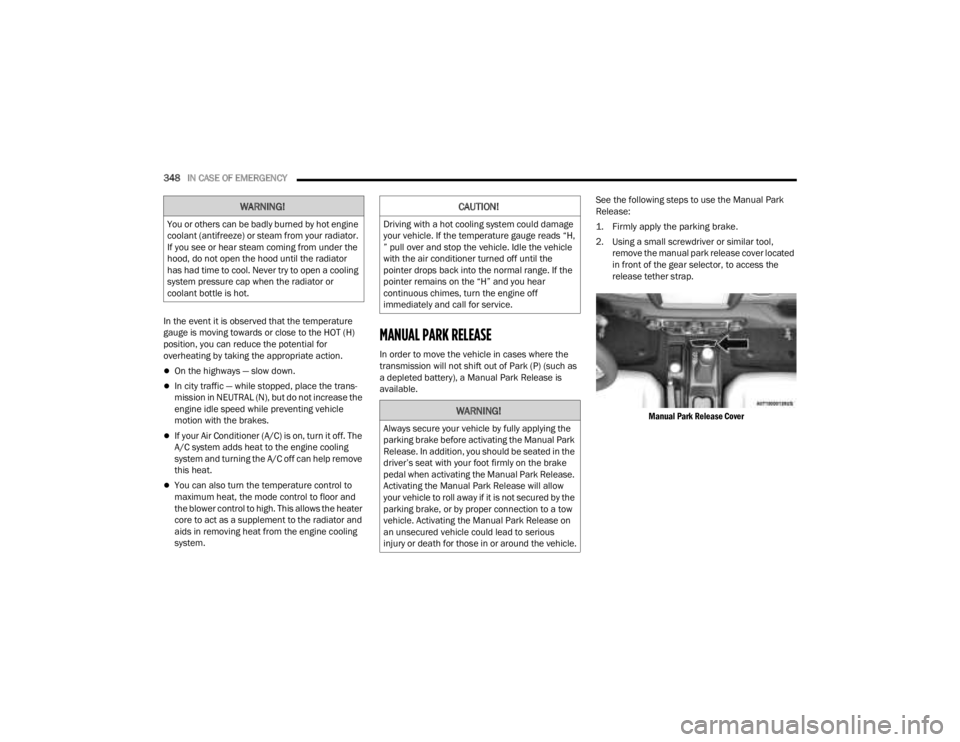
2. Using a small screwdriver or similar tool,
remove the manual park release cover located
in front of the gear selector, to access the
release tether strap.
Manual Park Release Cover
WARNING!
You or others can be badly burned by hot engine
coolant (antifreeze) or steam from your radiator.
If you see or hear steam coming from under the
hood, do not open the hood until the radiator
has had time to cool. Never try to open a cooling
system pressure cap when the radiator or
coolant bottle is hot.
CAUTION!
Driving with a hot cooling system could damage
your vehicle. If the temperature gauge reads “H,
” pull over and stop the vehicle. Idle the vehicle
with the air conditioner turned off until the
pointer drops back into the normal range. If the
pointer remains on the “H” and you hear
continuous chimes, turn the engine off
immediately and call for service.
WARNING!
Always secure your vehicle by fully applying the
parking brake before activating the Manual Park
Release. In addition, you should be seated in the
driver’s seat with your foot firmly on the brake
pedal when activating the Manual Park Release.
Activating the Manual Park Release will allow
your vehicle to roll away if it is not secured by the
parking brake, or by proper connection to a tow
vehicle. Activating the Manual Park Release on
an unsecured vehicle could lead to serious
injury or death for those in or around the vehicle.
23_JT_OM_EN_USC_t.book Page 348
Page 357 of 448
SERVICING AND MAINTENANCE355
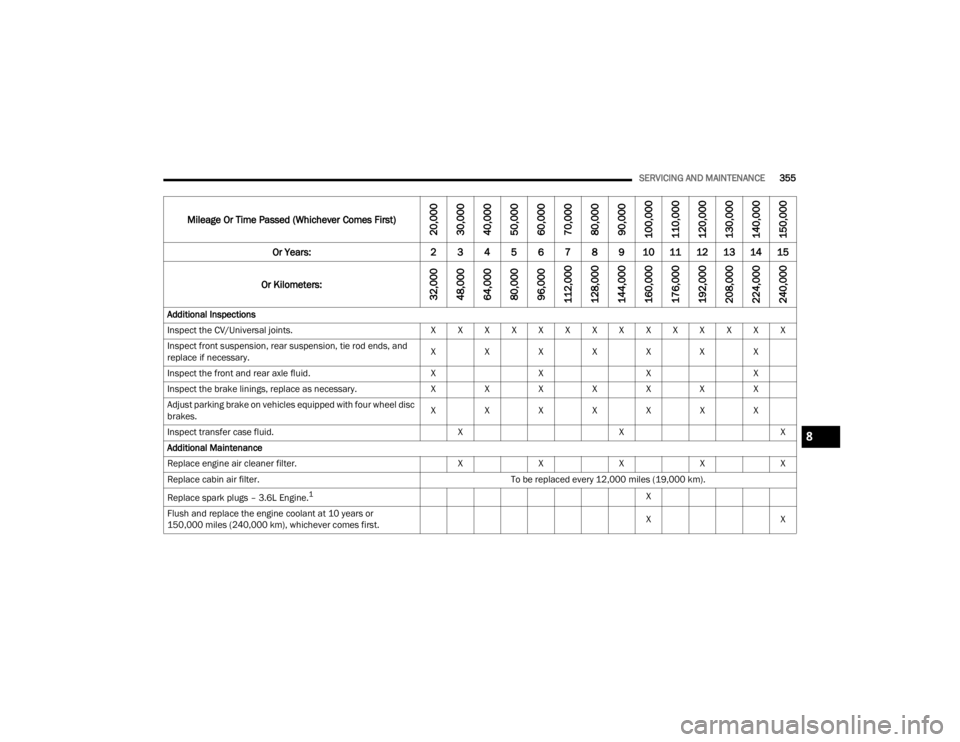
Mileage Or Time Passed (Whichever Comes First)
20,000
30,000
40,000
50,000
60,000
70,000
80,000
90,000
100,000
110,000
120,000
130,000
140,000
150,000
Or Years: 2 3 4 5 6 7 8 9 10 11 12 13 14 15
Or Kilometers:
32,000
48,000
64,000
80,000
96,000
112,000
128,000
144,000
160,000
176,000
192,000
208,000
224,000
240,000
Additional Inspections
Inspect the CV/Universal joints. X X X X X X X X X X X X X X
Inspect front suspension, rear suspension, tie rod ends, and
replace if necessary. X
XXXXXX
Inspect the front and rear axle fluid. XXXX
Inspect the brake linings, replace as necessary. XXXXXXX
Adjust parking brake on vehicles equipped with four wheel disc
brakes. X
XXXXXX
Inspect transfer case fluid. XXX
Additional Maintenance
Replace engine air cleaner filter. XXXXX
Replace cabin air filter. To be replaced every 12,000 miles (19,000 km).
Replace spark plugs – 3.6L Engine.
1X
Flush and replace the engine coolant at 10 years or
150,000 miles (240,000 km), whichever comes first. X
X
8
23_JT_OM_EN_USC_t.book Page 355
Page 382 of 448
380SERVICING AND MAINTENANCE
(Continued)
BRAKE SYSTEM
In order to ensure brake system performance, all
brake system components should be inspected
periodically. For the proper maintenance intervals
Úpage 354.
Fluid Level Check — Brake Master Cylinder
The fluid level of the master cylinder should be
checked whenever the vehicle is serviced, or
immediately if the Brake System Warning Light is
on. If necessary, add fluid to bring level within the
designated marks on the side of the reservoir of
the brake master cylinder. Be sure to clean the top
of the master cylinder area before removing cap.
With disc brakes, fluid level can be expected to fall
as the brake pads wear. Brake fluid level should be
checked when pads are replaced. If the brake fluid
is abnormally low, check the system for leaks.
For further information Ú page 426.
FRONT/REAR AXLE FLUID
For normal service, periodic fluid level checks are
not required. When the vehicle is serviced for other
reasons the exterior surfaces of the axle assembly
should be inspected. If gear oil leakage is
suspected, inspect the fluid level.
Fluid Level Check
Lubricant should be approximately 1/8 inch
(3 mm) below the bottom edge of the oil fill hole.
NOTE:Make sure that the vehicle is level and supported
by the axles.
Adding Fluid
Add lubricant only at the fill hole and only to the
level specified above.
Selection Of Lubricant
Use only the manufacturer’s recommended fluid
Úpage 426.
WARNING!
Riding the brakes can lead to brake failure and
possibly a collision. Driving with your foot resting
or riding on the brake pedal can result in
abnormally high brake temperatures, excessive
lining wear, and possible brake damage. You
would not have your full braking capacity in an
emergency.
WARNING!
Use only manufacturer recommended brake
fluid Ú page 426. Using the wrong type of
brake fluid can severely damage your brake
system and/or impair its performance. The
proper type of brake fluid for your vehicle is
also identified on the original factory installed
hydraulic master cylinder reservoir.
To avoid contamination from foreign matter or
moisture, use only new brake fluid or fluid that
has been in a tightly closed container. Keep
the master cylinder reservoir cap secured at
all times. Brake fluid in a open container
absorbs moisture from the air resulting in a
lower boiling point. This may cause it to boil
unexpectedly during hard or prolonged
braking, resulting in sudden brake failure. This
could result in a collision.
Overfilling the brake fluid reservoir can result
in spilling brake fluid on hot engine parts,
causing the brake fluid to catch fire. Brake
fluid can also damage painted and vinyl
surfaces, care should be taken to avoid its
contact with these surfaces.
Do not allow petroleum based fluid to contam -
inate the brake fluid. Brake seal components
could be damaged, causing partial or
complete brake failure. This could result in a
collision.
WARNING!
23_JT_OM_EN_USC_t.book Page 380
Page 410 of 448
408SERVICING AND MAINTENANCE
When cleaning extremely dirty wheels, including
excessive brake dust, care must be taken in the
selection of tire and wheel cleaning chemicals and
equipment to prevent damage to the wheels.
Mopar® Wheel Treatment or Mopar® Chrome
Cleaner, or their equivalent, is recommended or
select a non-abrasive, non-acidic cleaner for
aluminum or chrome wheels.
NOTE:If you intend parking or storing your vehicle for an
extended period after cleaning the wheels with
wheel cleaner, drive your vehicle and apply the
brakes to remove the water droplets from the
brake components. This activity will remove the
red rust on the brake rotors and prevent vehicle
vibration when braking.
Dark Vapor Chrome, Black Satin Chrome, or Low
Gloss Clear Coat WheelsSNOW TRACTION DEVICES
Use of traction devices require sufficient
tire-to-body clearance. Due to limited clearance,
the following snow traction devices are
recommended. Follow these recommendations to
guard against damage:
Snow traction device must be of proper size for
the tire, as recommended by the snow traction
device manufacturer.
No other tire sizes are recommended for use
with the snow traction device.
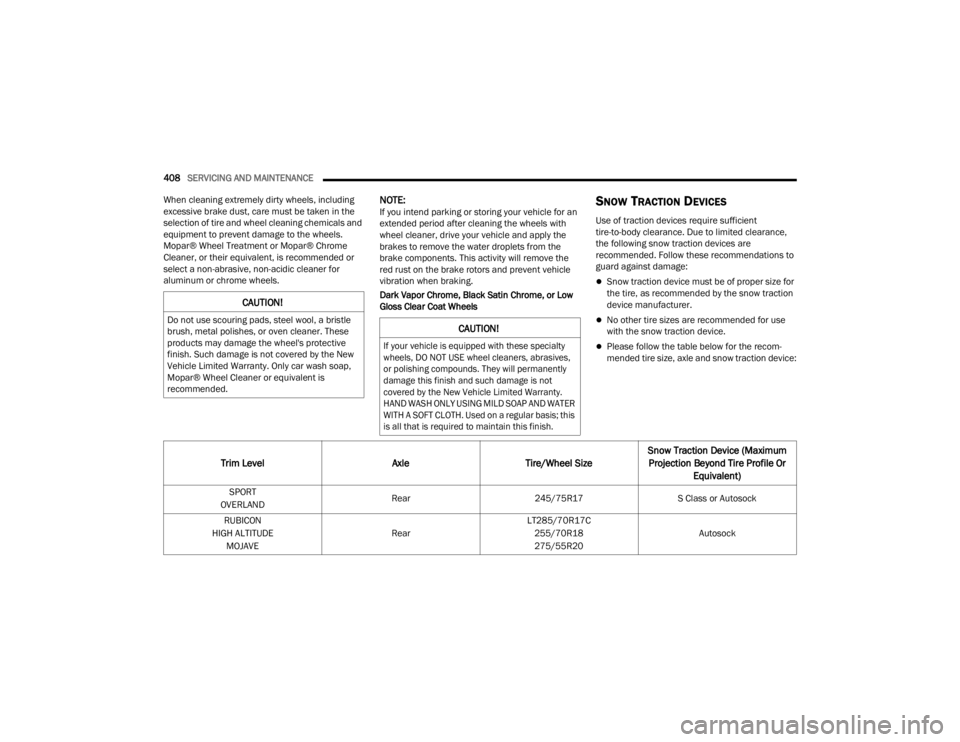
Please follow the table below for the recom -
mended tire size, axle and snow traction device:
CAUTION!
Do not use scouring pads, steel wool, a bristle
brush, metal polishes, or oven cleaner. These
products may damage the wheel's protective
finish. Such damage is not covered by the New
Vehicle Limited Warranty. Only car wash soap,
Mopar® Wheel Cleaner or equivalent is
recommended.CAUTION!
If your vehicle is equipped with these specialty
wheels, DO NOT USE wheel cleaners, abrasives,
or polishing compounds. They will permanently
damage this finish and such damage is not
covered by the New Vehicle Limited Warranty.
HAND WASH ONLY USING MILD SOAP AND WATER
WITH A SOFT CLOTH. Used on a regular basis; this
is all that is required to maintain this finish.
Trim Level AxleTire/Wheel SizeSnow Traction Device (Maximum
Projection Beyond Tire Profile Or Equivalent)
SPORT
OVERLAND Rear
245/75R17 S Class or Autosock
RUBICON
HIGH ALTITUDE MOJAVE RearLT285/70R17C
255/70R18
275/55R20 Autosock
23_JT_OM_EN_USC_t.book Page 408
Page 420 of 448
418
TECHNICAL SPECIFICATIONS
VEHICLE IDENTIFICATION NUMBER (VIN)
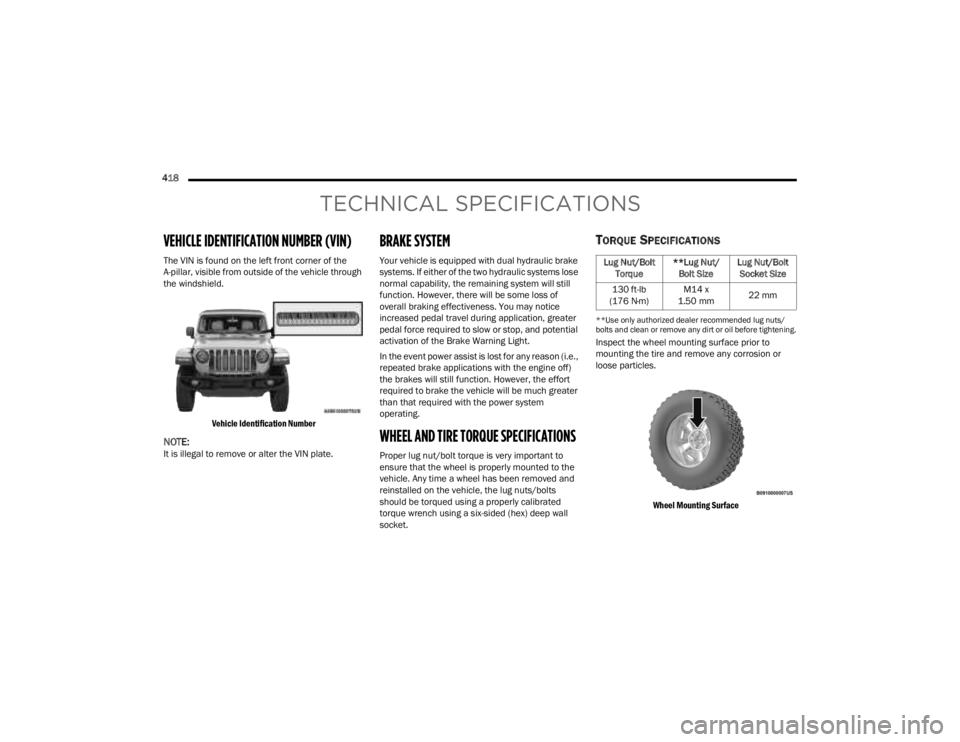
The VIN is found on the left front corner of the
A-pillar, visible from outside of the vehicle through
the windshield.
Vehicle Identification Number
NOTE:It is illegal to remove or alter the VIN plate.
BRAKE SYSTEM
Your vehicle is equipped with dual hydraulic brake
systems. If either of the two hydraulic systems lose
normal capability, the remaining system will still
function. However, there will be some loss of
overall braking effectiveness. You may notice
increased pedal travel during application, greater
pedal force required to slow or stop, and potential
activation of the Brake Warning Light.
In the event power assist is lost for any reason (i.e.,
repeated brake applications with the engine off)
the brakes will still function. However, the effort
required to brake the vehicle will be much greater
than that required with the power system
operating.
WHEEL AND TIRE TORQUE SPECIFICATIONS
Proper lug nut/bolt torque is very important to
ensure that the wheel is properly mounted to the
vehicle. Any time a wheel has been removed and
reinstalled on the vehicle, the lug nuts/bolts
should be torqued using a properly calibrated
torque wrench using a six-sided (hex) deep wall
socket.
TORQUE SPECIFICATIONS
**Use only authorized dealer recommended lug nuts/
bolts and clean or remove any dirt or oil before tightening.
Inspect the wheel mounting surface prior to
mounting the tire and remove any corrosion or
loose particles.
Wheel Mounting Surface
Lug Nut/Bolt Torque **Lug Nut/
Bolt Size Lug Nut/Bolt
Socket Size
130 ft-lb
(176 N·m) M14 x
1.50 mm 22 mm
23_JT_OM_EN_USC_t.book Page 418
Page 435 of 448

433
INDEX
A
About Your Brakes......................................... 418Accessory Drive Belt Inspection..................... 372Adaptive Cruise Control (ACC)
(Cruise Control).............................................. 173Adding Engine Coolant (Antifreeze)............... 378Adding Fuel.......................................... 191, 192Additives, Fuel............................................... 419Advance Phone Connectivity......................... 252Air BagAir Bag Operation...................................... 308Air Bag Warning Light............. 132, 306, 309Enhanced Accident Response......... 317, 352Event Data Recorder (EDR)....................... 352Front Air Bag................................... 307, 309If Deployment Occurs................................ 316Knee Impact Bolsters................................ 314Maintaining Your Air Bag System.............. 317Maintenance............................................. 317Redundant Air Bag Warning Light.............307Transporting Pets...................................... 329Air Bag Light........................................ 306, 329Air Cleaner, Engine (Engine Air Cleaner
Filter)............................................................. 366Air Conditioner Maintenance......................... 372Air Conditioner Refrigerant.................. 372, 373
Air Conditioner System................................. 372Air Conditioning Filter..............................68, 373Air Conditioning System................................... 67Air Conditioning, Operating Tips....................... 67Air Filter........................................................ 366Air PressureTires......................................................... 402AlarmArm The System.......................................... 23Disarm The System..................................... 23Security Alarm............................................. 23Alterations/ModificationsVehicle......................................................... 11Android Auto........................................ 254, 255Android Auto™
S
........................................ 254Antifreeze (Engine Coolant)................. 377, 423Disposal................................................... 378Anti-Lock Brake System (ABS)............. 135, 279Apple CarPlay....................................... 254, 257Apple CarPlay®
S
...................................... 256Assist, Hill Start............................................. 283Audio Settings............................................... 240Audio Systems (Radio).................................. 214Auto Down Power Windows............................. 81Automatic Dimming Mirror............................... 51Automatic Door Locks...................................... 27
Automatic Headlights.......................................58Automatic High Beams.....................................58Automatic Temperature Control (ATC)..............67Automatic Transmission................................ 157Adding Fluid.............................................. 382Autostick................................................... 160Fluid And Filter Change............................. 382Fluid Change............................................. 382Fluid Level Check............................. 381, 382Fluid Type........................................ 382, 426Gear Ranges............................................. 157Special Additives...................................... 381Automatic Transmission Limp Home Mode... 159AutoPark....................................................... 145AUX..................................................................71Auxiliary Electrical Outlet (Power Outlet)..........77Auxiliary Power Outlet......................................77Auxiliary Switches............................................79Axle Fluid....................................................... 426Axle Lock.............................................. 165, 166
B
Battery.......................................................... 364Charging System Light.............................. 133Keyless Key Fob Replacement....................16Bed Lights........................................................59
11
23_JT_OM_EN_USC_t.book Page 433