transmission JEEP GLADIATOR 2023 Repair Manual
[x] Cancel search | Manufacturer: JEEP, Model Year: 2023, Model line: GLADIATOR, Model: JEEP GLADIATOR 2023Pages: 448, PDF Size: 17.37 MB
Page 280 of 448
278MULTIMEDIA
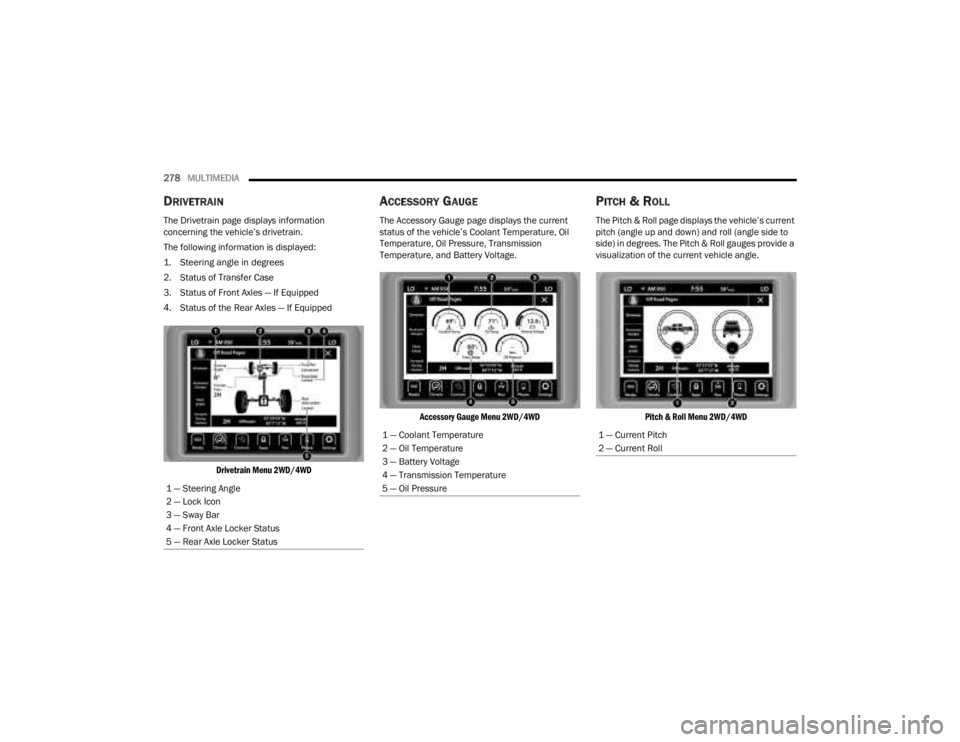
DRIVETRAIN
The Drivetrain page displays information
concerning the vehicle’s drivetrain.
The following information is displayed:
1. Steering angle in degrees
2. Status of Transfer Case
3. Status of Front Axles — If Equipped
4. Status of the Rear Axles — If Equipped
Drivetrain Menu 2WD/4WD
ACCESSORY GAUGE
The Accessory Gauge page displays the current
status of the vehicle’s Coolant Temperature, Oil
Temperature, Oil Pressure, Transmission
Temperature, and Battery Voltage.
Accessory Gauge Menu 2WD/4WD
PITCH & ROLL
The Pitch & Roll page displays the vehicle’s current
pitch (angle up and down) and roll (angle side to
side) in degrees. The Pitch & Roll gauges provide a
visualization of the current vehicle angle.
Pitch & Roll Menu 2WD/4WD
1 — Steering Angle
2 — Lock Icon
3 — Sway Bar
4 — Front Axle Locker Status
5 — Rear Axle Locker Status
1 — Coolant Temperature
2 — Oil Temperature
3 — Battery Voltage
4 — Transmission Temperature
5 — Oil Pressure1 — Current Pitch
2 — Current Roll
23_JT_OM_EN_USC_t.book Page 278
Page 285 of 448
SAFETY283
ESC Activation/Malfunction Indicator Light
And ESC OFF Indicator Light
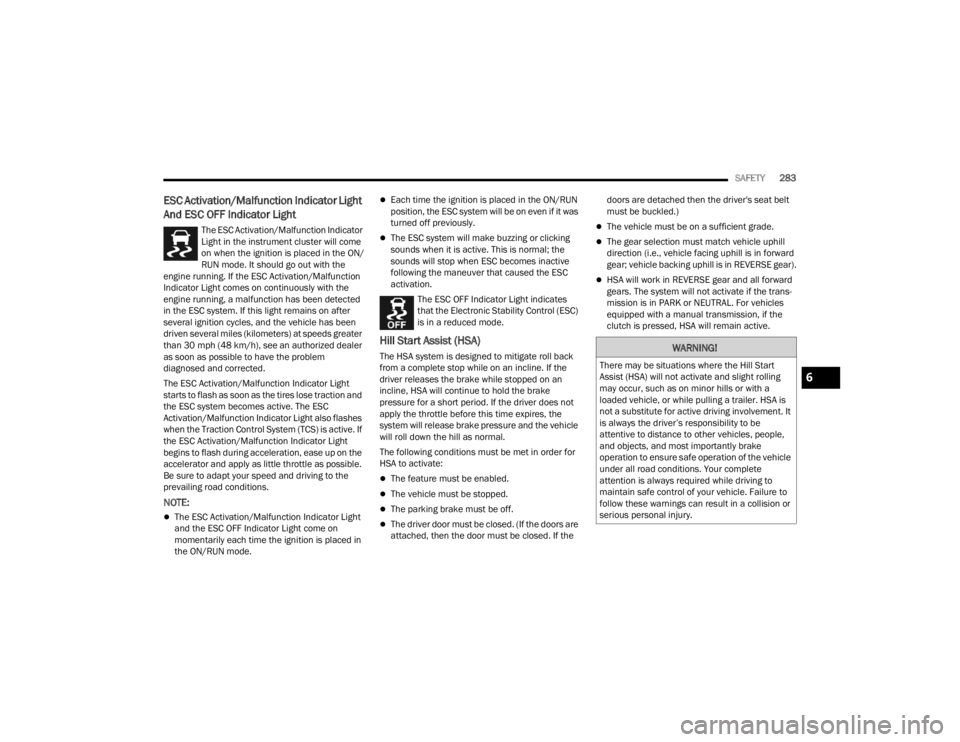
The ESC Activation/Malfunction Indicator
Light in the instrument cluster will come
on when the ignition is placed in the ON/
RUN mode. It should go out with the
engine running. If the ESC Activation/Malfunction
Indicator Light comes on continuously with the
engine running, a malfunction has been detected
in the ESC system. If this light remains on after
several ignition cycles, and the vehicle has been
driven several miles (kilometers) at speeds greater
than 30 mph (48 km/h), see an authorized dealer
as soon as possible to have the problem
diagnosed and corrected.
The ESC Activation/Malfunction Indicator Light
starts to flash as soon as the tires lose traction and
the ESC system becomes active. The ESC
Activation/Malfunction Indicator Light also flashes
when the Traction Control System (TCS) is active. If
the ESC Activation/Malfunction Indicator Light
begins to flash during acceleration, ease up on the
accelerator and apply as little throttle as possible.
Be sure to adapt your speed and driving to the
prevailing road conditions.
NOTE:
The ESC Activation/Malfunction Indicator Light
and the ESC OFF Indicator Light come on
momentarily each time the ignition is placed in
the ON/RUN mode.
Each time the ignition is placed in the ON/RUN
position, the ESC system will be on even if it was
turned off previously.
The ESC system will make buzzing or clicking
sounds when it is active. This is normal; the
sounds will stop when ESC becomes inactive
following the maneuver that caused the ESC
activation.
The ESC OFF Indicator Light indicates
that the Electronic Stability Control (ESC)
is in a reduced mode.
Hill Start Assist (HSA)
The HSA system is designed to mitigate roll back
from a complete stop while on an incline. If the
driver releases the brake while stopped on an
incline, HSA will continue to hold the brake
pressure for a short period. If the driver does not
apply the throttle before this time expires, the
system will release brake pressure and the vehicle
will roll down the hill as normal.
The following conditions must be met in order for
HSA to activate:
The feature must be enabled.
The vehicle must be stopped.
The parking brake must be off.
The driver door must be closed. (If the doors are
attached, then the door must be closed. If the doors are detached then the driver's seat belt
must be buckled.)
The vehicle must be on a sufficient grade.
The gear selection must match vehicle uphill
direction (i.e., vehicle facing uphill is in forward
gear; vehicle backing uphill is in REVERSE gear).
HSA will work in REVERSE gear and all forward
gears. The system will not activate if the trans
-
mission is in PARK or NEUTRAL. For vehicles
equipped with a manual transmission, if the
clutch is pressed, HSA will remain active.
WARNING!
There may be situations where the Hill Start
Assist (HSA) will not activate and slight rolling
may occur, such as on minor hills or with a
loaded vehicle, or while pulling a trailer. HSA is
not a substitute for active driving involvement. It
is always the driver’s responsibility to be
attentive to distance to other vehicles, people,
and objects, and most importantly brake
operation to ensure safe operation of the vehicle
under all road conditions. Your complete
attention is always required while driving to
maintain safe control of your vehicle. Failure to
follow these warnings can result in a collision or
serious personal injury.
6
23_JT_OM_EN_USC_t.book Page 283
Page 286 of 448

284SAFETY
Disabling And Enabling HSA
This feature can be turned on or turned off. To
change the current setting, see Ú page 215 for
further information.
Towing With HSA
HSA will also provide assistance to mitigate roll
back while towing a trailer.
Rain Brake Support (RBS)
RBS may improve braking performance in wet
conditions. It will periodically apply a small amount
of brake pressure to remove any water buildup on
the front brake rotors. It functions when the
windshield wipers are in LO or HI speed. When RBS
is active, there is no notification to the driver and
no driver interaction is required.
Ready Alert Braking (RAB)
RAB may reduce the time required to reach full
braking during emergency braking situations. It
anticipates when an emergency braking situation
may occur by monitoring how fast the throttle is
released by the driver. The Electronic Brake
Control will prepare the brake system for a panic
stop.
Rear Seat Reminder Alert (RSRA)
RSRA alerts you through a visual and auditory
notification of the possible presence of an object,
passenger, or pet in the rear seats if a rear door
was opened up to 10 minutes before the ignition
was placed in the ON/RUN position. RSRA does not
directly detect objects, passengers, or pets in the
rear seats. When the previous conditions are met,
RSRA displays the message “Check Rear Seat” on
the instrument cluster display and sounds an
auditory alert upon the driver placing the ignition in
the OFF position to exit the vehicle.
To enable or disable RSRA, see Ú page 215.
WARNING!
If you use a trailer brake controller with your
trailer, the trailer brakes may be activated and
deactivated with the brake switch. If so, there
may not be enough brake pressure to hold
both the vehicle and the trailer on a hill when
the brake pedal is released. In order to avoid
rolling down an incline while resuming accel -
eration, manually activate the trailer brake or
apply more vehicle brake pressure prior to
releasing the brake pedal.
HSA is not a parking brake. Always apply the
parking brake fully when exiting your vehicle.
Also, be certain to place the transmission in
PARK.
Failure to follow these warnings can result in a
collision or serious personal injury.
WARNING!
Before exiting a vehicle, always come to a
complete stop, then shift the automatic trans -
mission into PARK and apply the parking
brake.
Always make sure the keyless ignition node is
in the OFF position, key fob is removed from
the vehicle and vehicle is locked.
Never leave children alone in a vehicle, or with
access to an unlocked vehicle. Leaving chil -
dren in a vehicle unattended is dangerous for
a number of reasons. A child or others could
be seriously or fatally injured. Children should
be warned not to touch the parking brake,
brake pedal or the gear selector.
Do not leave the key fob in or near the vehicle,
or in a location accessible to children, and do
not leave the ignition of a vehicle equipped
with Keyless Enter ‘n Go™ in the ACC or ON/
RUN position. A child could operate power
windows, other controls, or move the vehicle.
Do not leave children or animals inside parked
vehicles in hot weather. Interior heat build-up
may cause serious injury or death.
23_JT_OM_EN_USC_t.book Page 284
Page 287 of 448

SAFETY285
Selec-Speed Control (SSC) — If Equipped
SSC is intended for off-road driving in
4WD Low only. SSC maintains vehicle
speed by actively controlling engine
torque and brakes.
SSC has three states:
1. Off (feature is not enabled and will not activate)
2. Enabled (feature is enabled and ready but activation conditions are not met, or driver is
actively overriding with brake or throttle
application)
3. Active (feature is enabled and actively controlling vehicle speed)
Enabling SSC
SSC is enabled by pushing the SSC switch, but the
following conditions must also be met to enable
SSC:
The driveline is in 4WD Low.
The vehicle speed is below 5 mph (8 km/h).
The parking brake is released.
The driver seat belt is buckled.
The driver is not applying throttle.
The driver door is closed (If doors are attached,
the door must be closed. If doors are detached,
then driver seat belt must be buckled). Activating SSC
Once SSC is enabled it will activate automatically
once the following conditions are met:
The driver releases the throttle.
The driver releases the brake.
The transmission is in any selection other than
PARK.
Your vehicle speed is below 20 mph (32 km/h).
The driver door is closed (If doors are attached,
the door must be closed. If doors are detached,
then driver seat belt must be buckled).
The set speed for SSC is selectable by the driver,
and can be adjusted by using the gear shift +/-.
Additionally, the SSC set speed may be reduced
when climbing a grade and the level of set speed
reduction depends on the magnitude of grade. The
following summarizes the SSC set speeds:
SSC Target Set Speeds
1st = 0.6 mph (1 km/h)
2nd = 1.2 mph (2 km/h)
3rd = 1.8 mph (3 km/h)
4th = 2.5 mph (4 km/h)
5th = 3.1 mph (5 km/h)
6th = 3.7 mph (6 km/h)
7th = 4.3 mph (7 km/h)
8th = 5 mph (8 km/h)
9th = 5.6 mph (9 km/h) — if equipped
REVERSE = 0.6 mph (1 km/h)
NEUTRAL = 1.2 mph (2 km/h)
PARK = SSC remains enabled but not active
SSC Target Set Speeds — If Equipped With Off
Road+
1st = 0.6 mph (1 km/h)
2nd = 0.9 mph (1.5 km/h)
3rd = 1.2 mph (2 km/h)
4th = 1.5 mph (2.5 km/h)
5th = 1.8 mph (3 km/h)
6th = 2.5 mph (4 km/h)
7th = 3.7 mph (6 km/h)
8th = 5 mph (8 km/h)
REVERSE = 0.6 mph (1 km/h)
NEUTRAL = 1.2 mph (2 km/h)
PARK = SSC remains enabled but not active
NOTE:
During SSC, the +/- gear selector input is used
for SSC target speed selection but will not affect
the gear chosen by the transmission. While
6
23_JT_OM_EN_USC_t.book Page 285
Page 288 of 448

286SAFETY
actively controlling SSC, the transmission will
shift appropriately for the driver-selected set
speed and corresponding driving conditions.
SSC operation is influenced by Off Road+ drive
mode if active. The differences may be notable
to the driver as a varying level of aggressive -
ness.
Driver Override
The driver may override SSC activation with throttle
or brake application at any time.
Deactivating SSC
SSC will be deactivated but remain available if any
of the following conditions occur:
The driver overrides SSC set speed with throttle
or brake application.
The vehicle speed exceeds 20 mph (32 km/h)
but remains below 40 mph (64 km/h).
The vehicle is shifted into PARK.
Disabling SSC
SSC will deactivate and be disabled if any of the
following conditions occur:
The driver pushes the SSC switch.
The driveline is shifted out of the 4WD Low.
The parking brake is applied.
The vehicle is driven greater than 20 mph
(32 km/h) for greater than 70 seconds.
The vehicle is driven greater than 40 mph
(64 km/h). SSC will exist immediately.
The driver door opens (Driver door opens if
doors are attached or driver seat belt is
unbuckled if doors are detached).
Feedback To The Driver
The instrument cluster has an SSC icon and the
SSC switch has a lamp that offers feedback to the
driver about the state SSC is in.
The cluster icon and switch lamp will illuminate
and remain on solid when SSC is enabled or
activated. These are the normal operating
conditions for SSC.
The cluster icon and switch lamp will flash for
several seconds then extinguish when the driver
pushes the SSC switch but enabled conditions
are not met.
The cluster icon and switch lamp will flash for
several seconds then extinguish when SSC
disables due to excess speed.
The cluster icon and switch lamp will flash then
extinguish when SSC deactivates due to over -
heated brakes.
Traction Control System (TCS)
The TCS monitors the amount of wheel spin for
each of the driven wheels. If wheel spin is
detected, the TCS may apply brake pressure to the
spinning wheel(s) and/or reduce engine power to
provide enhanced acceleration and stability. A
feature of the TCS, Brake Limited Differential (BLD)
functions similarly to a limited slip differential and
controls the wheel spin across a driven axle. If one
wheel on a driven axle is spinning faster than the
other, the system will apply the brake of the
spinning wheel. This will allow more engine torque
to be applied to the wheel that is not spinning. BLD
may remain enabled even if TCS and ESC are in
reduced modes.
Trailer Sway Control (TSC)
TSC uses sensors in the vehicle to recognize an
excessively swaying trailer and will take the
appropriate actions to attempt to stop the sway.
WARNING!
SSC is only intended to assist the driver in
controlling vehicle speed when driving in
off-road conditions. The driver must remain
attentive to the driving conditions and is
responsible for maintaining a safe vehicle
speed.
23_JT_OM_EN_USC_t.book Page 286
Page 299 of 448

SAFETY297
Vehicles With A Full-Size Matching Spare
1. If your vehicle is equipped with a matching full-size spare wheel and tire assembly, it has
a Tire Pressure Monitoring System sensor,
and can be monitored by the Tire Pressure
Monitoring System (TPMS) when swapped
with a low pressure road tire.
2. In the event that the matching full-size spare tire is swapped with a low pressure road tire,
the next ignition switch cycle will still show the
TPMS Warning Light to be on, a chime to
sound, an “Inflate to XX” message to appear in
the instrument cluster, and the graphic display
will still show the low tire pressure value in a
different color.
3. Driving the vehicle for up to 20 minutes above 15 mph (24 km/h) will turn off the TPMS
Warning Light as long as none of road tires are
below the low pressure warning threshold.
TIRE FILL ALERT
This feature notifies the user when the placard tire
pressure is attained while inflating or deflating the
tire.
The customer may choose to disable or enable the
Tire Fill Alert feature in the apps menu of the
Uconnect system.
NOTE:
Only one tire can be filled at a time when using
the Tire Fill Alert system.
The Tire Fill Alert feature cannot be entered if an
existing TPMS system fault is set to “active” or if
the system is in deactivation mode (if equipped).
The system will be activated when the system
detects an increase in tire pressure while filling the
tire. The ignition must be in the ON/RUN mode with
the transmission in PARK for vehicles equipped
with an automatic transmission. For vehicles
equipped with a manual transmission, the parking
brake must be applied.
NOTE:It is not required to have the engine running to
enter Tire Fill Alert mode.
The hazard lamps will come on to confirm the
vehicle is in Tire Fill Alert mode. If the hazard lamps
do not come on while inflating the tire, the Tire
Pressure Monitoring System (TPMS) sensor may
be in an inoperative position, preventing the TPMS
sensor signal from being received. In this case, the
vehicle may need to be moved slightly forward or
backward. The Tire Fill Alert system will only inflate or deflate
one tire at a time. Wait until the hazard lights have
stopped flashing for 30 seconds after the desired
pressure is achieved in one tire before switching to
another.
When Tire Fill Alert mode is entered, the tire
pressure display screen will be displayed in the
instrument cluster.
Operation:
The horn will chirp once to let the user know
when to stop filling the tire, when it reaches
recommended pressure.
The horn will chirp three times if the tire is over
-
filled and will continue to chirp every five
seconds if the user continues to inflate the tire.
The horn will chirp once again when enough air
is let out to reach proper inflation level.
The horn will also chirp three times if the tire is
then underinflated and will continue to chirp
every five seconds if the user continues to
deflate the tire.
NOTE:The Tire Fill Alert feature is set to “Disabled” every
time the ignition is turned to “OFF”. To re-enable
the Tire Fill Alert feature at the next ignition “RUN”
state, the customer must re-enable the feature
through use of the customer settings in the radio.
6
23_JT_OM_EN_USC_t.book Page 297
Page 300 of 448

298SAFETY
SELECTABLE TIRE FILL ALERT — IF EQUIPPED
The Selectable Tire Fill Alert (STFA) system is an
optional feature that is included as part of the
normal Tire Fill Alert system. The system is
designed to allow you to select a pressure to inflate
or deflate the vehicle's front and rear axle tires to,
and to provide feedback while inflating or deflating
the vehicle's tires.
In the Selectable Tire Fill Alert application, which is
located in the apps menu of the Uconnect system,
you will be able to select a pressure setting for both
the front and rear axle tire pressures by scrolling
through a pressure range from XX to 15 psi in 1 psi
increments for each axle setting.
XX = the vehicle's cold placard pressure values for
the front and rear axles as shown on the vehicle
placard pressure label.
NOTE:The Tire Fill Alert feature disables every time the
ignition is placed in the OFF position. The feature
must be re-enabled through the radio each time
the ignition is placed back in the ON/RUN position
Úpage 215.
You may also store pressure values chosen for
each axle in the Uconnect system application as
preset pressure values. Up to two sets of preset
pressure values can be stored in the Uconnect
system for the front and rear axle. Once you select
the tire pressures for the front and rear axles that you want to inflate or deflate to, you can begin
inflating or deflating one tire at a time.
NOTE:The STFA system will only support inflating or
deflating one tire at a time.
In order to use STFA, the Tire Fill Alert feature must
be enabled through the radio Ú
page 215.
The system will be activated when the TPMS
receiver module detects a change in tire pressure.
The ignition must be in the ON/RUN mode, with the
transmission in PARK in vehicles with an automatic
transmission, and in NEUTRAL with the parking
brake engaged in vehicles with a manual
transmission. The hazard lamps will come on to
confirm the vehicle is in Tire Fill Alert mode.
When Tire Fill Alert mode is entered, the tire
pressure screen will be displayed in the instrument
cluster. If the hazard lamps do not come on while
inflating or deflating the tire, the Tire Pressure
Monitoring System (TPMS) sensor may be in an
inoperative position, preventing the TPMS sensor
signal from being received. In this case, the vehicle
may need to be moved slightly forward or
backward.
The STFA system will only inflate or deflate one tire
at a time. Wait until the hazard lights have stopped
flashing for 30 seconds after the desired pressure
is achieved on one tire before switching to another. Horn chirps will indicate STFA status as tires are
inflated/deflated. The horn will chirp under the
following STFA states:
1. The horn will chirp once when the selected
pressure is reached to let you know when to
stop inflating or deflating the tire.
2. The horn will chirp three times if the tire is overinflated or over-deflated.
3. The horn will chirp once again when enough air is added or removed to reach proper selected
pressure level.
TPMS DEACTIVATION — IF EQUIPPED
The TPMS can be deactivated if replacing all four
wheel and tire assemblies (road tires) with wheel
and tire assemblies that do not have TPMS
sensors, such as when installing winter wheel and
tire assemblies on your vehicle.
To deactivate the TPMS, first replace all four wheel
and tire assemblies (road tires) with tires not
equipped with Tire Pressure Monitoring System
(TPMS) sensors. Then, drive the vehicle for
20 minutes above 15 mph (24 km/h). The TPMS
will chime, the TPMS Warning Light will flash on
and off for 75 seconds and then remain on. The
instrument cluster will display the “SERVICE TIRE
PRESSURE SYSTEM” message and then display
dashes (--) in place of the pressure values.
23_JT_OM_EN_USC_t.book Page 298
Page 319 of 448
SAFETY317
(Continued)
Enhanced Accident Response System
In the event of an impact, if the communication
network remains intact, and the power remains
intact, depending on the nature of the event, the
Occupant Restraint Controller (ORC) will determine
whether to have the Enhanced Accident Response
System perform the following functions:
Cut off fuel to the engine (if equipped)
Cut off battery power to the electric motor (if
equipped)
Flash hazard lights as long as the battery has
power
Turn on the interior lights, which remain on as
long as the battery has power or for 15 minutes
from the intervention of the Enhanced Accident
Response System
Unlock the power door locks
Your vehicle may also be designed to perform any
of these other functions in response to the
Enhanced Accident Response System:
Turn off the Fuel Filter Heater, Turn off the HVAC
Blower Motor, Close the HVAC Circulation Door
Cut off battery power to the:
Engine
Electric Motor (if equipped)
Electric power steering
Brake booster
Electric park brake
Automatic transmission gear selector
Horn
Front wiper
NOTE:After an accident, remember to cycle the ignition to
the STOP (OFF/LOCK) position and remove the key
from the ignition switch to avoid draining the
battery. Carefully check the vehicle for fuel leaks in
the engine compartment and on the ground near
the engine compartment and fuel tank before
resetting the system and starting the engine. If
there are no fuel leaks or damage to the vehicle
electrical devices (e.g. headlights) after an
accident, reset the system by following the
procedure described below. If you have any doubt,
contact an authorized dealer.
Enhanced Accident Response System
Reset Procedure
In order to reset the Enhanced Accident Response
System functions after an event, the ignition switch
must be changed from ignition START or ON/RUN
to ignition OFF. Carefully check the vehicle for fuel
leaks in the engine compartment and on the
ground near the engine compartment and fuel
tank before resetting the system and starting the engine. After an accident, if the vehicle will not
start after performing the reset procedure, the
vehicle must be towed to an authorized dealer to
be inspected and to have the Enhanced Accident
Response System reset.
Maintaining Your Air Bag System
WARNING!
Modifications to any part of the air bag system
could cause it to fail when you need it. You
could be injured if the air bag system is not
there to protect you. Do not modify the compo
-
nents or wiring, including adding any kind of
badges or stickers to the steering wheel hub
trim cover or the upper passenger side of the
instrument panel. Do not modify the front
fascia/bumper, vehicle body structure, or add
aftermarket side steps or running boards.
It is dangerous to try to repair any part of the
air bag system yourself. Be sure to tell anyone
who works on your vehicle that it has an air
bag system.
6
23_JT_OM_EN_USC_t.book Page 317
Page 338 of 448
336IN CASE OF EMERGENCY
PREPARATIONS FOR JACKING
1. Park on a firm, level surface. Avoid ice or
slippery areas.
2. Turn on the Hazard Warning Flashers.
3. Apply the parking brake.
4. Shift the automatic transmission into PARK (P), or a manual transmission into REVERSE.
5. Cycle the ignition to OFF.
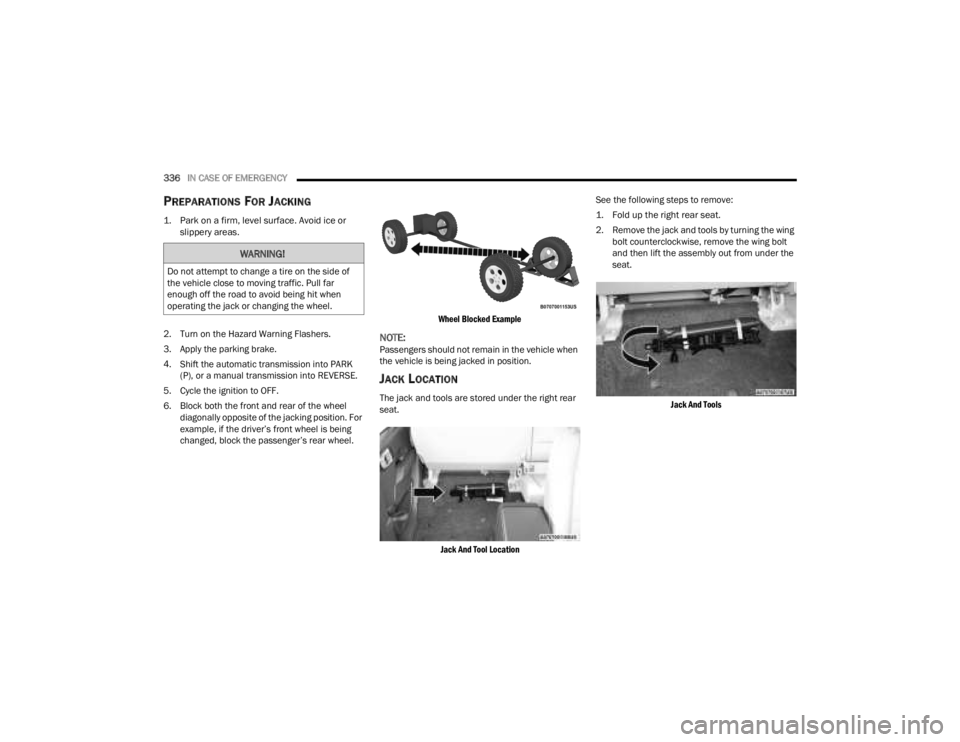
6. Block both the front and rear of the wheel diagonally opposite of the jacking position. For
example, if the driver’s front wheel is being
changed, block the passenger’s rear wheel.
Wheel Blocked Example
NOTE:Passengers should not remain in the vehicle when
the vehicle is being jacked in position.
JACK LOCATION
The jack and tools are stored under the right rear
seat.
Jack And Tool Location
See the following steps to remove:
1. Fold up the right rear seat.
2. Remove the jack and tools by turning the wing
bolt counterclockwise, remove the wing bolt
and then lift the assembly out from under the
seat.
Jack And Tools
WARNING!
Do not attempt to change a tire on the side of
the vehicle close to moving traffic. Pull far
enough off the road to avoid being hit when
operating the jack or changing the wheel.
23_JT_OM_EN_USC_t.book Page 336
Page 341 of 448
IN CASE OF EMERGENCY339
(Continued)
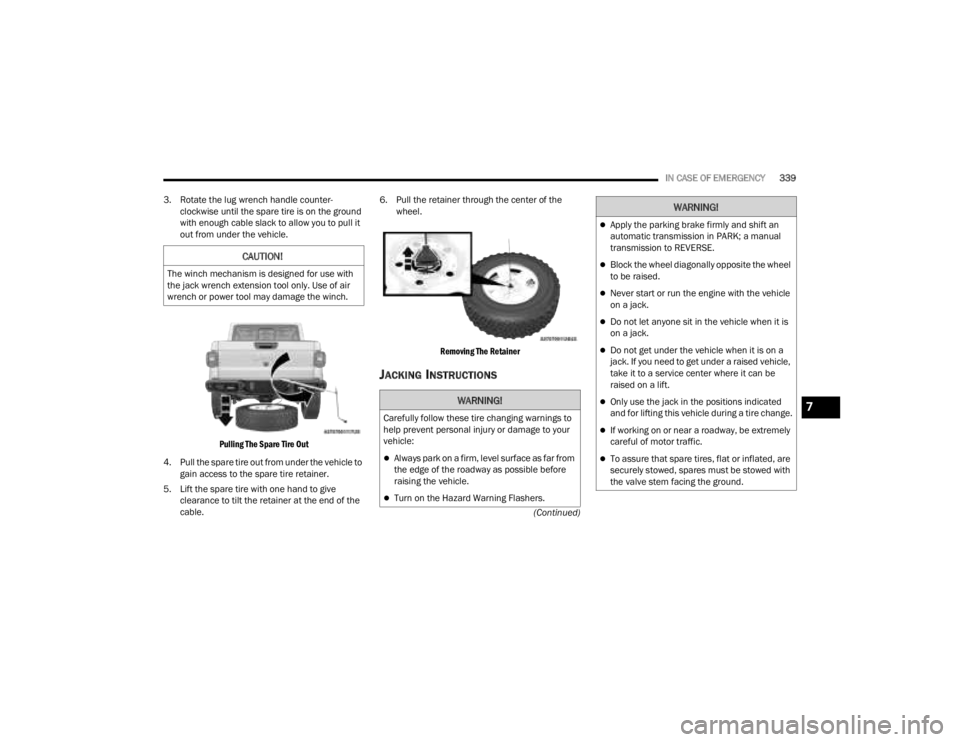
3. Rotate the lug wrench handle counter-
clockwise until the spare tire is on the ground
with enough cable slack to allow you to pull it
out from under the vehicle.
Pulling The Spare Tire Out
4. Pull the spare tire out from under the vehicle to gain access to the spare tire retainer.
5. Lift the spare tire with one hand to give clearance to tilt the retainer at the end of the
cable. 6. Pull the retainer through the center of the
wheel.
Removing The Retainer
JACKING INSTRUCTIONS
CAUTION!
The winch mechanism is designed for use with
the jack wrench extension tool only. Use of air
wrench or power tool may damage the winch.
WARNING!
Carefully follow these tire changing warnings to
help prevent personal injury or damage to your
vehicle:
Always park on a firm, level surface as far from
the edge of the roadway as possible before
raising the vehicle.
Turn on the Hazard Warning Flashers.
Apply the parking brake firmly and shift an
automatic transmission in PARK; a manual
transmission to REVERSE.
Block the wheel diagonally opposite the wheel
to be raised.
Never start or run the engine with the vehicle
on a jack.
Do not let anyone sit in the vehicle when it is
on a jack.
Do not get under the vehicle when it is on a
jack. If you need to get under a raised vehicle,
take it to a service center where it can be
raised on a lift.
Only use the jack in the positions indicated
and for lifting this vehicle during a tire change.
If working on or near a roadway, be extremely
careful of motor traffic.
To assure that spare tires, flat or inflated, are
securely stowed, spares must be stowed with
the valve stem facing the ground.
WARNING!
7
23_JT_OM_EN_USC_t.book Page 339