jack JEEP GLADIATOR 2023 Owners Manual
[x] Cancel search | Manufacturer: JEEP, Model Year: 2023, Model line: GLADIATOR, Model: JEEP GLADIATOR 2023Pages: 448, PDF Size: 17.37 MB
Page 8 of 448

6
CONNECTED VEHICLE SERVICES —
IF EQUIPPED ........................................................ 258 Is My Vehicle Connected?............................. 258
Introduction To Connected Vehicle
Services ......................................................... 258
Getting Started With Connected Vehicle
Services ......................................................... 260
Using SiriusXM Guardian™ .......................... 261
Manage My SiriusXM Guardian™ Account .. 272
CONNECTED SERVICES FAQS ........................... 272
Connected Services SOS FAQs —
If Equipped .................................................... 272
Connected Services Remote Door Lock/
Unlock FAQs .................................................. 272
Connected Services Roadside Assistance
FAQs .............................................................. 272
Connected Services Send & Go FAQs —
If Equipped .................................................... 273
Connected Services Vehicle Finder FAQs ... 273
Connected Services Stolen Vehicle
Assistance FAQs — If Equipped ................... 273
Connected Services Remote Vehicle
Start FAQs ..................................................... 274
Connected Services Remote Horn &
Lights FAQs .................................................... 274
Connected Services Account
FAQs — If Equipped ....................................... 274
Data Collection & Privacy.............................. 276 RADIO OPERATION AND MOBILE PHONES ..... 276
Regulatory And Safety Information .............. 277
OFF-ROAD PAGES — IF EQUIPPED.................... 277
Off-Road Pages Status Bar ........................... 277Drivetrain ....................................................... 278
Accessory Gauge ........................................... 278Pitch & Roll ................................................... 278
SAFETY
SAFETY FEATURES .............................................. 279
Anti-Lock Brake System (ABS) ..................... 279
Electronic Brake Control (EBC) System ...... 280
AUXILIARY DRIVING SYSTEMS.......................... 287
Blind Spot Monitoring (BSM) —
If Equipped .................................................... 287
Forward Collision Warning (FCW) With
Mitigation — If Equipped ............................... 291
Tire Pressure Monitoring System (TPMS) .... 294
OCCUPANT RESTRAINT SYSTEMS ................... 299
Occupant Restraint Systems Features ....... 299
Important Safety Precautions ...................... 299Seat Belt Systems ........................................ 300Supplemental Restraint Systems (SRS) ...... 306Child Restraints ............................................. 318 SAFETY TIPS ......................................................... 328
Transporting Passengers.............................. 328
Transporting Pets .......................................... 329Connected Vehicles ...................................... 329
Safety Checks You Should Make Inside
The Vehicle ................................................... 329
Periodic Safety Checks You Should Make
Outside The Vehicle ...................................... 330
Exhaust Gas................................................... 331
Carbon Monoxide Warnings ......................... 331
IN CASE OF EMERGENCY
HAZARD WARNING FLASHERS ......................... 332
ASSIST AND SOS SYSTEM — IF EQUIPPED ...... 332
JACKING AND TIRE CHANGING
S
.................. 335
Preparations For Jacking ............................. 336 Jack Location ................................................ 336
Spare Tire Location And Removal ............... 338
Jacking Instructions ...................................... 339
To Stow The Flat Or Spare ............................ 342
Reinstalling The Jack And Tools ................... 343
JUMP STARTING ................................................. 343
Preparations For Jump Start ........................ 344Jump Starting Procedure .............................. 345
REFUELING IN EMERGENCY – IF EQUIPPED .. 346
IF YOUR ENGINE OVERHEATS ............................ 347
MANUAL PARK RELEASE ................................... 348
FREEING A STUCK VEHICLE .............................. 349
23_JT_OM_EN_USC_t.book Page 6
Page 150 of 448

148STARTING AND OPERATING
NOTE:Engine start-up in very low ambient temperature
could result in evident white smoke. This condition
will disappear as the engine warms up.
AUTOMATIC TRANSMISSION
Start the engine with the transmission gear
selector in the PARK (P) position. Apply the brake
before shifting to any driving range.
EXTREME COLD WEATHER
The cartridge block heater clips into the engine
block near the water jacket and transfers heat to
the coolant. It requires a 110–115 Volt AC
electrical outlet with a grounded, three-wire
extension cord. Its use is recommended for
environments that routinely fall below -10°F
(-23°C). It should be used when the vehicle has not
been running overnight or longer periods and
should be plugged in two hours prior to start. Its
use is required for cold starts with temperatures
under -20°F (-28°C).
NOTE:The engine block heater and heater cord are
factory installed options. If your vehicle is not
equipped, engine block heaters and heater cords
are available from an authorized Mopar® dealer.
A 12 Volt heater built into the fuel filter housing
aids in preventing fuel gelling. It is controlled by
a built-in thermostat.
A Diesel Pre-Heat system both improves engine
starting and reduces the amount of white
smoke generated by a warming engine.
NORMAL STARTING
Observe the instrument cluster lights when
starting the engine.
NOTE:Normal starting of either a cold or a warm engine is
obtained without pumping or pressing the accel -
erator pedal.
1. Always apply the parking brake.
2. Press and hold the brake pedal while pushing the ENGINE START/STOP button once.
NOTE:A delay of the start of up to five seconds is possible
under very cold conditions. The “Wait to Start”
telltale will be illuminated during the preheat
process. When the engine “Wait To Start” telltale
turns off the engine will automatically crank.
Do not leave the key fob in or near the vehicle,
or in a location accessible to children, and do
not leave the ignition of a vehicle equipped
with Keyless Enter ‘n Go™ in the ACC or ON/
RUN position. A child could operate power
windows, other controls, or move the vehicle.
Do not leave children or animals inside parked
vehicles in hot weather. Interior heat build-up
may cause serious injury or death.
CAUTION!
The engine is allowed to crank as long as
25 seconds. If the engine fails to start during
this period, please wait at least two minutes
for the starter to cool before repeating start
procedure.
If the Water in Fuel Indicator Light remains on,
DO NOT START engine before you drain the
water from the fuel filters to avoid engine
damage Ú page 368.
WARNING!
CAUTION!
If the Water in Fuel Indicator Light remains on,
DO NOT START the engine before you drain the
water from the fuel filters to avoid engine
damage Úpage 368.
23_JT_OM_EN_USC_t.book Page 148
Page 190 of 448

188STARTING AND OPERATING
(Continued)
PARKSENSE SYSTEM USAGE
P
RECAUTIONS
NOTE:
Ensure that the front and rear fascia/bumpers
are free of snow, ice, mud, dirt and debris to
keep the ParkSense system operating properly.
Jackhammers, large trucks, and other vibra -
tions could affect the performance of Park -
Sense.
When you turn the ParkSense system off, the
instrument cluster display will show a vehicle
graphic of the ParkSense on/off state for two
seconds. Furthermore, once you turn Park -
Sense off, it remains off until you turn it on
again, even if you cycle the ignition.
When you move the gear selector to the
REVERSE position and ParkSense is turned off,
the instrument cluster display will show the
“ParkSense OFF” message. This message will
be displayed for as long as the vehicle is in
REVERSE.
ParkSense, when on, will reduce the volume of
the radio when it is sounding a tone.
Clean the ParkSense sensors regularly, taking
care not to scratch or damage them. The
sensors must not be covered with ice, snow,
slush, mud, dirt or debris. Failure to do so can
result in the system not working properly. The ParkSense system might not detect an obstacle
behind or in front of the fascia/bumper, or it
could provide a false indication that an obstacle
is behind or in front of the fascia/bumper.
Use the ParkSense switch to turn the ParkSense
system off if obstacles such as bicycle carriers,
trailer hitches, etc. are placed within 12 inches
(30 cm) of the rear fascia/bumper. Failure to do
so can result in the system misinterpreting a
close obstacle as a sensor problem, causing the
“PARKSENSE UNAVAILABLE SERVICE
REQUIRED” message to appear in the instru
-
ment cluster display.
ParkSense should be disabled when the tailgate
is in the lowered or open position. A lowered tail -
gate could provide a false indication that an
obstacle is behind the vehicle.
WARNING!
Drivers must be careful when backing up even
when using ParkSense. Always check carefully
behind your vehicle, look behind you, and be
sure to check for pedestrians, animals, other
vehicles, obstructions, and blind spots before
backing up. You are responsible for safety and
must continue to pay attention to your
surroundings. Failure to do so can result in
serious injury or death.
Before using ParkSense, it is strongly recom -
mended that the ball mount and hitch ball
assembly be disconnected from the vehicle
when the vehicle is not used for towing.
Failure to do so can result in injury or damage
to vehicles or obstacles because the hitch ball
will be much closer to the obstacle than the
rear fascia/bumper when the vehicle sounds
the continuous tone. Also, the sensors could
detect the ball mount and hitch ball assembly,
depending on its size and shape, giving a false
indication that an obstacle is behind the
vehicle.
CAUTION!
ParkSense is only a parking aid and it is
unable to recognize every obstacle, including
small obstacles. Parking curbs might be
temporarily detected or not detected at all.
Obstacles located above or below the sensors
will not be detected when they are in close
proximity.
The vehicle must be driven slowly when using
ParkSense in order to be able to stop in time
when an obstacle is detected. It is recom -
mended that the driver looks over his/her
shoulder when using ParkSense.
WARNING!
23_JT_OM_EN_USC_t.book Page 188
Page 212 of 448

210STARTING AND OPERATING
until it makes contact with the object. Apply the
throttle lightly while holding a light brake pressure
and ease the vehicle up and over the object.
USING A SPOTTER
There are many times where it is hard to see the
obstacle or determine the correct path.
Determining the correct path can be extremely
difficult when you are confronting many obstacles.
In these cases have someone guide you over,
through, or around the obstacle. Have the person
stand a safe distance in front of you where they
can see the obstacle, watch your tires and
undercarriage, and guide you through.
CROSSING LARGE ROCKS
When approaching large rocks, choose a path
which ensures you drive over the largest of them
with your tires. This will lift your undercarriage over
the obstacle. The tread of the tire is tougher and
thicker than the side wall and is designed to take
the abuse. Always look ahead and make every
effort to cross the large rocks with your tires.
CROSSING A RAVINE, GULLY, DITCH,
WASHOUT OR RUT
When crossing a ravine, gully, ditch, washout or a
large rut, the angled approach is the key to
maintaining your vehicle's mobility. Approach
these obstacles at a 45-degree angle and let each
tire go through the obstacle independently. You
need to use caution when crossing large obstacles
with steep sides. Do not attempt to cross any large
obstacle with steep sides at an angle great enough
to put the vehicle at risk of a rollover. If you get
caught in a rut, dig a small trench to the right or left
at a 45-degree angle ahead of the front tires. Use
the removed dirt to fill the rut ahead of the turnout
you just created. You should now be able to drive
out following the trench you just created at a
45-degree angle.
CROSSING LOGS
To cross a log, approach it at a slight angle
(approximately 10 to 15 degrees). This allows one
front tire to be on top of the log while the other just
starts to climb the log. While climbing the log,
modulate your brake and accelerator to avoid
spinning the log out from under your tires. Then
ease the vehicle off the log using your brakes.
GETTING HIGH-CENTERED
If you get hung up or high-centered on an object,
get out of the vehicle and try to determine what the
vehicle is hung up on, where it is contacting the
underbody and what is the best direction to
recover the vehicle. Depending on what you are in
contact with, jack the vehicle up and place a few
rocks under the tires so the weight is off of the high
point when you let the vehicle down. You can also
try rocking the vehicle or winching the vehicle off
the object.
WARNING!
Crossing obstacles can cause abrupt steering
system loading which could cause you to lose
control of your vehicle.
CAUTION!
Never attempt to straddle a rock that is large
enough to strike your axles or undercarriage.
Never attempt to drive over a rock which is
large enough to contact the door sills.
WARNING!
There is an increased risk of rollover when
crossing an obstacle, at any angle, with steep
sides.
CAUTION!
Do not attempt to cross a log with a greater
diameter than the running ground clearance or
the vehicle will become high-centered.
CAUTION!
Winching or rocking the vehicle off hard objects
increases the risk of underbody damage.
23_JT_OM_EN_USC_t.book Page 210
Page 245 of 448

MULTIMEDIA243
AUX MODE
Overview
Auxiliary Mode (AUX) is entered by inserting an AUX
device using a cable with a 3.5 mm audio jack into
the AUX port, or by pressing the AUX button on the
left side of the touchscreen or under the Source
Select button (if equipped).
To insert an Auxiliary device, gently insert the
Auxiliary device cable into the AUX port. If you
insert an Auxiliary device with the ignition and the
radio on, the unit will switch to AUX Mode and
begin to play.
Controlling The Auxiliary Device
Auxiliary Mode (AUX) is entered by inserting an AUX
device using a cable with a 3.5 mm audio jack into
the AUX port or by pressing the AUX button on the
left side of the touchscreen, or under the Source
Select button (if equipped).
NOTE:The radio unit is acting as the amplifier for audio
output from the Auxiliary device. Therefore, if the
volume control on the Auxiliary device is set too
low, there will be insufficient audio signal for the
radio unit to play the music on the device.
Seek Up /Seek Down
In USB Mode, press the Seek Up button on the
touchscreen for the next selection on the USB
device. Press and release the Seek Down button on the touchscreen to return to the beginning of
the current selection, or to return to the beginning
of the previous selection if the USB device is within
the first three seconds of the current selection.
In Bluetooth® Mode, press and release the Seek
Up button on the touchscreen for the next
selection on the Bluetooth® device. Press and
release the Seek Down button on the touchscreen
to return to the beginning of the current selection,
or return to the beginning of the previous selection
if the Bluetooth® device is within the first second
of the current selection.
Browse
In USB Mode, press the Browse button on the
touchscreen to display the browse window. In USB
Mode, the left side of the browse window displays
a list of ways you can browse through the contents
of the USB device. If supported by the device, you
can browse by Folder, Artist, Playlist, Album, Song,
etc. Press the desired button on the touchscreen
on the left side of the screen. The center of the
browse window shows items and their
sub-functions, which can be scrolled through by
pressing the Up and Down buttons to the right. The
TUNE/SCROLL knob can also be used to scroll.
Media Mode
In USB Mode, press the Media button on the
touchscreen to select the desired audio source:
USB.
In Bluetooth® Mode, press the Media button on
the touchscreen to select the desired audio
source: Bluetooth®.
In AUX Mode, press the Media button on the
touchscreen to select the desired audio source:
AUX.
Repeat
In USB Mode, press the Repeat button on the
touchscreen to toggle the repeat functionality. The
Repeat button on the touchscreen is highlighted
when active. The Radio will continue to play the
current track, repeatedly, as long as the repeat is
active. Press the Repeat button again to enter
Repeat All. The radio will continue to play all the
current tracks, repeatedly, as long as the repeat
function is active. To cancel Repeat, press the
Repeat button a third time.
Shuffle
In USB Mode, press the Shuffle button on the
touchscreen to play the selections on the USB
device in random order to provide an interesting
change of pace. Press the Shuffle button on the
touchscreen a second time to turn this feature off.
Audio
Audio settings can be accessed by pressing the
Audio button Ú
page 234.
5
23_JT_OM_EN_USC_t.book Page 243
Page 337 of 448
IN CASE OF EMERGENCY335
Operator error by the SOS operator
LTE (voice/data) or 4G (data) network conges -
tion
Weather
Buildings, structures, geographic terrain, or
tunnels
NOTE:
Your vehicle may be transmitting data as autho -
rized by the subscriber.
Never place anything on or near the vehicle’s
LTE (voice/data) or 4G (data) and GPS
antennas. You could prevent LTE (voice/data) or
4G (data) and GPS signal reception, which can
prevent your vehicle from placing an emergency
call. An operable LTE (voice/data) or 4G (data) network connection and a GPS signal is
required for the SOS Call system to function
properly.
Changes or modifications not expressly
approved by the party responsible for compli
-
ance could void the user's authority to operate
the equipment.
Automatic SOS — If Equipped
Automatic SOS is a hands-free safety service that
can immediately connect you with help in the event
that your vehicle’s airbags deploy. Please refer to
your provided radio supplement for complete
information.
JACKING AND TIRE CHANGING
Use this QR code to access your
digital experience.
WARNING!
ALWAYS obey traffic laws and pay attention to
the road. ALWAYS drive safely with your hands on
the steering wheel. You have full responsibility
and assume all risks related to the use of the
features and applications in this vehicle. Only
use the features and applications when it is safe
to do so. Failure to do so may result in an
accident involving serious injury or death.
CAUTION!
To avoid damage to the mirror during cleaning,
never spray any cleaning solution directly onto
the mirror. Apply the solution onto a clean cloth
and wipe the mirror clean.
WARNING!
Do not attempt to change a tire on the side of
the vehicle close to moving traffic. Pull far
enough off the road to avoid the danger of
being hit when operating the jack or changing
the wheel.
Being under a jacked-up vehicle is dangerous.
The vehicle could slip off the jack and fall on
you. You could be crushed. Never put any part
of your body under a vehicle that is on a jack.
If you need to get under a raised vehicle, take
the vehicle to a service center where it can be
raised on a lift.
Never start or run the engine while the vehicle
is on a jack.
The jack is designed to be used as a tool for
changing tires only. The jack should not be
used to lift the vehicle for service purposes.
The vehicle should be jacked on a firm level
surface only. Avoid ice or slippery areas.7
23_JT_OM_EN_USC_t.book Page 335
Page 338 of 448
336IN CASE OF EMERGENCY
PREPARATIONS FOR JACKING
1. Park on a firm, level surface. Avoid ice or
slippery areas.
2. Turn on the Hazard Warning Flashers.
3. Apply the parking brake.
4. Shift the automatic transmission into PARK (P), or a manual transmission into REVERSE.
5. Cycle the ignition to OFF.
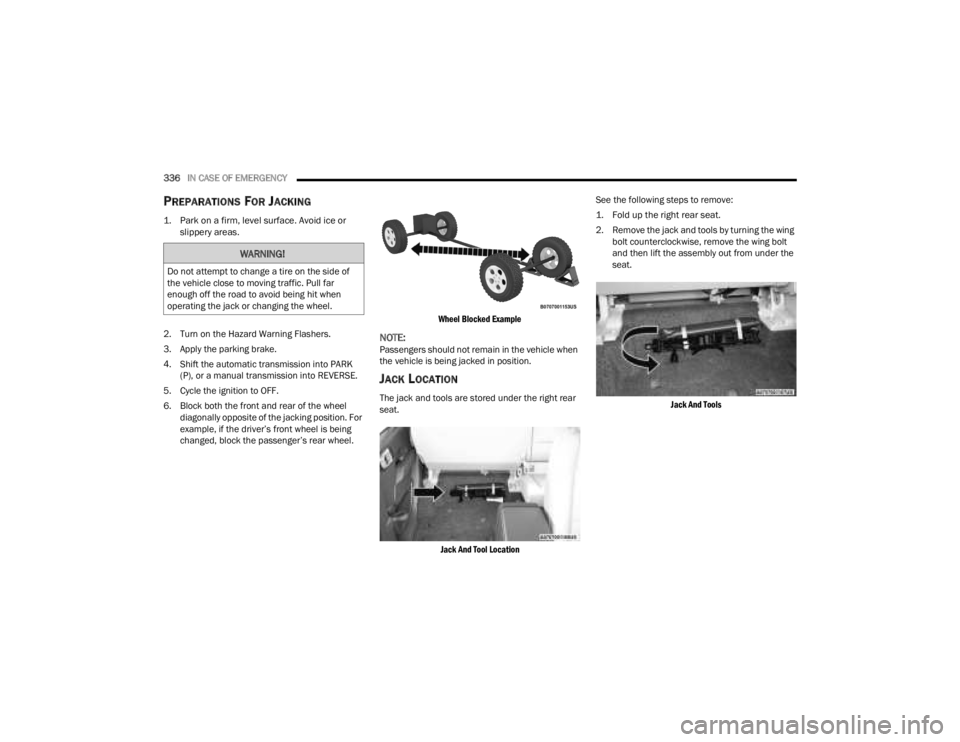
6. Block both the front and rear of the wheel diagonally opposite of the jacking position. For
example, if the driver’s front wheel is being
changed, block the passenger’s rear wheel.
Wheel Blocked Example
NOTE:Passengers should not remain in the vehicle when
the vehicle is being jacked in position.
JACK LOCATION
The jack and tools are stored under the right rear
seat.
Jack And Tool Location
See the following steps to remove:
1. Fold up the right rear seat.
2. Remove the jack and tools by turning the wing
bolt counterclockwise, remove the wing bolt
and then lift the assembly out from under the
seat.
Jack And Tools
WARNING!
Do not attempt to change a tire on the side of
the vehicle close to moving traffic. Pull far
enough off the road to avoid being hit when
operating the jack or changing the wheel.
23_JT_OM_EN_USC_t.book Page 336
Page 339 of 448
IN CASE OF EMERGENCY337
(Continued)
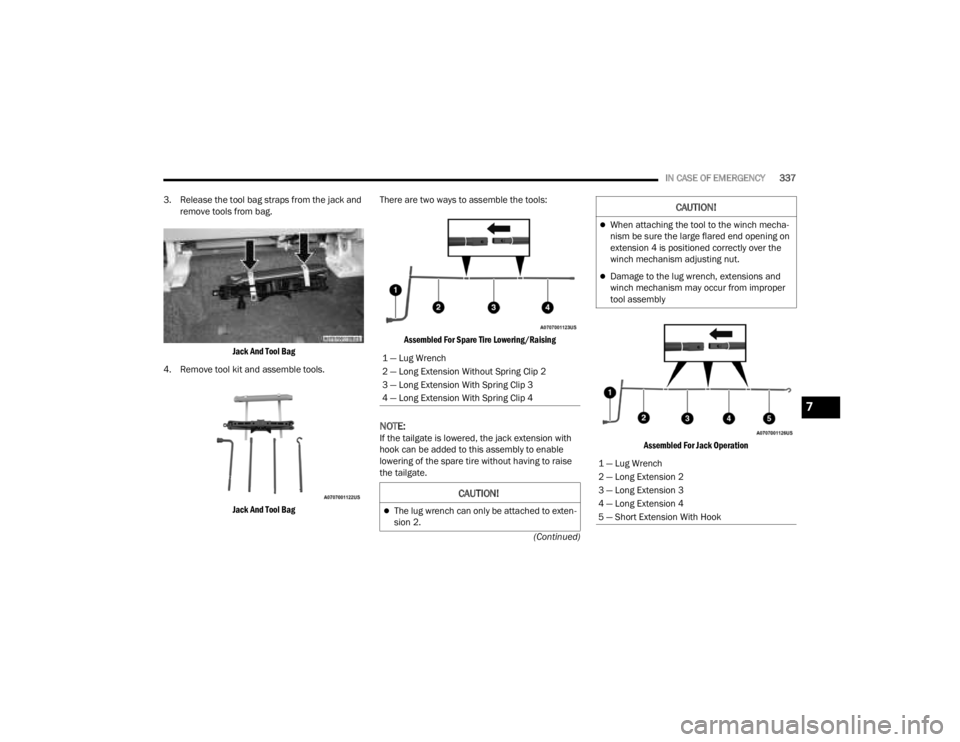
3. Release the tool bag straps from the jack and
remove tools from bag.
Jack And Tool Bag
4. Remove tool kit and assemble tools.
Jack And Tool Bag
There are two ways to assemble the tools:
Assembled For Spare Tire Lowering/Raising
NOTE:If the tailgate is lowered, the jack extension with
hook can be added to this assembly to enable
lowering of the spare tire without having to raise
the tailgate.
Assembled For Jack Operation
1 — Lug Wrench
2 — Long Extension Without Spring Clip 2
3 — Long Extension With Spring Clip 3
4 — Long Extension With Spring Clip 4
CAUTION!
The lug wrench can only be attached to exten
-
sion 2.
When attaching the tool to the winch mecha -
nism be sure the large flared end opening on
extension 4 is positioned correctly over the
winch mechanism adjusting nut.
Damage to the lug wrench, extensions and
winch mechanism may occur from improper
tool assembly
1 — Lug Wrench
2 — Long Extension 2
3 — Long Extension 3
4 — Long Extension 4
5 — Short Extension With Hook
CAUTION!
7
23_JT_OM_EN_USC_t.book Page 337
Page 340 of 448
338IN CASE OF EMERGENCY
SPARE TIRE LOCATION AND REMOVAL
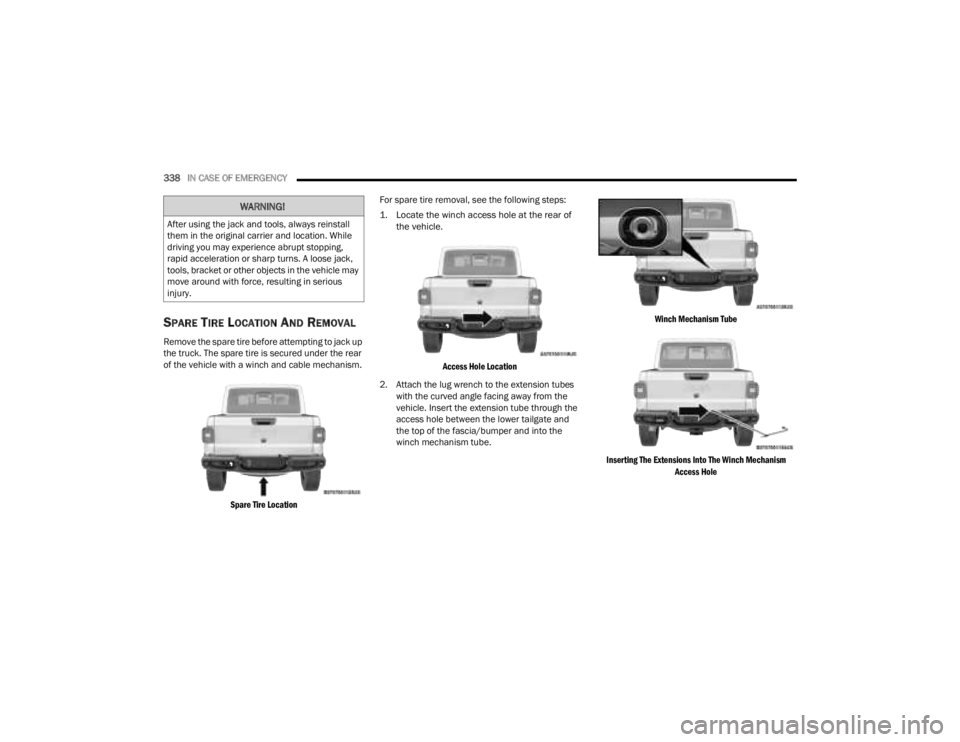
Remove the spare tire before attempting to jack up
the truck. The spare tire is secured under the rear
of the vehicle with a winch and cable mechanism.
Spare Tire Location
For spare tire removal, see the following steps:
1. Locate the winch access hole at the rear of
the vehicle.
Access Hole Location
2. Attach the lug wrench to the extension tubes with the curved angle facing away from the
vehicle. Insert the extension tube through the
access hole between the lower tailgate and
the top of the fascia/bumper and into the
winch mechanism tube.
Winch Mechanism Tube
Inserting The Extensions Into The Winch Mechanism Access Hole
WARNING!
After using the jack and tools, always reinstall
them in the original carrier and location. While
driving you may experience abrupt stopping,
rapid acceleration or sharp turns. A loose jack,
tools, bracket or other objects in the vehicle may
move around with force, resulting in serious
injury.
23_JT_OM_EN_USC_t.book Page 338
Page 341 of 448
IN CASE OF EMERGENCY339
(Continued)
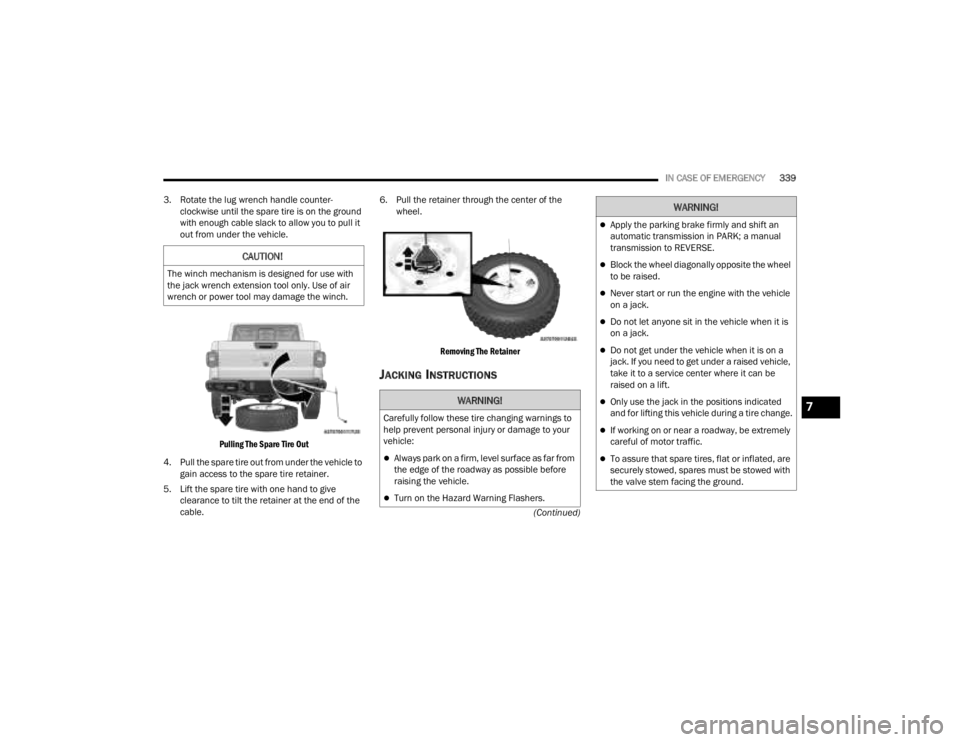
3. Rotate the lug wrench handle counter-
clockwise until the spare tire is on the ground
with enough cable slack to allow you to pull it
out from under the vehicle.
Pulling The Spare Tire Out
4. Pull the spare tire out from under the vehicle to gain access to the spare tire retainer.
5. Lift the spare tire with one hand to give clearance to tilt the retainer at the end of the
cable. 6. Pull the retainer through the center of the
wheel.
Removing The Retainer
JACKING INSTRUCTIONS
CAUTION!
The winch mechanism is designed for use with
the jack wrench extension tool only. Use of air
wrench or power tool may damage the winch.
WARNING!
Carefully follow these tire changing warnings to
help prevent personal injury or damage to your
vehicle:
Always park on a firm, level surface as far from
the edge of the roadway as possible before
raising the vehicle.
Turn on the Hazard Warning Flashers.
Apply the parking brake firmly and shift an
automatic transmission in PARK; a manual
transmission to REVERSE.
Block the wheel diagonally opposite the wheel
to be raised.
Never start or run the engine with the vehicle
on a jack.
Do not let anyone sit in the vehicle when it is
on a jack.
Do not get under the vehicle when it is on a
jack. If you need to get under a raised vehicle,
take it to a service center where it can be
raised on a lift.
Only use the jack in the positions indicated
and for lifting this vehicle during a tire change.
If working on or near a roadway, be extremely
careful of motor traffic.
To assure that spare tires, flat or inflated, are
securely stowed, spares must be stowed with
the valve stem facing the ground.
WARNING!
7
23_JT_OM_EN_USC_t.book Page 339