engine oil JEEP GLADIATOR 2023 Owners Manual
[x] Cancel search | Manufacturer: JEEP, Model Year: 2023, Model line: GLADIATOR, Model: JEEP GLADIATOR 2023Pages: 448, PDF Size: 17.37 MB
Page 6 of 448

4
INSTRUMENT CLUSTER DISPLAY ...................... 121 Instrument Cluster Display Location And
Controls .......................................................... 122
Oil Life Reset — If Equipped
S
................... 122
Off Road+ Display — If Equipped .................. 123
Instrument Cluster Display Selectable
Items .............................................................. 123
Instrument Cluster Display Menu Items ...... 124
Battery Saver On, Battery Saver Mode
Message, And Electrical Load Reduction
Actions
(If Equipped) .................................................. 127
Diesel Displays .............................................. 128 Diesel Particulate Filter (DPF) Messages .... 128Fuel System Messages ................................. 130
WARNING LIGHTS AND MESSAGES ................. 132
Red Warning Lights ....................................... 132
Yellow Warning Lights ................................... 135Yellow Indicator Lights .................................. 138
Green Indicator Lights................................... 139White Indicator Lights ................................... 140Blue Indicator Lights ..................................... 141
ONBOARD DIAGNOSTIC SYSTEM — OBD II ...... 141
Onboard Diagnostic System
(OBD II) Cybersecurity ................................... 142
EMISSIONS INSPECTION AND MAINTENANCE
PROGRAMS .......................................................... 142
STARTING AND OPERATING
STARTING THE ENGINE — GASOLINE ENGINE
(IF EQUIPPED) ...................................................... 144
Manual Transmission — If Equipped ........... 144Automatic Transmission —
If Equipped .................................................... 144
Normal Starting ............................................ 144
AutoPark ........................................................ 145Extreme Cold Weather
(Below –22°F Or −30°C) ............................ 146
Extended Park Starting ................................. 146
If Engine Fails To Start ................................. 147
After Starting ................................................. 147
STARTING THE ENGINE — DIESEL ENGINE
(IF EQUIPPED) ...................................................... 147
Automatic Transmission ............................... 148
Extreme Cold Weather .................................. 148
Normal Starting ............................................. 148Starting Fluids ............................................... 149
NORMAL OPERATION — DIESEL ENGINE ......... 149
Cold Weather Precautions ............................ 149
Engine Idling .................................................. 150
Stopping The Engine ..................................... 150
Cooling System Tips — Automatic
Transmission ................................................. 151
ENGINE BREAK-IN RECOMMENDATIONS —
GASOLINE ENGINE (IF EQUIPPED) ................... 151 ENGINE BREAK-IN RECOMMENDATIONS —
DIESEL ENGINE (IF EQUIPPED) .......................... 152
PARKING BRAKE ................................................. 152
MANUAL TRANSMISSION — IF EQUIPPED ....... 153
Shifting........................................................... 154
Downshifting.................................................. 155
AUTOMATIC TRANSMISSION —
IF EQUIPPED ......................................................... 155
Ignition Park Interlock................................... 156
Brake/Transmission Shift Interlock (BTSI)
System .......................................................... 1578–Speed Automatic Transmission .............. 157
Gear Ranges .................................................. 157
FOUR–WHEEL DRIVE OPERATION ................... 161
Four-Position Transfer Case —
If Equipped .................................................... 161
Five-Position Transfer Case —
If Equipped .................................................... 163
Trac-Lok Rear Axle — If Equipped ................ 165Axle Lock (Tru-Lok) Front And Rear —
If Equipped ................................................... 165
Axle Lock (Tru-Lok) Rear Only —
If Equipped ................................................... 166
Electronic Sway Bar Disconnect —
If Equipped ................................................... 166
OFF ROAD+ — If Equipped ............................ 168
ELECTRO-HYDRAULIC POWER STEERING ....... 168
23_JT_OM_EN_USC_t.book Page 4
Page 9 of 448

7
TOWING A DISABLED VEHICLE .......................... 350 Four–Wheel Drive Models ............................ 351
Without The Key Fob ..................................... 351
Emergency Tow Hooks —
If Equipped .................................................... 351
ENHANCED ACCIDENT RESPONSE SYSTEM
(EARS) .................................................................. 352
EVENT DATA RECORDER (EDR) ......................... 352
SERVICING AND MAINTENANCE
SCHEDULED SERVICING — GASOLINE
ENGINE ................................................................. 353
Maintenance Plan ......................................... 354
SCHEDULED SERVICING — DIESEL ENGINE .... 357
Maintenance Plan — Diesel Fuel Up To
B5 Biodiesel................................................... 358Additional Maintenance — B6 To B20
Biodiesel ........................................................ 361
ENGINE COMPARTMENT .................................... 362
3.6L Gasoline Engine ................................... 3623.0L Diesel Engine ........................................ 363
Checking Oil Level ......................................... 364
Adding Washer Fluid ..................................... 364
Maintenance-Free Battery ............................ 364
Pressure Washing ......................................... 365 VEHICLE MAINTENANCE..................................... 365
Engine Oil ....................................................... 365
Engine Oil Filter ............................................. 366Engine Air Cleaner Filter ............................... 366
Draining Fuel/Water Separator Filter —
Diesel Engine ................................................. 368
Fuel Filter Replacement — Diesel Engine .... 369
Priming If The Engine Has Run Out Of
Fuel — Diesel Engine .................................... 370
Intervention Regeneration Strategy —
Message Process Flow ................................ 371Diesel Exhaust Fluid ..................................... 371
Accessory Drive Belt Inspection ................... 372Air Conditioner Maintenance........................ 372
Body Lubrication ........................................... 374Windshield Wiper Blades.............................. 374Exhaust System ............................................ 376
Cooling System .............................................. 377
Charge Air Cooler — Inter-Cooler
(Diesel Engine) .............................................. 379
Brake System ............................................... 380
Front/Rear Axle Fluid ................................... 380Transfer Case ............................................... 381
Manual Transmission — If Equipped............ 381
Automatic Transmission —
If Equipped .................................................... 381
Fuses ............................................................. 382Bulb Replacement ........................................ 392 TIRES ..................................................................... 395
Tire Safety Information ................................. 395
Tires — General Information ......................... 401
Tire Types....................................................... 405Spare Tires — If Equipped ............................ 406
Wheel And Wheel Trim Care......................... 407
Snow Traction Devices ................................. 408
Tire Rotation Recommendations ................. 409
DEPARTMENT OF TRANSPORTATION
UNIFORM TIRE QUALITY GRADES .................... 410
Treadwear...................................................... 410
Traction Grades ............................................. 410Temperature Grades..................................... 410
STORING THE VEHICLE ....................................... 411
BODYWORK .......................................................... 411
Protection From Atmospheric Agents .......... 411
Body And Underbody Maintenance ............. 412
Preserving The Bodywork ............................. 412
INTERIORS ........................................................... 414
Carpet Safety Information ............................ 414
Carpet Removal............................................. 415Seats And Fabric Parts ................................. 416
Plastic And Coated Parts .............................. 417
Leather Surfaces........................................... 417
Glass Surfaces ............................................. 417
23_JT_OM_EN_USC_t.book Page 7
Page 13 of 448
11
CAMPERS
This vehicle is NOT recommended for slide-in camper applications.
VEHICLE MODIFICATIONS/ALTERATIONS
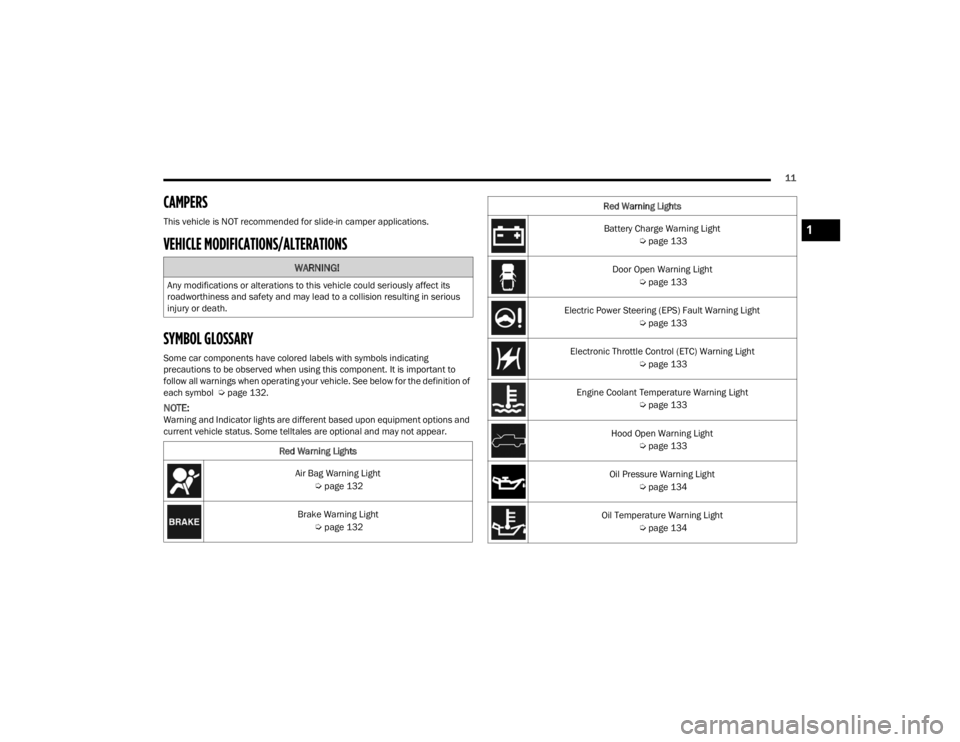
SYMBOL GLOSSARY
Some car components have colored labels with symbols indicating
precautions to be observed when using this component. It is important to
follow all warnings when operating your vehicle. See below for the definition of
each symbol Úpage 132.
NOTE:Warning and Indicator lights are different based upon equipment options and
current vehicle status. Some telltales are optional and may not appear.
WARNING!
Any modifications or alterations to this vehicle could seriously affect its
roadworthiness and safety and may lead to a collision resulting in serious
injury or death.
Red Warning LightsAir Bag Warning Light Úpage 132
Brake Warning Light Úpage 132
Battery Charge Warning Light
Úpage 133
Door Open Warning Light Úpage 133
Electric Power Steering (EPS) Fault Warning Light Úpage 133
Electronic Throttle Control (ETC) Warning Light Úpage 133
Engine Coolant Temperature Warning Light Úpage 133
Hood Open Warning Light Úpage 133
Oil Pressure Warning Light Úpage 134
Oil Temperature Warning Light Úpage 134
Red Warning Lights1
23_JT_OM_EN_USC_t.book Page 11
Page 120 of 448
118GETTING TO KNOW YOUR INSTRUMENT PANEL
Use this QR code to access your
digital experience.
INSTRUMENT CLUSTER
D
ESCRIPTIONS
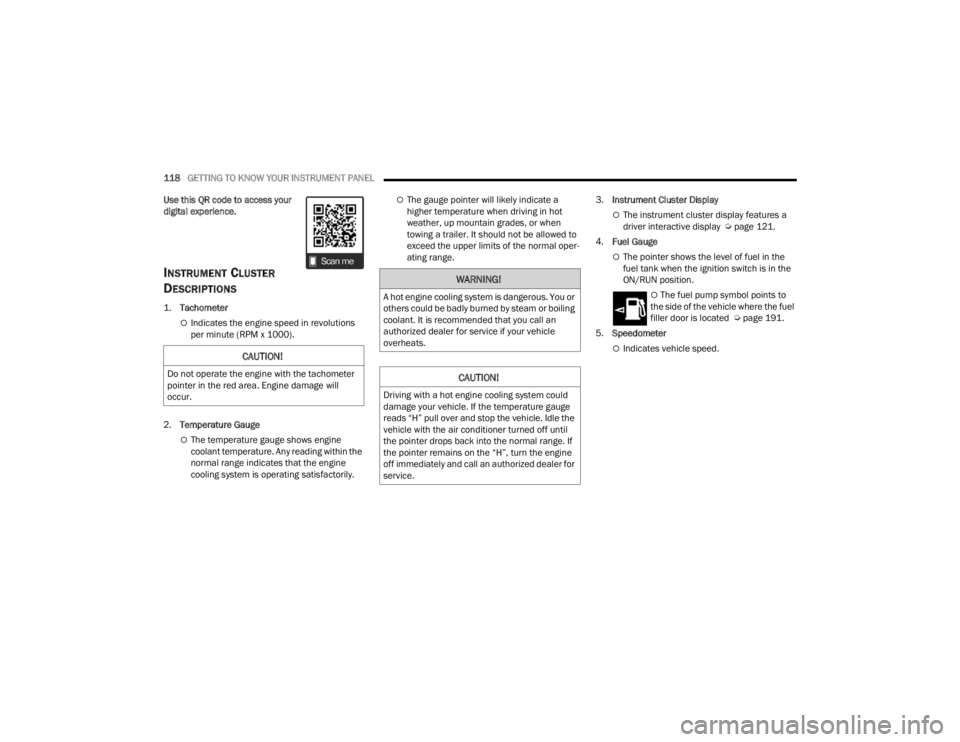
1.
Tachometer
Indicates the engine speed in revolutions
per minute (RPM x 1000).
2. Temperature Gauge
The temperature gauge shows engine
coolant temperature. Any reading within the
normal range indicates that the engine
cooling system is operating satisfactorily.
The gauge pointer will likely indicate a
higher temperature when driving in hot
weather, up mountain grades, or when
towing a trailer. It should not be allowed to
exceed the upper limits of the normal oper -
ating range. 3.
Instrument Cluster Display
The instrument cluster display features a
driver interactive display Ú page 121.
4. Fuel Gauge
The pointer shows the level of fuel in the
fuel tank when the ignition switch is in the
ON/RUN position.
The fuel pump symbol points to
the side of the vehicle where the fuel
filler door is located Ú page 191.
5. Speedometer
Indicates vehicle speed.CAUTION!
Do not operate the engine with the tachometer
pointer in the red area. Engine damage will
occur.
WARNING!
A hot engine cooling system is dangerous. You or
others could be badly burned by steam or boiling
coolant. It is recommended that you call an
authorized dealer for service if your vehicle
overheats.
CAUTION!
Driving with a hot engine cooling system could
damage your vehicle. If the temperature gauge
reads “H” pull over and stop the vehicle. Idle the
vehicle with the air conditioner turned off until
the pointer drops back into the normal range. If
the pointer remains on the “H”, turn the engine
off immediately and call an authorized dealer for
service.
23_JT_OM_EN_USC_t.book Page 118
Page 123 of 448
GETTING TO KNOW YOUR INSTRUMENT PANEL121
INSTRUMENT CLUSTER DESCRIPTIONS
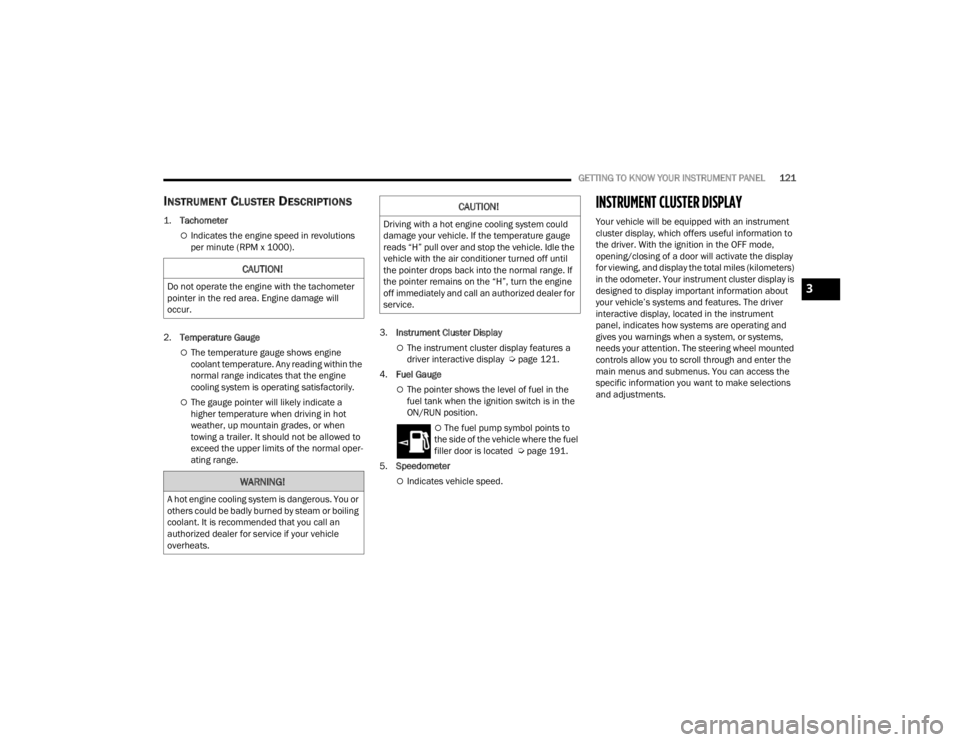
1.
Tachometer
Indicates the engine speed in revolutions
per minute (RPM x 1000).
2. Temperature Gauge
The temperature gauge shows engine
coolant temperature. Any reading within the
normal range indicates that the engine
cooling system is operating satisfactorily.
The gauge pointer will likely indicate a
higher temperature when driving in hot
weather, up mountain grades, or when
towing a trailer. It should not be allowed to
exceed the upper limits of the normal oper -
ating range. 3.
Instrument Cluster Display
The instrument cluster display features a
driver interactive display Ú page 121.
4. Fuel Gauge
The pointer shows the level of fuel in the
fuel tank when the ignition switch is in the
ON/RUN position.
The fuel pump symbol points to
the side of the vehicle where the fuel
filler door is located Ú page 191.
5. Speedometer
Indicates vehicle speed.
INSTRUMENT CLUSTER DISPLAY
Your vehicle will be equipped with an instrument
cluster display, which offers useful information to
the driver. With the ignition in the OFF mode,
opening/closing of a door will activate the display
for viewing, and display the total miles (kilometers)
in the odometer. Your instrument cluster display is
designed to display important information about
your vehicle’s systems and features. The driver
interactive display, located in the instrument
panel, indicates how systems are operating and
gives you warnings when a system, or systems,
needs your attention. The steering wheel mounted
controls allow you to scroll through and enter the
main menus and submenus. You can access the
specific information you want to make selections
and adjustments.
CAUTION!
Do not operate the engine with the tachometer
pointer in the red area. Engine damage will
occur.
WARNING!
A hot engine cooling system is dangerous. You or
others could be badly burned by steam or boiling
coolant. It is recommended that you call an
authorized dealer for service if your vehicle
overheats.
CAUTION!
Driving with a hot engine cooling system could
damage your vehicle. If the temperature gauge
reads “H” pull over and stop the vehicle. Idle the
vehicle with the air conditioner turned off until
the pointer drops back into the normal range. If
the pointer remains on the “H”, turn the engine
off immediately and call an authorized dealer for
service.
3
23_JT_OM_EN_USC_t.book Page 121
Page 124 of 448
122GETTING TO KNOW YOUR INSTRUMENT PANEL
INSTRUMENT CLUSTER DISPLAY
L
OCATION AND CONTROLS
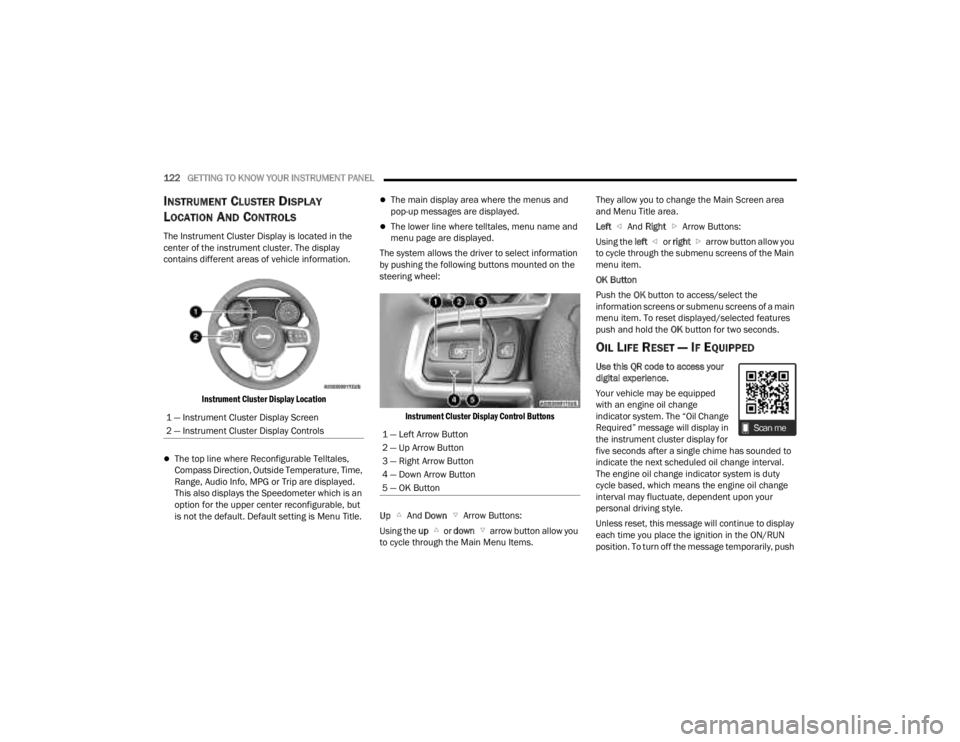
The Instrument Cluster Display is located in the
center of the instrument cluster. The display
contains different areas of vehicle information.
Instrument Cluster Display Location
The top line where Reconfigurable Telltales,
Compass Direction, Outside Temperature, Time,
Range, Audio Info, MPG or Trip are displayed.
This also displays the Speedometer which is an
option for the upper center reconfigurable, but
is not the default. Default setting is Menu Title.
The main display area where the menus and
pop-up messages are displayed.
The lower line where telltales, menu name and
menu page are displayed.
The system allows the driver to select information
by pushing the following buttons mounted on the
steering wheel:
Instrument Cluster Display Control Buttons
Up And Down Arrow Buttons:
Using the up or down arrow button allow you
to cycle through the Main Menu Items. They allow you to change the Main Screen area
and Menu Title area.
Left
And Right Arrow Buttons:
Using the left or right arrow button allow you
to cycle through the submenu screens of the Main
menu item.
OK Button
Push the OK button to access/select the
information screens or submenu screens of a main
menu item. To reset displayed/selected features
push and hold the OK button for two seconds.
OIL LIFE RESET — IF EQUIPPED
Use this QR code to access your
digital experience.
Your vehicle may be equipped
with an engine oil change
indicator system. The “Oil Change
Required” message will display in
the instrument cluster display for
five seconds after a single chime has sounded to
indicate the next scheduled oil change interval.
The engine oil change indicator system is duty
cycle based, which means the engine oil change
interval may fluctuate, dependent upon your
personal driving style.
Unless reset, this message will continue to display
each time you place the ignition in the ON/RUN
position. To turn off the message temporarily, push
1 — Instrument Cluster Display Screen
2 — Instrument Cluster Display Controls
1 — Left Arrow Button
2 — Up Arrow Button
3 — Right Arrow Button
4 — Down Arrow Button
5 — OK Button
23_JT_OM_EN_USC_t.book Page 122
Page 125 of 448

GETTING TO KNOW YOUR INSTRUMENT PANEL123
and release the OK button. To reset the oil change
indicator system (after performing the scheduled
maintenance), refer to the following procedure.
Oil Life Reset
1. Without pushing the brake pedal, place the ignition in the ON/RUN mode (do not start the
engine).
2. Navigate to "Oil Life" submenu in "Vehicle Info" in the instrument cluster display.
3. Push and hold the OK button until the gauge
resets to 100%.
Secondary Method For Oil Change Reset
Procedure
1. Without pushing the brake pedal, place the ignition in the ON/RUN position (do not start
the engine).
2. Fully press the accelerator pedal, slowly, three times within ten seconds.
3. Without pushing the brake pedal, place the ignition in the OFF position.
NOTE:If the indicator message illuminates when you start
the vehicle, the oil change indicator system did not
reset. If necessary, repeat this procedure.
OFF ROAD+ DISPLAY — IF EQUIPPED
When the Off Road+ button is pushed in the switch
bank, the Instrument Cluster Display will begin to
show messages related to the feature. Depending
on the Four Wheel Drive mode in use, the
messages will differ, and after five seconds, all
messages will clear from the display. The
messages are as follows:
2H: Off Road+ Unavailable, Shift to 4WD
4H: 4WD High Off Road+ Active
4L: 4WD Low Off Road+ Active
Adaptive Cruise Control (ACC) and Cruise Control
are not available when using Off Road+. If either
option is selected, a dedicated message will
display indicating that the features are not usable
concurrently. Messages are as follows:
4H: Cruise Control — Cruise Control Unavailable
in Off Road+
4H: Adaptive Cruise Control — Adaptive Cruise
Control (ACC) Unavailable in Off Road+
4L: Cruise Control — Cruise Control Unavailable
in 4WD Low
4L: Adaptive Cruise Control — Adaptive Cruise
Control (ACC) Unavailable in 4WD Low
NOTE:The behavior of Electronic Stability Control while in
Off Road+ varies depending on the 4WD status. If
the vehicle is in 4WD High, Traction Control is auto -
matically turned off. Also, holding the ESC OFF
button for five seconds will turn off ESC. In 4WD
Low, Electronic Stability Control automatically
shuts off regardless of the Off Road Status.
INSTRUMENT CLUSTER DISPLAY
S
ELECTABLE ITEMS
The instrument cluster display can be used to view
the following main menu items:
NOTE:Depending on the vehicles options, feature
settings may vary.
Speedometer Driver Assist —
If EquippedMessages
Vehicle Info Trip Info Screen Setup
Fuel Economy Stop/Start Audio
Off Road —
If Equipped
3
23_JT_OM_EN_USC_t.book Page 123
Page 130 of 448

128GETTING TO KNOW YOUR INSTRUMENT PANEL
What to do when an electrical load reduction
action message is present (“Battery Saver On” or
“Battery Saver Mode”)
During a trip:
Reduce power to unnecessary loads if possible:
Turn off redundant lights (interior or exte -
rior)
Check what may be plugged in to power
outlets +12 Volt, 115 Volts AC, USB ports
Check HVAC settings (blower, temperature)
Check the audio settings (volume)
After a trip:
Check if any aftermarket equipment was
installed (additional lights, upfitter electrical
accessories, audio systems, alarms) and review
specifications if any (load and ignition off draw
currents).
Evaluate the latest driving cycles (distance,
driving time and parking time).
The vehicle should have service performed if
the message is still present during consecutive
trips and the evaluation of the vehicle and
driving pattern did not help to identify the cause.
DIESEL DISPLAYS
When the appropriate conditions exist, the
following messages display in the instrument
cluster display:
Exhaust Filter Nearing Full Safely Drive at
Consistent Speeds to Clear
Exhaust Filter Full – Power Reduced See Dealer
Exhaust System Service Required – See Dealer
Exhaust System – Filter XX% Full Service
Required See Dealer
Exhaust System Regeneration in Process
Continue Driving
Exhaust System – Regeneration Completed
DIESEL PARTICULATE FILTER (DPF)
M
ESSAGES
This engine meets all required diesel engine
emissions standards. To achieve these emissions
standards, your vehicle is equipped with a
state-of-the-art engine and exhaust system. These
systems are seamlessly integrated into your
vehicle and managed by the Powertrain Control
Module (PCM). The PCM manages engine combustion to allow the exhaust system’s catalyst
to trap and burn Particulate Matter (PM)
pollutants, with no input or interaction on your part.
WARNING!
A malfunctioning catalytic converter, as
previously referenced, can reach higher
temperatures than in normal operating
conditions. This can cause a fire if you drive
slowly or park over flammable substances such
as dry plants, wood, cardboard, etc. This could
result in death or serious injury to the driver,
occupants or others.
CAUTION!
The engine may be switched off even if the
warning light is on: repeated interruptions of the
regeneration process could cause an early
deterioration of engine oil. For this reason it is
always advisable to wait for the symbol to go off
before turning off the engine, following the
previously mentioned instructions. Do not
complete the DPF regeneration process when
the vehicle is stopped.
23_JT_OM_EN_USC_t.book Page 128
Page 131 of 448

GETTING TO KNOW YOUR INSTRUMENT PANEL129
Your vehicle has the ability to alert you to
additional maintenance required on your vehicle or
engine. Refer to the following messages that may
be displayed on your instrument cluster display:
Exhaust Filter Nearing Full Safely Drive at
Consistent Speeds to Clear — This message will
be displayed if the exhaust particulate filter
reaches 80% of its maximum storage capacity.
Under conditions of exclusive short duration
and low speed driving cycles, your diesel engine
and exhaust after-treatment system may never
reach the conditions required to cleanse the
filter to remove the trapped PM. If this occurs,
the “Exhaust Filter XX% Full Safely Drive at
Highway Speeds to Remedy” message will be
displayed. If this message is displayed, you will
hear one chime to assist in alerting you of this
condition. By simply driving your vehicle at
highway speeds for up to 20 minutes, you can
remedy the condition in the particulate filter
system and allow your diesel engine and
exhaust after-treatment system to cleanse the
filter to remove the trapped PM and restore the
system to normal operating condition.
Exhaust System Regeneration in Process
Continue Driving — This message indicates that
the DPF is self-cleaning. Maintain your current
driving condition until regeneration is
completed.
Exhaust System — Regeneration Completed —
This message indicates that the DPF
self-cleaning is completed. If this message is
displayed, you will hear one chime to assist in
alerting you of this condition.
Exhaust System Service Required —
See Dealer — This message indicates regenera -
tion has been disabled due to a system malfunc -
tion. At this point the engine Powertrain Control
Module (PCM) will register a fault code, the
instrument panel will display a Malfunction Indi -
cator Light (MIL) light.
Exhaust Filter Full — Power Reduced
See Dealer — This message indicates the PCM
has derated the engine to limit the likelihood of
permanent damage to the after-treatment
system. If this condition is not corrected and a
dealer service is not performed, extensive
exhaust after-treatment damage can occur. To
correct this condition it will be necessary to have
your vehicle serviced by an authorized dealer.
NOTE:Failing to follow the oil change indicator, changing
your oil and resetting the oil change indicator by
0 miles (0 kilometers) remaining will prevent the
diesel exhaust filter from performing its cleaning
routine. This will shortly result in a Malfunction
Indicator Light (MIL) and reduced engine power.
Only an authorized dealer will be able to correct
this condition.
CAUTION!
See an authorized dealer, as damage to the
exhaust system could occur soon with continued
operation.CAUTION!
See an authorized dealer, as damage to the
exhaust system could occur soon with continued
operation.
3
23_JT_OM_EN_USC_t.book Page 129
Page 136 of 448
134GETTING TO KNOW YOUR INSTRUMENT PANEL
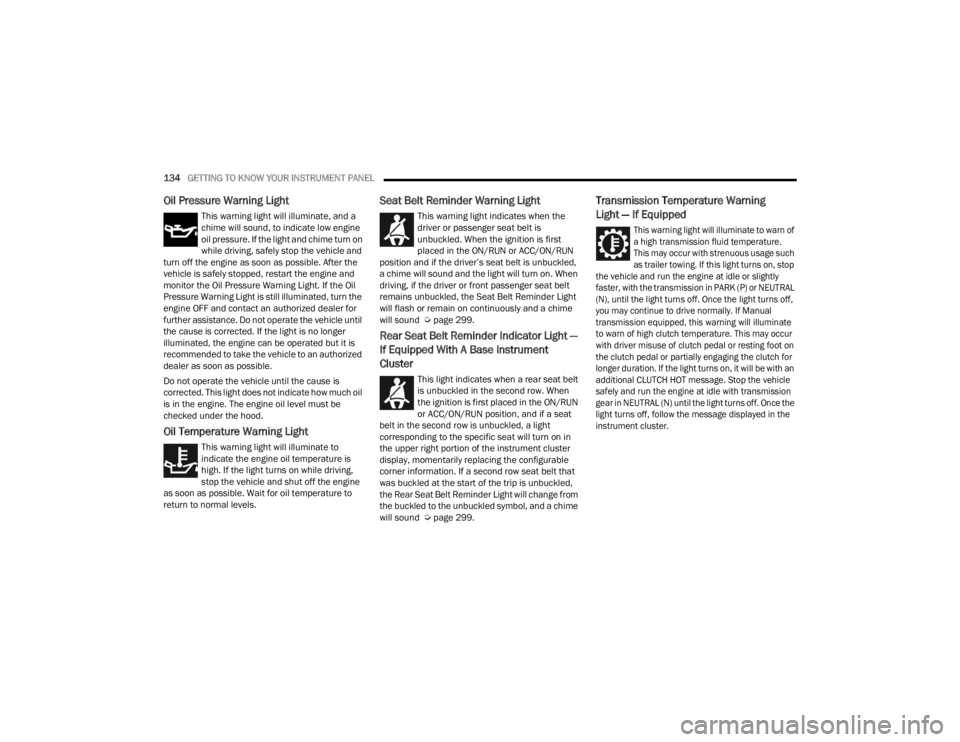
Oil Pressure Warning Light
This warning light will illuminate, and a
chime will sound, to indicate low engine
oil pressure. If the light and chime turn on
while driving, safely stop the vehicle and
turn off the engine as soon as possible. After the
vehicle is safely stopped, restart the engine and
monitor the Oil Pressure Warning Light. If the Oil
Pressure Warning Light is still illuminated, turn the
engine OFF and contact an authorized dealer for
further assistance. Do not operate the vehicle until
the cause is corrected. If the light is no longer
illuminated, the engine can be operated but it is
recommended to take the vehicle to an authorized
dealer as soon as possible.
Do not operate the vehicle until the cause is
corrected. This light does not indicate how much oil
is in the engine. The engine oil level must be
checked under the hood.
Oil Temperature Warning Light
This warning light will illuminate to
indicate the engine oil temperature is
high. If the light turns on while driving,
stop the vehicle and shut off the engine
as soon as possible. Wait for oil temperature to
return to normal levels.
Seat Belt Reminder Warning Light
This warning light indicates when the
driver or passenger seat belt is
unbuckled. When the ignition is first
placed in the ON/RUN or ACC/ON/RUN
position and if the driver’s seat belt is unbuckled,
a chime will sound and the light will turn on. When
driving, if the driver or front passenger seat belt
remains unbuckled, the Seat Belt Reminder Light
will flash or remain on continuously and a chime
will sound Ú page 299.
Rear Seat Belt Reminder Indicator Light —
If Equipped With A Base Instrument
Cluster
This light indicates when a rear seat belt
is unbuckled in the second row. When
the ignition is first placed in the ON/RUN
or ACC/ON/RUN position, and if a seat
belt in the second row is unbuckled, a light
corresponding to the specific seat will turn on in
the upper right portion of the instrument cluster
display, momentarily replacing the configurable
corner information. If a second row seat belt that
was buckled at the start of the trip is unbuckled,
the Rear Seat Belt Reminder Light will change from
the buckled to the unbuckled symbol, and a chime
will sound Ú page 299.
Transmission Temperature Warning
Light — If Equipped
This warning light will illuminate to warn of
a high transmission fluid temperature.
This may occur with strenuous usage such
as trailer towing. If this light turns on, stop
the vehicle and run the engine at idle or slightly
faster, with the transmission in PARK (P) or NEUTRAL
(N), until the light turns off. Once the light turns off,
you may continue to drive normally. If Manual
transmission equipped, this warning will illuminate
to warn of high clutch temperature. This may occur
with driver misuse of clutch pedal or resting foot on
the clutch pedal or partially engaging the clutch for
longer duration. If the light turns on, it will be with an
additional CLUTCH HOT message. Stop the vehicle
safely and run the engine at idle with transmission
gear in NEUTRAL (N) until the light turns off. Once the
light turns off, follow the message displayed in the
instrument cluster.
23_JT_OM_EN_USC_t.book Page 134