sport mode JEEP GLADIATOR 2023 Owners Manual
[x] Cancel search | Manufacturer: JEEP, Model Year: 2023, Model line: GLADIATOR, Model: JEEP GLADIATOR 2023Pages: 448, PDF Size: 17.37 MB
Page 9 of 448

7
TOWING A DISABLED VEHICLE .......................... 350 Four–Wheel Drive Models ............................ 351
Without The Key Fob ..................................... 351
Emergency Tow Hooks —
If Equipped .................................................... 351
ENHANCED ACCIDENT RESPONSE SYSTEM
(EARS) .................................................................. 352
EVENT DATA RECORDER (EDR) ......................... 352
SERVICING AND MAINTENANCE
SCHEDULED SERVICING — GASOLINE
ENGINE ................................................................. 353
Maintenance Plan ......................................... 354
SCHEDULED SERVICING — DIESEL ENGINE .... 357
Maintenance Plan — Diesel Fuel Up To
B5 Biodiesel................................................... 358Additional Maintenance — B6 To B20
Biodiesel ........................................................ 361
ENGINE COMPARTMENT .................................... 362
3.6L Gasoline Engine ................................... 3623.0L Diesel Engine ........................................ 363
Checking Oil Level ......................................... 364
Adding Washer Fluid ..................................... 364
Maintenance-Free Battery ............................ 364
Pressure Washing ......................................... 365 VEHICLE MAINTENANCE..................................... 365
Engine Oil ....................................................... 365
Engine Oil Filter ............................................. 366Engine Air Cleaner Filter ............................... 366
Draining Fuel/Water Separator Filter —
Diesel Engine ................................................. 368
Fuel Filter Replacement — Diesel Engine .... 369
Priming If The Engine Has Run Out Of
Fuel — Diesel Engine .................................... 370
Intervention Regeneration Strategy —
Message Process Flow ................................ 371Diesel Exhaust Fluid ..................................... 371
Accessory Drive Belt Inspection ................... 372Air Conditioner Maintenance........................ 372
Body Lubrication ........................................... 374Windshield Wiper Blades.............................. 374Exhaust System ............................................ 376
Cooling System .............................................. 377
Charge Air Cooler — Inter-Cooler
(Diesel Engine) .............................................. 379
Brake System ............................................... 380
Front/Rear Axle Fluid ................................... 380Transfer Case ............................................... 381
Manual Transmission — If Equipped............ 381
Automatic Transmission —
If Equipped .................................................... 381
Fuses ............................................................. 382Bulb Replacement ........................................ 392 TIRES ..................................................................... 395
Tire Safety Information ................................. 395
Tires — General Information ......................... 401
Tire Types....................................................... 405Spare Tires — If Equipped ............................ 406
Wheel And Wheel Trim Care......................... 407
Snow Traction Devices ................................. 408
Tire Rotation Recommendations ................. 409
DEPARTMENT OF TRANSPORTATION
UNIFORM TIRE QUALITY GRADES .................... 410
Treadwear...................................................... 410
Traction Grades ............................................. 410Temperature Grades..................................... 410
STORING THE VEHICLE ....................................... 411
BODYWORK .......................................................... 411
Protection From Atmospheric Agents .......... 411
Body And Underbody Maintenance ............. 412
Preserving The Bodywork ............................. 412
INTERIORS ........................................................... 414
Carpet Safety Information ............................ 414
Carpet Removal............................................. 415Seats And Fabric Parts ................................. 416
Plastic And Coated Parts .............................. 417
Leather Surfaces........................................... 417
Glass Surfaces ............................................. 417
23_JT_OM_EN_USC_t.book Page 7
Page 170 of 448
168STARTING AND OPERATING
OFF ROAD+ — IF EQUIPPED
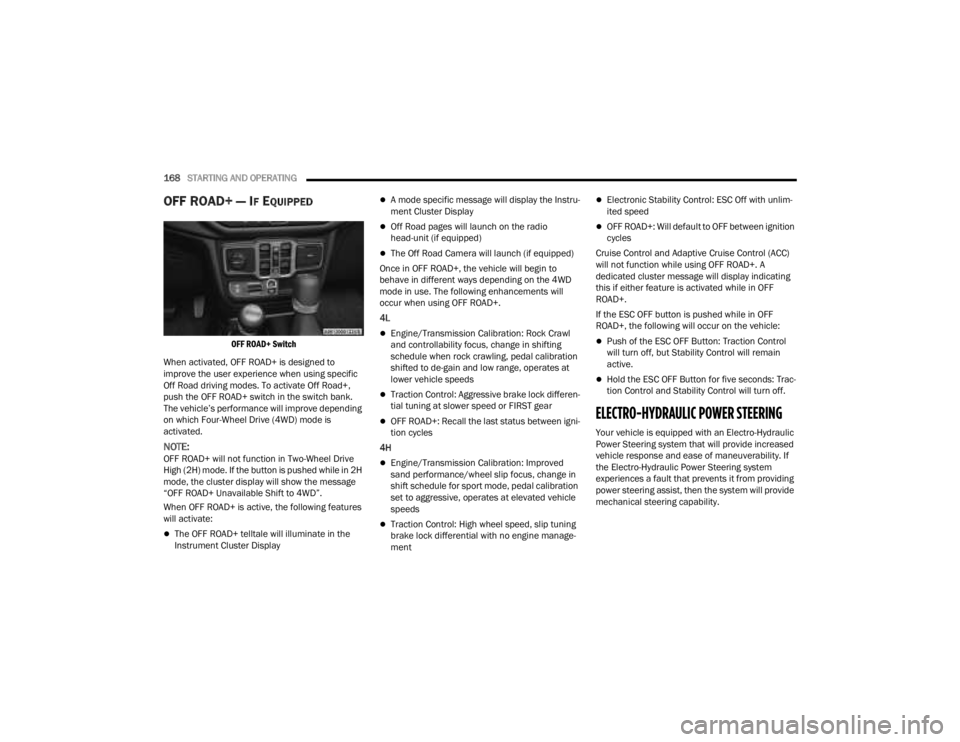
OFF ROAD+ Switch
When activated, OFF ROAD+ is designed to
improve the user experience when using specific
Off Road driving modes. To activate Off Road+,
push the OFF ROAD+ switch in the switch bank.
The vehicle’s performance will improve depending
on which Four-Wheel Drive (4WD) mode is
activated.
NOTE:OFF ROAD+ will not function in Two-Wheel Drive
High (2H) mode. If the button is pushed while in 2H
mode, the cluster display will show the message
“OFF ROAD+ Unavailable Shift to 4WD”.
When OFF ROAD+ is active, the following features
will activate:
The OFF ROAD+ telltale will illuminate in the
Instrument Cluster Display
A mode specific message will display the Instru -
ment Cluster Display
Off Road pages will launch on the radio
head-unit (if equipped)
The Off Road Camera will launch (if equipped)
Once in OFF ROAD+, the vehicle will begin to
behave in different ways depending on the 4WD
mode in use. The following enhancements will
occur when using OFF ROAD+.
4L
Engine/Transmission Calibration: Rock Crawl
and controllability focus, change in shifting
schedule when rock crawling, pedal calibration
shifted to de-gain and low range, operates at
lower vehicle speeds
Traction Control: Aggressive brake lock differen -
tial tuning at slower speed or FIRST gear
OFF ROAD+: Recall the last status between igni -
tion cycles
4H
Engine/Transmission Calibration: Improved
sand performance/wheel slip focus, change in
shift schedule for sport mode, pedal calibration
set to aggressive, operates at elevated vehicle
speeds
Traction Control: High wheel speed, slip tuning
brake lock differential with no engine manage -
ment
Electronic Stability Control: ESC Off with unlim -
ited speed
OFF ROAD+: Will default to OFF between ignition
cycles
Cruise Control and Adaptive Cruise Control (ACC)
will not function while using OFF ROAD+. A
dedicated cluster message will display indicating
this if either feature is activated while in OFF
ROAD+.
If the ESC OFF button is pushed while in OFF
ROAD+, the following will occur on the vehicle:
Push of the ESC OFF Button: Traction Control
will turn off, but Stability Control will remain
active.
Hold the ESC OFF Button for five seconds: Trac -
tion Control and Stability Control will turn off.
ELECTRO-HYDRAULIC POWER STEERING
Your vehicle is equipped with an Electro-Hydraulic
Power Steering system that will provide increased
vehicle response and ease of maneuverability. If
the Electro-Hydraulic Power Steering system
experiences a fault that prevents it from providing
power steering assist, then the system will provide
mechanical steering capability.
23_JT_OM_EN_USC_t.book Page 168
Page 201 of 448

STARTING AND OPERATING199
TRAILER HITCH CLASSIFICATION
The following chart provides the industry standard for the maximum trailer weight a given trailer hitch class can tow and should be used to assist you in selecting
the correct trailer hitch for your intended towing condition.
TRAILER TOWING WEIGHTS (MAXIMUM TRAILER WEIGHT RATINGS)
Trailer Hitch Classification Definitions
Class Max. Trailer Hitch Industry Standards
Class I - Light Duty 2,000 lb (907 kg)
Class II - Medium Duty 3,500 lb (1,587 kg)
Class III - Heavy Duty 6,000 lb (2,722 kg)
Class IV - Extra Heavy Duty 10,000 lb (4,535 kg)
Refer to the “Trailer Towing Weights (Maximum Trailer Weight Ratings)” chart for the Maximum Gross Trailer Weight (GTW) towable for your given drivetrain in
this section.
All trailer hitches should be professionally installed on your vehicle.
Model GCWRFrontal Area Maximum GTWMaximum Trailer TW
(See Note)
Sport - Manual Transmission 9,100 lb (4,128 kg) 40 ft2 (3.72 m2)4,000 lb (1,814 kg)
400 lb (181 kg)
Sport - Automatic Transmission 9,650 lb (4,377 kg)
40 ft
2 (3.72 m2)4,500 lb (2,041 kg)
450 lb (204 kg)
Diesel Sport - Automatic Transmission 12,100 lb (5,488 kg)
40 ft
2 (3.72 m2)6,500 lb (2,948 kg)
650 lb (295 kg)
4
23_JT_OM_EN_USC_t.book Page 199
Page 202 of 448

200STARTING AND OPERATING
Diesel Sport - Automatic
Transmission (Tow Package) 12,100 lb (5,488 kg)
55 ft
2 (5.11 m2)6,500 lb (2,948 kg)
650 lb (295 kg)
Sport - Automatic
Transmission (Max Tow Package) 12,800 lb (5,806 kg)
55 ft
2 (5.11 m2)7,650 lb (3,470 kg)
765 lb (347 kg)
Sport S - Manual Transmission 9,100 lb (4,128 kg)
40 ft
2 (3.72 m2)4,000 lb (1,814 kg)
400 lb (181 kg)
Sport S - Automatic Transmission 9,650 lb (4,377 kg)
40 ft
2 (3.72 m2)4,500 lb (2,041 kg)
450 lb (204 kg)
Diesel Sport S - Automatic Transmission 12,100 lb (5,488 kg)
40 ft
2 (3.72 m2)6,500 lb (2,948 kg)
650 lb (295 kg)
Diesel Sport S - Automatic
Transmission (Tow Package) 12,100 lb (5,488 kg)
55 ft
2 (5.11 m2)6,500 lb (2,948 kg)
650 lb (295 kg)
Sport S - Automatic
Transmission (Max Tow Package) 12,800 lb (5,806 kg)
55 ft
2 (5.11 m2)7,650 lb (3,470 kg)
765 lb (347 kg)
Overland - Manual Transmission 9,100 lb (4,128 kg)
40 ft
2 (3.72 m2)4,000 lb (1,814 kg)
400 lb (181 kg)
Overland - Automatic Transmission 9,650 lb (4,377 kg)
40 ft
2 (3.72 m2)4,500 lb (2,041 kg)
450 lb (204 kg)
Diesel Overland - Automatic Transmission 12,100 lb (5,488 kg)
40 ft
2 (3.72 m2)6,500 lb (2,948 kg)
650 lb (295 kg)
ModelGCWRFrontal Area Maximum GTWMaximum Trailer TW
(See Note)
23_JT_OM_EN_USC_t.book Page 200
Page 237 of 448
MULTIMEDIA235
Fast Seek Up and Fast Seek Down
Press and hold, and then release the Seek Up
or Seek Down button to advance the radio
through the available stations or channels at a
faster rate. The radio stops at the next available
station or channel when the button on the
touchscreen is released.
NOTE:Pressing and holding either the Seek Up or
Seek Down button will scan the different
frequency bands at a slower rate.
Direct Tune
Press the Tune button located at the bottom of the
radio screen to directly tune to a desired radio
station or channel.
Press the available number button on the
touchscreen to begin selecting a desired station.
Once a number has been entered, any numbers
that are no longer possible (stations that cannot be
reached) will become deactivated/grayed out.
Undo
You can backspace an entry by pressing the
Back button on the touchscreen.
GO
Once the last digit of a station has been entered,
press “Ok”. The Direct Tune screen will close, and
the system will automatically tune to that station.
RADIO VOICE COMMANDS
Use your voice to quickly get to the AM, FM, or
SiriusXM® Satellite Radio stations you would like
to hear. (Subscription or included SiriusXM®
Satellite Radio trial required.)
Push the VR button on the steering wheel and
wait for the beep to say a command. See an
example:
“ Tune to ninety-five-point-five FM”
“Tune to Satellite Channel Hits 1”
Did You Know: At any time, if you are not sure of
what to say or want to learn a Voice Command,
push the VR button and say “ Help”. The system
provides you with a list of commands.
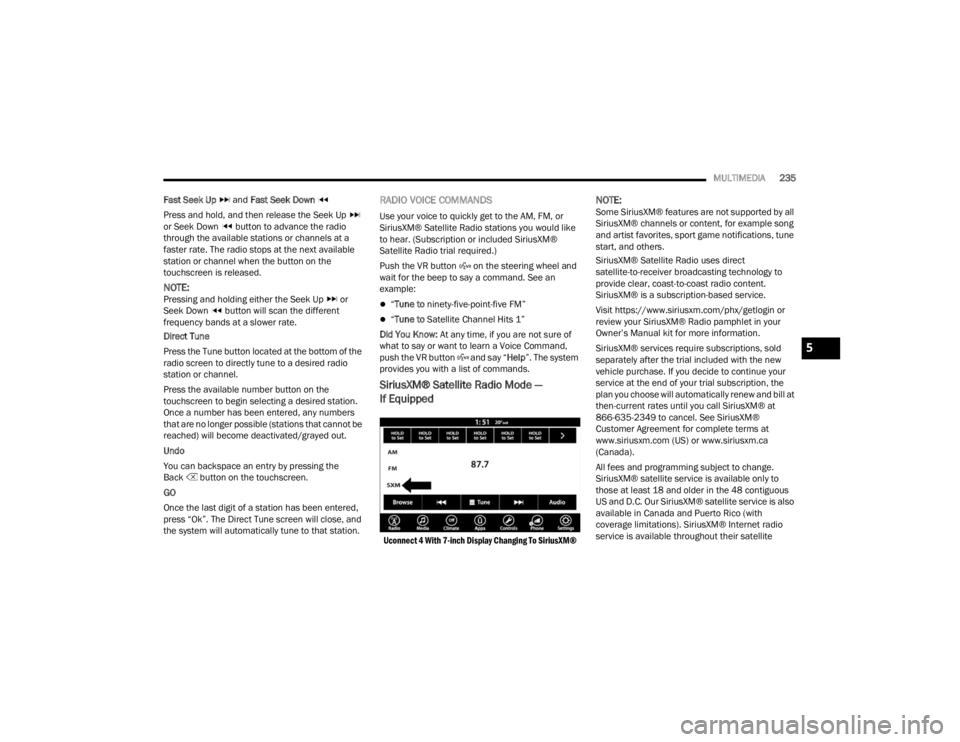
SiriusXM® Satellite Radio Mode —
If Equipped
Uconnect 4 With 7-inch Display Changing To SiriusXM®
NOTE:Some SiriusXM® features are not supported by all
SiriusXM® channels or content, for example song
and artist favorites, sport game notifications, tune
start, and others.
SiriusXM® Satellite Radio uses direct
satellite-to-receiver broadcasting technology to
provide clear, coast-to-coast radio content.
SiriusXM® is a subscription-based service.
Visit https://www.siriusxm.com/phx/getlogin or
review your SiriusXM® Radio pamphlet in your
Owner’s Manual kit for more information.
SiriusXM® services require subscriptions, sold
separately after the trial included with the new
vehicle purchase. If you decide to continue your
service at the end of your trial subscription, the
plan you choose will automatically renew and bill at
then-current rates until you call SiriusXM® at
866-635-2349 to cancel. See SiriusXM®
Customer Agreement for complete terms at
www.siriusxm.com (US) or www.siriusxm.ca
(Canada).
All fees and programming subject to change.
SiriusXM® satellite service is available only to
those at least 18 and older in the 48 contiguous
US and D.C. Our SiriusXM® satellite service is also
available in Canada and Puerto Rico (with
coverage limitations). SiriusXM® Internet radio
service is available throughout their satellite
5
23_JT_OM_EN_USC_t.book Page 235
Page 289 of 448
SAFETY287
NOTE:TSC cannot stop all trailers from swaying. Always
use caution when towing a trailer and follow the
trailer tongue weight recommendations. See
Úpage 197 for further information.
When TSC is functioning, the ESC Activation/
Malfunction Indicator Light will flash, the engine
power may be reduced, and you may feel the
brakes being applied to individual wheels to
attempt to stop the trailer from swaying. TSC is
disabled when the ESC system is in the “Partial
Off” or “Full Off” modes.
AUXILIARY DRIVING SYSTEMS
BLIND SPOT MONITORING (BSM) —
I
F EQUIPPED
The BSM system uses two radar sensors, located
inside the taillights, to detect highway licensable
vehicles (automobiles, trucks, motorcycles, etc.)
that enter the blind spot zones from the rear/front/
side of the vehicle.
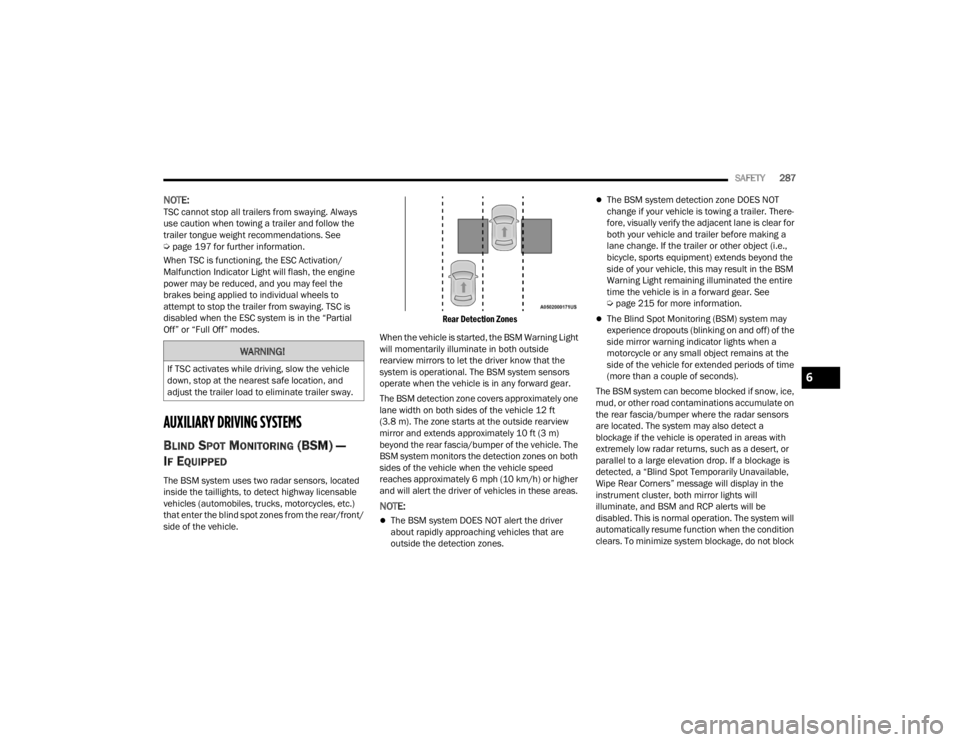
Rear Detection Zones
When the vehicle is started, the BSM Warning Light
will momentarily illuminate in both outside
rearview mirrors to let the driver know that the
system is operational. The BSM system sensors
operate when the vehicle is in any forward gear.
The BSM detection zone covers approximately one
lane width on both sides of the vehicle 12 ft
(3.8 m). The zone starts at the outside rearview
mirror and extends approximately 10 ft (3 m)
beyond the rear fascia/bumper of the vehicle. The
BSM system monitors the detection zones on both
sides of the vehicle when the vehicle speed
reaches approximately 6 mph (10 km/h) or higher
and will alert the driver of vehicles in these areas.
NOTE:
The BSM system DOES NOT alert the driver
about rapidly approaching vehicles that are
outside the detection zones.
The BSM system detection zone DOES NOT
change if your vehicle is towing a trailer. There -
fore, visually verify the adjacent lane is clear for
both your vehicle and trailer before making a
lane change. If the trailer or other object (i.e.,
bicycle, sports equipment) extends beyond the
side of your vehicle, this may result in the BSM
Warning Light remaining illuminated the entire
time the vehicle is in a forward gear. See
Ú page 215 for more information.
The Blind Spot Monitoring (BSM) system may
experience dropouts (blinking on and off) of the
side mirror warning indicator lights when a
motorcycle or any small object remains at the
side of the vehicle for extended periods of time
(more than a couple of seconds).
The BSM system can become blocked if snow, ice,
mud, or other road contaminations accumulate on
the rear fascia/bumper where the radar sensors
are located. The system may also detect a
blockage if the vehicle is operated in areas with
extremely low radar returns, such as a desert, or
parallel to a large elevation drop. If a blockage is
detected, a “Blind Spot Temporarily Unavailable,
Wipe Rear Corners” message will display in the
instrument cluster, both mirror lights will
illuminate, and BSM and RCP alerts will be
disabled. This is normal operation. The system will
automatically resume function when the condition
clears. To minimize system blockage, do not block
WARNING!
If TSC activates while driving, slow the vehicle
down, stop at the nearest safe location, and
adjust the trailer load to eliminate trailer sway.6
23_JT_OM_EN_USC_t.book Page 287
Page 301 of 448
SAFETY299
Beginning with the next ignition cycle, the TPMS
will no longer chime or display the “SERVICE TIRE
PRESSURE SYSTEM” message in the instrument
cluster but dashes (--) will remain in place of the
pressure values.
To reactivate the TPMS, replace all four wheel and
tire assemblies (road tires) with tires equipped with
TPMS sensors. Then, drive the vehicle for up to
20 minutes above 15 mph (24 km/h). The TPMS
will chime, the TPMS Warning Light will flash on
and off for 75 seconds and then turn off. The
instrument cluster will display the “SERVICE TIRE
PRESSURE SYSTEM” message and then display
pressure values in place of the dashes. On the next
ignition cycle the "SERVICE TIRE PRESSURE
SYSTEM" message will no longer be displayed as
long as no system fault exists.
OCCUPANT RESTRAINT SYSTEMS
Some of the most important safety features in your
vehicle are the restraint systems:
OCCUPANT RESTRAINT SYSTEMS
F
EATURES
Seat Belt Systems
Supplemental Restraint Systems (SRS) Air Bags
Child Restraints Some of the safety features described in this
section may be standard equipment on some
models, or may be optional equipment on others. If
you are not sure, ask an authorized dealer.
IMPORTANT SAFETY PRECAUTIONS
Please pay close attention to the information in
this section. It tells you how to use your restraint
system properly, to keep you and your passengers
as safe as possible.
Here are some simple steps you can take to
minimize the risk of harm from a deploying air bag:
1. Children 12 years old and under should
always ride buckled up in the rear seat of a
vehicle with a rear seat.
2. A child who is not big enough to wear the vehicle seat belt properly must be secured in
the appropriate child restraint or
belt-positioning booster seat in a rear seating
position Ú page 318.
3. If a child from 2 to 12 years old (not in a rear-facing child restraint) must ride in the
front passenger seat, move the seat as far
back as possible and use the proper child
restraint Ú page 318.
4. Never allow children to slide the shoulder belt behind them or under their arm. 5. You should read the instructions provided with
your child restraint to make sure that you are
using it properly.
6. All occupants should always wear their lap and shoulder belts properly.
7. The driver and front passenger seats should be moved back as far as practical to allow the
front air bags room to inflate.
8. Do not lean against the door or window. If your vehicle has side air bags, and deployment
occurs, the side air bags will inflate forcefully
into the space between occupants and the
door and occupants could be injured.
9. If the air bag system in this vehicle needs to be modified to accommodate a disabled person,
see Úpage 428 for customer service contact
information.
WARNING!
Never place a rear-facing child restraint in
front of an air bag. A deploying passenger
front air bag can cause death or serious injury
to a child 12 years or younger, including a
child in a rear-facing child restraint.
Never install a rear-facing child restraint in the
front seat of a vehicle. Only use a rear-facing
child restraint in the rear seat. If the vehicle
does not have a rear seat, do not transport a
rear-facing child restraint in that vehicle.
6
23_JT_OM_EN_USC_t.book Page 299
Page 307 of 448
SAFETY305
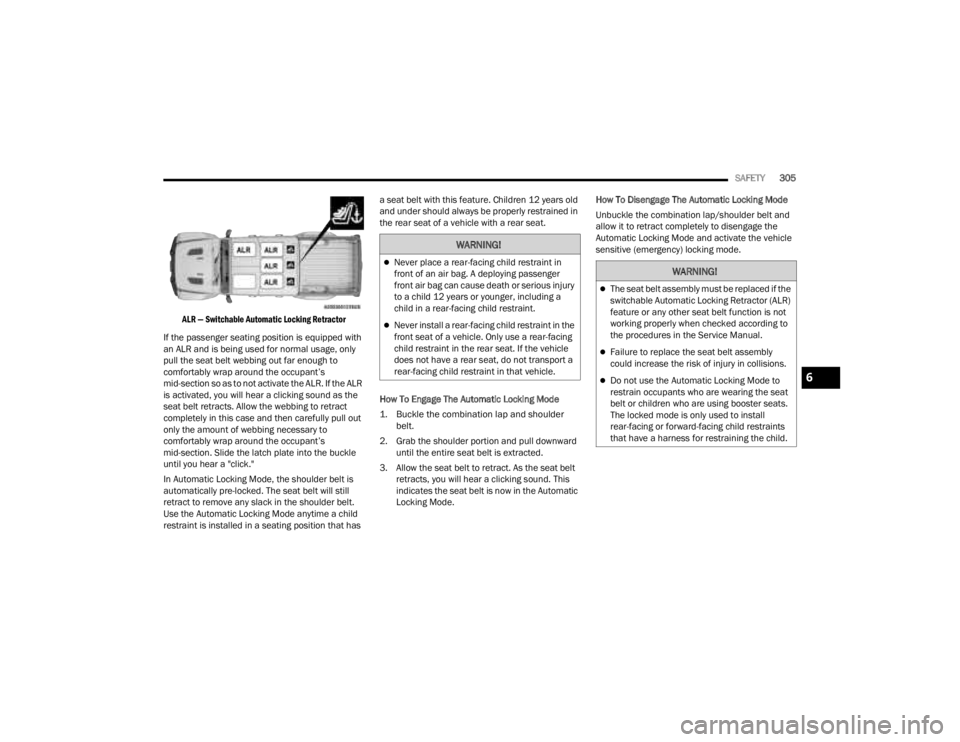
ALR — Switchable Automatic Locking Retractor
If the passenger seating position is equipped with
an ALR and is being used for normal usage, only
pull the seat belt webbing out far enough to
comfortably wrap around the occupant’s
mid-section so as to not activate the ALR. If the ALR
is activated, you will hear a clicking sound as the
seat belt retracts. Allow the webbing to retract
completely in this case and then carefully pull out
only the amount of webbing necessary to
comfortably wrap around the occupant’s
mid-section. Slide the latch plate into the buckle
until you hear a "click."
In Automatic Locking Mode, the shoulder belt is
automatically pre-locked. The seat belt will still
retract to remove any slack in the shoulder belt.
Use the Automatic Locking Mode anytime a child
restraint is installed in a seating position that has a seat belt with this feature. Children 12 years old
and under should always be properly restrained in
the rear seat of a vehicle with a rear seat.
How To Engage The Automatic Locking Mode
1. Buckle the combination lap and shoulder
belt.
2. Grab the shoulder portion and pull downward until the entire seat belt is extracted.
3. Allow the seat belt to retract. As the seat belt retracts, you will hear a clicking sound. This
indicates the seat belt is now in the Automatic
Locking Mode. How To Disengage The Automatic Locking Mode
Unbuckle the combination lap/shoulder belt and
allow it to retract completely to disengage the
Automatic Locking Mode and activate the vehicle
sensitive (emergency) locking mode.
WARNING!
Never place a rear-facing child restraint in
front of an air bag. A deploying passenger
front air bag can cause death or serious injury
to a child 12 years or younger, including a
child in a rear-facing child restraint.
Never install a rear-facing child restraint in the
front seat of a vehicle. Only use a rear-facing
child restraint in the rear seat. If the vehicle
does not have a rear seat, do not transport a
rear-facing child restraint in that vehicle.
WARNING!
The seat belt assembly must be replaced if the
switchable Automatic Locking Retractor (ALR)
feature or any other seat belt function is not
working properly when checked according to
the procedures in the Service Manual.
Failure to replace the seat belt assembly
could increase the risk of injury in collisions.
Do not use the Automatic Locking Mode to
restrain occupants who are wearing the seat
belt or children who are using booster seats.
The locked mode is only used to install
rear-facing or forward-facing child restraints
that have a harness for restraining the child.6
23_JT_OM_EN_USC_t.book Page 305
Page 331 of 448
SAFETY329
(Continued)
TRANSPORTING PETS
Air Bags deploying in the front seat could harm
your pet. An unrestrained pet will be thrown about
and possibly injured, or injure a passenger during
panic braking or in a collision.
Pets should be restrained in the rear seat (if
equipped) in pet harnesses or pet carriers that are
secured by seat belts.
CONNECTED VEHICLES
Privacy of any wireless and wired communications
cannot be assured. Third parties may unlawfully
intercept information and private communications
without your consent. For further information, refer
to “Data Collection & Privacy” in your Uconnect
Owner’s Manual Supplement or “Onboard
Diagnostic System (OBD II) Cybersecurity”
Ú page 142.
SAFETY CHECKS YOU SHOULD MAKE
I
NSIDE THE VEHICLE
Seat Belts
Inspect the seat belt system periodically, checking
for cuts, frays, and loose parts. Damaged parts
must be replaced immediately. Do not
disassemble or modify the system.
If your vehicle is involved in a collision, or if you
have questions regarding the seat belt or retractor
conditions, take your vehicle to an authorized FCA
dealer or authorized FCA Certified Collision Care
Program facility for inspection.
Air Bag Warning Light
The Air Bag Warning Light will turn on for
four to eight seconds as a bulb check
when the ignition switch is first placed in
the ON/RUN position. If the light is either
not on during starting, stays on, or turns on while
driving, have the system inspected at an
authorized dealer as soon as possible. This light
will illuminate with a single chime when a fault with
the Air Bag Warning Light has been detected, it will
stay on until the fault is removed. If the light comes
on intermittently or remains on while driving, have
an authorized dealer service the vehicle
immediately Ú page 306.
Defroster
Check operation by selecting the defrost mode and
place the blower control on high speed. You should
be able to feel the air directed against the
windshield. See an authorized dealer for service if
your defroster is inoperable.
Floor Mat Safety Information
Always use floor mats designed to fit your vehicle.
Only use a floor mat that does not interfere with the
operation of the pedal assemblies. Only use a floor
mat that is securely attached using the floor mat
fasteners so it cannot slip out of position and
interfere with the pedal assemblies or impair safe
operation of your vehicle in other ways.
WARNING!
It is not possible to know or to predict all of the
possible outcomes if your vehicle’s systems are
breached. It may be possible that vehicle
systems, including safety related systems, could
be impaired or a loss of vehicle control could
occur that may result in an accident involving
serious injury or death.
WARNING!
An improperly attached, damaged, folded, or
stacked floor mat, or damaged floor mat
fasteners may cause your floor mat to interfere
with the accelerator, brake, or clutch pedals and
cause a loss of vehicle control. To prevent
SERIOUS INJURY or DEATH:
ALWAYS securely attach your floor
mat using the floor mat fasteners. DO
NOT install your floor mat upside down
or turn your floor mat over. Lightly pull
to confirm mat is secured using the floor mat
fasteners on a regular basis.
6
23_JT_OM_EN_USC_t.book Page 329
Page 435 of 448

433
INDEX
A
About Your Brakes......................................... 418Accessory Drive Belt Inspection..................... 372Adaptive Cruise Control (ACC)
(Cruise Control).............................................. 173Adding Engine Coolant (Antifreeze)............... 378Adding Fuel.......................................... 191, 192Additives, Fuel............................................... 419Advance Phone Connectivity......................... 252Air BagAir Bag Operation...................................... 308Air Bag Warning Light............. 132, 306, 309Enhanced Accident Response......... 317, 352Event Data Recorder (EDR)....................... 352Front Air Bag................................... 307, 309If Deployment Occurs................................ 316Knee Impact Bolsters................................ 314Maintaining Your Air Bag System.............. 317Maintenance............................................. 317Redundant Air Bag Warning Light.............307Transporting Pets...................................... 329Air Bag Light........................................ 306, 329Air Cleaner, Engine (Engine Air Cleaner
Filter)............................................................. 366Air Conditioner Maintenance......................... 372Air Conditioner Refrigerant.................. 372, 373
Air Conditioner System................................. 372Air Conditioning Filter..............................68, 373Air Conditioning System................................... 67Air Conditioning, Operating Tips....................... 67Air Filter........................................................ 366Air PressureTires......................................................... 402AlarmArm The System.......................................... 23Disarm The System..................................... 23Security Alarm............................................. 23Alterations/ModificationsVehicle......................................................... 11Android Auto........................................ 254, 255Android Auto™
S
........................................ 254Antifreeze (Engine Coolant)................. 377, 423Disposal................................................... 378Anti-Lock Brake System (ABS)............. 135, 279Apple CarPlay....................................... 254, 257Apple CarPlay®
S
...................................... 256Assist, Hill Start............................................. 283Audio Settings............................................... 240Audio Systems (Radio).................................. 214Auto Down Power Windows............................. 81Automatic Dimming Mirror............................... 51Automatic Door Locks...................................... 27
Automatic Headlights.......................................58Automatic High Beams.....................................58Automatic Temperature Control (ATC)..............67Automatic Transmission................................ 157Adding Fluid.............................................. 382Autostick................................................... 160Fluid And Filter Change............................. 382Fluid Change............................................. 382Fluid Level Check............................. 381, 382Fluid Type........................................ 382, 426Gear Ranges............................................. 157Special Additives...................................... 381Automatic Transmission Limp Home Mode... 159AutoPark....................................................... 145AUX..................................................................71Auxiliary Electrical Outlet (Power Outlet)..........77Auxiliary Power Outlet......................................77Auxiliary Switches............................................79Axle Fluid....................................................... 426Axle Lock.............................................. 165, 166
B
Battery.......................................................... 364Charging System Light.............................. 133Keyless Key Fob Replacement....................16Bed Lights........................................................59
11
23_JT_OM_EN_USC_t.book Page 433