low beam JEEP GRAND CHEROKEE 2010 Owner handbook (in English)
[x] Cancel search | Manufacturer: JEEP, Model Year: 2010, Model line: GRAND CHEROKEE, Model: JEEP GRAND CHEROKEE 2010Pages: 350, PDF Size: 4.58 MB
Page 61 of 350
WARNING!(Continued)
• Never put floor mats or other floor cover-
ings on top of already installed floor mats.
Additional floor mats and other coverings
will reduce the size of the pedal area and
interfere with the pedals.
• Check mounting of mats on a regular basis.
Always properly reinstall and secure floor
mats that have been removed for cleaning.
• Always make sure that objects cannot fall
into the driver foot well while the vehicle is
moving. Objects can become trapped un-
der the brake pedal and accelerator pedal
causing a loss of vehicle control.
(Continued)WARNING!(Continued)
• If required, mounting posts must be prop-
erly installed, if not equipped from the fac-
tory.
Failure to properly follow floor mat installation
or mounting can cause interference with the
brake pedal and accelerator pedal operation
causing loss of control of the vehicle.
Periodic Safety Checks You Should
Make Outside the Vehicle
Tires
Examine tires for excessive tread wear and
uneven wear patterns. Check for stones, nails,
glass, or other objects lodged in the tread.
Inspect the tread and sidewall for cuts and
cracks. Check the wheel nuts for tightness.
Check the tires (including spare) for proper
pressure. Lights
Have someone observe the operation of exte-
rior lights while you work the controls. Check
turn signal and high beam indicator lights on
the instrument panel.
Door Latches
Check for positive closing, latching, and lock-
ing.
Fluid Leaks
Check area under vehicle after overnight park-
ing for fuel, engine coolant, oil, or other fluid
leaks. Also, if gasoline fumes are detected or if
fuel, power steering fluid, or brake fluid leaks
are suspected, the cause should be located
and corrected immediately.
57
Page 66 of 350
•Multifunction Lever ....................... 111
• Turn Signals ........................... 111
• Lane Change Assist ...................... 111
• Flash-To-Pass .......................... 111
• High/Low Beam Switch ..................... 112
• WINDSHIELD WIPERS AND WASHERS ............. 112
• Windshield Wiper Operation .................. 112
• Intermittent Wiper System ................... 113
• Windshield Washer Operation ................ 113
• Mist ................................ 114
• Rain Sensing Wipers — If Equipped ............. 114
• TILT/TELESCOPING STEERING COLUMN ............ 115
• POWER TILT/TELESCOPING STEERING COLUMN —
IF EQUIPPED ............................ 115
• HEATED STEERING WHEEL — IF EQUIPPED ......... 116
• ELECTRONIC SPEED CONTROL ................. 116
• To Activate ............................ 117
• To Set a Desired Speed .................... 117
• To Deactivate .......................... 117
• To Resume Speed ........................ 117
• To Vary the Speed Setting ................... 117
• To Accelerate for Passing ................... 118
62
Page 111 of 350
NOTE:
The engine must be running before the
headlights will turn on in the Automatic
Mode.
Headlights On Automatically With
Wipers
If your vehicle is equipped with Automatic
Headlights, it also has this customer-
programmable feature. When your headlights
are in the automatic mode and the engine is
running, they will automatically turn on when
the wiper system is on. Refer to “Electronic
Vehicle Information Center (EVIC)/Customer-
Programmable Features” in “Understanding
Your Instrument Panel” for further information.
If your vehicle is equipped with a “Rain Sensi-
tive Wiper System” and it is activated, the
headlights will automatically turn on after the
wipers complete five wipe cycles within ap-
proximately one minute, and they will turn off
approximately four minutes after the wipers
completely stop. Refer to “Windshield Wipers
and Washers” in this section for further informa-
tion.NOTE:
When your headlights come on during the
daytime, the instrument panel lights will
automatically dim to the lower nighttime
intensity. Refer to “Lights” in this section for
further information.SmartBeam™ — If EquippedThe SmartBeam™ system provides increased
forward lighting at night by automating high
beam control through the use of a digital cam-
era mounted on the inside rearview mirror. This
camera detects vehicle specific light and auto-
matically switches from high beams to low
beams until the approaching vehicle is out of
view.
NOTE:
If the windshield or SmartBeam™ mirror is
replaced, the SmartBeam™ mirror must be
re-aimed to ensure proper performance. See
your local authorized dealer.
To Activate
1. Enable the Automatic High Beams. Refer to
“Electronic Vehicle Information Center (EVIC)/
Customer-Programmable Features” in “Under-
standing Your Instrument Panel” for further in-
formation.
2. Turn the headlight switch to the AUTO head-
light position.
3. Push the multifunction lever away from you
(toward front of vehicle) to engage the high
beam mode.
NOTE:
This system will not activate until the ve-
hicle is at or above 20 mph (32 km/h).
To Deactivate
1. Pull the multifunction lever toward you (or
rearward in car) to manually deactivate the
system (normal operation of low beams).
2. Push back on the multifunction lever once
again to reactivate the system.
107
Page 112 of 350
NOTE:
Broken, muddy, or obstructed headlights
and taillights of vehicles in the field of view
will cause headlights to remain on longer
(closer to the vehicle). Also, dirt, film, and
other obstructions (sticker, toll box, etc.) on
the windshield or camera lens will cause the
system to function improperly.
Daytime Running Lights —
If Equipped
The Daytime Running Lights (low intensity)
come on whenever the engine is running, and
the transmission is not in the PARK position.
The lights will remain on until the ignition is
switched to the OFF or ACC position or the
parking brake is engaged. The headlight
switch must be used for normal nighttime driv-
ing.
Disabling the Daytime Running Lights
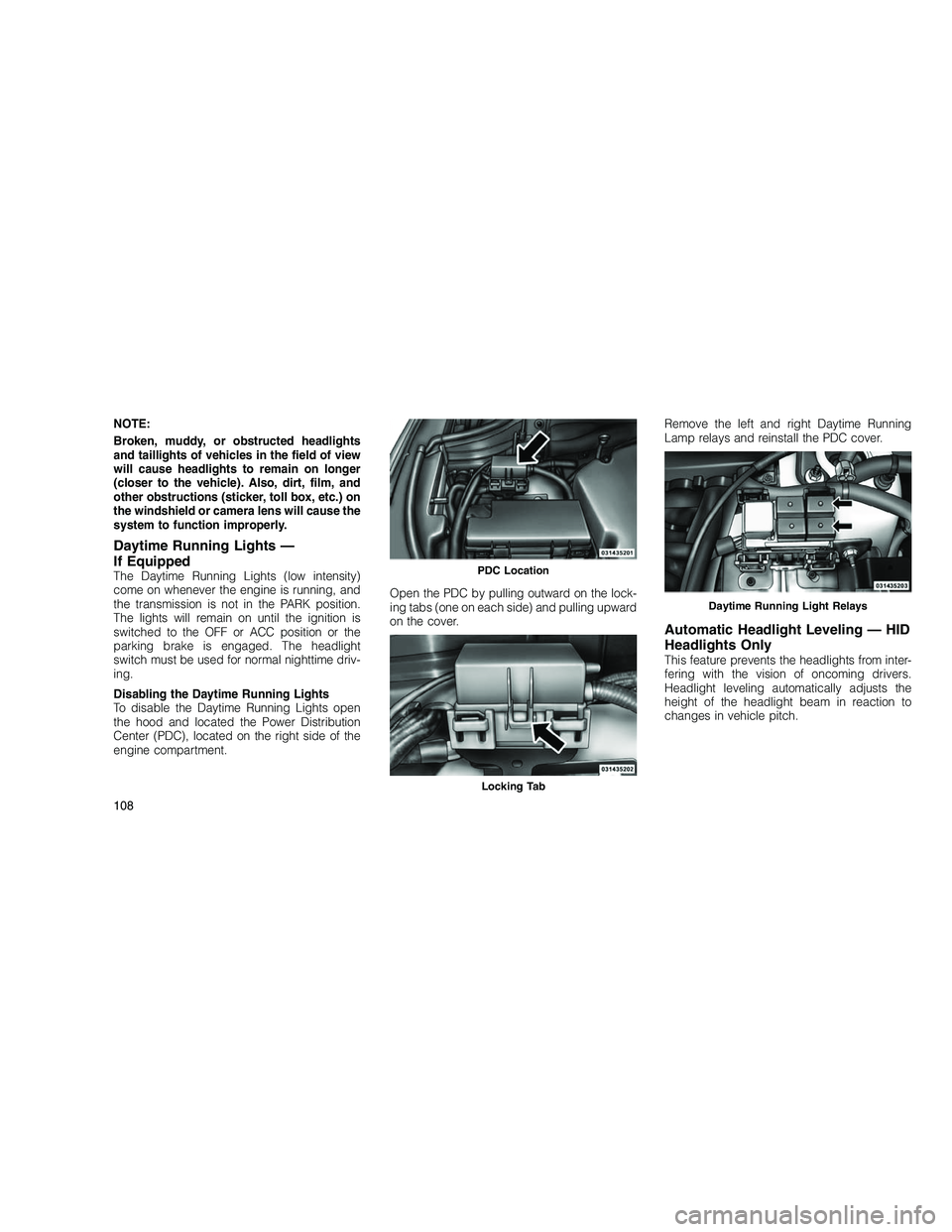
To disable the Daytime Running Lights open
the hood and located the Power Distribution
Center (PDC), located on the right side of the
engine compartment.Open the PDC by pulling outward on the lock-
ing tabs (one on each side) and pulling upward
on the cover.Remove the left and right Daytime Running
Lamp relays and reinstall the PDC cover.
Automatic Headlight Leveling — HID
Headlights Only
This feature prevents the headlights from inter-
fering with the vision of oncoming drivers.
Headlight leveling automatically adjusts the
height of the headlight beam in reaction to
changes in vehicle pitch.
PDC Location
Locking Tab
Daytime Running Light Relays
108
Page 116 of 350
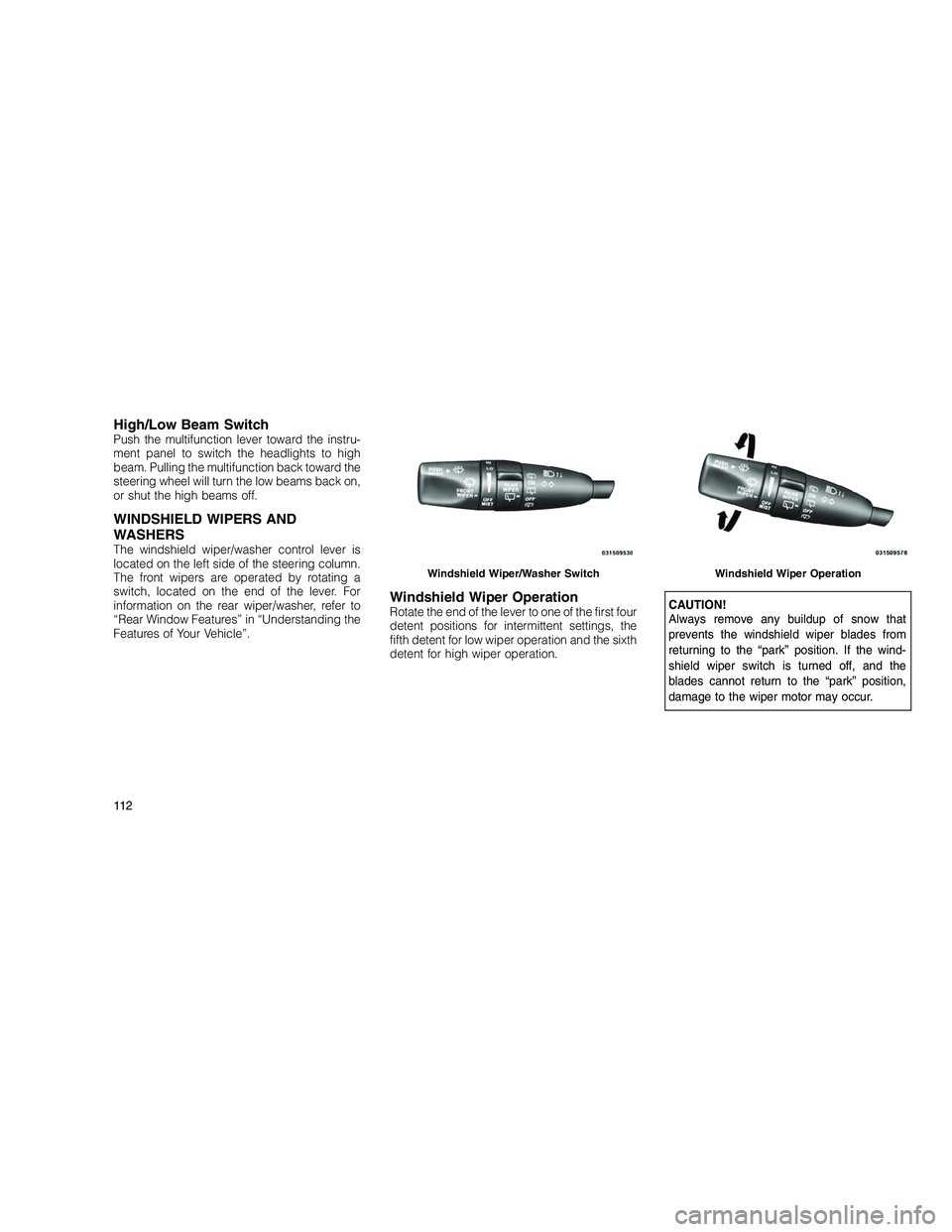
High/Low Beam SwitchPush the multifunction lever toward the instru-
ment panel to switch the headlights to high
beam. Pulling the multifunction back toward the
steering wheel will turn the low beams back on,
or shut the high beams off.
WINDSHIELD WIPERS AND
WASHERS
The windshield wiper/washer control lever is
located on the left side of the steering column.
The front wipers are operated by rotating a
switch, located on the end of the lever. For
information on the rear wiper/washer, refer to
“Rear Window Features” in “Understanding the
Features of Your Vehicle”.
Windshield Wiper OperationRotate the end of the lever to one of the first four
detent positions for intermittent settings, the
fifth detent for low wiper operation and the sixth
detent for high wiper operation.CAUTION!
Always remove any buildup of snow that
prevents the windshield wiper blades from
returning to the “park” position. If the wind-
shield wiper switch is turned off, and the
blades cannot return to the “park” position,
damage to the wiper motor may occur.
Windshield Wiper/Washer SwitchWindshield Wiper Operation
11 2
Page 130 of 350
not recommended. Doing so may block the
sensor and inhibit ACC operation.
Removing ACC Sensor For Off-Roading
NOTE:
When off-roading, it may be advisable to
remove the ACC sensor. The sensor is lo-
cated behind the front lower grille in the
center of the vehicle. After removing the
lower fascia, you may remove the lower
sensor and bracket assembly.
To remove the sensor follow these instructions:
1. Unplug the connector by depressing the two
tabs on the connector and pulling it out. Do not
pull by the wiring or using any tools to remove
the connector.
2. Remove the wiring christmas tree attach-
ment from the back of the bracket.
3. Remove the two M6 fasteners that connect
the bracket to the bumper.
NOTE:
Do not change the adjustment fasteners or
pull the sensor off of the bracket. Doing so
may misalign the sensor.Store the sensor and bracket assembly in a
safe location. The wiring and connector must
be stowed properly after the sensor and
bracket assembly is removed.
A connector plug is stowed on top of the
bumper beam. Insert the wiring connector into
the connector plug.
NOTE:
When the sensor is removed, Adaptive
Cruise Control, Normal Cruise Control, and
Forward Collision Warning will not be avail-
able. The cluster will display the warning
“ACC/FCW Unavailable - Service Radar Sen-
sor.”
To reinstall the sensor and bracket assembly
reverse the process above. The fastener torque
required to assembly the bracket back to the
beam is 6.6 ft lbs (9 Nm).
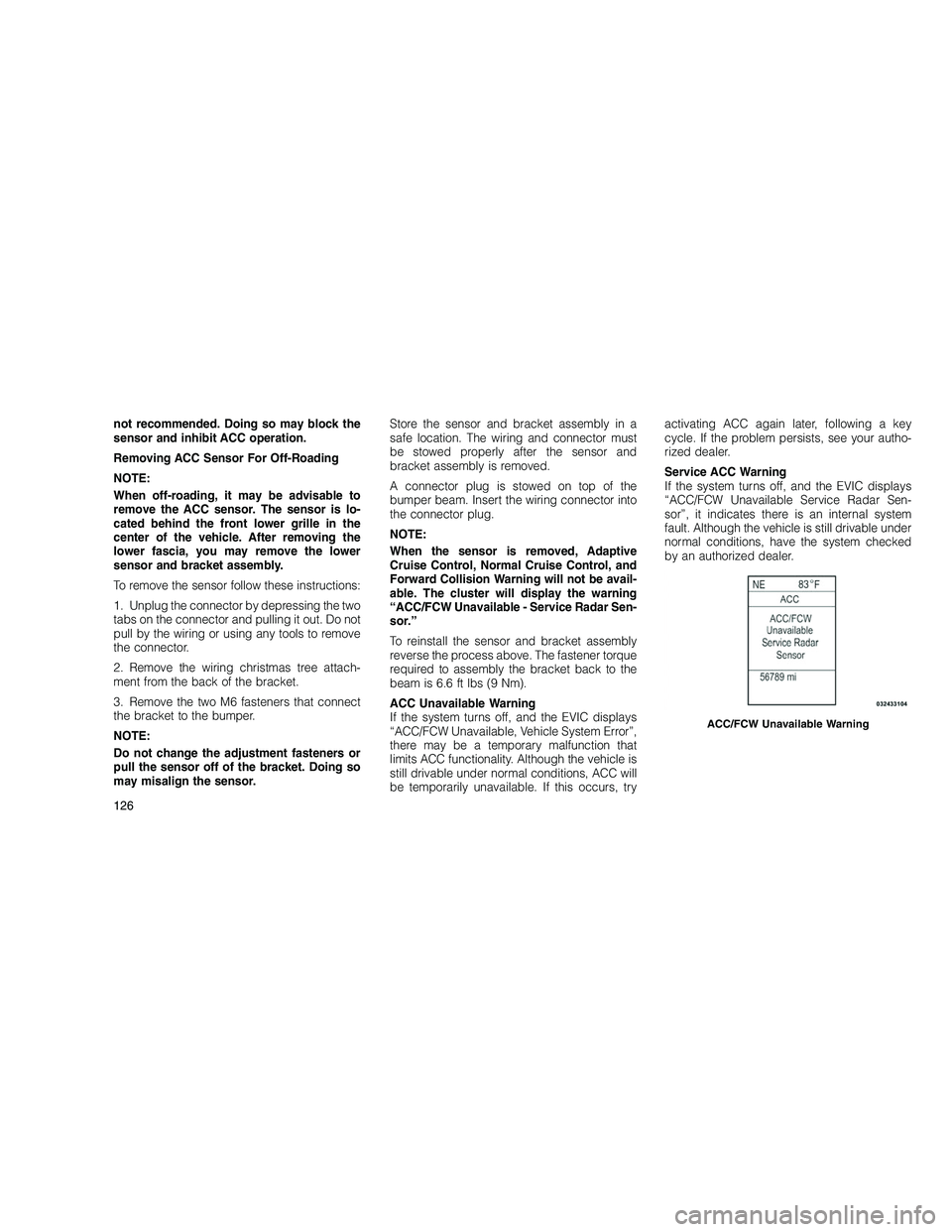
ACC Unavailable Warning
If the system turns off, and the EVIC displays
“ACC/FCW Unavailable, Vehicle System Error”,
there may be a temporary malfunction that
limits ACC functionality. Although the vehicle is
still drivable under normal conditions, ACC will
be temporarily unavailable. If this occurs, tryactivating ACC again later, following a key
cycle. If the problem persists, see your autho-
rized dealer.
Service ACC Warning
If the system turns off, and the EVIC displays
“ACC/FCW Unavailable Service Radar Sen-
sor”, it indicates there is an internal system
fault. Although the vehicle is still drivable under
normal conditions, have the system checked
by an authorized dealer.
ACC/FCW Unavailable Warning
126
Page 163 of 350
than 30 mph (48 km/h), see your authorized
dealer as soon as possible to have the problem
diagnosed and corrected.
NOTE:
•The “ESC Off Indicator Light” and the
“ESC Activation/Malfunction Indicator
Light” come on momentarily each time
the ignition switch is turned to ON/RUN.
• Each time the ignition is turned to ON/
RUN, the ESC system will be ON even if it
was turned off previously.
• The ESC system will make buzzing or
clicking sounds when it is active. This is
normal; the sounds will stop when ESC
becomes inactive following the maneuver
that caused the ESC activation.
5. TOW/HAUL Indicator Light —
If Equipped This light will illuminate when the
TOW/HAUL button has been se-
lected. The TOW/HAUL button is
located in the center of the instru-
ment panel (below the climate
controls). 6. Turn Signal Indicator
The arrows will flash with the exterior turn
signals when the turn signal lever is op-
erated. A tone will chime, and an EVIC
message will appear if the turn signals are left
on for more than 1 mile (1.6 km).
7. High Beam Indicator Indicates that headlights are on high
beam.
8. Front Fog Light Indicator — If Equipped This indicator will illuminate when the
front fog lights are on.
9. Hill Descent Control Indicator Light —
If Equipped The symbol indicates the status of
the Hill Decent Control (HDC) fea-
ture. The lamp will be on solid
when HDC is armed. HDC can
only be armed when the transfer
case is in the “4WD Low” position
and the vehicle speed is less then 30 mph
(48 km/h). If these conditions are not met while
attempting to use the HDC feature, the HDC
indicator lamp will flash on/off. 10. Electronic Vehicle Information Center
(EVIC) Display/Odometer Display
The odometer display shows the total distance
the vehicle has been driven.
Regulations require that upon transfer of ve-
hicle ownership, the seller certify to the pur-
chaser the correct mileage that the vehicle has
been driven. If your odometer needs to be
repaired or serviced, the repair technician
should leave the odometer reading the same as
it was before the repair or service. If s/he
cannot do so, then the odometer must be set at
zero, and a sticker must be placed in the door
jamb stating what the mileage was before the
repair or service. It is a good idea for you to
make a record of the odometer reading before
the repair/service, so that you can be sure that
it is properly reset, or that the door jamb sticker
is accurate if the odometer must be reset at
zero.
When the appropriate conditions exist, this
display shows the Electronic Vehicle Informa-
tion Center (EVIC) messages. Refer to “Elec-
tronic Vehicle Information Center”.
159
Page 170 of 350
from an authorized dealer. Refer to “Adaptive
Cruise Control (ACC)” in “Understanding
The Features Of Your Vehicle” (if equipped).
• Coolant low
• Service air suspension system
• Oil change due
• Key in ignition
• Lights on
• Key in Ignition Lights On
• Ignition or Accessory On
• Ignition or Accessory On. Lights On
• Turn signal on
• Park assist on
• Warning object detected
• Memory 1 profile set
• Memory 2 profile set
• Memory system unavailable — Not in Park
• Memory system unavailable — Seatbelt
buckled •
Memory 1 profile recall
• Memory 2 profile recall
• Wrong Key
• Damaged Key
• Key not programmed
• Function currently unavailable — Power Lift-
gate
• Unlock to operate — Power Liftgate
• Put in Park to operate — Power Liftgate
• Automatic high beams on
• Automatic high beams off
• Service Four Wheel Drive System
• Four Wheel Drive System in neutral
• ECO — Fuel Saver Indicator
• TERRAIN SETTINGS — AUTOMATIC
• TERRAIN SETTINGS — ROCK
• TERRAIN SETTINGS — SAND/MUD
• TERRAIN SETTINGS — SNOW
• TERRAIN SETTINGS — SPORT •
Sport Not Available in 4 Low 4 High is
Required
• Rock Not Available in 4 Low 4 High is
Required
• To Tow Vehicle Safely, Read Neutral Shift
Procedure in Owners Manual
• For 4x4 Low Slow Below 5 MPH or 8 KPH Put
Trans in N Press 4 Low
• For 4x4 High Slow Below 5 MPH or 8 KPH
Put Trans in N Press 4 Low
• Terrain System Settings Not Available
• Raising Vehicle Ride Height (with icon)
• Lowering Vehicle Ride Height (with icon)
• Normal Vehicle Ride Height — This message
is displayed (for 5 seconds) when the ve-
hicle has achieved the Normal Vehicle Ride
Height.
• Off Road Ride Height Leve l 1 — This mes-
sage is displayed (for 5 seconds) when the
vehicle has achieved the Off Road Height
Level 1.
166
Page 183 of 350
entering and exiting the vehicle. To make your
selection, press and release the SELECT but-
ton until a check-mark appears next to the
feature showing the system has been activated
or the check-mark is removed, showing the
system has been deactivated.
NOTE:
The seat will return to the memorized seat
location (if Recall Memory with Remote Key
Unlock is set to ON) when the RKE transmit-
ter is used to unlock the door. Refer to
“Driver Memory Seat” in “Understanding
The Features Of Your Vehicle” for further
information.
Tilt Mirror in Reverse
When this feature is selected, the outside rear-
view mirrors will tilt downward when the ignition
switch is in the RUN position and the transmis-
sion is in the REVERSE position. The mirrors will
move back to their previous position when the
transmission is shifted out of REVERSE. To
make your selection, press and release the
SELECT button until a check-mark appears
next to the feature showing the system has
been activated or the check-mark is removed,
showing the system has been deactivated.Key-Off Power Delay
When this feature is selected, the power win-
dow switches, radio, hands-free system (if
equipped), DVD video system (if equipped),
power sunroof (if equipped), and power outlets
will remain active for up to 10 minutes after the
ignition switch is turned OFF. Opening a vehicle
door will cancel this feature. To make your
selection, scroll up or down until the preferred
setting is highlighted, then press and release
the SELECT button until a check-mark appears
next to the setting, showing that setting has
been selected.
Illuminated Approach
When this feature is selected, the headlights
will activate and remain on for 0, 30, 60, or
90 seconds when the doors are unlocked with
the RKE transmitter. To make your selection,
scroll up or down until the preferred setting is
highlighted, then press and release the SE-
LECT button until a check-mark appears next
to the setting, showing that setting has been
selected.
Display Fuel Saver— If Equipped
The “ECO” message is located in the
Compass/Temperature display, this message
can be turned on or off. To make your selection,
press and release the FUNCTION SELECT but-
ton until “ON” or “OFF” appears.
Keyless Enter-N-Go (Passive Entry)
This feature allows you to lock and unlock the
vehicle’s door(s) without having to press the
RKE transmitter lock or unlock buttons. To
make your selection, press and release the
SELECT button until a check-mark appears
next to the feature showing the system has
been activated or the check-mark is removed,
showing the system has been deactivated.
Refer to “Keyless Enter-N-Go” in “Things To
Know Before Starting Your Vehicle”.
Auto High Beams
(Available with SmartBeam™ Only)
When this feature is selected, the high beam
headlights will deactivate automatically under
certain conditions. To make your selection,
press and release the SELECT button until a
check-mark appears next to the feature show-
ing the system has been activated or the
check-mark is removed, showing the system
179
Page 184 of 350
has been deactivated. Refer to “Lights/
SmartBeam™ — If Equipped” in “Understand-
ing The Features Of Your Vehicle” for further
information.
Wiper Mode — If Equipped
When this feature is selected, the system will
automatically activate the windshield wipers if it
senses moisture on the windshield. To make
your selection, press and release the SELECT
button until a check-mark appears next to the
feature showing the system has been activated
or the check-mark is removed, showing the
system has been deactivated. When this fea-
ture is deactivated, the system reverts to the
standard intermittent wiper operation.
Hill Start Assist (HSA)
When this feature is selected, the HSA system
is active. Refer to “Electronic Brake Control
System” in “Starting And Operating” for system
function and operating information. To make
your selection, press and release the SELECT
button until a check-mark appears next to the
feature showing the system has been activated
or the check-mark is removed, showing the
system has been deactivated.Blind Spot Alert
There are three selections when operating
Blind Spot Alert. By pressing and releasing the
SELECT button once, the Blind Spot Alert fea-
ture can be activated in “Blind Spot: Lights
Only” mode. When this mode is selected the
Blind Spot Monitor (BSM) system is activated
and will only show a visual alert in the outside
mirrors. By pressing and releasing the SELECT
button a second time “Blind Spot: Lights/CHM”
mode is activated. In this mode the Blind Spot
Monitor (BSM) will show a visual alert in the
outside mirrors as well as an audible alert when
the turn signal is on. When “Blind Spot: Off” is
selected the Blind Spot Monitor (BSM) system
is deactivated.
NOTE:
If your vehicle has experienced any damage
in the area where the sensor is located, even
if the fascia is not damaged, the sensor may
have become misaligned. Take your vehicle
to an authorized dealer to verify sensor
alignment. Having a sensor that is mis-
aligned will result in the BSM not operating
to specification.
Forward Collision Warning
The Forward Collision Warning (FCW) feature
can be can be set to Far, set to Near or turned
Off. The default status of FCW is the Far setting.
This means the system will warn you of a
possible collision with the vehicle in front of you
when you are farther away. This gives you the
most reaction time. To change the setting for
more dynamic driving select the Near setting.
This warns you of a possible collision with the
vehicle in front of you when you are much
closer. This allows for a more dynamic driving
experience. To change FCW status press and
release the SELECT button until a check-mark
appears next to the feature showing the system
has been activated or the check-mark is re-
moved, showing the system has been deacti-
vated.
For further information, refer to ”Adaptive
Cruise Control (ACC)” in “Understanding The
Features Of Your Vehicle”.
180