sensor JEEP GRAND CHEROKEE 2013 WK2 / 4.G Owner's Manual
[x] Cancel search | Manufacturer: JEEP, Model Year: 2013, Model line: GRAND CHEROKEE, Model: JEEP GRAND CHEROKEE 2013 WK2 / 4.GPages: 704, PDF Size: 5.14 MB
Page 247 of 704
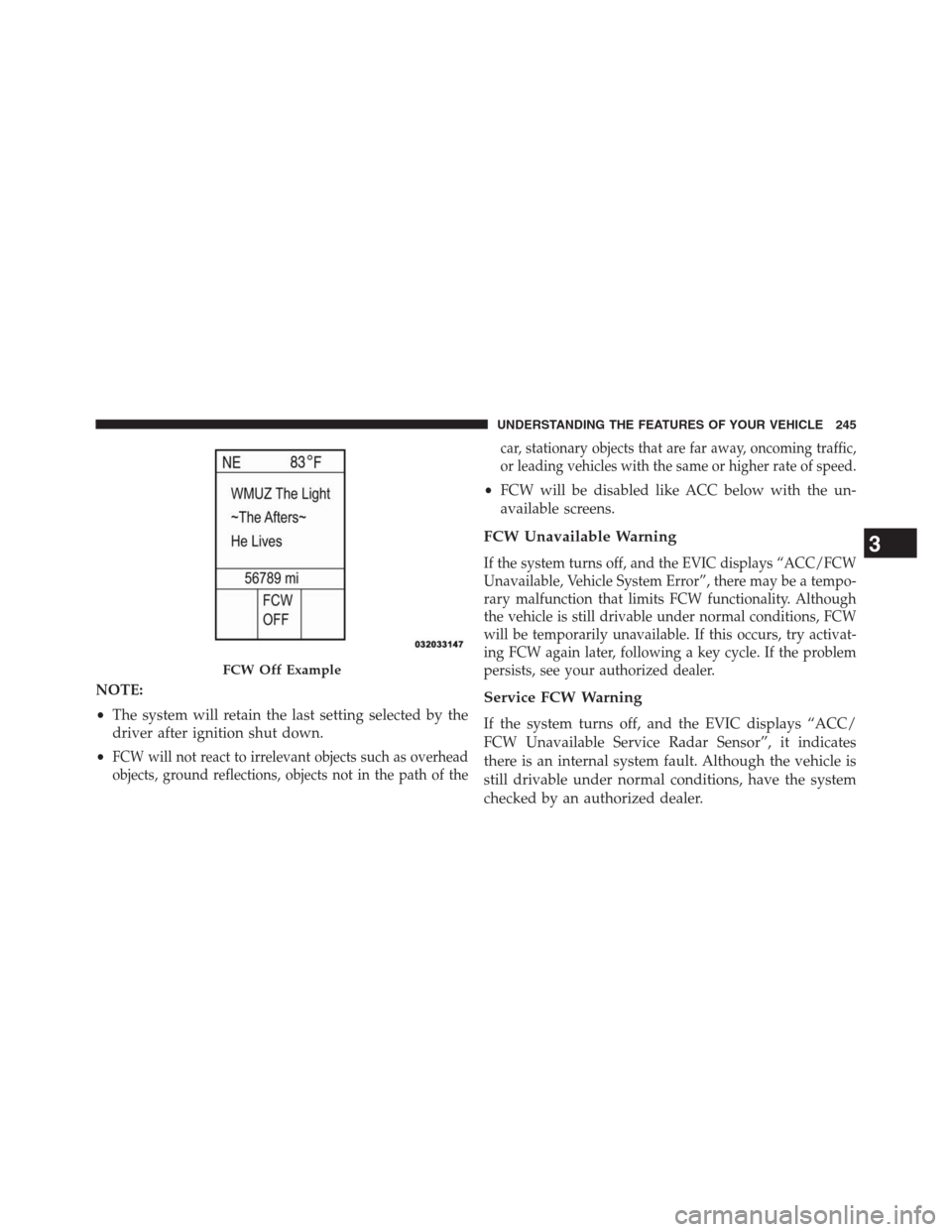
NOTE:
•The system will retain the last setting selected by the
driver after ignition shut down.
•
FCW will not react to irrelevant objects such as overhead
objects, ground reflections, objects not in the path of thecar, stationary objects that are far away, oncoming traffic,
or leading vehicles with the same or higher rate of speed.
•FCW will be disabled like ACC below with the un-
available screens.
FCW Unavailable Warning
If the system turns off, and the EVIC displays “ACC/FCW
Unavailable, Vehicle System Error”, there may be a tempo-
rary malfunction that limits FCW functionality. Although
the vehicle is still drivable under normal conditions, FCW
will be temporarily unavailable. If this occurs, try activat-
ing FCW again later, following a key cycle. If the problem
persists, see your authorized dealer.
Service FCW Warning
If the system turns off, and the EVIC displays “ACC/
FCW Unavailable Service Radar Sensor”, it indicates
there is an internal system fault. Although the vehicle is
still drivable under normal conditions, have the system
checked by an authorized dealer.
FCW Off Example
3
UNDERSTANDING THE FEATURES OF YOUR VEHICLE 245
Page 248 of 704
PARKSENSE® REAR PARK ASSIST — IF
EQUIPPED
The ParkSense® Rear Park Assist system provides visual
and audible indications of the distance between the rear
fascia and a detected obstacle when backing up, e.g.
during a parking maneuver. Refer to ParkSense® System
Usage Precautions for limitations of this system and
recommendations.
ParkSense® will retain the last system state (enabled or
disabled) from the last ignition cycle when the ignition is
changed to the ON/RUN position.
ParkSense® can be active only when the shift lever is in
REVERSE. If ParkSense® is enabled at this shift leverposition, the system will remain active until the vehicle
speed is increased to approximately 7 mph (11 km/h) or
above. The system will become active again if the vehicle
speed is decreased to speeds less than approximately
6 mph (9 km/h).
ParkSense® Sensors
The four ParkSense® sensors, located in the rear fascia/
bumper, monitor the area behind the vehicle that is
within the sensors’ field of view. The sensors can detect
obstacles from approximately 18 in (45 cm) up to 79 in
(200 cm) from the rear fascia/bumper in the horizontal
direction, depending on the location, type and orienta-
tion of the obstacle.
246 UNDERSTANDING THE FEATURES OF YOUR VEHICLE
Page 254 of 704
NOTE:The ParkSense® system will automatically dis-
able when the system detects that a trailer with trailer
brakes has been connected to the Integrated Trailer Brake
Module. The EVIC will display “PARKSENSE OFF”
message for as long as the vehicle is in reverse.
The ParkSense® switch LED will be ON when ParkSense®
is disabled or defective. The ParkSense® switch LED will
be OFF when the system is enabled.
Service The ParkSense® Rear Park Assist
System
When the ParkSense® Rear Park Assist System is mal-
functioning, the instrument cluster will actuate a single
chime, once per ignition cycle, and it will display the
“CLEAN PARK ASSIST SENSORS” or the “SERVICE
PARK ASSIST SYSTEM” message. Refer to “Electronic
Vehicle Information Center (EVIC)” in “Understanding
Your Instrument Panel” for further information. When
the shift lever is moved to REVERSE and the system hasdetected a faulted condition, the EVIC will display the
“PARK ASSIST SYSTEM OFF” message for as long as the
vehicle is in REVERSE. Under this condition, ParkSense
will not operate.
If “CLEAN PARK ASSIST SENSORS” appears in the
Electronic Vehicle Information Center (EVIC) make sure
the outer surface and the underside of the rear fascia/
bumper is clean and clear of snow, ice, mud, dirt or other
obstruction and then cycle the ignition. If the message
continues to appear, see an authorized dealer.
If “SERVICE PARK ASSIST SYSTEM” appears in the
EVIC, see an authorized dealer.
Cleaning The ParkSense® System
Clean the ParkSense® sensors with water, car wash soap
and a soft cloth. Do not use rough or hard cloths. Do not
scratch or poke the sensors. Otherwise, you could dam-
age the sensors.
252 UNDERSTANDING THE FEATURES OF YOUR VEHICLE
Page 255 of 704
ParkSense® System Usage Precautions
NOTE:
•Ensure that the rear bumper is free of snow, ice, mud,
dirt and debris to keep the ParkSense® system oper-
ating properly.
•Jackhammers, large trucks, and other vibrations could
affect the performance of ParkSense®.
•When you turn ParkSense® off, the instrument cluster
will display “PARK ASSIST SYSTEM OFF.” Further-
more, once you turn ParkSense® off, it remains off
until you turn it on again, even if you cycle the ignition
key.
•When you move the shift lever to the REVERSE
position and ParkSense® is turned off, the EVIC will
display “PARK ASSIST SYSTEM OFF” message for as
long as the vehicle is in REVERSE.•ParkSense®, when on, will MUTE the radio when it is
sounding a tone.
•Clean the ParkSense® sensors regularly, taking care
not to scratch or damage them. The sensors must not
be covered with ice, snow, slush, mud, dirt or debris.
Failure to do so can result in the system not working
properly. The ParkSense® system might not detect an
obstacle behind the fascia/bumper, or it could provide
a false indication that an obstacle is behind the
fascia/bumper.
•Objects such as bicycle carriers, trailer hitches, etc.,
must not be placed within 12 in (30 cm) from the rear
fascia/bumper while driving the vehicle. Failure to do
so can result in the system misinterpreting a close
object as a sensor problem, causing the “SERVICE
PARK ASSIST SYSTEM” message to be displayed in
the EVIC .
3
UNDERSTANDING THE FEATURES OF YOUR VEHICLE 253
Page 256 of 704
•On vehicles equipped with a tailgate, ParkSense®
should be disabled when the tailgate is in the lowered
or open position and the vehicle is in REVERSE. A
lowered tailgate could provide a false indication that
an obstacle is behind the vehicle.
CAUTION!
•ParkSense® is only a parking aid and it is unable to
recognize every obstacle, including small obstacles.
Parking curbs might be temporarily detected or not
detected at all. Obstacles located above or below
the sensors will not be detected when they are in
close proximity.
•The vehicle must be driven slowly when using
ParkSense® in order to be able to stop in time
when an obstacle is detected. It is recommended
that the driver looks over his/her shoulder when
using ParkSense®.
WARNING!
•Drivers must be careful when backing up even
when using ParkSense®. Always check carefully
behind your vehicle, look behind you, and be sure
to check for pedestrians, animals, other vehicles,
obstructions, and blind spots before backing up.
You are responsible for safety and must continue to
pay attention to your surroundings. Failure to do so
can result in serious injury or death.
•Before using ParkSense®, it is strongly recom-
mended that the ball mount and hitch ball assem-
bly is disconnected from the vehicle when the
vehicle is not used for towing. Failure to do so can
result in injury or damage to vehicles or obstacles
because the hitch ball will be much closer to the
obstacle than the rear fascia when the loudspeaker
sounds the continuous tone. Also, the sensors
(Continued)
254 UNDERSTANDING THE FEATURES OF YOUR VEHICLE
Page 310 of 704
CAUTION!
The TPMS has been optimized for the original
equipment tires and wheels. TPMS pressures and
warning have been established for the tire size
equipped on your vehicle. Undesirable system opera-
tion or sensor damage may result when using re-
placement equipment that is not of the same size,
type, and/or style. Aftermarket wheels can cause
sensor damage. Do not use tire sealant from a can or
balance beads if your vehicle is equipped with a
TPMS, as damage to the sensors may result.
12. Park/Headlight ON Indicator — If Equipped
This indicator will illuminate when the park
lights or headlights are turned on.13. Seat Belt Reminder Light
When the ignition switch is first turned to the
ON/RUN position, this light will turn on for four
to eight seconds as a bulb check. During the bulb
check, if the driver’s seat belt is unbuckled, a chime will
sound. After the bulb check or when driving, if the driver
or front passenger seat belt remains unbuckled, the Seat
Belt Indicator Light will flash or remain on continuously.
Refer to “Occupant Restraints” in “Things To Know
Before Starting Your Vehicle” for further information.
14. Brake Warning Light
This light monitors various brake functions,
including brake fluid level and parking brake
application. If the brake light turns on it may
indicate that the parking brake is applied, that
the brake fluid level is low, or that there is a problem with
the anti-lock brake system reservoir.
308 UNDERSTANDING YOUR INSTRUMENT PANEL
Page 319 of 704
When the appropriate conditions exist, the EVIC displays
the following messages:
•Vehicle Not in Park
•Key Left Vehicle
•Key Not Detected
•Service TPM System (refer to “Tire Pressure Monitor-
ing System” in “Starting And Operating”)
•Premium TPM System Graphic Display
•Service Keyless System (refer to Keyless Enter-N-Go™,
Passive Entry - if equipped)
•Service Park Assist System
•Park Assist System Blinded
•Park Assist Disabled
•Keyfob Battery Low
•Liftglass Open•Left front turn signal lamp out
•Right front turn signal lamp out
•Left rear turn signal lamp out
•Right rear turn signal lamp out
•Low Tire Pressure
•ESC System Off
•Service blind spot system
•Blind spot detection unavailable
•Blind spot system off
•Blind spot system unavailable sensor blocked
•Normal Cruise Ready — When Adaptive Cruise Con-
trol (ACC) system is turned off and Normal (Fixed
Speed) Cruise Control mode is available. Refer to
“Adaptive Cruise Control (ACC)” in “Understanding
The Features Of Your Vehicle” (if equipped).
4
UNDERSTANDING YOUR INSTRUMENT PANEL 317
Page 321 of 704
•Clean Radar Sensor in the Front of Vehicle — If the
ACC system deactivates due to performance limiting
conditions. Refer to “Adaptive Cruise Control (ACC)”
in “Understanding The Features Of Your Vehicle” (if
equipped).
•ACC/FCW Unavailable Vehicle System Error — If the
ACC system turns off due to a temporary malfunction
that limits functionality. Refer to “Adaptive Cruise
Control (ACC)” in “Understanding The Features Of
Your Vehicle” (if equipped).
•ACC/FCW Unavailable Service Radar Sensor — If the
ACC system turns off due to an internal system fault
that requires service from an authorized dealer. Refer
to “Adaptive Cruise Control (ACC)” in “Understand-
ing The Features Of Your Vehicle” (if equipped).
•Cruise Off When Park Brake is On
•ACC Cancelled Below Min. Speed.•Coolant low
•Service air suspension system
•Oil change due
•Key in ignition
•Lights on
•Key in Ignition Lights On
•Ignition or Accessory On
•Ignition or Accessory On. Lights On
•Turn signal on
•Park assist on
•Warning object detected
•Remote start aborted — Door ajar
•Remote start aborted — Hood ajar
•Remote start aborted — L/Gate ajar
4
UNDERSTANDING YOUR INSTRUMENT PANEL 319
Page 339 of 704
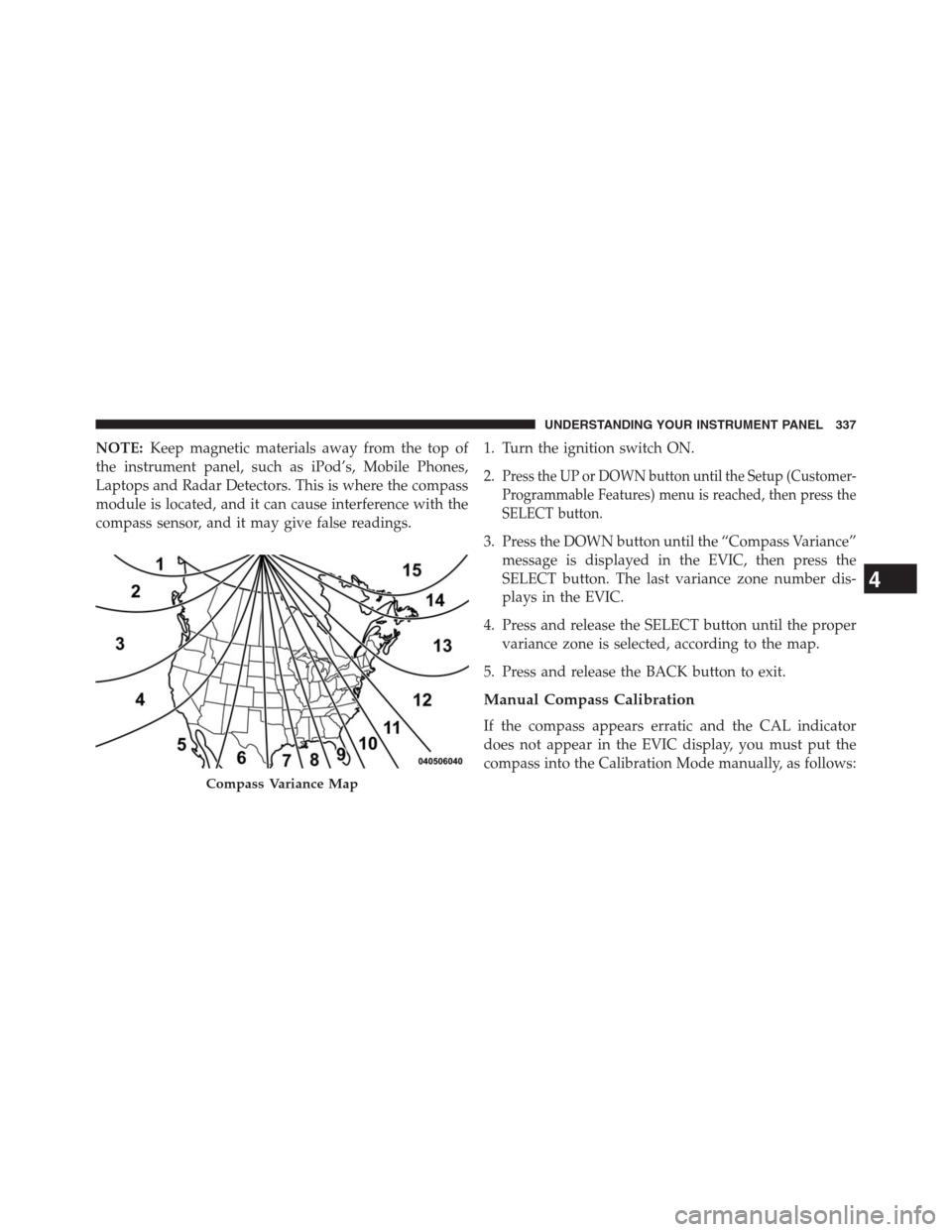
NOTE:Keep magnetic materials away from the top of
the instrument panel, such as iPod’s, Mobile Phones,
Laptops and Radar Detectors. This is where the compass
module is located, and it can cause interference with the
compass sensor, and it may give false readings.1. Turn the ignition switch ON.
2.
Press the UP or DOWN button until the Setup (Customer-
Programmable Features) menu is reached, then press the
SELECT button.
3. Press the DOWN button until the “Compass Variance”
message is displayed in the EVIC, then press the
SELECT button. The last variance zone number dis-
plays in the EVIC.
4. Press and release the SELECT button until the proper
variance zone is selected, according to the map.
5. Press and release the BACK button to exit.
Manual Compass Calibration
If the compass appears erratic and the CAL indicator
does not appear in the EVIC display, you must put the
compass into the Calibration Mode manually, as follows:
Compass Variance Map
4
UNDERSTANDING YOUR INSTRUMENT PANEL 337
Page 347 of 704
Hill Start Assist (HSA) — If Equipped
When this feature is selected, the HSA system is active.
Refer to “Electronic Brake Control System” in “Starting
And Operating” for system function and operating infor-
mation. To make your selection, press and release the
SELECT button until a check-mark appears next to the
feature showing the system has been activated or the
check-mark is removed showing the system has been
deactivated.
Blind Spot Alert — If Equipped
There are three selections when operating Blind Spot
Alert. By pressing and releasing the SELECT button once,
the Blind Spot Alert feature can be activated in “Blind
Spot: Lights Only” mode. When this mode is selected the
Blind Spot Monitor (BSM) system is activated and will
only show a visual alert in the outside mirrors. By
pressing and releasing the SELECT button a second time
“Blind Spot: Lights/CHM” mode is activated. In thismode the Blind Spot Monitor (BSM) will show a visual
alert in the outside mirrors as well as an audible alert
when the turn signal is on. When “Blind Spot: Off” is
selected the Blind Spot Monitor (BSM) system is deacti-
vated.
NOTE:If your vehicle has experienced any damage in
the area where the sensor is located, even if the fascia is
not damaged, the sensor may have become misaligned.
Take your vehicle to an authorized dealer to verify sensor
alignment. Having a sensor that is misaligned will result
in the BSM not operating to specification.Forward Collision Warning — If Equipped
The Forward Collision Warning (FCW) feature can be can
be set to Far, set to Near or turned Off. The default status
of FCW is the Far setting. This means the system will
warn you of a possible collision with the vehicle in front
of you when you are farther away. This gives you the
most reaction time. To change the setting for more
4
UNDERSTANDING YOUR INSTRUMENT PANEL 345