brake JEEP GRAND CHEROKEE 2014 WK2 / 4.G Owner's Manual
[x] Cancel search | Manufacturer: JEEP, Model Year: 2014, Model line: GRAND CHEROKEE, Model: JEEP GRAND CHEROKEE 2014 WK2 / 4.GPages: 220, PDF Size: 6.12 MB
Page 40 of 220
ELECTRONIC SHIFTER
Your vehicle is equipped with a fuel efficient 8 speed transmission. The electronic
shift lever in this vehicle does not slide like a conventional shifter. Instead, the shift
lever is spring loaded and moves forward and rearward, always returning to the center
position after each gear is selected.
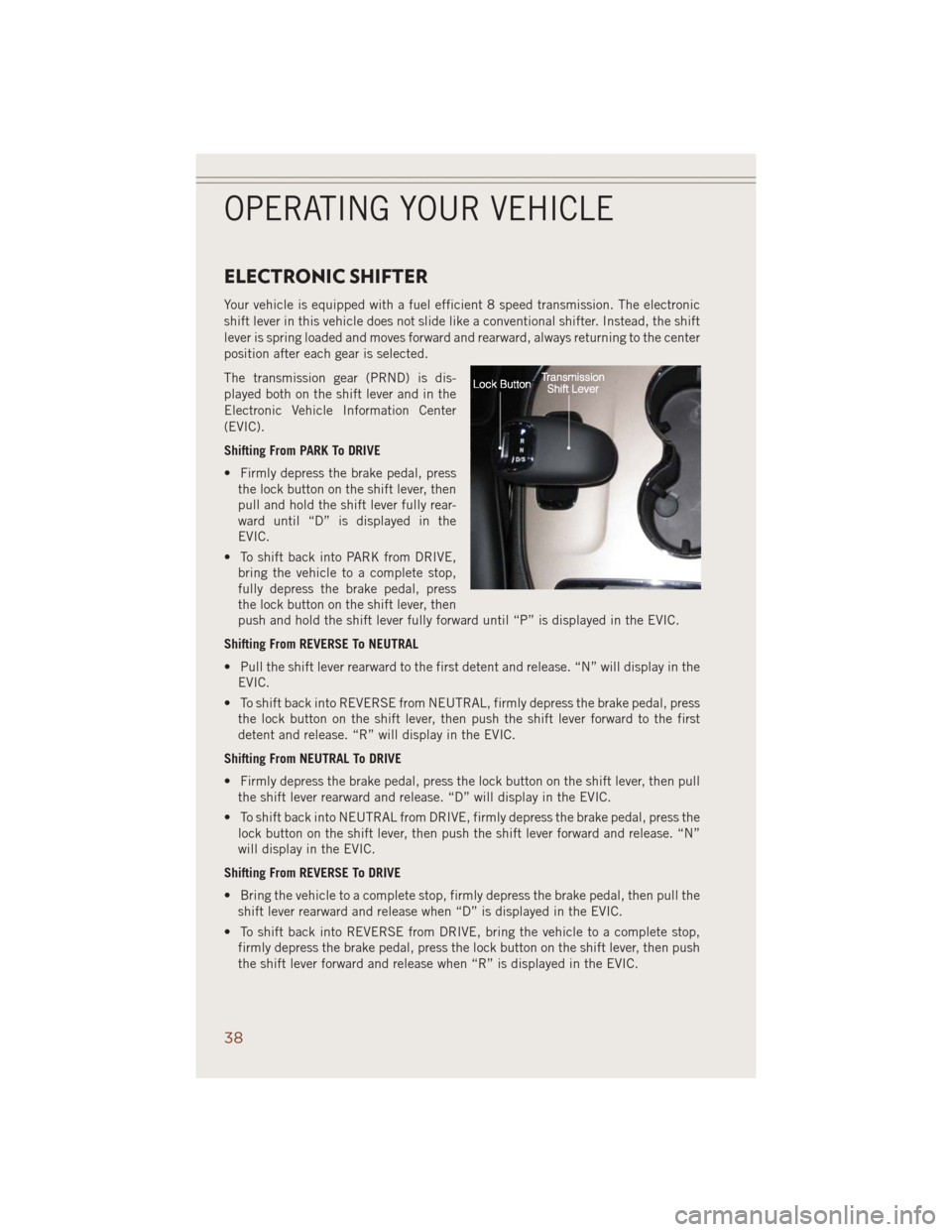
The transmission gear (PRND) is dis-
played both on the shift lever and in the
Electronic Vehicle Information Center
(EVIC).
Shifting From PARK To DRIVE
• Firmly depress the brake pedal, press
the lock button on the shift lever, then
pull and hold the shift lever fully rear-
ward until “D” is displayed in the
EVIC.
• To shift back into PARK from DRIVE,
bring the vehicle to a complete stop,
fully depress the brake pedal, press
the lock button on the shift lever, then
push and hold the shift lever fully forward until “P” is displayed in the EVIC.
Shifting From REVERSE To NEUTRAL
• Pull the shift lever rearward to the first detent and release. “N” will display in the
EVIC.
• To shift back into REVERSE from NEUTRAL, firmly depress the brake pedal, press
the lock button on the shift lever, then push the shift lever forward to the first
detent and release. “R” will display in the EVIC.
Shifting From NEUTRAL To DRIVE
• Firmly depress the brake pedal, press the lock button on the shift lever, then pull
the shift lever rearward and release. “D” will display in the EVIC.
• To shift back into NEUTRAL from DRIVE, firmly depress the brake pedal, press the
lock button on the shift lever, then push the shift lever forward and release. “N”
will display in the EVIC.
Shifting From REVERSE To DRIVE
• Bring the vehicle to a complete stop, firmly depress the brake pedal, then pull the
shift lever rearward and release when “D” is displayed in the EVIC.
• To shift back into REVERSE from DRIVE, bring the vehicle to a complete stop,
firmly depress the brake pedal, press the lock button on the shift lever, then push
the shift lever forward and release when “R” is displayed in the EVIC.
OPERATING YOUR VEHICLE
38
Page 117 of 220
• Push the BACK/LEFTbutton to access the information screens or sub-menu
screens of a main menu item.
• Push theOKbutton to access/select the information screens or sub-menu screens
of a main menu item. Push and hold the OK button for two seconds to reset
displayed/selected features that can be reset.
Compass Calibration
This compass is self-calibrating, which eliminates the need to set the compass
manually. When the vehicle is new, the compass may appear erratic and the EVIC will
display “– –” until the compass is calibrated.
You may also calibrate the compass by completing one or more 360 degree turns (in
an area free from large metal or metallic objects) until the “– –” message displayed
in the EVIC turns off. The compass will now function normally.
PROGRAMMABLE FEATURES
EVIC Programmable Features
The EVIC can be used to view or change the following settings. Push the UPor
DOWN
button until System Setup displays, then push the RIGHTbutton.
Scroll through the settings using the UP or DOWN buttons. Push the OK button to
change the setting. Push the BACK/LEFT
button to scroll back to a previous
menu or sub menu.
• Radio Info • Trip Info
• Fuel Economy Info • Tire Pressure
• Cruise Control Info • Vehicle Info
• Digital Vehicle Speed • Stored Warning Messages
• Screen Setup
Uconnect® Customer Programmable Features
• The Uconnect®system allows you to access Customer Programmable feature
settings such as Display, Clock, Safety/Assistance, Lights, Doors & Locks, Auto-On
Comfort & Remote Start, Engine Off Operation, Compass Settings, Audio, Trailer
Brake, Phone/Bluetooth
®, Suspension and SiriusXM Setup and System Informa-
tion through soft-keys.
ELECTRONICS
115
Page 118 of 220
• Touch the “Controls” or “Apps” soft-key located near the bottom of the screen,
then touch the “settings” soft-key to access the Settings screen. When making a
selection, scroll up or down until the preferred setting is highlighted, then press
and release the preferred setting until a check-mark appears next to the setting,
showing that setting has been selected. The following feature settings are
available:
• Display • Clock
• Safety & Driving Assistance • Doors & Locks
• Auto-On Comfort • Engine Off Options
• Compass (Uconnect
®5.0) • Audio
• Phone/Bluetooth®• SiriusXM Setup
• Lights • Trailer Brake
• Suspension • System Information
• Units • Voice
NOTE:
Depending on the vehicles options, feature settings may vary.
EVIC Reconfigurable Screen Setup
The following settings allow you to change what information is displayed in the
instrument cluster as well as the location that information is displayed.
Trip A
• Press and release the UP or DOWN arrow button until the Trip A icon is highlighted
in the EVIC (Toggle left or right to select Trip A or Trip B). Press and release the OK
button to display the Trip A information.
Trip B
• Press and release the UP or DOWN arrow button until the Trip B icon is highlighted
in the EVIC (Toggle left or right to select Trip A or Trip B). Press and release the OK
button to display the Trip B information.
Fuel Economy
• Press and release the UP or DOWN arrow button until the Fuel Economy icon is
highlighted. Press the RIGHT arrow button and the next screen will display the
following:
• Average Fuel Economy/Miles Per Gallon (MPG Bargraph)
• Range To Empty (RTE)
• Current Miles Per Gallon (MPG)
ELECTRONICS
116
Page 124 of 220
QUADRA-TRAC I® FOUR-WHEEL DRIVE
Quadra-Trac I® Operating Instructions/Precautions — 3.6L Only
The Quadra-Trac I®is a single-speed (HI range only) transfer case, which provides
convenient full-time four-wheel drive. No driver interaction is required. The Brake
Traction Control (BTC) System, which combines standard ABS and Traction Control,
provides resistance to any wheel that is slipping to allow additional torque transfer to
wheels with traction.
QUADRA-TRAC II®/QUADRA-DRIVE II® FOUR-WHEEL
DRIVE
Quadra-Trac II®/Quadra-Drive II® Operating Instructions/Precautions
The Quadra-Trac II®/Quadra-Drive II®transfer case is fully automatic in the normal
driving 4WD HI mode. The Quadra-Trac II®/Quadra-Drive II®transfer case provides
three mode positions:
• 4WD HI
• NEUTRAL
• 4WD LOW
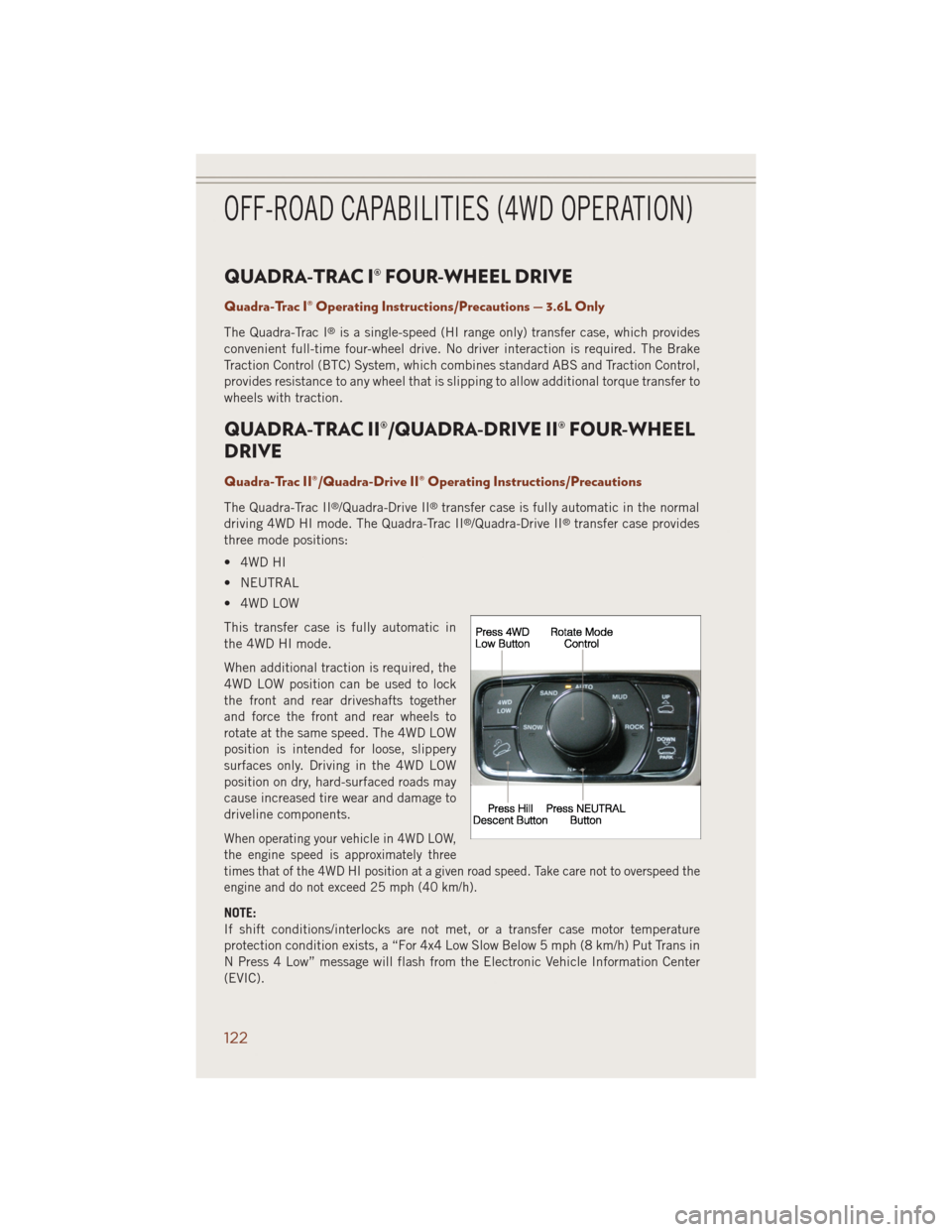
This transfer case is fully automatic in
the 4WD HI mode.
When additional traction is required, the
4WD LOW position can be used to lock
the front and rear driveshafts together
and force the front and rear wheels to
rotate at the same speed. The 4WD LOW
position is intended for loose, slippery
surfaces only. Driving in the 4WD LOW
position on dry, hard-surfaced roads may
cause increased tire wear and damage to
driveline components.
When operating your vehicle in 4WD LOW,
the engine speed is approximately three
times that of the 4WD HI position at a given road speed. Take care not to overspeed the
engine and do not exceed 25 mph (40 km/h).
NOTE:
If shift conditions/interlocks are not met, or a transfer case motor temperature
protection condition exists, a “For 4x4 Low Slow Below 5 mph (8 km/h) Put Trans in
N Press 4 Low” message will flash from the Electronic Vehicle Information Center
(EVIC).
OFF-ROAD CAPABILITIES (4WD OPERATION)
122
Page 125 of 220
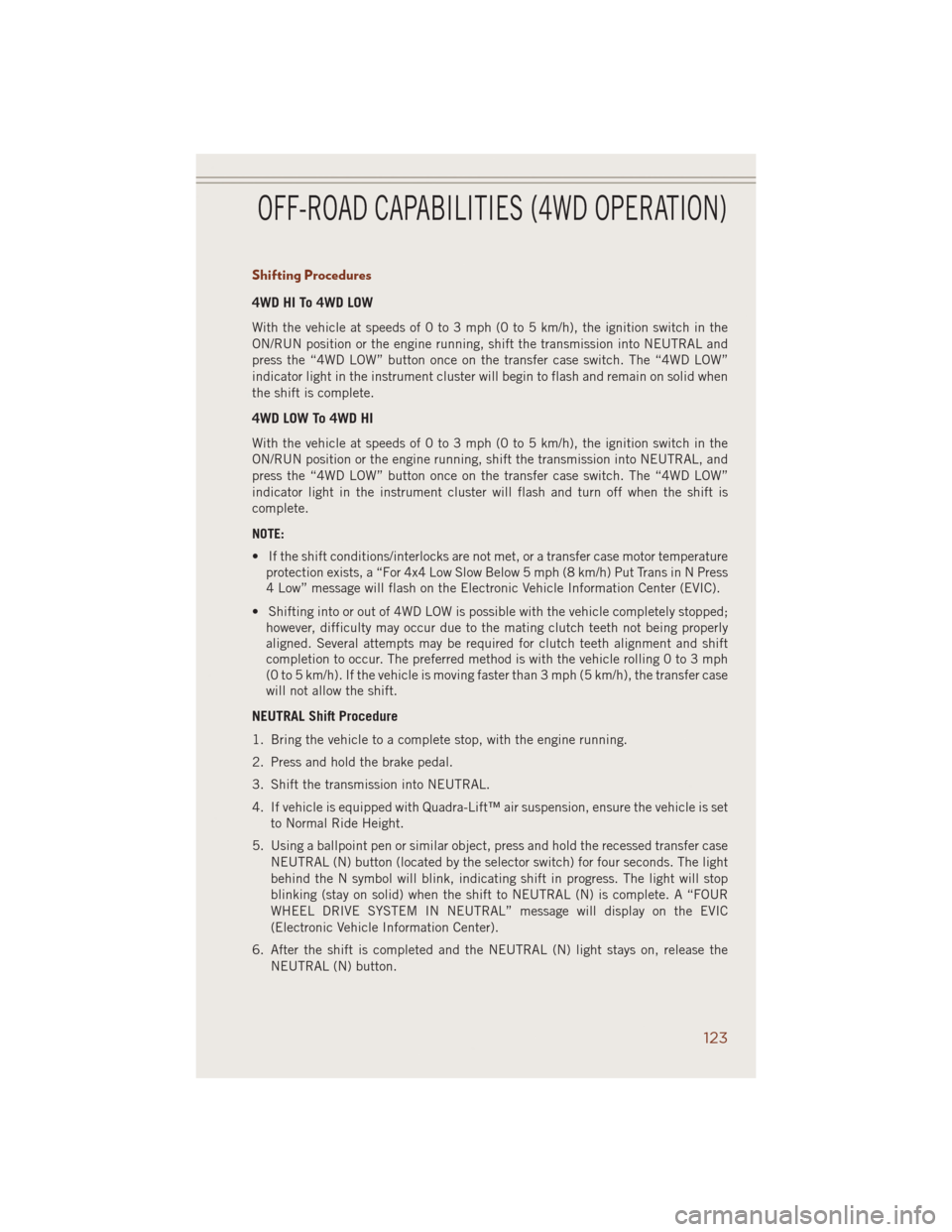
Shifting Procedures
4WD HI To 4WD LOW
With the vehicle at speeds of 0 to 3 mph (0 to 5 km/h), the ignition switch in the
ON/RUN position or the engine running, shift the transmission into NEUTRAL and
press the “4WD LOW” button once on the transfer case switch. The “4WD LOW”
indicator light in the instrument cluster will begin to flash and remain on solid when
the shift is complete.
4WD LOW To 4WD HI
With the vehicle at speeds of 0 to 3 mph (0 to 5 km/h), the ignition switch in the
ON/RUN position or the engine running, shift the transmission into NEUTRAL, and
press the “4WD LOW” button once on the transfer case switch. The “4WD LOW”
indicator light in the instrument cluster will flash and turn off when the shift is
complete.
NOTE:
• If the shift conditions/interlocks are not met, or a transfer case motor temperature
protection exists, a “For 4x4 Low Slow Below 5 mph (8 km/h) Put Trans in N Press
4 Low” message will flash on the Electronic Vehicle Information Center (EVIC).
• Shifting into or out of 4WD LOW is possible with the vehicle completely stopped;
however, difficulty may occur due to the mating clutch teeth not being properly
aligned. Several attempts may be required for clutch teeth alignment and shift
completion to occur. The preferred method is with the vehicle rolling 0 to 3 mph
(0 to 5 km/h). If the vehicle is moving faster than 3 mph (5 km/h), the transfer case
will not allow the shift.
NEUTRAL Shift Procedure
1. Bring the vehicle to a complete stop, with the engine running.
2. Press and hold the brake pedal.
3. Shift the transmission into NEUTRAL.
4. If vehicle is equipped with Quadra-Lift™ air suspension, ensure the vehicle is set
to Normal Ride Height.
5. Using a ballpoint pen or similar object, press and hold the recessed transfer case
NEUTRAL (N) button (located by the selector switch) for four seconds. The light
behind the N symbol will blink, indicating shift in progress. The light will stop
blinking (stay on solid) when the shift to NEUTRAL (N) is complete. A “FOUR
WHEEL DRIVE SYSTEM IN NEUTRAL” message will display on the EVIC
(Electronic Vehicle Information Center).
6. After the shift is completed and the NEUTRAL (N) light stays on, release the
NEUTRAL (N) button.
OFF-ROAD CAPABILITIES (4WD OPERATION)
123
Page 126 of 220
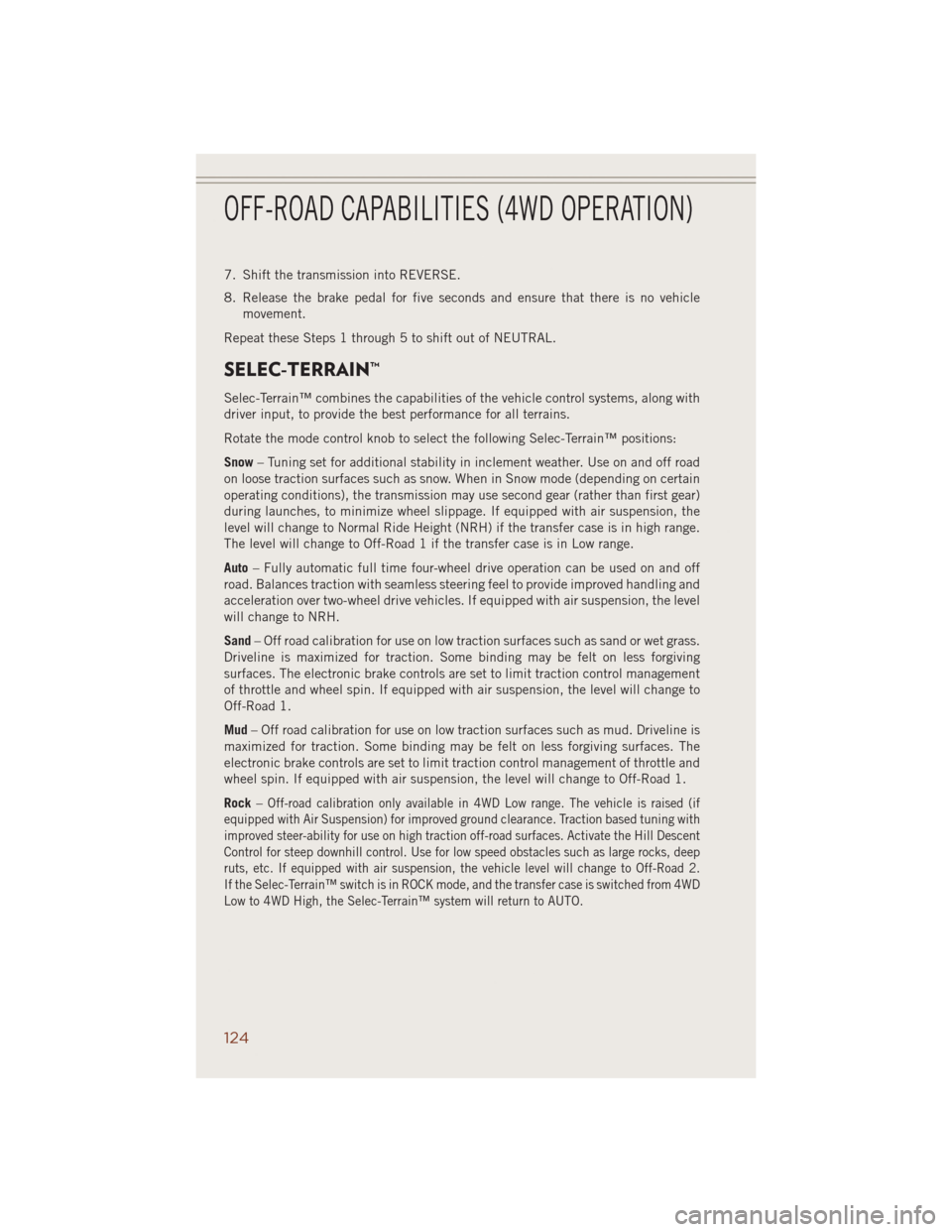
7. Shift the transmission into REVERSE.
8. Release the brake pedal for five seconds and ensure that there is no vehicle
movement.
Repeat these Steps 1 through 5 to shift out of NEUTRAL.
SELEC-TERRAIN™
Selec-Terrain™ combines the capabilities of the vehicle control systems, along with
driver input, to provide the best performance for all terrains.
Rotate the mode control knob to select the following Selec-Terrain™ positions:
Snow– Tuning set for additional stability in inclement weather. Use on and off road
on loose traction surfaces such as snow. When in Snow mode (depending on certain
operating conditions), the transmission may use second gear (rather than first gear)
during launches, to minimize wheel slippage. If equipped with air suspension, the
level will change to Normal Ride Height (NRH) if the transfer case is in high range.
The level will change to Off-Road 1 if the transfer case is in Low range.
Auto– Fully automatic full time four-wheel drive operation can be used on and off
road. Balances traction with seamless steering feel to provide improved handling and
acceleration over two-wheel drive vehicles. If equipped with air suspension, the level
will change to NRH.
Sand– Off road calibration for use on low traction surfaces such as sand or wet grass.
Driveline is maximized for traction. Some binding may be felt on less forgiving
surfaces. The electronic brake controls are set to limit traction control management
of throttle and wheel spin. If equipped with air suspension, the level will change to
Off-Road 1.
Mud– Off road calibration for use on low traction surfaces such as mud. Driveline is
maximized for traction. Some binding may be felt on less forgiving surfaces. The
electronic brake controls are set to limit traction control management of throttle and
wheel spin. If equipped with air suspension, the level will change to Off-Road 1.
Rock–
Off-road calibration only available in 4WD Low range. The vehicle is raised (if
equipped with Air Suspension) for improved ground clearance. Traction based tuning with
improved steer-ability for use on high traction off-road surfaces. Activate the Hill Descent
Control for steep downhill control. Use for low speed obstacles such as large rocks, deep
ruts, etc. If equipped with air suspension, the vehicle level will change to Off-Road 2.
If the Selec-Terrain™ switch is in ROCK mode, and the transfer case is switched from 4WD
Low to 4WD High, the Selec-Terrain™ system will return to AUTO.
OFF-ROAD CAPABILITIES (4WD OPERATION)
124
Page 129 of 220
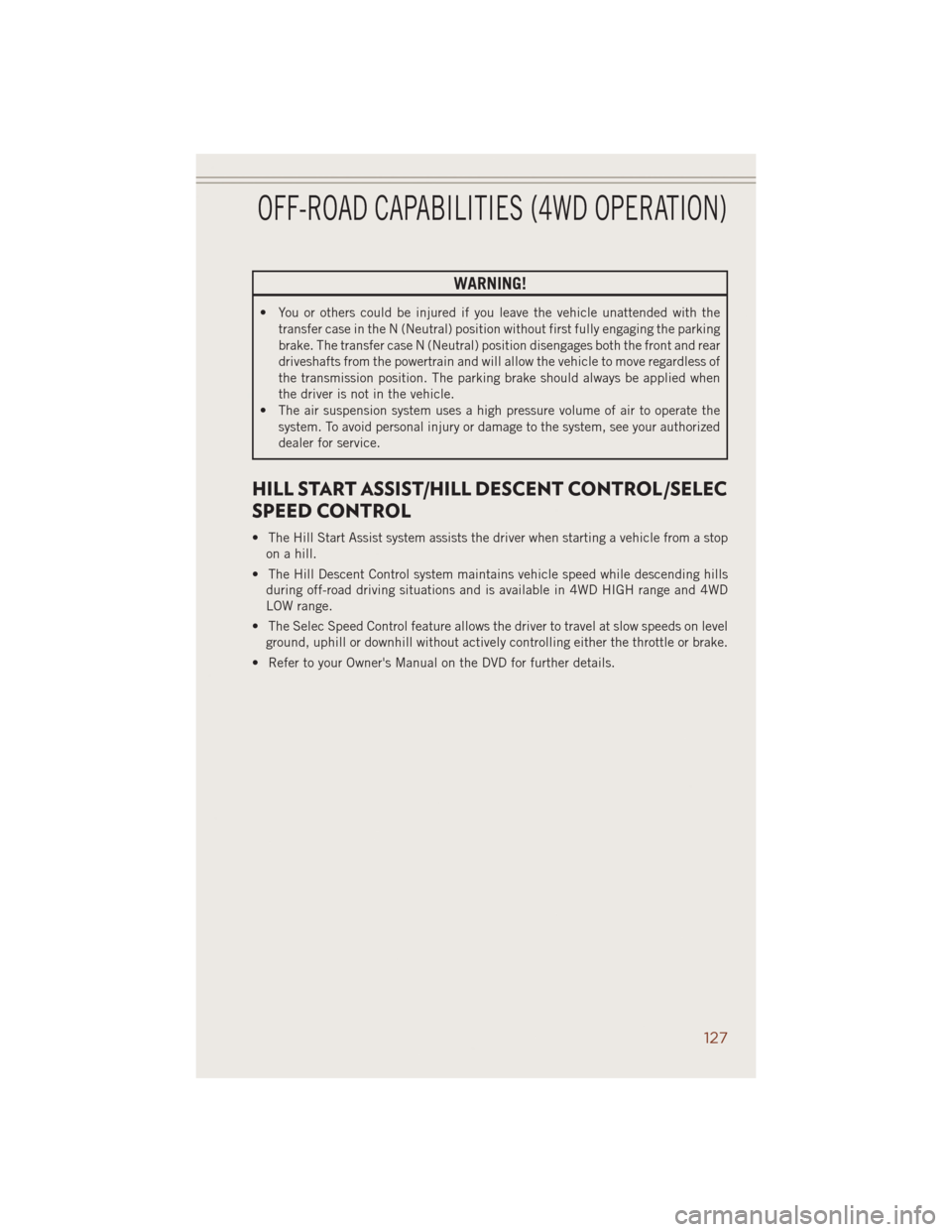
WARNING!
• You or others could be injured if you leave the vehicle unattended with the
transfer case in the N (Neutral) position without first fully engaging the parking
brake. The transfer case N (Neutral) position disengages both the front and rear
driveshafts from the powertrain and will allow the vehicle to move regardless of
the transmission position. The parking brake should always be applied when
the driver is not in the vehicle.
• The air suspension system uses a high pressure volume of air to operate the
system. To avoid personal injury or damage to the system, see your authorized
dealer for service.
HILL START ASSIST/HILL DESCENT CONTROL/SELEC
SPEED CONTROL
• The Hill Start Assist system assists the driver when starting a vehicle from a stop
on a hill.
• The Hill Descent Control system maintains vehicle speed while descending hills
during off-road driving situations and is available in 4WD HIGH range and 4WD
LOW range.
• The Selec Speed Control feature allows the driver to travel at slow speeds on level
ground, uphill or downhill without actively controlling either the throttle or brake.
• Refer to your Owner's Manual on the DVD for further details.
OFF-ROAD CAPABILITIES (4WD OPERATION)
127
Page 134 of 220
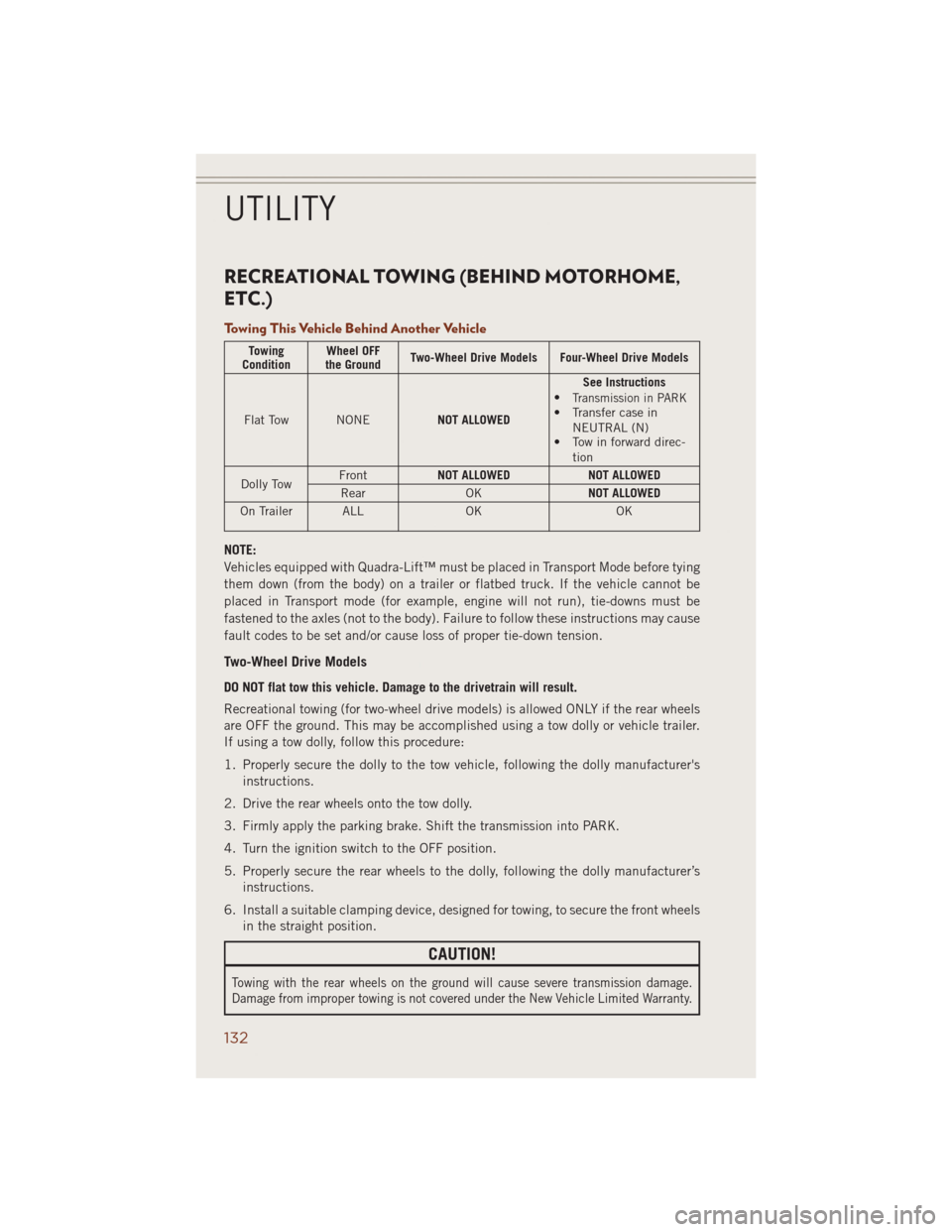
RECREATIONAL TOWING (BEHIND MOTORHOME,
ETC.)
Towing This Vehicle Behind Another Vehicle
Towing
ConditionWheel OFF
the GroundTwo-Wheel Drive Models Four-Wheel Drive Models
Flat Tow NONENOT ALLOWEDSee Instructions
•
Transmission in PARK• Transfer case in
NEUTRAL (N)
• Tow in forward direc-
tion
Dolly TowFrontNOT ALLOWED NOT ALLOWED
Rear OKNOT ALLOWED
On Trailer ALL OK OK
NOTE:
Vehicles equipped with Quadra-Lift™ must be placed in Transport Mode before tying
them down (from the body) on a trailer or flatbed truck. If the vehicle cannot be
placed in Transport mode (for example, engine will not run), tie-downs must be
fastened to the axles (not to the body). Failure to follow these instructions may cause
fault codes to be set and/or cause loss of proper tie-down tension.
Two-Wheel Drive Models
DO NOT flat tow this vehicle. Damage to the drivetrain will result.
Recreational towing (for two-wheel drive models) is allowed ONLY if the rear wheels
are OFF the ground. This may be accomplished using a tow dolly or vehicle trailer.
If using a tow dolly, follow this procedure:
1. Properly secure the dolly to the tow vehicle, following the dolly manufacturer's
instructions.
2. Drive the rear wheels onto the tow dolly.
3. Firmly apply the parking brake. Shift the transmission into PARK.
4. Turn the ignition switch to the OFF position.
5. Properly secure the rear wheels to the dolly, following the dolly manufacturer’s
instructions.
6. Install a suitable clamping device, designed for towing, to secure the front wheels
in the straight position.
CAUTION!
Towing with the rear wheels on the ground will cause severe transmission damage.
Damage from improper towing is not covered under the New Vehicle Limited Warranty.
UTILITY
132
Page 135 of 220
Quadra-Trac II® /Quadra-Drive® II /Selec-Terrain™ Four-Wheel Drive Models
The transfer case must be shifted into NEUTRAL (N) and the transmission must be
in PARK for recreational towing. The NEUTRAL (N) selection button is adjacent to
the transfer case selector switch. Shifts into and out of transfer case NEUTRAL (N)
can take place with the selector switch in any mode position.
CAUTION!
• DO NOT dolly tow any 4WD vehicle. Internal damage to the transmission or
transfer case will occur if a dolly is used when recreational towing.
• Tow only in a forward direction. Towing this vehicle backwards can cause severe
damage to the transfer case.
• The transmission must be in PARK for recreational towing.
• Before recreational towing, perform the procedure outlined under “Shifting
into NEUTRAL (N)” to be certain that the transfer case is fully in NEUTRAL
(N). Otherwise, internal damage will result.
• Failure to follow these procedures can cause severe transmission and/or
transfer case damage. Damage from improper towing is not covered under the
New Vehicle Limited Warranty.
• Do not use a bumper-mounted clamp-on tow bar on your vehicle. The bumper
face bar will be damaged.
Shifting Into NEUTRAL (N)
Use the following procedure to prepare your vehicle for recreational towing:
1. Bring the vehicle to a complete stop, with the engine running.
2. Press and hold the brake pedal.
3. Shift the transmission into NEUTRAL.
4. If vehicle is equipped with Quadra-Lift™ air suspension, ensure the vehicle is set
to Normal Ride Height.
5. Using a ballpoint pen or similar object, press and hold the recessed transfer case
NEUTRAL (N) button (located by the selector switch) for four seconds. The light
behind the N symbol will blink, indicating shift in progress. The light will stop
blinking (stay on solid) when the shift to NEUTRAL (N) is complete. A “FOUR
WHEEL DRIVE SYSTEM IN NEUTRAL” message will display on the EVIC
(Electronic Vehicle Information Center).
6. After the shift is completed and the NEUTRAL (N) light stays on, release the
NEUTRAL (N) button.
7. Shift the transmission into REVERSE.
8. Release the brake pedal for five seconds and ensure that there is no vehicle
movement.
9. Shift the transmission back into NEUTRAL
UTILITY
133
Page 136 of 220
10. With the transmission and transfer case in NEUTRAL, press and hold the
ENGINE START/STOP button until the engine turns off. Turning the engine off
will automatically place the transmission in PARK.
11. Press the ENGINE STOP/START button again (without pressing the brake
pedal), if needed, to turn the ignition switch to the OFF position.
12. Firmly apply the parking brake.
13. Attach the vehicle to the tow vehicle using a suitable tow bar.
14. Release the parking brake.
NOTE:
• Steps 1 through 4 are requirements that must be met before pressing the
NEUTRAL (N) button, and must continue to be met until the shift has been
completed. If any of these requirements are not met before pressing the NEUTRAL
(N) button or are no longer met during the shift, then the NEUTRAL (N) indicator
light will flash continuously until all requirements are met or until the NEUTRAL
(N) button is released.
• The ignition switch must be in the ON/RUN position for a shift to take place and
for the position indicator lights to be operable. If the ignition switch is not in the
ON/RUN position, the shift will not take place and no position indicator lights will
be on or flashing.
• A flashing NEUTRAL (N) position indicator light indicates that shift requirements
have not been met.
• If the vehicle is equipped with Quadra-Lift™ air suspension, the engine should be
started and left running for a minimum of 60 seconds (with all the doors closed)
at least once every 24 hours. This process allows the air suspension to adjust the
vehicle’s ride height to compensate for temperature effects.
WARNING!
You or others could be injured or killed if you leave the vehicle unattended with the
transfer case in the NEUTRAL (N) position without first fully engaging the parking
brake. The transfer case NEUTRAL (N) position disengages both the front and rear
driveshafts from the powertrain and will allow the vehicle to move, even if the
transmission is in PARK. The parking brake should always be applied when the
driver is not in the vehicle.
CAUTION!
It is necessary to follow these steps to be certain that the transfer case is fully in
NEUTRAL (N) before recreational towing to prevent damage to internal parts.
UTILITY
134