ad blue JEEP GRAND CHEROKEE 2016 WK2 / 4.G SRT User Guide
[x] Cancel search | Manufacturer: JEEP, Model Year: 2016, Model line: GRAND CHEROKEE, Model: JEEP GRAND CHEROKEE 2016 WK2 / 4.GPages: 723, PDF Size: 5.54 MB
Page 444 of 723
Radio
Use your voice to quickly get to the AM, FM or SiriusXM
Satellite Radio stations you would like to hear. (Subscrip-
tion or included SiriusXM Satellite Radio trial required.)
Push the VR button
. After the beep, say:
•Tune to ninety-five-point-five FM
• Tune to Satellite Channel Hits 1
TIP: At any time, if you are not sure of what to say or
want to learn a Voice Command, push the VR button
and say “Help.” The system will provide you with
a list of commands. Media
Uconnect offers connections via USB, SD, Bluetooth and
auxiliary ports (If Equipped). Voice operation is only
available for connected USB and iPod devices. (Remote
CD player optional and not available on all vehicles.)
Uconnect 8.4A/8.4AN Radio
442 UNDERSTANDING YOUR INSTRUMENT PANEL
Page 445 of 723
Push the VR button. After the beep, say one of the
following commands and follow the prompts to
switch your media source or choose an artist.
• Change source to Bluetooth
• Change source to iPod
• Change source to USB
• Play artist Beethoven; Play album Greatest Hits; Play
song Moonlight Sonata; Play genreClassical
TIP: Press the “browse” button on the touchscreen to see
all of the music on your iPod or USB device. Your Voice
Command must match exactlyhow the artist, album,
song and genre information is displayed.
Phone
Making and answering hands-free phone calls is easy
with Uconnect. When the “phonebook” button is illumi-
nated on your touchscreen, your system is ready. Check
UconnectPhone.com for mobile phone compatibility and
pairing instructions.
Uconnect 8.4A/8.4AN Media
4
UNDERSTANDING YOUR INSTRUMENT PANEL 443
Page 448 of 723
TIP:Voice Text Reply is not compatible with iPhone, but
if your vehicle is equipped with Siri Eyes Free, you can
use your voice to send a text message.
Climate (8.4A/8.4AN)
Too hot? Too cold? Adjust vehicle temperatures hands-
free and keep everyone comfortable while you keep
moving ahead. (If vehicle is equipped with climate
control.)
Push the VR button
. After the beep, say one of the
following commands:
• Set driver temperature to 70degrees
• Set passenger temperature to 70degrees
TIP: Voice Command for Climate may only be used to
adjust the interior temperature of your vehicle. Voice
Command will not work to adjust the heated seats or
steering wheel if equipped.iPhone Notification Settings
1 — Select “Settings”
2 — Select “Bluetooth”
3 — Select the (i) for the paired vehicle
4 — Turn on “Show Notifications” 446 UNDERSTANDING YOUR INSTRUMENT PANEL
Page 453 of 723
To link your internet radio accounts:
1. Download the Uconnect Access App to your mobiledevice.
2. Press the Via Mobile icon on the navigation bar at the bottom of the app. 3. Press the app you’d like to connect to your vehicle.
4. Enter your login information for the selected app and
press Link.
5. Next time you’re in your vehicle, enable Bluetooth, pair your phone and select the Via Mobile app you
want to play from the Uconnect touchscreen to stream
your personalized music.
NOTE:
• You can also complete this process on the web. Simply
visit moparownerconnect.com log in and click Set Up
Via Mobile Profile (under Quick Links).
• Once you download the app to your compatible
mobile device, you will also be able to start your
vehicle and lock/unlock its doors from virtually any-
where.
Mobile App
4
UNDERSTANDING YOUR INSTRUMENT PANEL 451
Page 455 of 723
TIP:
•Voice Texting is not compatible with iPhone, but if
your vehicle is equipped with Siri Eyes Free, you can
use your voice to send a text message.
• Messages are limited to 140 characters.
• The Messaging button on the touchscreen must be
illuminated to use the feature.
Yelp (8.4A/8.4AN)
Once registered with Uconnect Access, you can use your
voice to search for the most popular places or things
around you.
1. Press the “Apps
” button on the touchscreen.
2. Press the “Yelp” button on the touchscreen.
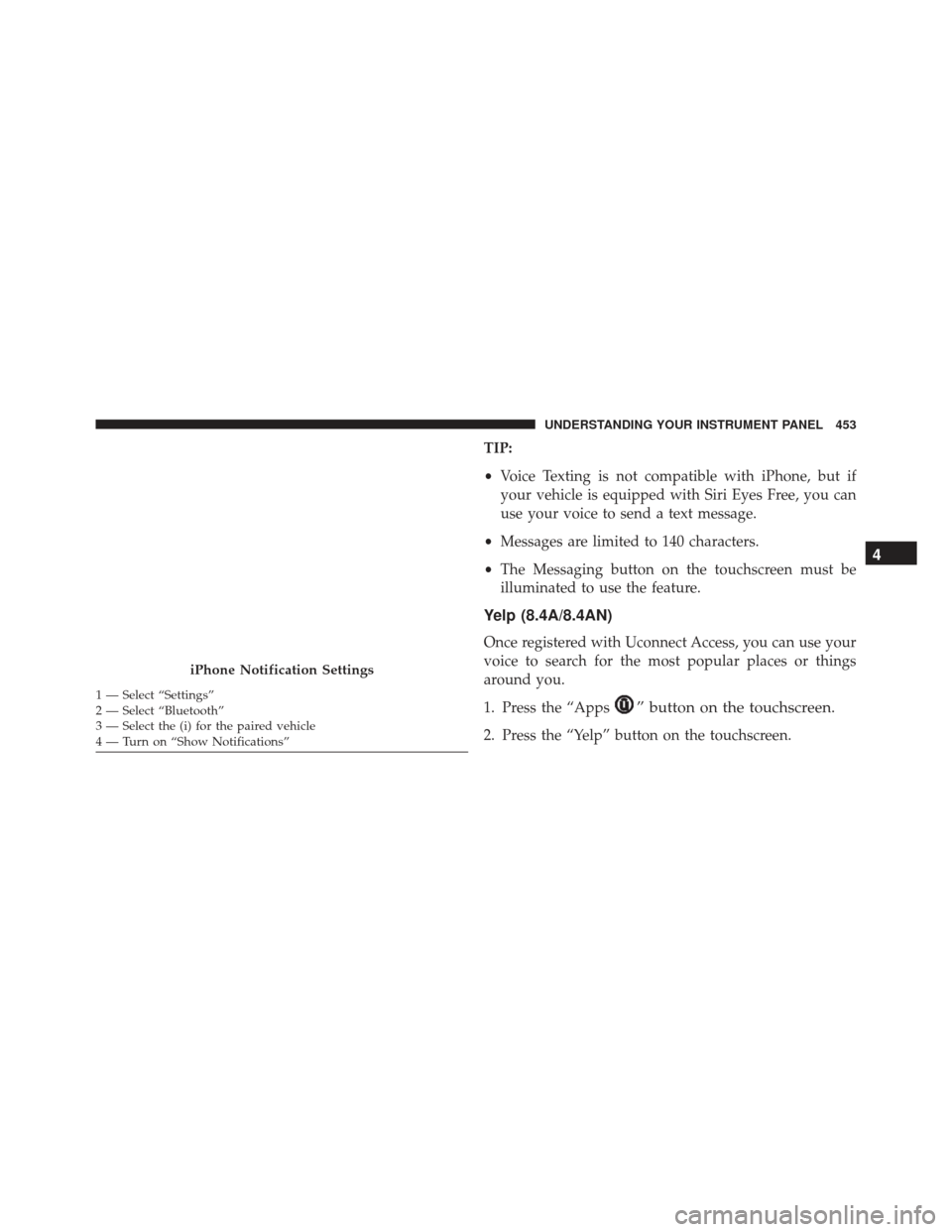
iPhone Notification Settings
1 — Select “Settings”
2 — Select “Bluetooth”
3 — Select the (i) for the paired vehicle
4 — Turn on “Show Notifications”
4
UNDERSTANDING YOUR INSTRUMENT PANEL 453
Page 458 of 723
Do Not Disturb
With Do Not Disturb, you can disable notifications from
incoming calls and texts, allowing you to keep your eyes
on the road and hands on the wheel. For your conve-
nience, there is a counter display to keep track of your
missed calls and text messages while you were using Do
Not Disturb.
Do Not Disturb can automatically reply with a text
message, a call or both, when declining an incoming call
and send it to voicemail.
Automatic reply messages can be:
•“I am driving right now, I will get back to you shortly.”
• Create a custom auto reply message up to 160 charac-
ters.
NOTE: Only the first 25 characters can been seen on the
touchscreen while typing a custom message. While in Do Not Disturb, Conference Call can be selected
so you can still place a second call without being inter-
rupted by incoming calls.
NOTE:
•
Reply with text message is not compatible with
iPhones.
• Auto reply with text message is only available on
phones that supporting Bluetooth MAP.
General Information
This device complies with FCC rules Part 15 and Industry
Canada RSS-210. Operation is subject to the following
two conditions:
1. This device may not cause harmful interference.
2. This device must accept any interference that may be received including interference that may cause unde-
sired operation.
456 UNDERSTANDING YOUR INSTRUMENT PANEL
Page 486 of 723
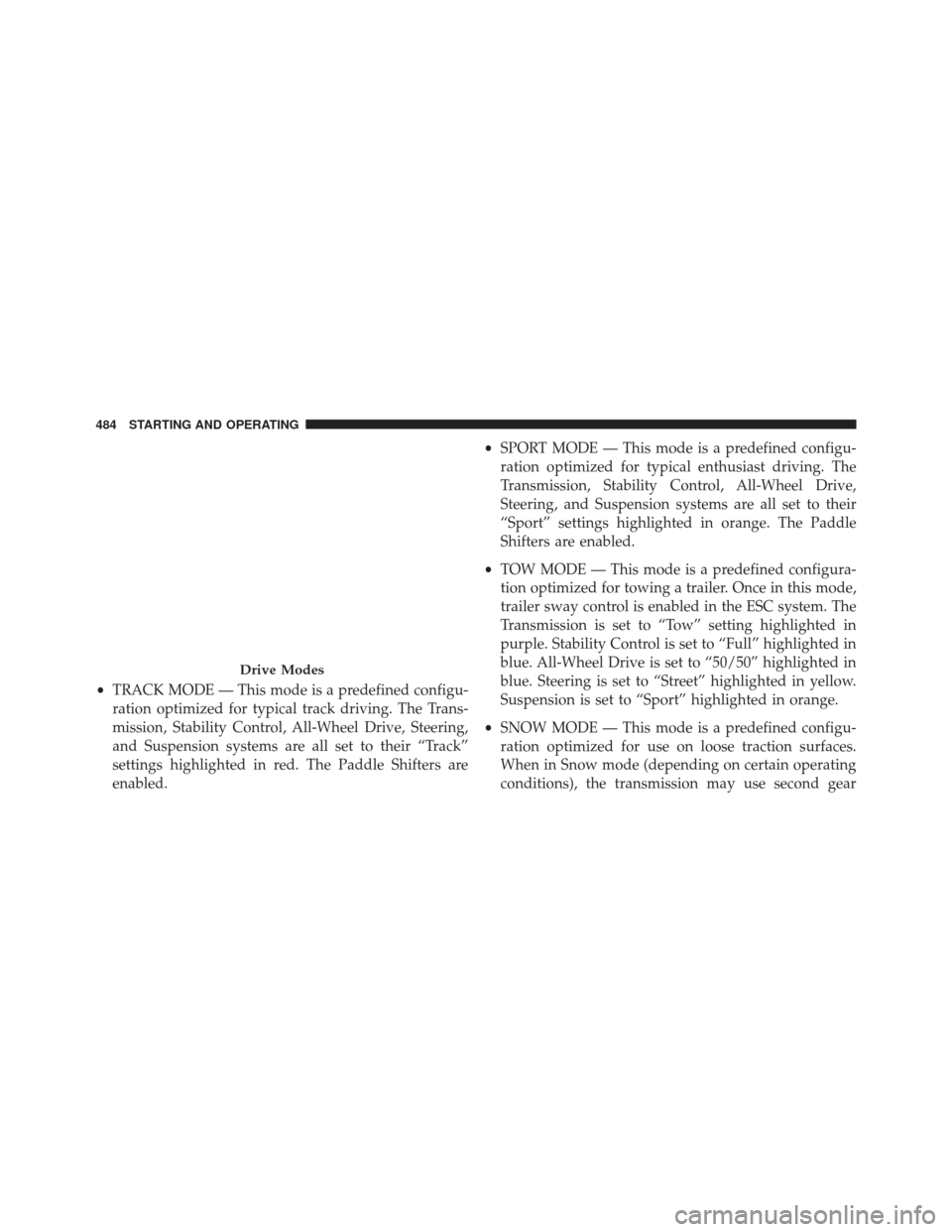
•TRACK MODE — This mode is a predefined configu-
ration optimized for typical track driving. The Trans-
mission, Stability Control, All-Wheel Drive, Steering,
and Suspension systems are all set to their “Track”
settings highlighted in red. The Paddle Shifters are
enabled. •
SPORT MODE — This mode is a predefined configu-
ration optimized for typical enthusiast driving. The
Transmission, Stability Control, All-Wheel Drive,
Steering, and Suspension systems are all set to their
“Sport” settings highlighted in orange. The Paddle
Shifters are enabled.
• TOW MODE — This mode is a predefined configura-
tion optimized for towing a trailer. Once in this mode,
trailer sway control is enabled in the ESC system. The
Transmission is set to “Tow” setting highlighted in
purple. Stability Control is set to “Full” highlighted in
blue. All-Wheel Drive is set to “50/50” highlighted in
blue. Steering is set to “Street” highlighted in yellow.
Suspension is set to “Sport” highlighted in orange.
• SNOW MODE — This mode is a predefined configu-
ration optimized for use on loose traction surfaces.
When in Snow mode (depending on certain operating
conditions), the transmission may use second gear
Drive Modes
484 STARTING AND OPERATING
Page 487 of 723
(rather than first gear) during launches, to minimize
wheel slippage. The Transmission is set to “Snow”
setting highlighted in blue. Stability Control is set to
“Full” highlighted in blue. All-Wheel Drive is set to
“50/50” highlighted in blue. Steering is set to “Street”
highlighted in yellow. Suspension is set to “Street”
highlighted in yellow.
• AUTO MODE — This mode activated when selecting
“Auto” with the Selec-Track switch. The Transmission,
Stability Control and All-Wheel Drive modes are set to
their “Street” settings highlighted in yellow. Steering
and Suspension can be configured in either the
“Street,” “Sport,” or “Track” and the Paddle Shifters
may be enabled or disabled while in auto set-up mode. •
CUSTOM MODE — This mode allows the driver to
create a custom vehicle configuration that is saved for
quick selection of favorite settings. Custom Mode may
be selected by pushing the “Custom” button on Selec-
Track switch. Custom Mode allows you to create a
custom configuration that is saved for quick selection
of your favorite settings. While in Custom Mode, the
All-Wheel Drive, Stability Control, Transmission,
Steering, Suspension, and Paddle Shifter settings are
shown in their current configuration. While in the
Custom Mode screen, press the “Custom Set-Up”
button on the touchscreen to access the selectable
options. Select which mode suits your driving needs
for a custom driving experience.
5
STARTING AND OPERATING 485
Page 661 of 723
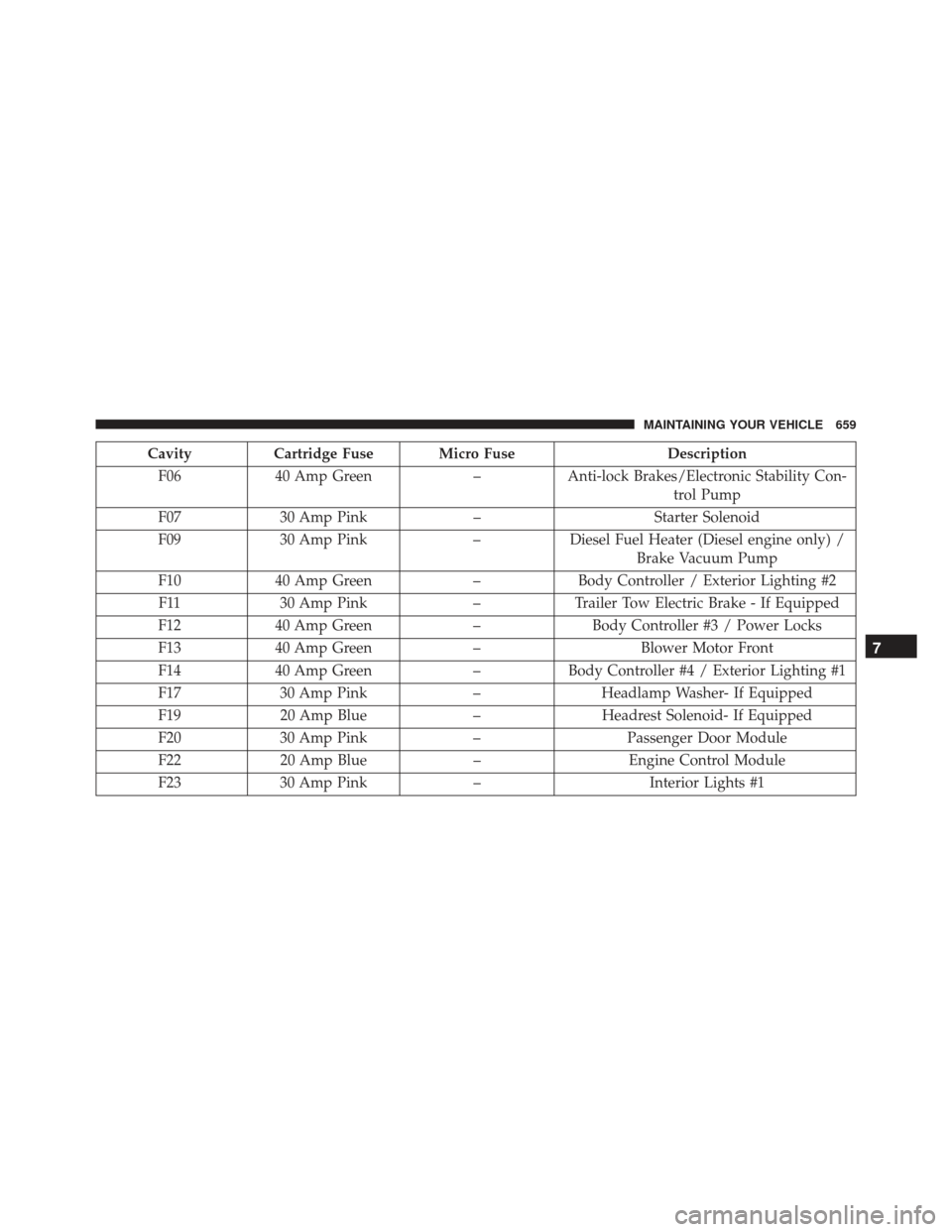
CavityCartridge Fuse Micro Fuse Description
F06 40 Amp Green –Anti-lock Brakes/Electronic Stability Con-
trol Pump
F07 30 Amp Pink –Starter Solenoid
F09 30 Amp Pink –Diesel Fuel Heater (Diesel engine only) /
Brake Vacuum Pump
F10 40 Amp Green –Body Controller / Exterior Lighting #2
F11 30 Amp Pink –Trailer Tow Electric Brake - If Equipped
F12 40 Amp Green –Body Controller #3 / Power Locks
F13 40 Amp Green –Blower Motor Front
F14 40 Amp Green –Body Controller #4 / Exterior Lighting #1
F17 30 Amp Pink –Headlamp Washer- If Equipped
F19 20 Amp Blue –Headrest Solenoid- If Equipped
F20 30 Amp Pink –Passenger Door Module
F22 20 Amp Blue –Engine Control Module
F23 30 Amp Pink –Interior Lights #1
7
MAINTAINING YOUR VEHICLE 659
Page 662 of 723
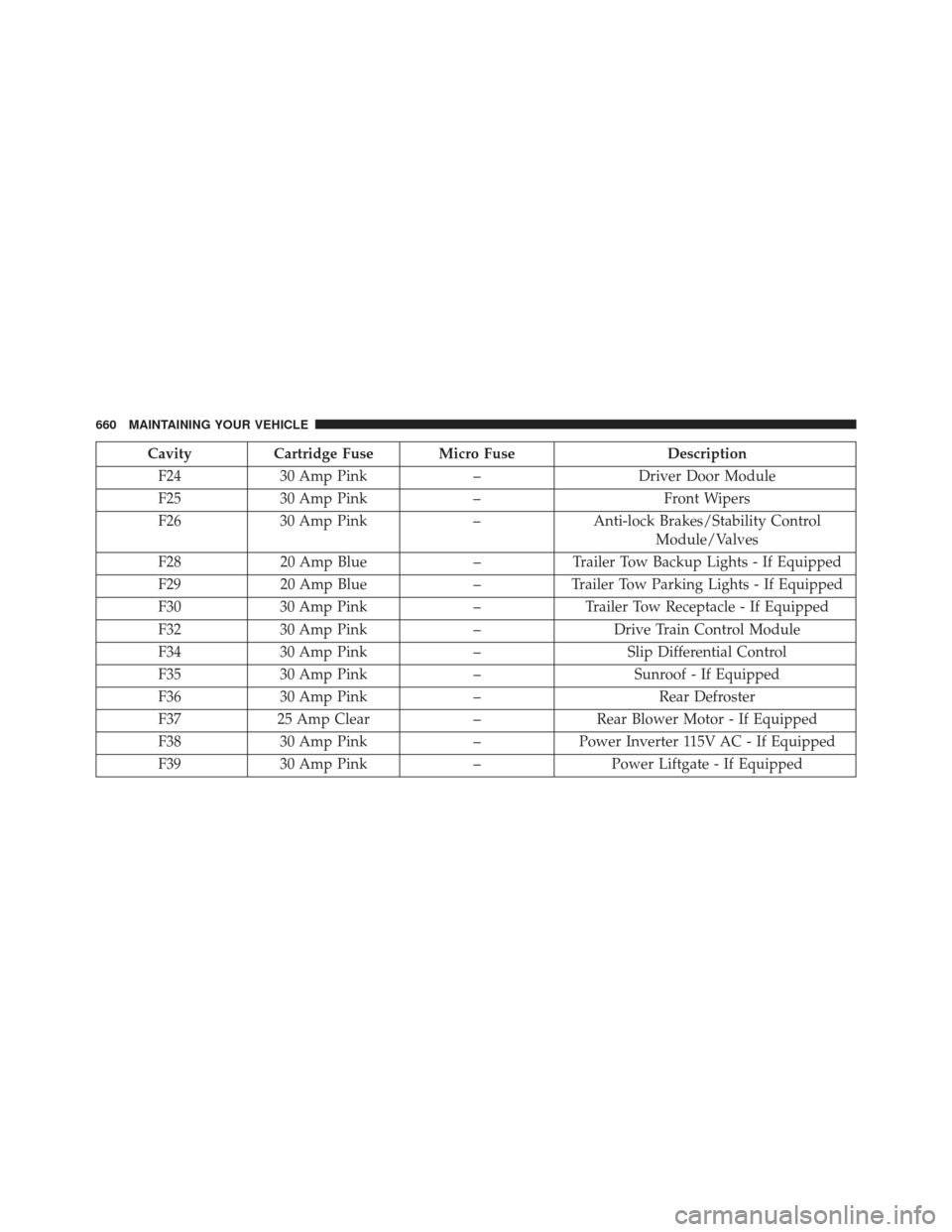
CavityCartridge Fuse Micro Fuse Description
F24 30 Amp Pink –Driver Door Module
F25 30 Amp Pink –Front Wipers
F26 30 Amp Pink –Anti-lock Brakes/Stability Control
Module/Valves
F28 20 Amp Blue –Trailer Tow Backup Lights - If Equipped
F29 20 Amp Blue –Trailer Tow Parking Lights - If Equipped
F30 30 Amp Pink –Trailer Tow Receptacle - If Equipped
F32 30 Amp Pink –Drive Train Control Module
F34 30 Amp Pink –Slip Differential Control
F35 30 Amp Pink –Sunroof - If Equipped
F36 30 Amp Pink –Rear Defroster
F37 25 Amp Clear –Rear Blower Motor - If Equipped
F38 30 Amp Pink –Power Inverter 115V AC - If Equipped
F39 30 Amp Pink –Power Liftgate - If Equipped
660 MAINTAINING YOUR VEHICLE