instrument panel JEEP GRAND CHEROKEE 2020 Owner handbook (in English)
[x] Cancel search | Manufacturer: JEEP, Model Year: 2020, Model line: GRAND CHEROKEE, Model: JEEP GRAND CHEROKEE 2020Pages: 378, PDF Size: 6.88 MB
Page 74 of 378
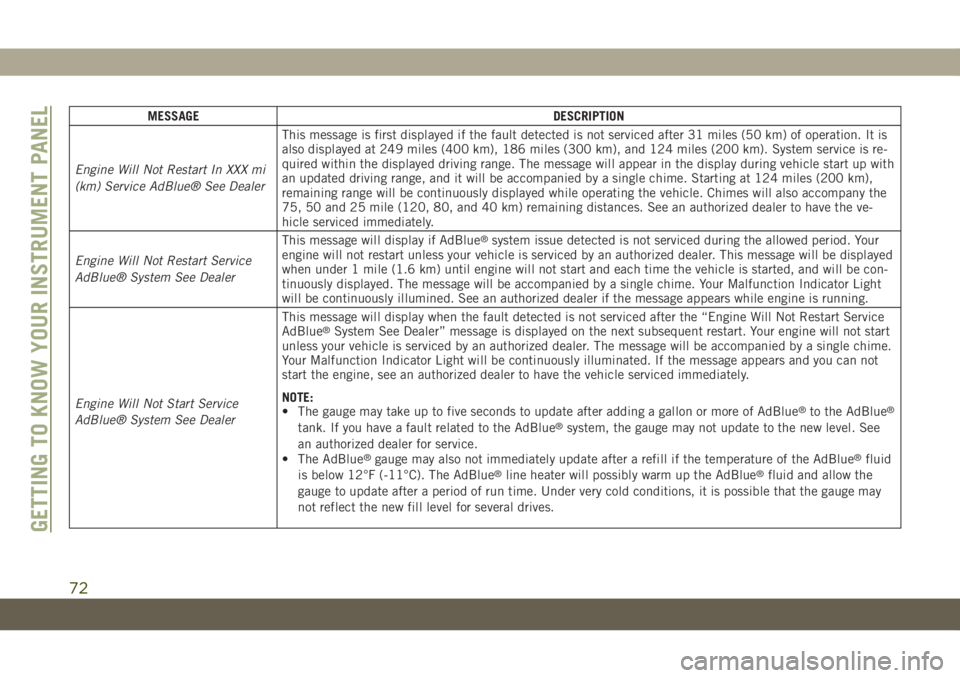
MESSAGE DESCRIPTION
Engine Will Not Restart In XXX mi
(km) Service AdBlue® See DealerThis message is first displayed if the fault detected is not serviced after 31 miles (50 km) of operation. It is
also displayed at 249 miles (400 km), 186 miles (300 km), and 124 miles (200 km). System service is re-
quired within the displayed driving range. The message will appear in the display during vehicle start up with
an updated driving range, and it will be accompanied by a single chime. Starting at 124 miles (200 km),
remaining range will be continuously displayed while operating the vehicle. Chimes will also accompany the
75, 50 and 25 mile (120, 80, and 40 km) remaining distances. See an authorized dealer to have the ve-
hicle serviced immediately.
Engine Will Not Restart Service
AdBlue® System See DealerThis message will display if AdBlue
®system issue detected is not serviced during the allowed period. Your
engine will not restart unless your vehicle is serviced by an authorized dealer. This message will be displayed
when under 1 mile (1.6 km) until engine will not start and each time the vehicle is started, and will be con-
tinuously displayed. The message will be accompanied by a single chime. Your Malfunction Indicator Light
will be continuously illumined. See an authorized dealer if the message appears while engine is running.
Engine Will Not Start Service
AdBlue® System See DealerThis message will display when the fault detected is not serviced after the “Engine Will Not Restart Service
AdBlue
®System See Dealer” message is displayed on the next subsequent restart. Your engine will not start
unless your vehicle is serviced by an authorized dealer. The message will be accompanied by a single chime.
Your Malfunction Indicator Light will be continuously illuminated. If the message appears and you can not
start the engine, see an authorized dealer to have the vehicle serviced immediately.
NOTE:
• The gauge may take up to five seconds to update after adding a gallon or more of AdBlue
®to the AdBlue®
tank. If you have a fault related to the AdBlue®system, the gauge may not update to the new level. See
an authorized dealer for service.
• The AdBlue
®gauge may also not immediately update after a refill if the temperature of the AdBlue®fluid
is below 12°F (-11°C). The AdBlue®line heater will possibly warm up the AdBlue®fluid and allow the
gauge to update after a period of run time. Under very cold conditions, it is possible that the gauge may
not reflect the new fill level for several drives.
GETTING TO KNOW YOUR INSTRUMENT PANEL
72
Page 75 of 378
TRIP COMPUTER
Push and release the up or down arrow button
until the Trip A or Trip B icon is highlighted in
the instrument cluster display (Toggle left or
right to select Trip A or Trip B). Push and
release the OK button to display the Trip
information.
WARNING LIGHTS AND
MESSAGES
The warning/indicator lights will illuminate in
the instrument panel together with a dedi-
cated message and/or acoustic signal when
applicable. These indications are indicative
and precautionary and as such must not be
considered as exhaustive and/or alternative
to the information contained in the Owner’s
Manual, which you are advised to read care-
fully in all cases. Always refer to the informa-
tion in this chapter in the event of a failure
indication. All active telltales will display first
if applicable. The system check menu may
appear different based upon equipment op-
tions and current vehicle status. Some tell-
tales are optional and may not appear.
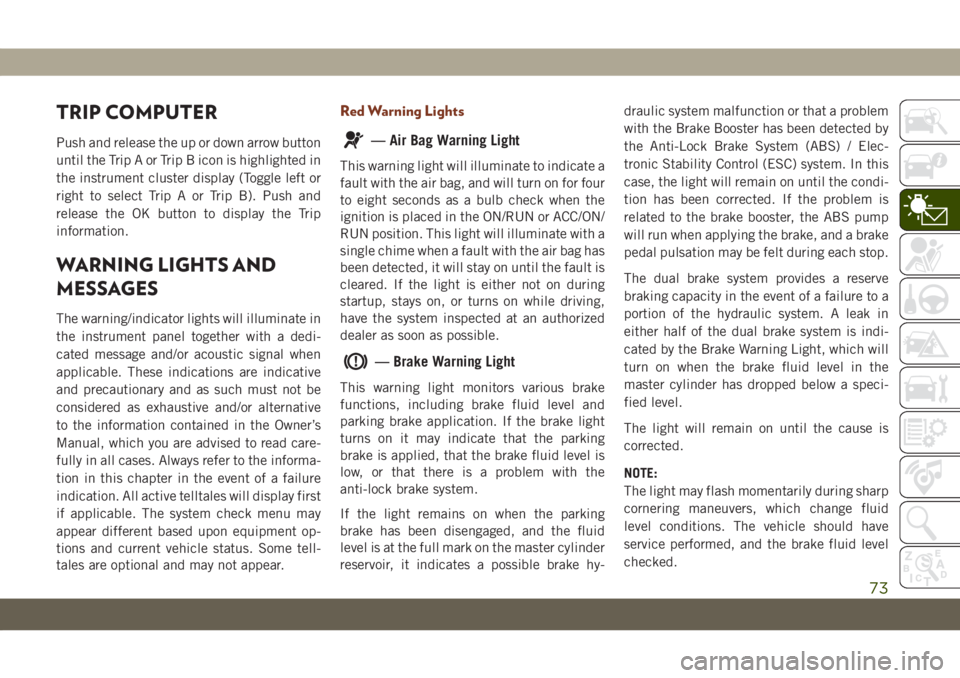
Red Warning Lights
— Air Bag Warning Light
This warning light will illuminate to indicate a
fault with the air bag, and will turn on for four
to eight seconds as a bulb check when the
ignition is placed in the ON/RUN or ACC/ON/
RUN position. This light will illuminate with a
single chime when a fault with the air bag has
been detected, it will stay on until the fault is
cleared. If the light is either not on during
startup, stays on, or turns on while driving,
have the system inspected at an authorized
dealer as soon as possible.
— Brake Warning Light
This warning light monitors various brake
functions, including brake fluid level and
parking brake application. If the brake light
turns on it may indicate that the parking
brake is applied, that the brake fluid level is
low, or that there is a problem with the
anti-lock brake system.
If the light remains on when the parking
brake has been disengaged, and the fluid
level is at the full mark on the master cylinder
reservoir, it indicates a possible brake hy-draulic system malfunction or that a problem
with the Brake Booster has been detected by
the Anti-Lock Brake System (ABS) / Elec-
tronic Stability Control (ESC) system. In this
case, the light will remain on until the condi-
tion has been corrected. If the problem is
related to the brake booster, the ABS pump
will run when applying the brake, and a brake
pedal pulsation may be felt during each stop.
The dual brake system provides a reserve
braking capacity in the event of a failure to a
portion of the hydraulic system. A leak in
either half of the dual brake system is indi-
cated by the Brake Warning Light, which will
turn on when the brake fluid level in the
master cylinder has dropped below a speci-
fied level.
The light will remain on until the cause is
corrected.
NOTE:
The light may flash momentarily during sharp
cornering maneuvers, which change fluid
level conditions. The vehicle should have
service performed, and the brake fluid level
checked.
73
Page 76 of 378
If brake failure is indicated, immediate repair
is necessary.
WARNING!
Driving a vehicle with the red brake light
on is dangerous. Part of the brake system
may have failed. It will take longer to stop
the vehicle. You could have a collision.
Have the vehicle checked immediately.
Vehicles equipped with the Anti-Lock Brake
System (ABS) are also equipped with Elec-
tronic Brake Force Distribution (EBD). In the
event of an EBD failure, the Brake Warning
Light will turn on along with the ABS Light.
Immediate repair to the ABS system is re-
quired.
Operation of the Brake Warning Light can be
checked by turning the ignition switch from
the OFF position to the ON/RUN position.
The light should illuminate for approximately
four seconds. The light should then turn off
unless the parking brake is applied or a brake
fault is detected. If the light does not illumi-
nate, have the light inspected by an autho-
rized dealer.The light also will turn on when the parking
brake is applied with the ignition switch in
the ON/RUN position.
NOTE:
This light shows only that the parking brake is
applied. It does not show the degree of brake
application.
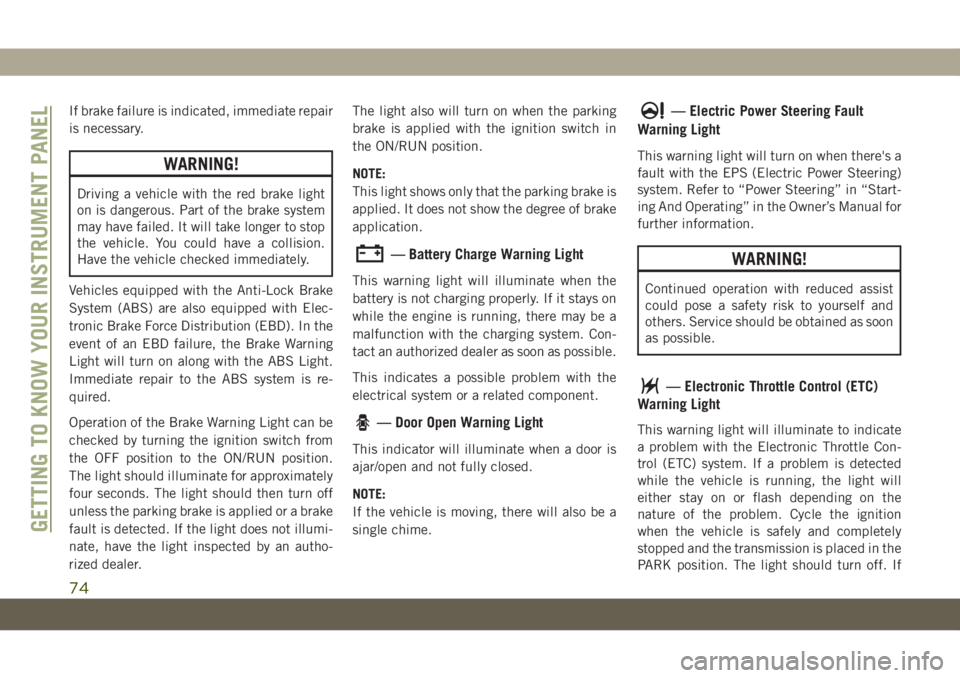
— Battery Charge Warning Light
This warning light will illuminate when the
battery is not charging properly. If it stays on
while the engine is running, there may be a
malfunction with the charging system. Con-
tact an authorized dealer as soon as possible.
This indicates a possible problem with the
electrical system or a related component.
— Door Open Warning Light
This indicator will illuminate when a door is
ajar/open and not fully closed.
NOTE:
If the vehicle is moving, there will also be a
single chime.
— Electric Power Steering Fault
Warning Light
This warning light will turn on when there's a
fault with the EPS (Electric Power Steering)
system. Refer to “Power Steering” in “Start-
ing And Operating” in the Owner’s Manual for
further information.
WARNING!
Continued operation with reduced assist
could pose a safety risk to yourself and
others. Service should be obtained as soon
as possible.
— Electronic Throttle Control (ETC)
Warning Light
This warning light will illuminate to indicate
a problem with the Electronic Throttle Con-
trol (ETC) system. If a problem is detected
while the vehicle is running, the light will
either stay on or flash depending on the
nature of the problem. Cycle the ignition
when the vehicle is safely and completely
stopped and the transmission is placed in the
PARK position. The light should turn off. If
GETTING TO KNOW YOUR INSTRUMENT PANEL
74
Page 78 of 378
ACC/ON/RUN position and if the driver’s seat
belt is unbuckled, a chime will sound and the
light will turn on. When driving, if the driver
or front passenger seat belt remains unbuck-
led, the Seat Belt Reminder Light will flash or
remain on continuously and a chime will
sound.
Refer to “Occupant Restraint Systems” in
“Safety” for further information.
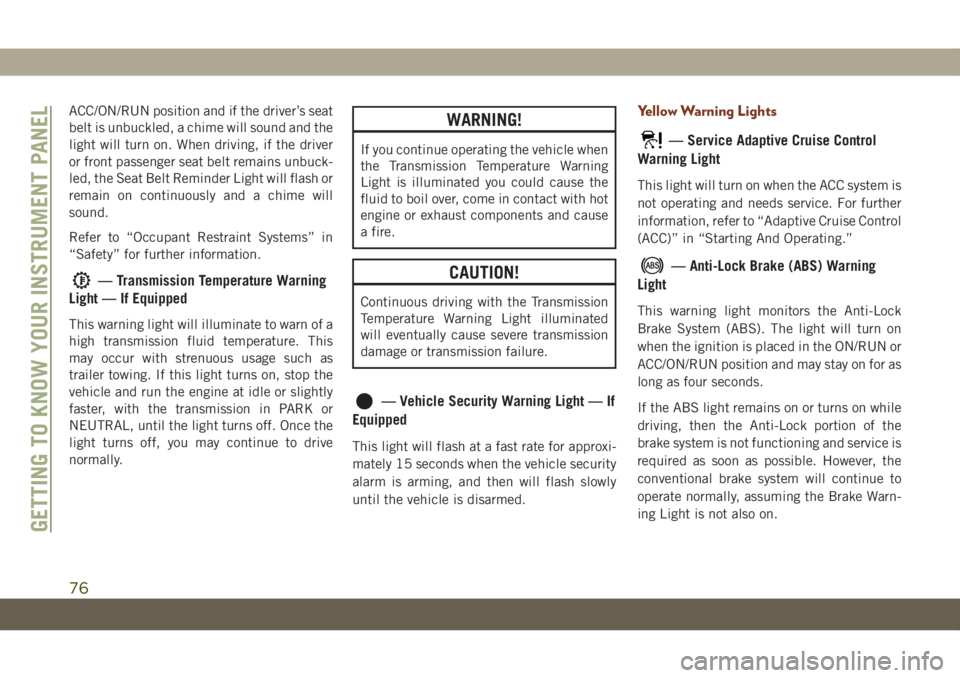
— Transmission Temperature Warning
Light — If Equipped
This warning light will illuminate to warn of a
high transmission fluid temperature. This
may occur with strenuous usage such as
trailer towing. If this light turns on, stop the
vehicle and run the engine at idle or slightly
faster, with the transmission in PARK or
NEUTRAL, until the light turns off. Once the
light turns off, you may continue to drive
normally.
WARNING!
If you continue operating the vehicle when
the Transmission Temperature Warning
Light is illuminated you could cause the
fluid to boil over, come in contact with hot
engine or exhaust components and cause
a fire.
CAUTION!
Continuous driving with the Transmission
Temperature Warning Light illuminated
will eventually cause severe transmission
damage or transmission failure.
— Vehicle Security Warning Light — If
Equipped
This light will flash at a fast rate for approxi-
mately 15 seconds when the vehicle security
alarm is arming, and then will flash slowly
until the vehicle is disarmed.
Yellow Warning Lights
— Service Adaptive Cruise Control
Warning Light
This light will turn on when the ACC system is
not operating and needs service. For further
information, refer to “Adaptive Cruise Control
(ACC)” in “Starting And Operating.”
— Anti-Lock Brake (ABS) Warning
Light
This warning light monitors the Anti-Lock
Brake System (ABS). The light will turn on
when the ignition is placed in the ON/RUN or
ACC/ON/RUN position and may stay on for as
long as four seconds.
If the ABS light remains on or turns on while
driving, then the Anti-Lock portion of the
brake system is not functioning and service is
required as soon as possible. However, the
conventional brake system will continue to
operate normally, assuming the Brake Warn-
ing Light is not also on.
GETTING TO KNOW YOUR INSTRUMENT PANEL
76
Page 80 of 378
— Low Washer Fluid Warning Light —
If Equipped
This warning light will illuminate when the
windshield washer fluid is low.
— Engine Check/Malfunction Indica-
tor Warning Light (MIL)
The Engine Check/Malfunction Indicator
Light (MIL) is a part of an Onboard Diagnostic
System called OBD II that monitors engine
and automatic transmission control systems.
This warning light will illuminate when the
ignition is in the ON/RUN position before
engine start. If the bulb does not come on
when turning the ignition switch from OFF to
ON/RUN, have the condition checked
promptly.
Certain conditions, such as a loose or missing
gas cap, poor quality fuel, etc., may illumi-
nate the light after engine start. The vehicle
should be serviced if the light stays on
through several typical driving styles. In most
situations, the vehicle will drive normally and
will not require towing.When the engine is running, the MIL may
flash to alert serious conditions that could
lead to immediate loss of power or severe
catalytic converter damage. The vehicle
should be serviced by an authorized dealer as
soon as possible if this occurs.WARNING!
A malfunctioning catalytic converter, as
referenced above, can reach higher tem-
peratures than in normal operating condi-
tions. This can cause a fire if you drive
slowly or park over flammable substances
such as dry plants, wood, cardboard, etc.
This could result in death or serious injury
to the driver, occupants or others.
CAUTION!
Prolonged driving with the Malfunction
Indicator Light (MIL) on could cause dam-
age to the vehicle control system. It also
could affect fuel economy and driveability.
If the MIL is flashing, severe catalytic
converter damage and power loss will soon
occur. Immediate service is required.
— AdBlue® (UREA) Injection System
Failure Warning Light — If Equipped
This warning light will illuminate along with a
dedicated message on the display (If
Equipped) if an unknown fluid not conform-
ing with acceptable characteristics is in-
serted, or if an average consumption of
AdBlue
®(UREA) over 50% is detected. Con-
tact an authorized dealer as soon as possible.
If the problem is not solved, a specific mes-
sage will appear on the Instrument Cluster
Display whenever a certain threshold is
reached until it will no longer be possible to
start the engine.
When about 125 mi (200 km) are remaining
before the AdBlue
®tank is empty, a continu-
ous dedicated message will appear on the
instrument panel, accompanied by a buzzer
sound (If Equipped).
SERV4WD— Service 4WD Warning Light — If
Equipped
This warning light will illuminate to signal a
fault with the 4WD system. If the light stays
on or comes on during driving, it means that
the 4WD system is not functioning properlyGETTING TO KNOW YOUR INSTRUMENT PANEL
78
Page 82 of 378
hicle start-ups as long as the malfunction
exists. When the malfunction indicator is
illuminated, the system may not be able to
detect or signal low tire pressure as intended.
TPMS malfunctions may occur for a variety of
reasons, including the installation of replace-
ment or alternate tires or wheels on the ve-
hicle that prevent the TPMS from functioning
properly. Always check the TPMS malfunc-
tion telltale after replacing one or more tires
or wheels on your vehicle to ensure that the
replacement or alternate tires and wheels
allow the TPMS to continue to function
properly.
CAUTION!
The TPMS has been optimized for the
original equipment tires and wheels.
TPMS pressures and warning have been
established for the tire size equipped on
your vehicle. Undesirable system opera-
tion or sensor damage may result when
using replacement equipment that is not
of the same size, type, and/or style. After-
market wheels can cause sensor damage.
Using aftermarket tire sealants may cause
CAUTION!
the Tire Pressure Monitoring System
(TPMS) sensor to become inoperable. Af-
ter using an aftermarket tire sealant it is
recommended that you take your vehicle
to your authorized dealer to have your
sensor function checked.
The system only warns the tire pressure is
low: it is not able to inflate them.
Yellow Indicator Lights
— Air Suspension Active Indicator
Light — If Equipped
This light will illuminate when the air suspen-
sion system is actively adjusting the ride
height.
— Air Suspension Entry/Exit Indica-
tor Light— If Equipped
This light will illuminate when the vehicle is
automatically lowered from ride height posi-
tion downward for easy entry and exit of the
vehicle.
— Air Suspension Aerody-
namic Height Indicator Light— If Equipped
This light will illuminate when the air suspen-
sion system is set to the Aerodynamic setting.
— Air Suspension Off-
Road 1 Indicator Light — If Equipped
This light will illuminate when the air suspen-
sion system is set to the Off-Road 1 setting.
— Air Suspension Off-
Road 2 Indicator Light — If Equipped
This light will illuminate when the air suspen-
sion system is set to the Off-Road 2 setting.
— Forward Collision Warning Off Indi-
cator Light — If Equipped
This indicator light illuminates to indicate
that Forward Collision Warning is off.
— 4WD Low Indicator Light — If
Equipped
This light alerts the driver that the vehicle is
in the four-wheel drive LOW mode. The front
and rear driveshafts are mechanically locked
together forcing the front and rear wheels toGETTING TO KNOW YOUR INSTRUMENT PANEL
80
Page 84 of 378
Green Indicator Lights
— Adaptive Cruise Control (ACC) Set
With No Target Detected Indicator Light —
If Equipped
This light will turn on when the Adaptive
Cruise Control is set and there is no target
vehicle detected. Refer to "Adaptive Cruise
Control (ACC) — If Equipped" in "Starting
And Operating" for further information.
— Adaptive Cruise Control (ACC) Set
With Target Light — If Equipped
This will display when the ACC is set and a
target vehicle is detected. Refer to “Adaptive
Cruise Control (ACC) — If Equipped” in
“Starting And Operating” for further informa-
tion.
— Cruise Control Set Indicator Light
— If Equipped
This indicator light will illuminate when the
cruise control is set to the desired speed.
Refer to “Speed Control” in “Starting And
Operating” for further information.
— Front Fog Indicator Light — If
Equipped
This indicator light will illuminate when the
front fog lights are on.
— LaneSense Indicator Light — If
Equipped
The LaneSense indicator light illuminates
solid green when both lane markings have
been detected and the system is “armed”
and ready to provide visual and torque warn-
ings if an unintentional lane departure oc-
curs.
Refer to “LaneSense — If Equipped" in
“Starting And Operating” for further informa-
tion.
— Park/Headlight On Indicator Light
This indicator light will illuminate when the
park lights or headlights are turned on.
— Snow Mode SRT Indicator Light
This light will turn on when Snow Mode is
active.
Refer to “Selec-Track” in “Starting And Op-
erating” for further information.
— Sport Mode Indicator Light
This light will turn on when Sport Mode is
active.
— Sport Mode SRT Indicator Light
This light will turn on when Sport Mode is
active.
Refer to “Selec-Track” in “Starting And Op-
erating” for further information.
— Stop/Start Active Indicator Light —
If Equipped
This indicator light will illuminate when the
Stop/Start function is in “Autostop” mode.
— Tow Mode SRT Indicator Light
This light will turn on when Tow Mode is
active.
Refer to “Selec-Track” in “Starting And Op-
erating” for further information.
— Track Mode SRT Indicator Light
This light will turn on when Track Mode is
active.GETTING TO KNOW YOUR INSTRUMENT PANEL
82
Page 86 of 378
and flash along with a continuous chime.
Speed Warning can be turned on and off in
the instrument cluster display.
Refer to “Instrument Cluster Display” in
“Getting To Know Your Instrument Panel” in
the Owner’s Manual for further information.
The number “55” is only an example of a
speed that can be set.
— Speed Warning Indicator Light — If
Equipped
When Set Speed Warning is turned on, the
speed warning telltale will illuminate in the
instrument cluster with a number matching
the set speed. When the set speed is ex-
ceeded, a single chime will sound along with
pop up message of speed warning exceeded.
When the set speed is exceeded, the indica-
tion will light up yellow and flash along with a
continuous chime (up to ten seconds or until
the speed is no longer exceeded). The indi-
cation will not turn yellow and flash with a
continuous chime unless the speed is ex-
ceeded by 1.9 mph (3 km/h) or more.Speed Warning can be turned on and off in
the instrument cluster display. For further
information, refer to “Instrument Cluster Dis-
play Menu Items” in “Getting To Know Your
Instrument Panel.”
NOTE:
The number “55” is only an example of a
speed that can be set.
— Cruise Control Ready Indicator
Light
This light will turn on when the speed control
has been turned on, but not set. Refer to
“Speed Control — If Equipped” in “Starting
And Operating” for further information.
— Selec Speed Control Indicator
Light — If Equipped
This light will turn on when “Selec Speed
Control” is activated.
To activate “Selec Speed Control”, assure the
vehicle is Four Wheel Drive Low (4WD) and
push the button on the Instrument Panel.NOTE:
If the vehicle is not in 4WD Low, “To Enter
Selec-Speed Shift to 4WD Low” will appear
in the instrument cluster display.
— Valet Mode SRT Indicator
Light
This light will turn on when Valet Mode is
active.
Blue Indicator Lights
— High Beam Indicator Light
This indicator light will illuminate to indicate
that the high beam headlights are on. With
the low beams activated, push the multifunc-
tion lever forward (toward the front of the
vehicle) to turn on the high beams. Pull the
multifunction lever rearward (toward the rear
of the vehicle) to turn off the high beams. If
the high beams are off, pull the lever toward
you for a temporary high beam on, "flash to
pass" scenario.
GETTING TO KNOW YOUR INSTRUMENT PANEL
84
Page 90 of 378
WARNING!
The Brake Assist System (BAS) cannot
prevent the natural laws of physics from
acting on the vehicle, nor can it increase
the traction afforded by prevailing road
conditions. BAS cannot prevent collisions,
including those resulting from excessive
speed in turns, driving on very slippery
surfaces, or hydroplaning. The capabilities
of a BAS-equipped vehicle must never be
exploited in a reckless or dangerous man-
ner, which could jeopardize the user's
safety or the safety of others.
Hill Start Assist (HSA)
The HSA system is designed to mitigate roll
back from a complete stop while on an in-
cline. If the driver releases the brake while
stopped on an incline, HSA will continue to
hold the brake pressure for a short period. If
the driver does not apply the throttle before
this time expires, the system will release
brake pressure and the vehicle will roll down
the hill as normal.The following conditions must be met in
order for HSA to activate:
• The feature must be enabled.
• The vehicle must be stopped.
• Park brake must be off.
• Driver door must be closed.
• The vehicle must be on a sufficient grade.
• The gear selection must match vehicle up-
hill direction (i.e., vehicle facing uphill is in
forward gear; vehicle backing uphill is in
REVERSE gear).
• HSA will work in REVERSE gear and all
forward gears. The system will not activate
if the transmission is in PARK or NEU-
TRAL. For vehicles equipped with a manual
transmission, if the clutch is pressed, HSA
will remain active.
WARNING!
There may be situations where the Hill
Start Assist (HSA) will not activate and
slight rolling may occur, such as on minor
hills or with a loaded vehicle, or while
pulling a trailer. HSA is not a substitute for
WARNING!
active driving involvement. It is always the
driver’s responsibility to be attentive to
distance to other vehicles, people, and
objects, and most importantly brake op-
eration to ensure safe operation of the
vehicle under all road conditions. Your
complete attention is always required
while driving to maintain safe control of
your vehicle. Failure to follow these warn-
ings can result in a collision or serious
personal injury.
Disabling And Enabling HSA
This feature can be turned on or turned off.
To change the current setting, proceed as
follows:
• If disabling HSA using your instrument
cluster display, refer to “Instrument Cluster
Display” in “Getting To Know Your Instru-
ment Panel” for further information.
• If disabling HSA using Uconnect Settings,
refer to “Uconnect Settings” in “Multime-
dia” for further information.
SAFETY
88
Page 107 of 378
NOTE:
It is particularly important, for you to regu-
larly check the tire pressure in all of your tires
and to maintain the proper pressure.
The Tire Pressure Monitor System (TPMS)
consists of the following components:
• Receiver Module
• Four Tire Pressure Monitoring Sensors• Various Tire Pressure Monitoring System
Messages, which display in the instrument
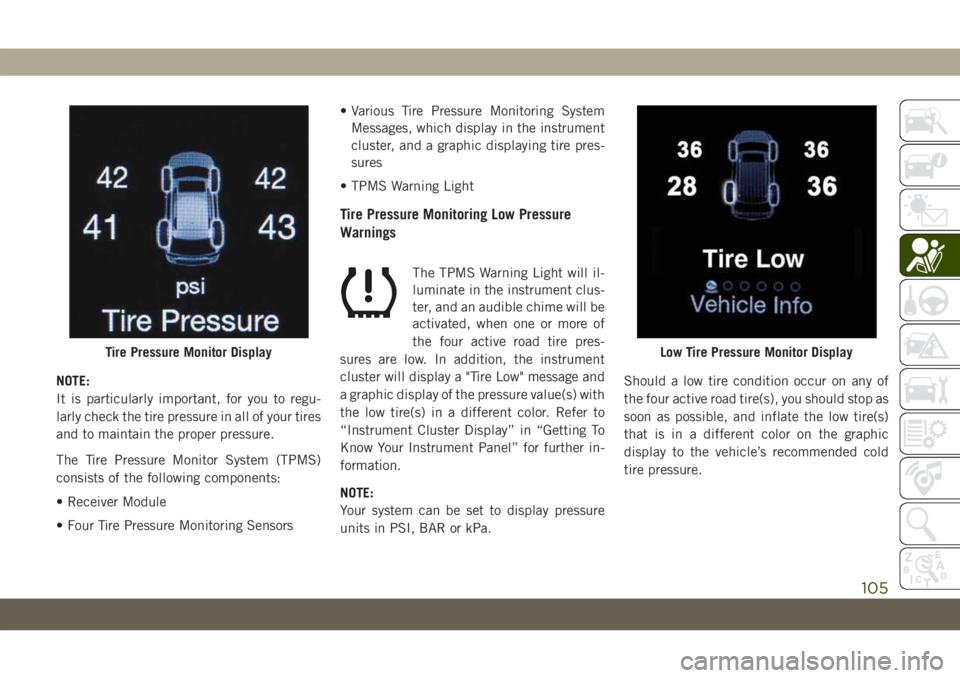
cluster, and a graphic displaying tire pres-
sures
• TPMS Warning Light
Tire Pressure Monitoring Low Pressure
Warnings
The TPMS Warning Light will il-
luminate in the instrument clus-
ter, and an audible chime will be
activated, when one or more of
the four active road tire pres-
sures are low. In addition, the instrument
cluster will display a "Tire Low" message and
a graphic display of the pressure value(s) with
the low tire(s) in a different color. Refer to
“Instrument Cluster Display” in “Getting To
Know Your Instrument Panel” for further in-
formation.
NOTE:
Your system can be set to display pressure
units in PSI, BAR or kPa.Should a low tire condition occur on any of
the four active road tire(s), you should stop as
soon as possible, and inflate the low tire(s)
that is in a different color on the graphic
display to the vehicle’s recommended cold
tire pressure.
Tire Pressure Monitor DisplayLow Tire Pressure Monitor Display
105