cruise control JEEP GRAND CHEROKEE 2023 User Guide
[x] Cancel search | Manufacturer: JEEP, Model Year: 2023, Model line: GRAND CHEROKEE, Model: JEEP GRAND CHEROKEE 2023Pages: 424, PDF Size: 15.48 MB
Page 145 of 424
STARTING AND OPERATING143
Adaptive Cruise Control (ACC) Operation
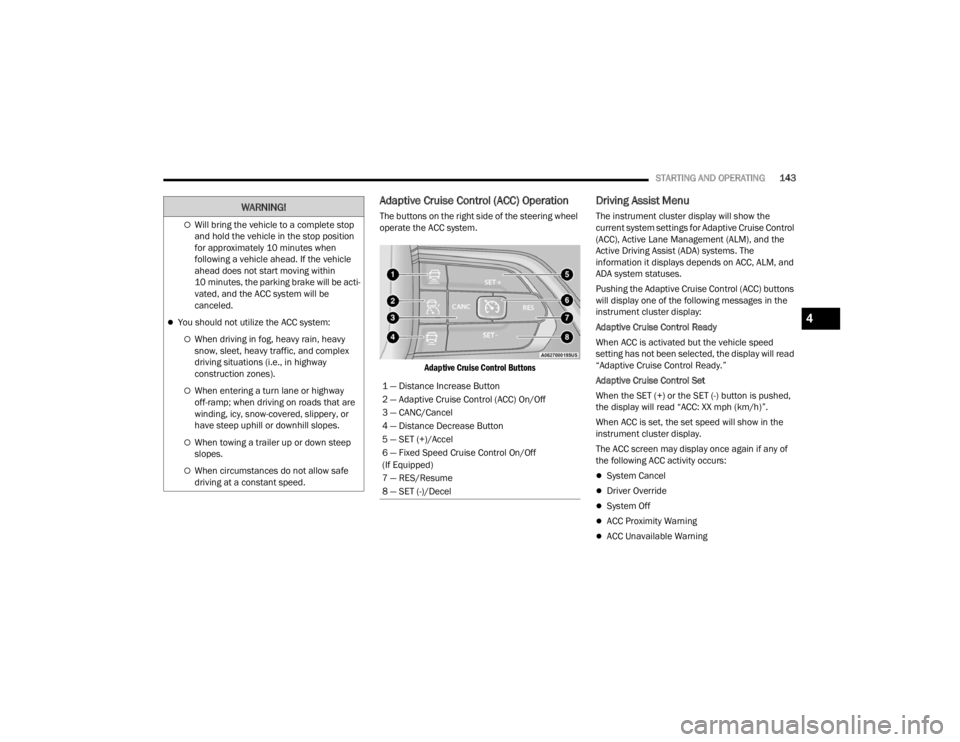
The buttons on the right side of the steering wheel
operate the ACC system.
Adaptive Cruise Control Buttons
Driving Assist Menu
The instrument cluster display will show the
current system settings for Adaptive Cruise Control
(ACC), Active Lane Management (ALM), and the
Active Driving Assist (ADA) systems. The
information it displays depends on ACC, ALM, and
ADA system statuses.
Pushing the Adaptive Cruise Control (ACC) buttons
will display one of the following messages in the
instrument cluster display:
Adaptive Cruise Control Ready
When ACC is activated but the vehicle speed
setting has not been selected, the display will read
“Adaptive Cruise Control Ready.”
Adaptive Cruise Control Set
When the SET (+) or the SET (-) button is pushed,
the display will read “ACC: XX mph (km/h)”.
When ACC is set, the set speed will show in the
instrument cluster display.
The ACC screen may display once again if any of
the following ACC activity occurs:
System Cancel
Driver Override
System Off
ACC Proximity Warning
ACC Unavailable Warning
Will bring the vehicle to a complete stop
and hold the vehicle in the stop position
for approximately 10 minutes when
following a vehicle ahead. If the vehicle
ahead does not start moving within
10 minutes, the parking brake will be acti -
vated, and the ACC system will be
canceled.
You should not utilize the ACC system:
When driving in fog, heavy rain, heavy
snow, sleet, heavy traffic, and complex
driving situations (i.e., in highway
construction zones).
When entering a turn lane or highway
off-ramp; when driving on roads that are
winding, icy, snow-covered, slippery, or
have steep uphill or downhill slopes.
When towing a trailer up or down steep
slopes.
When circumstances do not allow safe
driving at a constant speed.
WARNING!
1 — Distance Increase Button
2 — Adaptive Cruise Control (ACC) On/Off
3 — CANC/Cancel
4 — Distance Decrease Button
5 — SET (+)/Accel
6 — Fixed Speed Cruise Control On/Off
(If Equipped)
7 — RES/Resume
8 — SET (-)/Decel
4
23_WL_OM_EN_USC_t.book Page 143
Page 146 of 424

144STARTING AND OPERATING
Adaptive Cruise Control Off
When ACC is deactivated, the display will read
“Adaptive Cruise Control Off”.
The instrument cluster display will return to the last
display selected after five seconds of no ACC
display activity.
Activating Adaptive Cruise Control (ACC)
The minimum set speed for the ACC system is
20 mph (32 km/h).
When the system is turned on and in the ready
state, the instrument cluster display will read “ACC
Ready.”
When the system is off, the instrument cluster
display will read “Adaptive Cruise Control (ACC)
Off.”
NOTE:You cannot engage ACC under the following condi -
tions:
When in 4WD Low
When the brakes are applied
When the parking brake is applied
When the transmission is in PARK, REVERSE or
NEUTRAL
When the brakes are overheated
When the driver’s door is open at low speeds
When the driver’s seat belt is unbuckled at low
speeds
When there is a stationary vehicle in front of
your vehicle in close proximity
When Electronic Stability Control (ESC) Full Off
mode is active
To Activate/Deactivate
Push and release the Adaptive Cruise Control
(ACC) on/off button. The ACC menu in the
instrument cluster displays “ACC Ready.”
To turn the system off, push and release the
Adaptive Cruise Control (ACC) on/off button again.
At this time, the system will turn off and the
instrument cluster displays “Adaptive Cruise
Control (ACC) Off.”
To Set A Desired Speed
When the vehicle reaches the speed desired, push
the SET (+) button or the SET (-) button and
release. The instrument cluster display will show
the set speed.
NOTE:Fixed Speed Cruise Control (if equipped) is used
without ACC enabled. To change between Adaptive
Cruise Control (ACC) and Fixed Speed Cruise
Control features, first turn off ACC by pushing the
ACC on/off button. Then, turn on Fixed Speed
Cruise Control by pushing the Fixed Speed Cruise
Control on/off button.
If ACC is set when the vehicle speed is below
20 mph (32 km/h), the set speed will default to
20 mph (32 km/h).
NOTE:Fixed Speed Cruise Control cannot be set below
20 mph (32 km/h).
If either system is set when the vehicle speed is
above 20 mph (32 km/h), the set speed shall be
the current speed of the vehicle.
WARNING!
Leaving the Adaptive Cruise Control (ACC)
system on when not in use is dangerous. You
could accidentally set the system or cause it to
go faster than you want. You could lose control
and have a collision. Always leave the system off
when you are not using it.
WARNING!
In Fixed Speed Cruise Control mode, the system
will not react to vehicles ahead. In addition, the
proximity warning does not activate and no
alarm will sound even if you are too close to the
vehicle ahead since neither the presence of the
vehicle ahead nor the vehicle-to-vehicle distance
is detected. Be sure to maintain a safe distance
between your vehicle and the vehicle ahead.
Always be aware which mode is selected.
23_WL_OM_EN_USC_t.book Page 144
Page 147 of 424

STARTING AND OPERATING145
NOTE:
Keeping your foot on the accelerator pedal can
cause the vehicle to continue to accelerate
beyond the set speed. If this occurs, the
message “DRIVER OVERRIDE” will display in the
instrument cluster display.
If you continue to accelerate beyond the set
speed while ACC is enabled, the system will not
be controlling the distance between your vehicle
and the vehicle ahead. The vehicle speed will
only be determined by the position of the accel-
erator pedal.
To Cancel
The following conditions cancel the ACC or Fixed
Speed Cruise Control systems:
The brake pedal is applied
The CANC (cancel) button is pushed
The gear selector is removed from the DRIVE
position
The Electronic Stability Control/Traction Control
System (ESC/TCS) activates
The vehicle parking brake is applied
The Trailer Sway Control (TSC) activates
The braking temperature exceeds normal range
(overheated) The following conditions will only cancel the ACC
system:
Driver seat belt is unbuckled at low speeds
Driver door is opened at low speeds
To Turn Off
The system will turn off and erase the set speed in
memory if:
The Adaptive Cruise Control (ACC) on/off button
is pushed
Fixed Speed Cruise Control on/off button is
pushed
The ignition is placed in the OFF position
4WD Low is engaged
The Active Driving Assist (ADA) system (if
equipped) is enabled/engaged and the ADA
button is pressed
NOTE:If ADA is not enabled/engaged and the ADA button
is pressed, the ACC system will remain on or turn
on, depending on the state of ACC at the time of
the ADA button press.
To Resume
If there is a set speed in memory, push the RES
(resume) button and remove your foot from the
accelerator pedal. The instrument cluster display
will show the last set speed. Resume can be used at any speed above 20 mph
(32 km/h) when only Fixed Speed Cruise Control is
being used.
Resume can be used at any speed above 0 mph
(0 km/h) when ACC is active.
NOTE:
While in ACC mode, when the vehicle comes to
a complete stop longer than two seconds, the
driver will either have to push the RES (resume)
button or press the accelerator pedal to reen
-
gage the ACC system.
ACC cannot be resumed if there is a stationary
vehicle in front of your vehicle in close proximity.
WARNING!
The Resume function should only be used if
traffic and road conditions permit. Resuming a
set speed that is too high or too low for
prevailing traffic and road conditions could
cause the vehicle to accelerate or decelerate too
sharply for safe operation. Failure to follow these
warnings can result in a collision and death or
serious personal injury.
4
23_WL_OM_EN_USC_t.book Page 145
Page 149 of 424

STARTING AND OPERATING147
To decrease the distance setting, push the
Distance Decrease button and release. Each time
the button is pushed, the distance setting
decreases by one bar (shorter).
If there is no vehicle ahead, the vehicle will
maintain the set speed. If a slower moving vehicle
is detected in the same lane, the instrument
cluster display will show the ACC Set With Target
Detected Indicator Light, and the system will adjust
the vehicle speed automatically to maintain the
distance setting, regardless of the set speed.
The vehicle will then maintain the set distance
until:
The vehicle ahead accelerates to a speed above
the set speed.
The vehicle ahead moves out of your lane or
view of the sensor.
The distance setting is changed.
The system disengages Ú page 144.
The maximum braking applied by ACC is limited;
however, the driver can always apply the brakes
manually, if necessary.
NOTE:The brake lights will illuminate whenever the ACC
system applies the brakes. A Proximity Warning will alert the driver if ACC
predicts that its maximum braking level is not
sufficient to maintain the set distance. If this
occurs, a visual alert “BRAKE!” will flash in the
instrument cluster display and a chime will sound
while ACC continues to apply its maximum braking
capacity.
NOTE:The “BRAKE!” screen in the instrument cluster
display is a warning for the driver to take action
and does not necessarily mean that the Forward
Collision Warning system is applying the brakes
autonomously.
Overtake Aid
When driving with Adaptive Cruise Control (ACC)
engaged and following a vehicle, the system will
provide an additional acceleration up to the ACC
set speed to assist in passing the vehicle. This
additional acceleration is triggered when the driver
utilizes the left turn signal and will only be active
when passing on the left hand side.
ACC Operation At Stop
If the ACC system brings your vehicle to a standstill
while following a vehicle ahead, your vehicle will
resume motion, without any driver interaction, if
the vehicle ahead starts moving within two
seconds of your vehicle coming to a standstill.If the vehicle in front does not start moving within
two seconds of your vehicle coming to a standstill,
the driver will either have to push the RES (resume)
button, or apply the accelerator pedal to reengage
the ACC to the existing set speed.
NOTE:
If your vehicle is at a standstill for longer than
two seconds, the system will hold brake pres
-
sure for up to 10 minutes. If no driver action is
taken after the 10 minutes, the Electric Park
Brake will be applied and the ACC system will
cancel.
While ACC is holding your vehicle at a standstill
(or the vehicle is traveling below 3 mph
(5 km/h), and the driver seat belt is unbuckled
or the driver door is opened, the Electric Park
Brake will be applied and the ACC system will
cancel.
WARNING!
When the ACC system is resumed, the driver
must ensure that there are no pedestrians,
vehicles or objects in the path of the vehicle.
Failure to follow these warnings can result in a
collision and death or serious personal injury.
4
23_WL_OM_EN_USC_t.book Page 147
Page 150 of 424

148STARTING AND OPERATING
Display Warnings And Maintenance
“WIPE FRONT RADAR SENSOR IN FRONT OF
VEHICLE” WARNING
The “ACC Unavailable Wipe Front Radar Sensor”
warning will display and a chime will sound when
conditions temporarily limit system performance.
This most often occurs at times of poor visibility,
such as in snow or heavy rain. The ACC system may
also become temporarily blinded due to
obstructions, such as mud, dirt or ice. In these
cases, the instrument cluster display will display
the above message and the system will deactivate.
This message can sometimes be displayed while
driving in highly reflective areas (i.e. ice and snow,
or tunnels with reflective tiles). The ACC system will
recover after the vehicle has left these areas.
Under rare conditions, when the radar is not
tracking any vehicles or objects in its path, this
warning may temporarily occur.
NOTE:If the “ACC Unavailable Wipe Front Radar Sensor”
warning is active, Fixed Speed Cruise Control is still
available.
If weather conditions are not a factor, the driver
should examine the sensor. It may require cleaning
or removal of an obstruction. The sensor is located
in the center of the vehicle behind the lower grille. To keep the ACC System operating properly, it is
important to note the following maintenance
items:
Always keep the sensor clean. Carefully wipe the
sensor lens with a soft cloth. Be cautious not to
damage the sensor lens.
Do not remove any screws from the sensor.
Doing so could cause an ACC system malfunc
-
tion or failure and require a sensor realignment.
If the sensor or front end of the vehicle is
damaged due to a collision, see your authorized
dealer for service.
Do not attach or install any accessories near the
sensor, including transparent material or after -
market grilles. Doing so could cause an ACC
system failure or malfunction.
When the condition that deactivated the system is
no longer present, the system will return to the
“Adaptive Cruise Control Off” state and will resume
function by simply reactivating it.
NOTE:
If the “ACC Unavailable Wipe Front Radar
Sensor” message occurs frequently (e.g. more
than once on every trip) without any snow, rain,
mud, or other obstruction, have the radar
sensor realigned at an authorized dealer.
Installing a snowplow, front-end protector, an
aftermarket grille or modifying the grille is not
recommended. Doing so may block the sensor
and inhibit ACC operation.
“CLEAN FRONT WINDSHIELD” WARNING
The “ACC Limited Functionality Clean Front
Windshield” warning will display, and a chime will
sound when conditions temporarily limit system
performance. This most often occurs at times of
poor visibility, such as in snow or heavy rain and
fog. The ACC system may also become temporarily
blinded due to obstructions, such as mud, dirt, or
ice on windshield and fog on the inside of glass. In
these cases, the instrument cluster display will
read “ACC Limited Functionality Clean Front
Windshield” and the system will have degraded
performance.
This message can sometimes be displayed while
driving in adverse weather conditions. The ACC
system will recover after the vehicle has left these
areas. Under rare conditions, when the camera is
not tracking any vehicles or objects in its path this
warning may temporarily occur.
If weather conditions are not a factor, the driver
should examine the windshield and the camera
located on the back side of the inside rearview
mirror. They may require cleaning or removal of an
obstruction.
23_WL_OM_EN_USC_t.book Page 148
Page 154 of 424
152STARTING AND OPERATING
(Continued)
When a newly detected speed limit is lower than
the current speed limit, the display will update
along with a down arrow.
NOTE:Up or down arrows will be displayed for up to five
seconds.
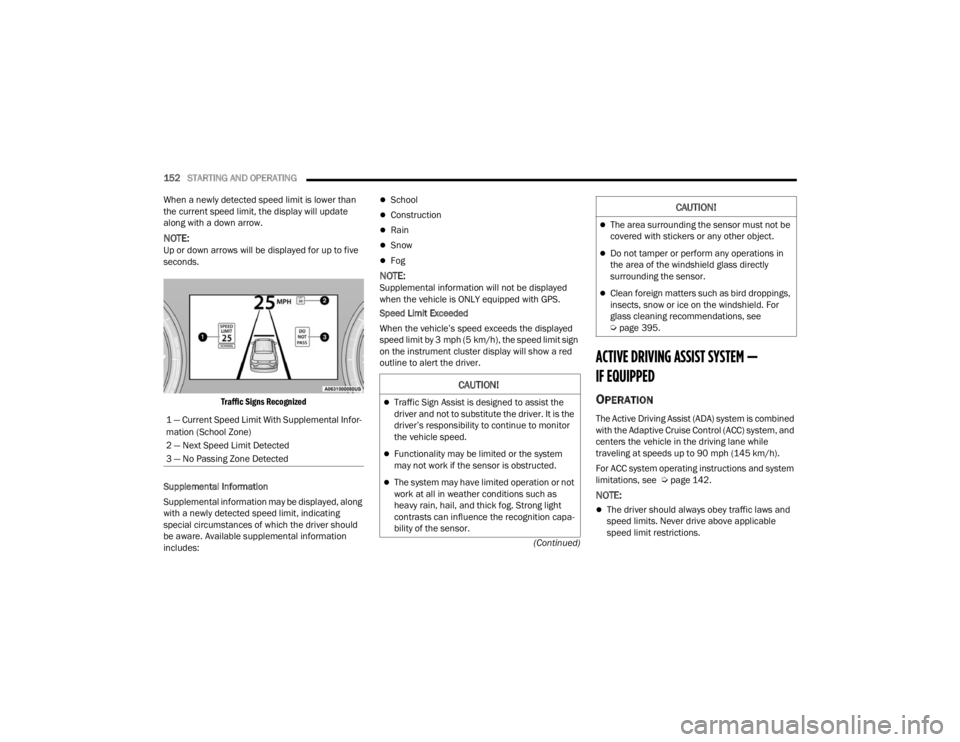
Traffic Signs Recognized
Supplemental Information
Supplemental information may be displayed, along
with a newly detected speed limit, indicating
special circumstances of which the driver should
be aware. Available supplemental information
includes:
School
Construction
Rain
Snow
Fog
NOTE:Supplemental information will not be displayed
when the vehicle is ONLY equipped with GPS.
Speed Limit Exceeded
When the vehicle’s speed exceeds the displayed
speed limit by 3 mph (5 km/h), the speed limit sign
on the instrument cluster display will show a red
outline to alert the driver.
ACTIVE DRIVING ASSIST SYSTEM —
IF EQUIPPED
OPERATION
The Active Driving Assist (ADA) system is combined
with the Adaptive Cruise Control (ACC) system, and
centers the vehicle in the driving lane while
traveling at speeds up to 90 mph (145 km/h).
For ACC system operating instructions and system
limitations, see Ú page 142.
NOTE:
The driver should always obey traffic laws and
speed limits. Never drive above applicable
speed limit restrictions.
1 — Current Speed Limit With Supplemental Infor
-
mation (School Zone)
2 — Next Speed Limit Detected
3 — No Passing Zone Detected
CAUTION!
Traffic Sign Assist is designed to assist the
driver and not to substitute the driver. It is the
driver’s responsibility to continue to monitor
the vehicle speed.
Functionality may be limited or the system
may not work if the sensor is obstructed.
The system may have limited operation or not
work at all in weather conditions such as
heavy rain, hail, and thick fog. Strong light
contrasts can influence the recognition capa -
bility of the sensor.
The area surrounding the sensor must not be
covered with stickers or any other object.
Do not tamper or perform any operations in
the area of the windshield glass directly
surrounding the sensor.
Clean foreign matters such as bird droppings,
insects, snow or ice on the windshield. For
glass cleaning recommendations, see
Ú page 395.
CAUTION!
23_WL_OM_EN_USC_t.book Page 152
Page 160 of 424

158STARTING AND OPERATING
(Continued)
Hands-Free Active Driving Assist System
Two haptic brake jerk warnings will be issued
(red warning light is being issued).
A seat vibration warning will occur (red warning
light is being issued).
The driver can take control of the vehicle at
anytime to override the warnings by pressing the
gas or brake pedal, moving the steering wheel, and
being attentive to the road.
SYSTEM OPERATION/LIMITATIONS
The Base Active Driving Assist and Hands-Free
Active Driving Assist systems DO NOT:
Warn or prevent collisions with other vehicles
Steer your vehicle around stopped vehicles,
slower vehicles, construction zones or equip -
ment, pedestrians, or animals
Respond to traffic lights or stop signs
Merge onto highways or exit off ramps
Change lanes (exception: Hands-Free, only
when initiated by the driver)
React to cross traffic
NOTE:Adaptive Cruise Control (ACC) is a core component
of ADA. For ACC system limitations Ú page 142.
The Active Driving Assist system may have limited
or reduced functionality when one of the following
conditions occur:
The vehicle’s radar sensors and/or forward
facing camera is damaged, covered,
misaligned, or obstructed (e.g. by mud, ice,
snow, etc.)
WARNING!
Active Driving Assist is an SAE Level 2 Driver
Assist feature, requiring driver attention at all
times. To prevent serious injury or death:
Always remember that the Active Driving
Assist system is a convenience system that
cannot accurately detect all situations.
Complete attention is always required while
driving, even when using the Active Driving
Assist system.
Always remain alert and be ready to take
control of the vehicle in the event that the
Active Driving Assist system deactivates, or
otherwise lacks full functionality as described
further before and after this statement.
Always keep your hands on the steering wheel
when the Base Active Driving Assist system is
activated.
Always keep your eyes on the road when the
Hands-Free Active Driving Assist system is
activated.
Maintain a safe distance from other vehicles
and pay attention to traffic conditions.
Do not use a hand held device when either
Base, or Hands-Free Active Driving Assist
system is engaged.
Always pay attention to the road when the
Hands-Free Active Driving Assist system is
engaged. The Active Driving Assist system will
not steer to avoid safety hazards, construction
zones, objects, or road impediments. You
need to take control to steer and brake the
vehicle in such situations, and when merging
into traffic, exiting the highway, making a turn
for crossing traffic, or stopping for traffic
control devices.
Do not place any objects on the steering wheel
(e.g. steering wheel covers) which could inter -
fere with the hand detection sensors.
WARNING!
23_WL_OM_EN_USC_t.book Page 158
Page 196 of 424

194STARTING AND OPERATING
Seven-Pin Connector
TOWING TIPS
Before towing, practice turning, stopping, and
backing up the trailer in an area located away from
heavy traffic.
Automatic Transmission
Select the DRIVE (D) range when towing. The
transmission controls include a drive strategy to
avoid frequent shifting when towing. However, if
frequent shifting does occur while in DRIVE, you
can use the AutoStick shift control to manually
select a lower gear.
NOTE:Using a lower gear while operating the vehicle
under heavy loading conditions, will improve
performance and extend transmission life by
reducing excessive shifting and heat buildup. This
action will also provide better engine braking.
Cruise Control — If Equipped
Do not use on hilly terrain or with heavy loads.
When using the Cruise Control, if you experience
speed drops greater than 10 mph (16 km/h),
disengage until you can get back to cruising
speed.
Use Cruise Control in flat terrain and with light
loads to maximize fuel efficiency.
1 — Backup Lamps
2 — Running Lamps
3 — Left Stop/Turn
4 — Ground
5 — Battery
6 — Right Stop/Turn
7 — Electric Brakes
23_WL_OM_EN_USC_t.book Page 194
Page 411 of 424

409
INDEX
A
About Your Brakes......................................... 396Accessory Drive Belt Inspection..................... 342Active Driving Assist System.......................... 152
Active Lane Management System.. 112, 115, 171
Adaptive Cruise Control (ACC)..... 113, 115, 142Adding Engine Coolant (Antifreeze)............... 347Adding Fuel.................................................... 183Additives, Fuel............................................... 398AdjustDown........................................................... 42Forward....................................................... 42Rearward..................................................... 42Up................................................................ 42Air Bag........................................................... 108Air Bag Operation...................................... 279Air Bag Warning Light...................... 277, 280Driver Knee Air Bag................................... 284Enhanced Accident Response......... 287, 329
Event Data Recorder (EDR)...................... 329Front Air Bag............................................. 280If Deployment Occurs............................... 286Knee Impact Bolsters............................... 284Maintaining Your Air Bag System.............. 288Maintenance............................................ 288Redundant Air Bag Warning Light............. 278Side Air Bags............................................ 284Transporting Pets..................................... 303Air Bag Light......................................... 277, 303
Air Cleaner, Engine (Engine Air Cleaner Filter)... 339
Air Conditioner Maintenance........................ 340Air Conditioner Refrigerant.................. 340, 341Air Conditioner System................................. 340Air Conditioning................................................ 67Max............................................................. 67Rear............................................................. 71Air Conditioning Filter....................................... 73Air Conditioning System................................... 72Air Conditioning, Operating Tips....................... 73
Air Filter......................................................... 339Air PressureTires.......................................................... 382AlarmArm The System....................................26, 27Disarm The System......................................27Panic............................................................19Rearm The System......................................27Security Alarm.......................................... 111Alarm SystemSecurity Alarm.............................................26Alterations/ModificationsVehicle.........................................................12Amazon FireTV..................................... 234, 240Amazon FireTV Built-in.................................. 234Ambient LightMulticolor.....................................................63Antifreeze (Engine Coolant).................. 347, 400Disposal.................................................... 348
11
23_WL_OM_EN_USC_t.book Page 409
Page 413 of 424

411
Checking Your Vehicle For Safety
.................. 303Checks, Safety............................................... 303Child Restraint............................................... 289Child Restraints Booster Seats............................................ 291Child Seat Installation............................... 300How To Stow An unused ALR Seat Belt..... 297Infant And Child Restraints....................... 290Locating The LATCH Anchorages............... 295Lower Anchors And Tethers For Children.. 292Older Children And Child Restraints..........291Seating Positions...................................... 292Child Safety Locks........................................... 31Clean Air Gasoline......................................... 398CleaningWheels...................................................... 388Climate Control................................................ 66Automatic.................................................... 66Rear............................................................ 69CNG And LP Fuel System Modifications......... 398Cold Weather Operation................................ 122Compact Spare Tire....................................... 386Contract, Service........................................... 405Cooling Pressure Cap (Radiator Cap).............348
Cooling System............................................. 346Adding Coolant (Antifreeze)...................... 347Coolant Level................................... 348, 349Cooling Capacity....................................... 400Disposal Of Used Coolant......................... 348Drain, Flush, And Refill............................. 347Inspection............................... 347, 348, 349Points To Remember................................ 349Pressure Cap............................................ 348Radiator Cap............................................ 348Selection Of Coolant(Antifreeze)......................... 347, 400, 401Corrosion Protection..................................... 392Cruise Control (Speed Control)..................... 142Cruise Light.......................................... 115, 116Customer Assistance.................................... 403Customer Programmable Features............... 204Cybersecurity................................................ 203
D
Daytime Running Lights................................... 58Defroster, Windshield................................... 304De-Icer, Remote Start...................................... 26De-Icer, Windshield.......................................... 66Diagnostic System, Onboard......................... 117Digital Instrument Cluster ¹.............................. 96
DipsticksOil (Engine)............................................... 337DisposalAntifreeze (Engine Coolant)...................... 348Do Not Use E-85 In Non-Flex Fuel Vehicles... 398Door Ajar....................................................... 109Door Locks................................................27, 31Child-Protection Door Lock — Rear Doors....31Doors...............................................................27Driver’s Seat Back Tilt......................................36Driving........................................................... 199Tips........................................................... 199DrowsyDriverDetection................................. 249
E
Electric Brake Control System....................... 250Anti-Lock Brake System............................ 248Electronic Roll Mitigation................. 251, 257Electric Parking Brake................................... 123Electrical Outlet, Auxiliary (Power Outlet).........78
Electronic Stability Control (ESC)... 111, 112, 251
Electronic Sway Bar Disconnect.................... 133Electronic Throttle Control Warning Light...... 109
11
23_WL_OM_EN_USC_t.book Page 411