phone JEEP GRAND CHEROKEE 2023 User Guide
[x] Cancel search | Manufacturer: JEEP, Model Year: 2023, Model line: GRAND CHEROKEE, Model: JEEP GRAND CHEROKEE 2023Pages: 424, PDF Size: 15.48 MB
Page 82 of 424
80GETTING TO KNOW YOUR VEHICLE
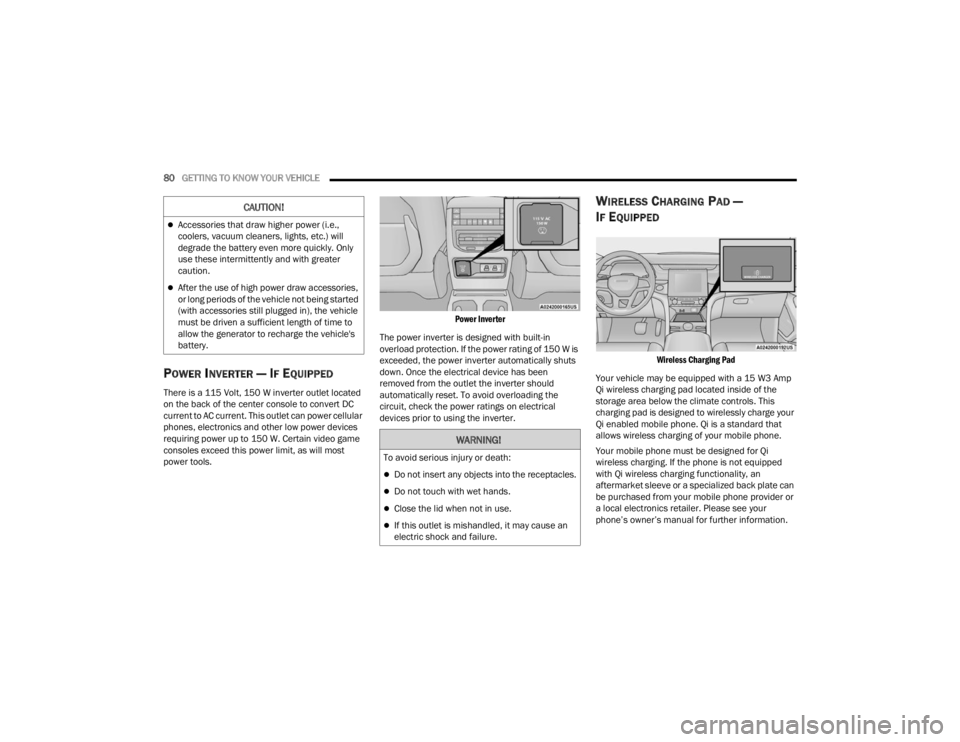
POWER INVERTER — IF EQUIPPED
There is a 115 Volt, 150 W inverter outlet located
on the back of the center console to convert DC
current to AC current. This outlet can power cellular
phones, electronics and other low power devices
requiring power up to 150 W. Certain video game
consoles exceed this power limit, as will most
power tools.
Power Inverter
The power inverter is designed with built-in
overload protection. If the power rating of 150 W is
exceeded, the power inverter automatically shuts
down. Once the electrical device has been
removed from the outlet the inverter should
automatically reset. To avoid overloading the
circuit, check the power ratings on electrical
devices prior to using the inverter.
WIRELESS CHARGING PAD —
I
F EQUIPPED
Wireless Charging Pad
Your vehicle may be equipped with a 15 W3 Amp
Qi wireless charging pad located inside of the
storage area below the climate controls. This
charging pad is designed to wirelessly charge your
Qi enabled mobile phone. Qi is a standard that
allows wireless charging of your mobile phone.
Your mobile phone must be designed for Qi
wireless charging. If the phone is not equipped
with Qi wireless charging functionality, an
aftermarket sleeve or a specialized back plate can
be purchased from your mobile phone provider or
a local electronics retailer. Please see your
phone’s owner’s manual for further information.
Accessories that draw higher power (i.e.,
coolers, vacuum cleaners, lights, etc.) will
degrade the battery even more quickly. Only
use these intermittently and with greater
caution.
After the use of high power draw accessories,
or long periods of the vehicle not being started
(with accessories still plugged in), the vehicle
must be driven a sufficient length of time to
allow the generator to recharge the vehicle's
battery.
CAUTION!
WARNING!
To avoid serious injury or death:
Do not insert any objects into the receptacles.
Do not touch with wet hands.
Close the lid when not in use.
If this outlet is mishandled, it may cause an
electric shock and failure.
23_WL_OM_EN_USC_t.book Page 80
Page 83 of 424
GETTING TO KNOW YOUR VEHICLE81
The wireless charging pad is equipped with an
anti-slip mat to hold your mobile phone in place,
and an LED indicator light.
LED Indicator Status:
No Light: Charging pad is idle or searching for a
device.
Blue Light: Device is detected and is charging.
Red Light/Flashing: Internal error or foreign
object is detected.
Important Notes Regarding This Vehicle’s Wireless
Charging Pad:
All vehicle doors must be closed for the wireless
charging pad to operate.
If the phone moves on the pad causing the red
light to illuminate, the phone will have to be
picked up and placed back on the charging pad
to resume charging.
Wireless charging is not as fast as when the
phone is connected to a wired charger.
The phone’s protective case must be removed
when placed on the wireless charging pad.
iPhone® 12 (including iPod®) is equipped with
software to protect the device from overheating.
When the software is active, the rate of charge
is slowed down to protect the device.
Phones must always be placed on the wireless
charging pad within the outline shown on the
pad so that its charging parts connect with the charging coils of the system. Movement of the
phone during charging may prevent or slow the
rate of charge.
Having multiple applications open on the phone
while charging will reduce the charging effi
-
ciency, and may even shut down an application
that is actively running (i.e. Apple CarPlay®).
This may also cause the phone to overheat.
Wireless chargers may implement certain
methods to prevent the phone from overheating
during charging such as slowing down the rate
of charge. In certain instances, the device may
shut down for a brief period of time (when the
device reaches a certain temperature). If this
happens, it does not mean there is a fault with
the wireless charing pad. This may just be a
protective measure to prevent damage to the
phone.
WINDOWS
POWER WINDOW CONTROLS
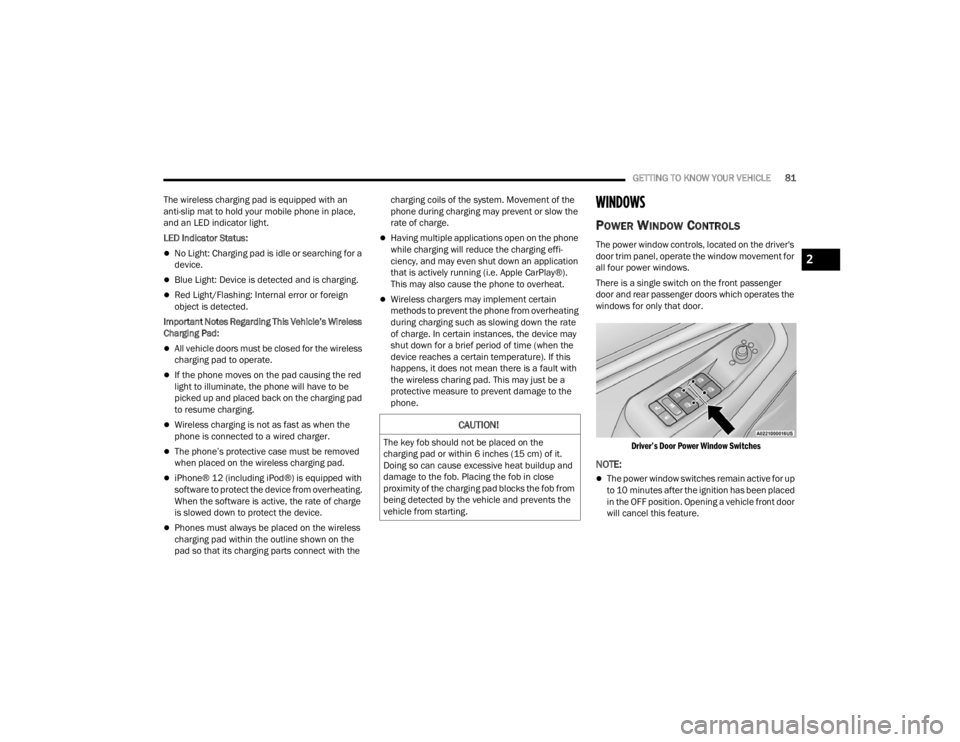
The power window controls, located on the driver's
door trim panel, operate the window movement for
all four power windows.
There is a single switch on the front passenger
door and rear passenger doors which operates the
windows for only that door.
Driver’s Door Power Window Switches
NOTE:
The power window switches remain active for up
to 10 minutes after the ignition has been placed
in the OFF position. Opening a vehicle front door
will cancel this feature.
CAUTION!
The key fob should not be placed on the
charging pad or within 6 inches (15 cm) of it.
Doing so can cause excessive heat buildup and
damage to the fob. Placing the fob in close
proximity of the charging pad blocks the fob from
being detected by the vehicle and prevents the
vehicle from starting.
2
23_WL_OM_EN_USC_t.book Page 81
Page 208 of 424

206MULTIMEDIA
Entertainment Screens
Theme Mode This setting will allow you to adjust the brightness of your theme. Setting
options are “Light”, “Dark” and “Auto”. Select to show themes in Light or Dark
mode. “Auto” changes the theme with the headlights.
Touchscreen Beep This setting will allow you to turn the touchscreen beep on or off.
Show Main Category Bar Labels
This setting will allow you to turn the bottom main category bar labels on or off.
Navigation Turn-by-Turn Displayed In Cluster This setting will display Navigation prompts in the Instrument Cluster Display.
Phone Pop-ups Displayed In Cluster This setting will display smartphone notifications and messages in the
Instrument Cluster Display.
Ready To Drive Pop-ups This setting will enable the Ready To Drive pop-ups in the Instrument Cluster
Display.
Massage Pop-Up Displayed With Button Press This setting will activate or deactivate the massage feature pop-ups.
Setting NameDescription
When the Entertainment Screens button is pressed on the touchscreen, the system displays the different options related to the vehicle’s Entertainment.
NOTE:Depending on the vehicle’s options, feature settings may vary.
Setting NameDescription
Passenger Screen Permissions This setting will enable or disable Passenger Screen Permissions. Options
within this setting are “Navigation”, “Device Manager”, and “Uconnect
Theater”, and each have “On” and “Off” options.
Rear Seat Screen Permissions This setting will enable or disable your Rear Seat Screen Permissions. “On”
and “Off” options are found within “Navigation”.
23_WL_OM_EN_USC_t.book Page 206
Page 210 of 424

208MULTIMEDIA
Show Main Category Bar Labels This setting will allow the main category bar labels to be shown on or off.
Navigation Turn-by-Turn Displayed In Cluster This setting will display Navigation prompts in the Instrument Cluster Display.
Phone Pop-Ups Displayed In Cluster This setting will display smartphone notifications and messages in the
Instrument Cluster Display.
Massage Pop-Up Displayed With Button Press This setting will activate or deactivate the massage feature pop-ups.
Time Format This setting will allow you to set the time format (AM/PM). Sync Time With GPS
must be “Off” for this setting to be available. The “12 hrs” setting will set the
time to a 12-hour format. The “24 hrs” setting will set the time to a 24-hour
format.
Voice Options This setting will allow you to change the voice options for the radio to “Male”
or “Female”.
Wake Up Word This setting will allow you to set the system “Wake Up” word. The available
options are “Off”, “Hey, Uconnect”, and “Hey, Jeep®”.
Voice Barge-in
This setting will allow Voice Barge-in, which is a feature that will allow you to
interrupt the help message or system prompts by speaking, to be turned on or off.
Show Command List This setting will allow the Command List to be shown on or off.
Navigation Settings This setting will redirect to the list of Navigation settings. Refer to your
Uconnect Radio Instruction Manual for further information.
Ambient Color Personalization This setting will redirect to a new menu that will allow you to change the
ambient lighting color in the cabin.
Setting Name
Description
23_WL_OM_EN_USC_t.book Page 208
Page 216 of 424

214MULTIMEDIA
Phone/Bluetooth®
Voice
When the Phone/Bluetooth® button is pressed on the touchscreen, the system displays the options related to Bluetooth® connectivity from an external audio
device or smartphone. The list of paired audio devices or smartphones can be accessed from this menu.
NOTE:Depending on the vehicle’s options, feature settings may vary.
Setting Name Description
Device Manager This setting will open the Device Manager main screen.
Do Not Disturb All This setting will open the Do Not Disturb All settings menu. The available
options are “On” and “Off”.
Enable Two Active Phones This setting will enable or disable two active phones with the vehicle. The
setting options are “On” and “Off”.
Phone Pop-Ups Displayed In Cluster This setting will activate phone message pop-ups in the Instrument Cluster
Display.
When the Voice button is pressed on the touchscreen, the system displays the options related to the vehicle’s Voice Recognition feature.
NOTE:Depending on the vehicle’s options, feature settings may vary.
Setting Name
Description
Voice Options This setting will allow you to change the system’s voice to either “Male” or
“Female”.
23_WL_OM_EN_USC_t.book Page 214
Page 225 of 424

MULTIMEDIA223
Audio
When the Audio button is pressed on the touchscreen, the system displays options related to the vehicle’s sound system. These settings can change the audio
location within the vehicle, adjust the bass or treble levels, and auto-play settings from an audio device or smartphone.
NOTE:Depending on the vehicle’s options, feature settings may vary.
Setting Name Description
Balance/Fade This setting will adjust audio levels from specific speakers in the front/back
and left/right of the vehicle. The Speaker icon can be moved to set audio
location.
Equalizer This setting will adjust the “Bass”, “Mid”, and “Treble” ranges of the audio.
Speed Adjusted Volume This setting will adjust audio volume as speeds increase. At a higher setting,
the volume will increase more as the vehicle speeds up. The available settings
are “Off”, “1”, “2”, and “3”.
Surround Sound This setting will turn the Surround Sound system on or off.
AUX Volume Offset This setting will tune the audio levels from a device connected through the
AUX port. The available settings are “+” and “-”.
Auto Play This setting will automatically begin playing audio from a connected device.
Auto-On Radio This setting will automatically turn the radio on when the vehicle is started, if
selected. The available settings are “Off”, “On”, and “Recall Last”. With Recall
Last, the system resumes the previous task before vehicle shut off.
Radio off With Door This setting will keep the radio on when a door is opened or until the Radio Off
Delay time is reached. The available settings are “On” and “Off”.
Volume Adjustment This setting will allow you to set the audio volume levels for each option
(Media, Phone, Navigation, etc.). You can set the volume between 0 and 38.
Media Expander This setting will allow you to turn the Media Expander setting “On” or “Off”.
5
23_WL_OM_EN_USC_t.book Page 223
Page 226 of 424

224MULTIMEDIA
Notifications
When the Notifications button is pressed on the touchscreen, the system displays the options related to Notifications for the system.
NOTE:Depending on the vehicle’s options, feature settings may vary.
Setting Name Description
Notification Sounds
Turn this setting “On” or “Off” to hear notification sounds throughout your system.
App Drawer Favoriting Pop-Ups This setting turns the App Favorited pop-up on or off.
App Drawer Unfavoriting Pop-Ups This setting turns the App Unfavorited pop-up on or off.
New Text Message Pop-Ups This setting turns receiving/storing a pop-up for new text messages of any
connected phone on or off.
Missed Calls Message This setting turns receiving/storing a pop-up for missed calls of any connected
phone on or off.
Navigation Pop-Ups This setting turns receiving/storing predictive Navigation Pop-Ups on or off.
23_WL_OM_EN_USC_t.book Page 224
Page 229 of 424

MULTIMEDIA227
Reset
When the Reset button is pressed on the touchscreen, the system displays the options related to resetting the Uconnect system back to its default settings.
These settings can clear personal data and reset selected settings from other menus.
NOTE:Depending on the vehicle’s options, feature settings may vary.
Setting Name Description
Restart Radio This setting will reboot the radio.
Reset Apps Drawer To Default Order This setting will return the apps drawer to the default order. The available
options are “Yes” and “Cancel”. The X button can also be pressed to cancel
the screen.
Restore Settings to Default This setting will return all the previously changed settings to their factory
defaults.
Clear Personal Data This setting will display a pop-up that gives you the option to clear all personal
data from the system, including Bluetooth® devices and presets.
Reset Wi-Fi Password For Projection This setting will allow you to reset the vehicle’s Wi-Fi password for smartphone
projection. The available options are “Yes” and “Cancel”. The X button can
also be pressed to cancel the screen.
Reset Performance Values This setting will reset the performance values for your vehicle.
Factory Reset This setting will restore the radio to its factory default settings.
5
23_WL_OM_EN_USC_t.book Page 227
Page 230 of 424
228MULTIMEDIA
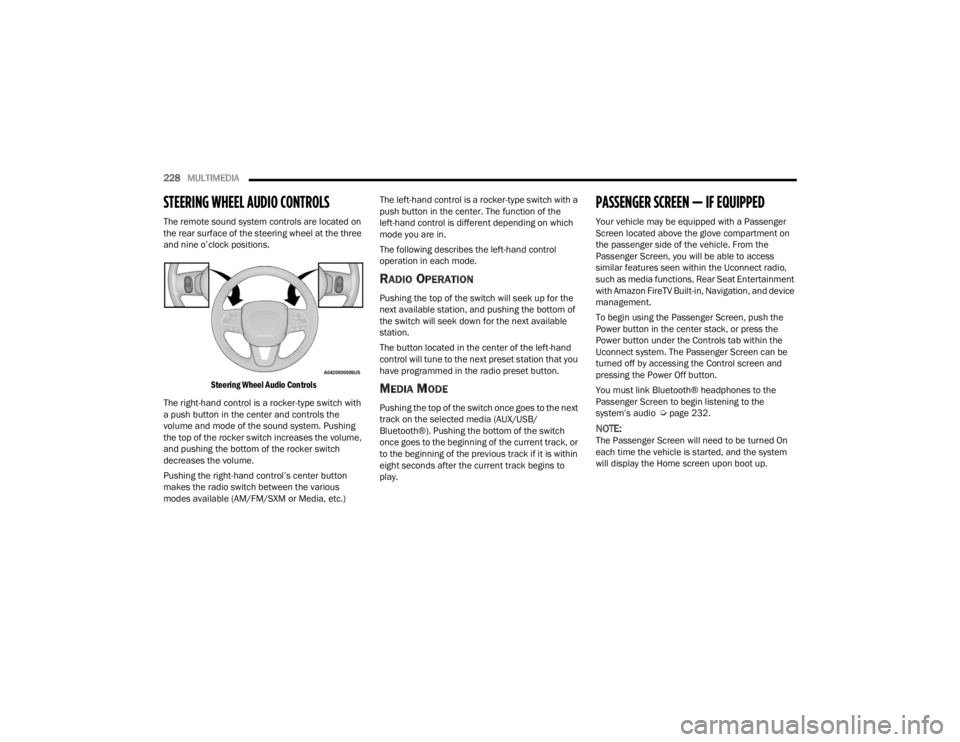
STEERING WHEEL AUDIO CONTROLS
The remote sound system controls are located on
the rear surface of the steering wheel at the three
and nine o’clock positions.
Steering Wheel Audio Controls
The right-hand control is a rocker-type switch with
a push button in the center and controls the
volume and mode of the sound system. Pushing
the top of the rocker switch increases the volume,
and pushing the bottom of the rocker switch
decreases the volume.
Pushing the right-hand control’s center button
makes the radio switch between the various
modes available (AM/FM/SXM or Media, etc.) The left-hand control is a rocker-type switch with a
push button in the center. The function of the
left-hand control is different depending on which
mode you are in.
The following describes the left-hand control
operation in each mode.
RADIO OPERATION
Pushing the top of the switch will seek up for the
next available station, and pushing the bottom of
the switch will seek down for the next available
station.
The button located in the center of the left-hand
control will tune to the next preset station that you
have programmed in the radio preset button.
MEDIA MODE
Pushing the top of the switch once goes to the next
track on the selected media (AUX/USB/
Bluetooth®). Pushing the bottom of the switch
once goes to the beginning of the current track, or
to the beginning of the previous track if it is within
eight seconds after the current track begins to
play.
PASSENGER SCREEN — IF EQUIPPED
Your vehicle may be equipped with a Passenger
Screen located above the glove compartment on
the passenger side of the vehicle. From the
Passenger Screen, you will be able to access
similar features seen within the Uconnect radio,
such as media functions, Rear Seat Entertainment
with Amazon FireTV Built-in, Navigation, and device
management.
To begin using the Passenger Screen, push the
Power button in the center stack, or press the
Power button under the Controls tab within the
Uconnect system. The Passenger Screen can be
turned off by accessing the Control screen and
pressing the Power Off button.
You must link Bluetooth® headphones to the
Passenger Screen to begin listening to the
system’s audio Ú
page 232.
NOTE:The Passenger Screen will need to be turned On
each time the vehicle is started, and the system
will display the Home screen upon boot up.
23_WL_OM_EN_USC_t.book Page 228
Page 232 of 424
230MULTIMEDIA
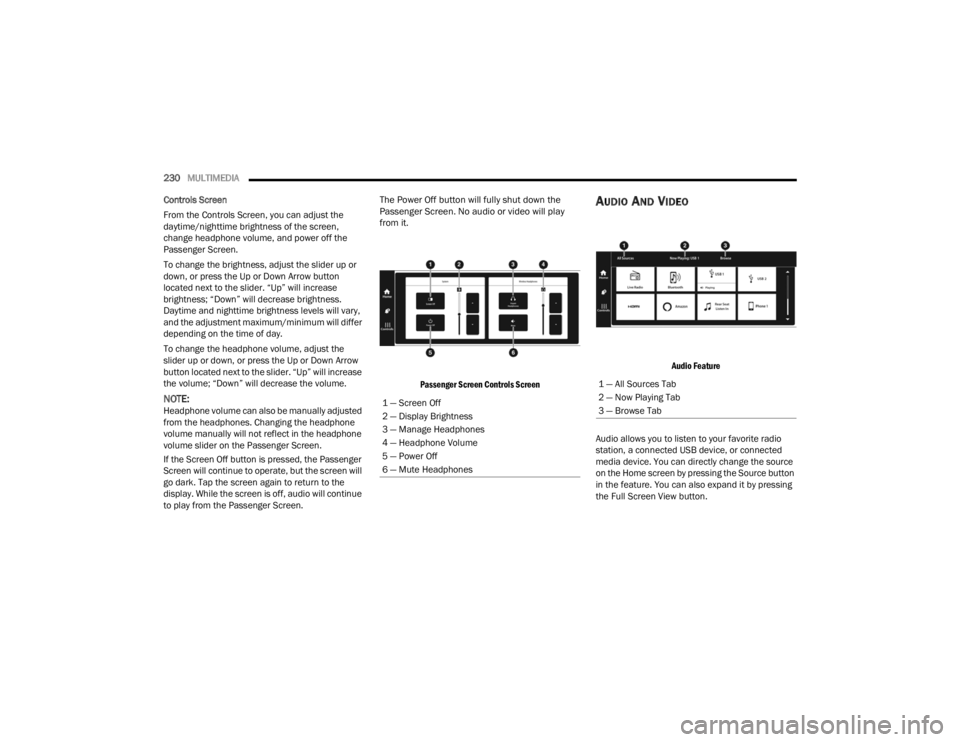
Controls Screen
From the Controls Screen, you can adjust the
daytime/nighttime brightness of the screen,
change headphone volume, and power off the
Passenger Screen.
To change the brightness, adjust the slider up or
down, or press the Up or Down Arrow button
located next to the slider. “Up” will increase
brightness; “Down” will decrease brightness.
Daytime and nighttime brightness levels will vary,
and the adjustment maximum/minimum will differ
depending on the time of day.
To change the headphone volume, adjust the
slider up or down, or press the Up or Down Arrow
button located next to the slider. “Up” will increase
the volume; “Down” will decrease the volume.
NOTE:Headphone volume can also be manually adjusted
from the headphones. Changing the headphone
volume manually will not reflect in the headphone
volume slider on the Passenger Screen.
If the Screen Off button is pressed, the Passenger
Screen will continue to operate, but the screen will
go dark. Tap the screen again to return to the
display. While the screen is off, audio will continue
to play from the Passenger Screen.
The Power Off button will fully shut down the
Passenger Screen. No audio or video will play
from it.
Passenger Screen Controls Screen
AUDIO AND VIDEO
Audio Feature
Audio allows you to listen to your favorite radio
station, a connected USB device, or connected
media device. You can directly change the source
on the Home screen by pressing the Source button
in the feature. You can also expand it by pressing
the Full Screen View button.
1 — Screen Off
2 — Display Brightness
3 — Manage Headphones
4 — Headphone Volume
5 — Power Off
6 — Mute Headphones
1 — All Sources Tab
2 — Now Playing Tab
3 — Browse Tab
23_WL_OM_EN_USC_t.book Page 230